parking brake TOYOTA PRIUS 2017 4.G Owner's Manual
[x] Cancel search | Manufacturer: TOYOTA, Model Year: 2017, Model line: PRIUS, Model: TOYOTA PRIUS 2017 4.GPages: 796, PDF Size: 20.13 MB
Page 309 of 796
PRIUS_OM_OM47B54U_(U)
3094-5. Using the driving support systems
4
Driving
■Dynamic radar cruise control with full-speed range can be set when
● The shift position is in D.
● Vehicle speed is above approximately 30 mph (50 km/h).
However, when a preceding vehicle is detected, the dynamic radar cruise
control with full-speed range can be set even if the vehicle speed is at or
below approximately 30 mph (50 km/h).
■ Accelerating after setting the vehicle speed
The vehicle can accelerate by operating the accelerator pedal. After acceler-
ating, the set speed resumes. However, during vehicle-to-vehicle distance
control mode, the vehicle speed may decrease below the set speed in order
to maintain the distance to the preceding vehicle.
■ Automatic cancelation of vehicle-t o-vehicle distance control mode
Vehicle-to-vehicle distance control mode is automatically canceled in the fol-
lowing situations.
● Actual vehicle speed falls below approximately 25 mph (40 km/h) when
there are no vehicles ahead.
● The preceding vehicle leaves the lane when your vehicle is following at a
vehicle speed below approximately 25 m ph (40 km/h). Otherwise, the sen-
sor can not properly detect the vehicle.
● VSC is activated.
● TRAC is activated for a period of time.
● When the VSC or TRAC system is turned off by pressing the VSC OFF
switch.
● The sensor cannot detect correctly because it is covered in some way.
● Pre-collision braking is activated.
● The parking brake is operated.
● Intelligent Clearance Sonar is operated. (if equipped)
● The vehicle is stopped by system control on a steep incline.
● The following are detected when the vehicle has been stopped by system
control:
• The driver is not wearing a seat belt.
• The driver’s door is opened.
• The vehicle has been stopped for about 3 minutes.
In this situation, the shift position may automatically switch to P. ( →P. 237)
If vehicle-to-vehicle distance control mode is automatically canceled for any
other reason, there may be a malfunction in the system. Contact your Toyota
dealer.
Page 340 of 796

340
PRIUS_OM_OM47B54U_(U)
4-5. Using the driving support systems
WARNING
■When using Intuitive parking assist
Observe the following precautions to avoid an unexpected accident.
● Do not exceed the speed limit of 6 mph (10 km/h).
● The sensors’ detection areas and reaction times are limited. When moving
forward or reversing, check the areas surrounding the vehicle (especially
the sides of the vehicle) for safety, and drive slowly, using the brake to
control the vehicle’s speed.
● Do not install accessories within the sensors’ detection areas.
Page 341 of 796
PRIUS_OM_OM47B54U_(U)
3414-5. Using the driving support systems
4
Driving
WARNING
■Sensors
Certain vehicle conditions and the surrounding environment may affect the
ability of the sensor to correctly detect obstacles. Particular instances where
this may occur are listed below.
● There is dirt, snow or ice on the sensor. (Wiping the sensors will resolve
this problem.)
● The sensor is frozen. (Thawing the area will resolve this problem.)
In especially cold weather, if a sensor is frozen, the screen may show an
abnormal display, or obstacles may not be detected.
● The sensor is covered in any way.
● In harsh sunlight or intense cold weather
● On an extremely bumpy road, on an incline, on gravel, or on grass
● The vicinity of the vehicle is noisy due to vehicle horns, motorcycle
engines, air brakes of large vehicles, or other loud noises producing ultra-
sonic waves.
● The sensor is splashed with water or drenched with heavy rain.
● The sensor is drenched with water on a flooded road.
● The vehicle is leaning considerably to one side.
● The vehicle is equipped with a fender pole or wireless antenna.
● The vehicle is approaching a tall or curved curb.
● The detection range is reduced due to an object such as a sign.
● The area directly under the bumpers is not detected.
● If obstacles draw too close to the sensor.
● The bumper or sensor receives a strong impact.
● A non-genuine Toyota suspension (lowered suspension etc.) is installed.
● There is another vehicle equipped with parking assist sensors in the vicin-
ity.
● Towing eyelets are installed.
● A backlit license plate is installed.
In addition to the examples above, depending on the shape and condition of
obstacles, detection may not be possible, or the detection range may be
shortened.
Page 344 of 796
344
PRIUS_OM_OM47B54U_(U)
4-5. Using the driving support systems
Intelligent Clearance Sonar∗
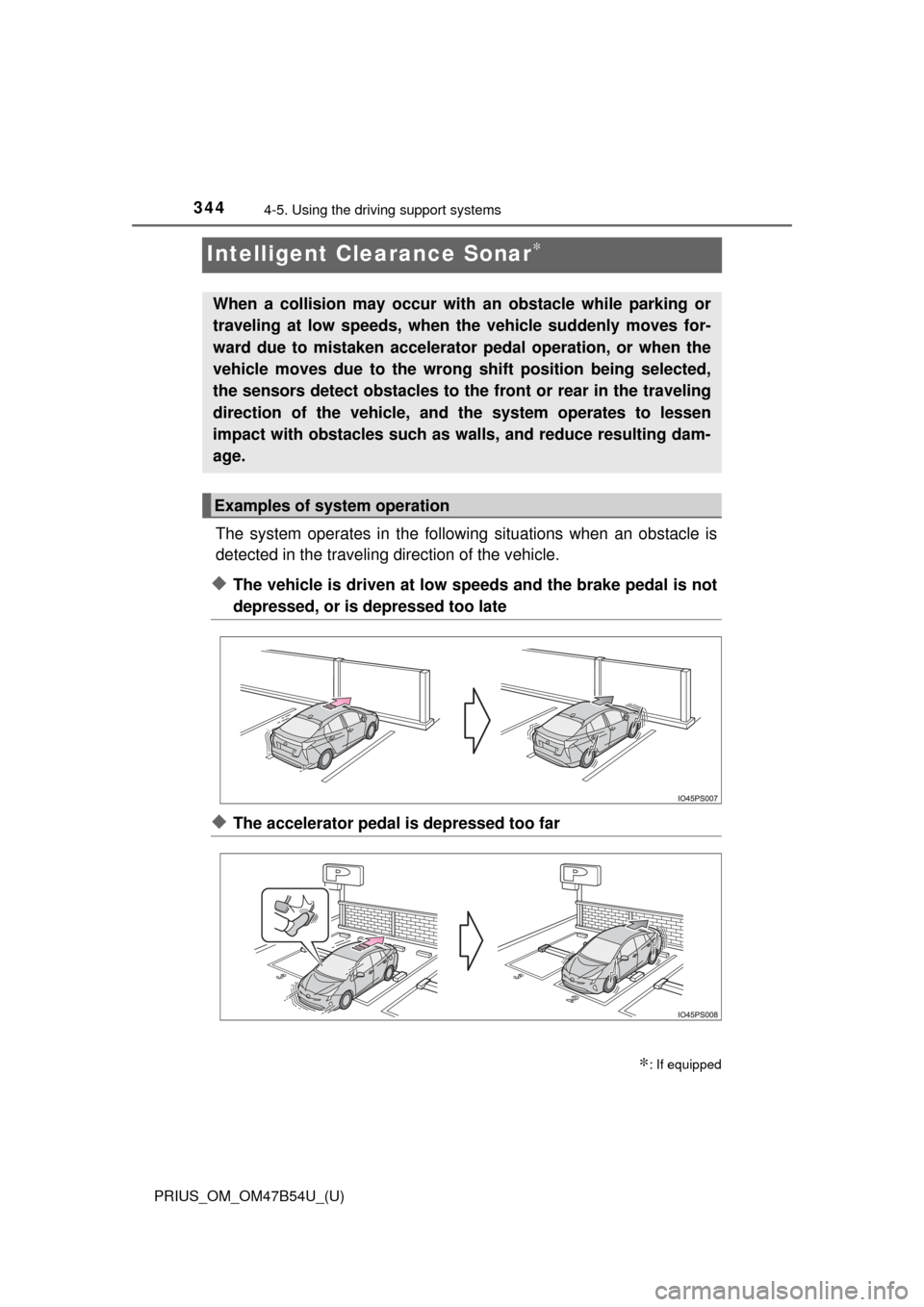
The system operates in the following situations when an obstacle is
detected in the traveling direction of the vehicle.
◆The vehicle is driven at low speeds and the brake pedal is not
depressed, or is depressed too late
◆The accelerator pedal is depressed too far
∗: If equipped
When a collision may occur with an obstacle while parking or
traveling at low speeds, when the vehicle suddenly moves for-
ward due to mistaken accelerator pedal operation, or when the
vehicle moves due to the wrong shift position being selected,
the sensors detect obstacles to the front or rear in the traveling
direction of the vehicle, and the system operates to lessen
impact with obstacles such as walls, and reduce resulting dam-
age.
Examples of system operation
Page 352 of 796
352
PRIUS_OM_OM47B54U_(U)
4-5. Using the driving support systems
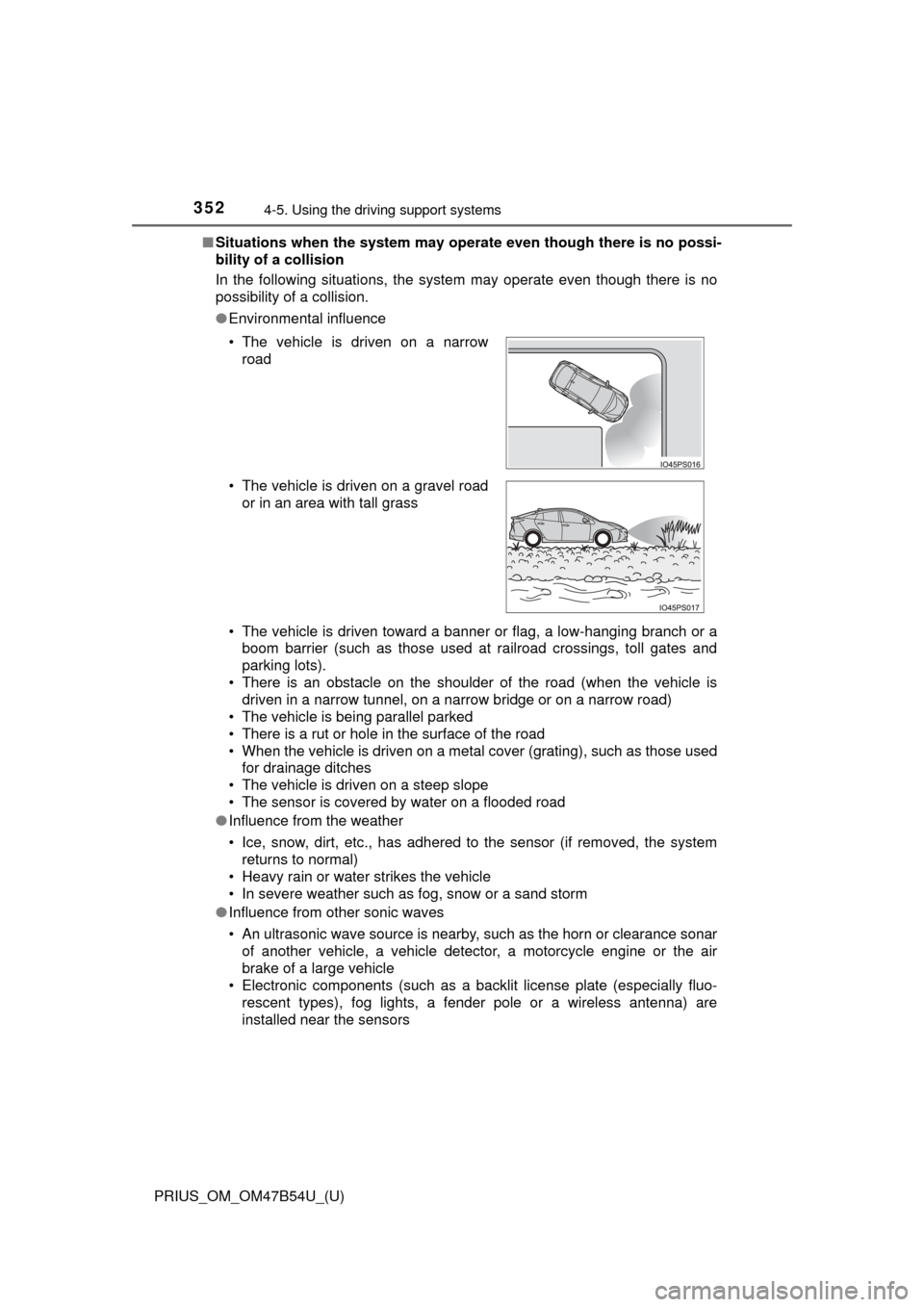
■Situations when the system may opera te even though there is no possi-
bility of a collision
In the following situations, the system may operate even though there is no
possibility of a collision.
● Environmental influence
• The vehicle is driven toward a banner or flag, a low-hanging branch or a
boom barrier (such as those used at railroad crossings, toll gates and
parking lots).
• There is an obstacle on the shoulder of the road (when the vehicle is driven in a narrow tunnel, on a narrow bridge or on a narrow road)
• The vehicle is being parallel parked
• There is a rut or hole in the surface of the road
• When the vehicle is driven on a metal cover (grating), such as those used for drainage ditches
• The vehicle is driven on a steep slope
• The sensor is covered by water on a flooded road
● Influence from the weather
• Ice, snow, dirt, etc., has adhered to the sensor (if removed, the system
returns to normal)
• Heavy rain or water strikes the vehicle
• In severe weather such as fog, snow or a sand storm
● Influence from other sonic waves
• An ultrasonic wave source is nearby, such as the horn or clearance sonar
of another vehicle, a vehicle detector, a motorcycle engine or the air
brake of a large vehicle
• Electronic components (such as a backlit license plate (especially fluo-
rescent types), fog lights, a fender pole or a wireless antenna) are
installed near the sensors
• The vehicle is driven on a narrow
road
• The vehicle is driven on a gravel road or in an area with tall grass
Page 354 of 796

354
PRIUS_OM_OM47B54U_(U)
4-5. Using the driving support systems
●Influence from other sonic waves
• An ultrasonic wave source is nearby, such as the horn or clearance sonar
of another vehicle, a vehicle detector, a motorcycle engine or the air
brake of a large vehicle
• Electronic components (such as a backlit license plate (especially fluo- rescent types), fog lights, a fender pole or a wireless antenna) are
installed near the sensors
● Changes in the vehicle
• The vehicle is tilted a large amount
• The height of the vehicle has drastically changed due to the carried load
(the nose tilts up or down)
• The direction of the sensor has deviated due to a collision or other impact
■ Intelligent Clearance Sonar function while the Simple Advanced Parking
Guidance System is operating
→P. 359
■ When removing and installi ng the 12-volt battery
The system needs to be initialized.
The system can be initialized by driving the vehicle straight ahead for 5 sec-
onds or more at a speed of approximately 22 mph (35 km/h) or higher.
■ When “ICS Unavailable” is displayed on the multi-information display
and the ICS OFF indicator flashes
● Ice, snow, dirt, etc., may have adhered to the sensor. If this occurs, remove
the ice, snow, dirt, etc., from the sensor to return the system to normal.
Also, a warning message may be displayed at low temperatures due to ice
forming on the sensor, and the sensor may not detect obstacles. Once the
ice melts, the system will return to normal.
● If this message is shown even after removing dirt from the sensor, or shown
when the sensor was not dirty to begin with, have the vehicle inspected at
your Toyota dealer.
● System initialization may not have been performed after removal and instal-
lation of the 12-volt battery. Perform system initialization.
■ When “ICS Malfunction Visit Your Deal er” is displayed on the multi-infor-
mation display, the ICS OFF indi cator flashes and the buzzer sounds
The system may not be operating properly. Have the vehicle inspected at
your Toyota dealer.
Page 357 of 796
357
PRIUS_OM_OM47B54U_(U)
4-5. Using the driving support systems
4
Driving
S-APGS (Simple Advanced Parking Guidance
System)
∗
■Function summary
The Simple Advanced Parking Guidance System automatically
operates the steering wheel to provide support when backing into
an area near a target parking spot, and when departing from a par-
allel parking spot. (Shift lever operations and speed adjustment
when moving forward or backing up are not performed automati-
cally.)
●The Simple Advanced Parking Guidance System does not park
the vehicle automatically. It is a system that provides support
when pulling out of a perpendicular or parallel parking spot.
● The Simple Advanced Parking Guidance System provides steer-
ing wheel operation assistance to guide the vehicle toward the
selected intended parking spot. The selected intended parking
spot may not always be reach able, depending on road and vehi-
cle conditions at the time of parking, and the distance to the
intended parking spot.
■Linking with the Intelligent Clearance Sonar function
While the Simple Advanced Parking Guidance System is operating,
if the system detects an obstacle that could result in a collision, the
emergency brakes operat e, regardless of whether the Intelligent
Clearance Sonar function is on or off. ( →P. 359)
∗: If equipped
Simple Advanced Parking Guidance System
WARNING
●When backing up or proceeding forward, be sure to directly confirm the
safety of the area to the front or rear, and the area around the vehicle, and
slowly back up or proceed forward while adjusting the vehicle speed by
depressing the brake pedal.
● If it seems the vehicle may make contact with a pedestrian, another vehi-
cle or any other obstacles, stop the vehicle by depressing the brake pedal,
and then press the S-APGS switch ( →P. 360) to turn the system off.
Page 359 of 796

PRIUS_OM_OM47B54U_(U)
3594-5. Using the driving support systems
4
Driving
■Intelligent Clearance Sonar function while the Simple Advanced Parking
Guidance System is operating
While the Simple Advanced Parking Guidance System is operating, if the sys-
tem detects an obstacle that could result in a collision, hybrid system output
suppression control and brake control of the Intelligent Clearance Sonar func-
tion are operated, regardless of whether the Intelligent Clearance Sonar\
func-
tion is on or off. ( →P. 346)
● After the Intelligent Clearance Sonar function operates, operation of th\
e
Simple Advanced Parking Guidance System is temporarily stopped, and
operation of the Intelligent Clearance Sonar function is indicated on the
multi-information display. ( →P. 350)
● When operation of the Simple Advanced Parking Guidance System is
stopped 3 times by operation of the Intelligent Clearance Sonar function, the
Simple Advanced Parking Guidance System is canceled.
● Once the Simple Advanced Parking Guidance System becomes available
after the Intelligent Clearance Sonar function is operated, a message
prompting you to shift is displayed on the multi-information display. Opera-
tion of the Simple Advanced Parking Guidance System can be resumed by
shifting according to the prompt on the multi-information display and press-
ing the S-APGS switch ( →P. 360) again.
■ Shifting while the Simple Advanced Parking Guidance System is operat-
ing
If the system determines that the drivers intends to move forward or in
reverse, assistance continues even if the drivers shifted before being
prompted to do so by the system. However, because driver operation differs
from the guidance provided by the system, the number of turning maneuvers
may increase.
Page 361 of 796
PRIUS_OM_OM47B54U_(U)
3614-5. Using the driving support systems
4
Driving
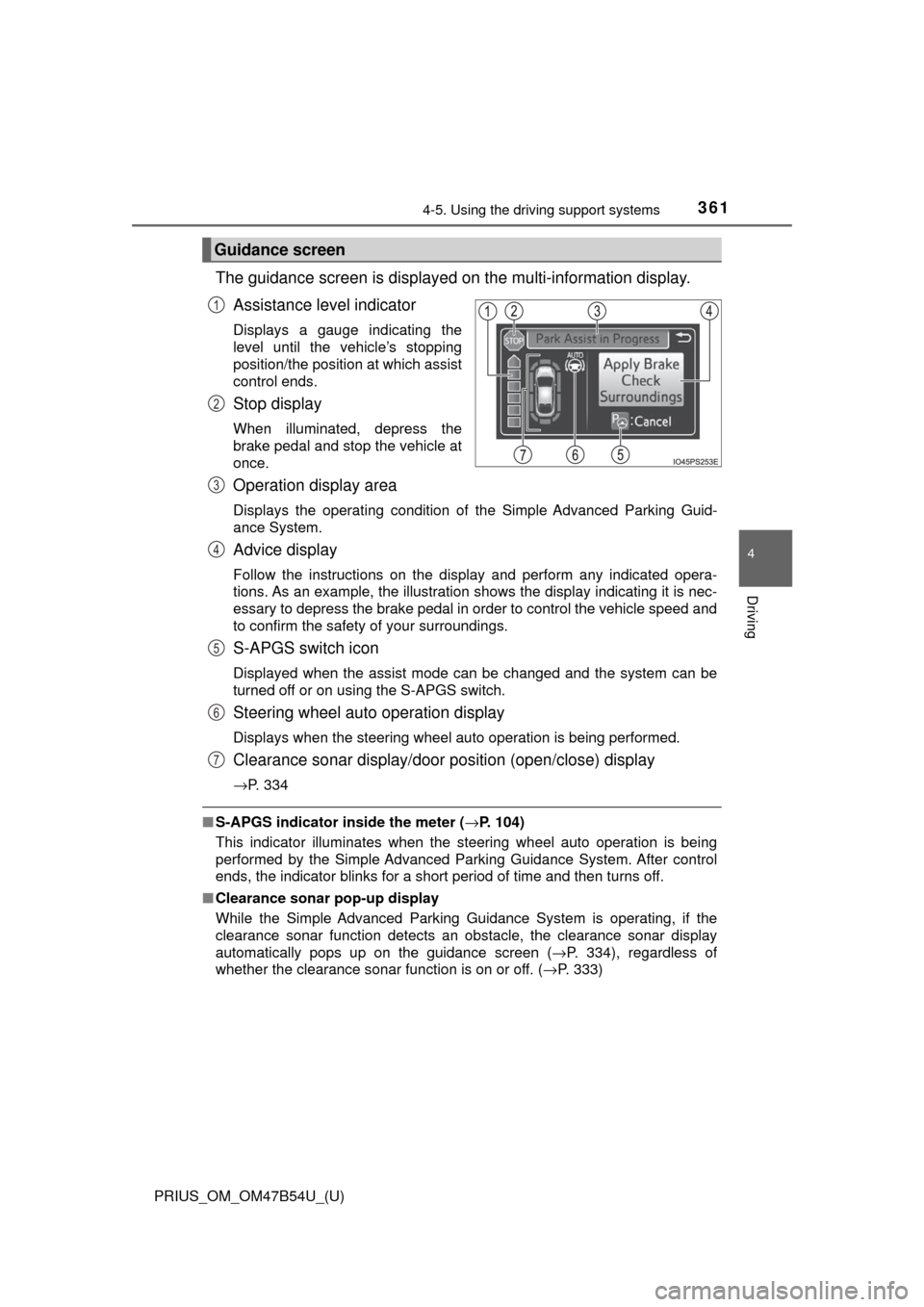
The guidance screen is displayed on the multi-information display.
Assistance level indicator
Displays a gauge indicating the
level until the vehicle’s stopping
position/the position at which assist
control ends.
Stop display
When illuminated, depress the
brake pedal and stop the vehicle at
once.
Operation display area
Displays the operating condition of the Simple Advanced Parking Guid-
ance System.
Advice display
Follow the instructions on the display and perform any indicated opera-
tions. As an example, the illustration shows the display indicating it is nec-
essary to depress the brake pedal in order to control the vehicle speed and
to confirm the safety of your surroundings.
S-APGS switch icon
Displayed when the assist mode can be changed and the system can be
turned off or on using the S-APGS switch.
Steering wheel auto operation display
Displays when the steering wheel auto operation is being performed.
Clearance sonar display/door position (open/close) display
→P. 334
■S-APGS indicator inside the meter ( →P. 104)
This indicator illuminates when the steering wheel auto operation is being
performed by the Simple Advanced Parking Guidance System. After control
ends, the indicator blinks for a short period of time and then turns off.
■ Clearance sonar pop-up display
While the Simple Advanced Parking Guidance System is operating, if the
clearance sonar function detects an obstacle, the clearance sonar display
automatically pops up on the guidance screen ( →P. 334), regardless of
whether the clearance sonar function is on or off. ( →P. 333)
Guidance screen
1
2
3
4
5
6
7
Page 366 of 796
366
PRIUS_OM_OM47B54U_(U)
4-5. Using the driving support systems
Assume an ordinary posture for backing up, rest your hands
lightly on the steering wheel wi thout applying any force, directly
confirm the safety of the area to the rear and around the vehicle,
confirm that there are no obst acles in the parking space, and
slowly back up while adjusting your speed by depressing the
brake pedal.
● When the vehicle cannot be cleanly entered within the target
parking spot on the first try and multi-turn maneuvering is nec-
essary, proceed to step .
● When multi-turn maneuvering is not necessary, proceed to
step . (→ P. 367)
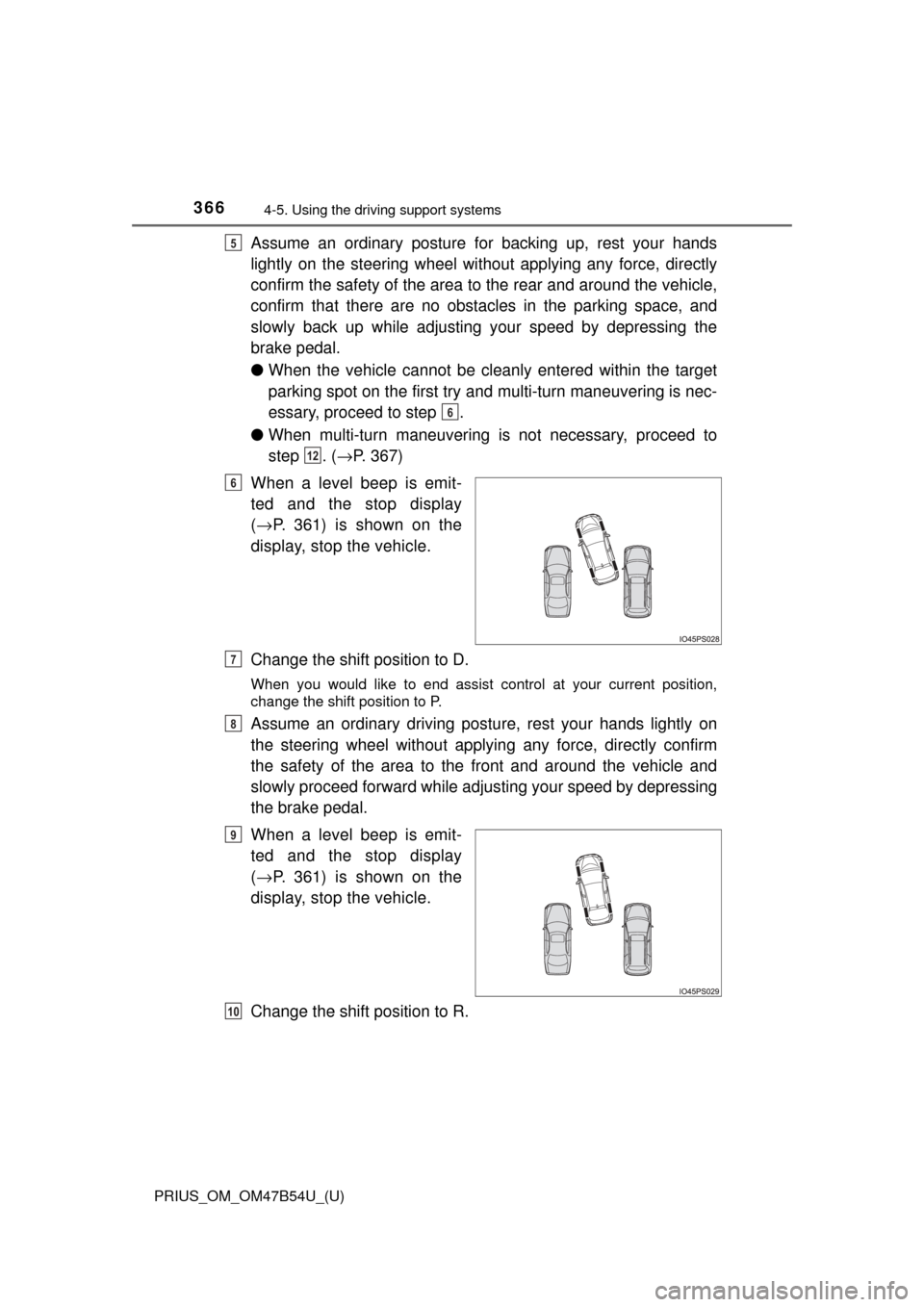
When a level beep is emit-
ted and the stop display
( → P. 361) is shown on the
display, stop the vehicle.
Change the shift position to D.
When you would like to end assist control at your current position,
change the shift position to P.
Assume an ordinary driving postu re, rest your hands lightly on
the steering wheel without applying any force, directly confirm
the safety of the area to the front and around the vehicle and
slowly proceed forward while adjus ting your speed by depressing
the brake pedal.
When a level beep is emit-
ted and the stop display
( → P. 361) is shown on the
display, stop the vehicle.
Change the shift position to R.
5
6
12
6
7
8
9
10