wire TOYOTA PRIUS 2017 4.G Owner's Manual
[x] Cancel search | Manufacturer: TOYOTA, Model Year: 2017, Model line: PRIUS, Model: TOYOTA PRIUS 2017 4.GPages: 796, PDF Size: 20.13 MB
Page 351 of 796

PRIUS_OM_OM47B54U_(U)
3514-5. Using the driving support systems
4
Driving
■Sensor detection range
The detection range of the Intelligent Clearance Sonar function differs from
the detection range of the clearance sonar ( →P. 337).
Therefore, even if the clearance sonar detects an obstacle and provides a
warning, the Intelligent Clearance Sonar may not start operating.
■ System operation
When the vehicle is stopped by system operation, the Intelligent Clearance
Sonar function stops and the ICS OFF indicator illuminates.
■ System recovery
When the Intelligent Clearance Sonar function is stopped by system opera-
tion and you would like to resume operation, either turn the Intelligent Clear-
ance Sonar ON again ( →P. 333), or turn the power switch off and then back
on. Furthermore, when the vehicle moves with an obstacle no longer in the
traveling direction of the vehicle, or when the traveling direction of the vehicle
changes (such as when switching from moving forward to backing up, and
vice versa), system operation automatically resumes.
■ Obstacles not detected by the sensors
The following obstacles may not be detected by the sensors.
●Objects such as people, cloth and snow, that are difficult for sonic waves to
reflect off of. (In particular, people may also not be detected depending on
the type of clothing they are wearing.)
● Objects not perpendicular with the ground, objects not at a right angle to the
traveling direction of the vehicle, uneven objects or waving objects
● Low objects
● Thin objects such as wires, fences, ropes and signposts
● Objects that are extremely close to the bumper
■ Clearance sonar buzzer
Regardless of whether the clearance sonar is on or off ( →P. 333), if the Intel-
ligent Clearance Sonar function is not stopped ( →P. 346), when the front or
rear sensors detect an obstacle and brake control is performed, the clearance
sonar buzzer also sounds and a notification of the approximate distance to
the obstacle is provided.
Page 352 of 796
352
PRIUS_OM_OM47B54U_(U)
4-5. Using the driving support systems
■Situations when the system may opera te even though there is no possi-
bility of a collision
In the following situations, the system may operate even though there is no
possibility of a collision.
● Environmental influence
• The vehicle is driven toward a banner or flag, a low-hanging branch or a
boom barrier (such as those used at railroad crossings, toll gates and
parking lots).
• There is an obstacle on the shoulder of the road (when the vehicle is driven in a narrow tunnel, on a narrow bridge or on a narrow road)
• The vehicle is being parallel parked
• There is a rut or hole in the surface of the road
• When the vehicle is driven on a metal cover (grating), such as those used for drainage ditches
• The vehicle is driven on a steep slope
• The sensor is covered by water on a flooded road
● Influence from the weather
• Ice, snow, dirt, etc., has adhered to the sensor (if removed, the system
returns to normal)
• Heavy rain or water strikes the vehicle
• In severe weather such as fog, snow or a sand storm
● Influence from other sonic waves
• An ultrasonic wave source is nearby, such as the horn or clearance sonar
of another vehicle, a vehicle detector, a motorcycle engine or the air
brake of a large vehicle
• Electronic components (such as a backlit license plate (especially fluo-
rescent types), fog lights, a fender pole or a wireless antenna) are
installed near the sensors
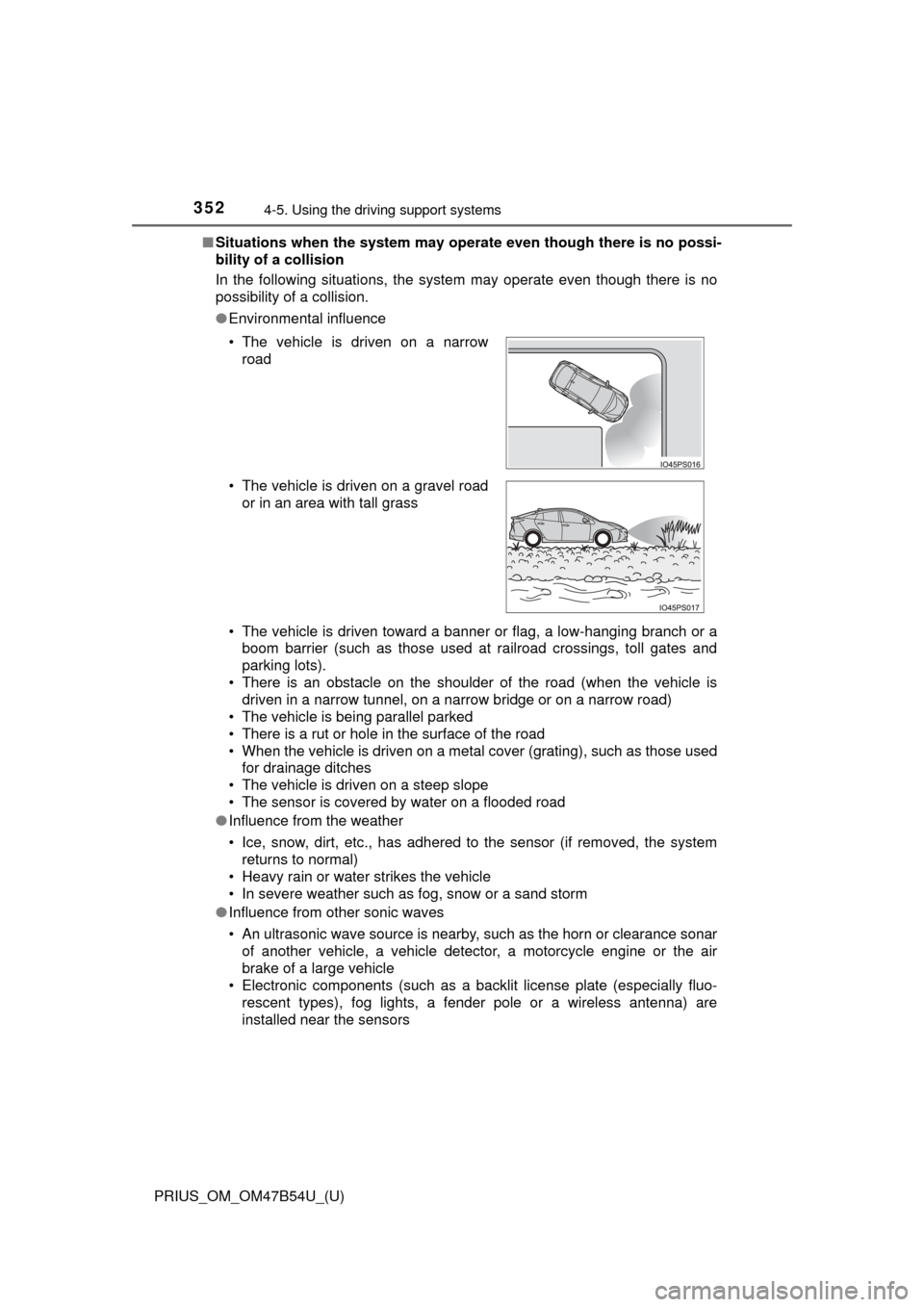
• The vehicle is driven on a narrow
road
• The vehicle is driven on a gravel road or in an area with tall grass
Page 354 of 796

354
PRIUS_OM_OM47B54U_(U)
4-5. Using the driving support systems
●Influence from other sonic waves
• An ultrasonic wave source is nearby, such as the horn or clearance sonar
of another vehicle, a vehicle detector, a motorcycle engine or the air
brake of a large vehicle
• Electronic components (such as a backlit license plate (especially fluo- rescent types), fog lights, a fender pole or a wireless antenna) are
installed near the sensors
● Changes in the vehicle
• The vehicle is tilted a large amount
• The height of the vehicle has drastically changed due to the carried load
(the nose tilts up or down)
• The direction of the sensor has deviated due to a collision or other impact
■ Intelligent Clearance Sonar function while the Simple Advanced Parking
Guidance System is operating
→P. 359
■ When removing and installi ng the 12-volt battery
The system needs to be initialized.
The system can be initialized by driving the vehicle straight ahead for 5 sec-
onds or more at a speed of approximately 22 mph (35 km/h) or higher.
■ When “ICS Unavailable” is displayed on the multi-information display
and the ICS OFF indicator flashes
● Ice, snow, dirt, etc., may have adhered to the sensor. If this occurs, remove
the ice, snow, dirt, etc., from the sensor to return the system to normal.
Also, a warning message may be displayed at low temperatures due to ice
forming on the sensor, and the sensor may not detect obstacles. Once the
ice melts, the system will return to normal.
● If this message is shown even after removing dirt from the sensor, or shown
when the sensor was not dirty to begin with, have the vehicle inspected at
your Toyota dealer.
● System initialization may not have been performed after removal and instal-
lation of the 12-volt battery. Perform system initialization.
■ When “ICS Malfunction Visit Your Deal er” is displayed on the multi-infor-
mation display, the ICS OFF indi cator flashes and the buzzer sounds
The system may not be operating properly. Have the vehicle inspected at
your Toyota dealer.
Page 417 of 796

417
PRIUS_OM_OM47B54U_(U)
5Audio system
5-5. Playing an audio CD and MP3/WMA/AAC discs
CD player operation.......... 438
5-6. Using an external device iPod player operation........ 444
USB memory device player operation.............. 449
Using the AUX .................. 454
5-7. Connecting Bluetooth
®
Preparations to use wireless
communication ............... 455
Registering a Bluetooth
®
audio player for the
first time .......................... 458
Registering a Bluetooth
®
phone for the first time.... 459
Registering a Bluetooth
® device ........... 460
Connecting a Bluetooth
® device ........... 462
Displaying a Bluetooth®
device details.................. 464
Detailed Bluetooth
®
settings ........................... 465 5-8. Bluetooth
® Audio
Listening to Bluetooth®
Audio .............................. 466
5-9. Bluetooth
® phone
Using a Bluetooth®
Phone ............................. 468
Making a call .................... 471
Receiving a call ................ 474
Speaking on the phone .... 475
Bluetooth
® phone
message function ........... 478
Using the steering wheel switches.......................... 482
Bluetooth
® phone
settings ........................... 483
Contact/Call History Settings .......................... 484
What to do if... (Troubleshooting) ........... 493
5-10. Bluetooth
®
Bluetooth®........................ 497
5-11. Using the voice command system
Voice command system ............................ 503
Page 446 of 796
4465-6. Using an external device
PRIUS_OM_OM47B54U_(U)
■About iPod
●“Made for iPod” and “Made for iPhone” mean that an electronic accessory
has been designed to connect specifically to iPod or iPhone, respectively,
and has been certified by the developer to meet Apple performance stan-
dards.
● Apple is not responsible for the operation of this device or its compliance
with safety and regulatory standards. Please note that the use of this acces-
sory with iPod or iPhone may affect wireless performance.
● iPhone, iPod, iPod classic, iPod nano, and iPod touch are trademarks of
Apple Inc., registered in the U.S. and other countries. Lightning is a trade-
mark of Apple Inc.
■ iPod cover art
●Depending on the iPod and songs in the iPod, iPod cover art may be dis-
played.
● This function can be changed to on/off. ( →P. 429)
● It may take time to display iPod cover art, and the iPod may not be operated
while the cover art display is in process.
● Only iPod cover art that is saved in JPEG format can be displayed.
■ iPod functions
●When an iPod is connected and the audio source is changed to iPod mode,
the iPod will resume play from the same point in which it was last used.
● Depending on the iPod that is connected to the system, certain functions
may not be available. If a function is unavailable due to a malfunction (as
opposed to a system specification), disconnecting the device and recon-
necting it may resolve the problem.
● While connected to the system, the iPod cannot be operated with its own
controls. It is necessary to use the controls of the vehicle’s audio system
instead.
● When the battery level of an iPod is very low, the iPod may not operate. If
so, charge the iPod before use.
● Compatible models ( →P. 448)
Page 455 of 796
455
PRIUS_OM_OM47B54U_(U)
5-7. Connecting Bluetooth®
5
Audio system
Preparations to use wireless communication
The following can be performed using Bluetooth® wireless com-
munication:
■A portable audio player can be operated and listened to via
audio system
■Hands-free phone calls can be made via a cellular phone
In order to use wireless communication, register and connect a
Bluetooth
® device by performing the following procedures.
Page 466 of 796
466
PRIUS_OM_OM47B54U_(U)
5-8. Bluetooth® Audio
Listening to Bluetooth® Audio
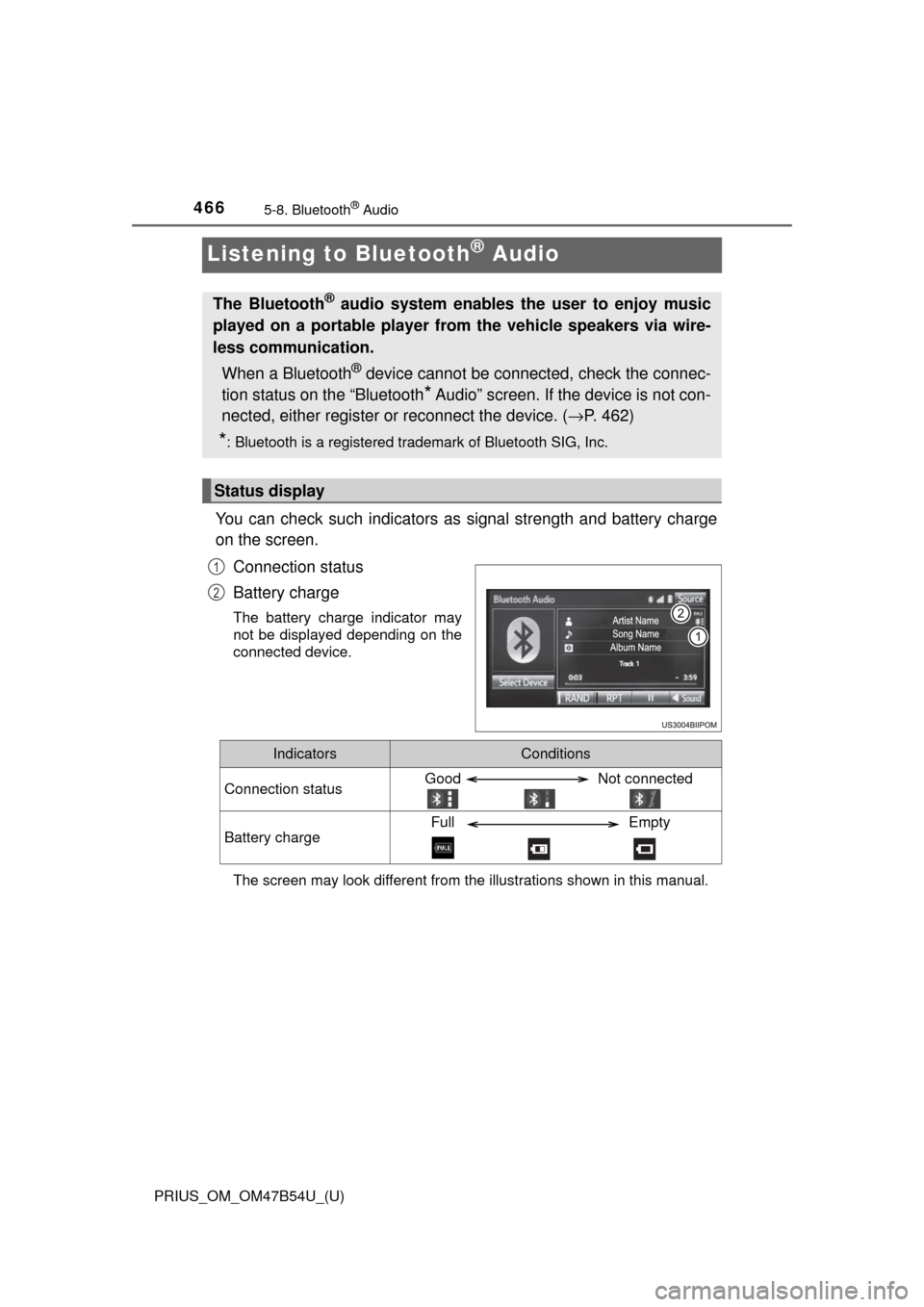
You can check such indicators as signal strength and battery charge
on the screen.
Connection status
Battery charge
The battery charge indicator may
not be displayed depending on the
connected device.
The screen may look different from t he illustrations shown in this manual.
The Bluetooth® audio system enables the user to enjoy music
played on a portable player from the vehicle speakers via wire-
less communication.
When a Bluetooth
® device cannot be connected, check the connec-
tion status on the “Bluetooth
* Audio” screen. If the device is not con-
nected, either register or reconnect the device. (→ P. 462)
*: Bluetooth is a registered trademark of Bluetooth SIG, Inc.
Status display
1
2
IndicatorsConditions
Connection statusGood Not connected
Battery chargeFull Empty
Page 468 of 796
468
PRIUS_OM_OM47B54U_(U)
5-9. Bluetooth® phone
Using a Bluetooth® Phone
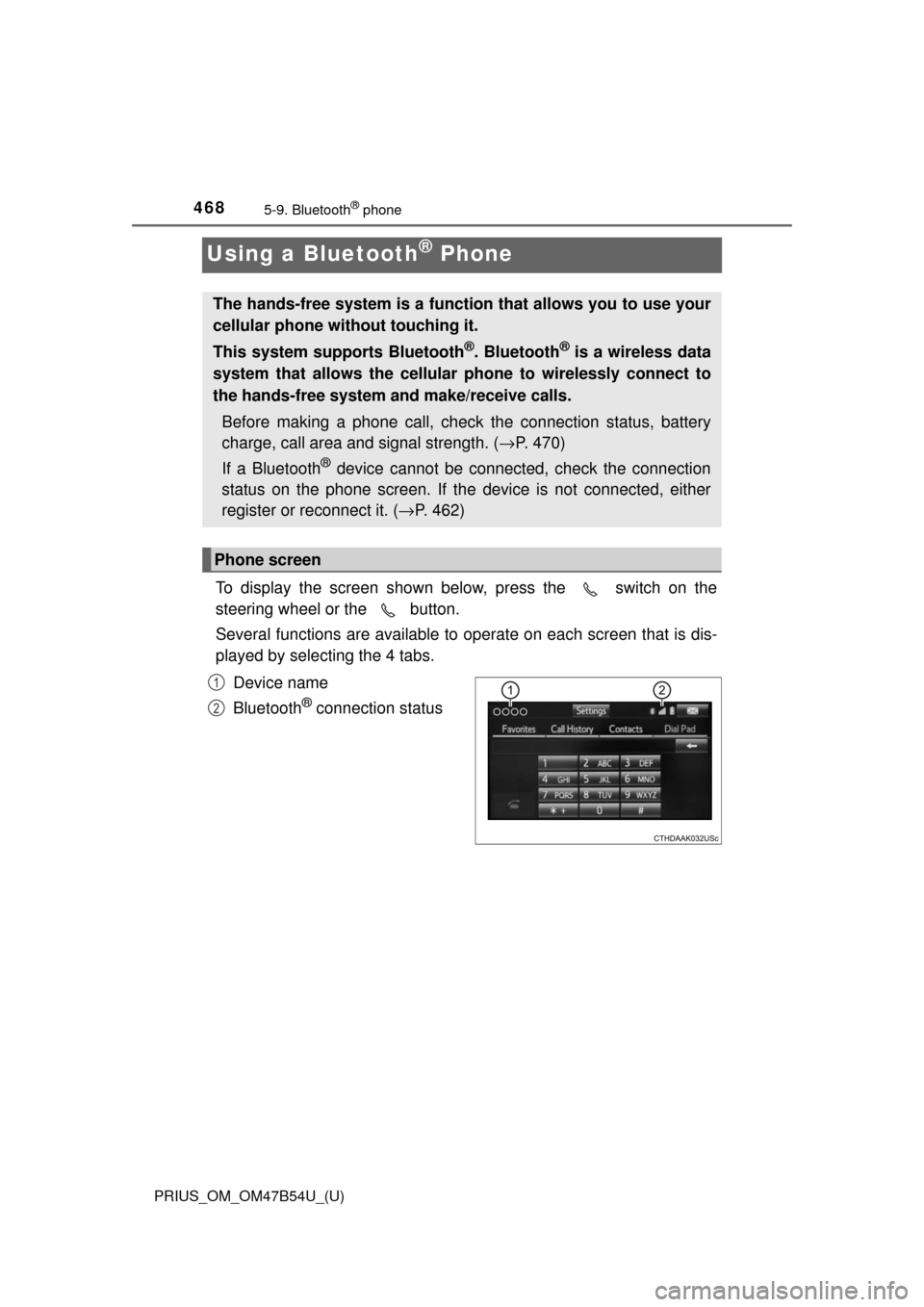
To display the screen shown below, press the switch on the
steering wheel or the button.
Several functions are available to operate on each screen that is dis-
played by selecting the 4 tabs.
Device name
Bluetooth
® connection status
The hands-free system is a function that allows you to use your
cellular phone without touching it.
This system supports Bluetooth
®. Bluetooth® is a wireless data
system that allows the cellular phone to wirelessly connect to
the hands-free system and make/receive calls.
Before making a phone call, check the connection status, battery
charge, call area and signal strength. ( →P. 470)
If a Bluetooth
® device cannot be connected, check the connection
status on the phone screen. If th e device is not connected, either
register or reconnect it. ( →P. 462)
Phone screen
1
2
Page 509 of 796

509
PRIUS_OM_OM47B54U_(U)
6Interior features
6-1. Using the air conditioning system and defogger
Automatic air conditioning system ............................ 510
Seat heaters...................... 521
6-2. Using the interior lights Interior lights list ................ 523• Front interior light .......... 524
• Front personal lights ..... 524
• Rear interior light .......... 525
6-3. Using the storage features List of storage features ..... 526• Glove box...................... 527
• Console box .................. 527
• Cup holders/bottle holders/
door pockets ................. 528
• Auxiliary boxes.............. 530
Luggage compartment features ........................... 531
6-4. Using the other interior features
Other interior features ....... 540 • Sun visors ..................... 540
• Vanity mirrors................ 540
• Power outlets ................ 541
• Wireless charger ........... 542
• Armrest ......................... 550
• Coat hooks.................... 550
• Assist grips ................... 551
Garage door opener.......... 552
Safety Connect ................. 559
Page 530 of 796
530
PRIUS_OM_OM47B54U_(U)
6-3. Using the storage features
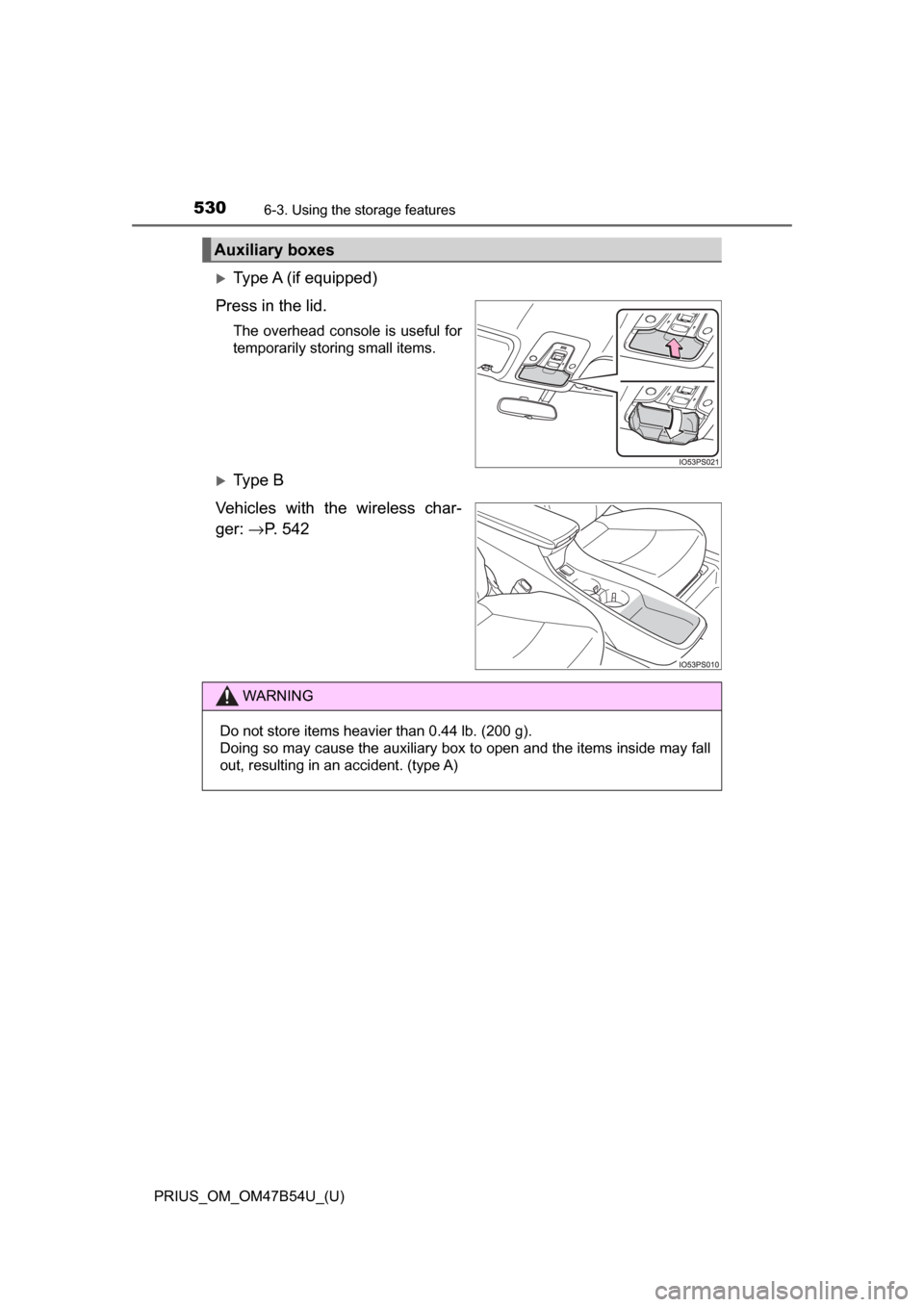
Type A (if equipped)
Press in the lid.
The overhead console is useful for
temporarily storing small items.
Ty p e B
Vehicles with the wireless char-
ger: →P. 5 4 2
Auxiliary boxes
WARNING
Do not store items heavier than 0.44 lb. (200 g).
Doing so may cause the auxiliary box to open and the items inside may fall
out, resulting in an accident. (type A)