lock TOYOTA PRIUS 2017 4.G Manual PDF
[x] Cancel search | Manufacturer: TOYOTA, Model Year: 2017, Model line: PRIUS, Model: TOYOTA PRIUS 2017 4.GPages: 796, PDF Size: 20.13 MB
Page 525 of 796
PRIUS_OM_OM47B54U_(U)
5256-2. Using the interior lights
6
Interior features
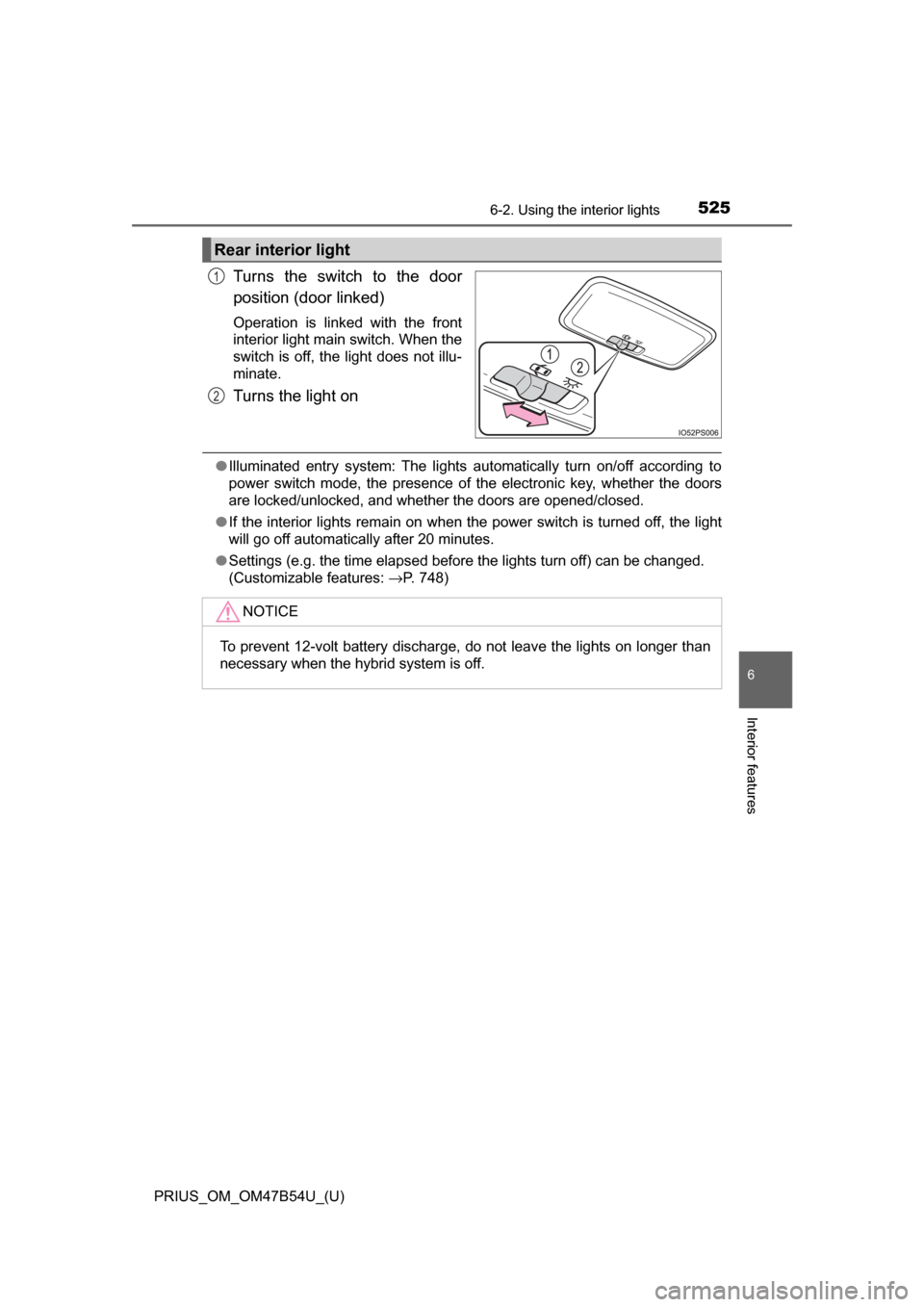
Turns the switch to the door
position (door linked)
Operation is linked with the front
interior light main switch. When the
switch is off, the light does not illu-
minate.
Turns the light on
●Illuminated entry system: The lights automatically turn on/off according to
power switch mode, the presence of the electronic key, whether the doors
are locked/unlocked, and whether the doors are opened/closed.
● If the interior lights remain on when the power switch is turned off, the light
will go off automatically after 20 minutes.
● Settings (e.g. the time elapsed before the lights turn off) can be changed.
(Customizable features: →P. 748)
Rear interior light
1
2
NOTICE
To prevent 12-volt battery discharge, do not leave the lights on longer than
necessary when the hybrid system is off.
Page 552 of 796
552
PRIUS_OM_OM47B54U_(U)
6-4. Using the other interior features
Garage door opener∗
The garage door opener (HomeLink® Universal Transceiver) is manu-
factured under license from HomeLink®.
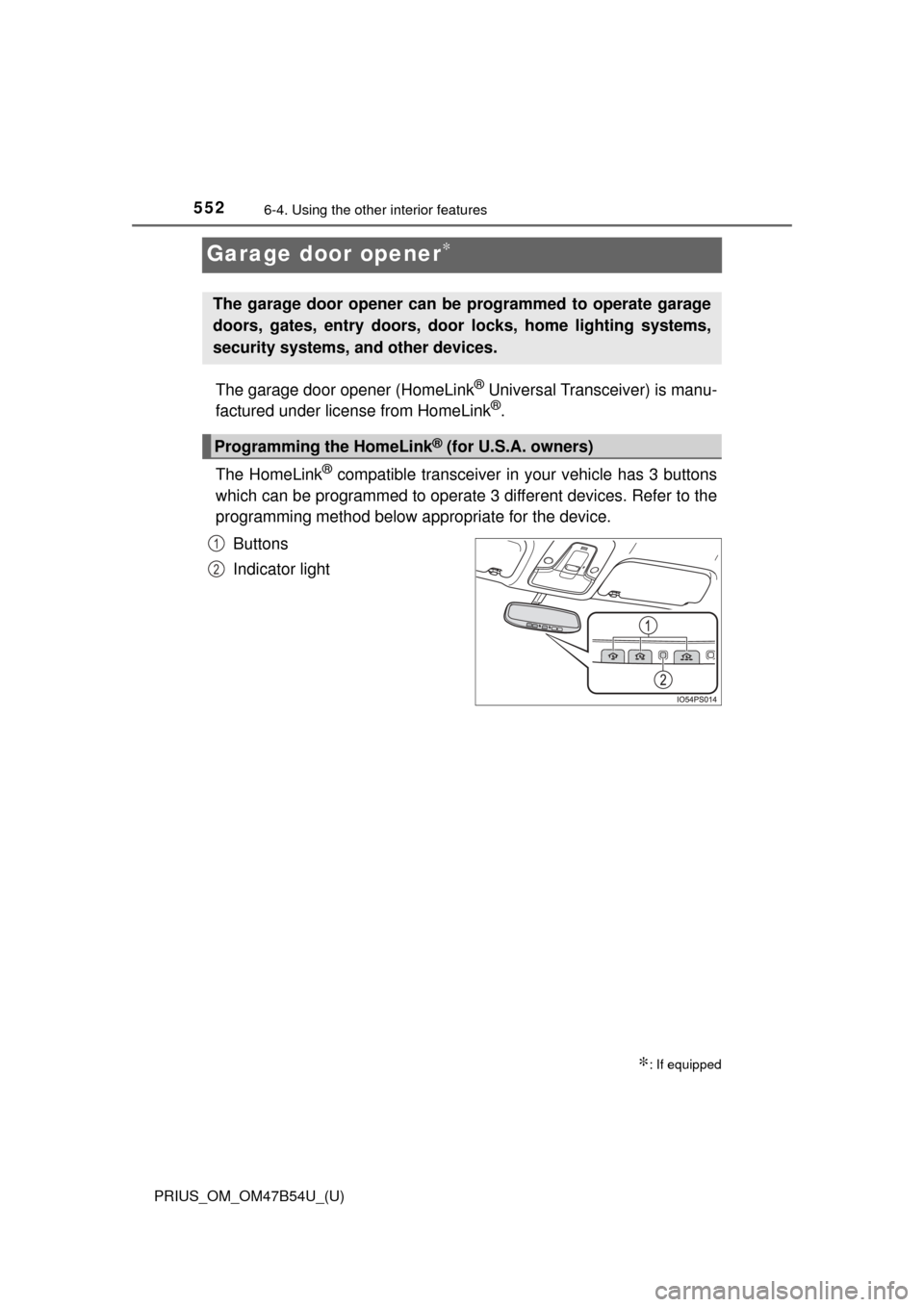
The HomeLink
® compatible transceiver in your vehicle has 3 buttons
which can be programmed to operate 3 different devices. Refer to the
programming method below appropriate for the device.
Buttons
Indicator light
∗: If equipped
The garage door opener can be programmed to operate garage
doors, gates, entry doors, door locks, home lighting systems,
security systems, and other devices.
Programming the HomeLink® (for U.S.A. owners)
1
2
Page 556 of 796
556
PRIUS_OM_OM47B54U_(U)
6-4. Using the other interior features
■Programming an entry gate (for U.S.A. owners)/Programming a
devices in the Canadian market
Place the remote control transmitter 1 to 3 in. (25 to 75 mm)
away from the HomeLink
® buttons.
Keep the HomeLink® indicator light in view while programming.
Press and hold the selected HomeLink® button.
Repeatedly press and release (cyc le) the remote control trans-
mitter for 2 seconds each until step 4 is completed.
When the HomeLink
® indicator light starts to flash rapidly,
release the buttons.
Test the HomeLink
® operation by pressing the newly pro-
grammed button. Check to see if the gate/device operates cor-
rectly.
Repeat the steps above to program another device for any of the
remaining HomeLink
® buttons.
■Programming other devices
To program other devices such as home security systems, home
door locks and lighting, contact your Toyota dealer for assistance.
■Reprogramming a button
The individual HomeLink
® buttons cannot be erased but can be
reprogrammed. To reprogram a button, follow the “Reprogramming
a HomeLink
® button” instructions.
Press the appropriate HomeLink
® button. The HomeLink® indicator
light should come on.
The HomeLink® compatible transceiver in your vehicle continues to send a
signal for up to 20 seconds as long as the button is pressed.
Operating HomeLink®
1
2
3
4
5
6
Page 567 of 796

5677-1. Maintenance and care
7
Maintenance and care
■Note for a smart key system
If the door handle becomes wet while the electronic key is within the ef\
fective
range, the do")
PRIUS_OM_OM47B54U_(U)
5677-1. Maintenance and care
7
Maintenance and care
■Note for a smart key system
If the door handle becomes wet while the electronic key is within the ef\
fective
range, the door may lock and unlock repeatedly. In that case, follow the fol-
lowing correction procedures to wash the vehicle:
●Place the key in a position 6 ft. (2 m) or more separate from the vehicle
while the vehicle is being washed. (Take care to ensure that the key is not
stolen.)
● Set the electronic key to battery-saving mode to disable the smart key sys-
tem. ( →P. 178)
■ Aluminum wheels
●Remove any dirt immediately by using a neutral detergent. Do not use hard
brushes or abrasive cleaners. Do not use strong or harsh chemical clean-
ers.
Use the same mild detergent and wax as used on the paint.
● Do not use detergent on the wheels when they are hot, for example after
driving for long distance in the hot weather.
● Wash detergent from the wheels immediately after use.
■ Bumpers
Do not scrub with abrasive cleaners.
■ Front side windows water-repellent coating (if equipped)
The following precautions can extend the effectiveness of the water-repellent
coating.
●Remove any dirt, etc. from the front side windows regularly.
● Do not allow dirt and dust to accumulate on the windows for a long period.
Clean the windows with a soft, damp cloth as soon as possible.
● Do not use wax or glass cleaners that contain abrasives when cleaning the
windows.
● Do not use any metallic objects to remove condensation build up.
Page 581 of 796
PRIUS_OM_OM47B54U_(U)
5817-2. Maintenance
7
Maintenance and care
Vehicle interior
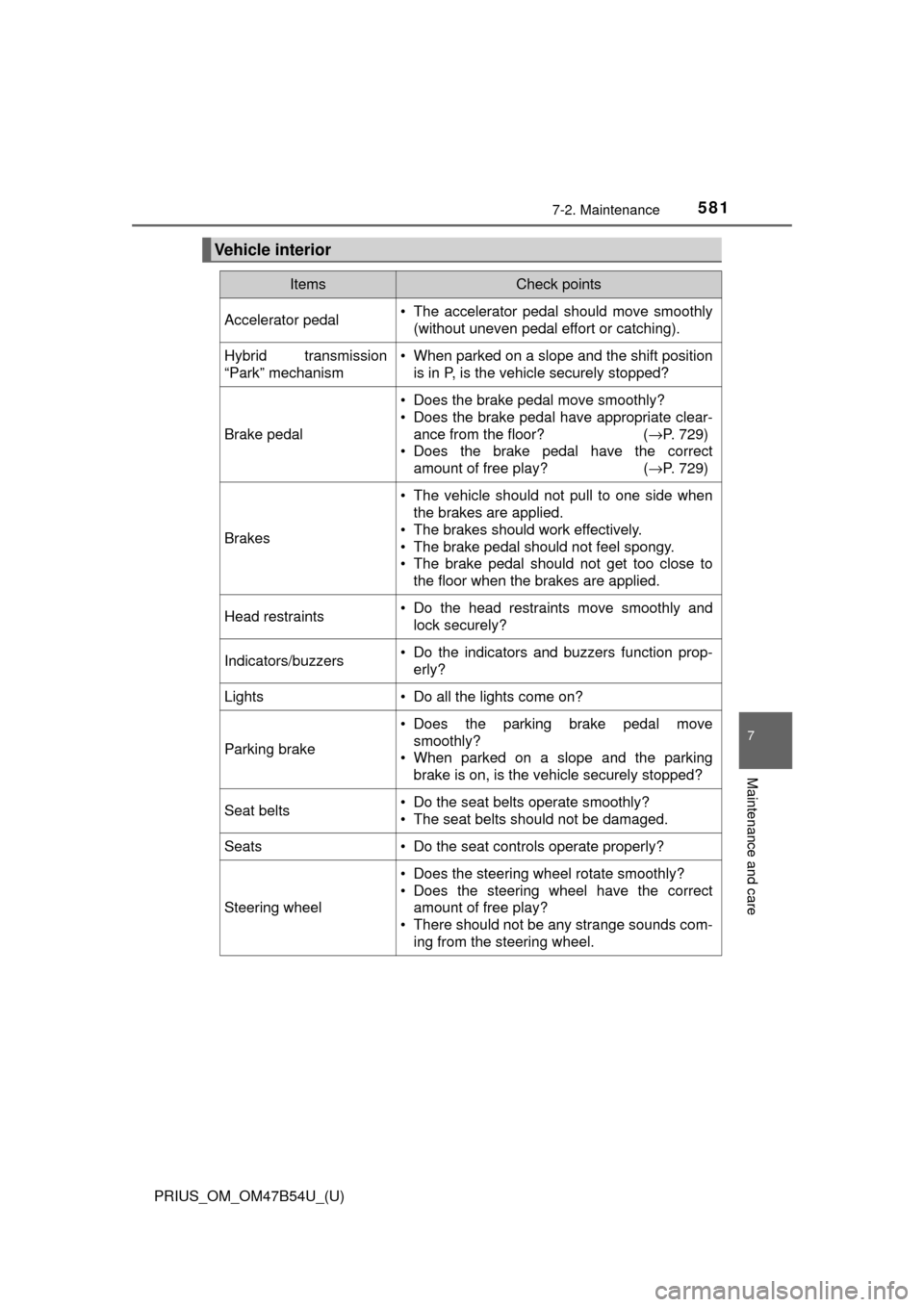
ItemsCheck points
Accelerator pedal• The accelerator pedal should move smoothly(without uneven pedal effort or catching).
Hybrid transmission
“Park” mechanism• When parked on a slope and the shift positionis in P, is the vehicle securely stopped?
Brake pedal
• Does the brake pedal move smoothly?
• Does the brake pedal have appropriate clear-
ance from the floor? ( →P. 729)
• Does the brake pedal have the correct amount of free play? ( →P. 729)
Brakes
• The vehicle should not pull to one side when
the brakes are applied.
• The brakes should work effectively.
• The brake pedal should not feel spongy.
• The brake pedal should not get too close to the floor when the brakes are applied.
Head restraints• Do the head restraints move smoothly andlock securely?
Indicators/buzzers• Do the indicators and buzzers function prop-erly?
Lights• Do all the lights come on?
Parking brake
• Does the parking brake pedal movesmoothly?
• When parked on a slope and the parking brake is on, is the vehicle securely stopped?
Seat belts• Do the seat belts operate smoothly?
• The seat belts should not be damaged.
Seats• Do the seat controls operate properly?
Steering wheel
• Does the steering wheel rotate smoothly?
• Does the steering wheel have the correctamount of free play?
• There should not be any strange sounds com- ing from the steering wheel.
Page 582 of 796
582
PRIUS_OM_OM47B54U_(U)
7-2. Maintenance
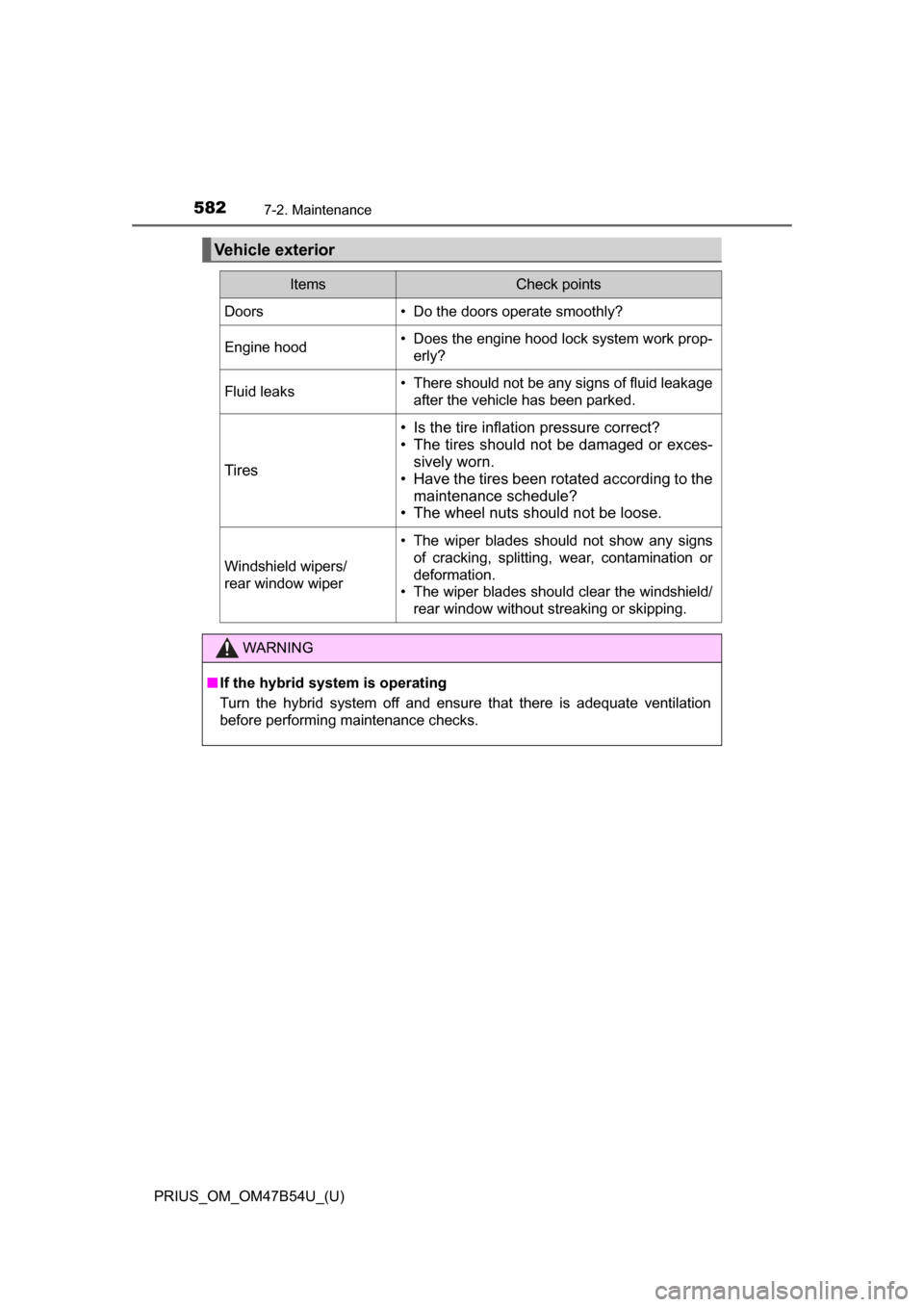
Vehicle exterior
ItemsCheck points
Doors• Do the doors operate smoothly?
Engine hood• Does the engine hood lock system work prop-erly?
Fluid leaks• There should not be any signs of fluid leakageafter the vehicle has been parked.
Tires
• Is the tire inflation pressure correct?
• The tires should not be damaged or exces-sively worn.
• Have the tires been rotated according to the
maintenance schedule?
• The wheel nuts should not be loose.
Windshield wipers/
rear window wiper
• The wiper blades should not show any signs
of cracking, splitting, wear, contamination or
deformation.
• The wiper blades should clear the windshield/
rear window without streaking or skipping.
WARNING
■If the hybrid system is operating
Turn the hybrid system off and ensure that there is adequate ventilation
before performing maintenance checks.
Page 587 of 796
587
PRIUS_OM_OM47B54U_(U)
7-3. Do-it-yourself maintenance
7
Maintenance and care
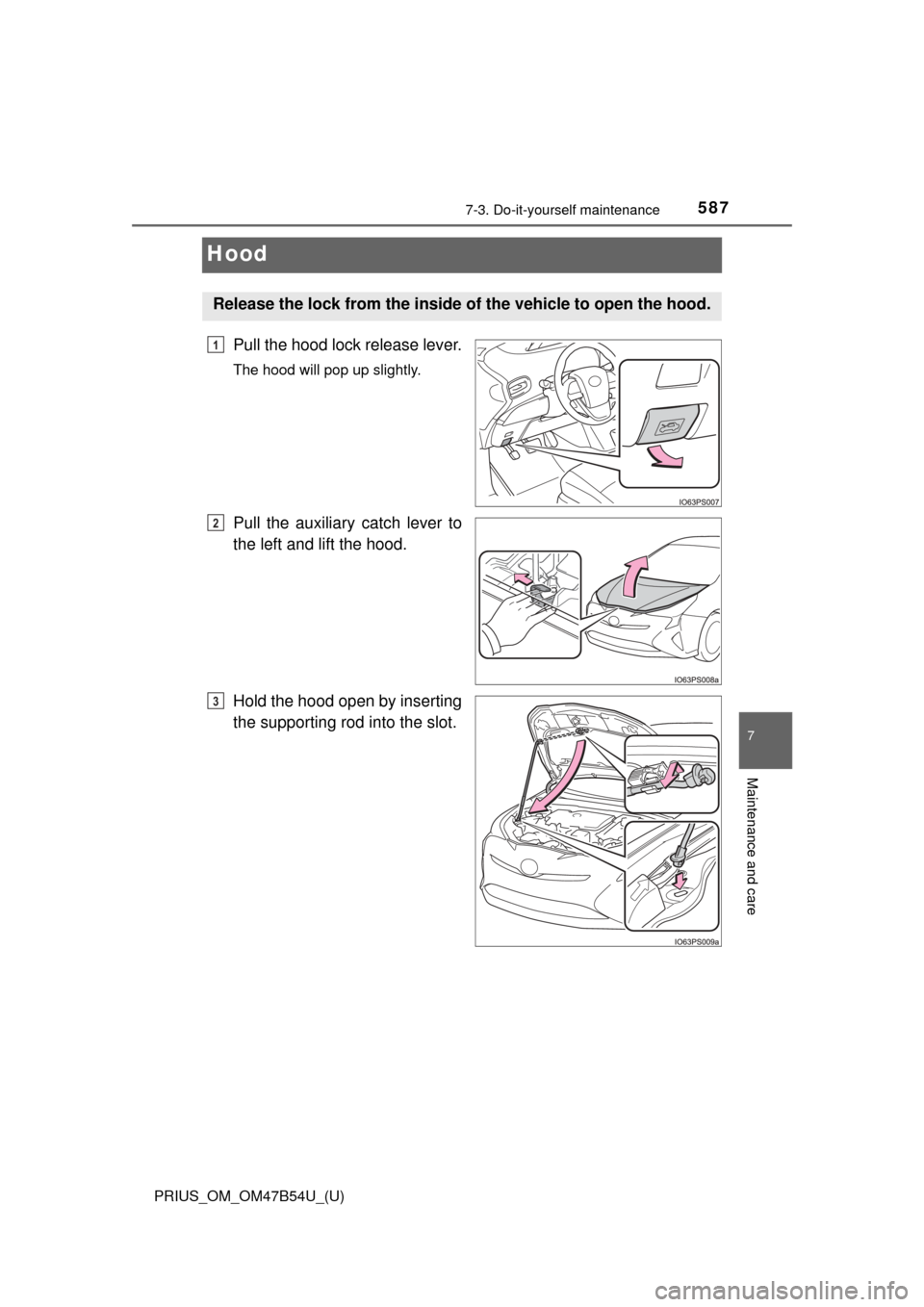
Hood
Pull the hood lock release lever.
The hood will pop up slightly.
Pull the auxiliary catch lever to
the left and lift the hood.
Hold the hood open by inserting
the supporting rod into the slot.
Release the lock from the inside of the vehicle to open the hood.
1
2
3
Page 588 of 796
588
PRIUS_OM_OM47B54U_(U)
7-3. Do-it-yourself maintenance
WARNING
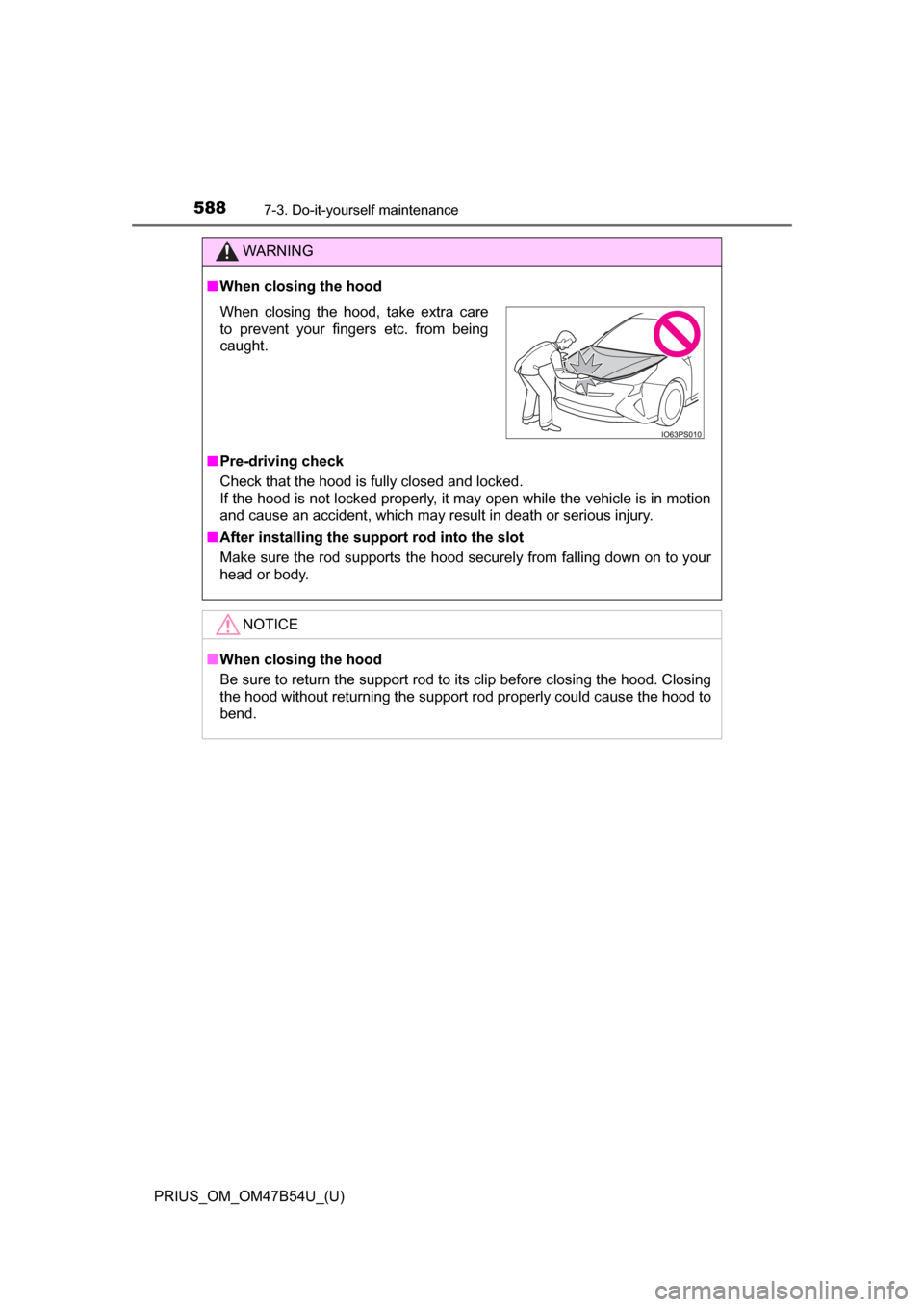
■When closing the hood
■ Pre-driving check
Check that the hood is fully closed and locked.
If the hood is not locked properly, it may open while the vehicle is in motion
and cause an accident, which may result in death or serious injury.
■ After installing the support rod into the slot
Make sure the rod supports the hood securely from falling down on to your
head or body.
NOTICE
■When closing the hood
Be sure to return the support rod to its clip before closing the hood. Closing
the hood without returning the support rod properly could cause the hood to
bend.
When closing the hood, take extra care
to prevent your fingers etc. from being
caught.
Page 592 of 796
592
PRIUS_OM_OM47B54U_(U)
7-3. Do-it-yourself maintenance
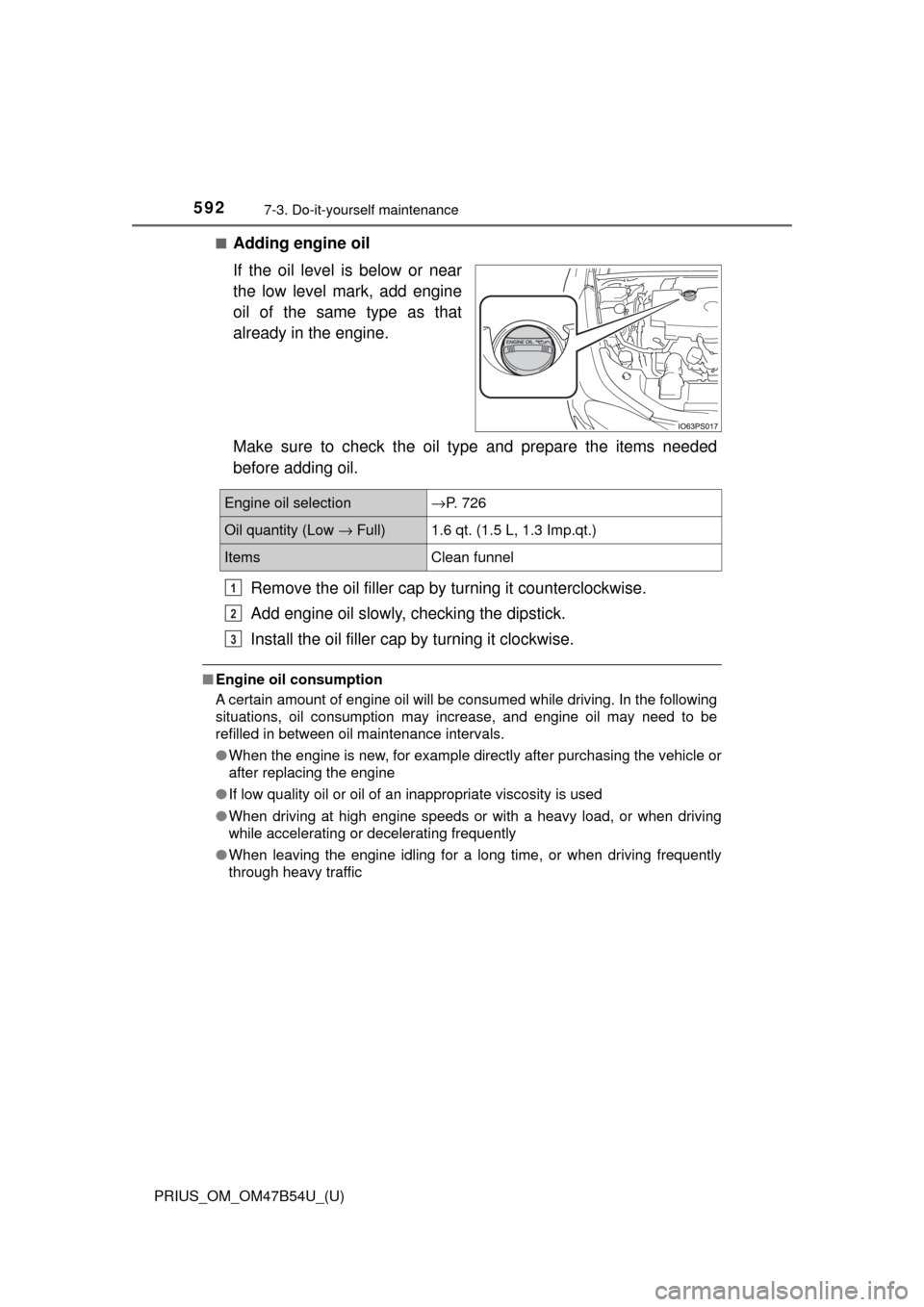
■Adding engine oil
If the oil level is below or near
the low level mark, add engine
oil of the same type as that
already in the engine.
Make sure to check the oil type and prepare the items needed
before adding oil.Remove the oil filler cap by turning it counterclockwise.
Add engine oil slowly, c hecking the dipstick.
Install the oil filler cap by turning it clockwise.
■Engine oil consumption
A certain amount of engine oil will be consumed while driving. In the following
situations, oil consumption may increase, and engine oil may need to be
refilled in between oil maintenance intervals.
●When the engine is new, for example directly after purchasing the vehicle or
after replacing the engine
● If low quality oil or oil of an inappropriate viscosity is used
● When driving at high engine speeds or with a heavy load, or when driving
while accelerating or decelerating frequently
● When leaving the engine idling for a long time, or when driving frequently
through heavy traffic
Engine oil selection→P. 726
Oil quantity (Low → Full)1.6 qt. (1.5 L, 1.3 Imp.qt.)
ItemsClean funnel
1
2
3
Page 597 of 796
PRIUS_OM_OM47B54U_(U)
5977-3. Do-it-yourself maintenance
7
Maintenance and care
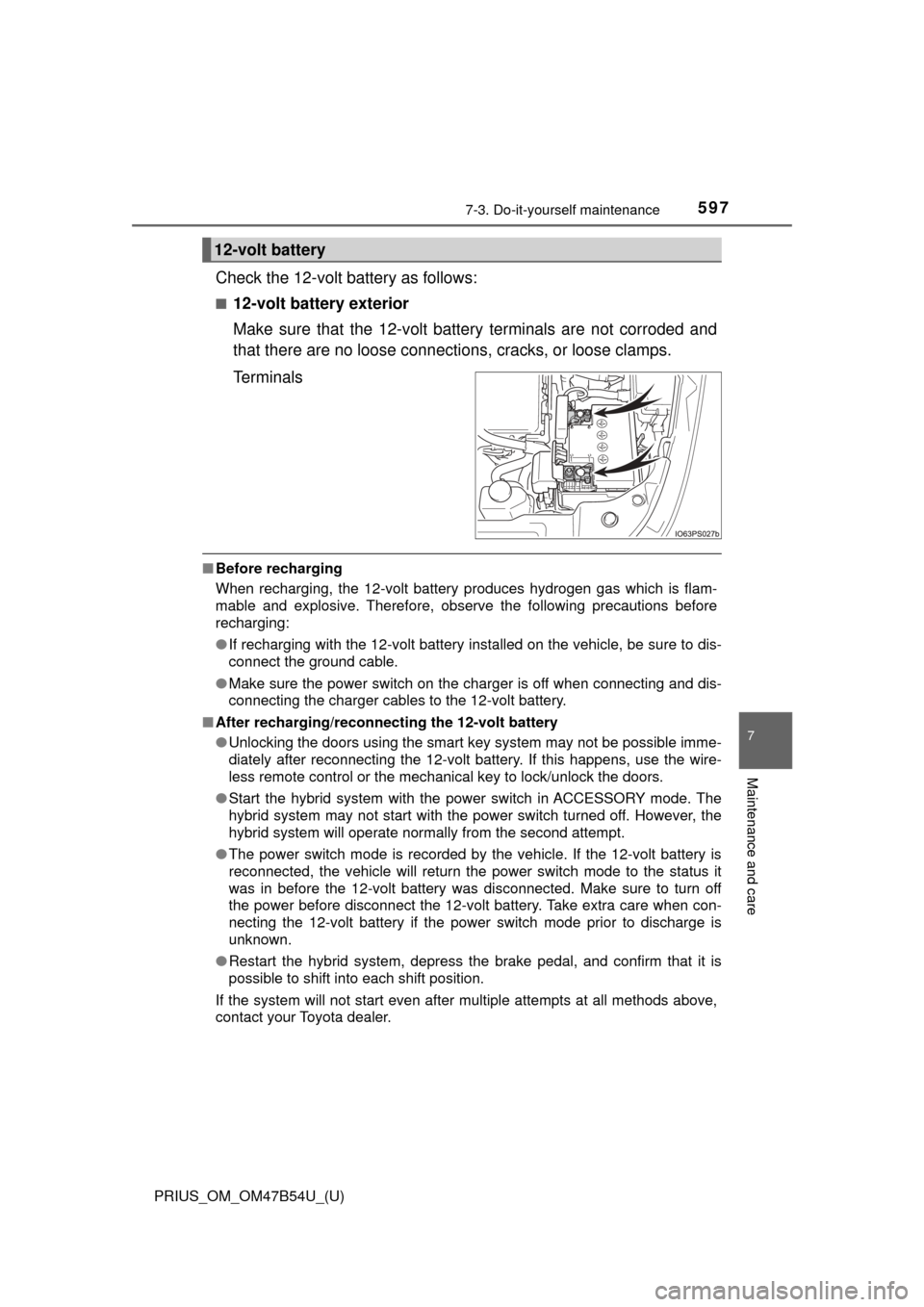
Check the 12-volt battery as follows:
■12-volt battery exterior
Make sure that the 12-volt battery terminals are not corroded and
that there are no loose connections, cracks, or loose clamps.
Terminals
■ Before recharging
When recharging, the 12-volt battery produces hydrogen gas which is flam-
mable and explosive. Therefore, observe the following precautions before
recharging:
●If recharging with the 12-volt battery installed on the vehicle, be sure to dis-
connect the ground cable.
● Make sure the power switch on the charger is off when connecting and dis-
connecting the charger cables to the 12-volt battery.
■ After recharging/reconnect ing the 12-volt battery
● Unlocking the doors using the smart key system may not be possible imme-
diately after reconnecting the 12-volt battery. If this happens, use the wire-
less remote control or the mechanical key to lock/unlock the doors.
● Start the hybrid system with the power switch in ACCESSORY mode. The
hybrid system may not start with the power switch turned off. However, the
hybrid system will operate normally from the second attempt.
● The power switch mode is recorded by the vehicle. If the 12-volt battery is
reconnected, the vehicle will return the power switch mode to the status it
was in before the 12-volt battery was disconnected. Make sure to turn off
the power before disconnect the 12-volt battery. Take extra care when con-
necting the 12-volt battery if the power switch mode prior to discharge is
unknown.
● Restart the hybrid system, depress the brake pedal, and confirm that it is
possible to shift into each shift position.
If the system will not start even after multiple attempts at all methods above,
contact your Toyota dealer.
12-volt battery