door lock TOYOTA PRIUS 2017 4.G Owners Manual
[x] Cancel search | Manufacturer: TOYOTA, Model Year: 2017, Model line: PRIUS, Model: TOYOTA PRIUS 2017 4.GPages: 796, PDF Size: 20.13 MB
Page 2 of 796
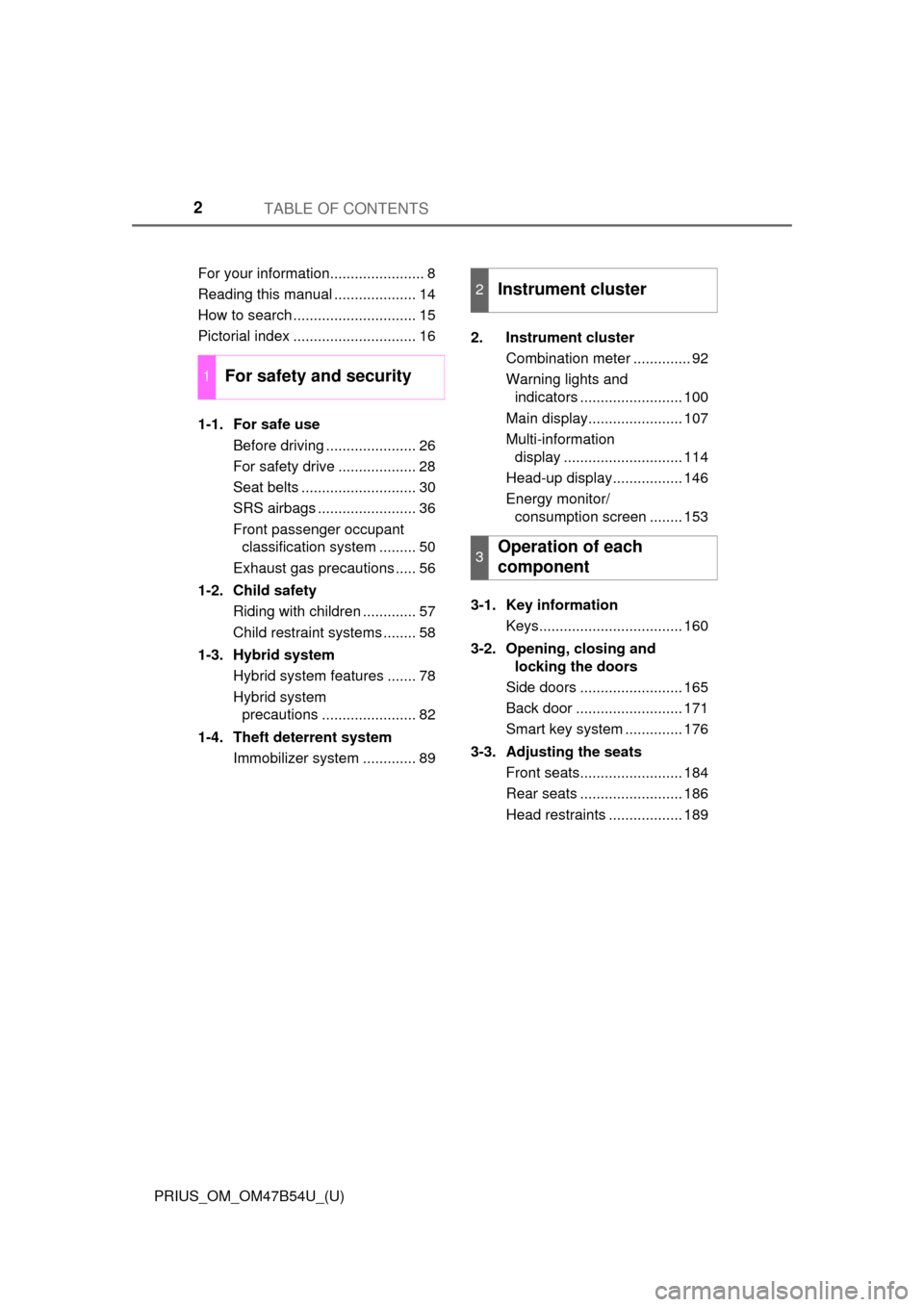
TABLE OF CONTENTS2
PRIUS_OM_OM47B54U_(U)For your information....................... 8
Reading this manual .................... 14
How to search .............................. 15
Pictorial index .............................. 16
1-1. For safe use
Before driving ...................... 26
For safety drive ................... 28
Seat belts ............................ 30
SRS airbags ........................ 36
Front passenger occupant classification system ......... 50
Exhaust gas precautions ..... 56
1-2. Child safety Riding with children ............. 57
Child restraint systems ........ 58
1-3. Hybrid system Hybrid system features ....... 78
Hybrid system precautions ....................... 82
1-4. Theft deterrent system Immobilizer system ............. 89 2. Instrument cluster
Combination meter .............. 92
Warning lights and indicators ......................... 100
Main display....................... 107
Multi-information display ............................. 114
Head-up display................. 146
Energy monitor/ consumption screen ........ 153
3-1. Key information Keys................................... 160
3-2. Opening, closing and locking the doors
Side doors ......................... 165
Back door .......................... 171
Smart key system .............. 176
3-3. Adjusting the seats Front seats......................... 184
Rear seats ......................... 186
Head restraints .................. 189
1For safety and security
2Instrument cluster
3Operation of each
component
Page 16 of 796
16Pictorial index
PRIUS_OM_OM47B54U_(U)
Pictorial index
■
Exterior
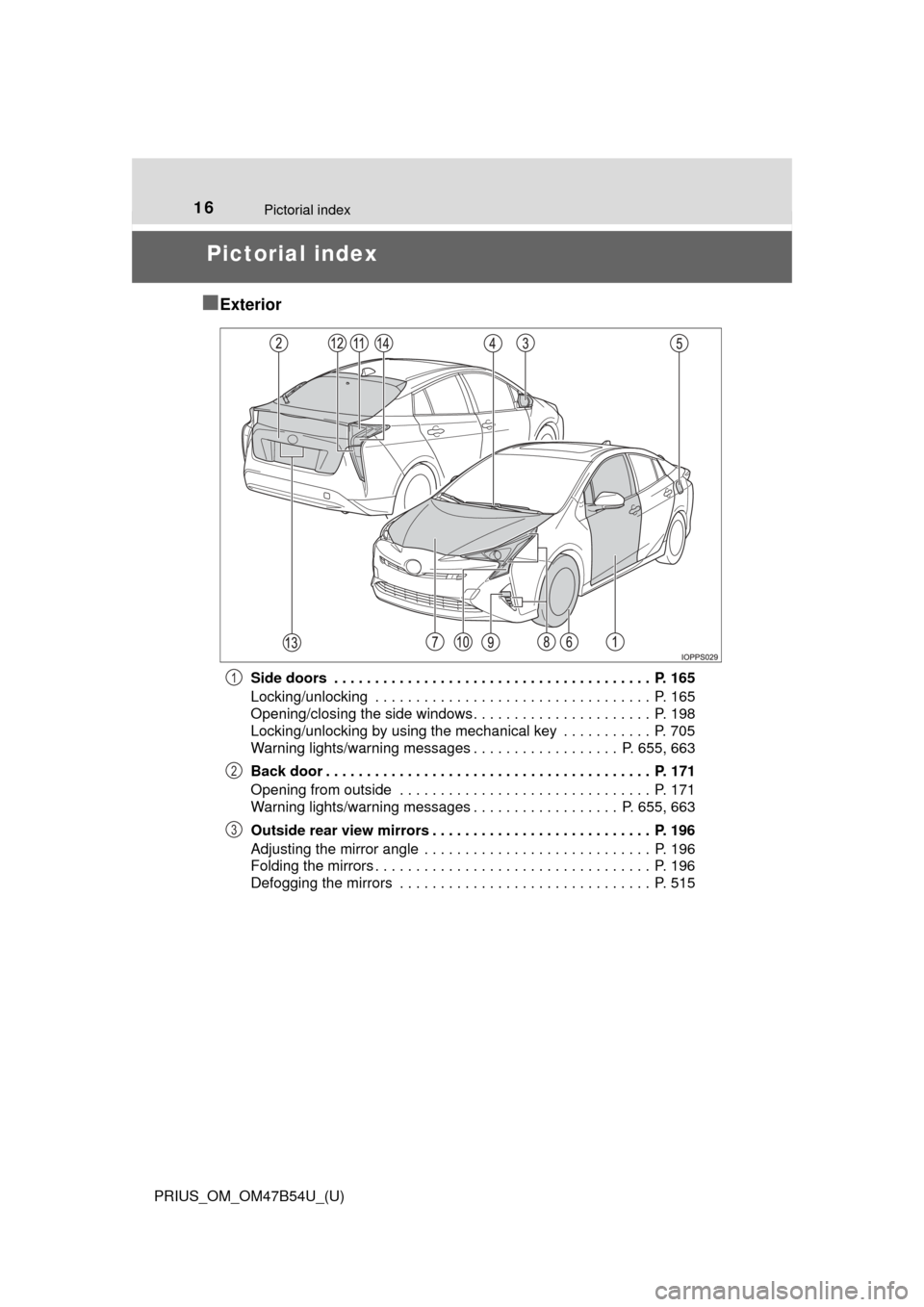
Side doors . . . . . . . . . . . . . . . . . . . . . . . . . . . . . . . . . . . . . . . P. 165
Locking/unlocking . . . . . . . . . . . . . . . . . . . . . . . . . . . . . . . . . . P. 165
Opening/closing the side windows. . . . . . . . . . . . . . . . . . . . . . P. 198
Locking/unlocking by using the mechanical key . . . . . . . . . . . P. 705
Warning lights/warning messages . . . . . . . . . . . . . . . . . . P. 655, 663
Back door . . . . . . . . . . . . . . . . . . . . . . . . . . . . . . . . . . . . . . . . P. 171
Opening from outside . . . . . . . . . . . . . . . . . . . . . . . . . . . . . . . P. 171
Warning lights/warning messages . . . . . . . . . . . . . . . . . . P. 655, 663
Outside rear view mirrors . . . . . . . . . . . . . . . . . . . . . . . . . . . P. 196
Adjusting the mirror angle . . . . . . . . . . . . . . . . . . . . . . . . . . . . P. 196
Folding the mirrors . . . . . . . . . . . . . . . . . . . . . . . . . . . . . . . . . . P. 196
Defogging the mirrors . . . . . . . . . . . . . . . . . . . . . . . . . . . . . . . P. 5151
2
3
Page 19 of 796
19Pictorial index
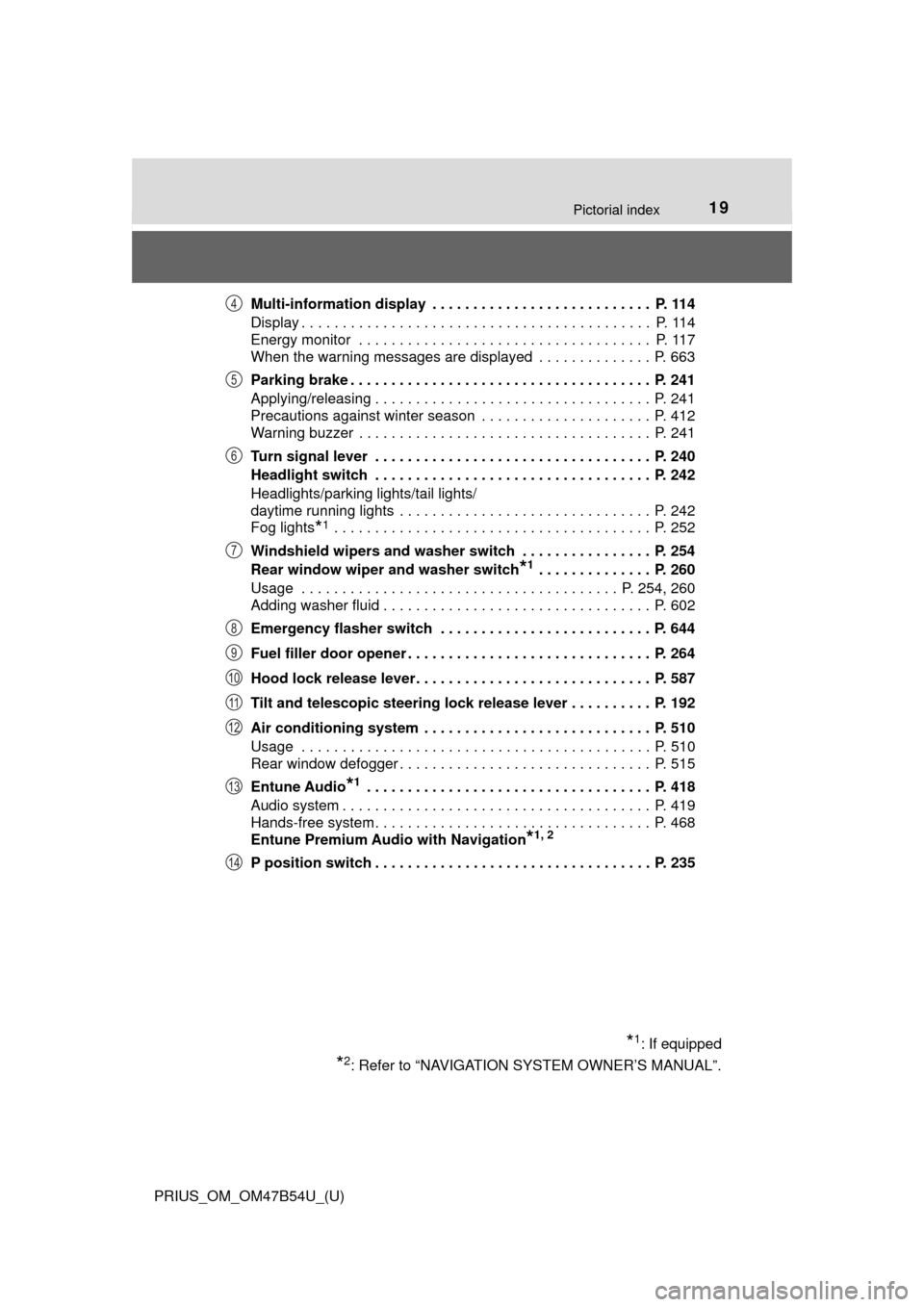
PRIUS_OM_OM47B54U_(U)Multi-information display . . . . . . . . . . . . . . . . . . . . . . . . . . . P. 114
Display . . . . . . . . . . . . . . . . . . . . . . . . . . . . . . . . . . . . . . . . . . . P. 114
Energy monitor . . . . . . . . . . . . . . . . . . . . . . . . . . . . . . . . . . . . P. 117
When the warning messages are displayed . . . . . . . . . . . . . . P. 663
Parking brake . . . . . . . . . . . . . . . . . . . . . . . . . . . . . . . . . . . . . P. 241
Applying/releasing . . . . . . . . . . . . . . . . . . . . . . . . . . . . . . . . . . P. 241
Precautions against winter season . . . . . . . . . . . . . . . . . . . . . P. 412
Warning buzzer . . . . . . . . . . . . . . . . . . . . . . . . . . . . . . . . . . . . P. 241
Turn signal lever . . . . . . . . . . . . . . . . . . . . . . . . . . . . . . . . . . P. 240
Headlight switch . . . . . . . . . . . . . . . . . . . . . . . . . . . . . . . . . . P. 242
Headlights/parking lights/tail lights/
daytime running lights . . . . . . . . . . . . . . . . . . . . . . . . . . . . . . . P. 242
Fog lights
*1 . . . . . . . . . . . . . . . . . . . . . . . . . . . . . . . . . . . . . . . P. 252
Windshield wipers and washer switch . . . . . . . . . . . . . . . . P. 254
Rear window wiper and washer switch
*1 . . . . . . . . . . . . . . P. 260
Usage . . . . . . . . . . . . . . . . . . . . . . . . . . . . . . . . . . . . . . . P. 254, 260
Adding washer fluid . . . . . . . . . . . . . . . . . . . . . . . . . . . . . . . . . P. 602
Emergency flasher switch . . . . . . . . . . . . . . . . . . . . . . . . . . P. 644
Fuel filler door opener . . . . . . . . . . . . . . . . . . . . . . . . . . . . . . P. 264
Hood lock release lever. . . . . . . . . . . . . . . . . . . . . . . . . . . . . P. 587
Tilt and telescopic steering lock release lever . . . . . . . . . . P. 192
Air conditioning system . . . . . . . . . . . . . . . . . . . . . . . . . . . . P. 510
Usage . . . . . . . . . . . . . . . . . . . . . . . . . . . . . . . . . . . . . . . . . . . P. 510
Rear window defogger . . . . . . . . . . . . . . . . . . . . . . . . . . . . . . . P. 515
Entune Audio
*1 . . . . . . . . . . . . . . . . . . . . . . . . . . . . . . . . . . . P. 418
Audio system . . . . . . . . . . . . . . . . . . . . . . . . . . . . . . . . . . . . . . P. 419
Hands-free system . . . . . . . . . . . . . . . . . . . . . . . . . . . . . . . . . . P. 468
Entune Premium Audio with Navigation
*1, 2
P position switch . . . . . . . . . . . . . . . . . . . . . . . . . . . . . . . . . . P. 235
*1: If equipped
*2: Refer to “NAVIGATION SYSTEM OWNER’S MANUAL”.
4
5
6
7
8
9
10
11
12
13
14
Page 20 of 796
20Pictorial index
PRIUS_OM_OM47B54U_(U)
■Switches
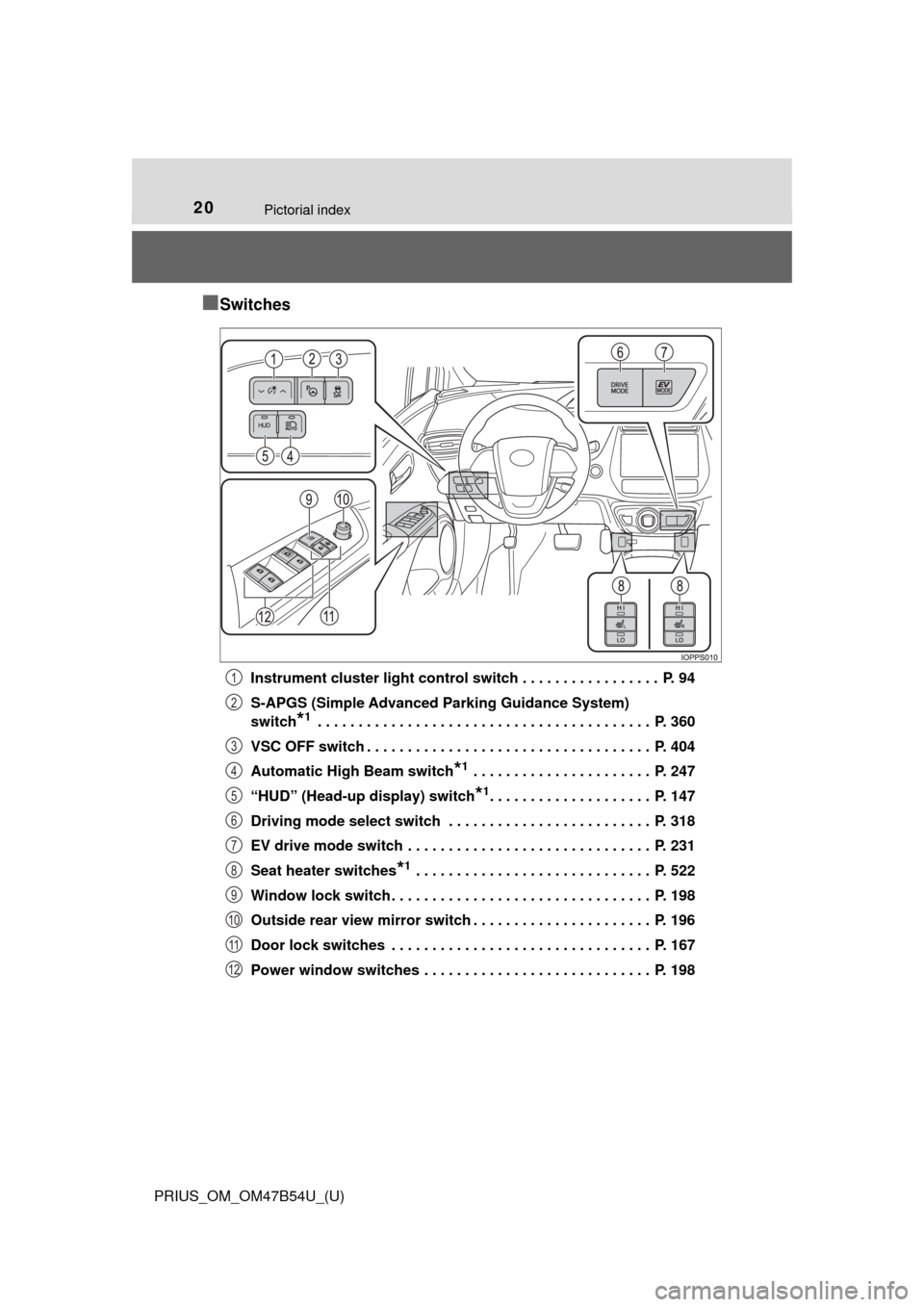
Instrument cluster light control switch . . . . . . . . . . . . . . . . . P. 94
S-APGS (Simple Advanced Parking Guidance System)
switch
*1 . . . . . . . . . . . . . . . . . . . . . . . . . . . . . . . . . . . . . . . . . P. 360
VSC OFF switch . . . . . . . . . . . . . . . . . . . . . . . . . . . . . . . . . . . P. 404
Automatic High Beam switch
*1 . . . . . . . . . . . . . . . . . . . . . . P. 247
“HUD” (Head-up display) switch
*1. . . . . . . . . . . . . . . . . . . . P. 147
Driving mode select switch . . . . . . . . . . . . . . . . . . . . . . . . . P. 318
EV drive mode switch . . . . . . . . . . . . . . . . . . . . . . . . . . . . . . P. 231
Seat heater switches
*1 . . . . . . . . . . . . . . . . . . . . . . . . . . . . . P. 522
Window lock switch . . . . . . . . . . . . . . . . . . . . . . . . . . . . . . . . P. 198
Outside rear view mirror switch . . . . . . . . . . . . . . . . . . . . . . P. 196
Door lock switches . . . . . . . . . . . . . . . . . . . . . . . . . . . . . . . . P. 167
Power window switches . . . . . . . . . . . . . . . . . . . . . . . . . . . . P. 198
1
2
3
4
5
6
7
8
9
10
11
12
Page 34 of 796
341-1. For safe use
PRIUS_OM_OM47B54U_(U)
WARNING
■Adjustable shoulder anchor
Always make sure the shoulder belt is positioned across the center of your
shoulder. The belt should be kept away from your neck, but not falling off
your shoulder. Failure to do so could reduce the amount of protection in an
accident and cause death or serious injuries in the event of a sudden stop,
sudden swerve or accident. ( →P. 31)
■ Seat belt damage and wear
● Do not damage the seat belts by allowing the belt, plate, or buckle to be
jammed in the door.
● Inspect the seat belt system periodically. Check for cuts, fraying, and loose
parts. Do not use a damaged seat belt until it is replaced. Damaged seat
belts cannot protect an occupant from death or serious injury.
● Ensure that the belt and plate are locked and the belt is not twisted.
If the seat belt does not function correctly, immediately contact your Toyota
dealer.
● Replace the seat assembly, including the belts, if your vehicle has been
involved in a serious accident, even if there’s no obvious damage.
● Do not attempt to install, remove, modify, disassemble or dispose of the
seat belts. Have any necessary repairs carried out by your Toyota dealer.
Inappropriate handling of the pretensioner may prevent it from operating
properly, resulting in death or serious injury.
Page 57 of 796
571-2. Child safety
PRIUS_OM_OM47B54U_(U)
1
For safety and security
Riding with children
●It is recommended that children sit in the rear seats to avoid acci-
dental contact with the shift lever, wiper switch etc.
● Use the rear door child-protector lock or the window lock switch to
avoid children opening the door while driving or operating the
power window accidentally. ( →P. 168, 198)
● Do not let small children operate equipment which may catch or
pinch body parts, such as the power window, hood, back door,
seats etc.
Observe the following precautions when children are in the vehi-
cle.
Use a child restraint system appropriate for the child, until the
child becomes large enough to pr operly wear the vehicle’s seat
belt.
WARNING
Never leave children unattended in the vehicle, and never allow children to
have or use the key.
Children may be able to start the vehicle or shift the vehicle into neut\
ral.
There is also a danger that children may injure themselves by playing with
the side windows, the moon roof (if equipped) or other features of the vehi-
cle. In addition, heat build-up or extremely cold temperatures inside the
vehicle can be fatal to children.
Page 159 of 796
159
PRIUS_OM_OM47B54U_(U)
3
Operation of
each component
3-1. Key information
Keys .................................. 160
3-2. Opening, closing and locking the doors
Side doors ......................... 165
Back door .......................... 171
Smart key system ............. 176
3-3. Adjusting the seats Front seats ........................ 184
Rear seats......................... 186
Head restraints.................. 189
3-4. Adjusting the steering wheel and mirrors
Steering wheel .................. 192
Inside rear view mirror ...... 194
Outside rear view mirrors ............................. 196
3-5. Opening and closing the windows and moon roof
Power windows ................. 198
Moon roof .......................... 202
Page 160 of 796
160
PRIUS_OM_OM47B54U_(U)
3-1. Key information
Keys
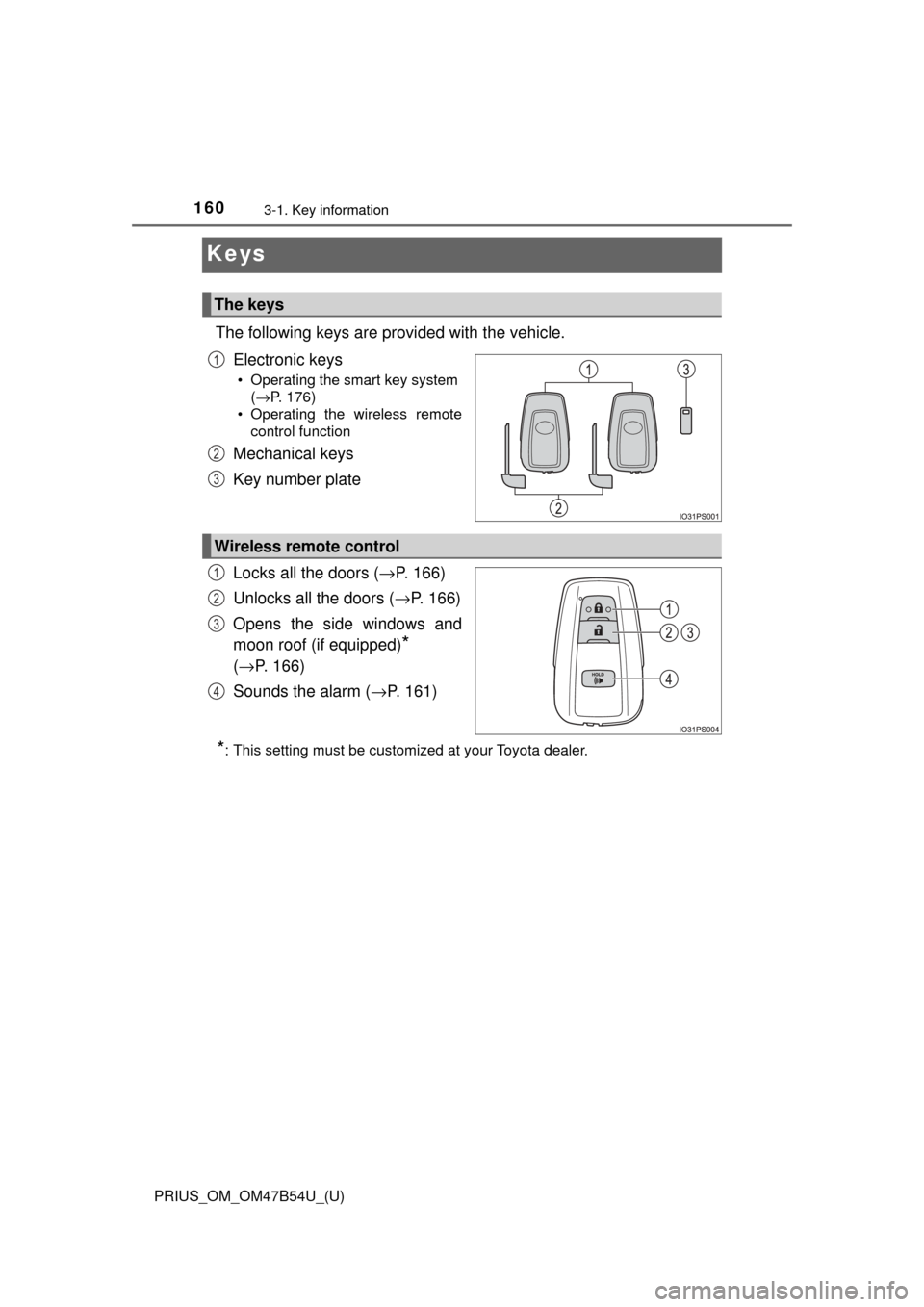
The following keys are provided with the vehicle.Electronic keys
• Operating the smart key system (→P. 176)
• Operating the wireless remote control function
Mechanical keys
Key number plate
Locks all the doors ( →P. 166)
Unlocks all the doors ( →P. 166)
Opens the side windows and
moon roof (if equipped)
*
( → P. 166)
Sounds the alarm ( →P. 161)
*: This setting must be customized at your Toyota dealer.
The keys
1
2
3
Wireless remote control
1
2
3
4
Page 163 of 796
PRIUS_OM_OM47B54U_(U)
1633-1. Key information
3
Operation of each component
■If a message regarding the state of the electronic key or power switch
mode, etc. is shown
To prevent trapping the electronic key inside the vehicle, leaving the vehicle
without turning off the power switch or other passengers from unintentionally
taking the key out of the vehicle, etc., a message that prompts the user to
confirm the state of the electronic key or power switch mode may be shown
on the multi-information display. In those cases, follow the instructions on the
display immediately.
■ If “Key Battery Low Replace Key Battery” is displayed on the multi-infor-
mation display
The electronic key has a low battery. Replace the electronic key battery.
(→P. 627)
■ Replacing the battery
→P. 627
■ Confirmation of the registered key number
The number of keys already registered to the vehicle can be confirmed. Ask
your Toyota dealer.
■ If “A New Key has been Registered Contact Your Dealer for Details” is
displayed on the mult i-information display
This message will be displayed each time the driver’s door is opened when
the doors are unlocked from the outside for approximately 10 days after a
new electronic key has been registered.
If this message is displayed but you have not had a new electronic key regis-
tered, ask your Toyota dealer to check if an unknown electronic key (other
than those in your possession) has been registered.
■ If a wrong key is used
The key cylinder rotates freely to isolate inside mechanism.
Page 165 of 796
165
PRIUS_OM_OM47B54U_(U)
3-2. Opening, closing and locking the doors
3
Operation of each component
Side doors
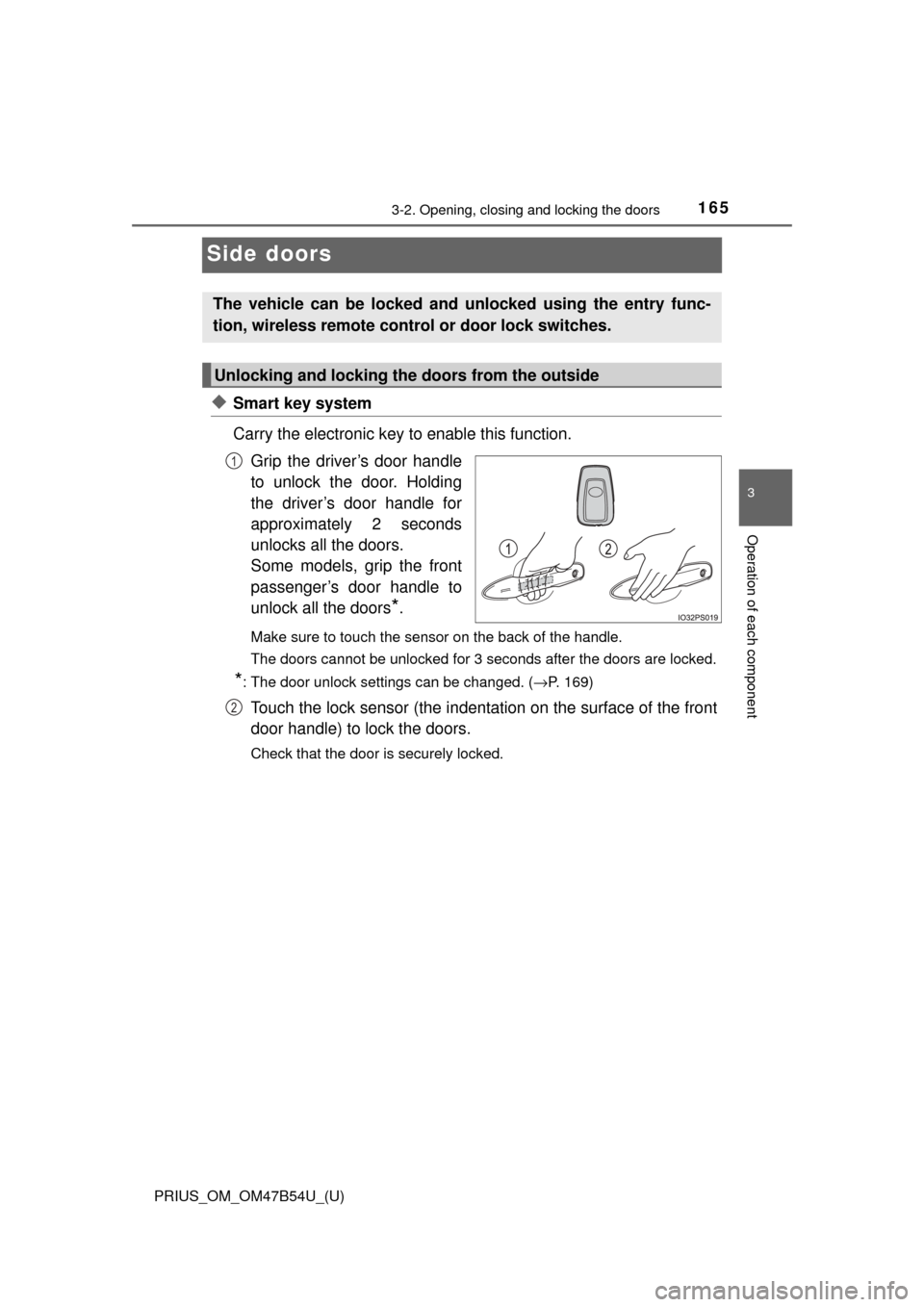
◆Smart key system
Carry the electronic key to enable this function.Grip the driver’s door handle
to unlock the door. Holding
the driver’s door handle for
approximately 2 seconds
unlocks all the doors.
Some models, grip the front
passenger’s door handle to
unlock all the doors
*.
Make sure to touch the sensor on the back of the handle.
The doors cannot be unlocked for 3 seconds after the doors are locked.
*: The door unlock settings can be changed. ( →P. 169)
Touch the lock sensor (the indentation on the surface of the front
door handle) to lock the doors.
Check that the door is securely locked.
The vehicle can be locked and unlocked using the entry func-
tion, wireless remote cont rol or door lock switches.
Unlocking and locking the doors from the outside
1
2