display TOYOTA PRIUS 2018 Accessories, Audio & Navigation (in English)
[x] Cancel search | Manufacturer: TOYOTA, Model Year: 2018, Model line: PRIUS, Model: TOYOTA PRIUS 2018Pages: 294, PDF Size: 4.43 MB
Page 249 of 294
249
5. SETUP
PRIUS_Navi_OM47C01U_(U)
17.08.28 17:21
NAVIGATION SYSTEM
7
1Display the “Detailed Navi. Settings”
screen.
(→ P.248)
2Select “Favorite POI Categories” .
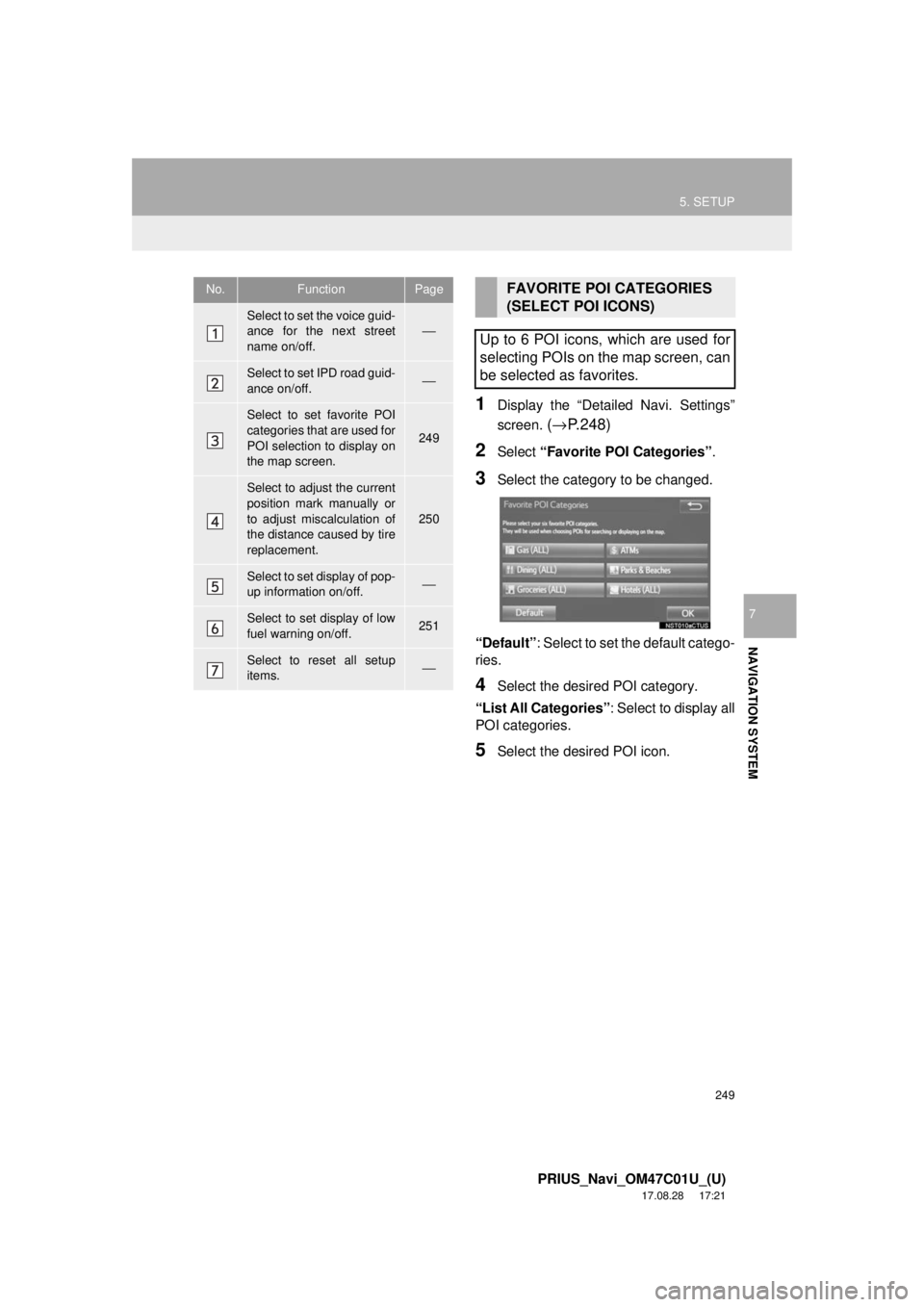
3Select the category to be changed.
“Default” : Select to set the default catego-
ries.
4Select the desired POI category.
“List All Categories”: Select to display all
POI categories.
5Select the desired POI icon.
No.FunctionPage
Select to set the voice guid-
ance for the next street
name on/off.⎯
Select to set IPD road guid-
ance on/off.⎯
Select to set favorite POI
categories that are used for
POI selection to display on
the map screen.
249
Select to adjust the current
position mark manually or
to adjust miscalculation of
the distance caused by tire
replacement.
250
Select to set display of pop-
up information on/off.⎯
Select to set display of low
fuel warning on/off.251
Select to reset all setup
items.⎯
FAVORITE POI CATEGORIES
(SELECT POI ICONS)
Up to 6 POI icons, which are used for
selecting POIs on the map screen, can
be selected as favorites.
Page 250 of 294
250
5. SETUP
PRIUS_Navi_OM47C01U_(U)
17.08.28 17:21
1Display the “Detailed Navi. Settings”
screen.
(→ P.248)
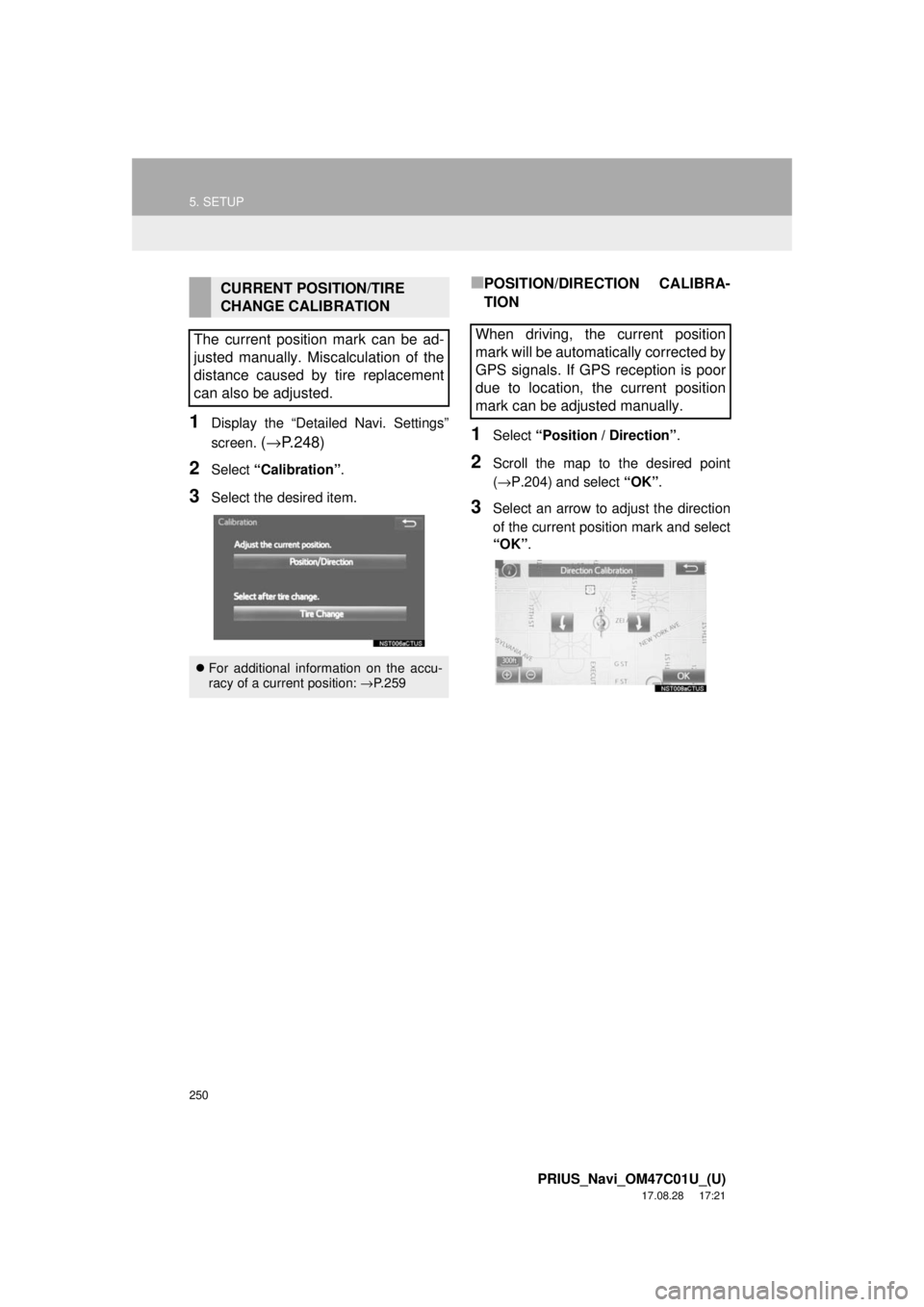
2Select “Calibration” .
3Select the desired item.
■POSITION/DIRECTION CALIBRA-
TION
1Select “Position / Direction” .
2Scroll the map to the desired point
(→P.204) and select “OK”.
3Select an arrow to adjust the direction
of the current position mark and select
“OK”.
CURRENT POSITION/TIRE
CHANGE CALIBRATION
The current position mark can be ad-
justed manually. Miscalculation of the
distance caused by tire replacement
can also be adjusted.
For additional information on the accu-
racy of a current position: →P.259
When driving, the current position
mark will be automatically corrected by
GPS signals. If GPS reception is poor
due to location, the current position
mark can be adjusted manually.
Page 251 of 294
251
5. SETUP
PRIUS_Navi_OM47C01U_(U)
17.08.28 17:21
NAVIGATION SYSTEM
7
■TIRE CHANGE CALIBRATION
1Select “Tire Change”.
The message appears and the quick dis-
tance calibration starts automatically.
1Display the “Detailed Navi. Settings”
screen.
(→ P.248)
2Select “Low Fuel Warning Pop-up” .
■SEARCHING GAS STATION IN LOW
FUEL WARNING
1Select “Yes” when the low fuel warn-
ing appears.
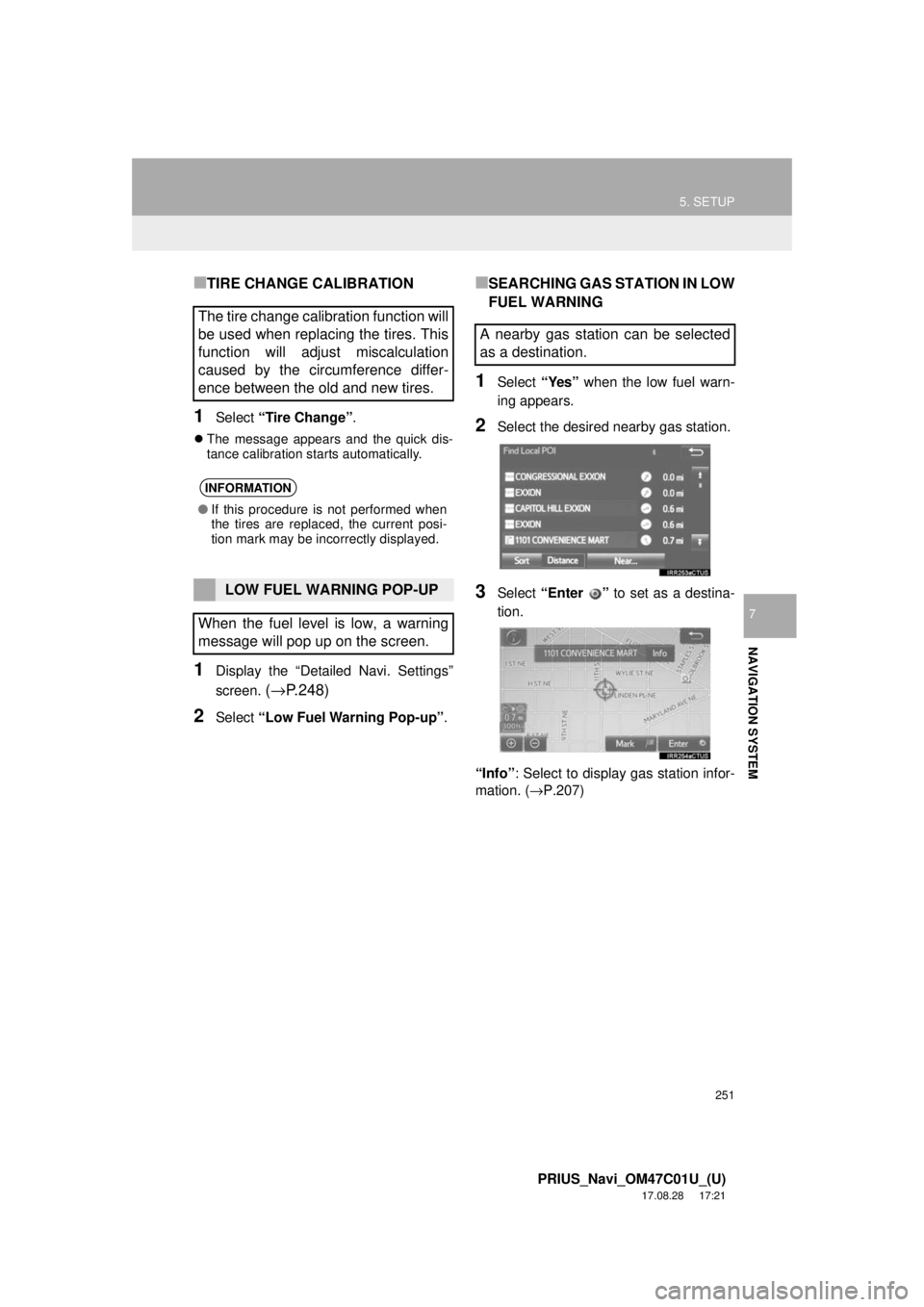
2Select the desired nearby gas station.
3Select “Enter ” to set as a destina-
tion.
“Info” : Select to display gas station infor-
mation. ( →P.207)
The tire change calibration function will
be used when replacing the tires. This
function will adjust miscalculation
caused by the circumference differ-
ence between the old and new tires.
INFORMATION
●If this procedure is not performed when
the tires are replaced, the current posi-
tion mark may be incorrectly displayed.
LOW FUEL WARNING POP-UP
When the fuel level is low, a warning
message will pop up on the screen.
A nearby gas station can be selected
as a destination.
Page 252 of 294
252
5. SETUP
PRIUS_Navi_OM47C01U_(U)
17.08.28 17:21
2. TRAFFIC SETTINGS
1Press the “APPS” button.
2Select “Setup” .
3Select “Traffic”.
4Select the items to be set.
5Select “OK”.
Traffic information such as traffic con-
gestion or traffic incident warnings can
be made available.
PS081IO
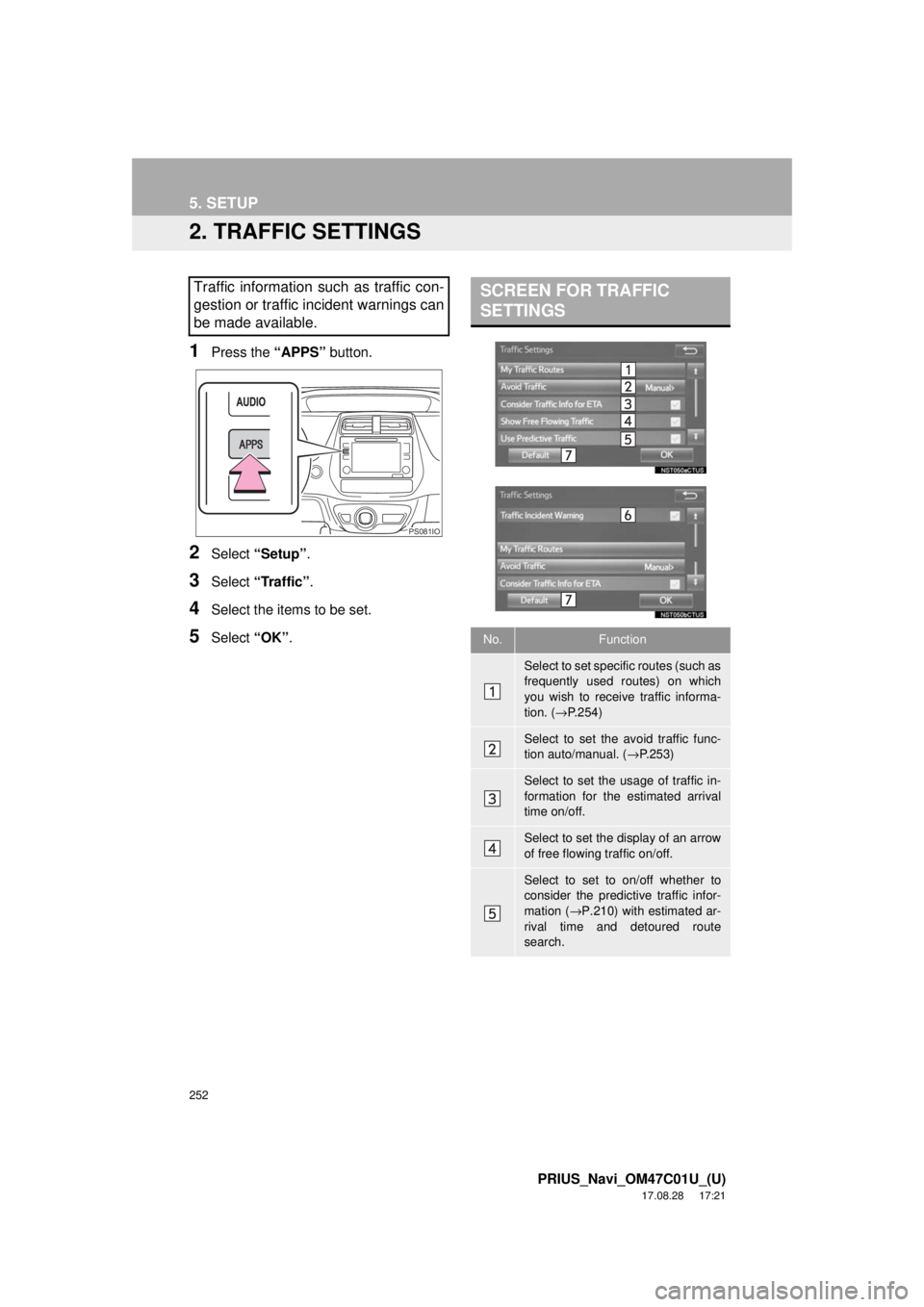
SCREEN FOR TRAFFIC
SETTINGS
No.Function
Select to set specific routes (such as
frequently used routes) on which
you wish to receive traffic informa-
tion. ( →P.254)
Select to set the avoid traffic func-
tion auto/manual. ( →P.253)
Select to set the usage of traffic in-
formation for the estimated arrival
time on/off.
Select to set the display of an arrow
of free flowing traffic on/off.
Select to set to on/off whether to
consider the predictive traffic infor-
mation ( →P.210) with estimated ar-
rival time and detoured route
search.
Page 253 of 294
253
5. SETUP
PRIUS_Navi_OM47C01U_(U)
17.08.28 17:21
NAVIGATION SYSTEM
7
1Display the “Traffic Settings” screen.
(→P.252)
2Select “Avoid Traffic” .
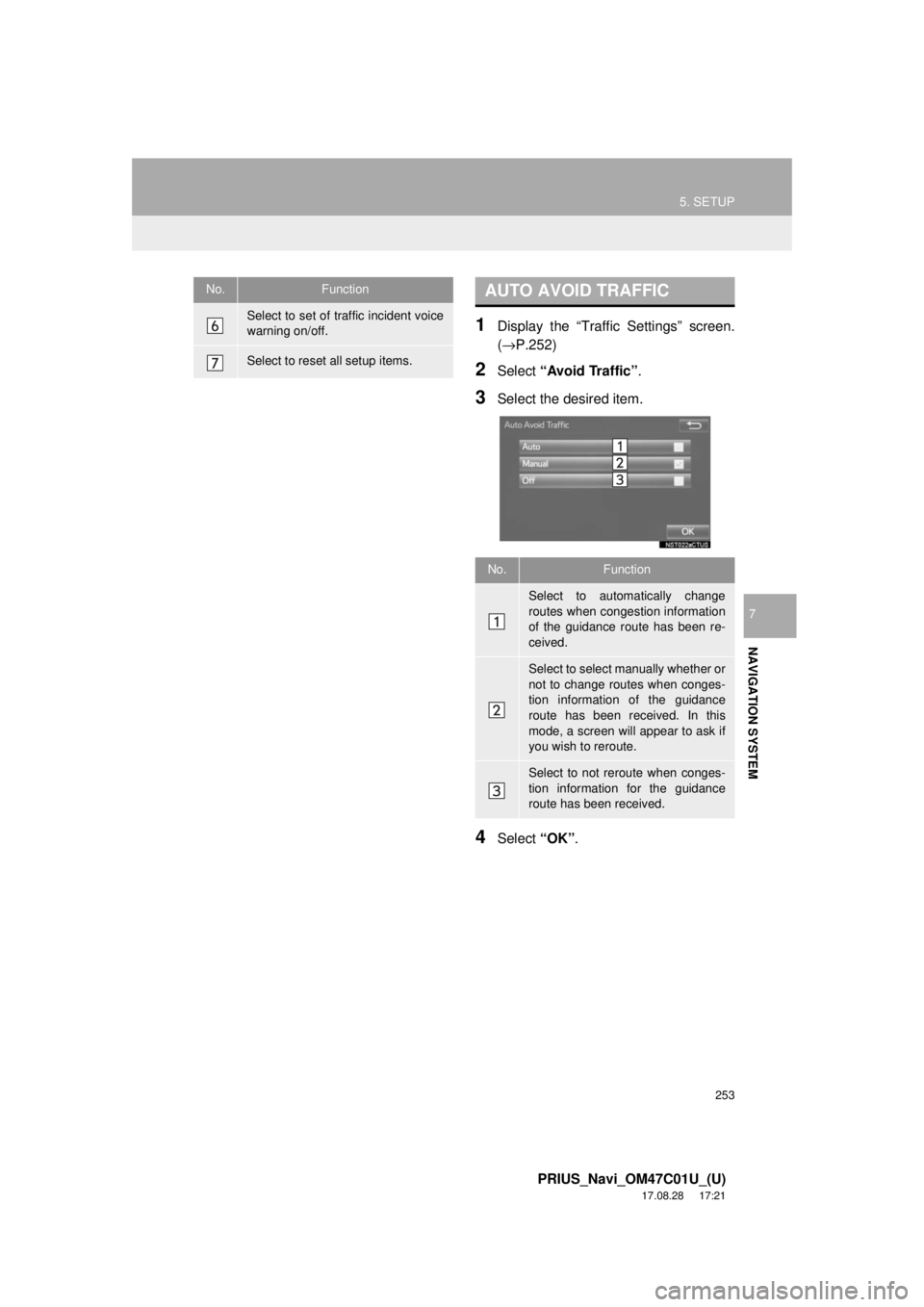
3Select the desired item.
4Select “OK”.
Select to set of traffic incident voice
warning on/off.
Select to reset all setup items.
No.FunctionAUTO AVOID TRAFFIC
No.Function
Select to automatically change
routes when congestion information
of the guidance route has been re-
ceived.
Select to select manually whether or
not to change routes when conges-
tion information of the guidance
route has been received. In this
mode, a screen will appear to ask if
you wish to reroute.
Select to not reroute when conges-
tion information for the guidance
route has been received.
Page 254 of 294
254
5. SETUP
PRIUS_Navi_OM47C01U_(U)
17.08.28 17:21
■CHANGING THE ROUTE MANUAL-
LY
1Select the desired item.
1Display the “Traffic Settings” screen.
(→P.252)
2Select “My Traffic Routes” .
3Select the desired item.
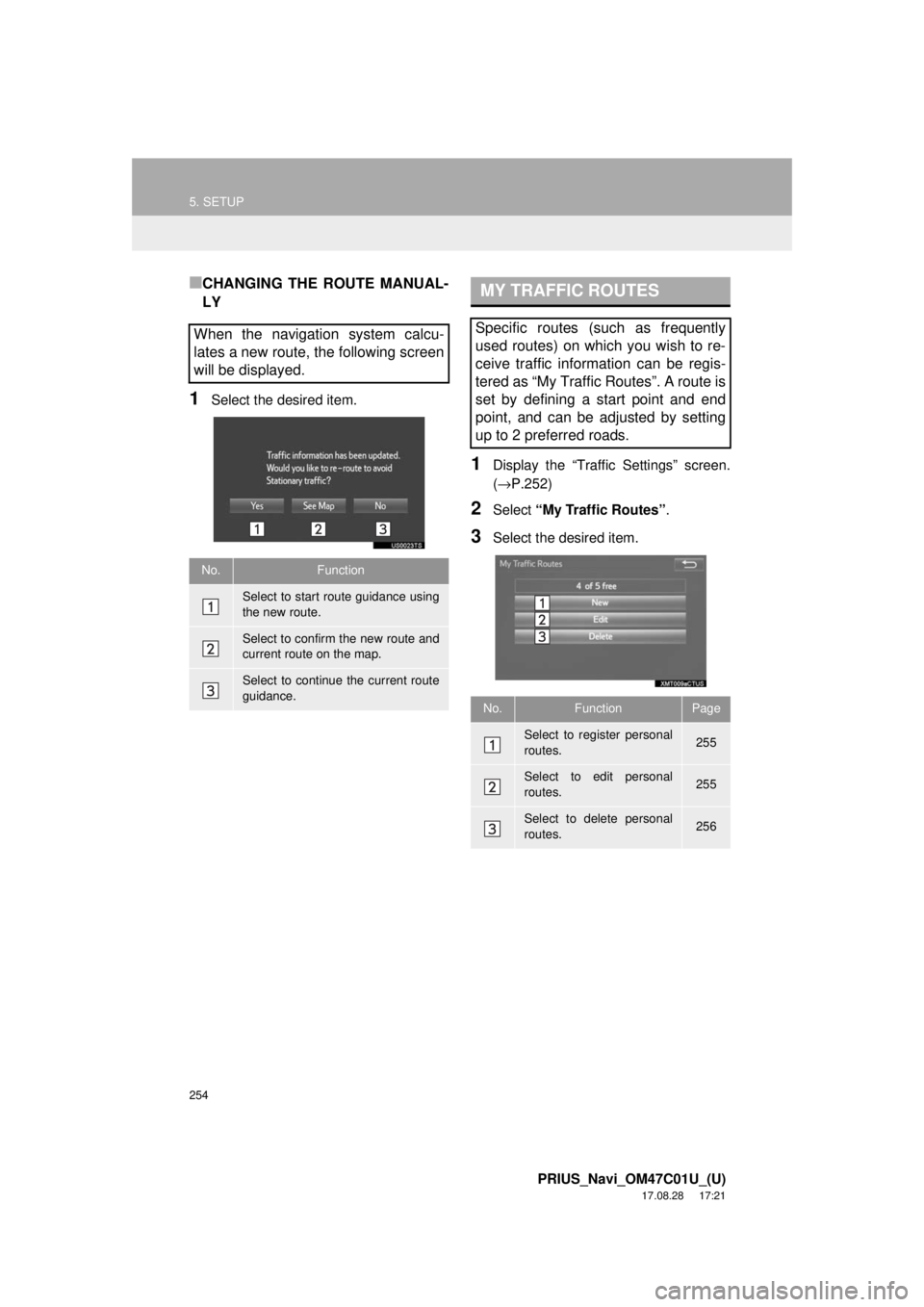
When the navigation system calcu-
lates a new route, the following screen
will be displayed.
No.Function
Select to start route guidance using
the new route.
Select to confirm the new route and
current route on the map.
Select to continue the current route
guidance.
MY TRAFFIC ROUTES
Specific routes (such as frequently
used routes) on which you wish to re-
ceive traffic information can be regis-
tered as “My Traffic Routes”. A route is
set by defining a start point and end
point, and can be adjusted by setting
up to 2 preferred roads.
No.FunctionPage
Select to register personal
routes.255
Select to edit personal
routes.255
Select to delete personal
routes.256
Page 255 of 294
255
5. SETUP
PRIUS_Navi_OM47C01U_(U)
17.08.28 17:21
NAVIGATION SYSTEM
7
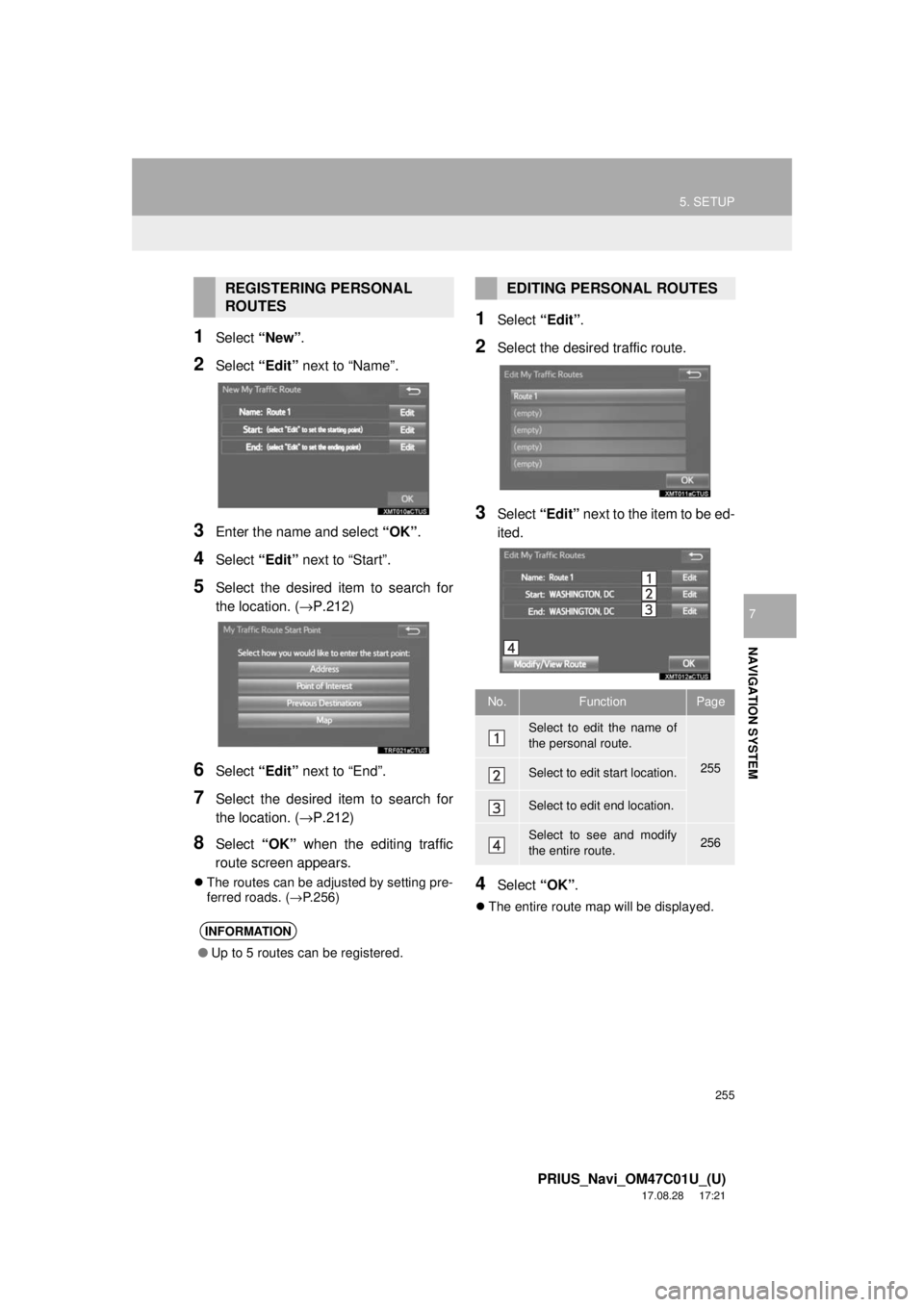
1Select “New”.
2Select “Edit” next to “Name”.
3Enter the name and select “OK”.
4Select “Edit” next to “Start”.
5Select the desired item to search for
the location. ( →P.212)
6Select “Edit” next to “End”.
7Select the desired item to search for
the location. ( →P.212)
8Select “OK” when the editing traffic
route screen appears.
The routes can be adjusted by setting pre-
ferred roads. ( →P.256)
1Select “Edit”.
2Select the desired traffic route.
3Select “Edit” next to the item to be ed-
ited.
4Select “OK”.
The entire route map will be displayed.
REGISTERING PERSONAL
ROUTES
INFORMATION
● Up to 5 routes can be registered.
EDITING PERSONAL ROUTES
No.FunctionPage
Select to edit the name of
the personal route.
255Select to edit start location.
Select to edit end location.
Select to see and modify
the entire route.256
Page 261 of 294

261
6. TIPS FOR THE NAVIGATION SYSTEM
PRIUS_Navi_OM47C01U_(U)
17.08.28 17:21
NAVIGATION SYSTEM
7
INFORMATION
●This navigation system uses tire turning
data and is designed to work with fac-
tory-specified tires for the vehicle.
Installing tires that are larger or smaller
than the originally equipped diameter
may cause inaccurate display of the cur-
rent position. The tire pressure also
affects the diameter of the tires, so make
sure that the tire pressure of all 4 tires is
correct.
Page 262 of 294
262
6. TIPS FOR THE NAVIGATION SYSTEM
PRIUS_Navi_OM47C01U_(U)
17.08.28 17:21
2. MAP DATABASE VERSION AND COVERED AREA
1Press the “APPS” button.
2Select “Navigation” .
3Select “Options”.
4Select “Map Data” .
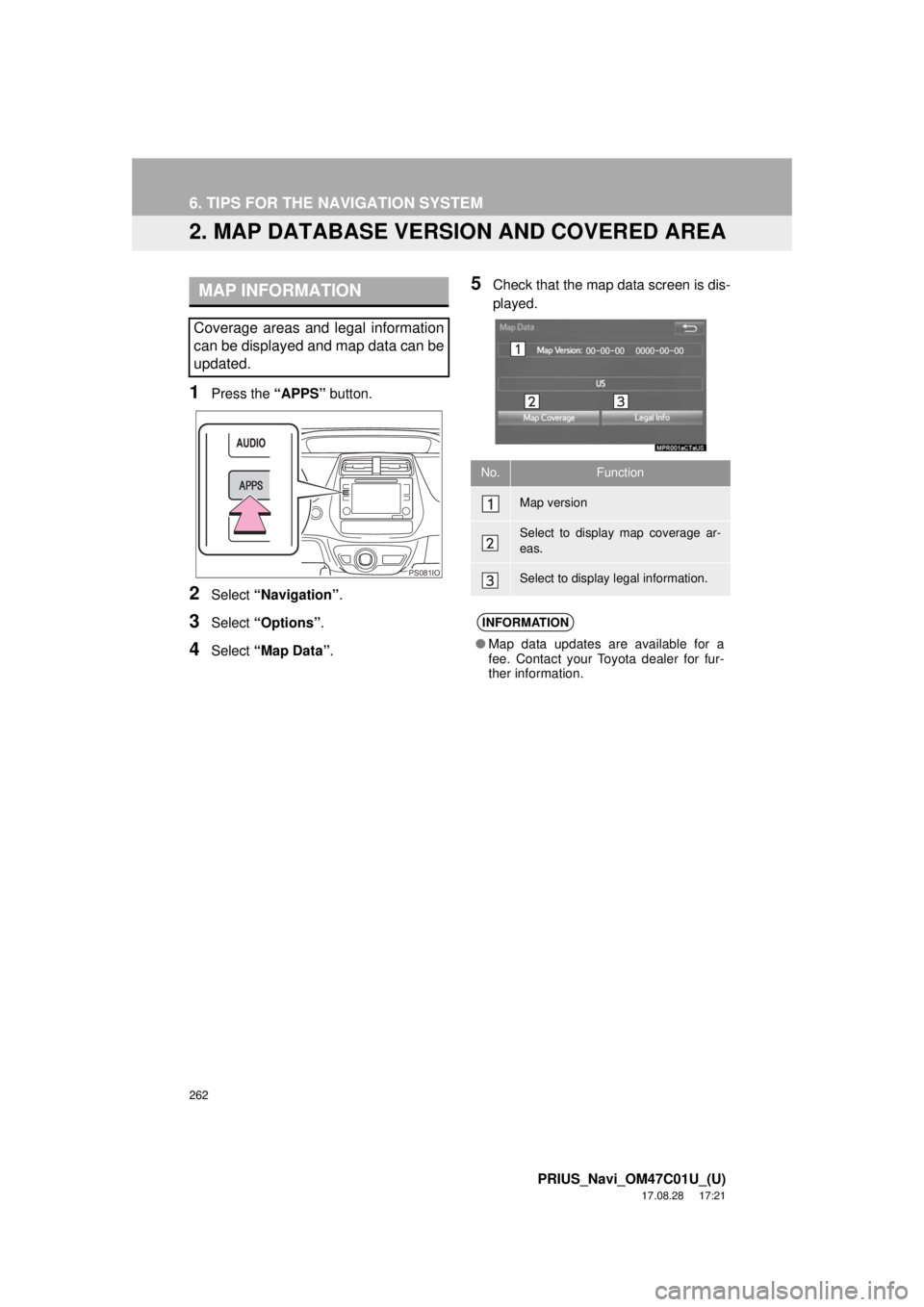
5Check that the map data screen is dis-
played.MAP INFORMATION
Coverage areas and legal information
can be displayed and map data can be
updated.
PS081IO
No.Function
Map version
Select to display map coverage ar-
eas.
Select to display legal information.
INFORMATION
●Map data updates are available for a
fee. Contact your Toyota dealer for fur-
ther information.
Page 267 of 294
267
1. Entune App Suite OVERVIEW
PRIUS_Navi_OM47C01U_(U)
17.08.28 17:21
Entune App Suite
8
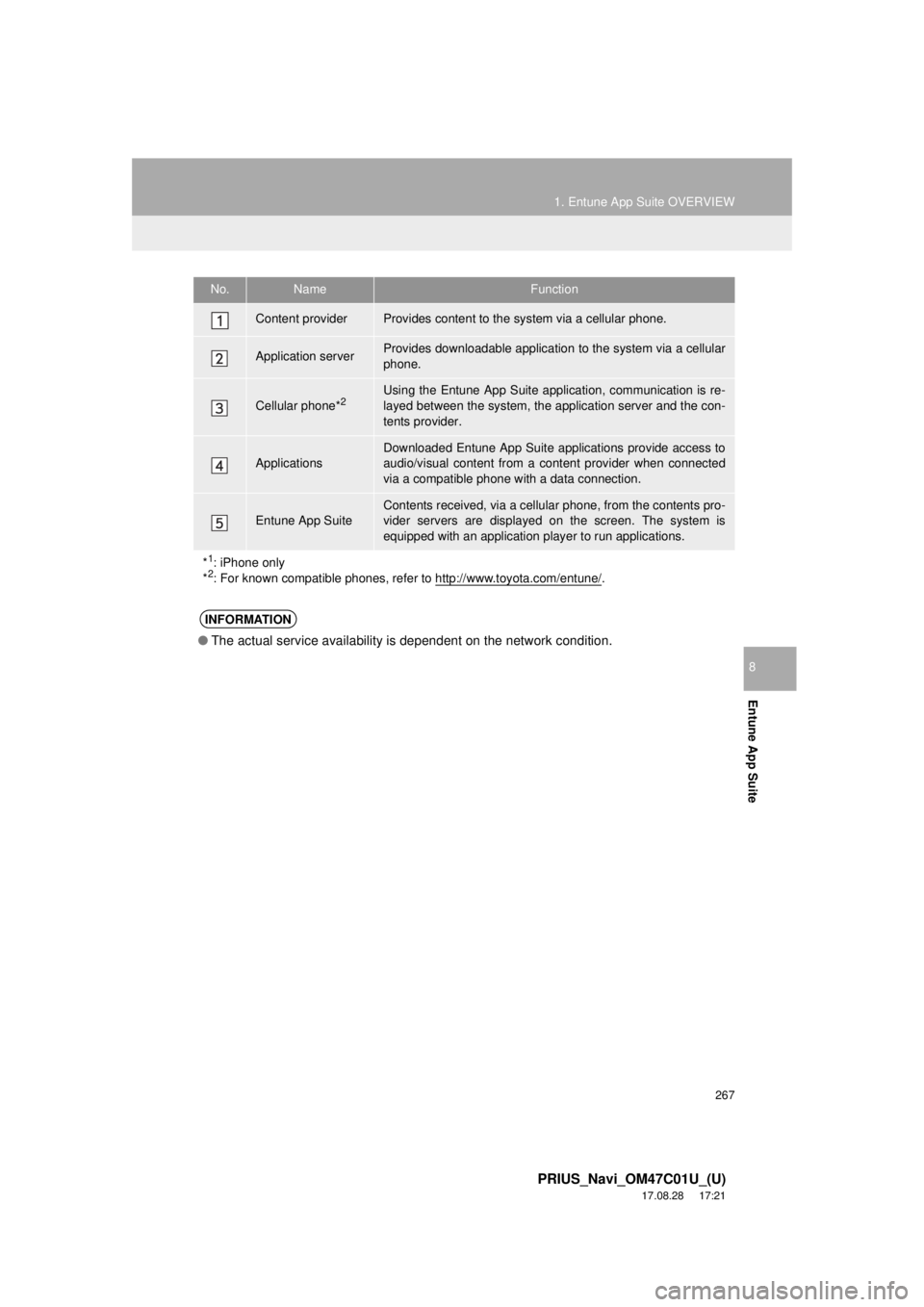
No.NameFunction
Content providerProvides content to the system via a cellular phone.
Application serverProvides downloadable application to the system via a cellular
phone.
Cellular phone*2Using the Entune App Suite application, communication is re-
layed between the system, the application server and the con-
tents provider.
Applications
Downloaded Entune App Suite applications provide access to
audio/visual content from a c ontent provider when connected
via a compatible phone with a data connection.
Entune App SuiteContents received, via a cellular phone, from the contents pro-
vider servers are displayed on the screen. The system is
equipped with an application play er to run applications.
*
1: iPhone only
*2: For known compatible phones, refer to http://www.toyota.com/entune/.
INFORMATION
● The actual service availability is dependent on the network condition.