AUX TOYOTA PRIUS 2018 Accessories, Audio & Navigation (in English)
[x] Cancel search | Manufacturer: TOYOTA, Model Year: 2018, Model line: PRIUS, Model: TOYOTA PRIUS 2018Pages: 292, PDF Size: 5.8 MB
Page 9 of 292
9
PRIUS_Wide Navi_OM47C03U_(U)
17.08.29 10:27
1
2
3
4
5
6
7
8
1. BASIC OPERATION ........................ 78
QUICK REFERENCE ............................ 78
SOME BASICS ...................................... 79
2. RADIO OPERATION ....................... 85
AM/FM RADIO....................................... 85
XM Satellite Radio ................................. 94
INTERNET RADIO .............................. 101
3. MEDIA OPERATION ..................... 102
USB MEMORY .................................... 102
iPod ..................................................... 106
Bluetooth
® AUDIO ............................... 110
AUX ..................................................... 115
4. AUDIO REMOTE CONTROLS ...... 116
STEERING SWITCHES ...................... 116
5. SETUP ........................................... 118
AUDIO SETTINGS .............................. 118
6. TIPS FOR OPERATING THE AUDIO SYSTEM ........ .................. 120
OPERATING INFORMATION ............. 120
1. VOICE COMMAND SYSTEM
OPERATION ................................ 128
VOICE COMMAND SYSTEM .............. 128
CASUAL SPEECH
RECOGNIZATION ............................ 135
COMMAND LIST ................................. 136
2. MOBILE ASSISTANT OPERATION ................................ 140
MOBILE ASSISTANT .......................... 140
1. USEFUL INFORMATION .............. 144
RECEIVING WEATHER
INFORMATION ................................. 144
DATA SERVICES SETTINGS ............. 146
1. PHONE OPERATION (HANDS-FREE SYSTEM
FOR CELLULAR PHONES)........ 148
QUICK REFERENCE .......................... 148
SOME BASICS .................................... 149
CALLING ON THE Bluetooth
®
PHONE .............................................. 154
RECEIVING ON THE Bluetooth
®
PHONE .............................................. 159
TALKING ON THE Bluetooth
®
PHONE .............................................. 160
Bluetooth
® PHONE MESSAGE
FUNCTION ........................................ 163
2. SETUP........................................... 168
PHONE SETTINGS ............................. 168
3. WHAT TO DO IF... ........................ 179
TROUBLESHOOTING ......................... 179
3AUDIO SYSTEM
4VOICE COMMAND SYSTEM
5INFORMATION
6PHONE
Page 76 of 292
76
PRIUS_Wide Navi_OM47C03U_(U)
17.08.29 10:33
1. QUICK REFERENCE ..................... 78
2. SOME BASICS............................... 79
TURNING THE SYSTEM ON AND OFF ..................................................... 79
SELECTING AN AUDIO SOURCE ........ 80
USB/AUX PORT .................................... 81
“Sound Settings” SCREEN .................... 81
AUDIO SCREEN ADJUSTMENT .......... 83
VOICE COMMAND SYSTEM ................ 84
1. AM/FM RADIO ............................... 85
OVERVIEW ............................................ 85
PRESET BUTTON SCREEN ................. 87
SELECTING A STATION FROM THE LIST ............................................. 88
CACHING A RADIO PROGRAM ........... 88
RADIO BROADCAST DATA SYSTEM .............................................. 90
USING HD Radio™ TECHNOLOGY...... 91
AVAILABLE HD Radio™ TECHNOLOGY.................................... 91
TROUBLESHOOTING GUIDE ............... 93
2. XM Satellite Radio ........................ 94
OVERVIEW ............................................ 94
HOW TO SUBSCRIBE TO AN XM Satellite Radio ............................... 96
DISPLAYING THE RADIO ID................. 98
SELECTING A CHANNEL FROM THE LIST ............................................. 98
IF THE SATELLITE RADIO TUNER MALFUNCTIONS ................................ 99
3. INTERNET RADIO....................... 101
LISTENING TO INTERNET RADIO ..... 101
1BASIC OPERATION2RADIO OPERATION
3
AUDIO SYSTEM
Page 77 of 292
3
77
PRIUS_Wide Navi_OM47C03U_(U)
17.08.29 10:33
1
2
3
4
5
6
7
8
1. USB MEMORY ............................. 102
OVERVIEW ......................................... 102
USB AUDIO ......................................... 105
USB VIDEO ......................................... 105
2. iPod .............................................. 106
OVERVIEW ......................................... 106
iPod AUDIO ......................................... 109
3. Bluetooth® AUDIO ...................... 110
OVERVIEW ......................................... 110
CONNECTING A Bluetooth®
DEVICE ............................................. 114
LISTENING TO Bluetooth
® AUDIO ..... 114
4. AUX .............................................. 115
OVERVIEW ......................................... 115
1. STEERING SWITCHES............... 116
1. AUDIO SETTINGS ...................... 118
AUDIO SETTINGS SCREEN............... 118
1. OPERATING INFORMATION ..... 120
RADIO.................................................. 120
iPod ...................................................... 121
FILE INFORMATION ........................... 122
TERMS ................................................ 124
ERROR MESSAGES ........................... 126
3MEDIA OPERATION4AUDIO REMOTE CONTROLS
5SETUP
6TIPS FOR OPERATING THE
AUDIO SYSTEM
AUDIO SYSTEM
Page 78 of 292
78
PRIUS_Wide Navi_OM47C03U_(U)
17.08.29 10:11
1. BASIC OPERATION
1. QUICK REFERENCE
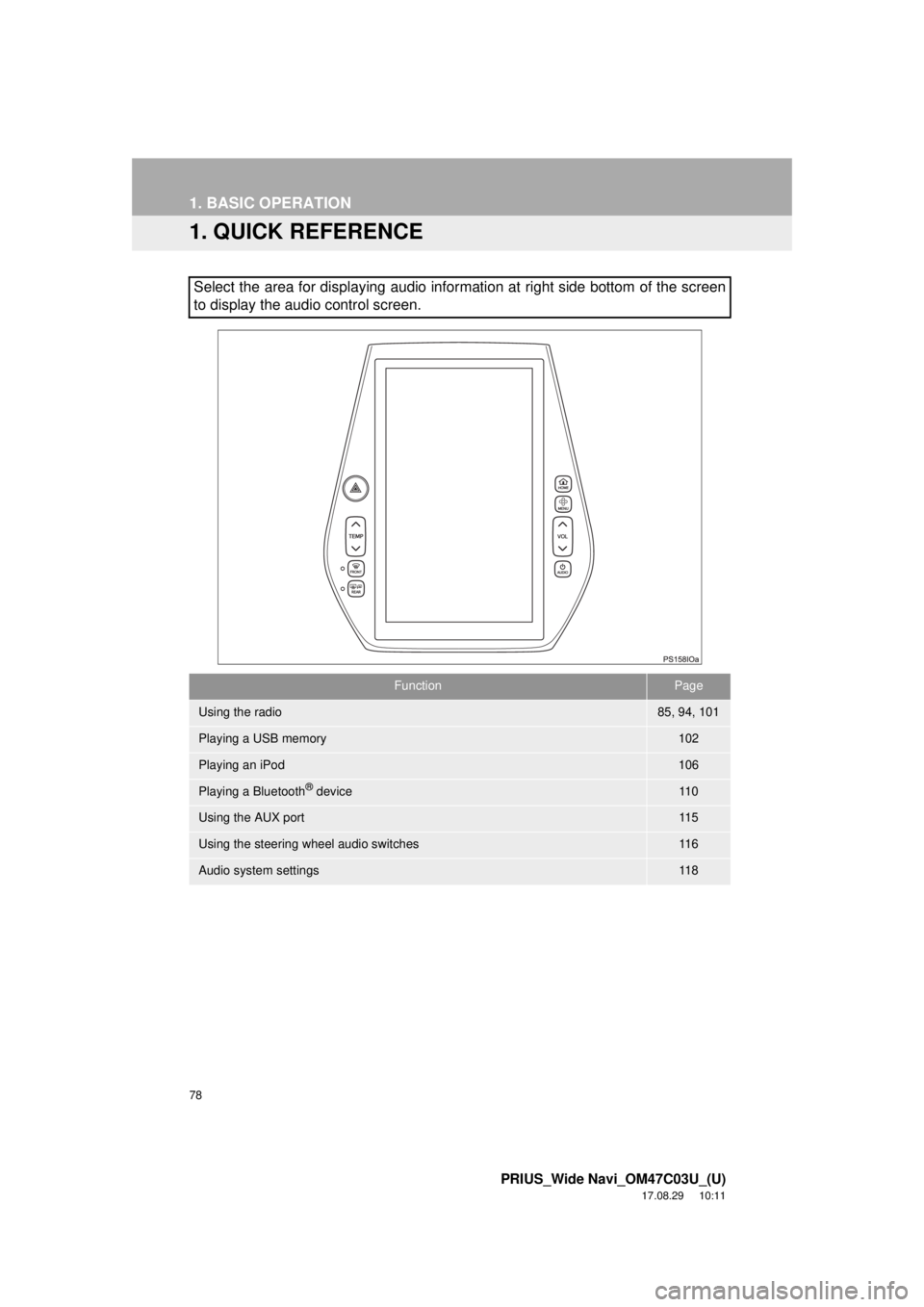
Select the area for displaying audio information at right side bottom of the screen
to display the audio control screen.
FunctionPage
Using the radio85, 94, 101
Playing a USB memory102
Playing an iPod106
Playing a Bluetooth® device11 0
Using the AUX port11 5
Using the steering wheel audio switches11 6
Audio system settings11 8
Page 81 of 292
81
1. BASIC OPERATION
PRIUS_Wide Navi_OM47C03U_(U)
17.08.29 10:11
AUDIO SYSTEM
3
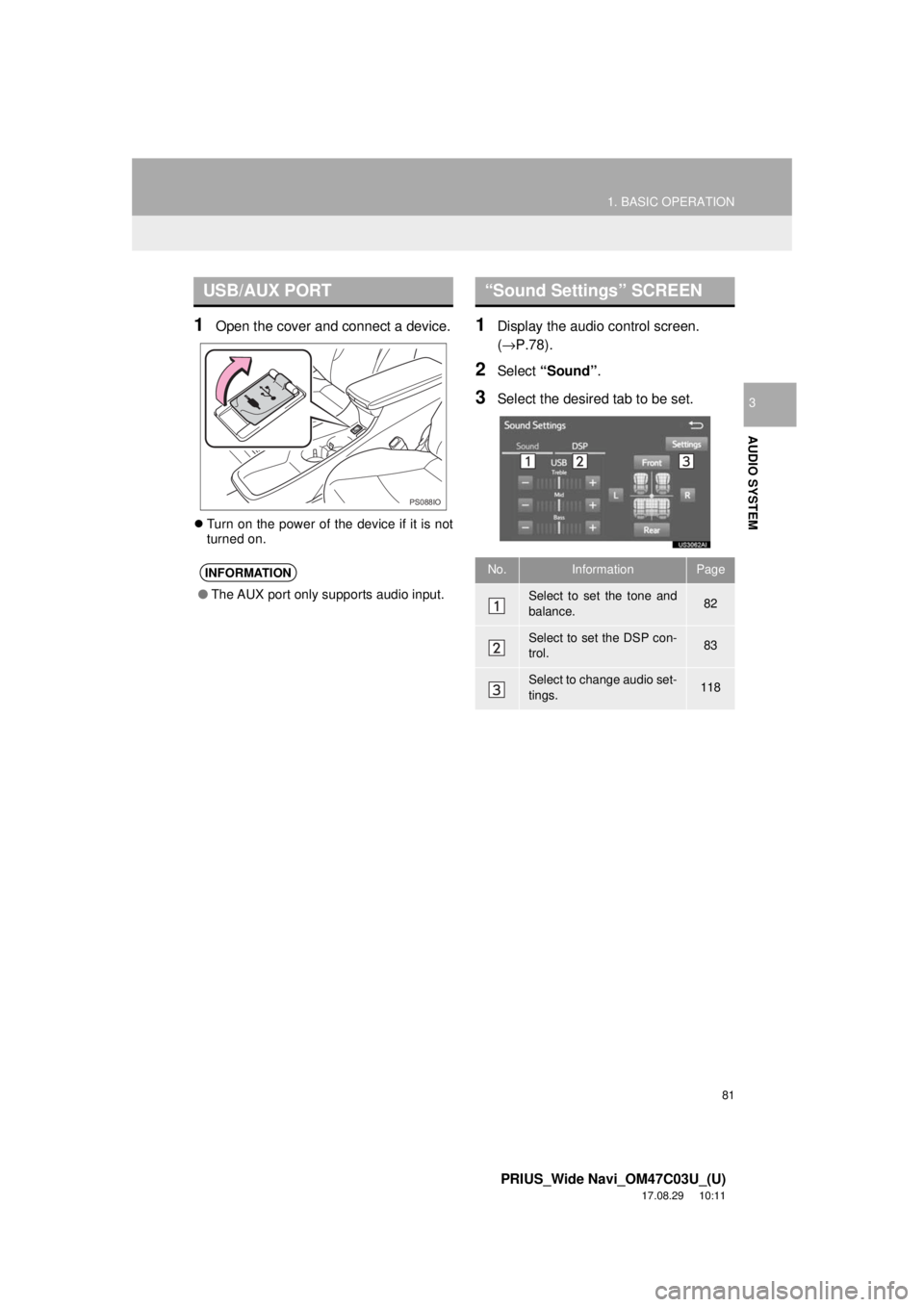
1Open the cover and connect a device.
Turn on the power of the device if it is not
turned on.
1Display the audio control screen.
(→P.78).
2Select “Sound” .
3Select the desired tab to be set.
USB/AUX PORT
INFORMATION
●The AUX port only supports audio input.
PS088IO
“Sound Settings” SCREEN
No.InformationPage
Select to set the tone and
balance.82
Select to set the DSP con-
trol.83
Select to change audio set-
tings.118
Page 115 of 292
115
3. MEDIA OPERATION
PRIUS_Wide Navi_OM47C03U_(U)
17.08.29 10:11
AUDIO SYSTEM
3
4. AUX
OVERVIEW
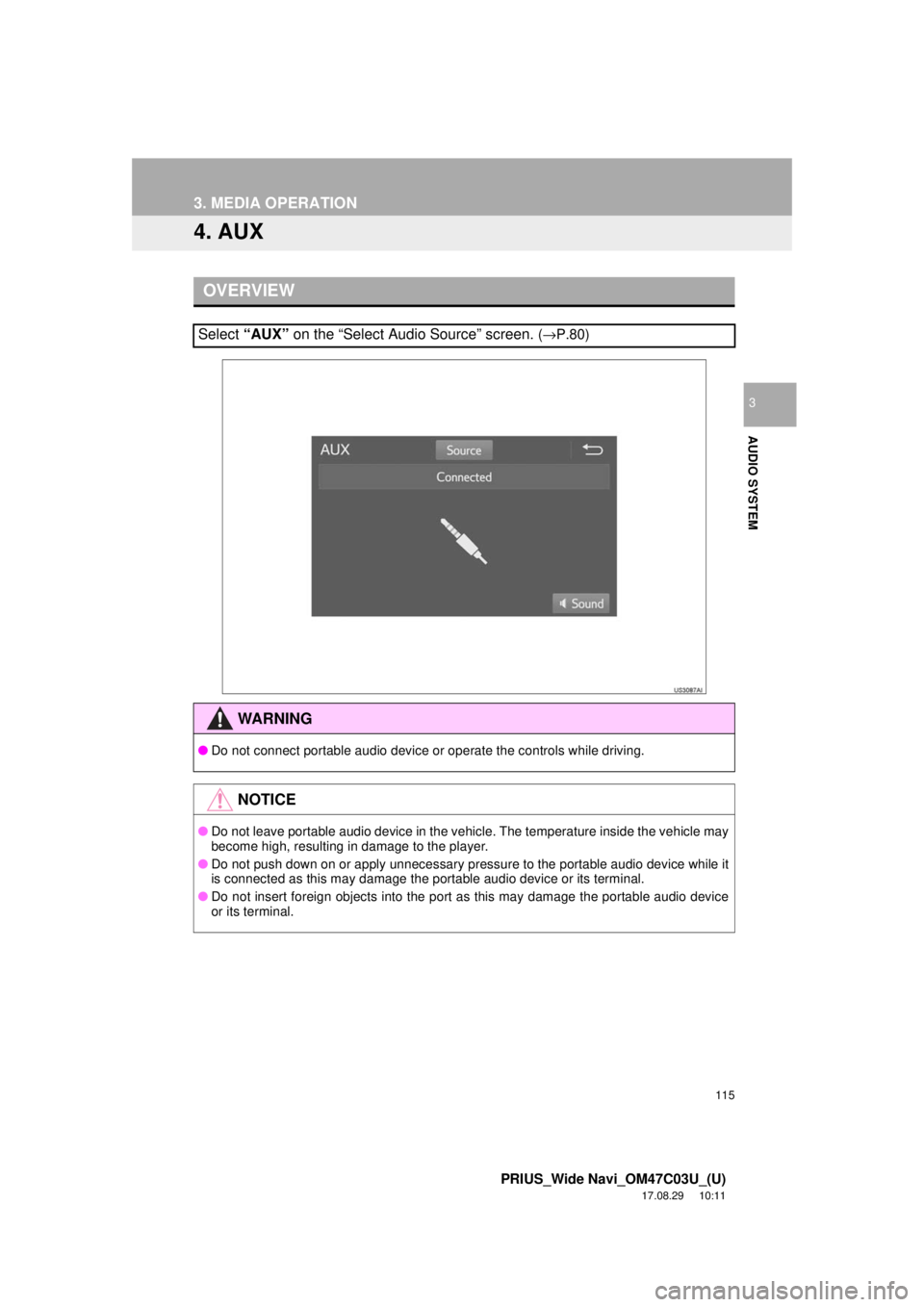
Select “AUX” on the “Select Audio Source” screen. (→P.80)
WA R N I N G
● Do not connect portable audio device or operate the controls while driving.
NOTICE
●Do not leave portable audio device in the vehicle. The temperature inside the vehicle may
become high, resulting in damage to the player.
● Do not push down on or apply unnecessary pressure to the portable audio device while it
is connected as this may damage the portable audio device or its terminal.
● Do not insert foreign objects into the port as this may damage the portable audio device
or its terminal.
Page 116 of 292
116
PRIUS_Wide Navi_OM47C03U_(U)
17.08.29 10:11
4. AUDIO REMOTE CONTROLS
1. STEERING SWITCHES
“MODE” switch
Volume cont rol switch
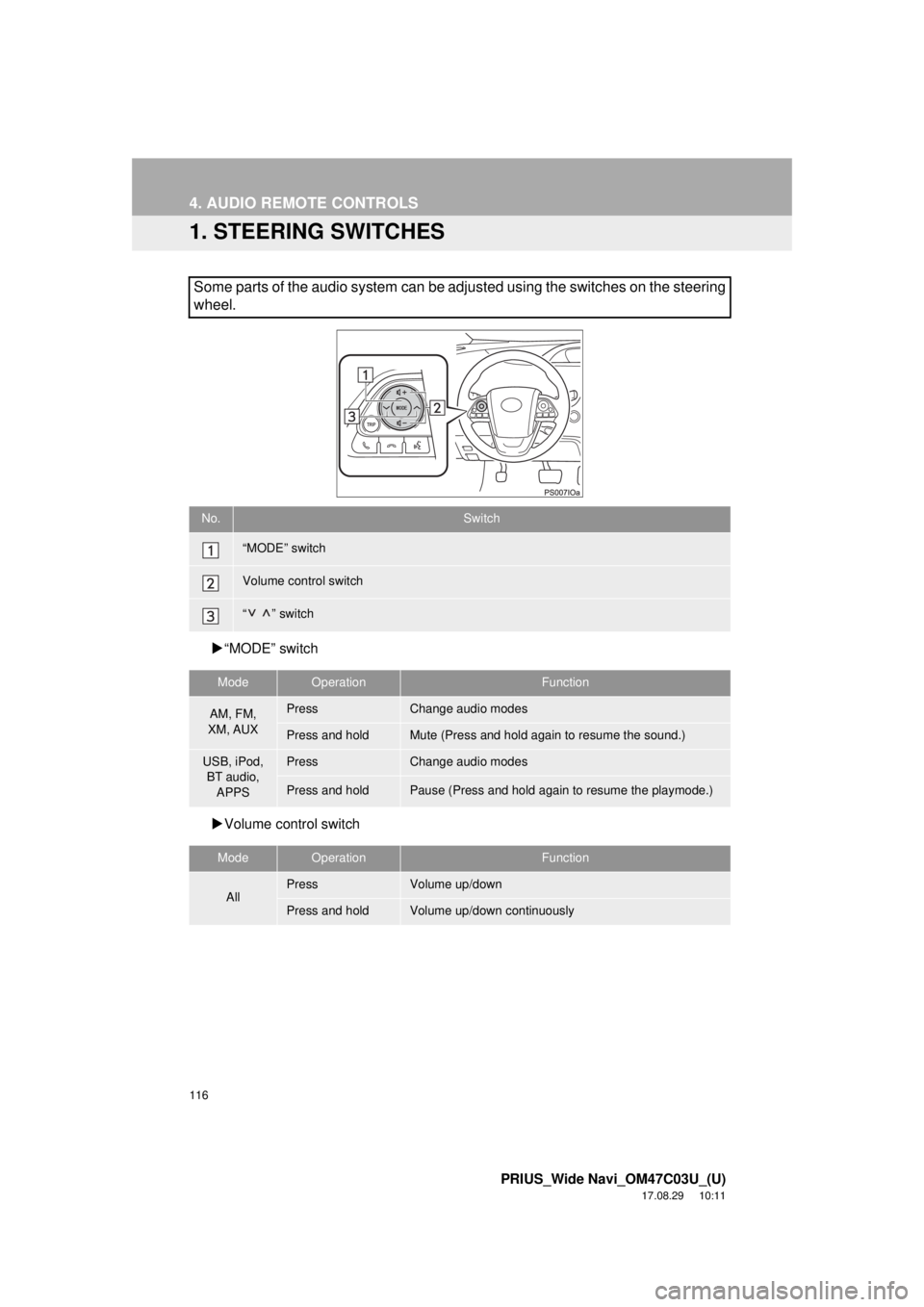
Some parts of the audio system can be adjusted using the switches on the steering
wheel.
No.Switch
“MODE” switch
Volume control switch
“” switch
ModeOperationFunction
AM, FM,
XM, AUXPressChange audio modes
Press and holdMute (Press and hold again to resume the sound.)
USB, iPod, BT audio,
APPSPressChange audio modes
Press and holdPause (Press and hold again to resume the playmode.)
ModeOperationFunction
AllPressVolume up/down
Press and holdVolume up/down continuously
Page 276 of 292

276
ALPHABETICAL INDEX
PRIUS_Wide Navi_OM47C03U_(U)
17.08.29 15:17
A
AM/FM radio ............................................. 85Available HD Radio™ Technology ........ 91
Caching a radio program ....................... 88
Overview ............................................... 85
Preset button screen ............................. 87
Radio broadcast data system ................ 90
Selecting a station from the list ............. 88
Troubleshooting guide ........................... 93
Using HD Radio™ Technology ............. 91
Audio remote controls ............................. 116
Audio settings ......................................... 118 Audio settings screen .......................... 118
Audio system ....... ..................................... 77
AUX......................................................... 115 Overview ............................................. 115
B
Basic function...................................... 12, 35
Basic information before operation ........... 36
Basic operation ................................. 78, 188
Bluetooth
® audio ..................................... 110
Connecting a Bluetooth® device ......... 114
Listening to Bluetooth® audio .............. 114
Overview ............................................. 110
Bluetooth
® phone message function ...... 163
Calling the message sender ................ 167
Checking messages ............................ 165
Message inbox screen ........................ 163
Receiving a message .......................... 164
Replying to a message (Quick reply) .................................... 166
Bluetooth
® settings ................................... 51
C
Calling on the Bluetooth® phone .............154
By call history ......................................155
By contacts list.....................................156
By dial pad ...........................................158
By favorites list ....................................155
By off hook switch................................158
Capacitive touch switches .........................38
Casual speech recognization ..................135
Command list ..........................................136
Controls overview......................................12
D
Data services settings .............................146 Setting download methods ..................146
Destination search ..................................207
Destination search screen.......................207
Detailed navigation settings ....................245 Screens for navigation settings ...........245
E
Editing route ............................................230Adding destinations .............................231
Deleting destinations ...........................231
Detour setting ......................................233
Reordering destinations.......................231
Selecting route type .............................232
Setting route preferences ....................232
Starting from adjacent road .................234
Entering letters and numbers/list screen operation ....................................44
Entering letters and numbers ................44
List screen .............................................45
ALPHABETICAL INDEX
Page 279 of 292

279
PRIUS_Wide Navi_OM47C03U_(U)
17.08.29 15:17
S
Screen adjustment .................................... 48
Search operation .................................... 209Searching by address ......................... 211
Searching by address book................. 215
Searching by coordinates.................... 218
Searching by emergency .................... 216
Searching by intersection and freeway ............................................ 216
Searching by map ............................... 218
Searching by point of interest.............. 212
Searching from previous destinations ..................................... 215
Selecting search area ......................... 210
Setting home as destination ................ 210
Setting preset destinations as destination ....................................... 210
Setting Bluetooth
® details ......................... 57
“Bluetooth* Setup” screen ..................... 57
Connecting a Bluetooth
® device ........... 60
Deleting a Bluetooth® device ................ 59
Editing the Bluetooth® device
information ......................................... 62
Registering a Bluetooth
® device ........... 58
“System Settings” screen ...................... 63
Setting home as the destination ............... 31
Setup .............................. 118, 168, 245, 274
“Setup” screen .......................................... 22 Some basics ..................................... 79, 149
About the contacts in the contact list ........................................ 152
Audio screen adjustment ....................... 83
Registering/connecting a Bluetooth
® phone ............................ 150
Selecting an audio source ..................... 80
“Sound Settings” screen ........................ 81
Turning the system on and off ............... 79
USB/AUX port ....................................... 81
Using the phone switch/ microphone ...................................... 150
Voice command system .... ............ 84, 151
When selling or disposing of the vehicle.............................................. 153
Starting route guidance ........................... 219 Pausing guidance ................................ 222
Starting route guidance ....................... 219
Steering switches .................................... 116
*: Bluetooth is a registered trademark of Bluetooth SIG, Inc.