ABS TOYOTA PRIUS 2018 (in English) User Guide
[x] Cancel search | Manufacturer: TOYOTA, Model Year: 2018, Model line: PRIUS, Model: TOYOTA PRIUS 2018Pages: 820, PDF Size: 15.63 MB
Page 414 of 820

414
PRIUS_OM_OM47B89U_(U)
4-5. Using the driving support systems
WARNING
■When the TRAC/VSC syst ems are turned off
Be especially careful and drive at a speed appropriate to the road condi-
tions. As these are systems to help ensure vehicle stability and driving
force, do not turn the TRAC/VSC systems off unless necessary.
■ Replacing tires
Make sure that all tires are of the specified size and of the same brand,
tread pattern and total load capacity. In addition, make sure that the tires are
inflated to the recommended tire inflation pressure level.
The ABS, VSC and TRAC and other driving assist systems will not function
correctly if different tires are installed on the vehicle.
Contact your Toyota dealer for further information when replacing tires or
wheels.
■ Handling of tires and the suspension
Using tires with any kind of problem or modifying the suspension will affect
the driving assist systems, and may cause a system to malfunction.
Page 474 of 820
474
PRIUS_OM_OM47B89U_(U)
5-9. Bluetooth® phone
Using a Bluetooth® Phone
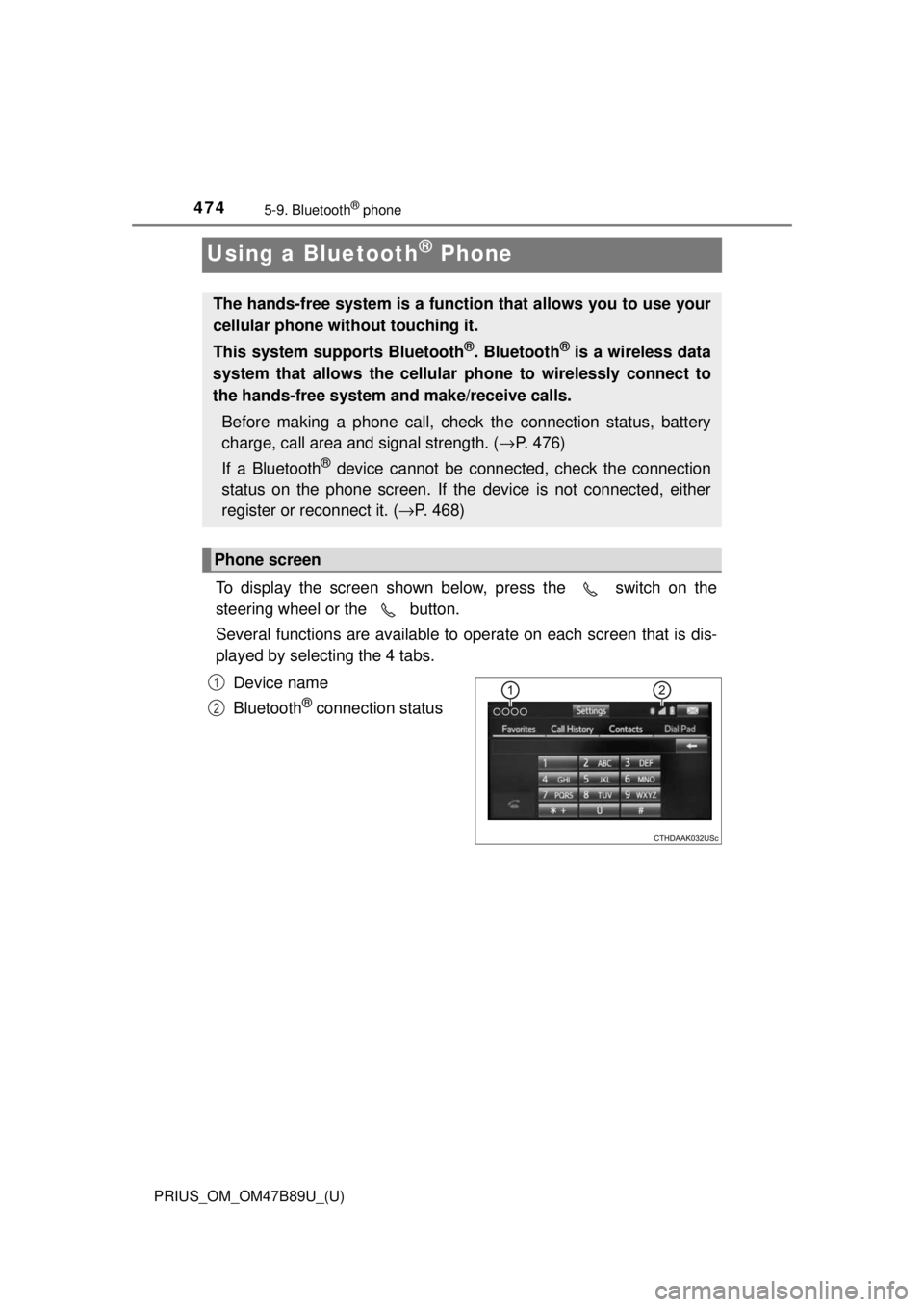
To display the screen shown below, press the switch on the
steering wheel or the button.
Several functions are available to operate on each screen that is dis-
played by selecting the 4 tabs.
Device name
Bluetooth
® connection status
The hands-free system is a function that allows you to use your
cellular phone without touching it.
This system supports Bluetooth
®. Bluetooth® is a wireless data
system that allows the cellular phone to wirelessly connect to
the hands-free system and make/receive calls.
Before making a phone call, check the connection status, battery
charge, call area and signal strength. ( →P. 476)
If a Bluetooth
® device cannot be connected, check the connection
status on the phone screen. If th e device is not connected, either
register or reconnect it. ( →P. 468)
Phone screen
1
2
Page 615 of 820
PRIUS_OM_OM47B89U_(U)
6157-3. Do-it-yourself maintenance
7
Maintenance and care
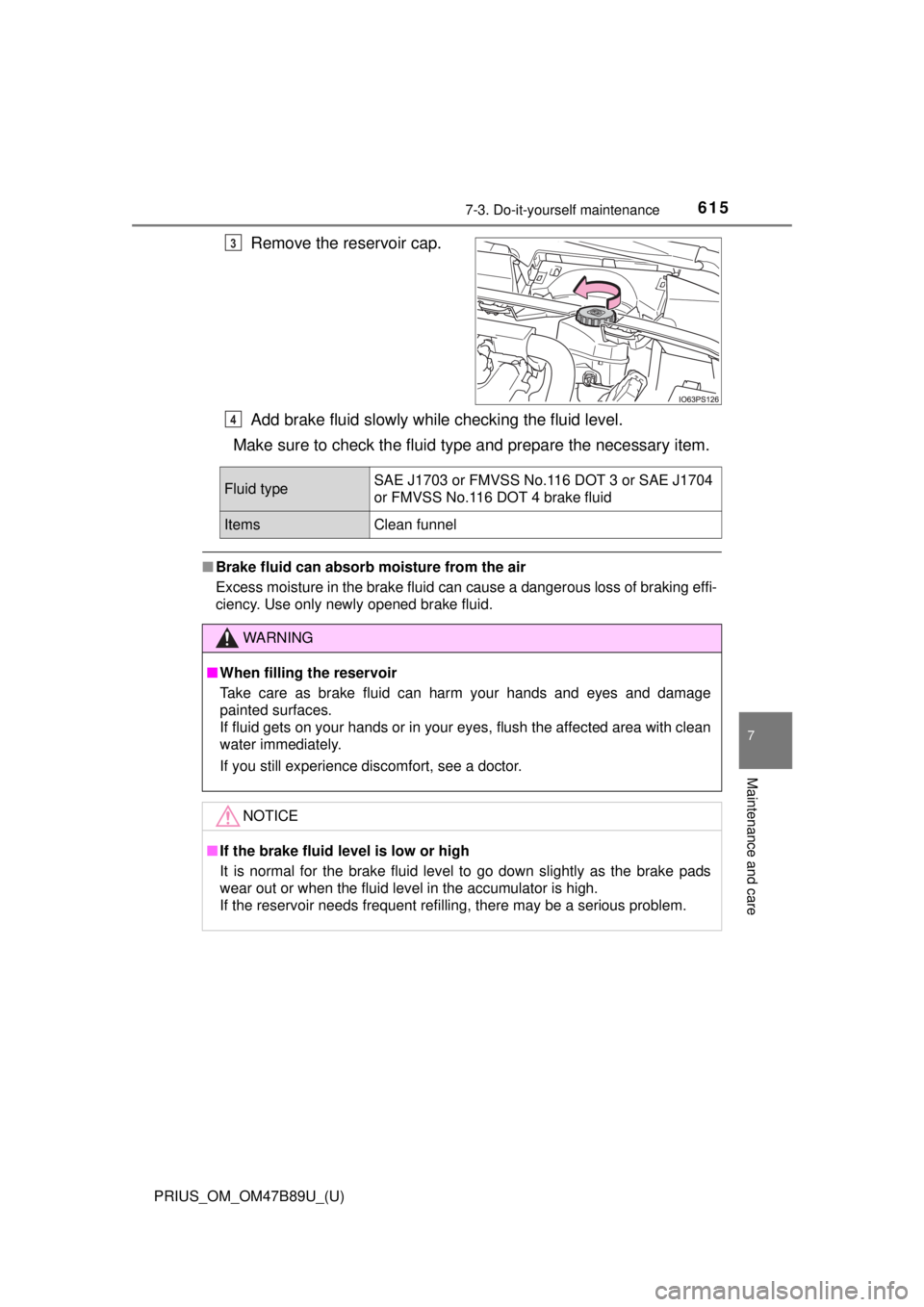
Remove the reservoir cap.
Add brake fluid slowly while checking the fluid level.
Make sure to check the fluid ty pe and prepare the necessary item.
■Brake fluid can absorb moisture from the air
Excess moisture in the brake fluid can cause a dangerous loss of braking effi-
ciency. Use only newly opened brake fluid.
3
4
Fluid type SAE J1703 or FMVSS No.116 DOT 3 or SAE J1704
or FMVSS No.116 DOT 4 brake fluid
ItemsClean funnel
WARNING
■
When filling the reservoir
Take care as brake fluid can harm your hands and eyes and damage
painted surfaces.
If fluid gets on your hands or in your eyes, flush the affected area with clean
water immediately.
If you still experience discomfort, see a doctor.
NOTICE
■If the brake fluid level is low or high
It is normal for the brake fluid level to go down slightly as the brake pads
wear out or when the fluid level in the accumulator is high.
If the reservoir needs frequent refilling, there may be a serious problem.
Page 674 of 820
6748-2. Steps to take in an emergency
PRIUS_OM_OM47B89U_(U)
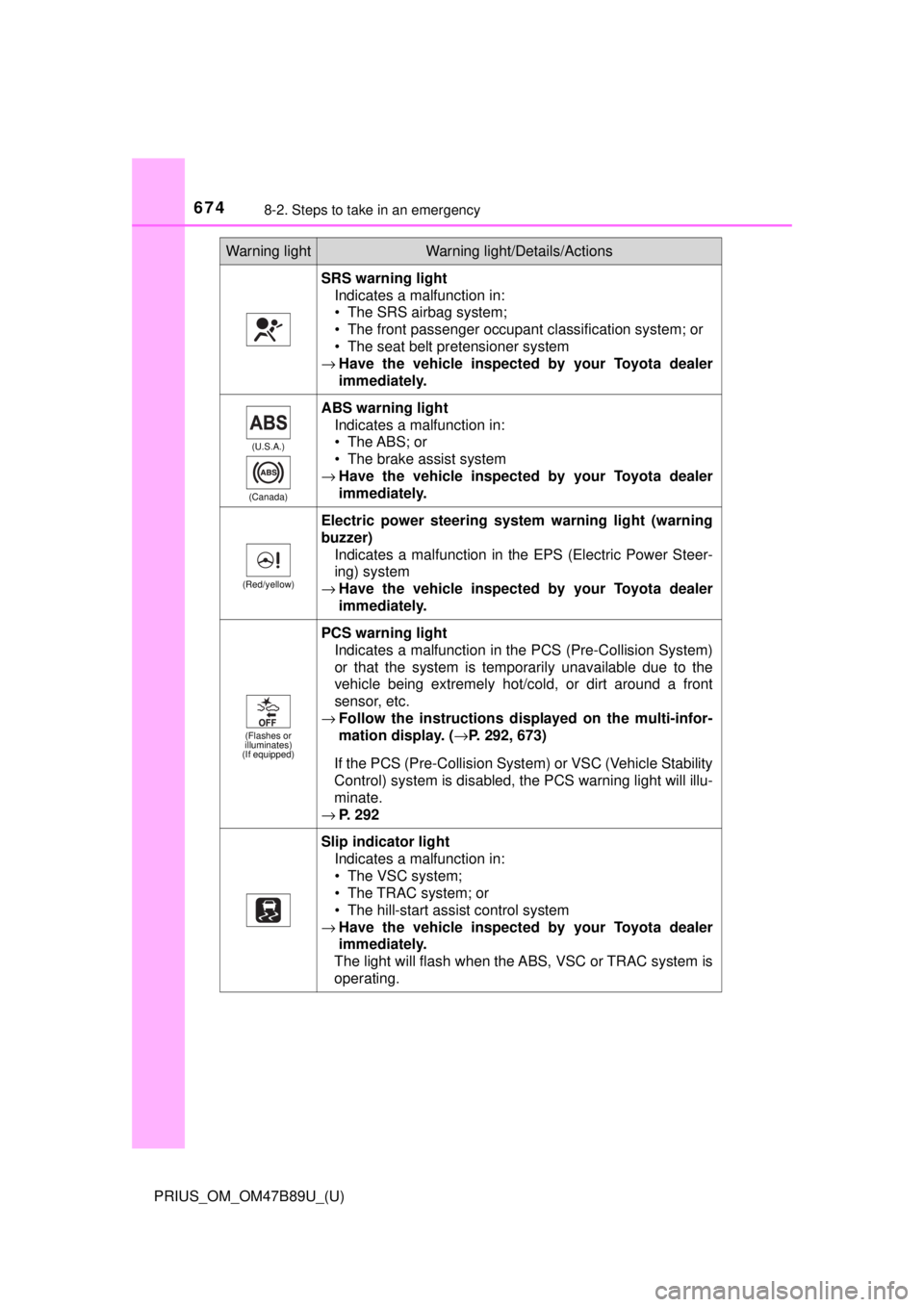
SRS warning lightIndicates a malfunction in:
• The SRS airbag system;
• The front passenger occupant classification system; or
• The seat belt pretensioner system
→ Have the vehicle inspected by your Toyota dealer
immediately.
(U.S.A.)
(Canada)
ABS warning light Indicates a malfunction in:
• The ABS; or
• The brake assist system
→ Have the vehicle inspected by your Toyota dealer
immediately.
(Red/yellow)
Electric power steering system warning light (warning
buzzer)
Indicates a malfunction in the EPS (Electric Power Steer-
ing) system
→ Have the vehicle inspected by your Toyota dealer
immediately.
(Flashes or
illuminates)
(If equipped)
PCS warning light
Indicates a malfunction in the PCS (Pre-Collision System)
or that the system is temporarily unavailable due to the
vehicle being extremely hot/cold, or dirt around a front
sensor, etc.
→ Follow the instructions displayed on the multi-infor-
mation display. (→ P. 292, 673)
If the PCS (Pre-Collision Syst em) or VSC (Vehicle Stability
Control) system is disabled, the PCS warning light will illu-
minate.
→ P. 292
Slip indicator light
Indicates a malfunction in:
• The VSC system;
• The TRAC system; or
• The hill-start assist control system
→ Have the vehicle inspected by your Toyota dealer
immediately.
The light will flash when the ABS, VSC or TRAC system is
operating.
Warning lightWarning light/Details/Actions
Page 686 of 820
6868-2. Steps to take in an emergency
PRIUS_OM_OM47B89U_(U)
■Warning messages
The warning messages explained below may differ from the actual messages
according to operation conditions and vehicle specifications.
■ System warning lights
The master warning light does not come on or flash in the following cases.
Instead, a separate system warning light will come on along with a message
or image shown on the multi-information display.
●“Antilock Brake System Malfunction Visit Your Dealer”:
The ABS warning light comes on. ( →P. 674)
● “Braking Power Low Visit Your Dealer”:
The brake system warning light (yellow) will come on. ( →P. 673)
● Indicates that a door is not fully closed while the vehicle is stopped.:
The Open door warning light comes on. ( →P. 675)
■ If “Visit Your Dealer” is shown
The system or part shown on the multi-information display is malfunctioning.
Have the vehicle inspected by your Toyota dealer.
■ If a message about an operation is shown
●If a message about an operation of the accelerator pedal or brake pedal is
shown
A warning message about an operation of the brake pedal may be shown
while the driving assist systems such as PCS (Pre-Collision System) (if
equipped) or the dynamic radar cruise control with full-speed range (if
equipped) is operating. If a warning message is shown, be sure to deceler-
ate the vehicle or follow an instruction shown on the multi-information dis-
play.
● A warning message is shown when Drive-Start Control or Intelligent Clear-
ance Sonar (if equipped) operates ( →P. 216, 356). Follow the instructions
on the multi-information display.
● If a message about an operation of the power switch is shown
An instruction for operation of the power switch is shown when the incorrect
procedure for starting the hybrid system is performed or the power switch is
operated incorrectly. Follow the instructions shown on the multi-information
display to operate the power switch again.
● If a message about a shift operation is shown
To prevent the shift position from being selected incorrectly or the vehicle
from moving unexpectedly, the shift position may be changed automatically
(→P. 242) or operating the shift lever or P position switch may be required.
In this case, change the shift position following the instructions on the multi-
information display.
● If a message or image about an open/close state of a part or replenishment
of a consumable is shown
Confirm the part indicated by the multi-information display or a warning light,
and then perform the coping method such as closing the open door or
replenishing a consumable.
Page 703 of 820
7038-2. Steps to take in an emergency
PRIUS_OM_OM47B89U_(U)
8
When trouble arises
WARNING
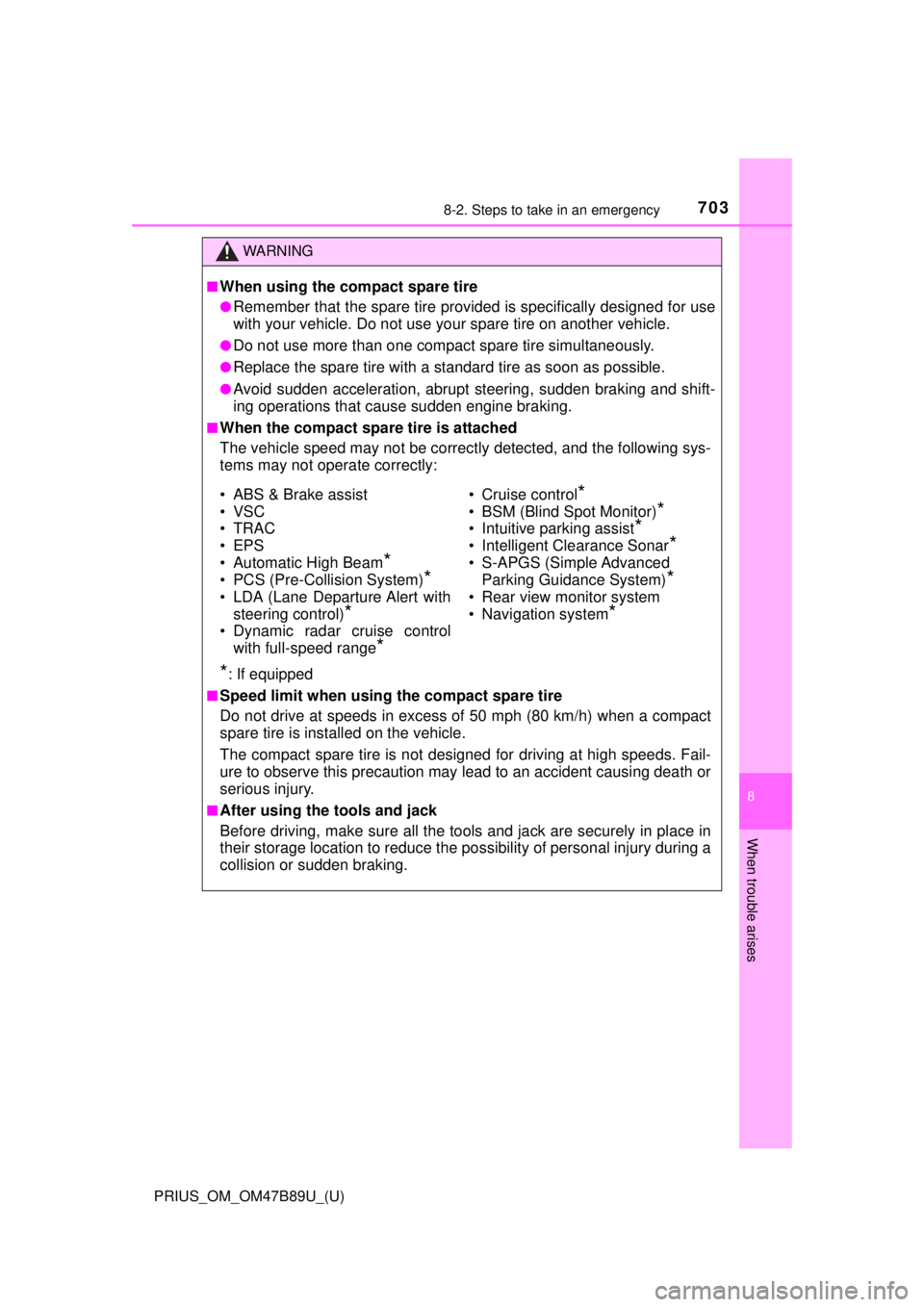
■When using the compact spare tire
●Remember that the spare tire provided is specifically designed for use
with your vehicle. Do not use your spare tire on another vehicle.
●Do not use more than one compact spare tire simultaneously.
●Replace the spare tire with a standard tire as soon as possible.
●Avoid sudden acceleration, abrupt steering, sudden braking and shift-
ing operations that cause sudden engine braking.
■When the compact spare tire is attached
The vehicle speed may not be correctly detected, and the following sys-
tems may not operate correctly:
*: If equipped
■Speed limit when using the compact spare tire
Do not drive at speeds in excess of 50 mph (80 km/h) when a compact
spare tire is installed on the vehicle.
The compact spare tire is not designed for driving at high speeds. Fail-
ure to observe this precaution may lead to an accident causing death or
serious injury.
■After using the tools and jack
Before driving, make sure all the tools and jack are securely in place in
their storage location to reduce the po ssibility of personal injury during a
collision or sudden braking.
• ABS & Brake assist
• VSC
•TRAC
• EPS
• Automatic High Beam
*
• PCS (Pre-Collision System)*
• LDA (Lane Departure Alert with steering control)
*
• Dynamic radar cruise control
with full-speed range
*
• Cruise control*
• BSM (Blind Spot Monitor)*
• Intuitive parking assist*
• Intelligent Clearance Sonar*
• S-APGS (Simple Advanced Parking Guidance System)
*
• Rear view monitor system
• Navigation system
*
Page 802 of 820

802Alphabetical index
PRIUS_OM_OM47B89U_(U)
Alphabetical index
A/C .................................... 516, 526Air conditioning filter ............. 634
Automatic air
conditioning system .... 516, 526
Climate control ...................... 519
Eco score (A/C score)........... 136
Humidity sensor ............ 523, 533
S-FLOW mode .............. 518, 528
ABS (Anti-lock Brake System)...... 408 Function ................................ 408
Warning light ......................... 674
Air conditioning filter .............. 634
Air conditioning system ............................ 516, 526 Air conditioning filter ............. 634
Automatic airconditioning system .... 516, 526
Climate control ...................... 519
Eco score (A/C score)........... 136
Humidity sensor ............ 523, 533
S-FLOW mode .............. 518, 528
Air intake vent ............................ 83
Cleaning................................ 637 Airbags ....................................... 36
Airbag operating conditions .... 44
Airbag precautions for
your child .............................. 39
Airbag warning light .............. 674
Correct driving posture ........... 28
Curtain shield airbag operating conditions ............. 45
Curtain shield airbag precautions........................... 42
Front passenger occupant
classification syst em ............ 50
General airbag precautions .... 39
Locations of airbags ............... 36
Modification and disposal of airbags ............................. 43
Side airbag operating
conditions ............................. 45
Side airbag precautions .......... 41
Side and curtain shield airbags operating
conditions ............................. 45
Side and curtain shield
airbags precautions .............. 42
SRS airbag instructions for Canadian owners ............... 785
SRS airbags ........................... 36
Anchor brackets ........................ 74
Antenna Radio .................................... 443
Smart key system ................. 182
A
Page 803 of 820

803Alphabetical index
PRIUS_OM_OM47B89U_(U)
Anti-lock brake system (ABS) ...................................... 408
Function ................................ 408
Warning light ......................... 674
Approach warning ................... 313
Armrest ..................................... 565
Assist grips .............................. 566
Audio input............................... 429
Audio system
(Entune Audio) ...................... 425 Antenna ................................ 443
Audio input ............................ 429
AUX port ............................... 460
Basic operations ................... 430
Bluetooth
® audio................... 472
CD player .............................. 444
iPod....................................... 450
MP3/WMA disc ..................... 444
Optimal use........................... 441
Portable music player ........... 429
Radio .................................... 442
Steering wheel audio switches.............................. 428
USB memory ........................ 455
Audio system (Entune Premium Audio with Navigation)
*
Automatic air conditioning system Air conditioning filter ............. 634
Automatic air conditioning system ....... ................. 516, 526
Climate control ...................... 519
Eco score (A/C score)........... 136
Humidity sensor ............ 523, 533
S-FLOW mode .............. 518, 528 Automatic door locking
and unlocking systems ........ 174
Automatic High Beam ............. 253
Automatic light control system.................................... 251
AUX port ................................... 429
Auxiliary boxes ........................ 545
Back door ................................. 177
Back-up lights Replacing light bulbs ............ 657
Wattage ................................ 754
Battery (12-volt battery)
Battery checking ................... 611
If the 12-volt battery is discharged.......................... 729
Preparing and checking before winter ...................... 418
Replacing.............................. 732
Warning light......................... 673
Battery (traction battery) .......... 82
Blind Spot Monitor (BSM) ....... 326
Bluetooth
®............................... 503
Audio system ....... ................. 472
Hands-free system (for cellular phone) ............. 474
Registering/removing a Bluetooth
® device ........... 466
Selecting a Bluetooth®
device ................................. 468
Wireless communication....... 461
B
*: Refer to the “NAVIGATION SYSTEM OWNER’S MANUAL”.
Page 817 of 820

817Alphabetical index
PRIUS_OM_OM47B89U_(U)
Warning lightsABS....................................... 674
Brake Override System......... 677
Brake system ....... ................. 673
Charging system ................... 673
Drive-Start Control ................ 677
Driver’s seat belt reminder ............................. 675
Electronic engine control system ......... ....................... 673
Electric power steering ......... 674
Front passenger’s seat
belt reminder ...................... 675
High coolant temperature ..... 675
ICS OFF indicator ................. 675
Intelligent Clearance Sonar .................................. 677
Low engine oil pressure ........ 673
Low fuel level ........................ 675
Malfunction indicator lamp .... 673
Master warning light.............. 676
Open door ............................. 675
PCS ...................................... 674
Rear passengers’ seat belt reminder light...................... 675
Seat belt reminder light ......... 675
Slip indicator ......................... 674
SRS ...................................... 674
Tire pressure......................... 676 Warning messages.................. 684
Warning reflector..................... 549
Washer
Checking............................... 616
Preparing and checking before winter ...................... 418
Switch ........................... 260, 266
Washing and waxing ............... 582
Water-repellent coating .......... 583
Weights Cargo capacity...................... 228
Load limits ............................ 744
What to do if... (Troubleshooting) ................. 798
Wheels ...................................... 631 Replacing wheels ................. 691
Size....................................... 752
Window glasses ...................... 204
Window lock switch ................ 204
Windows Power windows..................... 204
Rear windowdefogger ..................... 520, 530
Washer ......................... 260, 266
Windshield wipers ................... 260 Handling the wiper arms ....... 587
Winter driving tips ................... 418
Wiper rubber replacement ...... 642
Wireless charger ..................... 557
Wireless communication ........ 461
Wireless remote control
key .......................................... 166 Locking/Unlocking ................ 166
Panic mode........................... 167
Replacing the battery............ 646
WMA disc ................................. 444