parking sensors TOYOTA PRIUS 2018 (in English) User Guide
[x] Cancel search | Manufacturer: TOYOTA, Model Year: 2018, Model line: PRIUS, Model: TOYOTA PRIUS 2018Pages: 820, PDF Size: 15.63 MB
Page 374 of 820
374
PRIUS_OM_OM47B89U_(U)
4-5. Using the driving support systems
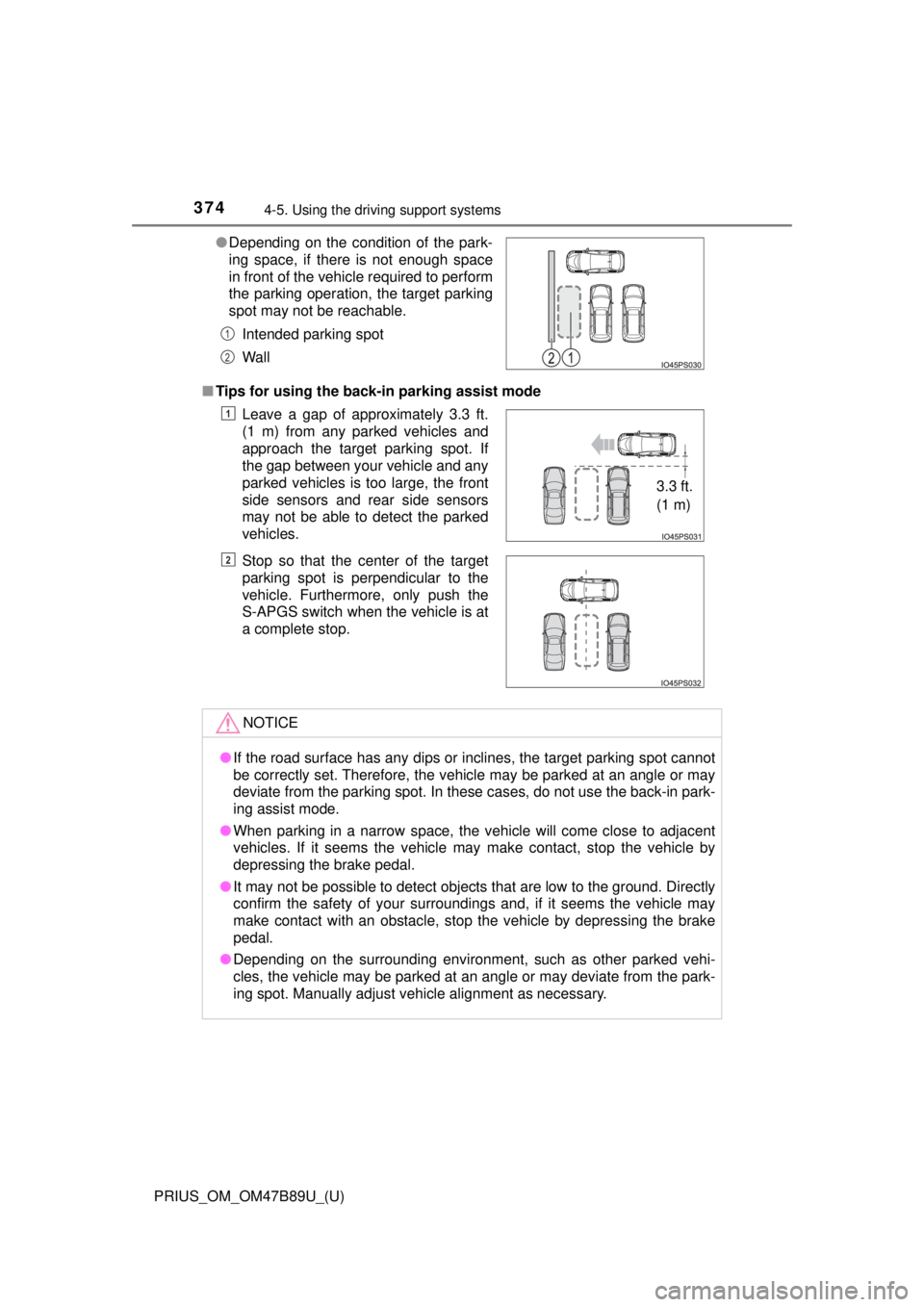
■Tips for using the back-in parking assist mode ●Depending on the condition of the park-
ing space, if there is not enough space
in front of the vehicle required to perform
the parking operation, the target parking
spot may not be reachable.
Intended parking spot
Wall
Leave a gap of approximately 3.3 ft.
(1 m) from any parked vehicles and
approach the target parking spot. If
the gap between your vehicle and any
parked vehicles is too large, the front
side sensors and rear side sensors
may not be able to detect the parked
vehicles.
Stop so that the center of the target
parking spot is perpendicular to the
vehicle. Furthermore, only push the
S-APGS switch when the vehicle is at
a complete stop.
NOTICE
●If the road surface has any dips or inclines, the target parking spot cannot
be correctly set. Therefore, the vehicle may be parked at an angle or may
deviate from the parking spot. In these cases, do not use the back-in park-
ing assist mode.
● When parking in a narrow space, the vehicle will come close to adjacent
vehicles. If it seems the vehicle may make contact, stop the vehicle by
depressing the brake pedal.
● It may not be possible to detect objects that are low to the ground. Directly
confirm the safety of your surroundings and, if it seems the vehicle may\
make contact with an obstacle, stop the vehicle by depressing the brake
pedal.
● Depending on the surrounding environment, such as other parked vehi-
cles, the vehicle may be parked at an angle or may deviate from the park-
ing spot. Manually adjust vehicle alignment as necessary.
1
2
1
3.3 ft.
(1 m)
2
Page 380 of 820
380
PRIUS_OM_OM47B89U_(U)
4-5. Using the driving support systems
When the vehicle is almost entirely within the target parking spot,
a high-pitched beep is emitted and the stop display is shown on
the display, stop the vehicle.
This completes the parallel parking assist mode.
● After stopping, feel free to maneuver the vehicle to reach the
desired parking spot.
● Be sure to back up while checking the area to the front and
rear of the vehicle directly and by using the mirrors.
■Parallel parking assist mode operating conditions
●In order to operate the parallel parking assist mode correctly, drive slowly (at
a speed at which the vehicle can be quickly stopped) parallel to the road (or
shoulder) while maintaining a distance of approximately 3 ft. (1 m) to any
parked vehicles.
● The function cannot be used when the vehicle speed is approximately
19 mph (30 km/h) or higher.
● The front side sensors and rear side sensors are used to detect parked
vehicles and determine the parking spot. Therefore, when detection is not
possible ( →P. 397), guidance is not issued.
● If there are no parked vehicles, the parking spot cannot be determined.
Therefore, the parallel parking assist mode cannot be operated.
● If unable to detect the environment surrounding the parking space, the par-
allel parking assist mode may not be able to operate.
● Guidance will continue until the vehicle speed meets or exceeds approxi-
mately 19 mph (30 km/h) or the function is turned off using the S-APGS
switch.
■ Timing for pressing the S-APGS switch
In the following cases, the assist mode may also operate during the steps
taken to park using the parallel parking assist mode. However, in these
cases, conduct parking procedures according to the information on the multi-
information display.
●In step the S-APGS switch is pressed after already passing over the tar-
get parking spot.
If the vehicle is not stopped in step , pressing the S-APGS switch 1 time
while the vehicle is in motion allows you to select “Parallel Parking” and
proceed directly to step .
● The vehicle is moved up to the position in step without the S-APGS
switch being pressed. Then the S-APGS switch is pressed after having
changed the shift position to R.
12
1
1
2
3
Page 387 of 820
PRIUS_OM_OM47B89U_(U)
3874-5. Using the driving support systems
4
Driving
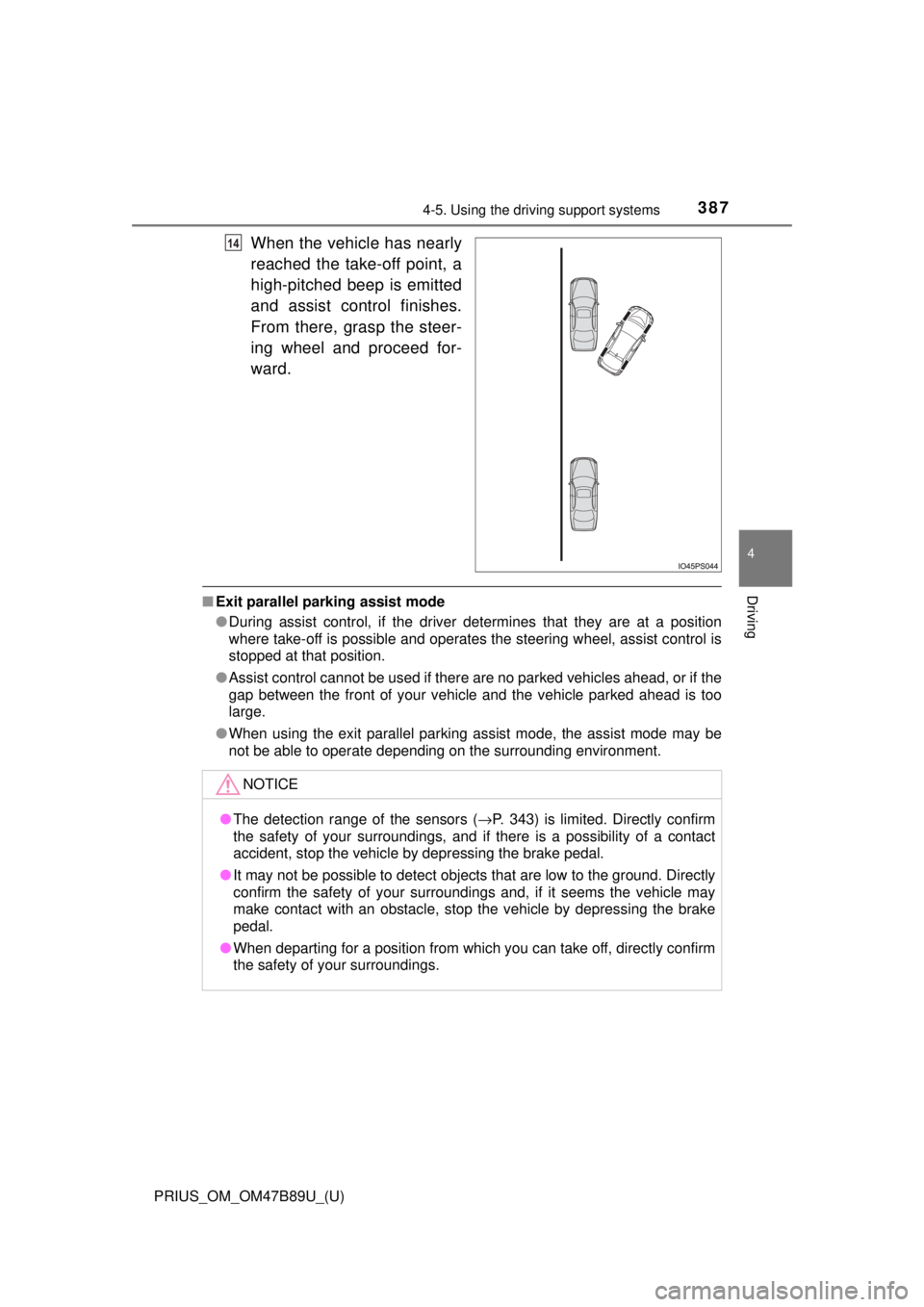
When the vehicle has nearly
reached the take-off point, a
high-pitched beep is emitted
and assist control finishes.
From there, grasp the steer-
ing wheel and proceed for-
ward.
■Exit parallel parking assist mode
●During assist control, if the driver determines that they are at a position
where take-off is possible and operates the steering wheel, assist control is
stopped at that position.
● Assist control cannot be used if there are no parked vehicles ahead, or if the
gap between the front of your vehicle and the vehicle parked ahead is too
large.
● When using the exit parallel parking assist mode, the assist mode may be
not be able to operate depending on the surrounding environment.
14
NOTICE
●The detection range of the sensors ( →P. 343) is limited. Directly confirm
the safety of your surroundings, and if there is a possibility of a contact
accident, stop the vehicle by depressing the brake pedal.
● It may not be possible to detect objects that are low to the ground. Directly
confirm the safety of your surroundings and, if it seems the vehicle may\
make contact with an obstacle, stop the vehicle by depressing the brake
pedal.
● When departing for a position from which you can take off, directly confirm
the safety of your surroundings.
Page 393 of 820
PRIUS_OM_OM47B89U_(U)
3934-5. Using the driving support systems
4
Driving
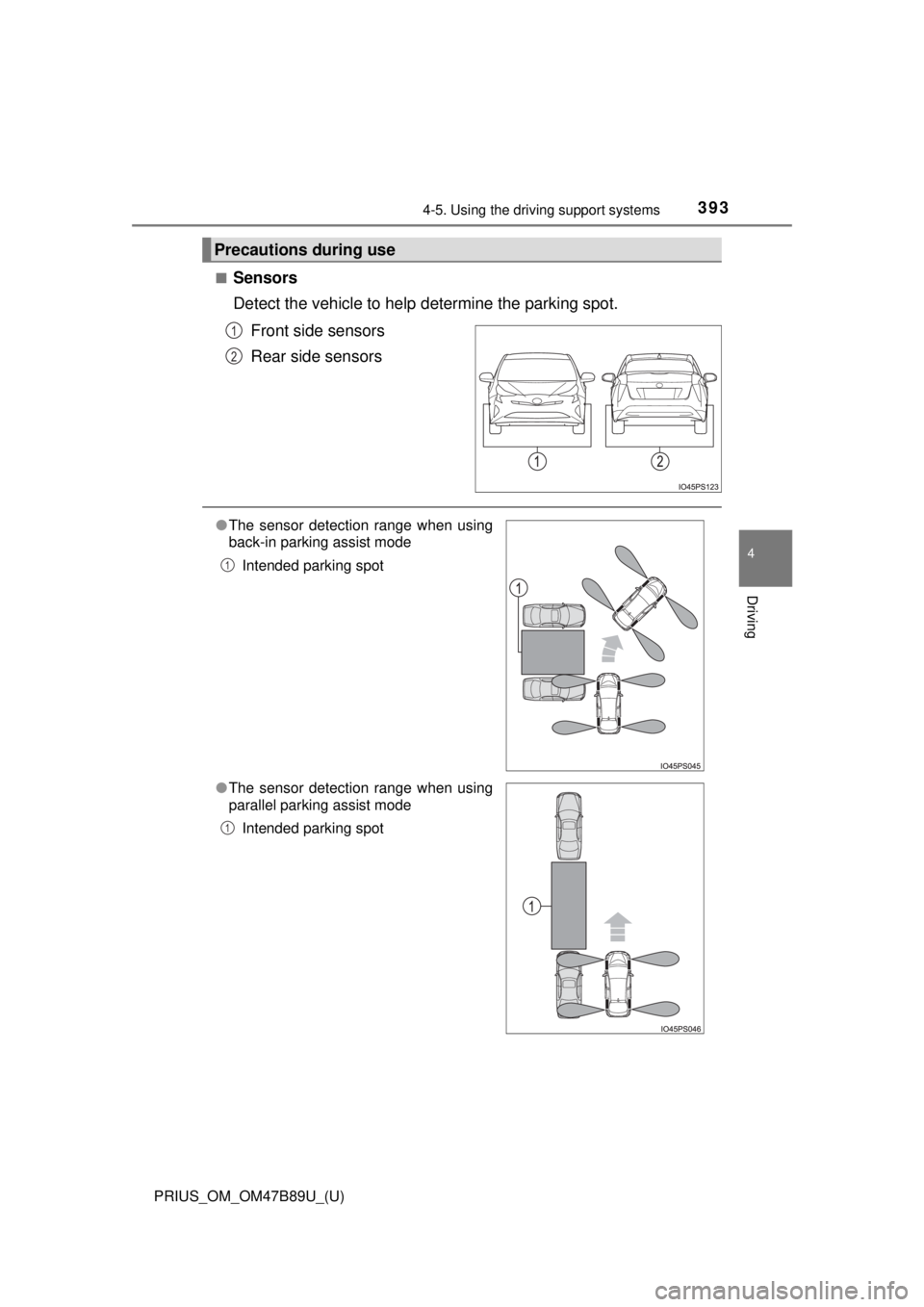
■Sensors
Detect the vehicle to help determine the parking spot.
Front side sensors
Rear side sensors
Precautions during use
1
2
● The sensor detection range when using
back-in parking assist mode
Intended parking spot
● The sensor detection range when using
parallel parking assist mode
Intended parking spot
1
1
Page 396 of 820

396
PRIUS_OM_OM47B89U_(U)
4-5. Using the driving support systems
WARNING
●Do not use the system in the following situations, as the system may be
unable to correctly assist you in reaching the target parking spot and may
lead to an unexpected accident.
• In an area that is not a parking lot
• A parking lot that is not paved and has no parking space lines, such as
a sand or gravel parking lot
• A parking lot that has a slope or undulations in the road
• A frozen, snow-covered or slippery road
• The asphalt is melting due to hot weather
• There is an obstacle between the vehicle and the target parking spot
• Using tire chains or compact spare tire (if equipped)
● Do not use tire other than that provided by the manufacturer. The system
may not operate properly. When replacing tires, contact your Toyota
dealer.
● The system may not be able position the vehicle in the set location in the
following situations.
• The tires are extremely worn or the tire pressure is low
• The vehicle is carrying very heavy load
• The vehicle is tilted due to having luggage, etc. located on one side of
the vehicle
• There are road heaters installed in the parking lot to prevent the road
surface from freezing.
In any other situations when the set position and vehicle position greatly
differ, have the vehicle inspected by your Toyota dealer.
● Make sure to observe the following precautions regarding the exit parallel
parking assist mode.
Exit parallel parking assist mode is a function used when departing from a
parallel parking spot. However, this function may not be usable if obsta-
cles or people are detected in front of the vehicle. Only use this function
when departing from a parallel parking spot. In the event that the steering
control operates, either turn the system off using the S-APGS switch or
operate the steering wheel to stop the control.
● If exit parallel parking assist mode is mistakenly used in the following situ-
ations, the vehicle may make contact with an obstacle.
The departure function is operated in a direction where an obstacle is
present, but the obstacle is not detected by the side sensors (situations
such as when the vehicle is directly beside a pole).
Page 397 of 820

PRIUS_OM_OM47B89U_(U)
3974-5. Using the driving support systems
4
Driving
WARNING
●Observe the following precautions, as the sensors may stop functioning
properly which may lead to an accident.
• Do not subject the sensor to strong shocks by hitting it, etc. The sen-
sors may not function properly.
• When using a high-pressure washer to wash the vehicle, do not spray
water directly on the sensors. Equipment may not function properly if
subjected to an impact from strong water pressure. If the vehicle
bumper strikes something, equipment may not operate properly due to
a sensor malfunction. Have the vehicle inspected at your Toyota dealer.
● In the following situations, the sensors may not operate normally and may
lead to an accident. Drive carefully.
• Obstacles cannot be detected in the side areas until a scan of the side
areas is completed. ( →P. 345)
• Even after the scan of the side areas is completed, obstacles such as other vehicles, people or animals that approach from the sides cannot
be detected.
• The sensor is frozen (if it thaws, the system returns to normal). A warning message may display at particularly low temperatures due to
the sensor freezing and it may not detect parked vehicles.
• The sensor is blocked by someone’s hand.
• The vehicle is tilted a large amount.
• The temperature is extremely hot or cold.
• The vehicle is driven on undulating r oads, slopes, gravel roads, in areas
with tall grass, etc.
• An ultrasonic wave source is nearby, such as the horn or sensors of another vehicle, a motorcycle engine or the air brake of a large vehicle.
• Heavy rain or a water strikes the vehicle.
• The angle of the sensor may be deviated when assist control starts even if there is a parked vehicle in the target parking spot. Have the
vehicle inspected at your Toyota dealer.
• Do not install any accessories within the sensor detection range.
Page 776 of 820
776
PRIUS_OM_OM47B89U_(U)
9-2. Customization
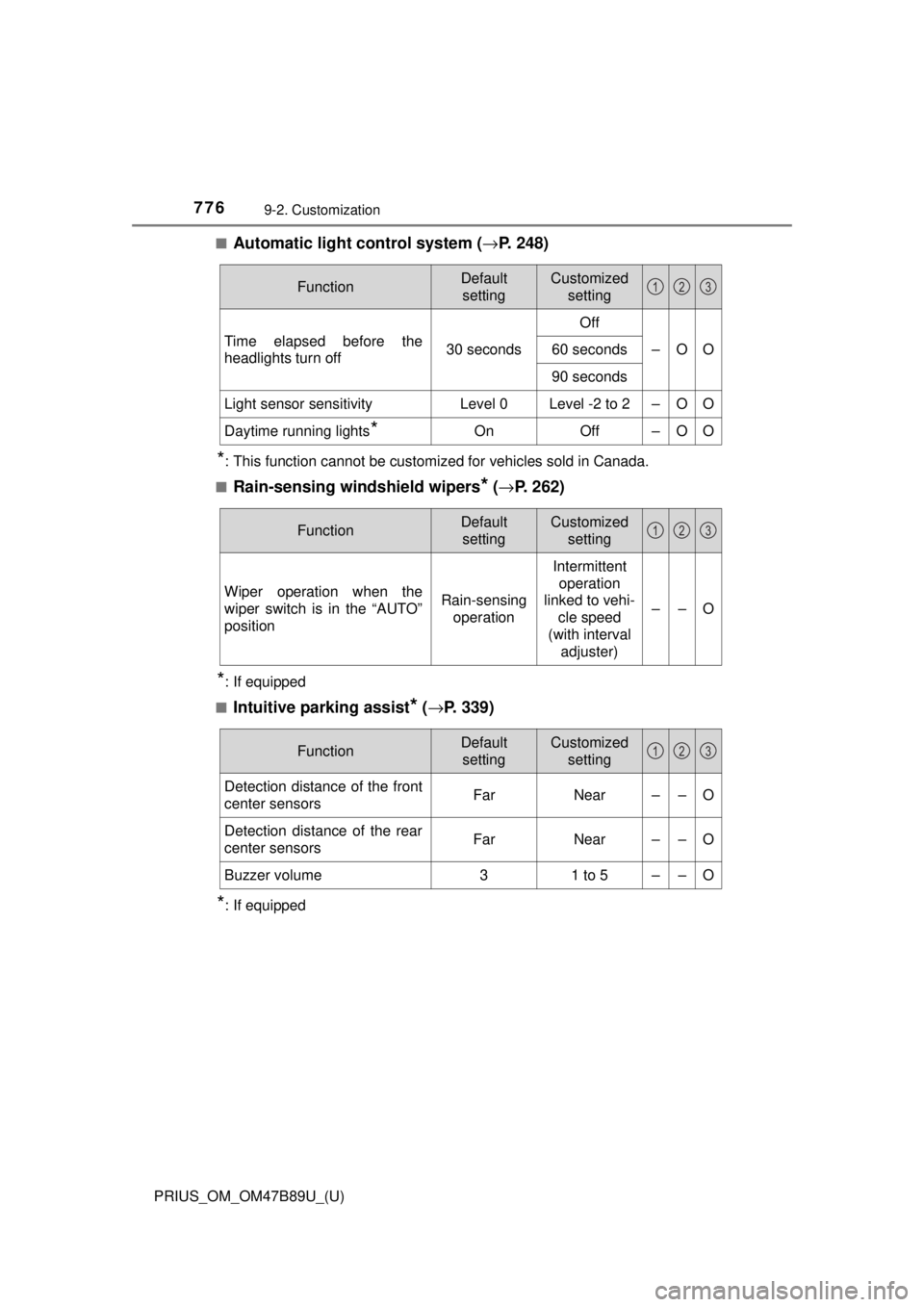
■Automatic light control system (→P. 248)
*: This function cannot be customized for vehicles sold in Canada.
■
Rain-sensing windshield wipers* ( → P. 262)
*: If equipped
■
Intuitive parking assist* ( → P. 339)
*: If equipped
FunctionDefault
settingCustomized setting
Time elapsed before the
headlights turn off 30 secondsOff
–OO
60 seconds
90 seconds
Light sensor sensitivityLevel 0Level -2 to 2–OO
Daytime running lights*OnOff–OO
123
FunctionDefault
settingCustomized setting
Wiper operation when the
wiper switch is in the “AUTO”
positionRain-sensing operation
Intermittent
operation
linked to vehi- cle speed
(with interval adjuster)
––O
123
FunctionDefault
settingCustomized setting
Detection distance of the front
center sensorsFarNear––O
Detection distance of the rear
center sensorsFarNear––O
Buzzer volume31 to 5––O
123
Page 811 of 820
811Alphabetical index
PRIUS_OM_OM47B89U_(U)
Multi-information displayAir conditioning system
settings screen ................... 134
Audio system-linked display ................................ 133
BSM (Blind Spot Monitor) ..... 326
Display contents ................... 114
Drive information................... 116
Driving assist system information.......................... 138
Dynamic radar cruise control
with full-speed range .......... 304
Energy monitor ..................... 117
Language .............................. 142
LDA (Lane Departure Alert with steering control) .......... 298
Navigation system-linked
display ................................ 133
Parking assist system ... 340, 367
Pre-collision warning............. 281
Settings display..................... 139
Warning message display..... 138
Navigation system
*
Noise from under vehicle............ 8
Odometer.................................. 109
Oil Engine oil .............................. 748
Opener Fuel filler door ....................... 270
Hood ..................................... 601
Outside rear view mirrors ....... 202 Adjustment ............................ 202
Blind Spot Monitor ................ 326
Folding .................................. 202
Outside rear view mirror
defoggers ................... 520, 530 Outside temperature
display.................................... 108
Overhead console ................... 545
Overheating ............................. 735
Overheating, Engine ............... 735
P position switch ..................... 241
Panic mode .............................. 167
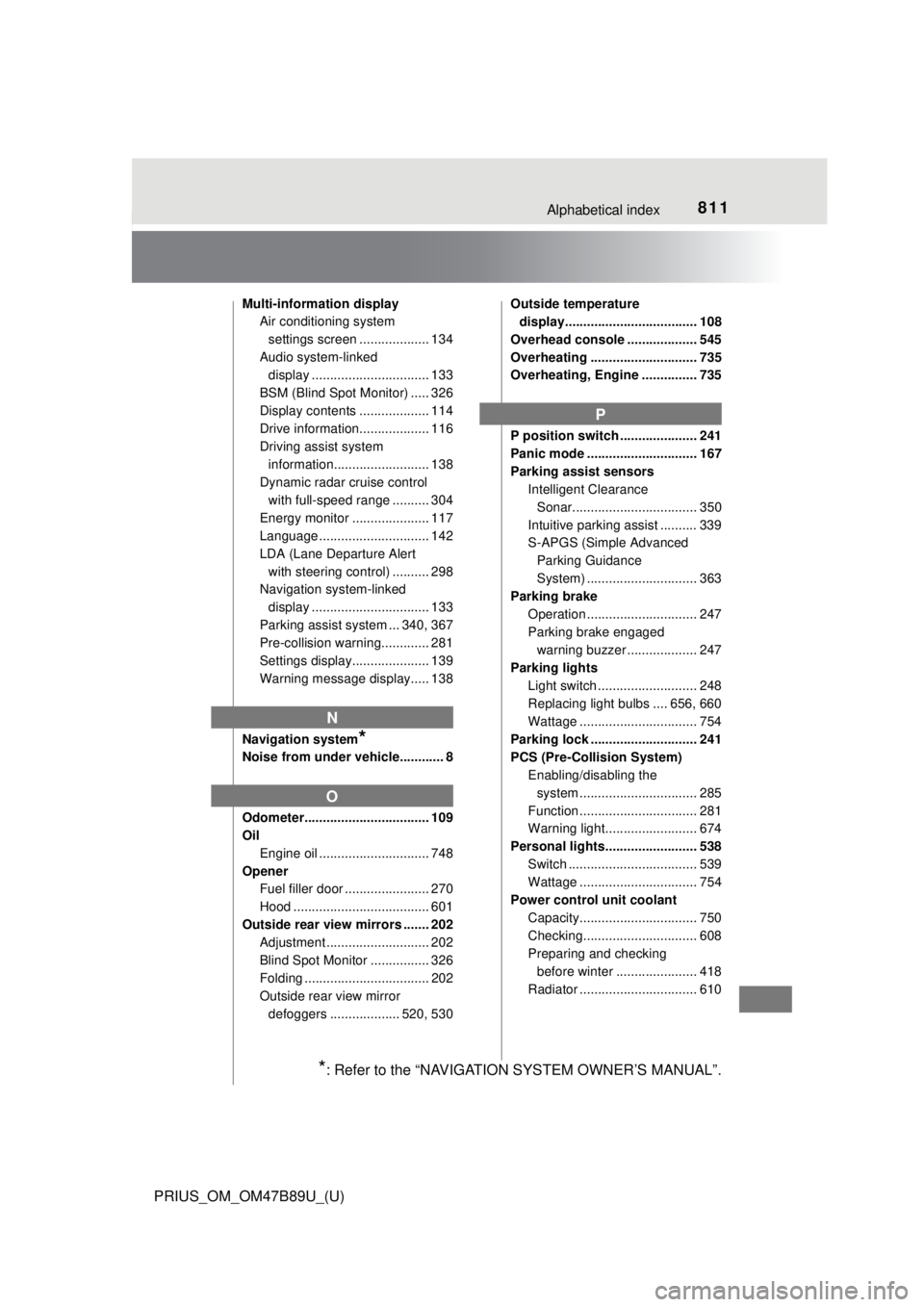
Parking assist sensors Intelligent Clearance
Sonar.................................. 350
Intuitive parking assist .......... 339
S-APGS (Simple Advanced Parking Guidance
System) .............................. 363
Parking brake
Operation .............................. 247
Parking brake engaged warning buzzer ................... 247
Parking lights Light switch ........................... 248
Replacing light bulbs .... 656, 660
Wattage ................................ 754
Parking lock ............................. 241
PCS (Pre-Collision System) Enabling/disabling the
system .......... ...................... 285
Function ................................ 281
Warning light......................... 674
Personal lights......................... 538 Switch ................................... 539
Wattage ................................ 754
Power control unit coolant Capacity................................ 750
Checking............................... 608
Preparing and checking before winter ...................... 418
Radiator ................................ 610
N
O
P
*: Refer to the “NAVIGATION SYSTEM OWNER’S MANUAL”.
Page 813 of 820

813Alphabetical index
PRIUS_OM_OM47B89U_(U)
S-APGS (Simple Advanced Parking Guidance
System) .................................. 363
Safety Connect ........................ 574
Seat belts.................................... 30 Adjusting the seat belt ............ 31
Automatic Locking Retractor............................... 31
Child restra int system
installation ............................ 61
Cleaning and maintaining
the seat belt ........................ 589
Emergency Locking Retractor............................... 31
How to wear your seat belt ..... 30
How your child should wear the seat belt .......................... 31
Pregnant women, proper seat belt use ......................... 33
Reminder light and buzzer .... 675
Seat belt extender................... 32
Seat belt instructions for Canadian owners ............... 783
Seat belt pretensioners ........... 31
SRS warning light ................. 674
Seat heaters ............................. 536
Seating capacity ...................... 228 Seats
Adjustment............................ 190
Adjustment precautions ........ 191
Child seats/child restraint system installation ................ 61
Cleaning ............................... 588
Front seats............................ 190
Head restraint ....................... 195
Properly sitting in the seat ...... 28
Seat heaters ......................... 536
Sensor
Automatic headlight system .......... ...................... 251
Automatic High Beam
system .......... ...................... 253
Camera sensor ..................... 275
Inside rear view mirror .......... 201
LDA (Lane Departure Alert with steering control) .......... 293
Parking assist
sensors............... 339, 352, 393
Radar sensor ........................ 275
Rain-sensing windshield wipers ................................. 264
Service reminder indicators ............................... 100
Shift lever ................................. 240
Shift lever light ........................ 538
Side airbags ............................... 36
Side doors ................................ 171
Side marker lights
Light switch ........................... 248
Replacing light bulbs ............ 660
S
Page 816 of 820

816Alphabetical index
PRIUS_OM_OM47B89U_(U)
Tools ................................. 692, 707
Top tether strap ......................... 74
Total load capacity .................. 744
TowingDinghy towing ....................... 230
Emergency towing ................ 666
Towing eyelet........................ 669
Trailer towing ........................ 229
Toyota Safety Sense P ............ 273
Traction control ....................... 408
Trailer towing ........................... 229
Transmission Driving mode select switch ................................. 324
Hybrid transmission .............. 240
P position switch ................... 241
TRAC (Traction Control)
Function ................................ 408
VSC OFF switch ................... 410
Trip meters ............................... 109
Troubleshooting ...................... 798
Turn signal lights Replacing light bulbs..... 656, 657
Turn signal lever ................... 246
Wattage ................................ 754
USB memory ............................ 455
USB port ................................... 429 Vanity lights
Vanity lights .......................... 555
Wattage ................................ 754
Vanity mirrors .......................... 555 Vanity lights .......................... 555
Vehicle data recordings ............ 10
Vehicle identification number ................................... 745
Vehicle proximity notification system ................. 79
Vehicle Stability Control
(VSC) ...................................... 408
Voice command system ......... 509 Microphone ........................... 475
Switches ............................... 509
VSC (Vehicle Stabilit y Control) .... 408
Warning buzzers Blind Spot Monitor (BSM) ..... 326
Brake system ....... ................. 673
Downshifting ......................... 242
Lane departure alert ............. 294
Open door..................... 175, 675
Open moon roof.................... 210
Parking assist
sensors............... 339, 350, 363
Pre-collision warning ............ 281
Radar cruise control ............. 313
Seat belt reminder ................ 675
U
V
W