door lock TOYOTA PRIUS 2018 (in English) Owner's Guide
[x] Cancel search | Manufacturer: TOYOTA, Model Year: 2018, Model line: PRIUS, Model: TOYOTA PRIUS 2018Pages: 820, PDF Size: 15.63 MB
Page 209 of 820
PRIUS_OM_OM47B89U_(U)
2093-5. Opening and closing the windows and moon roof
3
Operation of each component
■The moon roof can be operated when
The power switch is in ON mode.
■ Operating the moon roof after turning the hybrid system off
The moon roof can be operated for approximately 45 seconds even after the
power switch is turned to ACCESSORY mode or turned off. It cannot, how-
ever, be operated once either front door is opened.
■ Jam protection function
If an object is detected between the moon roof and the frame while the moon
roof is closing or tilting down, travel is stopped and the moon roof opens
slightly.
■ Sunshade
The sunshade can be opened and closed manually. However, the sunshade
will open automatically to slightly before the fully open position when the
moon roof is opened.
■ Door lock linked mo on roof operation
● The moon roof can be opened and closed using the mechanical key.
*
( →P. 726)
● The moon roof can be opened using the wireless remote control.
*
( →P. 172)
*: These settings must be customized at your Toyota dealer.
Page 210 of 820

210
PRIUS_OM_OM47B89U_(U)
3-5. Opening and closing the windows and moon roof
■When the moon roof do es not close normally
Perform the following procedure:
Stop the vehicle.
Press and hold the “CLOSE” or “UP” switch.
*
The moon roof will tilt up, stop a little time and tilt down. Then it will open
fully and close again, and then stop.
Check to make sure that the moon roof has completely stopped and then
release the switch.
*: If the switch is released at the incorrect time, the procedure will have to beperformed again from the beginning.
If the moon roof does not fully close even after performing the above proce-
dure correctly, have the vehicle inspected by your Toyota dealer.
■ Moon roof open reminder function
The buzzer sounds and a message is shown on the multi-information display
in the instrument cluster when the power switch is turned off and the driver’s
door is opened with the moon roof open.
■ Customization
Settings (e.g. linked door lock operation) can be changed.
(Customizable features: →P. 770)
1
2
3
Page 214 of 820
214
PRIUS_OM_OM47B89U_(U)
4-1. Before driving
Driving the vehicle
→P. 2 3 1
With the brake pedal depressed, shift the shift position to D.
( → P. 240)
Check that the shift position indicator shows D.
Release the parking brake. ( →P. 247)
Gradually release the brake pedal and gently depress the accelera-
tor pedal to accelerate the vehicle.
With the shift position in D, depress the brake pedal.
If necessary, set the parking brake.
If the vehicle is to be stopped for an extended period of time, shift the shift
position to P. (
→P. 241)
Stop the vehicle completely.
Set the parking brake. ( →P. 247)
Shift the shift position to P. ( →P. 241)
Check that the shift position indicator shows P.
Press the power switch to stop the hybrid system.
Slowly release the brake pedal.
Lock the door, making sure that you have the electronic key on your
person.
If parking on a hill, block the wheels as needed.
The following procedures should be observed to ensure safe
driving:
Starting the hybrid system
Driving
Stopping
Parking the vehicle
1
2
3
1
2
1
2
3
4
5
6
Page 221 of 820
PRIUS_OM_OM47B89U_(U)
2214-1. Before driving
4
Driving
WARNING
Observe the following precautions.
Failure to do so may result in death or serious injury.
■When the vehicle is parked
● Do not leave glasses, cigarette lighters, spray cans, or soft drink cans in
the vehicle when it is in the sun.
Doing so may result in the following:
• Gas may leak from a cigarette lighter or spray can, and may lead to a fire.
• The temperature inside the vehicle may cause the plastic lenses and
plastic material of glasses to deform or crack.
• Soft drink cans may fracture, causing the contents to spray over the
interior of the vehicle, and may also cause a short circuit in the vehicle’s
electrical components.
● Do not leave cigarette lighters in the vehicle. If a cigarette lighter is in a
place such as the glove box or on the floor, it may be lit accidentally when
luggage is loaded or the seat is adjusted, causing a fire.
● Do not attach adhesive discs to the windshield or windows. Do not place con-
tainers such as air fresheners on the instrument panel or dashboard. Adhe-
sive discs or containers may act as lenses, causing a fire in the vehicle.
● Do not leave a door or window open if the curved glass is coated with a
metallized film such as a silver-colored one. Reflected sunlight may cause
the glass to act as a lens, causing a fire.
● Always apply the parking brake, shift the shift position to P, stop the hybrid
system and lock the vehicle.
Do not leave the vehicle unattended while the “READY” indicator is illumi-
nated.
If the vehicle is parked with the shift position in P but the parking brake is
not set, the vehicle may start to move, possibly leading to an accident.
● Do not touch the exhaust pipe while the “READY” indicator is illuminated
or immediately after turning the hybrid system off.
Doing so may cause burns.
Page 235 of 820
PRIUS_OM_OM47B89U_(U)
2354-2. Driving procedures
4
Driving
■Meter display
When the power switch is turned off, each display will turn off as follows.
●The shift position indicator will turn off after approximately 2 seconds.
● The multi-information display, clock, etc. will turn off after approximately 30
seconds.
(Each display will also turn off immediately if a door is locked before 30 sec-
onds has elapsed.)
■ If the smart key system has been deactivated in a customized setting
→P. 726
WARNING
■When starting the hybrid system
Always start the hybrid system while sitting in the driver’s seat. Do not
depress the accelerator pedal while starting the hybrid system under any
circumstances.
Doing so may cause an accident resulting in death or serious injury.
■ Stopping the hybrid system in an emergency
● If you want to stop the hybrid system in an emergency while driving the
vehicle, press and hold the power switch for more than 2 seconds, or
press it briefly 3 times or more in succession. ( →P. 665)
However, do not touch the power switch while driving except in an emer-
gency. Turning the hybrid system off while driving will not cause loss of
steering or braking control, however, power assist to the steering will be
lost. This will make it more difficult to steer smoothly, so you should pull
over and stop the vehicle as soon as it is safe to do so.
● If the power switch is operated while the vehicle is running, a warning
message will be shown on the multi-information display and a buzzer
sounds.
● When restarting the hybrid system after an emergency shutdown while
driving, press the power switch. When restarting the hybrid system after
stopping the vehicle, change the shift position to P and then press the
power switch.
Page 251 of 820
PRIUS_OM_OM47B89U_(U)
2514-3. Operating the lights and wipers
4
Driving
■Daytime running light system
●The daytime running lights illuminate using the same lights as the head-
lights, and illuminate dimmer than the headlights.
● To make your vehicle more visible to other drivers during daytime driving,
the daytime running lights turn on automatically when all of the following
conditions are met. (The daytime running lights are not designed for use at
night.)
• The hybrid system is operating
• The parking brake is released
• The headlight switch is in the (Canada only), , or
* position
*: When the surroundings are bright
The daytime running lights remain on after they illuminate, even if the park-
ing brake is set again.
● For the U.S.A.: Daytime running lights can be turned off by operating the
switch.
● Compared to turning on the headlights, the daytime running light system
offers greater durability and consumes less electricity, so it can help improve
fuel economy.
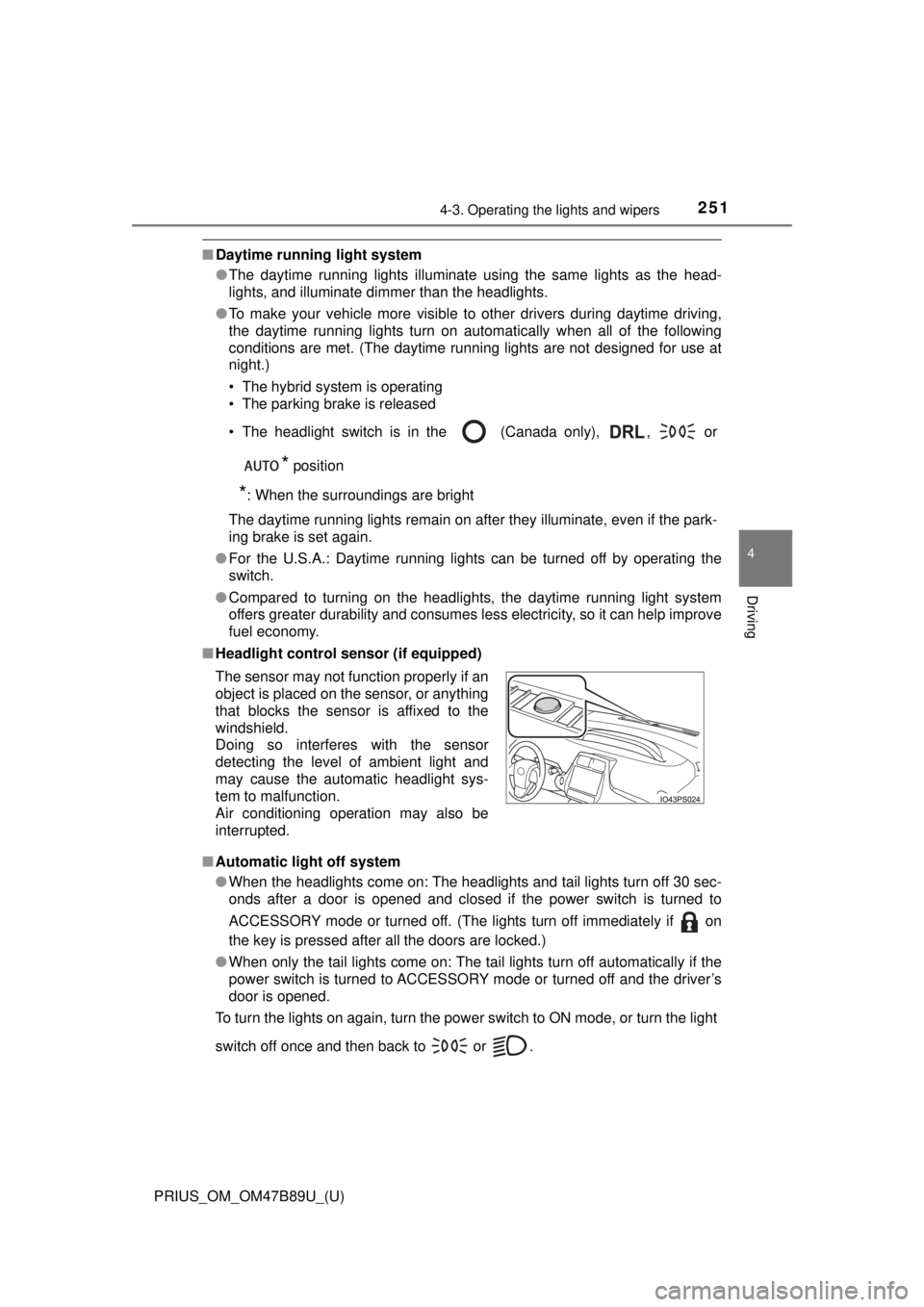
■ Headlight control sensor (if equipped)
■ Automatic light off system
●When the headlights come on: The headlights and tail lights turn off 30 sec-
onds after a door is opened and closed if the power switch is turned to
ACCESSORY mode or turned off. (The lights turn off immediately if on
the key is pressed after all the doors are locked.)
● When only the tail lights come on: The tail lights turn off automatically if the
power switch is turned to ACCESSORY mode or turned off and the driver’s
door is opened.
To turn the lights on again, turn the power switch to ON mode, or turn th\
e light
switch off once and then back to or . The sensor may not function properly if an
object is placed on the sensor, or anything
that blocks the sensor is affixed to the
windshield.
Doing so interferes with the sensor
detecting the level of ambient light and
may cause the automatic headlight sys-
tem to malfunction.
Air conditioning operation may also be
interrupted.
Page 271 of 820
PRIUS_OM_OM47B89U_(U)
2714-4. Refueling
4
Driving
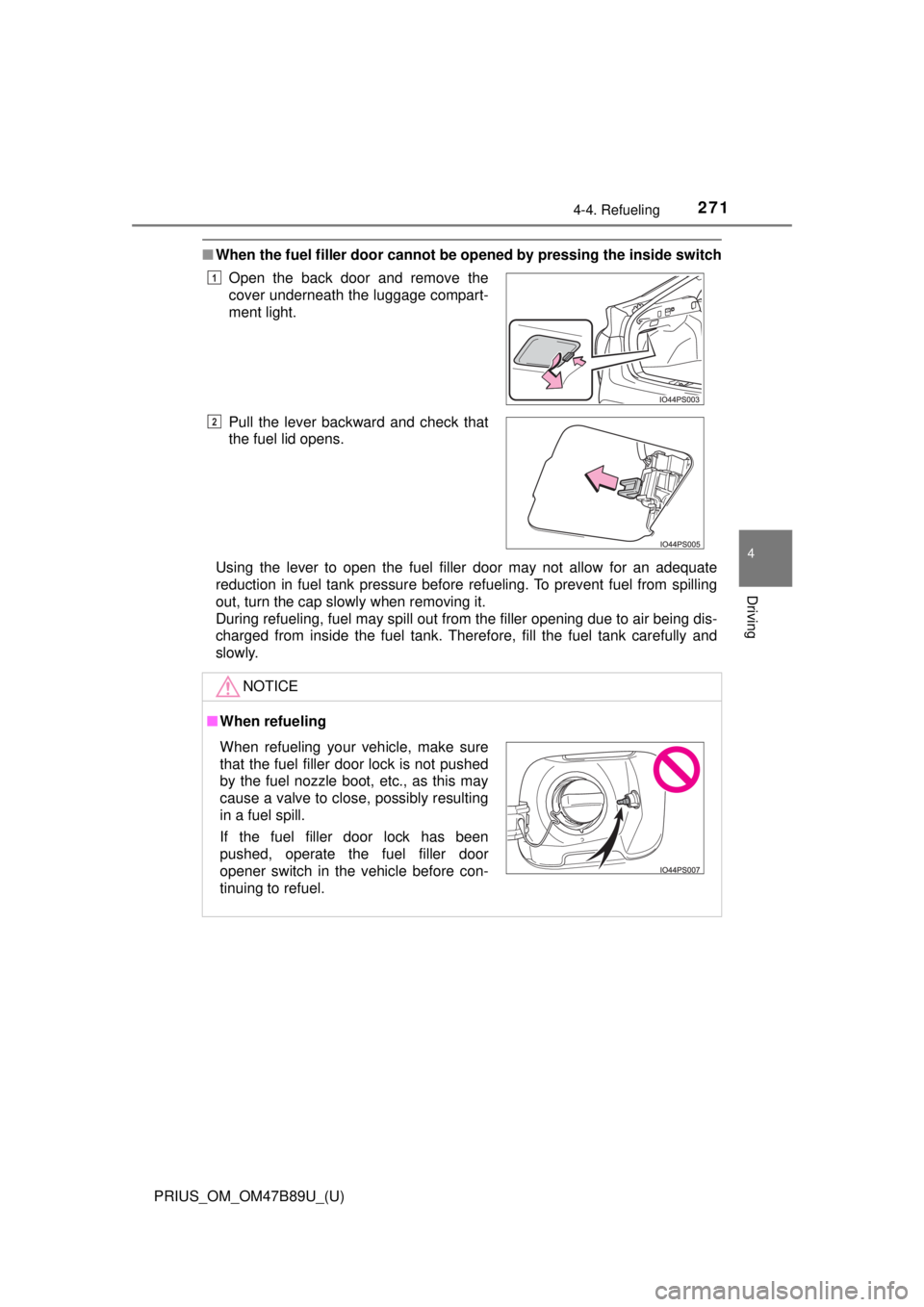
■When the fuel filler door cannot be opened by pressing the inside switch
Using the lever to open the fuel filler door may not allow for an adequate
reduction in fuel tank pressure before refueling. To prevent fuel from spilling
out, turn the cap slowly when removing it.
During refueling, fuel may spill out from the filler opening due to air being dis-
charged from inside the fuel tank. Therefore, fill the fuel tank carefully and
slowly.Open the back door and remove the
cover underneath the luggage compart-
ment light.
Pull the lever backward and check that
the fuel lid opens.
NOTICE
■
When refueling
1
2
When refueling your vehicle, make sure
that the fuel filler door lock is not pushed
by the fuel nozzle boot, etc., as this may
cause a valve to close, possibly resulting
in a fuel spill.
If the fuel filler door lock has been
pushed, operate the fuel filler door
opener switch in the vehicle before con-
tinuing to refuel.
Page 540 of 820
540
PRIUS_OM_OM47B89U_(U)
6-2. Using the interior lights
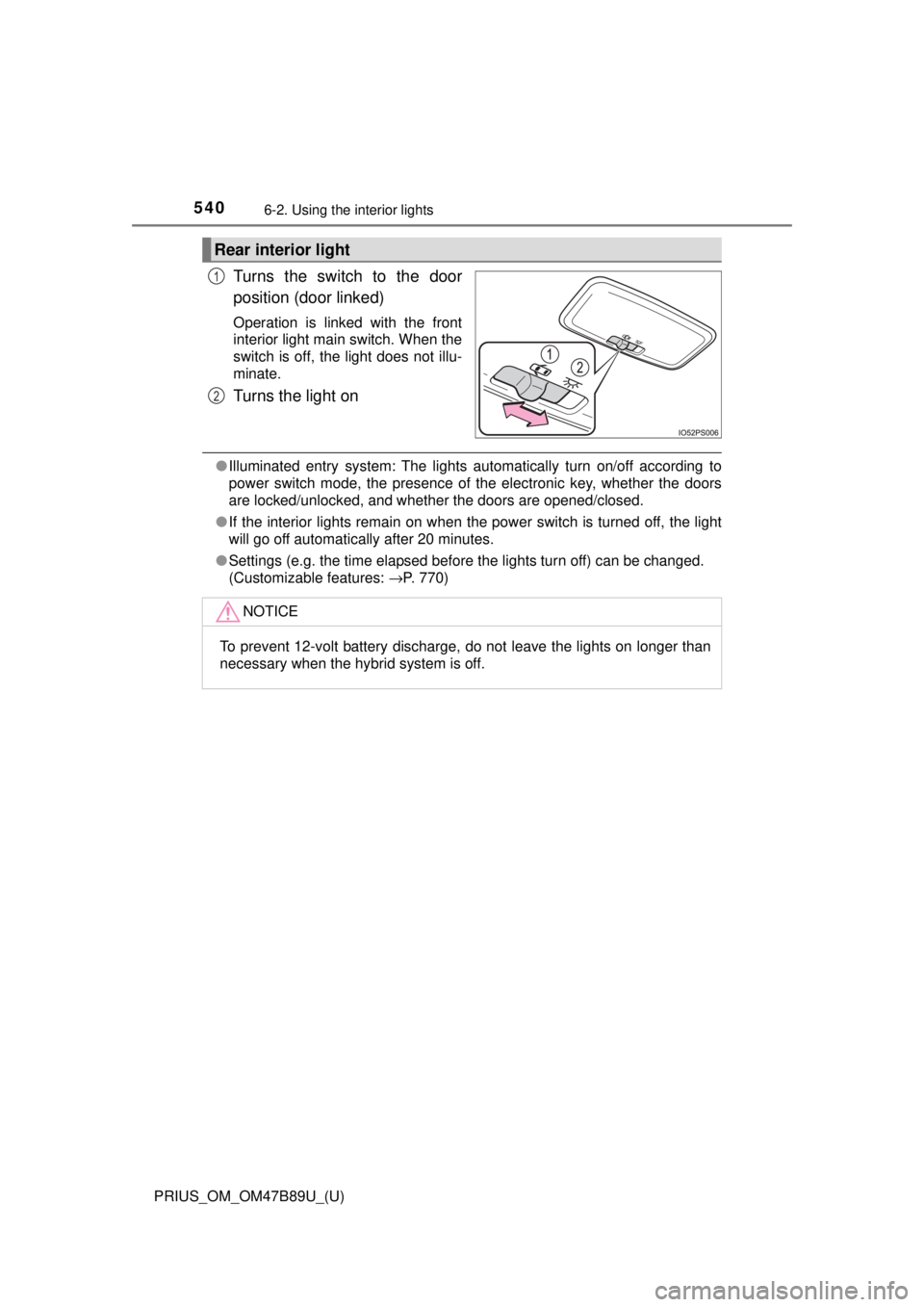
Turns the switch to the door
position (door linked)
Operation is linked with the front
interior light main switch. When the
switch is off, the light does not illu-
minate.
Turns the light on
●Illuminated entry system: The lights automatically turn on/off according to
power switch mode, the presence of the electronic key, whether the doors
are locked/unlocked, and whether the doors are opened/closed.
● If the interior lights remain on when the power switch is turned off, the light
will go off automatically after 20 minutes.
● Settings (e.g. the time elapsed before the lights turn off) can be changed.
(Customizable features: →P. 770)
Rear interior light
1
2
NOTICE
To prevent 12-volt battery discharge, do not leave the lights on longer than
necessary when the hybrid system is off.
Page 567 of 820
567
PRIUS_OM_OM47B89U_(U)
6-4. Using the other interior features
6
Interior features
Garage door opener∗
The garage door opener (HomeLink® Universal Transceiver) is manu-
factured under license from HomeLink®.
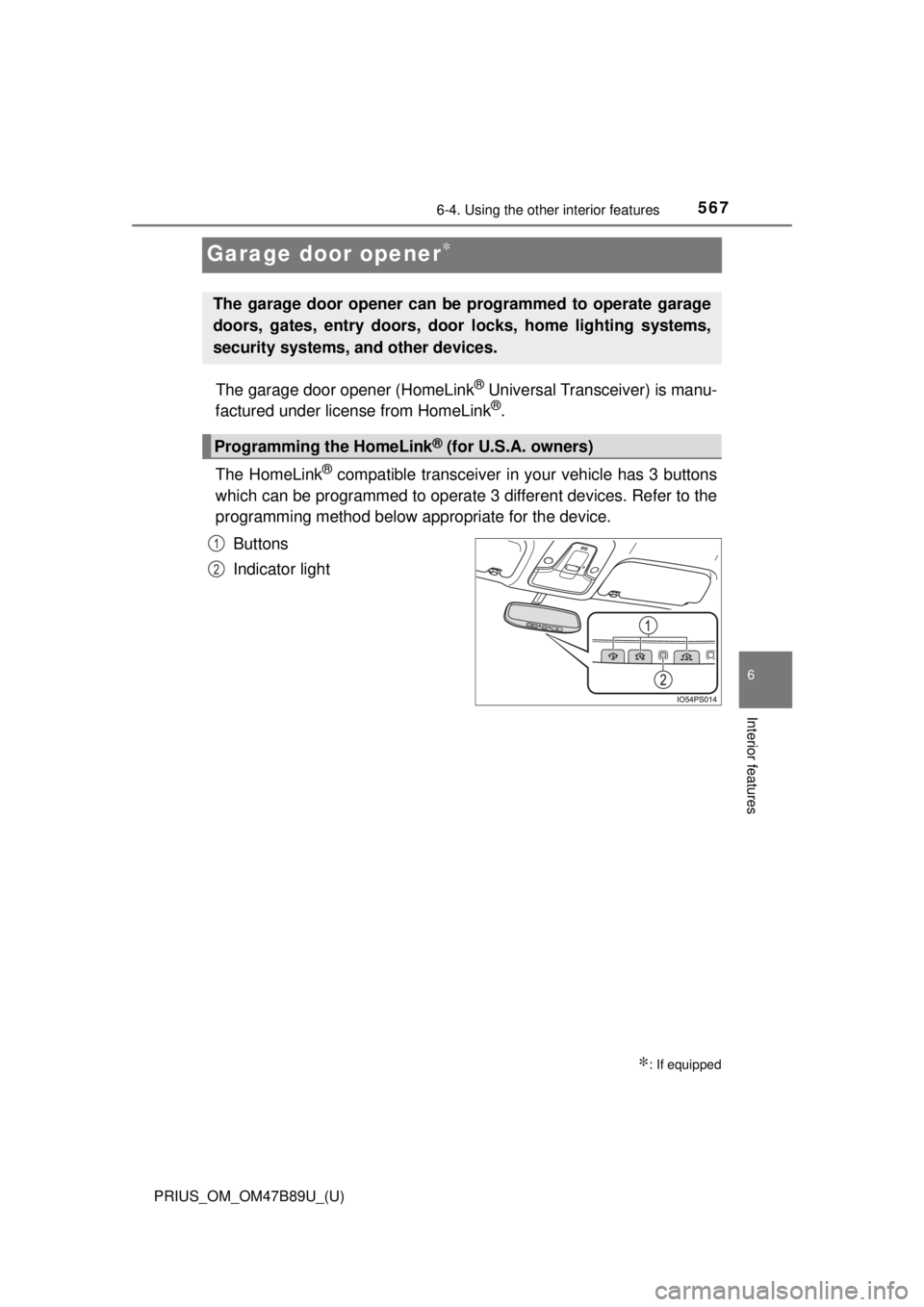
The HomeLink
® compatible transceiver in your vehicle has 3 buttons
which can be programmed to operate 3 different devices. Refer to the
programming method below appropriate for the device.
Buttons
Indicator light
∗: If equipped
The garage door opener can be programmed to operate garage
doors, gates, entry doors, door locks, home lighting systems,
security systems, and other devices.
Programming the HomeLink® (for U.S.A. owners)
1
2
Page 571 of 820
PRIUS_OM_OM47B89U_(U)
5716-4. Using the other interior features
6
Interior features
■Programming an entry gate (for U.S.A. owners)/Programming a
devices in the Canadian marketPlace the remote control transmitter 1 to 3 in. (25 to 75 mm)
away from the HomeLink
® buttons.
Keep the HomeLink® indicator light in view while programming.
Press and hold the selected HomeLink® button.
Repeatedly press and release (cyc le) the remote control trans-
mitter for 2 seconds each until step 4 is completed.
When the HomeLink
® indicator light starts to flash rapidly,
release the buttons.
Test the HomeLink
® operation by pressing the newly pro-
grammed button. Check to see if the gate/device operates cor-
rectly.
Repeat the steps above to program another device for any of the
remaining HomeLink
® buttons.
■Programming other devices
To program other devices such as home security systems, home
door locks and lighting, contact your Toyota dealer for assistance.
■Reprogramming a button
The individual HomeLink
® buttons cannot be erased but can be
reprogrammed. To reprogram a button, follow the “Reprogramming
a HomeLink
® button” instructions.
Press the appropriate HomeLink
® button. The HomeLink® indicator
light should come on.
The HomeLink® compatible transceiver in your vehicle continues to send a
signal for up to 20 seconds as long as the button is pressed.
Operating HomeLink®
1
2
3
4
5
6