fuel consumption TOYOTA PRIUS 2019 Owners Manual (in English)
[x] Cancel search | Manufacturer: TOYOTA, Model Year: 2019, Model line: PRIUS, Model: TOYOTA PRIUS 2019Pages: 828, PDF Size: 16.9 MB
Page 98 of 828
98
PRIUS_OM_OM47C35U_(U)
2. Instrument cluster
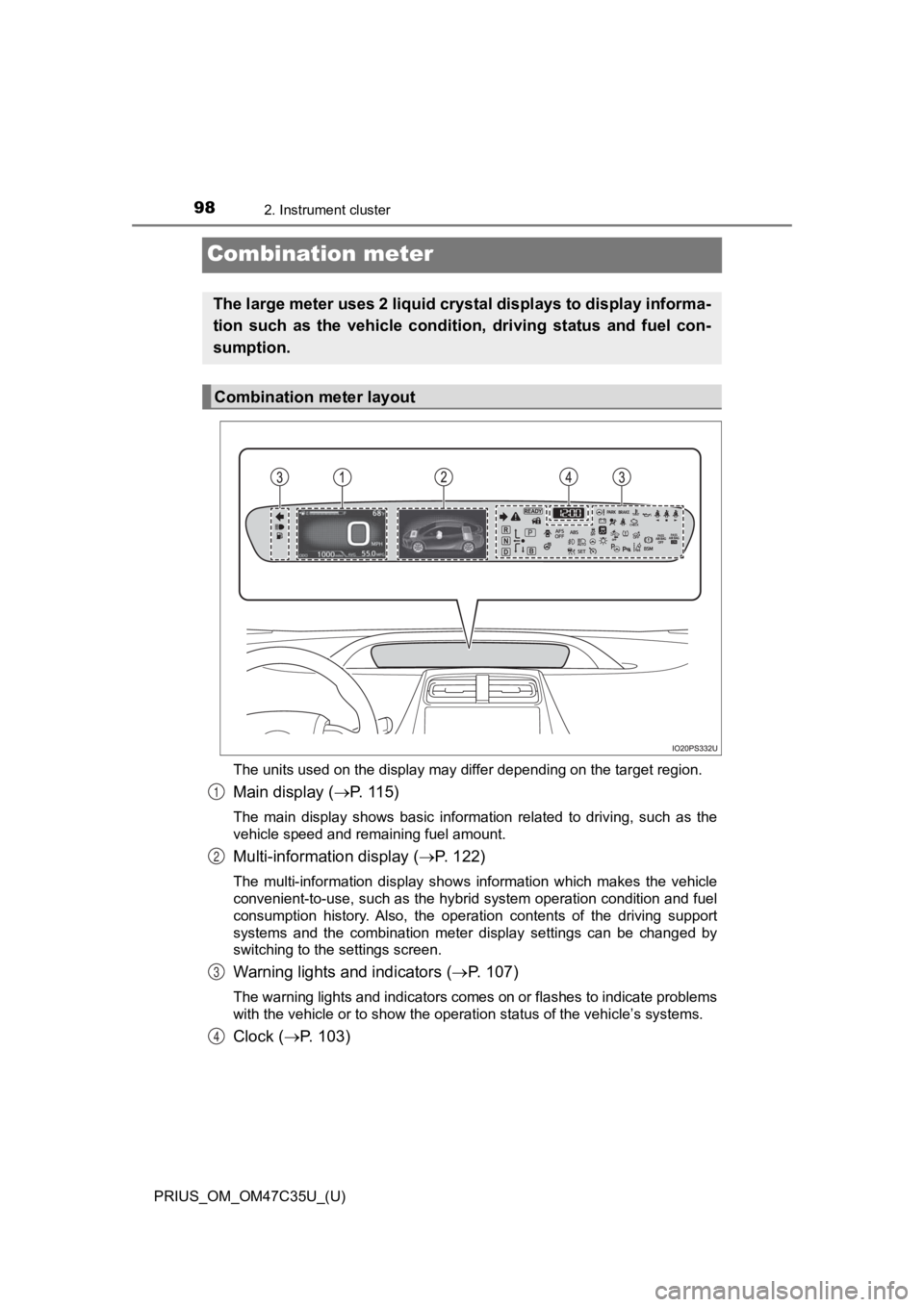
Combination meter
The units used on the display may differ depending on the target region.
Main display (P. 115)
The main display shows basic information related to driving, su ch as the
vehicle speed and remaining fuel amount.
Multi-information display ( P. 122)
The multi-information display shows information which makes the vehicle
convenient-to-use, such as the hybrid system operation conditio n and fuel
consumption history. Also, the operation contents of the drivin g support
systems and the combination meter display settings can be chang ed by
switching to the settings screen.
Warning lights and indicators ( P. 1 0 7 )
The warning lights and indicators comes on or flashes to indicate problems
with the vehicle or to show the operation status of the vehicle ’s systems.
Clock (P. 103)
The large meter uses 2 liquid crystal displays to display infor ma-
tion such as the vehicle conditi on, driving status and fuel con-
sumption.
Combination meter layout
1
2
3
4
Page 102 of 828
102
PRIUS_OM_OM47C35U_(U)
2. Instrument cluster
■When there is information to be notified about the vehicle
When a shift position is mistakenly selected or a problem occurs in
a vehicle system, a warning me ssage (or image) is displayed on
the multi-inform ation display.
When a warning message is displayed, follow the instructions displayed
on the display. ( P. 693)
■
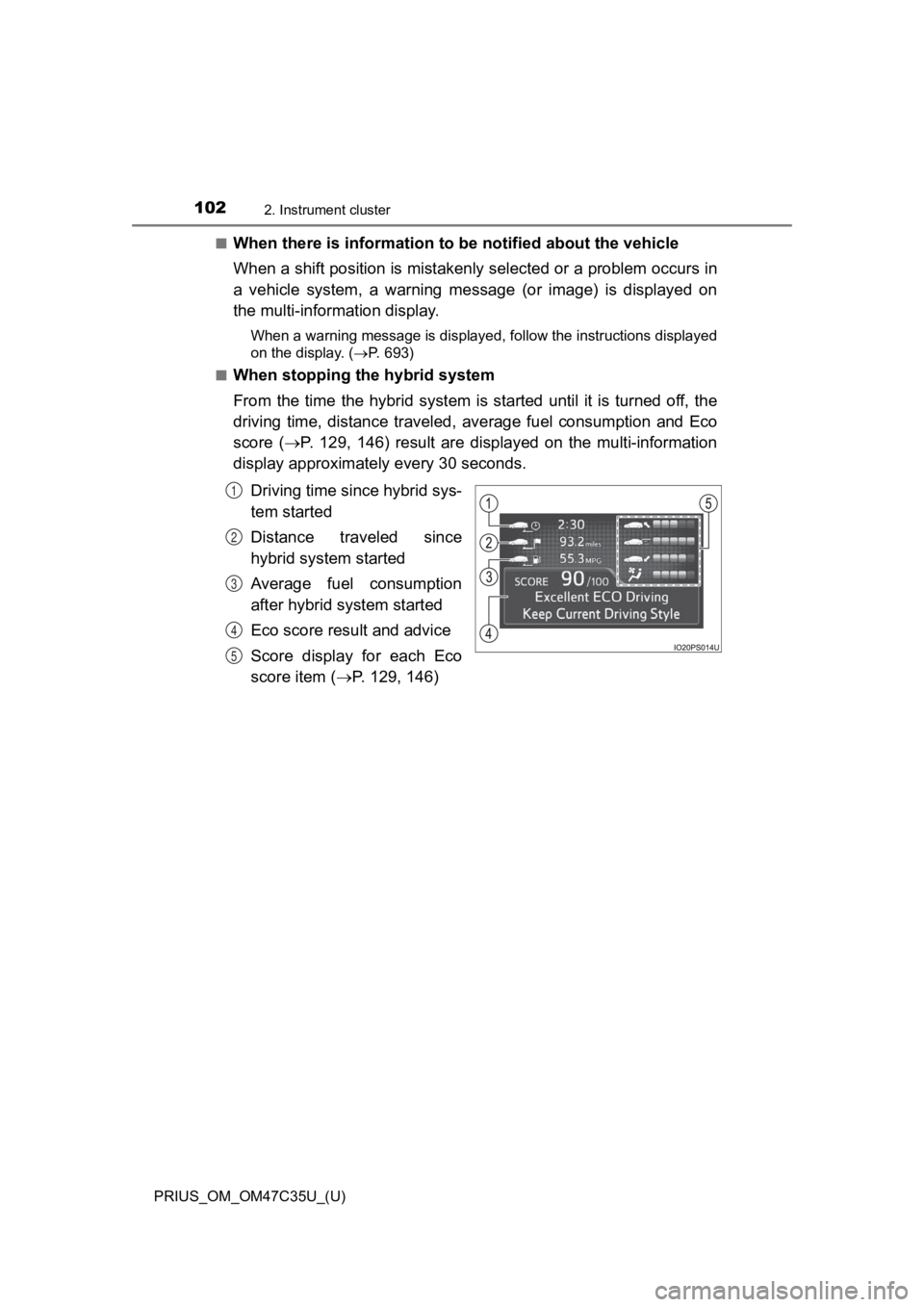
When stopping the hybrid system
From the time the hybrid system is started until it is turned off, the
driving time, distance traveled, average fuel consumption and Eco
score ( P. 129, 146) result are displayed on the multi-information
display approximately every 30 seconds.
Driving time since hybrid sys-
tem started
Distance traveled since
hybrid system started
Average fuel consumption
after hybrid system started
Eco score result and advice
Score display for each Eco
score item ( P. 129, 146)
1
2
3
4
5
Page 105 of 828
PRIUS_OM_OM47C35U_(U)
1052. Instrument cluster
2
Instrument cluster
■When disconnecting and reconnecting 12-volt battery terminals
The settings of the clock will be reset.
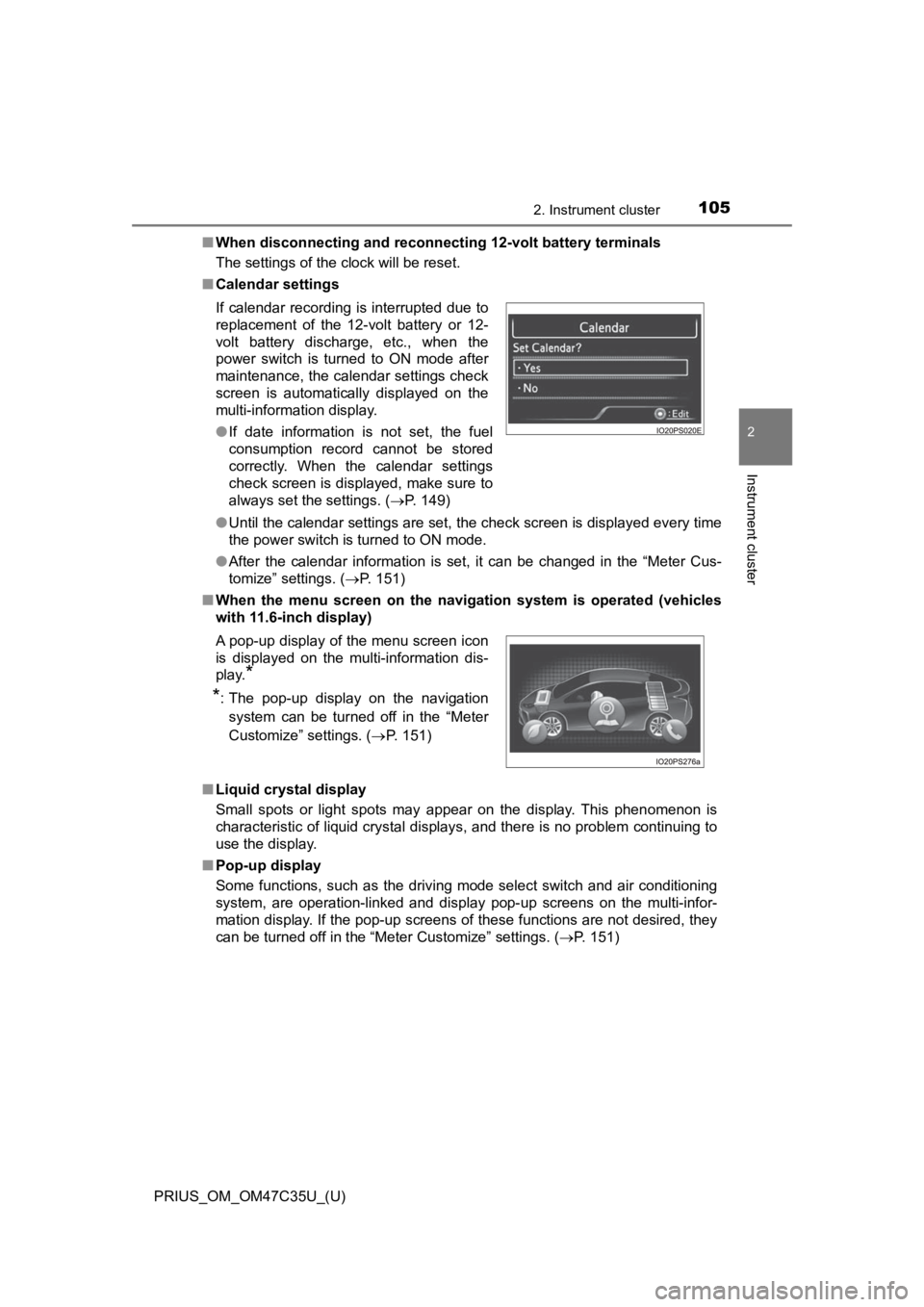
■ Calendar settings
●Until the calendar settings are set, the check screen is displa yed every time
the power switch is turned to ON mode.
● After the calendar information is set, it can be changed in the “Meter Cus-
tomize” settings. ( P. 151)
■ When the menu screen on the navi gation system is operated (vehicles
with 11.6-inch display)
■ Liquid crystal display
Small spots or light spots may appear on the display. This phen omenon is
characteristic of liquid crystal displays, and there is no prob lem continuing to
use the display.
■ Pop-up display
Some functions, such as the driving mode select switch and air conditioning
system, are operation-linked and display pop-up screens on the multi-infor-
mation display. If the pop-up screens of these functions are not desired, they
can be turned off in the “Meter Customize” settings. ( P. 151)
If calendar recording is interrupted due to
replacement of the 12-volt battery or 12-
volt battery discharge, etc., when the
power switch is turned to ON mode after
maintenance, the calendar settings check
screen is automatically displayed on the
multi-information display.
●
If date information is not set, the fuel
consumption record cannot be stored
correctly. When the calendar settings
check screen is displayed, make sure to
always set the settings. ( P. 149)
A pop-up display of the menu screen icon
is displayed on the multi-information dis-
play.
*
*
: The pop-up display on the navigation
system can be turned off in the “Meter
Customize” settings. ( P. 151)
Page 116 of 828

116
PRIUS_OM_OM47C35U_(U)
2. Instrument cluster
Speedometer
Displays the vehicle speed
Fuel gauge
Displays the quantity of fuel remaining in the tank
Outside temperature
Displays the outside temperature within the range of -40°F (-40°C) to
122°F (50°C).
The temperature display flashes for approximately 10 seconds wh en the
outside temperature drops to approximately 37 F (3 C) or less, and then
stops flashing.
Mileage display (odometer/tr ip meters/driving range)
The possible driving range estimated from the mileage and current remain-
ing fuel amount can be displayed. ( P. 117)
Average fuel consumption display
The average fuel consumption that is linked with the contents o f the mile-
age display can be displayed. ( P. 117)
Sub-screen
When split screen is selected for the main display, information such as the
Hybrid System Indicator and current fuel consumption can be dis played.
( P. 119)
1
2
3
4
5
6
Page 117 of 828
PRIUS_OM_OM47C35U_(U)
1172. Instrument cluster
2
Instrument cluster
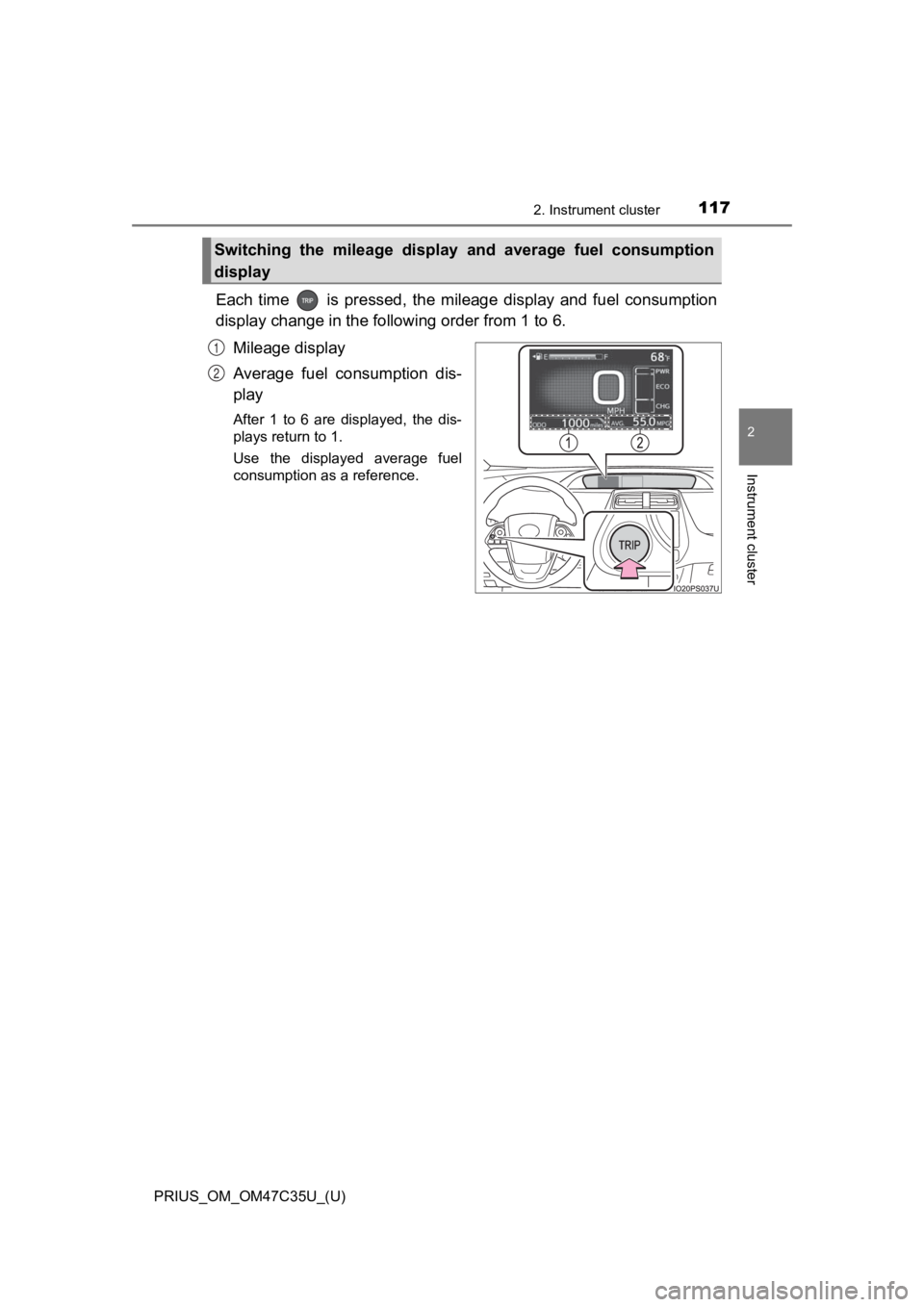
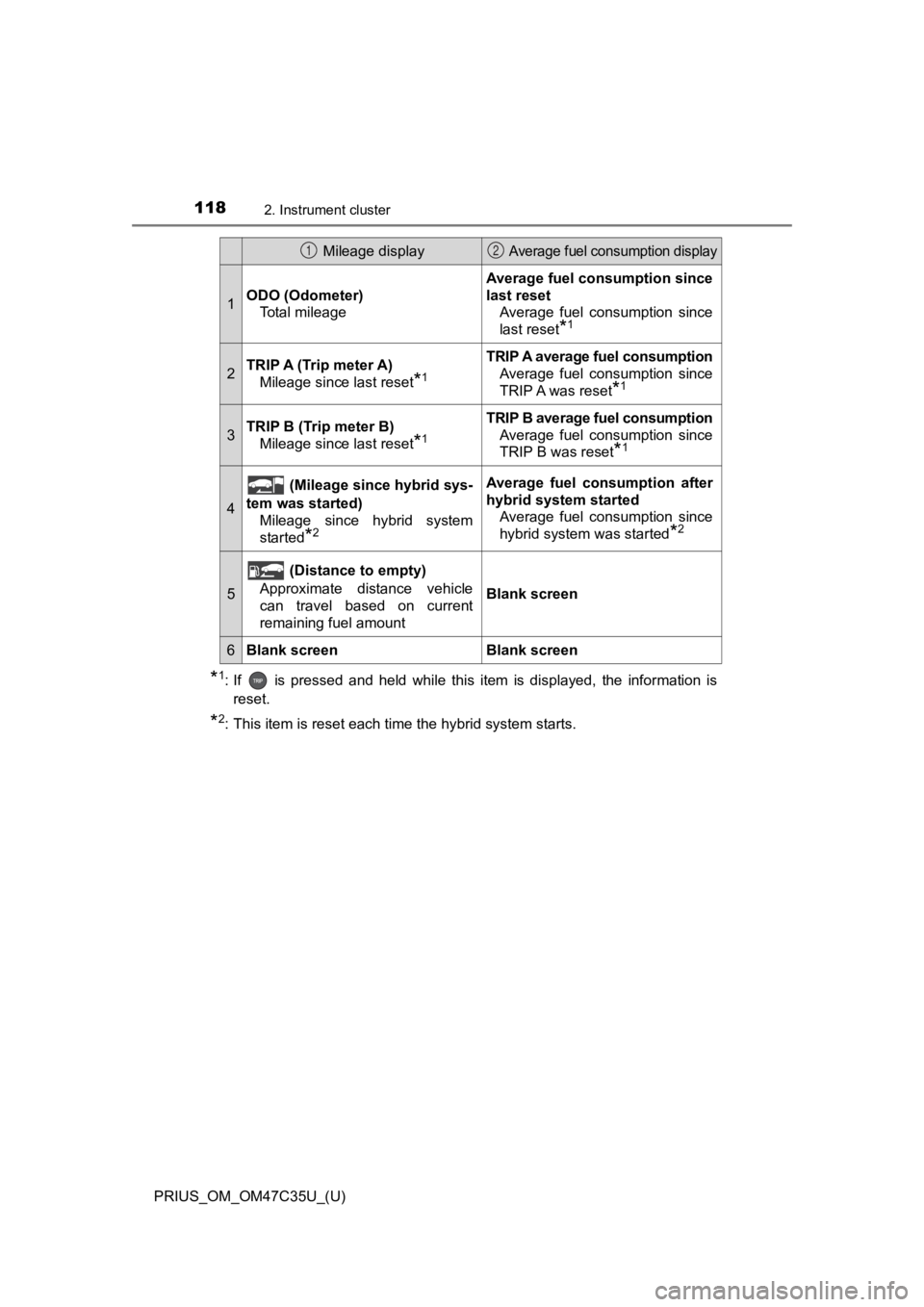
Each time is pressed, the mileage display and fuel consumption
display change in the following order from 1 to 6.
Mileage display
Average fuel consumption dis-
play
After 1 to 6 are displayed, the dis-
plays return to 1.
Use the displayed average fuel
consumption as a reference.
Switching the mileage display and average fuel consumption
display
1
2
Page 118 of 828
118
PRIUS_OM_OM47C35U_(U)
2. Instrument cluster
*1: If is pressed and held while this item is displayed, the information is
reset.
*2: This item is reset each time the hybrid system starts.
Mileage display Average fuel consumption display
1ODO (Odometer) Total mileage
Average fuel consumption since
last resetAverage fuel consumption since
last reset
*1
2TRIP A (Trip meter A)Mileage since last reset
*1
TRIP A average fuel consumption
Average fuel consumption since
TRIP A was reset
*1
3TRIP B (Trip meter B)Mileage since last reset
*1
TRIP B average fuel consumptionAverage fuel consumption since
TRIP B was reset
*1
4
(Mileage since hybrid sys-
tem was started) Mileage since hybrid system
started
*2
Average fuel con sumption after
hybrid system started Average fuel consumption since
hybrid system was started
*2
5
(Distance to empty)
Approximate distance vehicle
can travel based on current
remaining fuel amount
Blank screen
6Blank screenBlank screen
12
Page 120 of 828
120
PRIUS_OM_OM47C35U_(U)
2. Instrument cluster
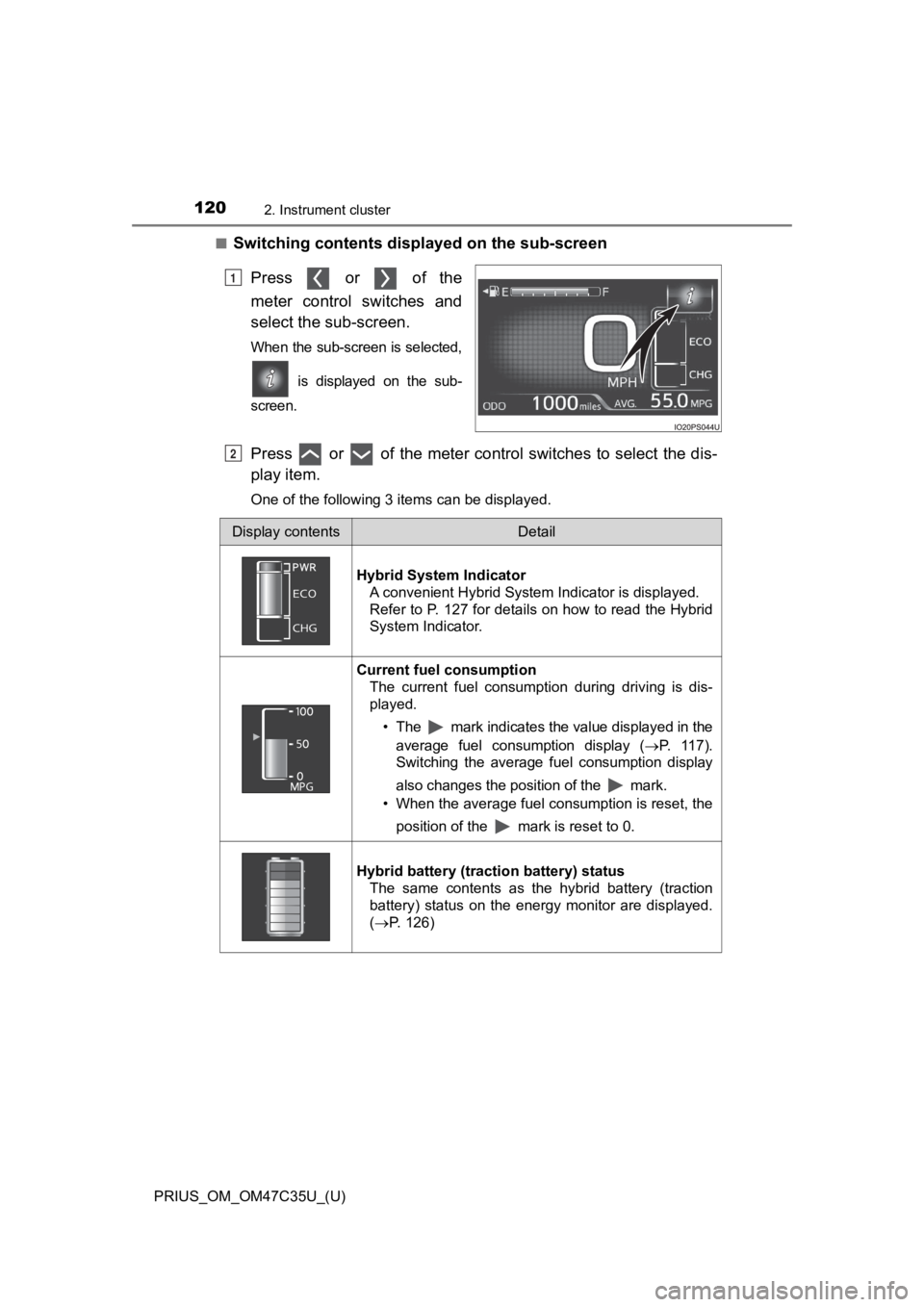
■Switching contents displayed on the sub-screen
Press or of the
meter control switches and
select the sub-screen.
When the sub-screen is selected,
is displayed on the sub-
screen.
Press or of the meter control switches to select the dis-
play item.
One of the following 3 items can be displayed.
1
2
Display contentsDetail
Hybrid System Indicator A convenient Hybrid System Indicator is displayed.
Refer to P. 127 for details on how to read the Hybrid
System Indicator.
Current fuel consumption
The current fuel consumption during driving is dis-
played.
• The mark indicates the value displayed in theaverage fuel consumption display ( P. 117).
Switching the average fuel consumption display
also changes the position of the mark.
• When the average fuel consumption is reset, the
position of the mark is reset to 0.
Hybrid battery (traction battery) status The same contents as the hybrid battery (traction
battery) status on the energy monitor are displayed.
(P. 126)
Page 123 of 828
PRIUS_OM_OM47C35U_(U)
1232. Instrument cluster
2
Instrument cluster
*1: If equipped
*2: When there is a warning message that can be displayed, the color of
changes to amber.
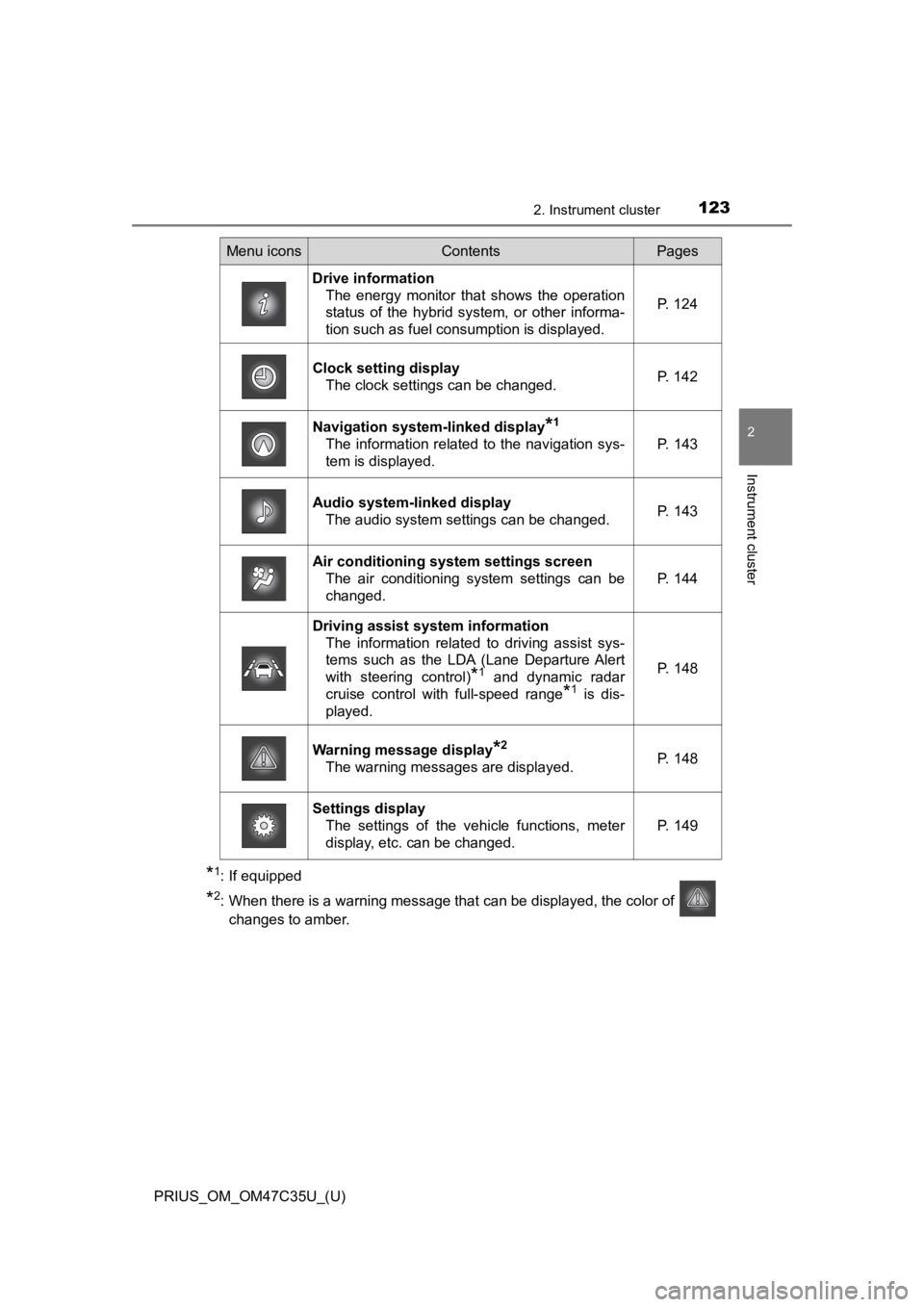
Menu iconsContentsPages
Drive information The energy monitor that shows the operation
status of the hybrid system, or other informa-
tion such as fuel consumption is displayed. P. 124
Clock setting display
The clock settings can be changed. P. 142
Navigation system-linked display*1
The information related to the navigation sys-
tem is displayed.P. 143
Audio system-linked display
The audio system settings can be changed.P. 143
Air conditioning system settings screenThe air conditioning system settings can be
changed.
P. 144
Driving assist system information
The information related to driving assist sys-
tems such as the LDA (Lane Departure Alert
with steering control)
*1 and dynamic radar
cruise control with full-speed range
*1 is dis-
played.
P. 148
Warning message display*2
The warning messages are displayed.P. 148
Settings display The settings of the vehicle functions, meter
display, etc. can be changed.
P. 149
Page 124 of 828
124
PRIUS_OM_OM47C35U_(U)
2. Instrument cluster
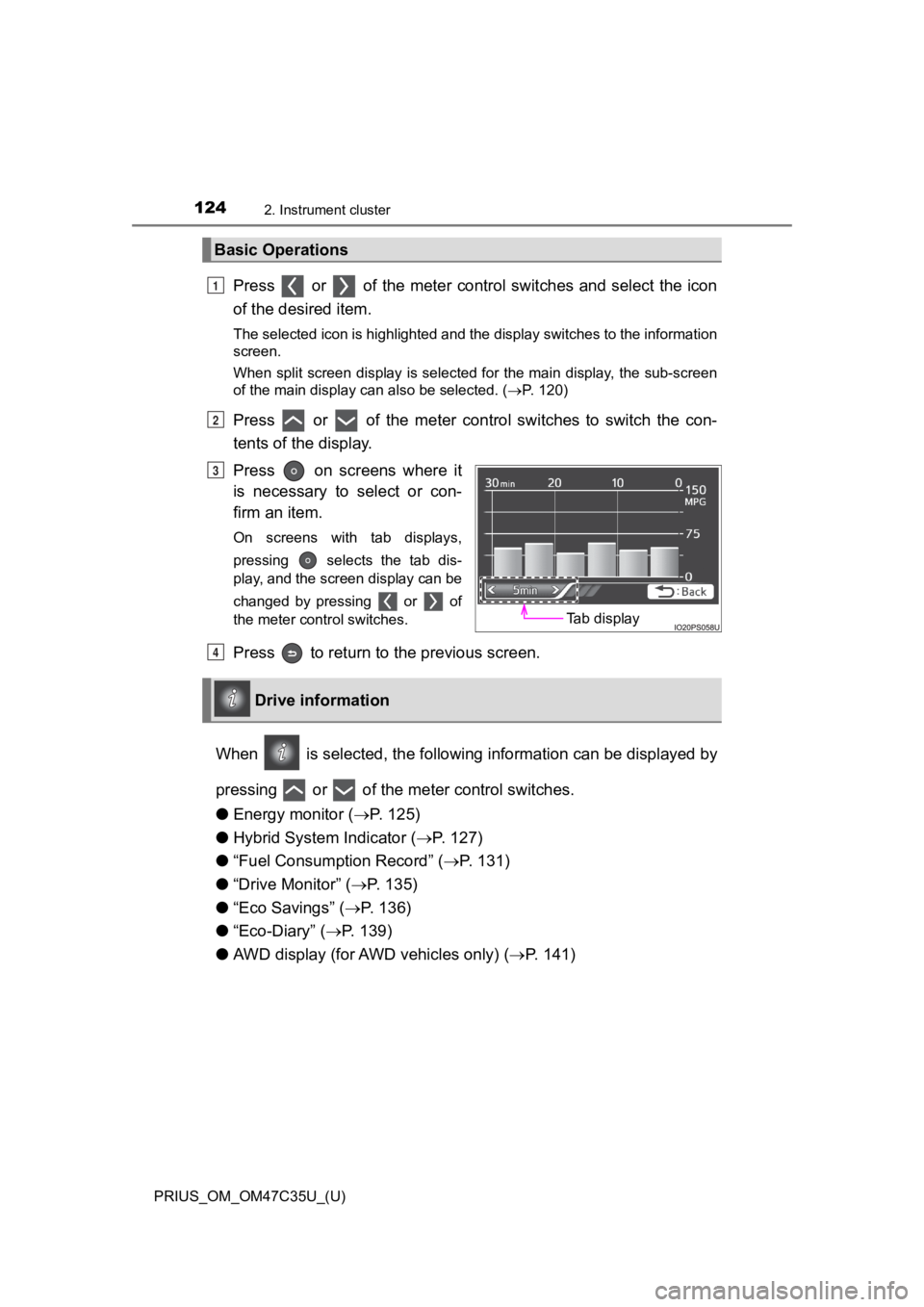
Press or of the meter control switches and select the icon
of the desired item.
The selected icon is highlighted and the display switches to the information
screen.
When split screen display is selected for the main display, the sub-screen
of the main display can also be selected. ( P. 120)
Press or of the meter control switches to switch the con-
tents of the display.
Press on screens where it
is necessary to select or con-
firm an item.
On screens with tab displays,
pressing selects the tab dis-
play, and the screen display can be
changed by pressing or of
the meter control switches.
Press to return to the previous screen.
When is selected, the following information can be displayed by
pressing or of the meter control switches.
● Energy monitor ( P. 125)
● Hybrid System Indicator ( P. 127)
● “Fuel Consumption Record” ( P. 1 3 1 )
● “Drive Monitor” ( P. 1 3 5 )
● “Eco Savings” ( P. 136)
● “Eco-Diary” ( P. 139)
● AWD display (for AWD vehicles only) ( P. 141)
Basic Operations
1
2
Tab display
P
Drive information
4
Page 131 of 828
PRIUS_OM_OM47C35U_(U)
1312. Instrument cluster
2
Instrument cluster
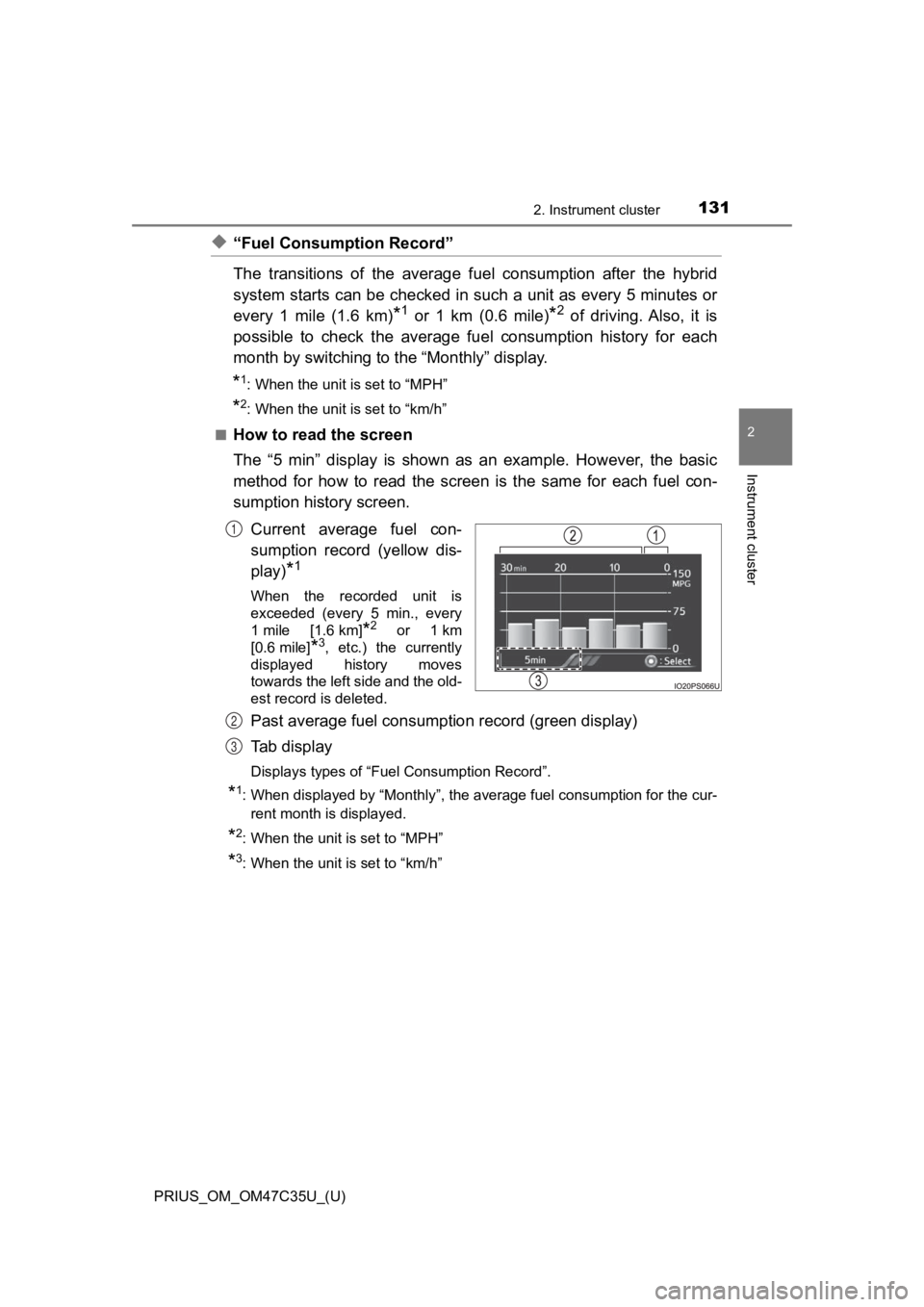
◆“Fuel Consumption Record”
The transitions of the average fuel consumption after the hybrid
system starts can be checked in such a unit as every 5 minutes or
every 1 mile (1.6 km)
*1 or 1 km (0.6 mile)*2 of driving. Also, it is
possible to check the average fu el consumption history for each
month by switching to the “Monthly” display.
*1: When the unit is set to “MPH”
*2: When the unit is set to “km/h”
■
How to read the screen
The “5 min” display is shown as an example. However, the basic
method for how to read the screen is the same for each fuel con -
sumption history screen.
Current average fuel con-
sumption record (yellow dis-
play)
*1
When the recorded unit is
exceeded (every 5 min., every
1mile [1.6km]
*2 or 1km
[0.6 mile]
*3, etc.) the currently
displayed history moves
towards the left side and the old-
est record is deleted.
Past average fuel consumption record (green display)
Tab display
Displays types of “Fuel Consumption Record”.
*1: When displayed by “Monthly”, the average fuel consumption for the cur-
rent month is displayed.
*2: When the unit is set to “MPH”
*3: When the unit is set to “km/h”
1
2
3