USB TOYOTA PRIUS 2021 Accessories, Audio & Navigation (in English)
[x] Cancel search | Manufacturer: TOYOTA, Model Year: 2021, Model line: PRIUS, Model: TOYOTA PRIUS 2021Pages: 310, PDF Size: 7.07 MB
Page 9 of 310
9
PRIUS_Navi_OM47E22U_(U)
20.04.15 12:08
1
2
3
4
5
6
7
8
9
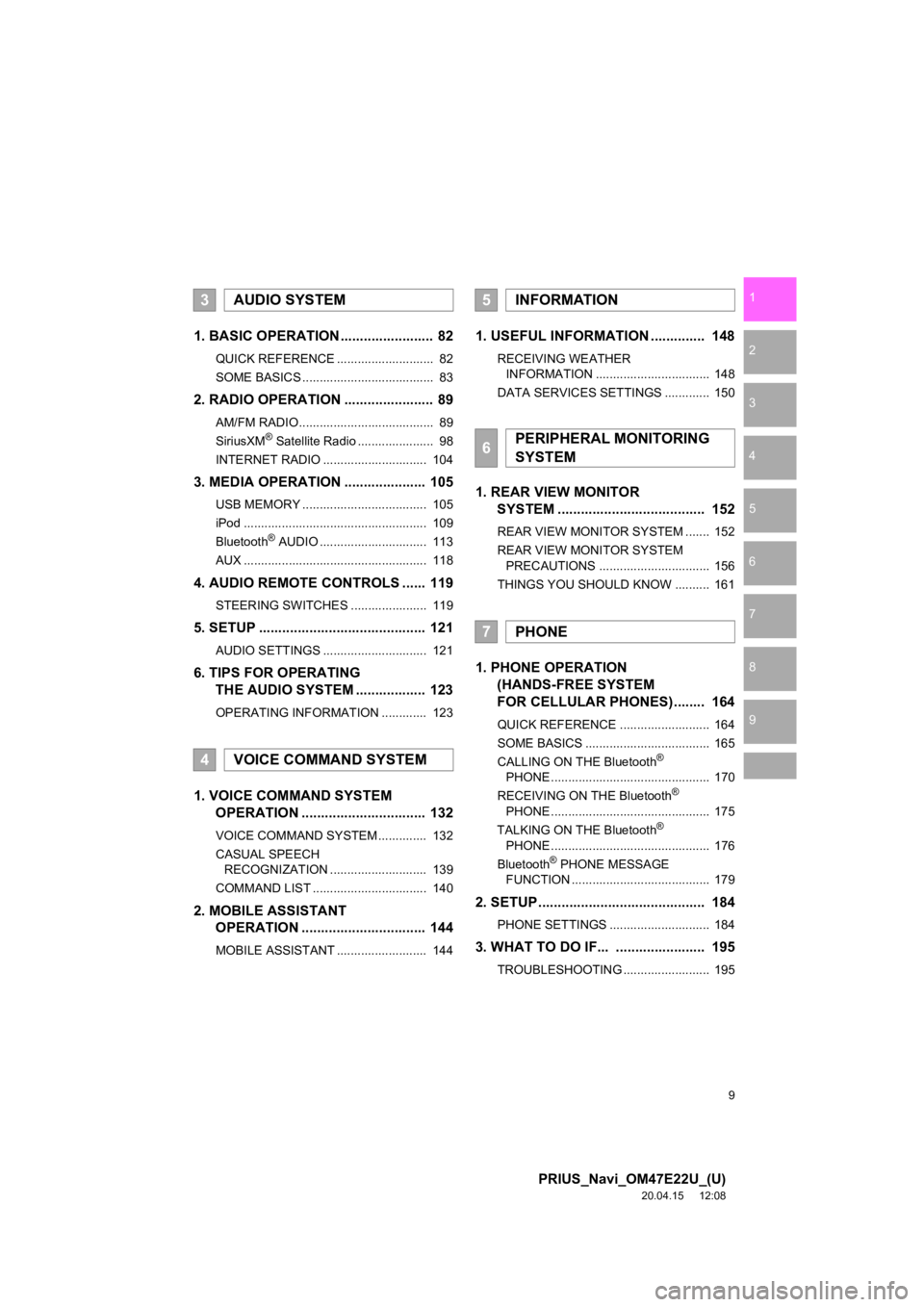
1. BASIC OPERATION ........................ 82
QUICK REFERENCE ............................ 82
SOME BASICS ...................................... 83
2. RADIO OPERATION ....................... 89
AM/FM RADIO....................................... 89
SiriusXM® Satellite Radio ...................... 98
INTERNET RADIO .............................. 104
3. MEDIA OPERATION ..................... 105
USB MEMORY .................................... 105
iPod ..................................................... 109
Bluetooth
® AUDIO ............................... 113
AUX ..................................................... 118
4. AUDIO REMOTE CONTROLS ...... 119
STEERING SWITCHES ...................... 119
5. SETUP ........................................... 121
AUDIO SETTINGS .............................. 121
6. TIPS FOR OPERATING THE AUDIO SYSTEM .................. 123
OPERATING INFORMATION ............. 123
1. VOICE COMMAND SYSTEM OPERATION ................................ 132
VOICE COMMAND SYSTEM .............. 132
CASUAL SPEECH
RECOGNIZATION ............................ 139
COMMAND LIST ................................. 140
2. MOBILE ASSISTANT OPERATION ................................ 144
MOBILE ASSISTANT .......................... 144
1. USEFUL INFORMATION .............. 148
RECEIVING WEATHER
INFORMATION ................................. 148
DATA SERVICES SETTINGS ............. 150
1. REAR VIEW MONITOR SYSTEM ....... ............................ ... 152
REAR VIEW MONITOR SYSTEM ....... 152
REAR VIEW MONITOR SYSTEM
PRECAUTIONS ................................ 156
THINGS YOU SHOULD KNOW .......... 161
1. PHONE OPERATION (HANDS-FREE SYSTEM
FOR CELLULAR PHONES)........ 164
QUICK REFERENCE .......................... 164
SOME BASICS .................................... 165
CALLING ON THE Bluetooth
®
PHONE .............................................. 170
RECEIVING ON THE Bluetooth
®
PHONE .............................................. 175
TALKING ON THE Bluetooth
®
PHONE .............................................. 176
Bluetooth
® PHONE MESSAGE
FUNCTION ........................................ 179
2. SETUP........................................... 184
PHONE SETTINGS ............................. 184
3. WHAT TO DO IF... ....................... 195
TROUBLESHOOTING ......................... 195
3AUDIO SYSTEM
4VOICE COMMAND SYSTEM
5INFORMATION
6PERIPHERAL MONITORING
SYSTEM
7PHONE
Page 68 of 310
68
2. CONNECTIVITY SETTINGS
PRIUS_Navi_OM47E22U_(U)
20.04.20 14:08
3. Apple CarPlay®*
1Enable Siri on the device to be con-
nected.
2Connect the device to the USB port.
(P.85)
3Select “Always Enable” or “Enable
Once” .
If “Don’t Enable” is selected, an Apple
CarPlay connection will not be estab-
lished. In this case, the device can be
operated as a normal Apple device, such
as an iPod.
Depending on the device connected, it
may take approximately 3 to 6 seconds
before an Apple CarPlay connection is
established.
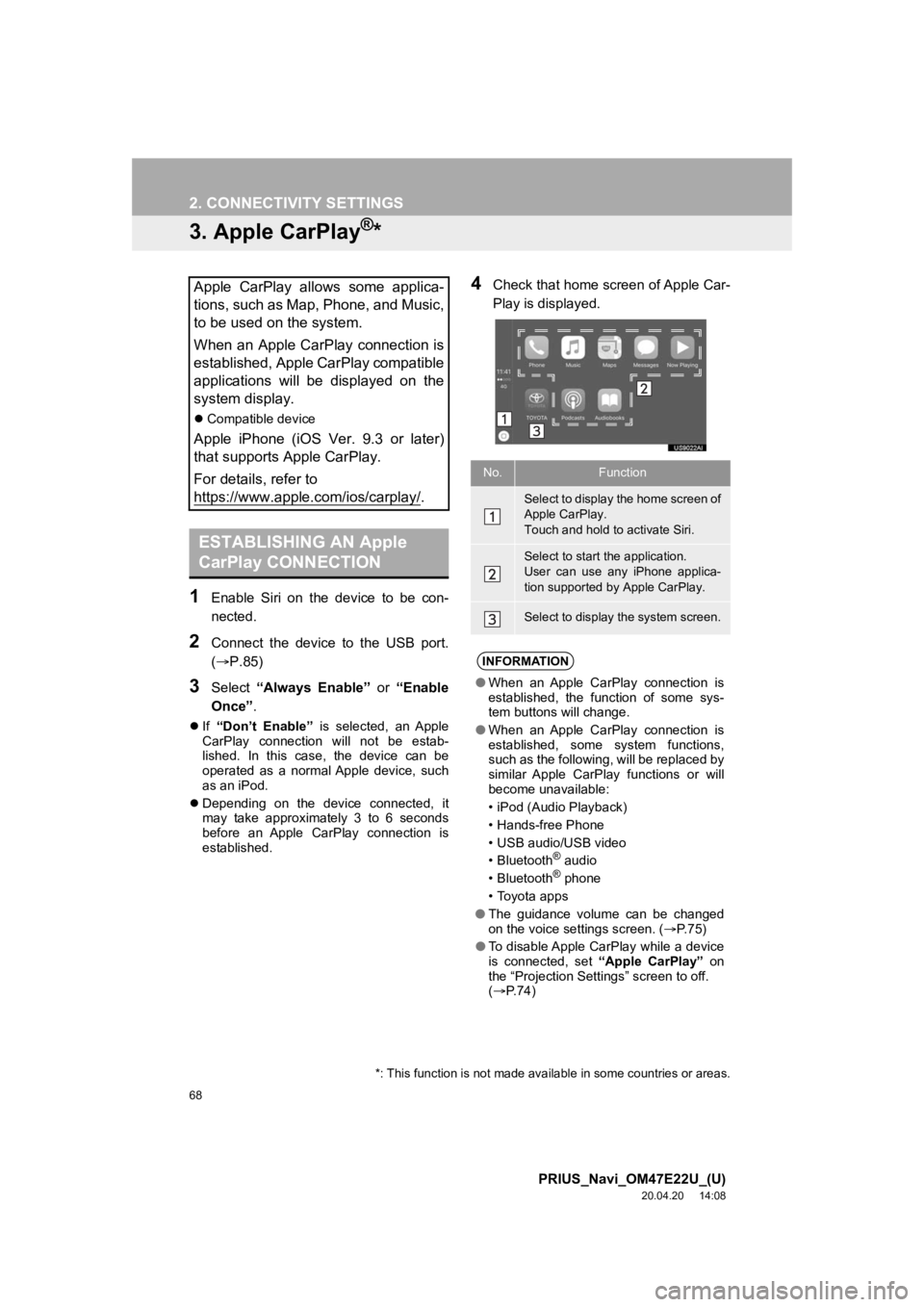
4Check that home screen of Apple Car-
Play is displayed.Apple CarPlay allows some applica-
tions, such as Map, Phone, and Music,
to be used on the system.
When an Apple CarPlay connection is
established, Apple CarPlay compatible
applications will be displayed on the
system display.
Compatible device
Apple iPhone (iOS Ver. 9.3 or later)
that supports Apple CarPlay.
For details, refer to
https://www.apple.com/ios/carplay/
.
ESTABLISHING AN Apple
CarPlay CONNECTION
*: This function is not made avai lable in some countries or areas.
No.Function
Select to display the home screen of
Apple CarPlay.
Touch and hold to activate Siri.
Select to start the application.
User can use any iPhone applica-
tion supported by Apple CarPlay.
Select to display the system screen.
INFORMATION
●When an Apple CarPlay connection is
established, the function of some sys-
tem buttons will change.
● When an Apple CarPlay connection is
established, some system functions,
such as the following, will be replaced by
similar Apple CarPlay functions or will
become unavailable:
• iPod (Audio Playback)
• Hands-free Phone
• USB audio/USB video
•Bluetooth
® audio
•Bluetooth® phone
• Toyota apps
● The guidance volume can be changed
on the voice settings screen. ( P. 7 5 )
● To disable Apple CarPlay while a device
is connected, set “Apple CarPlay” on
the “Projection Settings” screen to off.
( P.74)
Page 70 of 310
70
2. CONNECTIVITY SETTINGS
PRIUS_Navi_OM47E22U_(U)
20.04.20 14:08
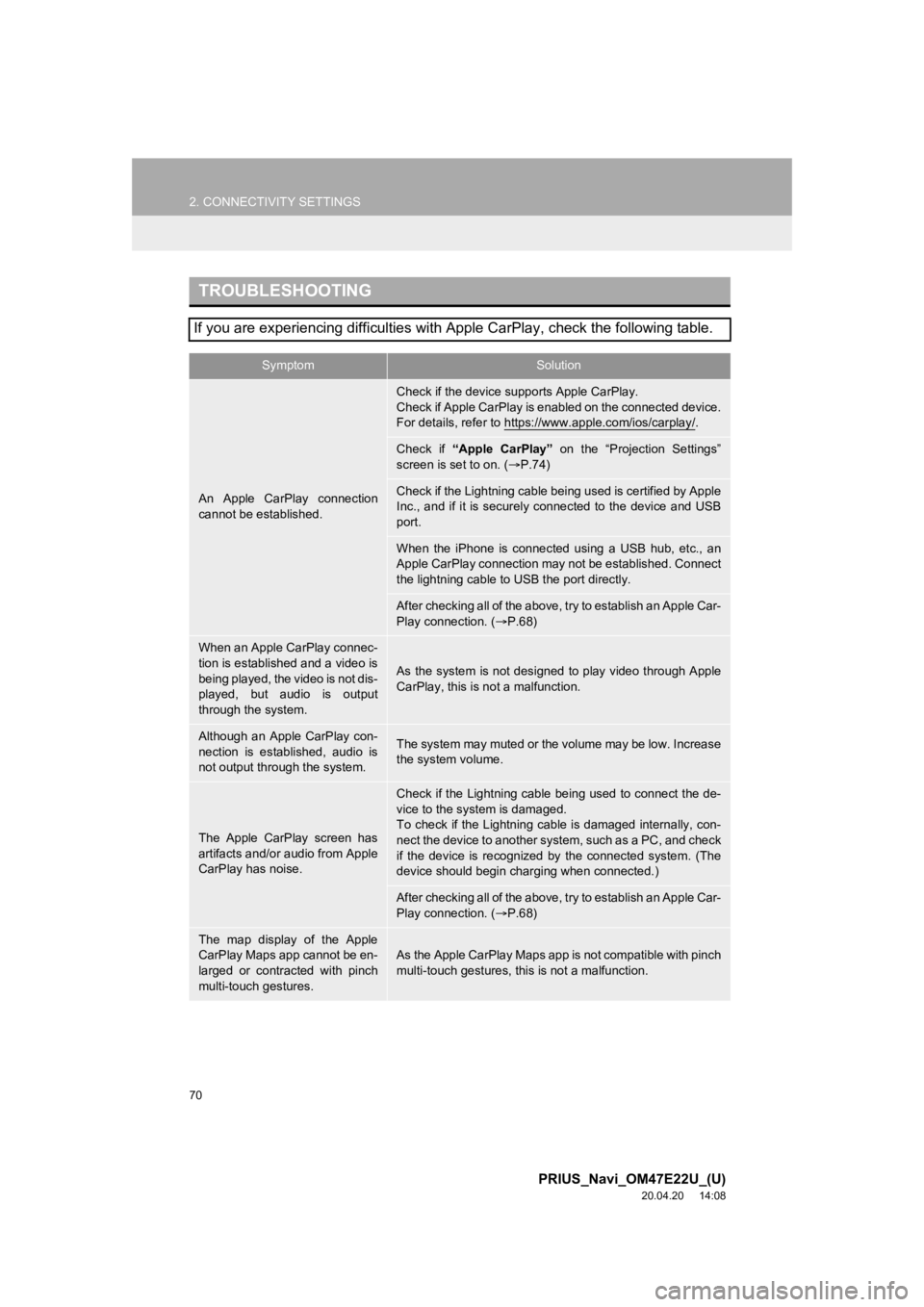
TROUBLESHOOTING
If you are experiencing difficulties with Apple CarPlay, check the following table.
SymptomSolution
An Apple CarPlay connection
cannot be established.
Check if the device supports Apple CarPlay.
Check if Apple CarPlay is enabled on the connected device.
For details, refer to https://www.apple.com/ios/carplay/
.
Check if “Apple CarPlay” on the “Projection Settings”
screen is set to on. ( P.74)
Check if the Lightning cable bei ng used is certified by Apple
Inc., and if it is securely connected to the device and USB
port.
When the iPhone is connected using a USB hub, etc., an
Apple CarPlay connection may not be established. Connect
the lightning cable to USB the port directly.
After checking all of the above, t ry to establish an Apple Car-
Play connection. ( P.68)
When an Apple CarPlay connec-
tion is established and a video is
being played, the video is not dis-
played, but audio is output
through the system.
As the system is not designed to play video through Apple
CarPlay, this is not a malfunction.
Although an Apple CarPlay con-
nection is established, audio is
not output through the system.The system may muted or the volume may be low. Increase
the system volume.
The Apple CarPlay screen has
artifacts and/or audio from Apple
CarPlay has noise.
Check if the Lightning cable being used to connect the de-
vice to the system is damaged.
To check if the Lightning cable is damaged internally, con-
nect the device to another system, such as a PC, and check
if the device is recognized by the connected system. (The
device should begin char ging when connected.)
After checking all of the above, t ry to establish an Apple Car-
Play connection. ( P.68)
The map display of the Apple
CarPlay Maps app cannot be en-
larged or contracted with pinch
multi-touch gestures.As the Apple CarPlay Maps app is not compatible with pinch
multi-touch gestures, this is not a malfunction.
Page 74 of 310
74
3. OTHER SETTINGS
PRIUS_Navi_OM47E22U_(U)
20.03.26 18:17
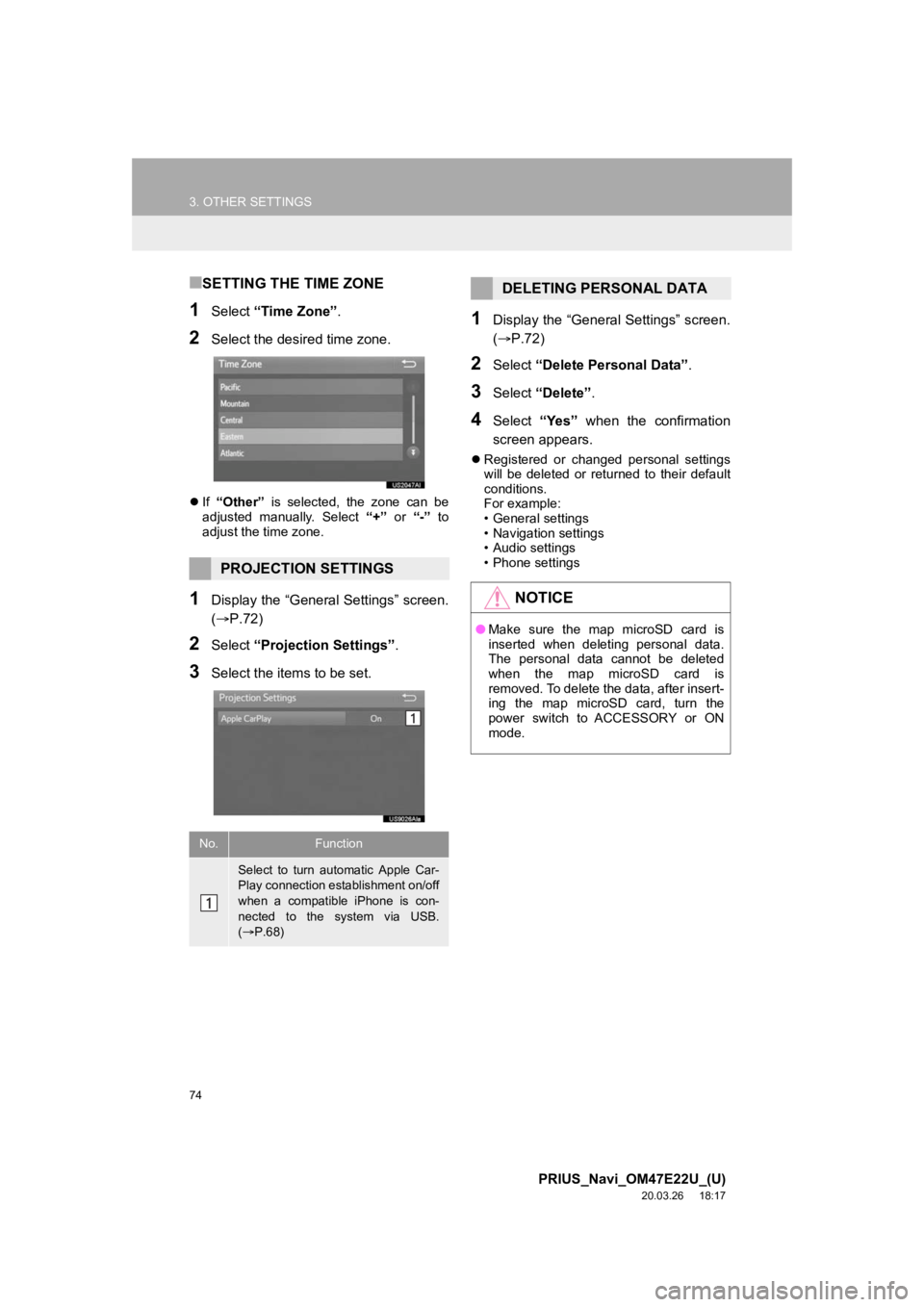
■SETTING THE TIME ZONE
1Select “Time Zone” .
2Select the desired time zone.
If “Other” is selected, the zone can be
adjusted manually. Select “+” or “-” to
adjust the time zone.
1Display the “General Settings” screen.
(P.72)
2Select “Projection Settings” .
3Select the items to be set.
1Display the “General Settings” screen.
(P.72)
2Select “Delete Personal Data” .
3Select “Delete” .
4Select “Yes” when the confirmation
screen appears.
Registered or changed personal settings
will be deleted or returned to their default
conditions.
For example:
• General settings
• Navigation settings
• Audio settings
• Phone settings
PROJECTION SETTINGS
No.Function
Select to turn automatic Apple Car-
Play connection establishment on/off
when a compatible iPhone is con-
nected to the system via USB.
( P.68)
DELETING PERSONAL DATA
NOTICE
● Make sure the map microSD card is
inserted when deleting personal data.
The personal data cannot be deleted
when the map microSD card is
removed. To delete the data, after insert-
ing the map microSD card, turn the
power switch to ACCESSORY or ON
mode.
Page 80 of 310
80
PRIUS_Navi_OM47E22U_(U)
20.03.26 18:17
1. QUICK REFERENCE ..................... 82
2. SOME BASICS............................... 83
TURNING THE SYSTEM ON AND OFF ..................................................... 83
SELECTING AN AUDIO SOURCE ........ 84
USB/AUX PORT .................................... 85
“Sound Settings” SCREEN .................... 85
AUDIO SCREEN ADJUSTMENT .......... 87
VOICE COMMAND SYSTEM ................ 88
1. AM/FM RADIO ............................... 89
OVERVIEW ............................................ 89
PRESET BUTTON SCREEN ................. 91
SELECTING A STATION FROM THE LIST ............................................. 92
CACHING A RADIO PROGRAM ........... 92
RADIO BROADCAST DATA SYSTEM .............................................. 94
USING HD Radio™ TECHNOLOGY...... 95
AVAILABLE HD Radio™ TECHNOLOGY.................................... 95
TROUBLESHOOTING GUIDE ............... 97
2. SiriusXM® Satellite Radio ............ 98
OVERVIEW ............................................ 98
HOW TO SUBSCRIBE TO SiriusXM Radio Services................................... 100
DISPLAYING THE RADIO ID............... 101
SELECTING A CHANNEL FROM THE LIST ................................................... 101
IF THE SATELLITE RADIO TUNER MALFUNCTIONS .............................. 102
3. INTERNET RADIO....................... 104
LISTENING TO INTERNET RADIO ..... 104
1BASIC OPERATION2RADIO OPERATION
3
AUDIO SYSTEM
Page 81 of 310
3
81
PRIUS_Navi_OM47E22U_(U)
20.03.26 18:17
1
2
3
4
5
6
7
8
9
1. USB MEMORY ............................. 105
OVERVIEW ......................................... 105
USB AUDIO ......................................... 108
USB VIDEO ......................................... 108
2. iPod .............................................. 109
OVERVIEW ......................................... 109
iPod AUDIO ......................................... 112
3. Bluetooth® AUDIO ...................... 113
OVERVIEW ......................................... 113
CONNECTING A Bluetooth®
DEVICE ............................................. 117
LISTENING TO Bluetooth
® AUDIO ..... 117
4. AUX .............................................. 118
OVERVIEW ......................................... 118
1. STEERING SWITCHES............... 119
1. AUDIO SETTINGS ...................... 121
AUDIO SETTINGS SCREEN............... 121
1. OPERATING INFORMATION ..... 123
RADIO.................................................. 123
iPod ...................................................... 124
FILE INFORMATION ........................... 125
TERMS ................................................ 127
ERROR MESSAGES ........................... 129
3MEDIA OPERATION4AUDIO REMOTE CONTROLS
5SETUP
6TIPS FOR OPERATING THE
AUDIO SYSTEM
AUDIO SYSTEM
Page 82 of 310
82
PRIUS_Navi_OM47E22U_(U)
20.03.26 18:17
1. BASIC OPERATION
1. QUICK REFERENCE
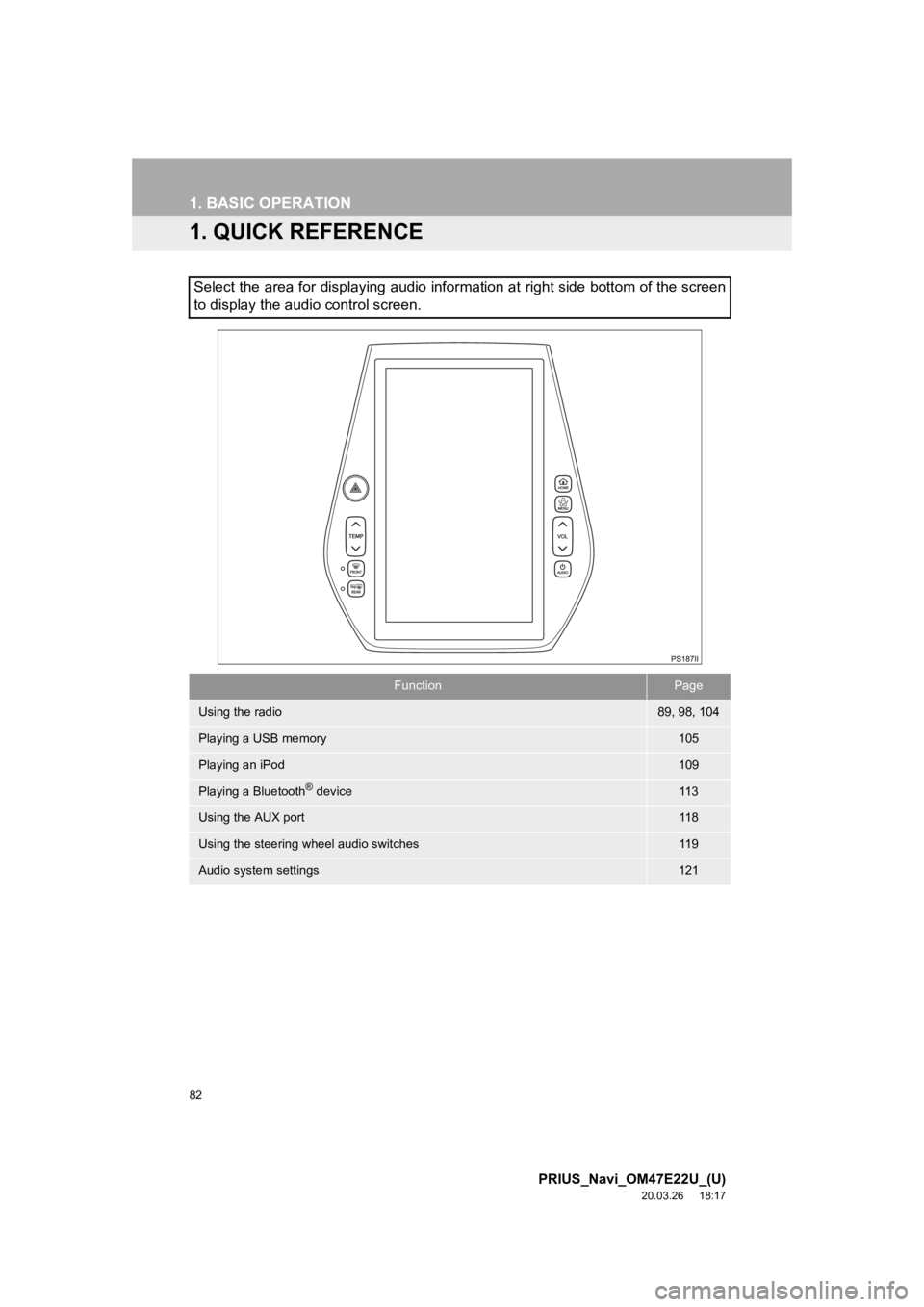
Select the area for displaying audio information at right side bottom of the screen
to display the audio control screen.
FunctionPage
Using the radio89, 98, 104
Playing a USB memory105
Playing an iPod109
Playing a Bluetooth® device11 3
Using the AUX port11 8
Using the steering wheel audio switches11 9
Audio system settings121
Page 84 of 310
84
1. BASIC OPERATION
PRIUS_Navi_OM47E22U_(U)
20.03.26 18:17
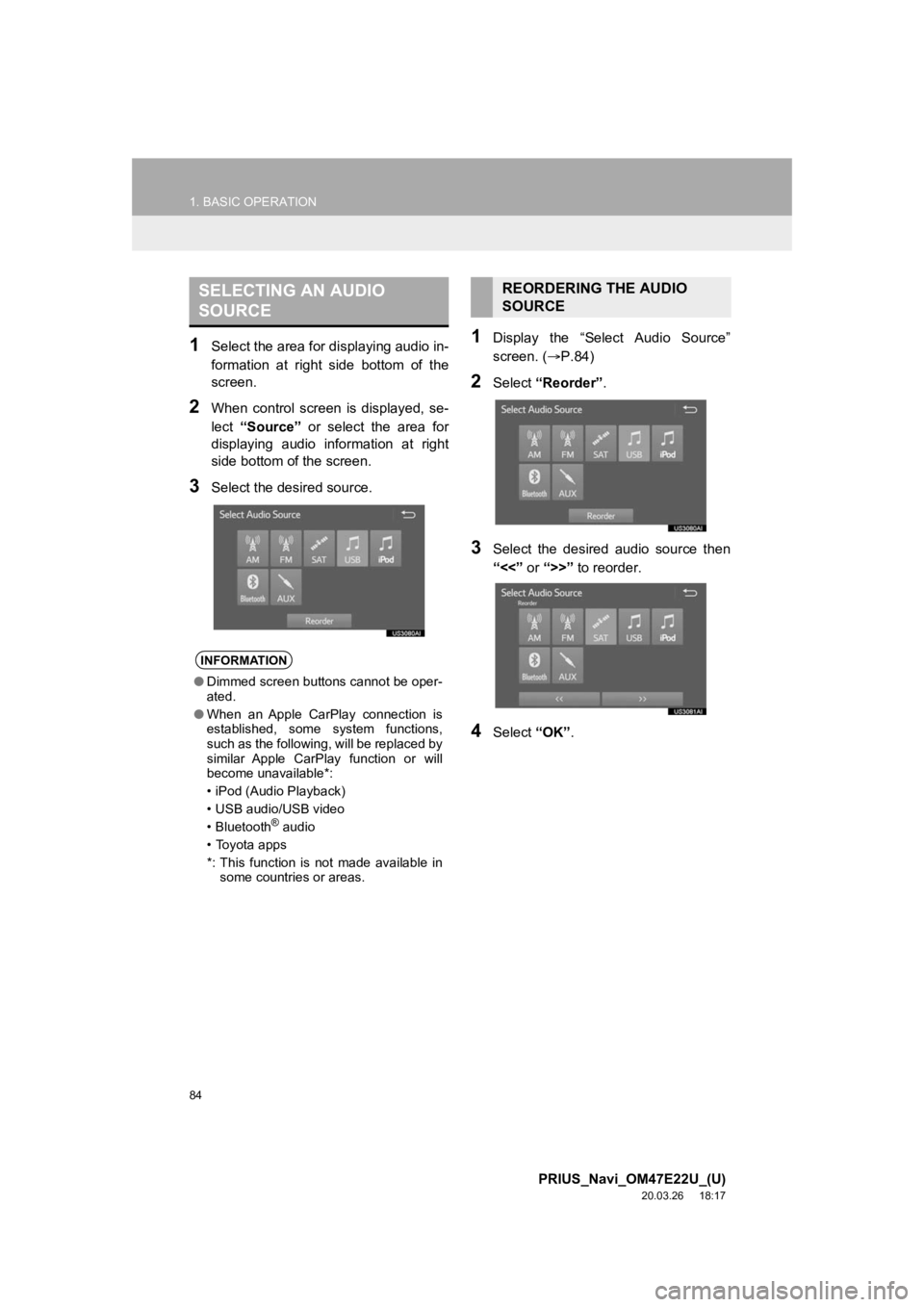
1Select the area for displaying audio in-
formation at right side bottom of the
screen.
2When control screen is displayed, se-
lect “Source” or select the area for
displaying audio information at right
side bottom of the screen.
3Select the desired source.
1Display the “Select Audio Source”
screen. ( P.84)
2Select “Reorder” .
3Select the desired audio source then
“<<” or “>>” to reorder.
4Select “OK”.
SELECTING AN AUDIO
SOURCE
INFORMATION
●Dimmed screen buttons cannot be oper-
ated.
● When an Apple CarPlay connection is
established, some system functions,
such as the following, will be replaced by
similar Apple CarPlay function or will
become unavailable*:
• iPod (Audio Playback)
• USB audio/USB video
• Bluetooth
® audio
• Toyota apps
*: This function is not made available in some countries or areas.
REORDERING THE AUDIO
SOURCE
Page 85 of 310
85
1. BASIC OPERATION
PRIUS_Navi_OM47E22U_(U)
20.03.26 18:17
AUDIO SYSTEM
3
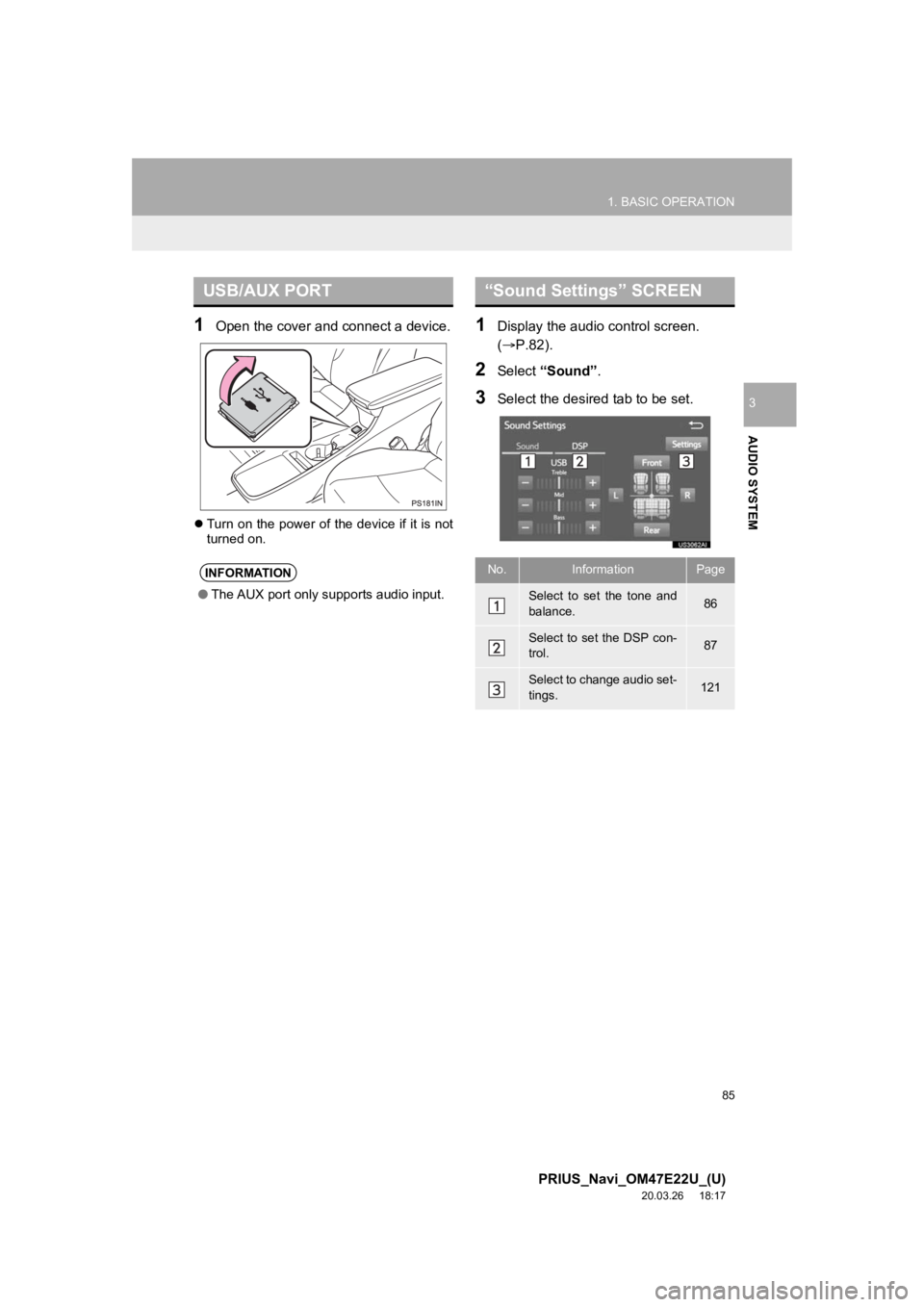
1Open the cover and connect a device.
Turn on the power of the device if it is not
turned on.
1Display the audio control screen.
(P.82).
2Select “Sound” .
3Select the desired tab to be set.
USB/AUX PORT
INFORMATION
●The AUX port only supports audio input.
“Sound Settings” SCREEN
No.InformationPage
Select to set the tone and
balance.86
Select to set the DSP con-
trol.87
Select to change audio set-
tings.121
Page 87 of 310
87
1. BASIC OPERATION
PRIUS_Navi_OM47E22U_(U)
20.03.26 18:17
AUDIO SYSTEM
31Select the “DSP” tab and select the
desired item to be set.
Type A
2Select “Automatic Sound Levelizer” .
3Select “High”, “Mid”, “Low”, or
“Off” .
Type B
2Select “Automatic Sound Levelizer” .
3Select on or off.
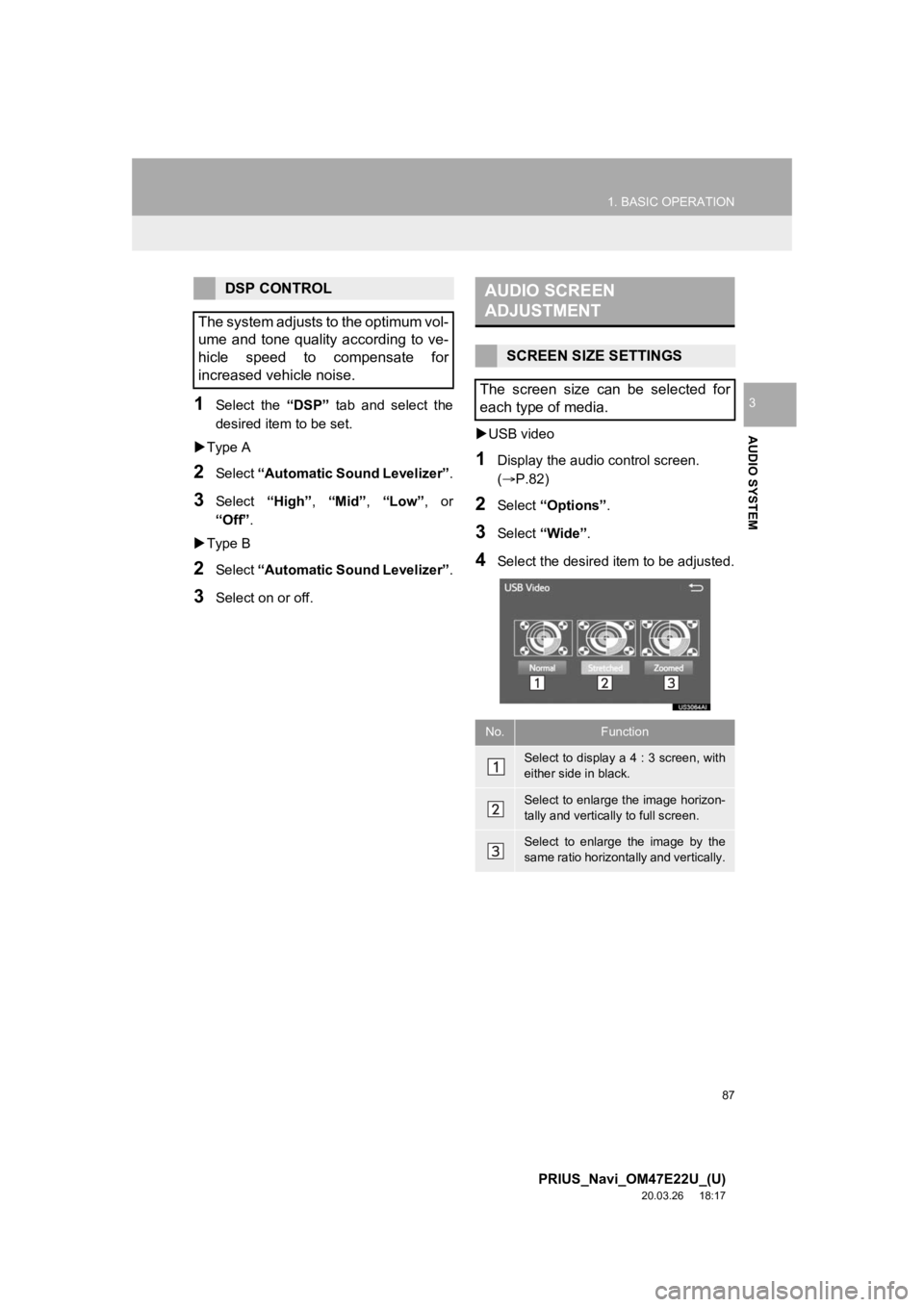
USB video
1Display the audio control screen.
(P.82)
2Select “Options”.
3Select “Wide” .
4Select the desired i tem to be adjusted.
DSP CONTROL
The system adjusts to the optimum vol-
ume and tone quality according to ve-
hicle speed to compensate for
increased vehicle noise.AUDIO SCREEN
ADJUSTMENT
SCREEN SIZE SETTINGS
The screen size can be selected for
each type of media.
No.Function
Select to display a 4 : 3 screen, with
either side in black.
Select to enlarge the image horizon-
tally and vertically to full screen.
Select to enlarge the image by the
same ratio horizontally and vertically.