fog light TOYOTA PRIUS 2021 (in English) User Guide
[x] Cancel search | Manufacturer: TOYOTA, Model Year: 2021, Model line: PRIUS, Model: TOYOTA PRIUS 2021Pages: 740, PDF Size: 17.6 MB
Page 274 of 740
274
PRIUS_OM_OM47E09U_(U)
4-3. Operating the lights and wipers
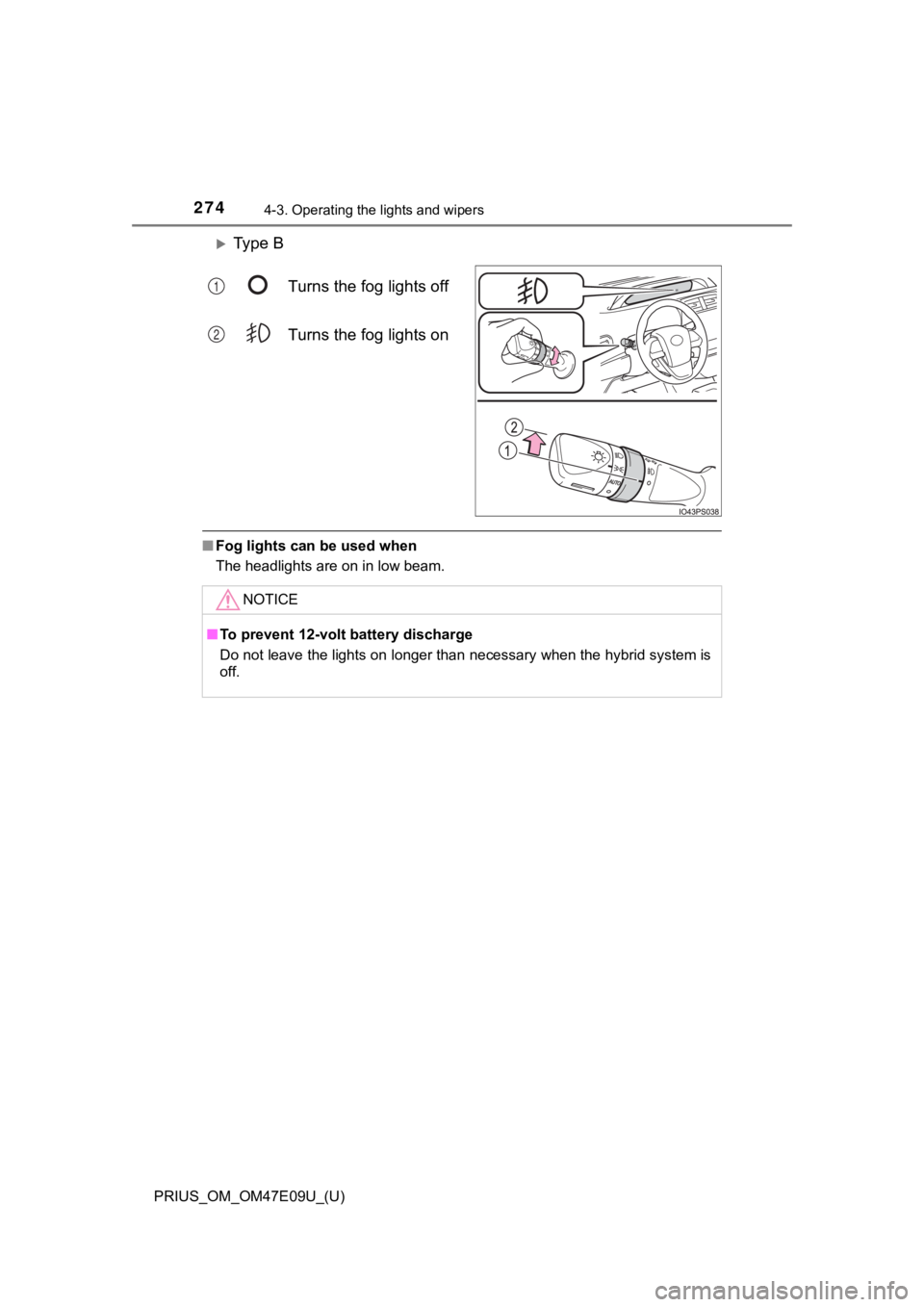
Ty p e BTurns the fog lights off
Turns the fog lights on
■Fog lights can be used when
The headlights are on in low beam.
1
2
NOTICE
■To prevent 12-volt b attery discharge
Do not leave the lights on longer than necessary when the hybri d system is
off.
Page 291 of 740
PRIUS_OM_OM47E09U_(U)
2914-5. Using the driving support systems
4
Driving
WARNING
■To avoid malfunction of the front camera
Observe the following precautions.
Otherwise, the front camera may not operate properly, possibly leading to
an accident resulting in death or serious injury.
● Keep the windshield clean at all times.
• If the windshield is dirty or covered with an oily film, water droplets,
snow, etc., clean the windshield.
• If a glass coating agent is applied to the windshield, it will still be neces-
sary to use the windshield wipers to remove water droplets, etc . from
the area of the windshield in front of the front camera.
• If the inner side of the windshield where the front camera is installed is
dirty, contact your Toyota dealer.
● If the part of the windshield in front of the front camera is f ogged up or cov-
ered with condensation, or ice, use the windshield defogger to remove the
fog, condensation, or ice. ( P. 440, 450)
● If water droplets cannot be properly removed from the area of t he wind-
shield in front of the front camera by the windshield wipers, replace the
wiper insert or wiper blade.
● Do not attach window tint to the windshield.
● Replace the windshield if it is damaged or cracked.
After replacing the windshield, the front camera must be recali brated. Con-
tact your Toyota dealer for details.
● Do not allow liquids to contact the front camera.
● Do not allow bright lights to shine into the front camera.
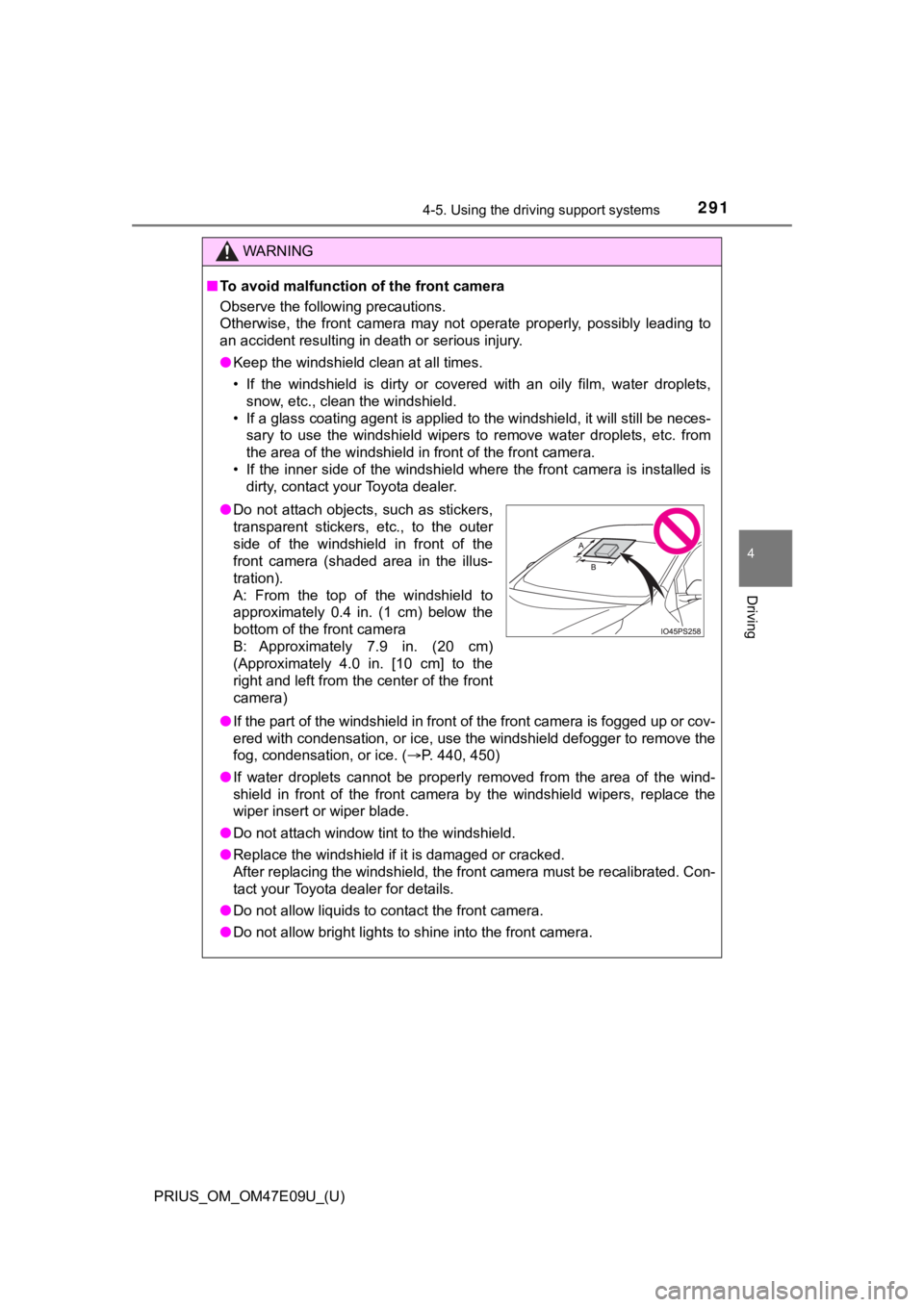
●Do not attach objects, such as stickers,
transparent stickers, etc., to the outer
side of the windshield in front of the
front camera (shaded area in the illus-
tration).
A: From the top of the windshield to
approximately 0.4 in. (1 cm) below the
bottom of the front camera
B: Approximately 7.9 in. (20 cm)
(Approximately 4.0 in. [10 cm] to the
right and left from the center of the front
camera)
Page 295 of 740
PRIUS_OM_OM47E09U_(U)
2954-5. Using the driving support systems
4
Driving
●In the following situations, if the situation has changed (or the vehicle has
been driven for some time) and the normal operating conditions are
detected, the message will disappear and the system will become opera-
tional.
If the message does not disappear, contact your Toyota dealer. • When the temperature around the radar sensor is outside of the opera-
tional range, such as when the vehicle is in the sun or in an e xtremely
cold environment
• When the front camera cannot detect objects in front of the ve hicle, such
as when driving in the dark, snow, or fog, or when bright lights are shining
into the front camera
SituationActions
When the area around a sensor
is covered with dirt, moisture
(fogged up, covered with con-
densation, ice, etc.), or other
foreign matterTo clean the part of the windshield in front
of the front camera, use the windshield
wipers or the windshield defogger of the
air conditioning system ( P. 440, 450).
When the temperature around
the front camera is outside of
the operational range, such as
when the vehicle is in the sun or
in an extremely cold environ-
ment
If the front camera is hot, such as after
the vehicle had been parked in the sun,
use the air conditioning system to
decrease the temperature around the
front camera.
If a sunshade was used when the vehi-
cle was parked, depending on its type,
the sunlight reflected from the surface
of the sunshade may cause the tem-
perature of the front camera to become
excessively high.
If the front camera is cold, such after the
vehicle is parked in an extremely cold
environment, use the air conditioning
system to increase the temperature
around the front camera.
The area in front of the front
camera is obstructed, such as
when the hood is open or a
sticker is attached to the part of
the windshield in front of the
front camera.
Close the hood, remove the sticker, etc.
to clear the obstruction.
Page 324 of 740
324
PRIUS_OM_OM47E09U_(U)
4-5. Using the driving support systems
In the following situations, the RSA syst em will notify the driver.
● When the vehicle speed exceeds the speed notification threshold of
the speed limit sign displayed, the sign display will be emphas ized
and a buzzer will sound.
● When the RSA system recognizes a do not enter sign and deter-
mines that your vehicle has ent ered a no-entry area, the displayed
sign will flash and a buzzer will sound.
Depending on the situation, a not ification function may not operate
properly.
■ Setting procedure
P. 151
■ Automatic turn-off of RSA sign display
In the following situations, a displayed speed limit sign and/o r do not enter
sign will stop being displayed automatically:
● No sign has been recognized for a certain distance.
● The road changes due to a left or right turn, etc.
In the following situations, stop and yield signs will stop bei ng displayed auto-
matically:
● The system determines that your vehicle has passed the sign.
● The road changes due to a left or right turn, etc.
■ Conditions in which the function may not operate or detect correctly
In the following situations, RSA does not operate normally and may not rec-
ognize signs, display the incorrect sign, etc. However, this do es not indicate a
malfunction.
● The front camera is misaligned due to a strong impact being applied to the
sensor, etc.
● Dirt, snow, stickers, etc. are on the windshield near the front camera.
● In inclement weather such as heavy rain, fog, snow or sand storms
● Light from an oncoming vehicle, the sun, etc. enters the front camera.
● The sign is dirty, faded, tilted or bent.
● The contrast of electronic sign is low.
● All or part of the sign is hidden by the leaves of a tree, a pole, etc.
● The sign is only visible to the front camera for a short amount of time.
● The driving scene (turning, lane change, etc.) is judged incorr ectly.
● If a sign not appropriate for the currently traveled lane, but the sign exists
directly after a freeway branches, or in an adjacent lane just before merging.
● Stickers are attached to the rear of the preceding vehicle.
Notification function
Page 381 of 740
PRIUS_OM_OM47E09U_(U)
3814-5. Using the driving support systems
4
Driving
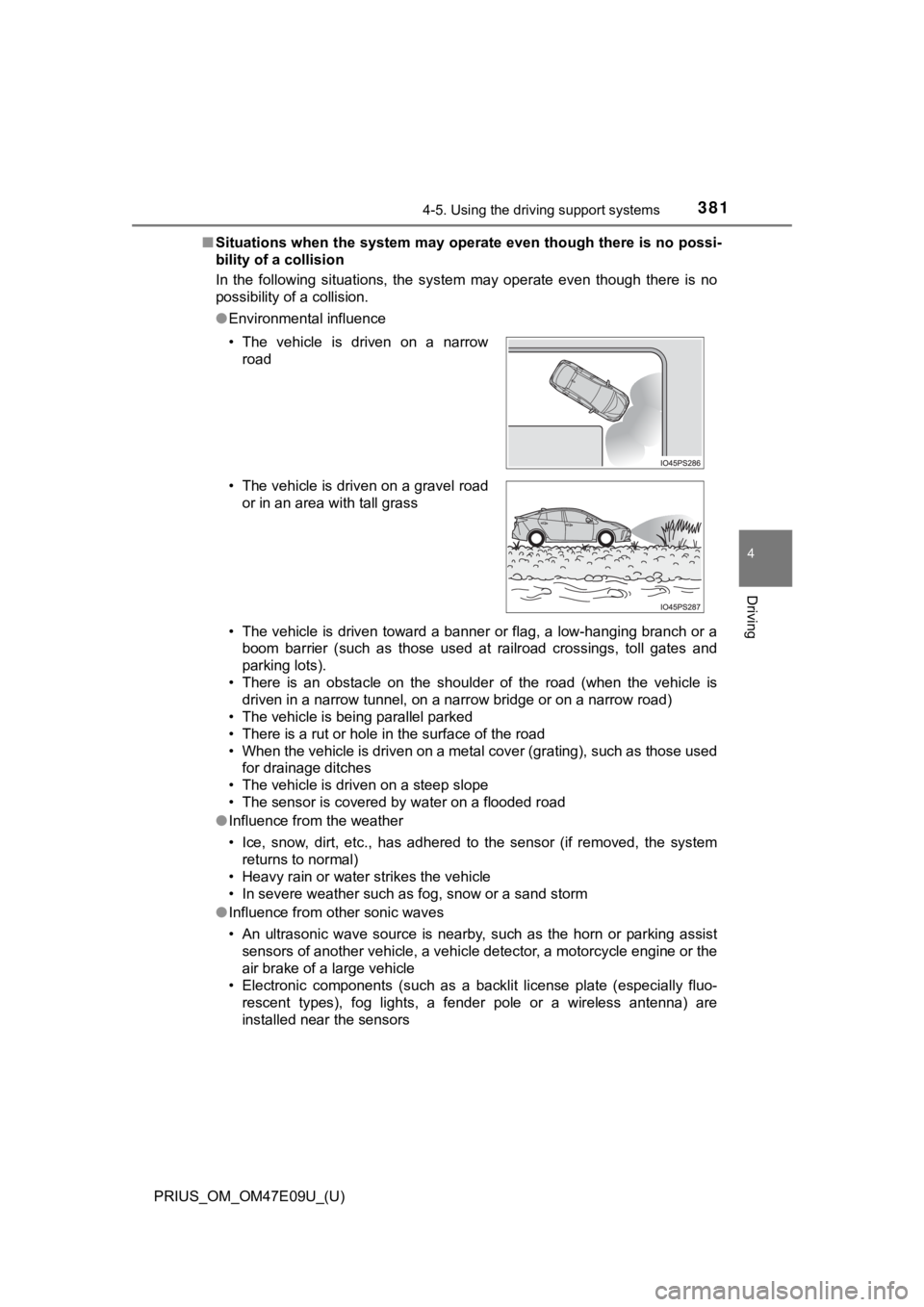
■Situations when the system may operate even though there is no possi-
bility of a collision
In the following situations, the system may operate even though there is no
possibility of a collision.
● Environmental influence
• The vehicle is driven toward a banner or flag, a low-hanging branch or a
boom barrier (such as those used at railroad crossings, toll gates and
parking lots).
• There is an obstacle on the shoulder of the road (when the veh icle is
driven in a narrow tunnel, on a narrow bridge or on a narrow road)
• The vehicle is being parallel parked
• There is a rut or hole in the surface of the road
• When the vehicle is driven on a metal cover (grating), such as those used
for drainage ditches
• The vehicle is driven on a steep slope
• The sensor is covered by water on a flooded road
● Influence from the weather
• Ice, snow, dirt, etc., has adhered to the sensor (if removed, the system
returns to normal)
• Heavy rain or water strikes the vehicle
• In severe weather such as fog, snow or a sand storm
● Influence from other sonic waves
• An ultrasonic wave source is nearby, such as the horn or parki ng assist
sensors of another vehicle, a vehicle detector, a motorcycle en gine or the
air brake of a large vehicle
• Electronic components (such as a backlit license plate (especially fluo-
rescent types), fog lights, a fender pole or a wireless antenna ) are
installed near the sensors
• The vehicle is driven on a narrow
road
• The vehicle is driven on a gravel road or in an area with tall grass
Page 383 of 740

PRIUS_OM_OM47E09U_(U)
3834-5. Using the driving support systems
4
Driving
●Influence from other sonic waves
• An ultrasonic wave source is nearby, such as the horn or parki ng assist
sensors of another vehicle, a vehicle detector, a motorcycle en gine or the
air brake of a large vehicle
• Electronic components (such as a backlit license plate (especially fluo- rescent types), fog lights, a fender pole or a wireless antenna ) are
installed near the sensors
● Changes in the vehicle
• When driving with the shift position in N
• The vehicle is tilted a large amount
• The height of the vehicle has drastically changed due to the c arried load
(the nose tilts up or down)
• The direction of the sensor has deviated due to a collision or other impact
■ Parking Support Brake function while the Simple Advanced Parkin g
Guidance System is operating
P. 388
■ When removing and instal ling the 12-volt battery
The system needs to be initialized.
The system can be initialized by driving the vehicle straight a head for 5 sec-
onds or more at a speed of approximately 22 mph (35 km/h) or hi gher.
■ When “PKSB Unavailable” is displayed on the multi-information display
and the PKSB OFF indicator flashes
●Ice, snow, dirt, etc., may have adhered to the sensor. If this occurs, remove
the ice, snow, dirt, etc., from the sensor to return the system to normal.
Also, a warning message may be displayed at low temperatures du e to ice
forming on the sensor, and the sensor may not detect obstacles. Once the
ice melts, the system will return to normal.
● If this message is shown even after removing dirt from the sensor, or shown
when the sensor was not dirty to begin with, have the vehicle i nspected at
your Toyota dealer.
● System initialization may not have been performed after removal and instal-
lation of the 12-volt battery. Perform system initialization.
■ When “PKSB Malfunction Visit Your Dealer” is displayed on the m ulti-
information display, the PKSB OFF indicator flashes and the buz zer
sounds
The system may not be operating properly. Have the vehicle inspected at
your Toyota dealer.
Page 435 of 740
435
PRIUS_OM_OM47E09U_(U)
5Interior features
5-1. Using the air conditioning system and defogger
Automatic air conditioning system (vehicles with
7-inch display) ................. 436
Automatic air conditioning system (vehicles with
11.6-inch display) ............ 446
Heated steering wheel/ seat heaters .................... 456 5-2. Using the interior lights
Interior lights list ................ 458• Front interior light .......... 459
• Front personal lights ..... 459
• Rear interior light .......... 460
5-3. Using the storage features
List of storage features ..... 461 • Glove box...................... 462
• Console box .................. 462
• Cup holders .................. 463
• Bottle holders/
door pockets ................. 464
• Auxiliary boxes.............. 465
• Seat back pockets ........ 466
Luggage compartment features ........................... 467
5-4. Using the other interior features
Other interior features ....... 473 • Sun visors ..................... 473
• Vanity mirrors................ 473
• Power outlets ................ 474
• USB charging ports....... 475
• Wireless charger ........... 477
• Armrest ......................... 486
• Coat hooks.................... 486
• Assist grips ................... 487
Garage door opener.......... 488
Page 457 of 740
PRIUS_OM_OM47E09U_(U)
4575-1. Using the air conditioning system and defogger
5
Interior features
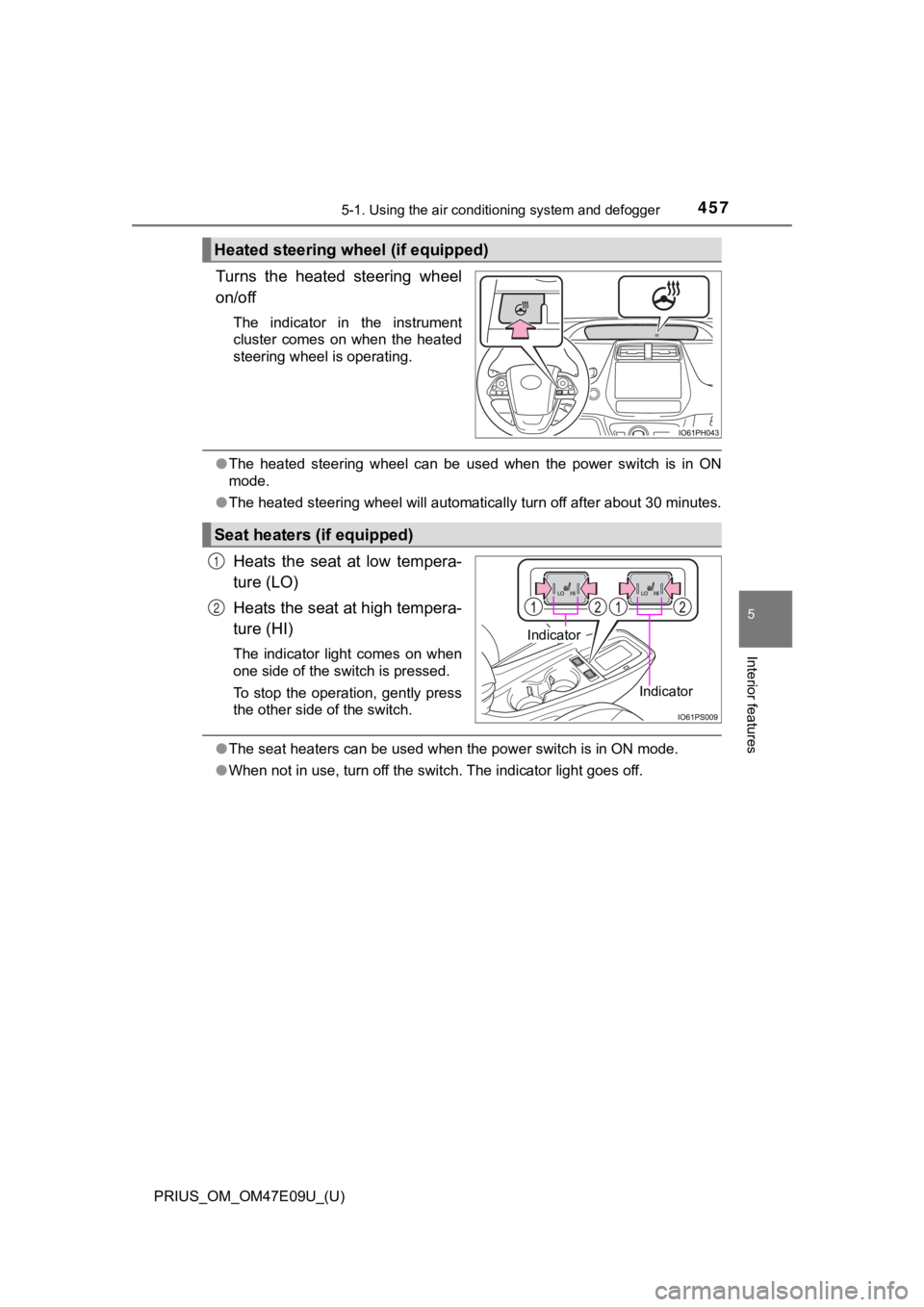
Turns the heated steering wheel
on/off
The indicator in the instrument
cluster comes on when the heated
steering wheel is operating.
●The heated steering wheel can be used when the power switch is in ON
mode.
● The heated steering wheel will automatically turn off after about 30 minutes.
Heats the seat at low tempera-
ture (LO)
Heats the seat at high tempera-
ture (HI)
The indicator light comes on when
one side of the switch is pressed.
To stop the operation, gently press
the other side of the switch.
●The seat heaters can be used when the power switch is in ON mod e.
● When not in use, turn off the switch. The indicator light goes off.
Heated steering wheel (if equipped)
Seat heaters (if equipped)
Indicator
Indicator
1
2
Page 504 of 740
504
PRIUS_OM_OM47E09U_(U)
6-1. Maintenance and care
NOTICE
■Cleaning detergents
● Do not use the following types of detergent, as they may discol or the vehi-
cle interior or cause streaks or damage to painted surfaces:
• Non-seat portions: Organic substances such as benzene or gasol ine,
alkaline or acidic solutions, dye, and bleach
• Seats: Alkaline or acidic solutions, such as thinner, benzene, and alco-
hol
● Do not use polish wax or polish cleaner. The instrument panel’s or other
interior part’s painted surface may be damaged.
■ Preventing damage to leather surfaces
Observe the following precautions to avoid damage to and deterioration of
leather surfaces:
● Remove any dust or dirt from leather surfaces immediately.
● Do not expose the vehicle to direct sunlight for extended perio ds of time.
Park the vehicle in the shade, especially during summer.
● Do not place items made of vinyl, plastic, or containing wax on the uphol-
stery, as they may stick to the leather surface if the vehicle interior heats
up significantly.
■ Water on the floor
Do not wash the vehicle floor with water.
Vehicle systems such as the audio system may be damaged if wate r comes
into contact with electrical components such as the audio syste m above or
under the floor of the vehicle. Water may also cause the body to rust.
■ When cleaning the inside of the windshield (vehicles with Toyota
Safety Sense 2.0)
Do not allow glass cleaner to contact the lens. Also, do not to uch the lens.
( P. 289).
■ Cleaning the inside of the rear window
● Do not use glass cleaner to clean the rear window, as this may cause
damage to the rear window defogger heater wires. Use a cloth da mpened
with lukewarm water to gently wipe the window clean. Wipe the w indow in
strokes running parallel to the heater wires.
● Be careful not to scratch or damage the heater wires.
Page 577 of 740

PRIUS_OM_OM47E09U_(U)
5776-3. Do-it-yourself maintenance
6
Maintenance and care
■Replacing the following bulbs
If any of the lights listed below has burnt out, have it replaced by
your Toyota dealer.
● Headlights and daytime running lights
● Parking lights (LED type: if equipped)
● Fog lights
● Front turn signal lights
● Tail lights
● Stop lights
● High mounted stoplight
● License plate lights
■LED lights
The lights other than the parking lights (bulb type: if equippe d), front side
marker lights, rear turn signal lights, rear side maker lights and back-up lights
each consist of a number of LEDs. If any of the LEDs burn out, take your
vehicle to your Toyota dealer to have the light replaced.
■ Condensation build-up on the inside of the lens
Temporary condensation build-up on the inside of the headlight lens does not
indicate a malfunction. Contact your Toyota dealer for more information in the
following situations:
● Large drops of water have built up on the inside of the lens.
● Water has built up inside the light.
■ When replacing light bulbs
P. 565