Battery TOYOTA PRIUS C 2012 NHP10 / 1.G User Guide
[x] Cancel search | Manufacturer: TOYOTA, Model Year: 2012, Model line: PRIUS C, Model: TOYOTA PRIUS C 2012 NHP10 / 1.GPages: 552, PDF Size: 8.27 MB
Page 33 of 552

33
1-1. Hybrid system
1
Before driving
CAUTION
■
Road accident cautions
If your vehicle is involved in an accident, observe the following precautions
to reduce the risk of death or serious injury:
●Stop the vehicle in a safe place to prevent subsequent accidents, shift the
shift lever to P, apply the parking brake, and turn the hybrid system off.
( P. 148)
● Do not touch the high voltage parts, cables or connectors. Carefully check
to see if there are exposed high voltage parts or cables.
● If electric wires are exposed inside or outside your vehicle, an electric
shock may occur. Never touch exposed electric wires.
● If a fluid leak occurs, do not touch the fluid as it may be strong alkaline
electrolyte from the hybrid battery (traction battery). If it comes into contact
with your skin or eyes, wash it off immediately with a large amount of water
or, if possible, boric acid solution. Seek immediate medical attention.
● If a fire occurs in the hybrid vehicle, leave the vehicle as soon as possible.
Never use a fire extinguisher that is not meant for electric fires. Using even
a small amount of water may be dangerous.
● If your vehicle needs to be towed, do so with the front wheels raised. If the
wheels connected to the electric motor (traction motor) are on the ground
when towing, the motor may continue to generate electricity. This may
cause a fire. ( P. 425)
● Carefully inspect the ground under the vehicle. If you find that liquid has
leaked onto the ground, the fuel system may have been damaged. Leave
the vehicle as soon as possible and contact your Toyota dealer.
■ Nickel-metal hydride battery
Your vehicle contains a sealed nickel-metal hydride battery. If disposed of
improperly, it is hazardous to the environment and there is a risk of severe
burns and electrical shock that may result in death or serious injury.
Page 34 of 552

34 1-1. Hybrid system
NOTICE
■Hybrid battery air vent
●Do not place foreign objects over or in front of the air vent. The hybrid bat-
tery (traction battery) may overheat and be damaged.
● Clean the air vent regularly to prevent the hybrid battery (traction battery)
from overheating.
● Do not wet the air vent as this may cause a short circuit and damage the
hybrid battery (traction battery).
● Do not carry large amounts of water such as water cooler bottles in the
vehicle. If water spills onto the hybrid battery (traction battery), the battery
may be damaged.
Page 36 of 552
36 1-1. Hybrid system
Display Audio systemMulti-information display
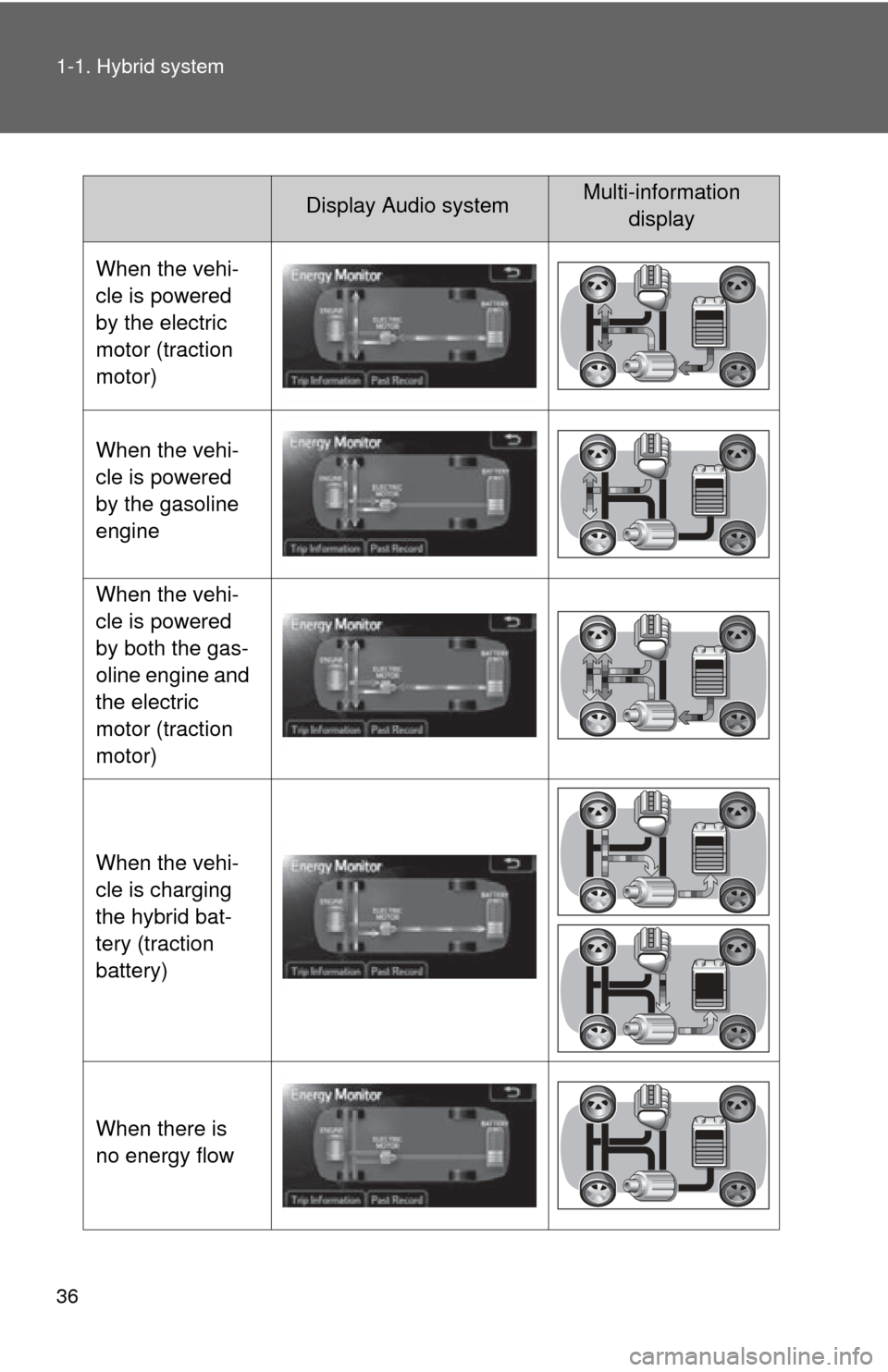
When the vehi-
cle is powered
by the electric
motor (traction
motor)
When the vehi-
cle is powered
by the gasoline
engine
When the vehi-
cle is powered
by both the gas-
oline engine and
the electric
motor (traction
motor)
When the vehi-
cle is charging
the hybrid bat-
tery (traction
battery)
When there is
no energy flow
Page 37 of 552

37
1-1. Hybrid system
1
Before drivingThese images are examples only, and may vary slightly from actual condi-
tions.
Hybrid battery
(traction bat-
tery) status
LowFull
Low Full
Display Audio systemMulti-information
display
Page 41 of 552
41
1-1. Hybrid system
1
Before driving
■
Remaining hybrid battery (tract ion battery) charge display
The charge amount of the hybrid battery (traction battery) is automatically
controlled by the hybrid system. For this reason, even if electricity is recov-
ered via the regenerative braking, or electricity is generated via the gasoline
engine, the displayed hybrid battery (traction battery) charge amount may
not reach the highest level (level 8). However, this does not indicate a mal-
function.
■ Resetting the consumption data (Display Audio System)
Selecting “Clear” on the “Trip Information” screen will reset the fuel con-
sumption and the regenerated energy for the past 15 minutes. Selecting
“Yes” on the following screen will confirm resetting of all the data.
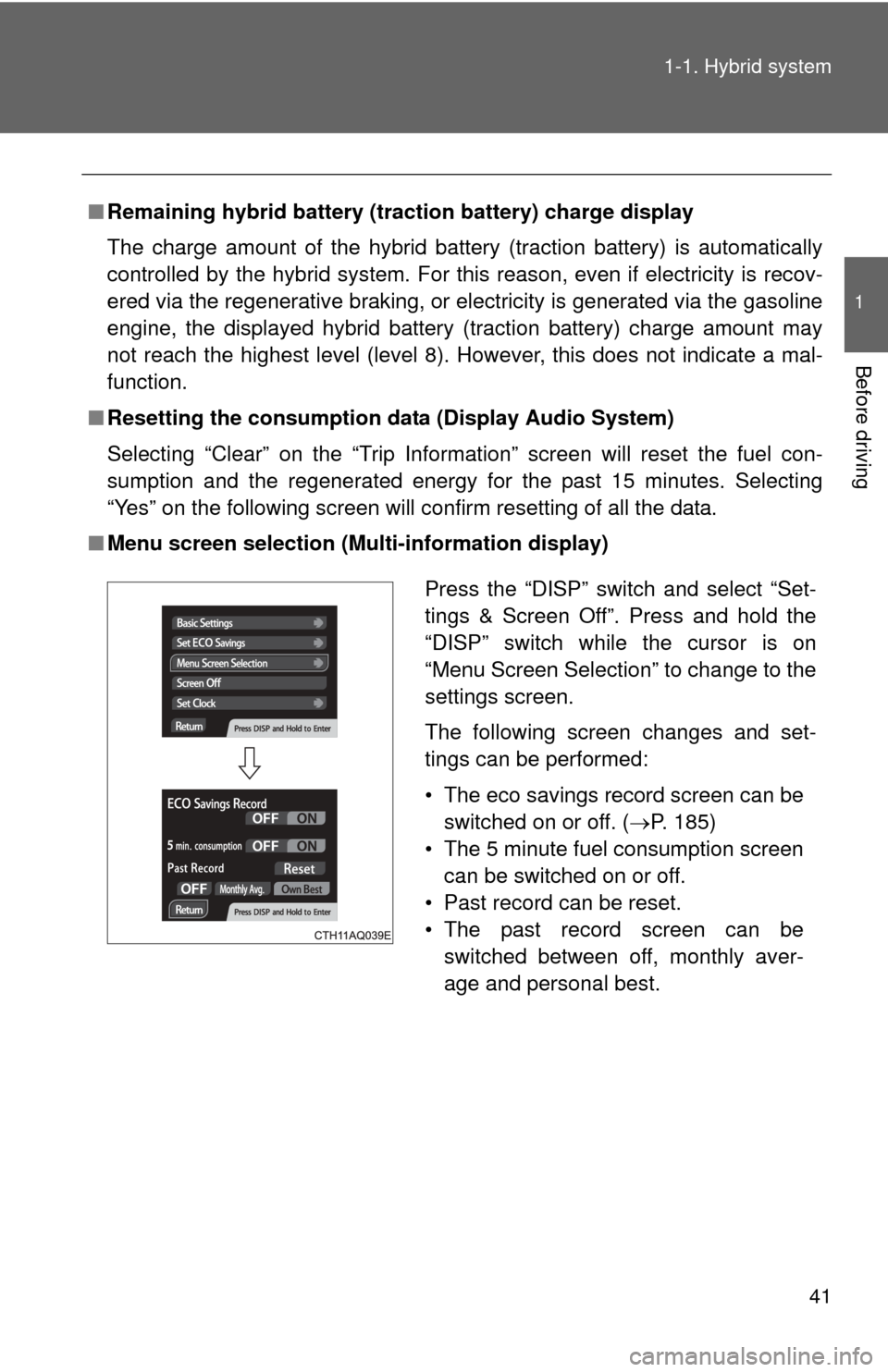
■ Menu screen selection (Multi-information display)
Press the “DISP” switch and select “Set-
tings & Screen Off”. Press and hold the
“DISP” switch while the cursor is on
“Menu Screen Selection” to change to the
settings screen.
The following screen changes and set-
tings can be performed:
• The eco savings record screen can be
switched on or off. ( P. 185)
• The 5 minute fuel consumption screen can be switched on or off.
• Past record can be reset.
• The past record screen can be switched between off, monthly aver-
age and personal best.
Page 45 of 552
45
1-2. Key information
1
Before driving
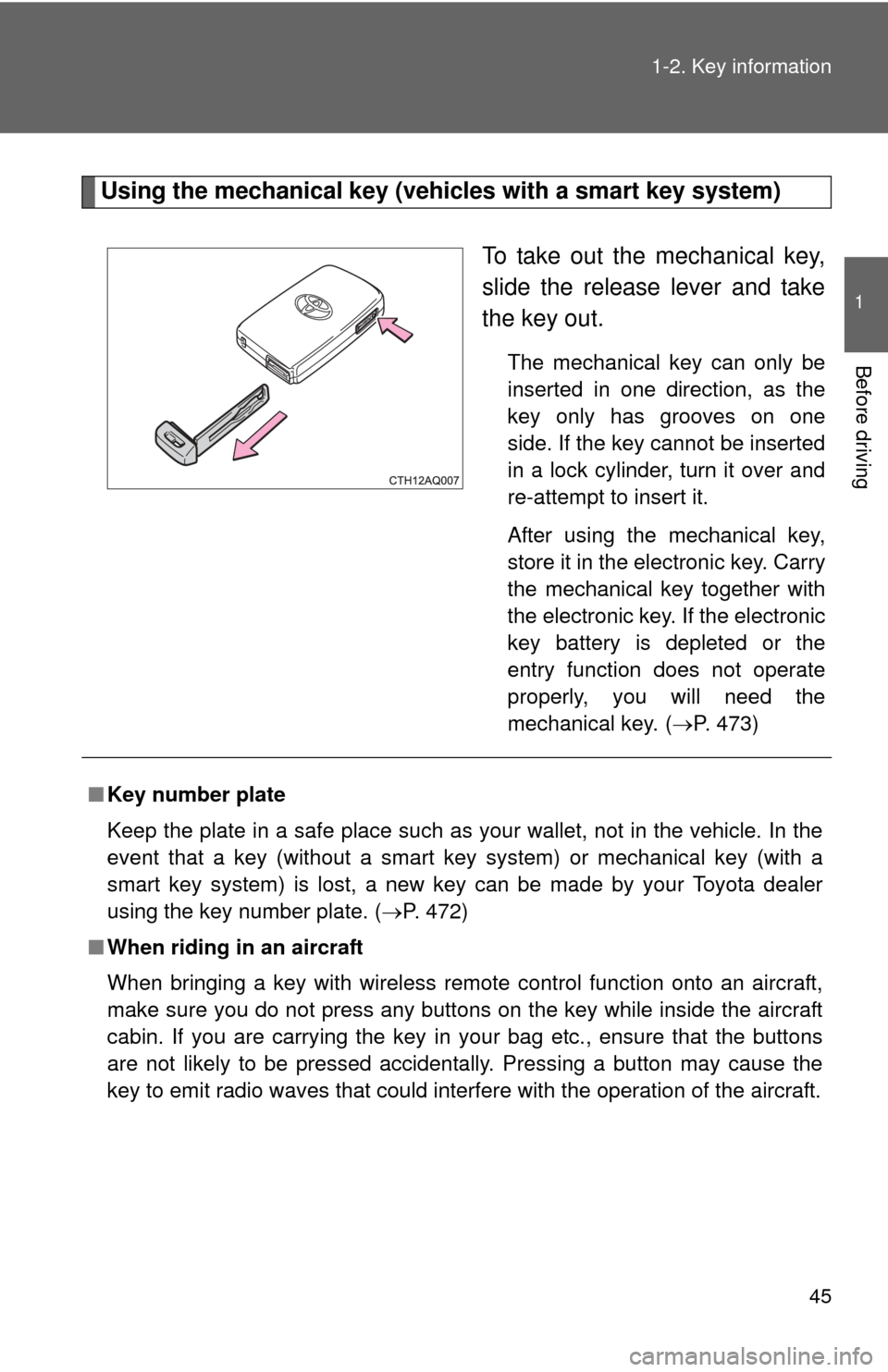
Using the mechanical key (vehicles with a smart key system)
To take out the mechanical key,
slide the release lever and take
the key out.
The mechanical key can only be
inserted in one direction, as the
key only has grooves on one
side. If the key cannot be inserted
in a lock cylinder, turn it over and
re-attempt to insert it.
After using the mechanical key,
store it in the electronic key. Carry
the mechanical key together with
the electronic key. If the electronic
key battery is depleted or the
entry function does not operate
properly, you will need the
mechanical key.
(P. 473)
■ Key number plate
Keep the plate in a safe place such as your wallet, not in the vehicle. In the
event that a key (without a smart key system) or mechanical key (with a
smart key system) is lost, a new key can be made by your Toyota dealer
using the key number plate. ( P. 472)
■ When riding in an aircraft
When bringing a key with wireless remote control function onto an aircra\
ft,
make sure you do not press any buttons on the key while inside the aircraft
cabin. If you are carrying the key in your bag etc., ensure that the buttons
are not likely to be pressed accidentally. Pressing a button may cause the
key to emit radio waves that could interfere with the operation of the a\
ircraft.
Page 53 of 552
53
1-3. Opening, closing and locking the doors
1
Before driving
■
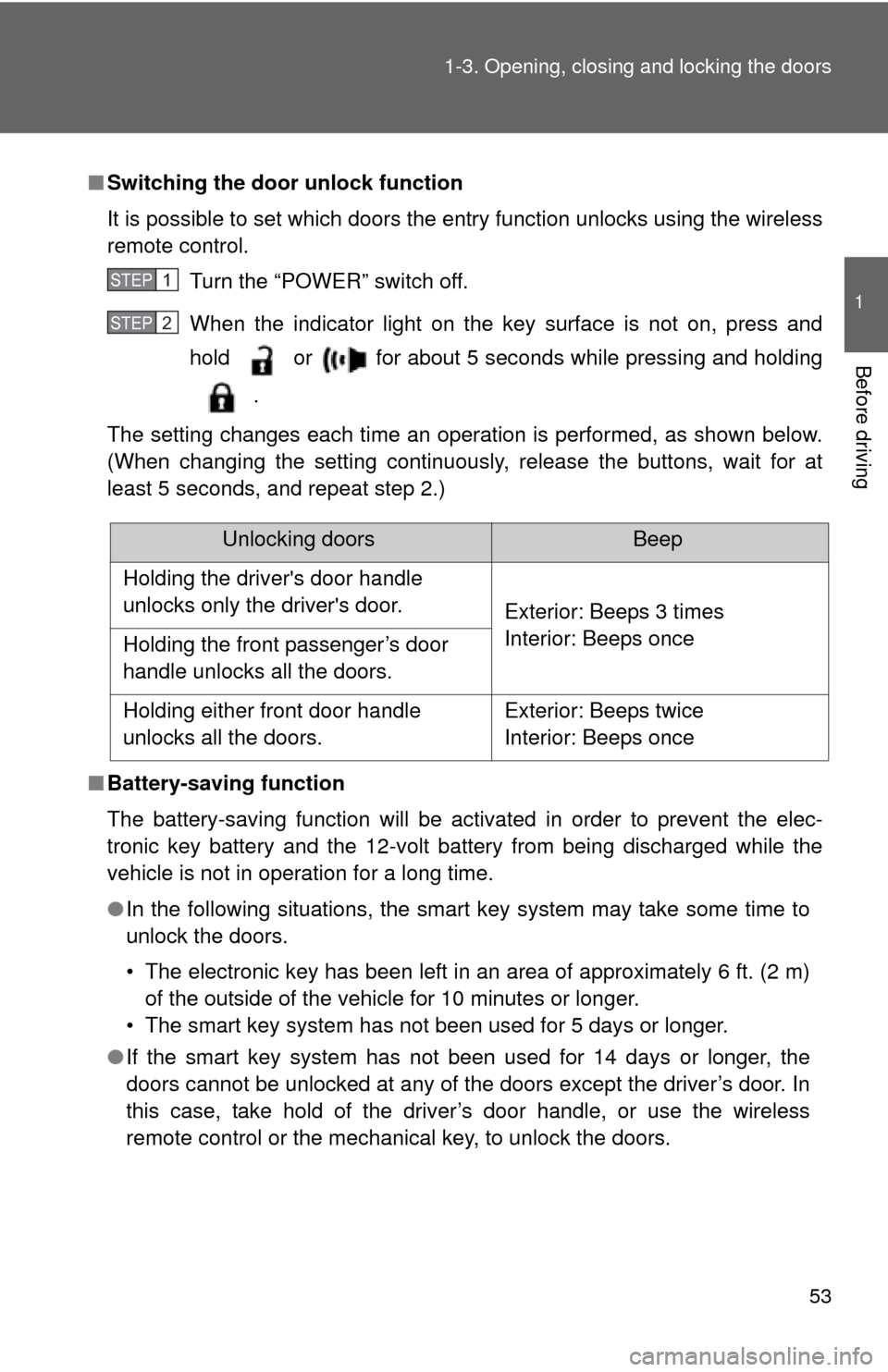
Switching the door unlock function
It is possible to set which doors the entry function unlocks using the wireless
remote control.
Turn the “POWER” switch off.
When the indicator light on the key surface is not on, press and
hold or for about 5 seconds while pressing and holding
.
The setting changes each time an operation is performed, as shown below.
(When changing the setting continuously, release the buttons, wait for at
least 5 seconds, and repeat step 2.)
■ Battery-saving function
The battery-saving function will be activated in order to prevent the elec-
tronic key battery and the 12-volt battery from being discharged while the
vehicle is not in operation for a long time.
●In the following situations, the smart key system may take some time to
unlock the doors.
• The electronic key has been left in an area of approximately 6 ft. (2 m)
of the outside of the vehicle for 10 minutes or longer.
• The smart key system has not been used for 5 days or longer.
● If the smart key system has not been used for 14 days or longer, the
doors cannot be unlocked at any of the doors except the driver’s door. In
this case, take hold of the driver’s door handle, or use the wireless
remote control or the mechanical key, to unlock the doors.
STEP1
STEP2
Unlocking doorsBeep
Holding the driver's door handle
unlocks only the driver's door. Exterior: Beeps 3 times
Interior: Beeps once
Holding the front passenger’s door
handle unlocks all the doors.
Holding either front door handle
unlocks all the doors. Exterior: Beeps twice
Interior: Beeps once
Page 54 of 552
54 1-3. Opening, closing and locking the doors
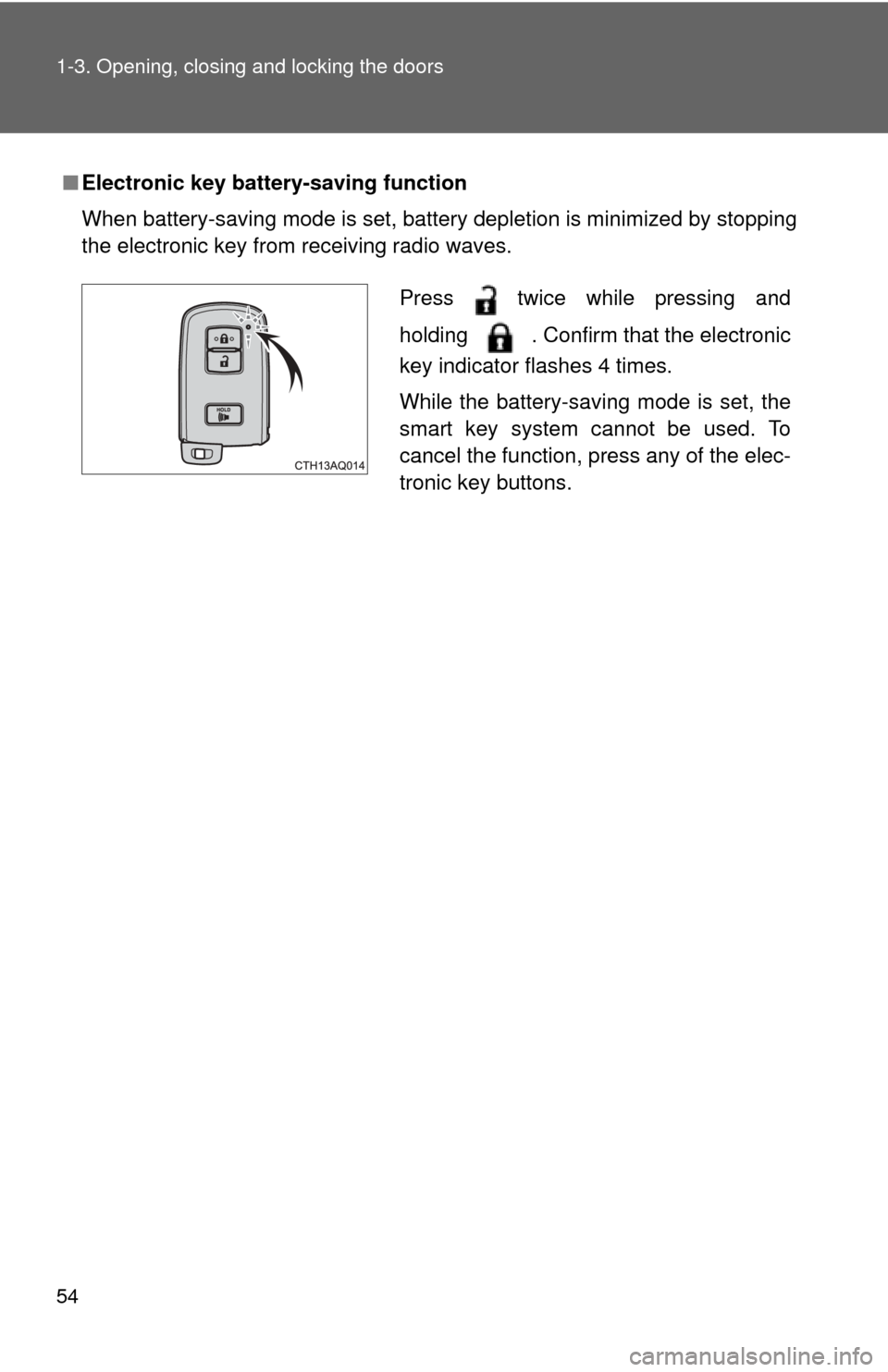
■Electronic key battery-saving function
When battery-saving mode is set, battery depletion is minimized by stopping
the electronic key from receiving radio waves.
Press twice while pressing and
holding . Confirm that the electronic
key indicator flashes 4 times.
While the battery-saving mode is set, the
smart key system cannot be used. To
cancel the function, press any of the elec-
tronic key buttons.
Page 55 of 552

55
1-3. Opening, closing and locking the doors
1
Before driving
■
Conditions affecting operation
The smart key system uses weak radio waves. In the following situations,
the communication between the electronic key and the vehicle may be
affected, preventing the smart key system, wireless remote control and
immobilizer system from operating properly.
(Ways of coping: P. 473)
● When the electronic key battery is depleted
● Near a TV tower, electric power plant, gas station, radio station, large dis-
play, airport or other facility that generates strong radio waves or electri-
cal noise
● When the electronic key is in contact with, or is covered by the following
metallic objects
• Cards to which aluminum foil is attached
• Cigarette boxes that have aluminum foil inside
• Metallic wallets or bags
• Coins
• Hand warmers made of metal
• Media such as CDs and DVDs
● When other wireless keys (that emit radio waves) are being used nearby
● When carrying the electronic key together with the following devices that
emit radio waves
• A portable radio, cellular phone, cordless phone or other wireless com-
munication device
• Another vehicle’s electronic key or a wireless key that emits radio waves
• Personal computers or personal digital assistants (PDAs)
• Digital audio players
• Portable game systems
● If window tint with a metallic content or metallic objects are attached to
the rear window
● When the electronic key is placed near a battery charger or electronic
devices
Page 56 of 552

56 1-3. Opening, closing and locking the doors
■Notes for the entry function
●Even when the electronic key is within the effective range (detection
areas), the system may not operate properly in the following cases:
• The electronic key is too close to the window or outside door handle,
near the ground, or in a high place when the doors are locked or
unlocked.
• The electronic key is on the instrument panel, luggage cover or floor, in the door pockets or glove box when the hybrid system is started or
“POWER” switch modes are changed.
● Do not exit the vehicle with the electronic key placed on the instrument
panel or near the door pockets. Depending on the radio wave reception
conditions, it may be detected by the antenna outside the cabin and the
door will become lockable from the outside, possibly trapping the elec-
tronic key inside the vehicle.
● As long as the electronic key is within the effective range, the doors may
be locked or unlocked by anyone.
● Whether or not the electronic key is inside the vehicle, the hybrid system
could be started if the electronic key is near the window.
● The doors may unlock if a large amount of water splashes on the door
handle, such as in the rain or in a car wash when the electronic key is
within the effective range. (The door will automatically be locked after
approximately 60 seconds if the doors are not opened and closed.)
● The lock and unlock sensors may not work properly if they come into
contact with ice, snow, mud, etc. Clean the sensors and attempt to oper-
ate them again.
● If the wireless remote control is used to lock the doors when the elec-
tronic key is near the vehicle, there is a possibility that the door may not
be unlocked by the entry function. (Using the wireless remote control to
unlock the doors may resume the function.)
● If the door handle becomes wet while the electronic key is within the
effective range, the door may lock and unlock repeatedly. In that case,
follow the following correction procedures to wash the vehicle:
• Place the electronic key in a location 6 ft. (2 m) or more away from the
vehicle. (Take care to ensure that the key is not stolen.)
• Set the electronic key to battery-saving mode to disable the smart key system. ( P. 54)