light TOYOTA PRIUS C 2012 NHP10 / 1.G Workshop Manual
[x] Cancel search | Manufacturer: TOYOTA, Model Year: 2012, Model line: PRIUS C, Model: TOYOTA PRIUS C 2012 NHP10 / 1.GPages: 552, PDF Size: 8.27 MB
Page 160 of 552
160 2-1. Driving procedures
■If the hybrid system does not start (vehicles with immobilizer system)
The immobilizer system may not have been deactivated. ( P. 110)
Contact your Toyota dealer.
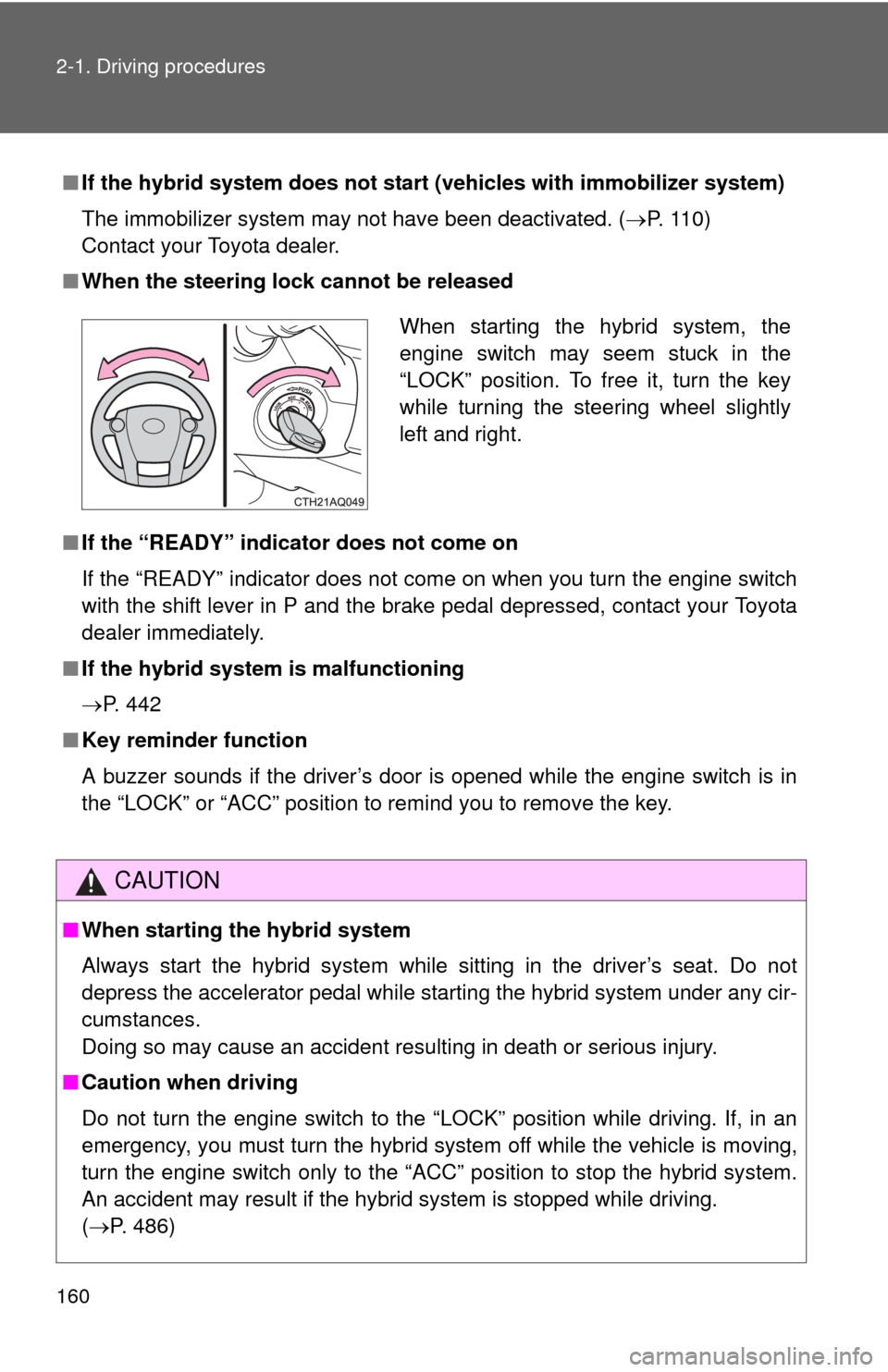
■ When the steering lock cannot be released
■ If the “READY” indicator does not come on
If the “READY” indicator does not come on when you turn the engine switch
with the shift lever in P and the brake pedal depressed, contact your Toyota
dealer immediately.
■ If the hybrid system is malfunctioning
P. 442
■ Key reminder function
A buzzer sounds if the driver’s door is opened while the engine switch is in
the “LOCK” or “ACC” position to remind you to remove the key.
CAUTION
■When starting the hybrid system
Always start the hybrid system while sitting in the driver’s seat. Do not
depress the accelerator pedal while starting the hybrid system under any cir-
cumstances.
Doing so may cause an accident resulting in death or serious injury.
■ Caution when driving
Do not turn the engine switch to the “LOCK” position while driving. If, in an
emergency, you must turn the hybrid system off while the vehicle is moving,
turn the engine switch only to the “ACC” position to stop the hybrid system.
An accident may result if the hybrid system is stopped while driving.
(P. 486)
When starting the hybrid system, the
engine switch may seem stuck in the
“LOCK” position. To free it, turn the key
while turning the steering wheel slightly
left and right.
Page 163 of 552
163
2-1. Driving procedures
2
When driving
Check that the “READY” indicator is on.
If the “READY” indicator changes from a flashing light to a solid
light and a beep sound, the hybrid system is starting normally.
The vehicle will not move when
the “READY” indicator is off.
The vehicle can move when the “READY” indicator is on even if
the engine is stopped. (The engine starts or stops automatically in
accordance with the state of the vehicle.)
■ Stopping the hybrid system
Stop the vehicle completely.
Shift the shift lever to P.
Set the parking brake. ( P. 177)
Press the “POWER” switch.
Slowly release the brake pedal and check that on the
multi-information display is off.
STEP5
STEP1
STEP2
STEP3
STEP4
STEP5
Page 169 of 552

169
2-1. Driving procedures
2
When driving
NOTICE
■
To prevent 12-volt battery discharge
●Do not leave the “POWER” switch in ACCESSORY or ON mode for long
periods of time without the hybrid system on.
● If is displayed on the multi-information display, the “POWER”
switch is not off. Exit the vehicle after turning the “POWER” switch off.
● Do not stop the hybrid system when the shift lever is in a position other
than P. If the hybrid system is stopped in another shift lever position, the
“POWER” switch will not be turned off but instead be turned to ACCES-
SORY mode. If the vehicle is left in ACCESSORY mode, 12-volt battery
discharge may occur.
■ When starting the hybrid system
If the hybrid system becomes difficult to start, have your vehicle checked by
your Toyota dealer immediately.
■ Symptoms indicating a malfunction with the “POWER” switch
If the “POWER” switch seems to be operating somewhat differently than
usual, such as the switch sticking slightly, there may be a malfunction. Con-
tact your Toyota dealer immediately.
Page 176 of 552
176
2-1. Driving procedures
Tur n signal lever
■Turn signals can be operated when
Vehicles without a smart key system
The engine switch is in the “ON” position.
Vehicles with a smart key system
The “POWER” switch is in ON mode.
■ If the indicator flashes faster than usual
Check that a light bulb in the front or rear turn signal lights has not burned
out.
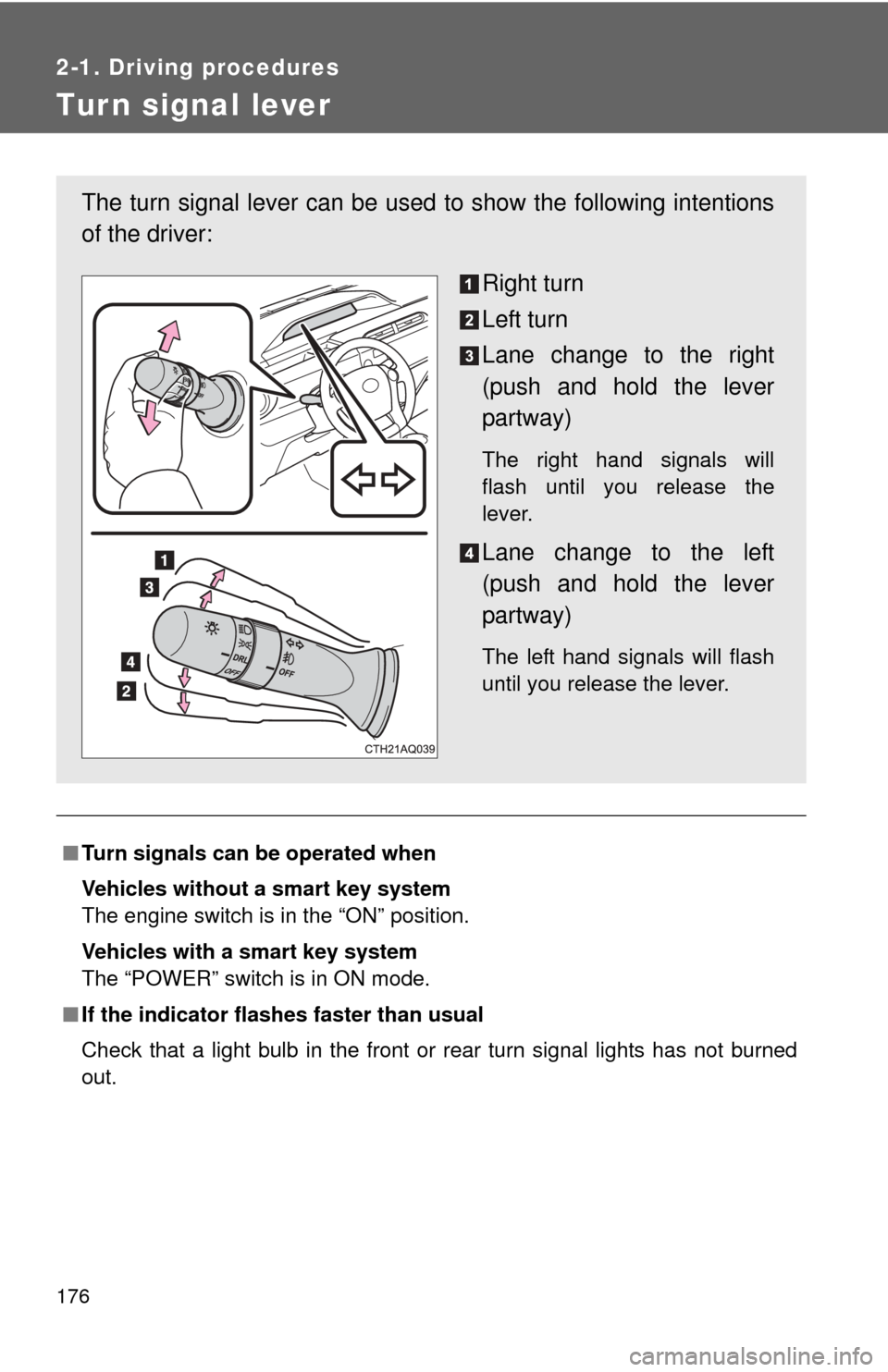
The turn signal lever can be used to show the following intentions
of the driver:
Right turn
Left turn
Lane change to the right
(push and hold the lever
partway)
The right hand signals will
flash until you release the
lever.
Lane change to the left
(push and hold the lever
partway)
The left hand signals will flash
until you release the lever.
Page 177 of 552
177
2-1. Driving procedures
2
When driving
Parking brake
■Parking brake engaged warning buzzer
A buzzer will sound if the vehicle is driven at a speed of approximately 3
mph (5 km/h) or more with the parking brake engaged. ( P. 444)
■ Usage in winter time
P. 229
NOTICE
■Before driving
Fully release the parking brake.
Driving the vehicle with the parking brake set will lead to brake components
overheating, which may affect braking performance and increase brake
wear.
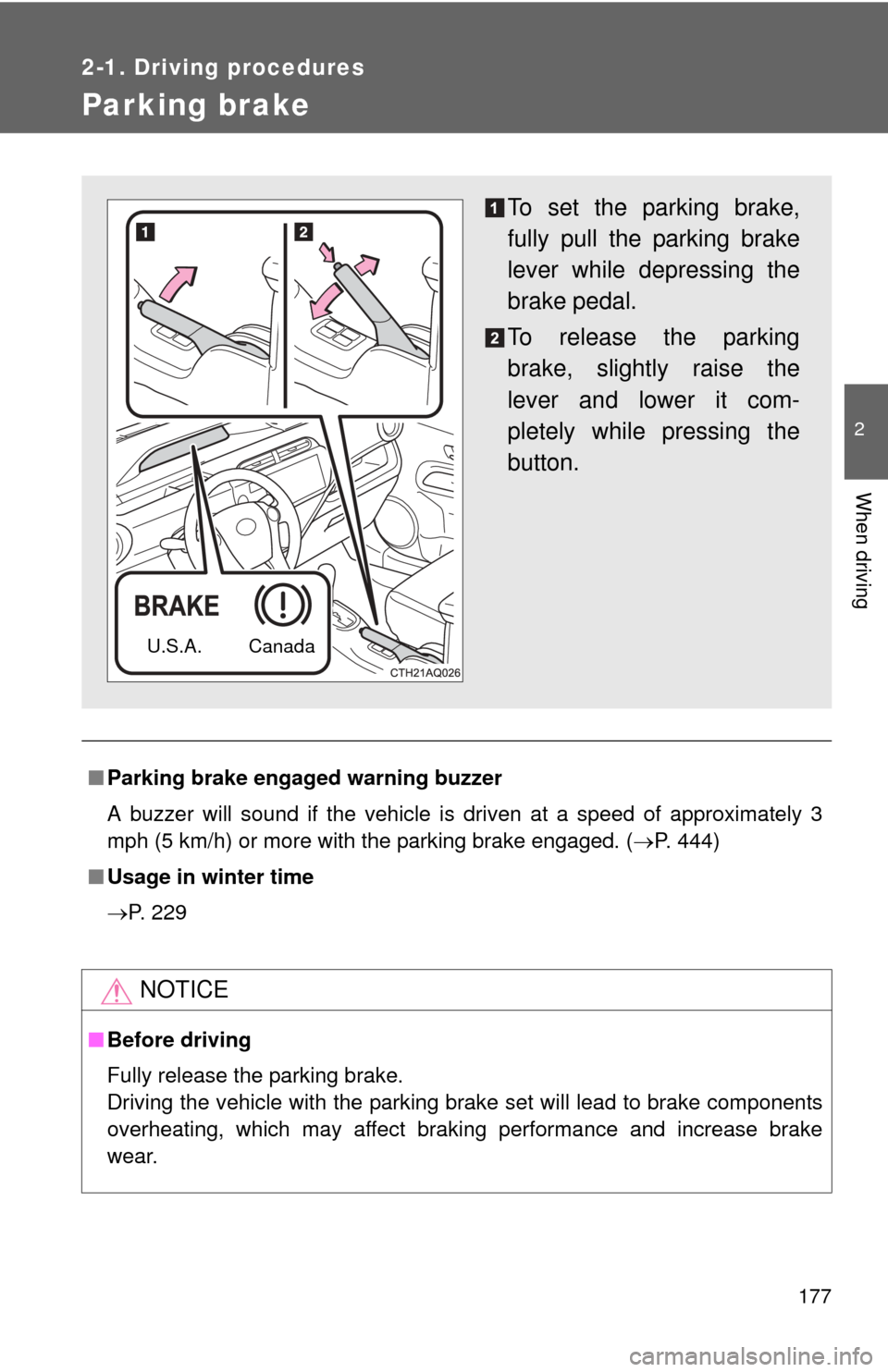
To set the parking brake,
fully pull the parking brake
lever while depressing the
brake pedal.
To release the parking
brake, slightly raise the
lever and lower it com-
pletely while pressing the
button.
U.S.A. Canada
Page 180 of 552
180 2-2. Instrument cluster
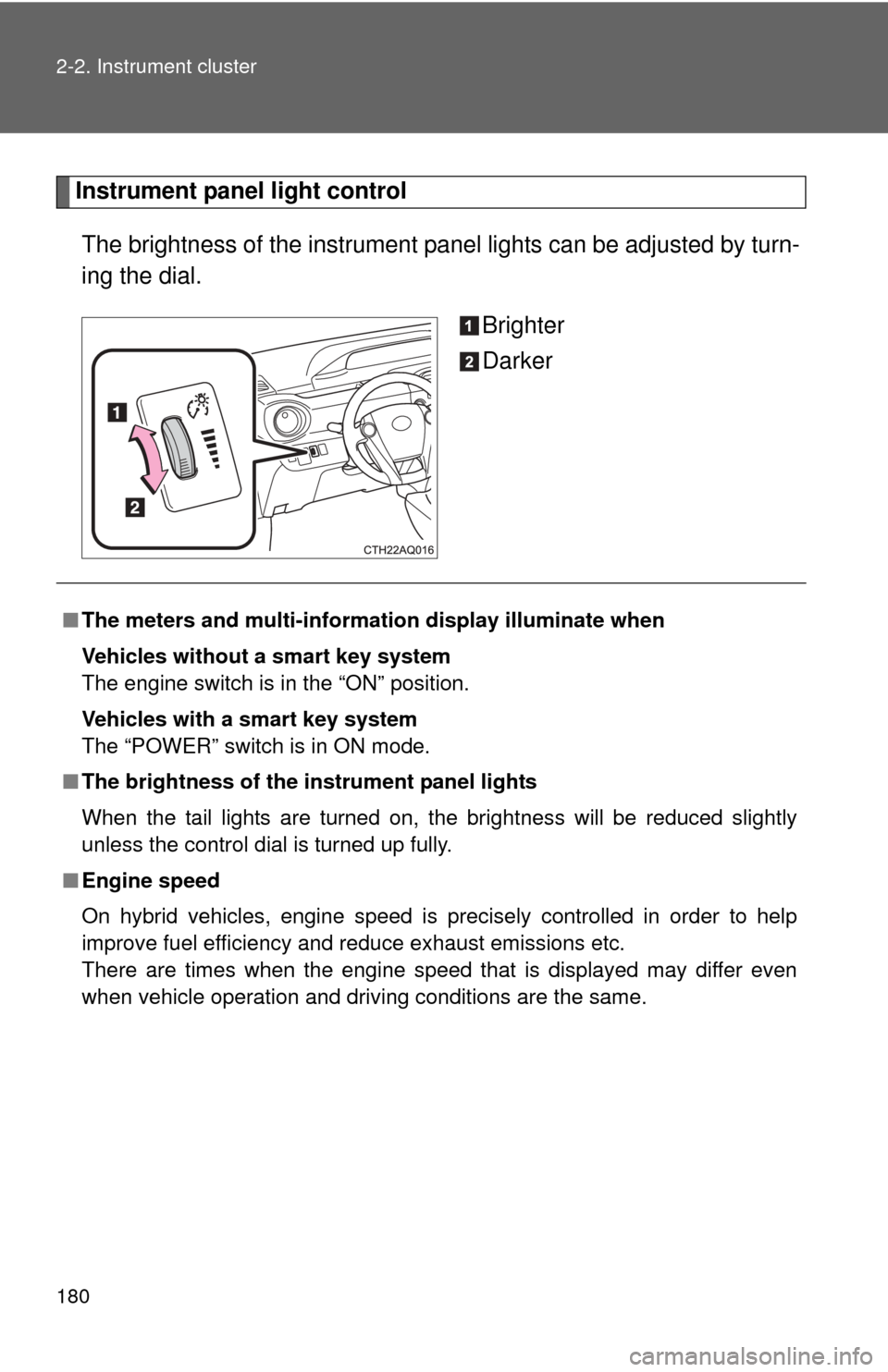
Instrument panel light controlThe brightness of the instrument pa nel lights can be adjusted by turn-
ing the dial.
Brighter
Darker
■The meters and multi-informat ion display illuminate when
Vehicles without a smart key system
The engine switch is in the “ON” position.
Vehicles with a smart key system
The “POWER” switch is in ON mode.
■ The brightness of the instrument panel lights
When the tail lights are turned on, the brightness will be reduced slightly
unless the control dial is turned up fully.
■ Engine speed
On hybrid vehicles, engine speed is precisely controlled in order to help
improve fuel efficiency and reduce exhaust emissions etc.
There are times when the engine speed that is displayed may differ even
when vehicle operation and driving conditions are the same.
Page 182 of 552
182
2-2. Instrument cluster
Indicators and warning lights
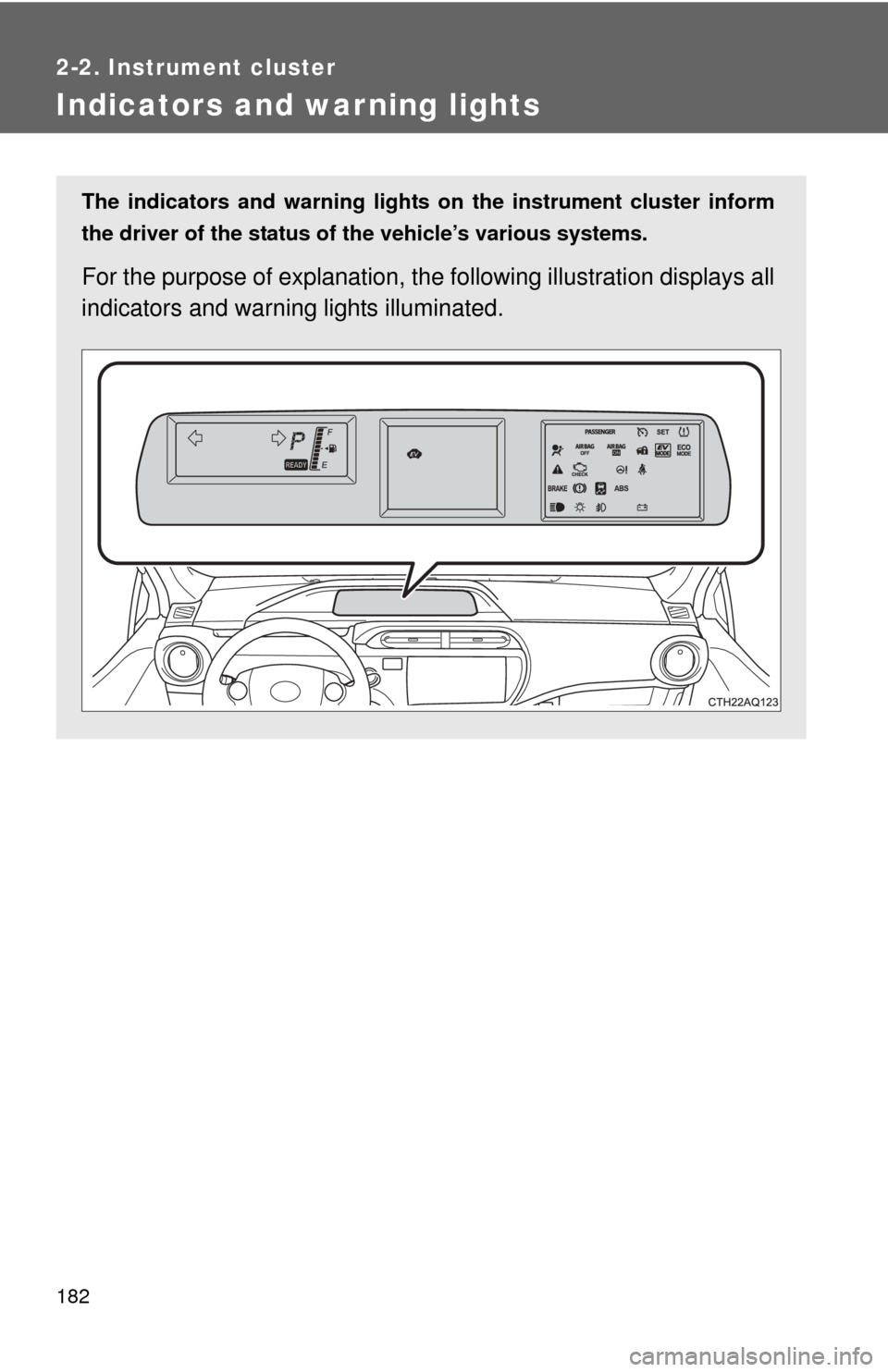
The indicators and warning lights on the instrument cluster inform
the driver of the status of the vehicle’s various systems.
For the purpose of explanation, the following illustration displays all
indicators and warn ing lights illuminated.
Page 183 of 552
183
2-2. Instrument cluster
2
When driving
■
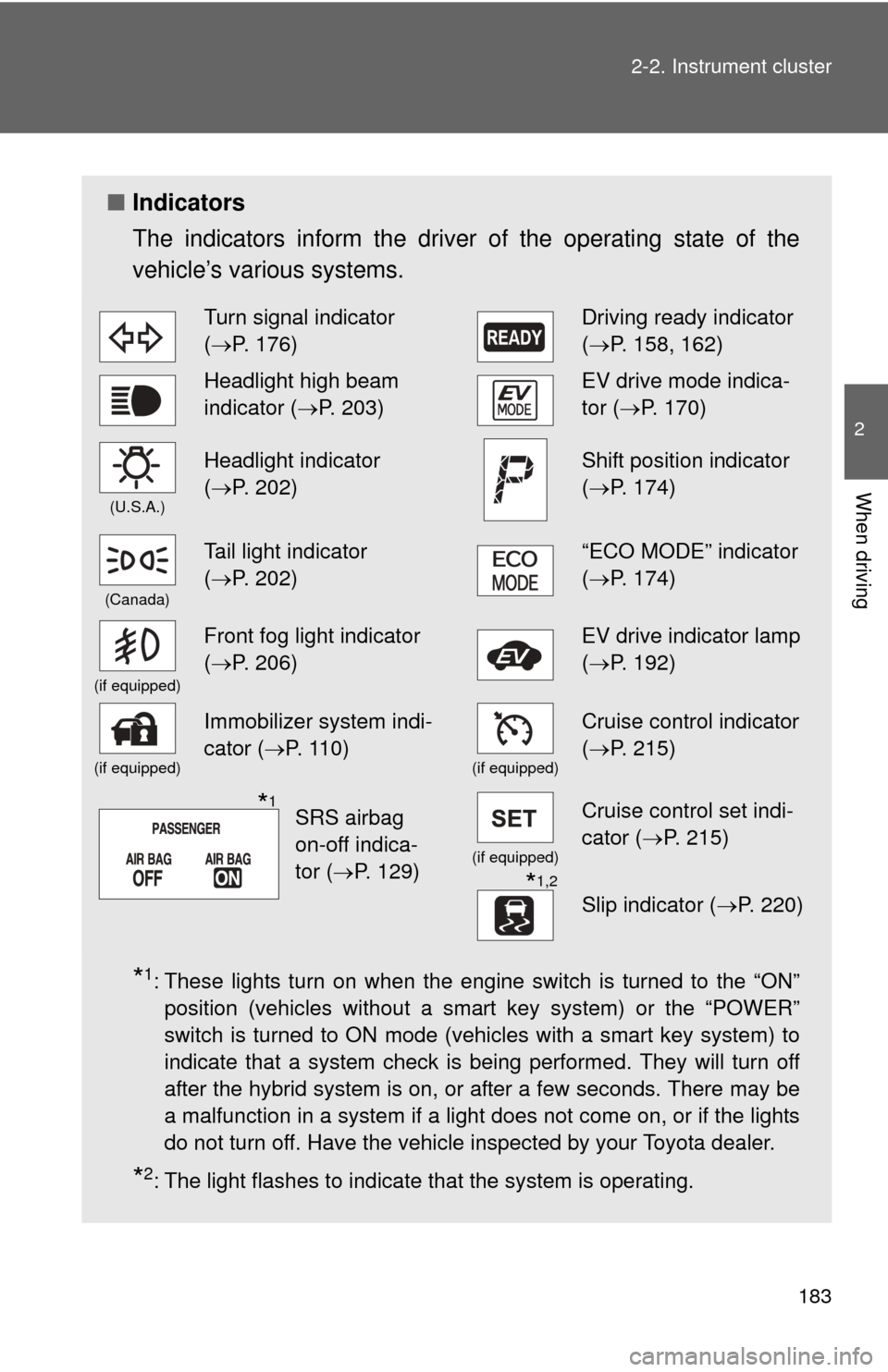
Indicators
The indicators inform the driver of the operating state of the
vehicle’s various systems.
*1: These lights turn on when the engine switch is turned to the “ON”
position (vehicles without a smart key system) or the “POWER”
switch is turned to ON mode (vehicles with a smart key system) to
indicate that a system check is being performed. They will turn off
after the hybrid system is on, or after a few seconds. There may be
a malfunction in a system if a light does not come on, or if the lights
do not turn off. Have the vehicle inspected by your Toyota dealer.
*2: The light flashes to indicate that the system is operating.
Turn signal indicator
(P. 176)Driving ready indicator
( P. 158, 162)
Headlight high beam
indicator ( P. 203)EV drive mode indica-
tor (P. 170)
(U.S.A.)
Headlight indicator
(P. 202)Shift position indicator
( P. 174)
(Canada)
Tail light indicator
(P. 202)“ECO MODE” indicator
( P. 174)
(if equipped)
Front fog light indicator
(P. 206)EV drive indicator lamp
( P. 192)
(if equipped)
Immobilizer system indi-
cator ( P. 110)
(if equipped)
Cruise control indicator
(P. 215)
(if equipped)
Cruise control set indi-
cator (P. 215)
*1,2
Slip indicator ( P. 220)
SRS airbag
on-off indica-
tor (P. 129)*1
Page 184 of 552
184 2-2. Instrument cluster
CAUTION
■If a safety system warning light does not come on
Should a safety system light such as the ABS or SRS warning light not come
on when you start the hybrid system, this could mean that these systems are
not available to help protect you in an accident, which could result in death
or serious injury. Have the vehicle inspected by your Toyota dealer immedi-
ately if this occurs.
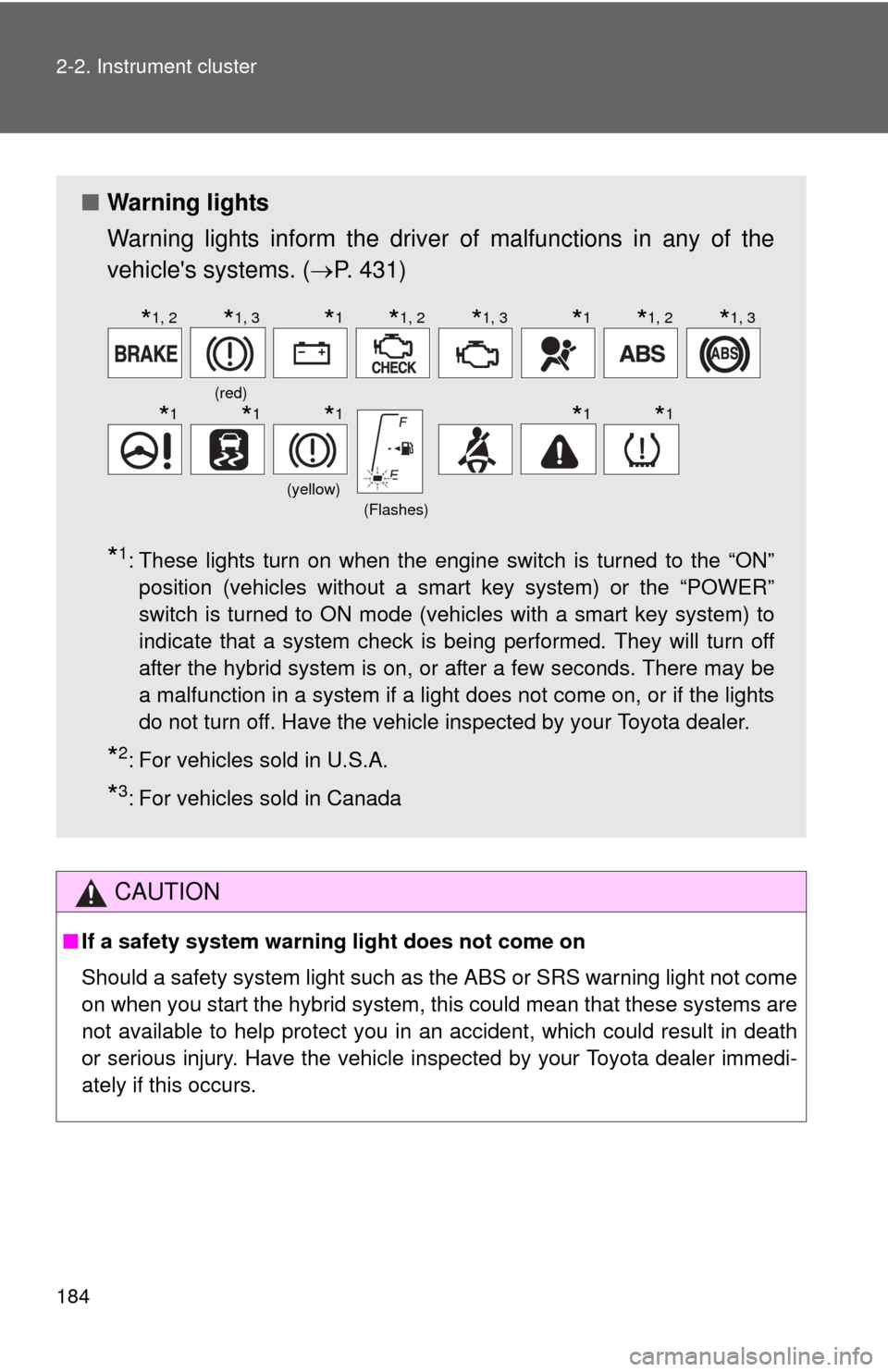
■ Warning lights
Warning lights inform the driver of malfunctions in any of the
vehicle's systems. ( P. 431)
*1: These lights turn on when the engine switch is turned to the “ON”
position (vehicles without a smart key system) or the “POWER”
switch is turned to ON mode (vehicles with a smart key system) to
indicate that a system check is being performed. They will turn off
after the hybrid system is on, or after a few seconds. There may be
a malfunction in a system if a light does not come on, or if the lights
do not turn off. Have the vehicle inspected by your Toyota dealer.
*2: For vehicles sold in U.S.A.
*3: For vehicles sold in Canada
(red)
(yellow)(Flashes)
*1, 2*1, 3*1*1, 2*1, 3*1*1, 2*1, 3
*1*1*1*1*1
Page 200 of 552

200 2-2. Instrument cluster
■The clock is displayed when
Vehicles without a smart key system
The engine switch is in the “ON” position.
Vehicles with a smart key system
The “POWER” switch is in ON mode.
■ Eco score
●As the accelerator pedal is not depressed, the driven distance using
cruise control (if equipped) is not included in the eco score.
● As the eco score evaluation differs according to driving conditions and
environmental factors, in some cases it may not be linked to fuel con-
sumption.
■ Eco savings
●Fuel cost and savings should be used as a guide only.
● Depending on refueling methods, driving conditions and environmental
factors, the actual and displayed fuel costs may differ.
● In some cases, fuel cost and savings may not be linked to the eco score
evaluation.
■ When disconnecting and reconnect ing 12-volt battery terminals
The following information data will be reset:
● Clock
● Past record (aside from the top 3 results)
● Average fuel consumption
● Cruising range
● Average vehicle speed
● Driving time
● EV driving rate/EV driven distance
Additionally, some displays may return to their default settings.
■ Liquid crystal display
Small spots or light spots may appear on the display. This phenomenon is
characteristic of liquid crystal displays, and there is no problem continuing to
use the display.