phone TOYOTA PRIUS C 2013 NHP10 / 1.G Owners Manual
[x] Cancel search | Manufacturer: TOYOTA, Model Year: 2013, Model line: PRIUS C, Model: TOYOTA PRIUS C 2013 NHP10 / 1.GPages: 556, PDF Size: 8.88 MB
Page 3 of 556

1
2
3
4
5
6
7
3
2-2. Instrument clusterGauges and meters ............ 179
Indicators and warning lights ................................. 182
Multi-information display ..... 185
2-3. Operating the lights and wipers
Headlight switch .................. 202
Fog light switch ................... 206
Windshield wipers and washer .............................. 208
Rear window wiper and washer .............................. 212
2-4. Using other driving systems
Cruise control ...................... 215
Driving assist systems ........ 219
Hill-start assist control ......... 222
2-5. Driving information Cargo and luggage ............. 224
Vehicle load limits ............... 228
Winter driving tips ............... 229
Trailer towing ...................... 233
Dinghy towing ..................... 234 3-1. Using the air conditioning
system and defogger
Automatic air conditioning system .............................. 236
Rear window and outside rear view
mirror defoggers ............... 245
3-2. Using the audio system Audio system types ............ 246
Using the radio ................... 252
Using the CD player ........... 254
Playing back MP3 and WMA discs ....................... 259
Operating an iPod .............. 266
Operating a USB memory ............................ 274
Optimal use of the audio system .............................. 282
Using the AUX port............. 285
Using the steering wheel audio switches.................. 286
3-3. Using the Bluetooth
®
audio system
Bluetooth
® audio/phone ..... 289
Using the Bluetooth®
audio/phone ..................... 293
Operating a Bluetooth
®
enabled portable player.... 298
Making a phone call ........... 301
Using the “SET UP” menu (“Bluetooth” menu) ........... 306
Using the “SET UP” menu (“Phone” menu) ................ 312
3Interior features
Page 9 of 556
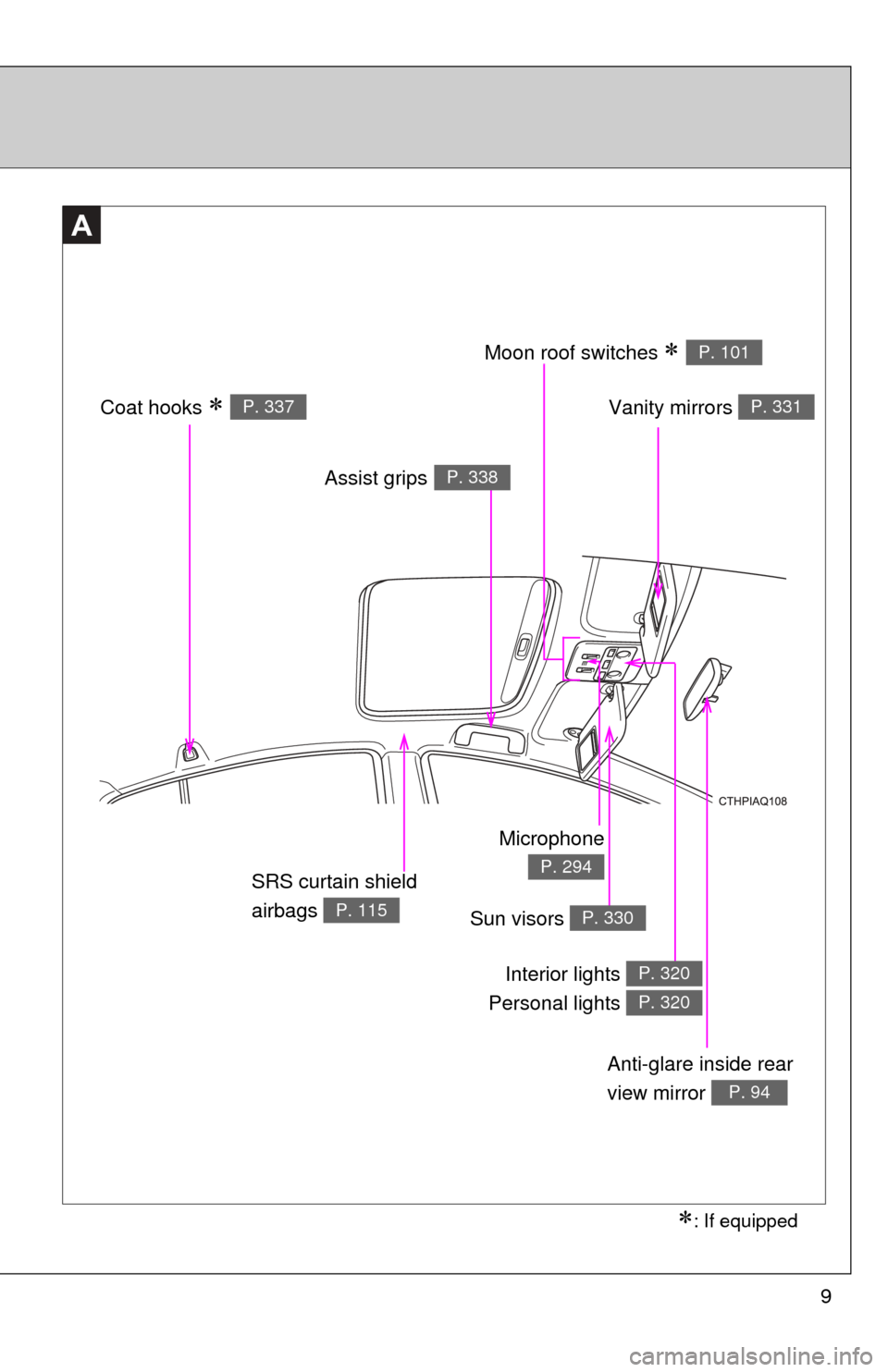
9
: If equipped
Anti-glare inside rear
view mirror
P. 94
Vanity mirrors P. 331
SRS curtain shield
airbags
P. 115
A
Moon roof switches P. 101
Sun visors P. 330
Interior lights
Personal lights P. 320
P. 320
Coat hooks P. 337
Microphone
P. 294
Assist gripsP. 338
Page 14 of 556
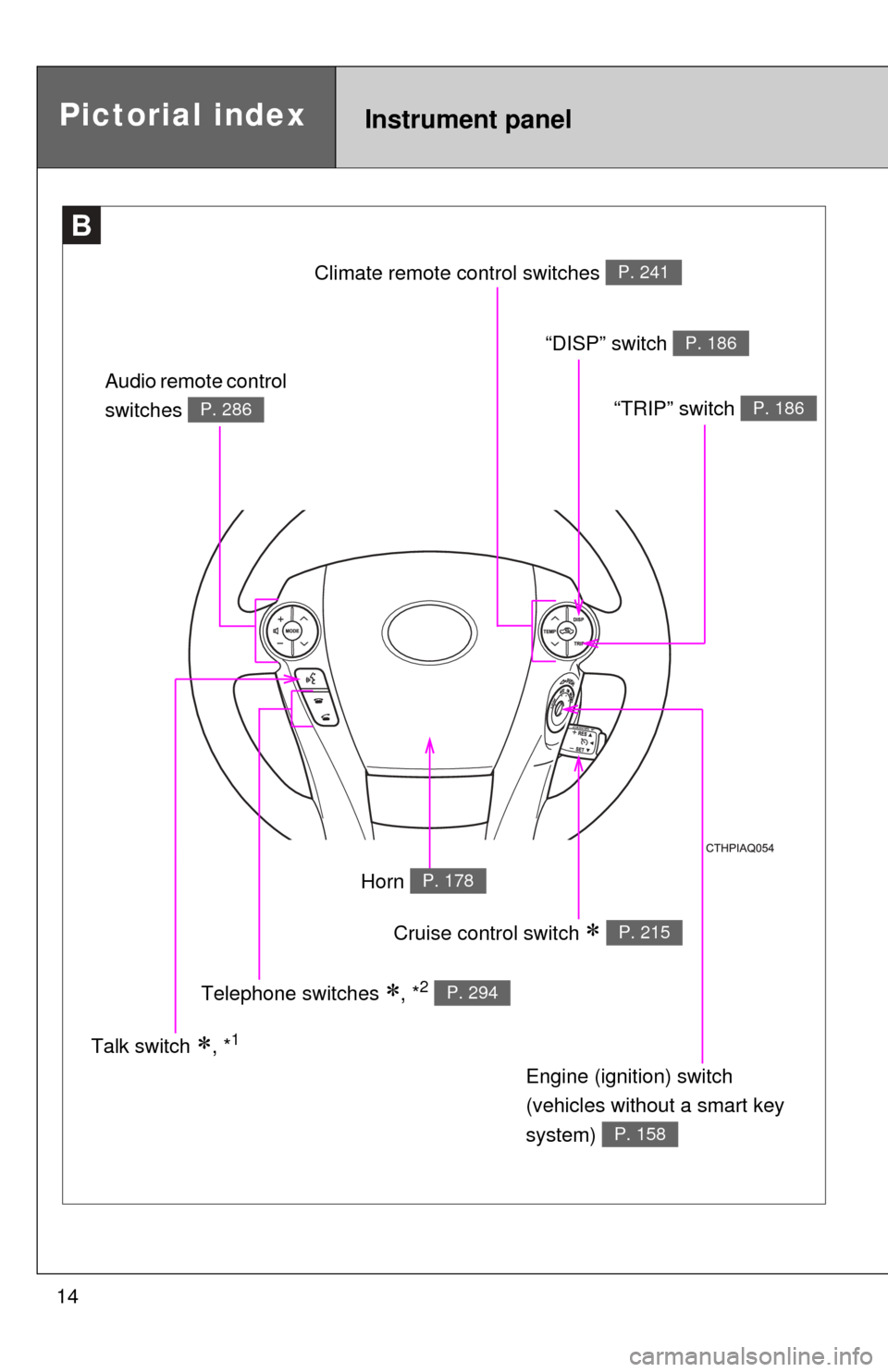
14
B
Pictorial indexInstrument panel
Cruise control switch P. 215
Engine (ignition) switch
(vehicles without a smart key
system)
P. 158
Audio remote control
switches
P. 286
Talk switch , *1
Telephone switches
, *2 P. 294
Horn P. 178
Climate remote co
ntrol switches P. 241
“DISP” switch P. 186
“TRIP” switch P. 186
Page 20 of 556

20
Scrapping of your Toyota
The SRS airbag and seat belt pretensioner devices in your Toyota contain
explosive chemicals. If the vehicle is scrapped with the airbags and seat belt
pretensioners left as they are, this may cause an accident such as fire. Be
sure to have the systems of the SRS airbag and seat belt pretensioner
removed and disposed of by a qualified service shop or by your Toyota
dealer before you scrap your vehicle.
Perchlorate Material
Special handling may apply, See www.dtsc.ca.gov/hazardouswaste/perchlorate.
Your vehicle has components that may contain perchlorate. These compo-
nents may include airbag, seat belt pretensioners, and wireless remote con-
trol batteries.
CAUTION
■General precautions while driving
Driving under the influence: Never drive your vehicle when under the influ-
ence of alcohol or drugs that have impaired your ability to operate your vehi-
cle. Alcohol and certain drugs delay reaction time, impair judgment and
reduce coordination, which could lead to an accident that could result in
death or serious injury.
Defensive driving: Always drive defensively. Anticipate mistakes that other
drivers or pedestrians might make and be ready to avoid accidents.
Driver distraction: Always give your full attention to driving. Anything that dis-
tracts the driver, such as adjusting controls, talking on a cellular phone or
reading can result in a collision with resulting death or serious injury to you,
your occupants or others.
■ General precaution regarding children’s safety
Never leave children unattended in the vehicle, and never allow children to
have or use the key.
Children may be able to start the vehicle or shift the vehicle into neutral.
There is also a danger that children may injure themselves by playing with
the cigarette lighter, the windows, or other features of the vehicle. In addi-
tion, heat build-up or extremely cold temperatures inside the vehicle can be
fatal to children.
Page 55 of 556

55
1-3. Opening, closing and locking the doors
1
Before driving
■
Conditions affecting operation
The smart key system uses weak radio waves. In the following situations,
the communication between the electronic key and the vehicle may be
affected, preventing the smart key system, wireless remote control and
immobilizer system from operating properly.
(Ways of coping: P. 475)
● When the electronic key battery is depleted
● Near a TV tower, electric power plant, gas station, radio station, large dis-
play, airport or other facility that generates strong radio waves or electri-
cal noise
● When the electronic key is in contact with, or is covered by the following
metallic objects
• Cards to which aluminum foil is attached
• Cigarette boxes that have aluminum foil inside
• Metallic wallets or bags
• Coins
• Hand warmers made of metal
• Media such as CDs and DVDs
● When other wireless keys (that emit radio waves) are being used nearby
● When carrying the electronic key together with the following devices that
emit radio waves
• A portable radio, cellular phone, cordless phone or other wireless com-
munication device
• Another vehicle’s electronic key or a wireless key that emits radio waves
• Personal computers or personal digital assistants (PDAs)
• Digital audio players
• Portable game systems
● If window tint with a metallic content or metallic objects are attached to
the rear window
● When the electronic key is placed near a battery charger or electronic
devices
Page 58 of 556

58 1-3. Opening, closing and locking the doors
■Electronic key battery depletion
●The standard battery life is 1 to 2 years.
● If the battery becomes low, an alarm will sound in the cabin when the
hybrid system stops. (P. 451)
● As the electronic key always receives radio waves, the battery will
become depleted even if the electronic key is not used. The following
symptoms indicate that the electronic key battery may be depleted.
Replace the battery when necessary. ( P. 399)
• The smart key system or the wireless remote control does not operate.
• The detection area becomes smaller.
• The LED indicator on the key surface does not turn on.
● To avoid serious deterioration, do not leave the electronic key within 3 ft.
(1 m) of the following electrical appliances that produce a magnetic field:
•TVs
• Personal computers
• Cellular phones, cordless phones and battery chargers
• Recharging cellular phones or cordless phones
• Induction cookers
• Table lamps
■ When the electronic key battery is fully depleted
P. 399
■ If the smart key system has been d eactivated in a customized setting
● Locking and unlocking the doors: Use the wireless remote control or
mechanical key. ( P. 61, 475)
● Starting the hybrid system and changing “POWER” switch modes:
P. 475
● Stopping the hybrid system: P. 476
■ Customization that can be co nfigured at Toyota dealer
Settings (e. g. operation signals) can be changed.
(Customizable features: P. 518)
Page 63 of 556

63
1-3. Opening, closing and locking the doors
1
Before driving
■
Conditions affecting operation
Vehicles without a smart key system
The wireless remote control function may not operate normally in the follow-
ing situations:
●When the wireless key battery is depleted
● Near a TV tower, electric power plant, gas station, radio station, large dis-
play, airport or other facility that generates strong radio waves or electri-
cal noise
● When carrying a portable radio, cell ular phone or other wireless commu-
nication device
● When the wireless key is in contact with, or is covered by a metallic
object
● When other wireless keys (that emits radio waves) are being used
nearby
● If window tint with a metallic content or metallic objects are attached to
the rear window
Vehicles with a smart key system
P. 5 5
■ If the wireless remote control does not operate properly (vehicles with
a smart key system)
Locking and unlocking the doors: Use the mechanical key.
( P. 475)
■ Key battery depletion
Vehicles without a smart key system
If the wireless remote control function does not operate, the battery may be
depleted. Replace the battery when necessary. ( P. 399)
Vehicles with a smart key system
P. 5 8
■ When the electronic key battery is fully depleted
P. 399
Page 235 of 556
Interior features3
235
3-1. Using the air conditioning system and defogger
Automatic air conditioning system ........................... 236
Rear window and outside rear view
mirror defoggers ............ 245
3-2. Using the audio system Audio system types .......... 246
Using the radio ................. 252
Using the CD player ......... 254
Playing back MP3 and WMA discs ..................... 259
Operating an iPod ............ 266
Operating a USB memory .......................... 274
Optimal use of the audio system.................. 282
Using the AUX port .......... 285
Using the steering wheel audio switches ............... 286
3-3. Using the Bluetooth
®
audio system
Bluetooth
® audio/
phone ............................. 289
Using the Bluetooth
®
audio/phone ................... 293
Operating a Bluetooth
®
enabled portable
player ............................. 298
Making a phone call ......... 301 Using the “SET UP”
menu (“Bluetooth”
menu)............................. 306
Using the “SET UP” menu (“Phone” menu).............. 312
3-4. Using the interior lights Interior lights list ............... 319
• Interior lights/personal lights................ 320
3-5. Using the storage features
List of storage features .... 322
• Glove box....................... 323
• Console box ................... 323
• Auxiliary boxes ............... 325
• Cup holders ................... 327
• Bottle holders ................. 328
3-6. Other interior features Sun visors ........................ 330
Vanity mirrors ................... 331
Outside temperature display............................ 332
Power outlet ..................... 334
Seat heaters..................... 335
Coat hooks ....................... 337
Assist grips....................... 338
Floor mat .......................... 339
Luggage cover ................. 341
Page 270 of 556

270 3-2. Using the audio system
■Cord hook
■ About iPod
●“Made for iPod” and “Made for iPhone” mean that an electroni\
c acces-
sory has been designed to connect specifically to iPod, or iPhone,
respectively, and has been certified by the developer to meet Apple per-
formance standards.
● Apple is not responsible for the operation of this device or its compliance
with safety and regulatory standards. Please note that the use of this
accessory with iPod or iPhone may affect wireless performance.
● iPhone, iPod, iPod classic, iPod n ano and iPod touch are trademarks of
Apple Inc., registered in the U.S. and other countries.
A cord can be secured as shown in the
illustration.
Cords with a diameter of approximately
0.2 in. (5 mm) can be secured.
Page 272 of 556

272 3-2. Using the audio system
■Compatible models
The following iPod
, iPod nano, iPod classic, iPod touch and iPhone
devices can be used with this system.
●Made for
• iPod touch (4th generation)
• iPod touch (3rd generation)
• iPod touch (2nd generation)
• iPod touch (1st generation)
• iPod classic
• iPod with video
• iPod nano (6th generation)
• iPod nano (5th generation)
• iPod nano (4th generation)
• iPod nano (3rd generation)
• iPod nano (2nd generation)
• iPod nano (1st generation)
• iPhone 4
• iPhone 3GS
• iPhone 3G
• iPhone
Depending on differences between models or software versions etc., some
models might be incompatible with this system.
Items related to standards and limitations are as follows:
● Maximum number of lists in device: 9999
● Maximum number of songs in device: 65535
● Maximum number of songs per list: 65535
CAUTION
■Caution while driving
Do not connect iPod or operate the controls.