radio TOYOTA PRIUS C 2015 NHP10 / 1.G User Guide
[x] Cancel search | Manufacturer: TOYOTA, Model Year: 2015, Model line: PRIUS C, Model: TOYOTA PRIUS C 2015 NHP10 / 1.GPages: 552, PDF Size: 9.47 MB
Page 141 of 552

1413-2. Opening, closing and locking the doors
3
Operation of each component
PRIUS c_U (OM52E68U)■
Notes for the entry function
●Even when the electronic key is within the effective range (detection areas),
the system may not operate properly in the following cases:
• The electronic key is too close to the window or outside door handle, near
the ground, or in a high place when the doors are locked or unlocked.
• The electronic key is on the instrument panel, luggage cover or floor, in
the door pockets or glove box when the hybrid system is started or
“POWER” switch modes are changed.
● Do not exit the vehicle with the electronic key placed on the instrument
panel or near the door pockets. Depending on the radio wave reception con-
ditions, it may be detected by the antenna outside the cabin and the door
will become lockable from the outside, possibly trapping the electronic key
inside the vehicle.
● As long as the electronic key is within the effective range, the doors may be
locked or unlocked by anyone. However, only the doors detecting the elec-
tronic key can be used to unlock the vehicle.
● Whether or not the electronic key is inside the vehicle, the hybrid system
could be started if the electronic key is near the window.
● The doors may unlock if a large amount of water splashes on the door han-
dle, such as in the rain or in a car wash when the electronic key is within the
effective range. (The door will automatically be locked after approximately
60 seconds if the doors are not opened and closed.)
● The lock and unlock sensors may not work properly if they come into con-
tact with ice, snow, mud, etc. Clean the sensors and attempt to operate
them again.
● If the wireless remote control is used to lock the doors when the electronic
key is near the vehicle, there is a possibility that the door may not be
unlocked by the entry function. (Using the wireless remote control to unlock
the doors may resume the function.)
● If the door handle becomes wet while the electronic key is within the effec-
tive range, the door may lock and unlock repeatedly. In that case, follow the
following correction procedures to wash the vehicle:
• Place the electronic key in a location 6 ft. (2 m) or more away from the
vehicle. (Take care to ensure that the key is not stolen.)
• Set the electronic key to battery-saving mode to disable the smart key
system. ( P. 139)
Page 144 of 552

1443-2. Opening, closing and locking the doors
PRIUS c_U (OM52E68U)
WARNING
■Caution regarding interference with electronic devices
●People with implantable cardiac pacemakers, cardiac resynchronization
therapy-pacemakers or implantable cardioverter defibrillators should keep
away from the smart key system antennas. ( P. 138)
The radio waves may affect the operation of such devices. If necessary,
the entry function can be disabled. Ask your Toyota dealer for details, such
as the frequency of radio waves and timing of the emitted radio waves.
Then, consult your doctor to see if you should disable the entry function.
● User of any electrical medical device other than implantable cardiac pace-
makers, cardiac resynchronization therapy-pacemakers or implantable
cardioverter defibrillators should consult the manufacturer of the device for
information about its operation under the influence of radio waves.
Radio waves could have unexpected effects on the operation of such
medical devices.
Ask your Toyota dealer for details for disabling the entry function.
Page 244 of 552

244
PRIUS c_U (OM52E68U)5-1. Using the audio system
Audio system types ........... 246
5-2. Basic Operations (Multimedia system)
Multimedia system ............ 247
Steering wheel audio switches .......................... 249
USB port/AUX port ............ 250
Basic audio operations...... 252
5-3. Setup (Multimedia system)
Setup menu....................... 254
General settings ................ 255
Audio settings ................... 257
Display settings ................. 258
Voice settings.................... 259
5-4. Using the Multimedia system
Selecting the audio source ............................. 260
List screen operation......... 261
Optimal use of the multimedia system .......... 263
5-5. Using the radio (Multimedia system)
Radio operation................. 264
5-6. Playing an audio CD and MP3/WMA/AAC discs
(Multimedia system)
CD player operation .......... 266
Page 249 of 552
2495-2. Basic Operations (Multimedia system)
5
Audio system
PRIUS c_U (OM52E68U)
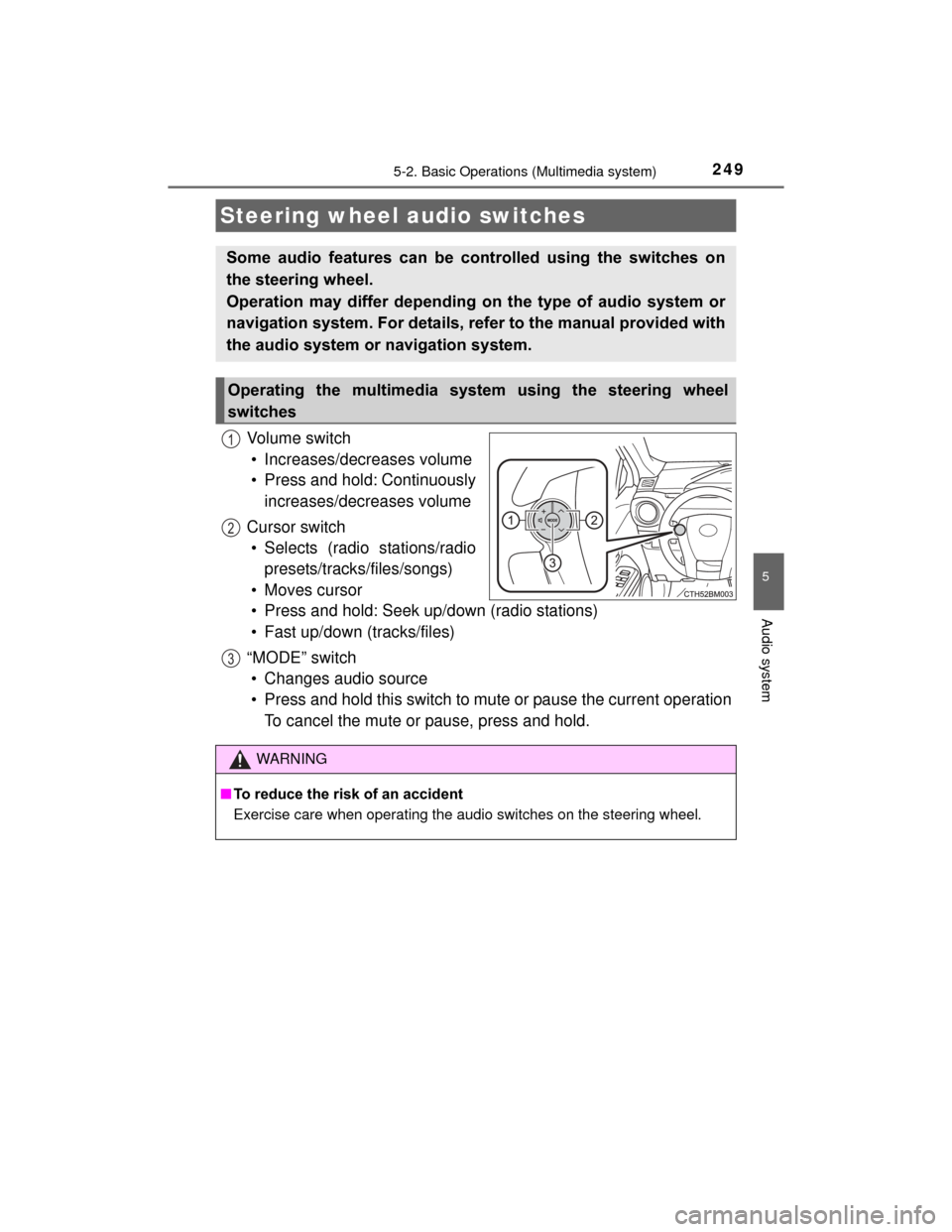
Vol um e s wit ch• Increases/decreases volume
• Press and hold: Continuously increases/decreases volume
Cursor switch • Selects (radio stations/radio presets/tracks/files/songs)
• Moves cursor
• Press and hold: Seek up/down (radio stations)
• Fast up/down (tracks/files)
“MODE” switch • Changes audio source
• Press and hold this switch to mute or pause the current operation To cancel the mute or pause, press and hold.
Steering wheel audio switches
Some audio features can be controlled using the switches on
the steering wheel.
Operation may differ depending on the type of audio system or
navigation system. For details, refer to the manual provided with
the audio system or navigation system.
Operating the multimedia system using the steering wheel
switches
1
12
3
WARNING
■ To reduce the risk of an accident
Exercise care when operating the audio switches on the steering wheel.
Page 252 of 552
2525-2. Basic Operations (Multimedia system)
PRIUS c_U (OM52E68U)
Basic audio operations
Basic audio operations and functions common to each mode are
explained in this section.
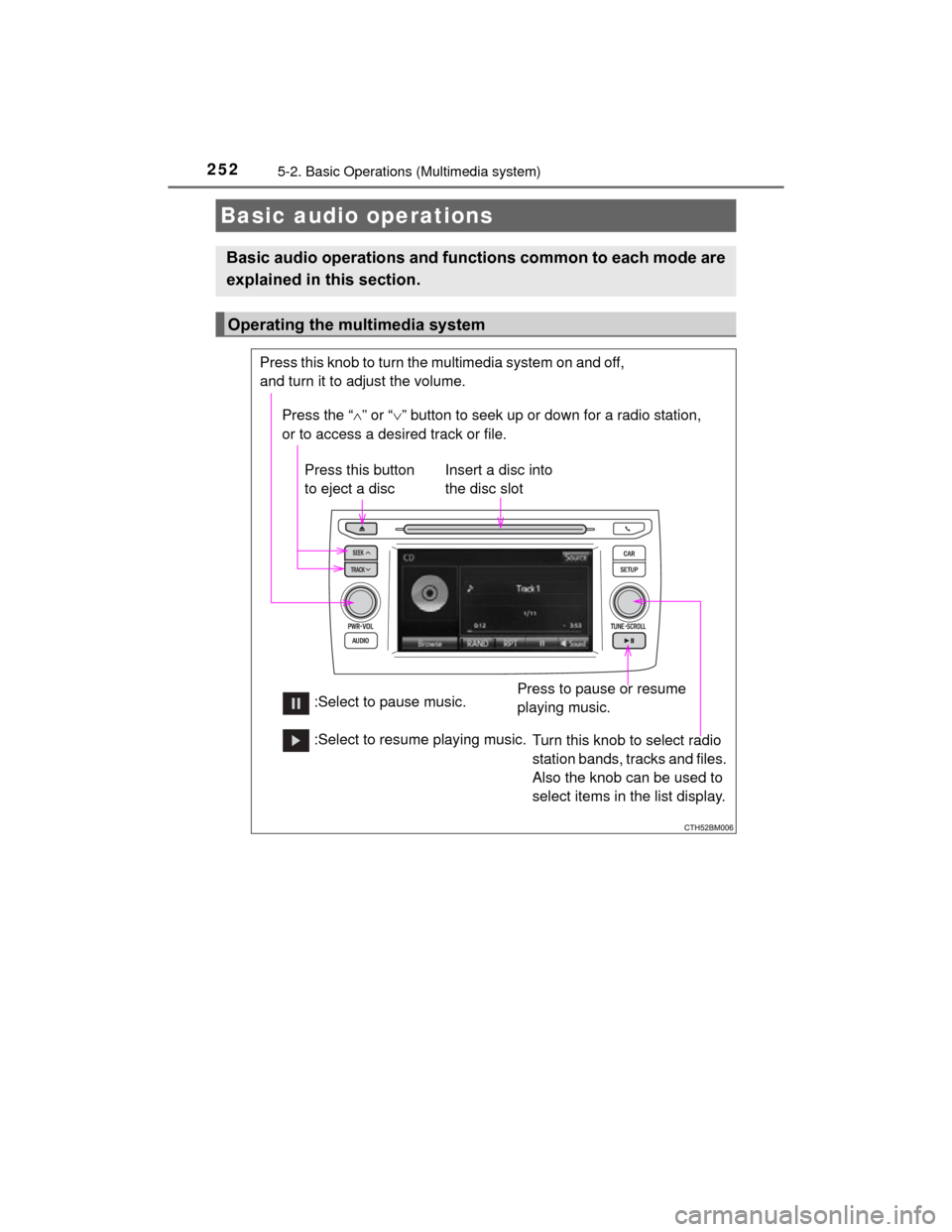
Operating the multimedia system
Press the “” or “ ” button to seek up or down for a radio station,
or to access a desired track or file.
Press this knob to turn the multimedia system on and off,
and turn it to adjust the volume.
Press this button
to eject a disc
Press to pause or resume
playing music.
Insert a disc into
the disc slot
:Select to pause music. Turn this knob to select radio
station bands, tracks and files.
Also the knob can be used to
select items in the list display.
:Select to resume playing music.
Page 257 of 552
2575-3. Setup (Multimedia system)
5
Audio system
PRIUS c_U (OM52E68U)
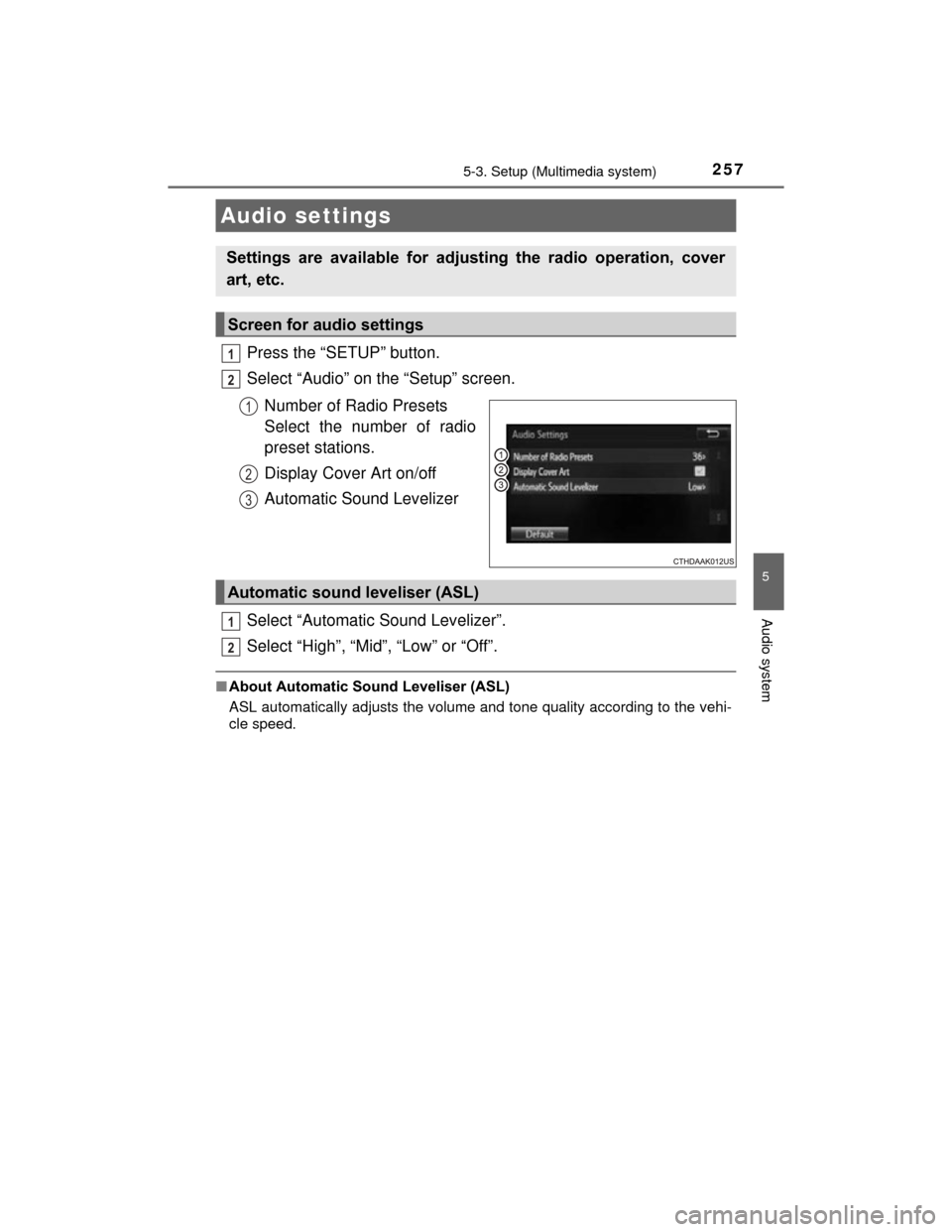
Press the “SETUP” button.
Select “Audio” on the “Setup” screen.Number of Radio Presets
Select the number of radio
preset stations.
Display Cover Art on/off
Automatic Sound Levelizer
Select “Automatic Sound Levelizer”.
Select “High”, “Mid”, “Low” or “Off”.
■ About Automatic Sound Leveliser (ASL)
ASL automatically adjusts the volume and tone quality according to the vehi-
cle speed.
Audio settings
Settings are available for adjusting the radio operation, cover
art, etc.
Screen for audio settings
1
2
1
2
3
Automatic sound leveliser (ASL)
1
2
Page 260 of 552
260
PRIUS c_U (OM52E68U)
5-4. Using the Multimedia system
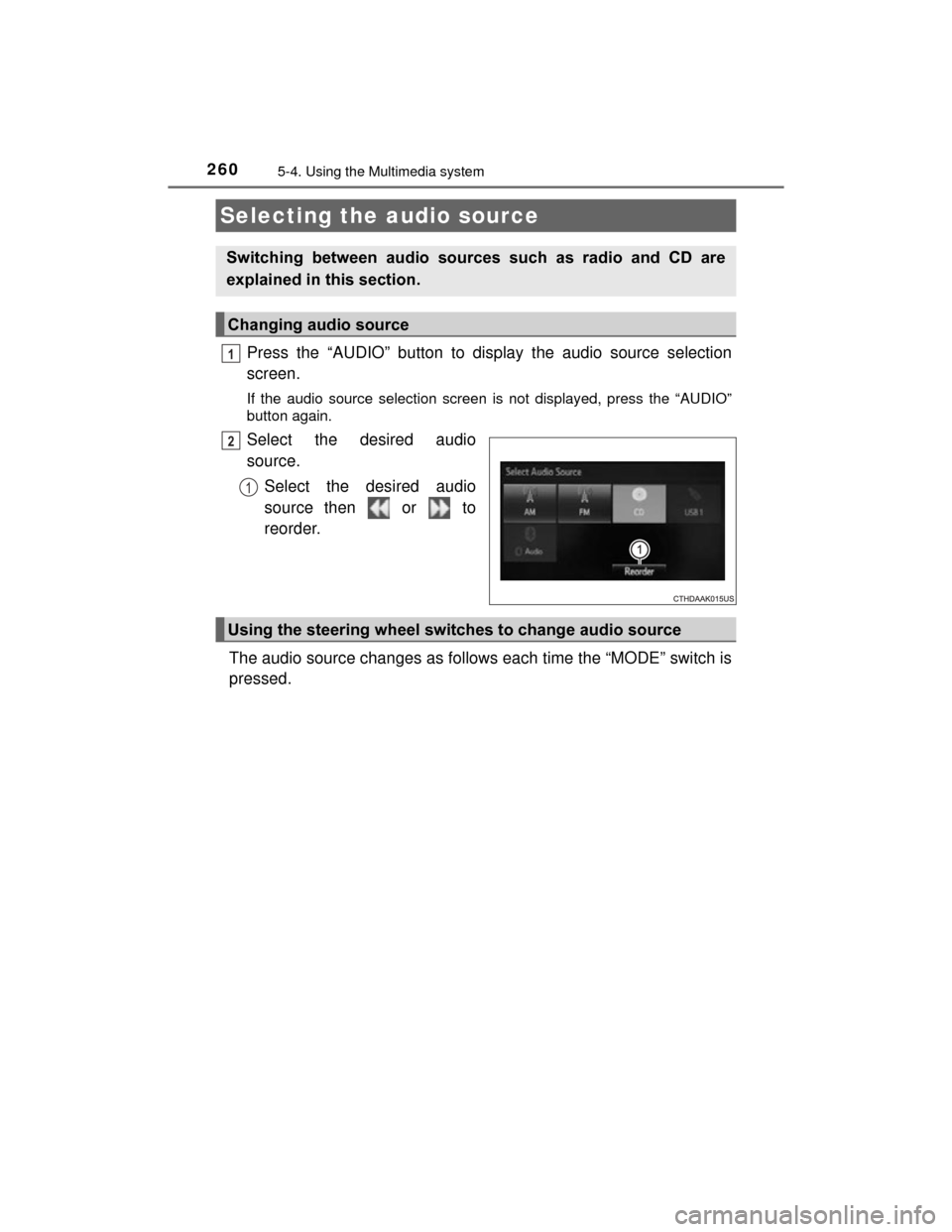
Press the “AUDIO” button to display the audio source selection
screen.
If the audio source selection screen is not displayed, press the “AUDIO”
button again.
Select the desired audio
source.Select the desired audio
source then or to
reorder.
The audio source changes as follows each time the “MODE” switch is
pressed.
Selecting the audio source
Switching between audio sources such as radio and CD are
explained in this section.
Changing audio source
1
2
1
Using the steering wheel switches to change audio source
Page 264 of 552
264
PRIUS c_U (OM52E68U)
5-5. Using the radio (Multimedia system)
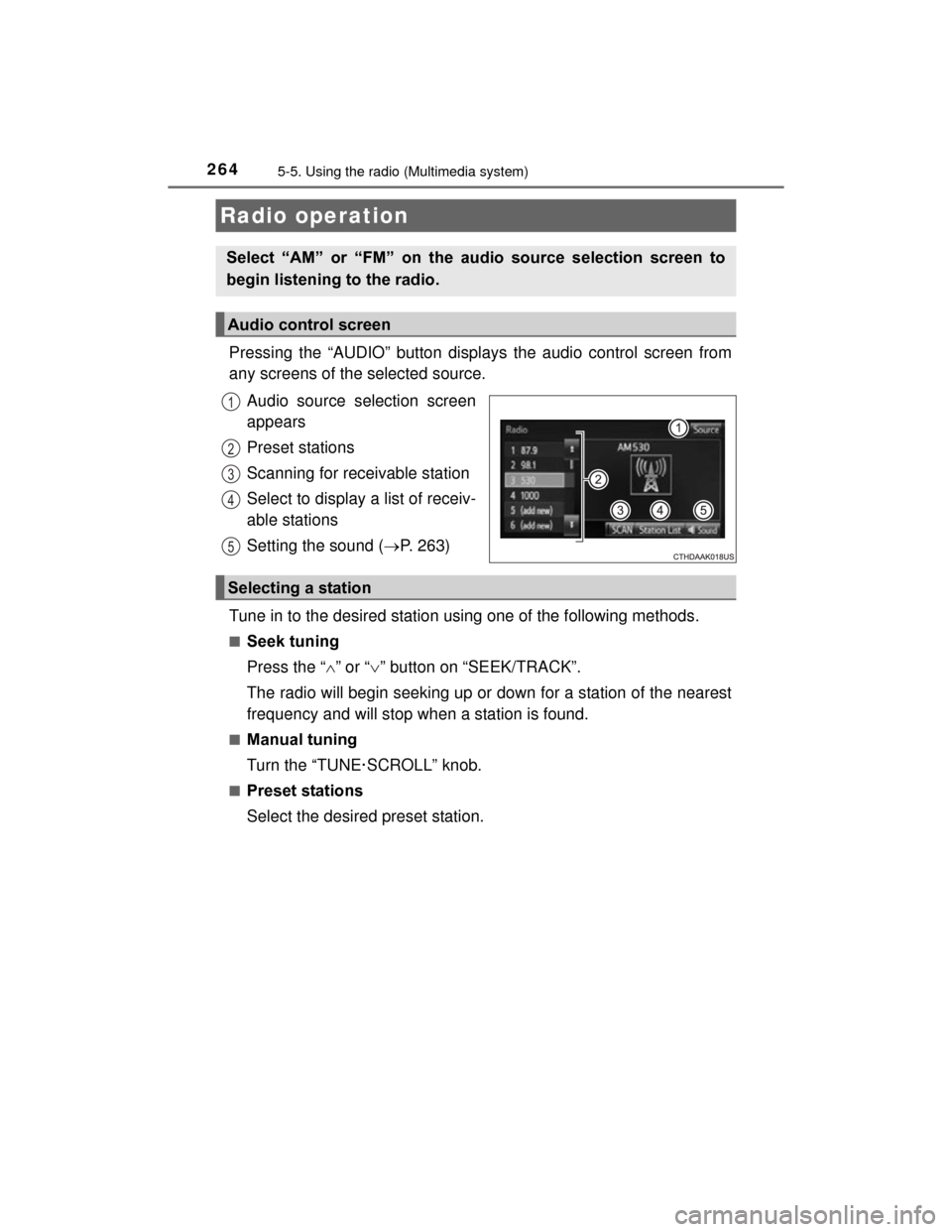
Pressing the “AUDIO” button displays the audio control screen from
any screens of the selected source.Audio source selection screen
appears
Preset stations
Scanning for receivable station
Select to display a list of receiv-
able stations
Setting the sound ( P. 263)
Tune in to the desired station using one of the following methods.
■Seek tuning
Press the “ ” or “ ” button on “SEEK/TRACK”.
The radio will begin seeking up or down for a station of the nearest
frequency and will stop when a station is found.
■Manual tuning
Turn the “TUNE·SCROLL” knob.
■Preset stations
Select the desired preset station.
Radio operation
Select “AM” or “FM” on the audio source selection screen to
begin listening to the radio.
Audio control screen
1
2
3
4
5
Selecting a station
Page 265 of 552
2655-5. Using the radio (Multimedia system)
5
Audio system
PRIUS c_U (OM52E68U)
Search for desired stations by turning the “TUNE·SCROLL” knob or
pressing the “” or “ ” button on “SEEK/TRACK”.
Select “(add new)”.
To change the preset station to a different one, select and hold the preset
station.
Select “Yes”.
Select “OK” after setting the new preset station.
■Refreshing the station list
Select “Refresh” on the “Station List” screen.
To cancel the refresh, select “Cancel Refresh”.
■Reception sensitivity
●Maintaining perfect radio reception at all times is difficult due to the continu-
ally changing position of the antenna, differences in signal strength and sur-
rounding objects, such as trains, transmitters, etc.
● The radio antenna is mounted on the rear roof.
Setting station presets
1
2
3
4
1
Page 284 of 552

2845-8. Connecting Bluetooth® (Multimedia system)
PRIUS c_U (OM52E68U)■
Certifications for the Bluetooth
FCC ID: BABFT0049A
●CAUTION: Radio Frequency Radiation Exposure
This equipment complies with FCC radiation exposure limits set forth for
uncontrolled equipment and meets the FCC radio frequency (RF) Exposure
Guidelines. This equipment has very low levels of RF energy that it deemed
to comply without maximum permissive exposure evaluation (MPE). But it
is desirable that it should be installed and operated with at least 20cm and
more between the radiator and person’s body in normal use position.
• Co-location: This transmitter must not be co-located or operated in con-
junction with any other antenna or transmitter.
• This device complies with part 15 of the FCC Rules. Operation is subject
to the following two conditions: (1) This device may not cause harmful
interference, and (2) this device must accept any interference received,
including interference that may cause undesired operation.
● FCC WARNING
Changes or modifications not expressly approved by the party responsible
for compliance could void the user's authority to operate the equipment.
● IC: 2024B-FT0049A
This device complies with Industry Canada licence-exempt RSS stan-
dard(s). Operation is subject to the following two conditions: (1) this device
may not cause interference, and (2) this device must accept any interfer-
ence, including interference that may cause undesired operation of the
device.
● CAUTION: Radio Frequency Radiation Exposure
This equipment complies with IC radiation exposure limits set forth for
uncontrolled equipment and meets RSS-102 of the IC radio frequency (RF)
Exposure rules.
This equipment has very low levels of RF energy that it deemed to comply
without maximum permissive exposure evaluation (MPE).
But it is desirable that it should be installed and operated with at least 20cm
and more between the radiator and person's body (excluding extremities:
hands, wrists, feet and ankles).