turn signal TOYOTA PRIUS C 2015 NHP10 / 1.G Owners Manual
[x] Cancel search | Manufacturer: TOYOTA, Model Year: 2015, Model line: PRIUS C, Model: TOYOTA PRIUS C 2015 NHP10 / 1.GPages: 552, PDF Size: 9.47 MB
Page 3 of 552
3
1
9 8 6 5
4
3
2
PRIUS c_U (OM52E68U)
10
7
4-1. Before drivingDriving the vehicle ............. 166
Cargo and luggage............ 175
Vehicle load limits ............. 179
Trailer towing..................... 180
Dinghy towing.................... 181
4-2. Driving procedures Engine (ignition) switch ..... 182
Power (ignition) switch ...... 186
EV drive mode................... 193
Hybrid transmission........... 196
Turn signal lever................ 199
Parking brake .................... 200
4-3. Operating the lights and wipers
Headlight switch ................ 201
Fog light switch ................. 205
Windshield wipers and washer ............................ 207
Rear window wiper and washer ............................ 211
4-4. Refueling Opening the fuel tank cap .................................. 214 4-5. Using the driving
support systems
Cruise control .................... 218
Rear view monitor system ............................. 222
Driving assist systems ....... 232
4-6. Driving tips Hybrid vehicle driving tips ................................... 238
Winter driving tips .............. 241
5-1. Using the audio system Audio system types ........... 246
5-2. Basic Operations (Multimedia system)
Multimedia system ............. 247
Steering wheel audio switches........................... 249
USB port/AUX port ............ 250
Basic audio operations ...... 252
5-3. Setup (Multimedia system)
Setup menu ....................... 254
General settings ................ 255
Audio settings .................... 257
Display settings ................. 258
Voice settings .................... 259
5-4. Using the Multimedia system
Selecting the audio source.............................. 260
List screen operation ......... 261
Optimal use of the multimedia system..... 263
4Driving
5Audio system
Page 15 of 552
15Pictorial index
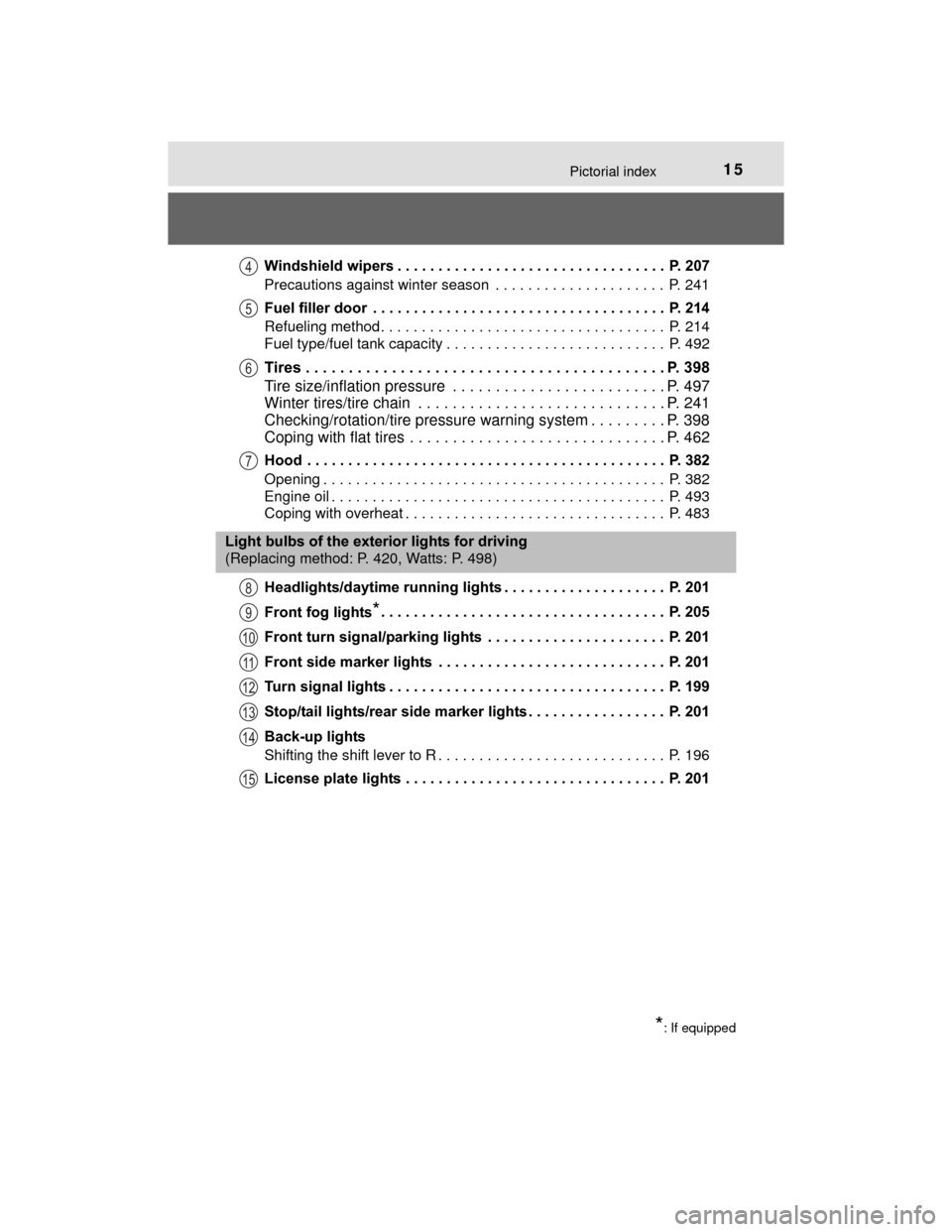
PRIUS c_U (OM52E68U)Windshield wipers . . . . . . . . . . . . . . . . . . . . . . . . . . . . . . . . . P. 207
Precautions against winter season . . . . . . . . . . . . . . . . . . . . . P. 241
Fuel filler door . . . . . . . . . . . . . . . . . . . . . . . . . . . . . . . . . . . . P. 214
Refueling method . . . . . . . . . . . . . . . . . . . . . . . . . . . . . . . . . . . P. 214
Fuel type/fuel tank capacity . . . . . . . . . . . . . . . . . . . . . . . . . . . P. 492
Tires . . . . . . . . . . . . . . . . . . . . . . . . . . . . . . . . . . . . . . . . . . P. 398
Tire size/inflation pressure . . . . . . . . . . . . . . . . . . . . . . . . . P. 497
Winter tires/tire chain . . . . . . . . . . . . . . . . . . . . . . . . . . . . . P. 241
Checking/rotation/tire pressure warning system . . . . . . . . . P. 398
Coping with flat tires . . . . . . . . . . . . . . . . . . . . . . . . . . . . . . P. 462
Hood . . . . . . . . . . . . . . . . . . . . . . . . . . . . . . . . . . . . . . . . . . . . P. 382
Opening . . . . . . . . . . . . . . . . . . . . . . . . . . . . . . . . . . . . . . . . . . P. 382
Engine oil . . . . . . . . . . . . . . . . . . . . . . . . . . . . . . . . . . . . . . . . . P. 493
Coping with overheat . . . . . . . . . . . . . . . . . . . . . . . . . . . . . . . . P. 483
Headlights/daytime running lights . . . . . . . . . . . . . . . . . . . . P. 201
Front fog lights
*. . . . . . . . . . . . . . . . . . . . . . . . . . . . . . . . . . . P. 205
Front turn signal/parking lights . . . . . . . . . . . . . . . . . . . . . . P. 201
Front side marker lights . . . . . . . . . . . . . . . . . . . . . . . . . . . . P. 201
Turn signal lights . . . . . . . . . . . . . . . . . . . . . . . . . . . . . . . . . . P. 199
Stop/tail lights/rear side marker lights . . . . . . . . . . . . . . . . . P. 201
Back-up lights
Shifting the shift lever to R . . . . . . . . . . . . . . . . . . . . . . . . . . . . P. 196
License plate lights . . . . . . . . . . . . . . . . . . . . . . . . . . . . . . . . P. 201
4
5
6
7
Light bulbs of the exterior lights for driving
(Replacing method: P. 420, Watts: P. 498)
*: If equipped
8
9
10
11
12
13
14
15
Page 17 of 552
17Pictorial index
PRIUS c_U (OM52E68U)Turn signal lever . . . . . . . . . . . . . . . . . . . . . . . . . . . . . . . . . . P. 199
Headlight switch . . . . . . . . . . . . . . . . . . . . . . . . . . . . . . . . . . P. 201
Headlights/front parking lights/tail lights/
daytime running lights . . . . . . . . . . . . . . . . . . . . . . . . . . . . . . . P. 201
Front fog lights
*1 . . . . . . . . . . . . . . . . . . . . . . . . . . . . . . . . . . . P. 205
Windshield wiper and washer switch . . . . . . . . . . . . . . . . . P. 207
Usage . . . . . . . . . . . . . . . . . . . . . . . . . . . . . . . . . . . .\
. . . . . . . P. 207
Adding washer fluid . . . . . . . . . . . . . . . . . . . . . . . . . . . . . . . . . P. 393
Emergency flasher switch . . . . . . . . . . . . . . . . . . . . . . . . . . P. 430
Fuel filler door opener . . . . . . . . . . . . . . . . . . . . . . . . . . . . . . P. 214
Hood lock release lever . . . . . . . . . . . . . . . . . . . . . . . . . . . . . P. 382
Tilt and telescopic steering lock release lever . . . . . . . . . . P. 153
Air conditioning system . . . . . . . . . . . . . . . . . . . . . . . . . . . . P. 340
Usage . . . . . . . . . . . . . . . . . . . . . . . . . . . . . . . . . . . .\
. . . . . . . P. 340
Rear window defogger . . . . . . . . . . . . . . . . . . . . . . . . . . . . . . . P. 342
Multimedia system
*1. . . . . . . . . . . . . . . . . . . . . . . . . . . . . . . P. 247
Navigation system
*1, 2
Power outlet . . . . . . . . . . . . . . . . . . . . . . . . . . . . . . . . . . . . . . P. 359
*1: If equipped
*2: Refer to “NAVIGATION SYSTEM OWNER’S MANUAL”.
4
5
6
7
8
9
10
11
12
Page 89 of 552
892. Instrument cluster
2
Instrument cluster
PRIUS c_U (OM52E68U)
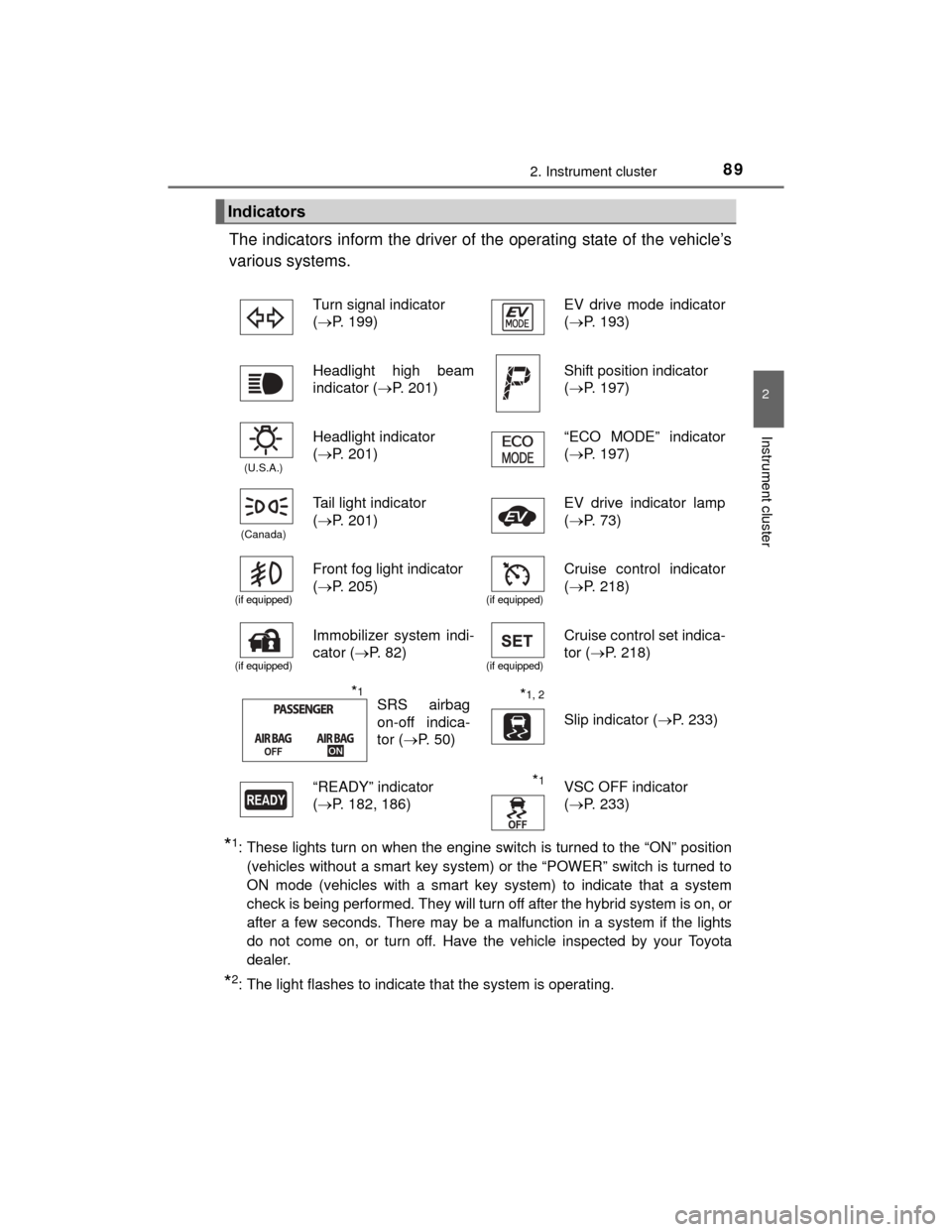
The indicators inform the driver of the operating state of the vehicle’s
various systems.
*1: These lights turn on when the engine switch is turned to the “ON” position(vehicles without a smart key system) or the “POWER” switch is turned to
ON mode (vehicles with a smart key system) to indicate that a system
check is being performed. They will turn off after the hybrid system is on, or
after a few seconds. There may be a malfunction in a system if the lights
do not come on, or turn off. Have the vehicle inspected by your Toyota
dealer.
*2: The light flashes to indicate that the system is operating.
Indicators
Turn signal indicator
(P. 199) EV drive mode indicator
(
P. 193)
Headlight high beam
indicator (P. 201)
Shift position indicator
( P. 197)
(U.S.A.)
Headlight indicator
(P. 201) “ECO MODE” indicator
(
P. 197)
(Canada)
Tail light indicator
(P. 201)EV drive indicator lamp
( P. 73)
(if equipped)
Front fog light indicator
(P. 205)
(if equipped)
Cruise control indicator
( P. 218)
(if equipped)
Immobilizer system indi-
cator ( P. 82)
(if equipped)
Cruise control set indica-
tor (P. 218)
*1, 2
Slip indicator ( P. 233)
“READY” indicator
( P. 182, 186)
*1VSC OFF indicator
( P. 233)
SRS airbag
on-off indica-
tor ( P. 5 0 )*1
Page 142 of 552

1423-2. Opening, closing and locking the doors
PRIUS c_U (OM52E68U)■
Notes for locking the doors
●Touching the door lock sensor while wearing gloves may delay or prevent
lock operation. Remove the gloves and touch the lock sensor again.
● When the lock operation is performed using the lock sensor, recognition sig-
nals will be shown up to two consecutive times. After this, no recognition
signals will be given.
● If the electronic key is inside the vehicle and a door handle becomes wet
during a car wash, a buzzer will sound outside the vehicle. To turn off the
alarm, lock all the doors.
■ Notes for the unlocking function
●A sudden approach to the effective r ange or door handle may prevent the
doors from being unlocked. In this case, return the door handle to the origi-
nal position and check that the doors unlock before pulling the door handle
again.
● Gripping the door handle when wearing a glove may not unlock the door.
Remove the gloves and touch the sensor on the back of the handle again.
● If there is another electronic key in t he detection area, it may take slightly
longer to unlock the doors after the door handle is gripped.
■ When the vehicle is not driven for extended periods
●To prevent theft of the vehicle, do not leave the electronic key within 6 ft. (2
m) of the vehicle.
● The smart key system can be deactivated in advance. Ask your Toyota
dealer for details.
■ To operate the smart key system properly
Make sure to carry the electronic key when operating the system. Do not get
the electronic key too close to the vehicle when operating the system from the
outside of the vehicle.
Depending on the position and holding condition of the electronic key, the key
may not be detected correctly and the system may not operate properly. (The
alarm may go off accidentally, or the door lock prevention function may not
operate.)
■ If the smart key system does not operate properly
●Locking and unlocking the doors: Use the mechanical key. (P. 476)
● Starting the hybrid system: P. 476
■ If the smart key system has been d eactivated in a customized setting
● Locking and unlocking the doors: Use the wireless remote control or
mechanical key. ( P. 125, 476)
● Starting the hybrid system and changing “POWER” switch modes:
P. 476
● Stopping the hybrid system: P. 477
■ Customization that can be configured at Toyota dealer
Settings (e. g. operation signals) can be changed.
(Customizable features: P. 514)
Page 165 of 552
165
4Driving
PRIUS c_U (OM52E68U)4-1. Before driving
Driving the vehicle ............. 166
Cargo and luggage ........... 175
Vehicle load limits ............. 179
Trailer towing..................... 180
Dinghy towing ................... 181
4-2. Driving procedures Engine (ignition) switch ..... 182
Power (ignition) switch ...... 186
EV drive mode .................. 193
Hybrid transmission........... 196
Turn signal lever................ 199
Parking brake .................... 200 4-3. Operating the lights and
wipers
Headlight switch ................ 201
Fog light switch ................. 205
Windshield wipers and washer ............................ 207
Rear window wiper and washer ............................ 211
4-4. Refueling Opening the fuel tank cap .................................. 214
4-5. Using the driving support systems
Cruise control .................... 218
Rear view monitor system ............................ 222
Driving assist systems ...... 232
4-6. Driving tips Hybrid vehicle driving tips .................................. 238
Winter driving tips ............. 241
Page 199 of 552
1994-2. Driving procedures
4
Driving
PRIUS c_U (OM52E68U)
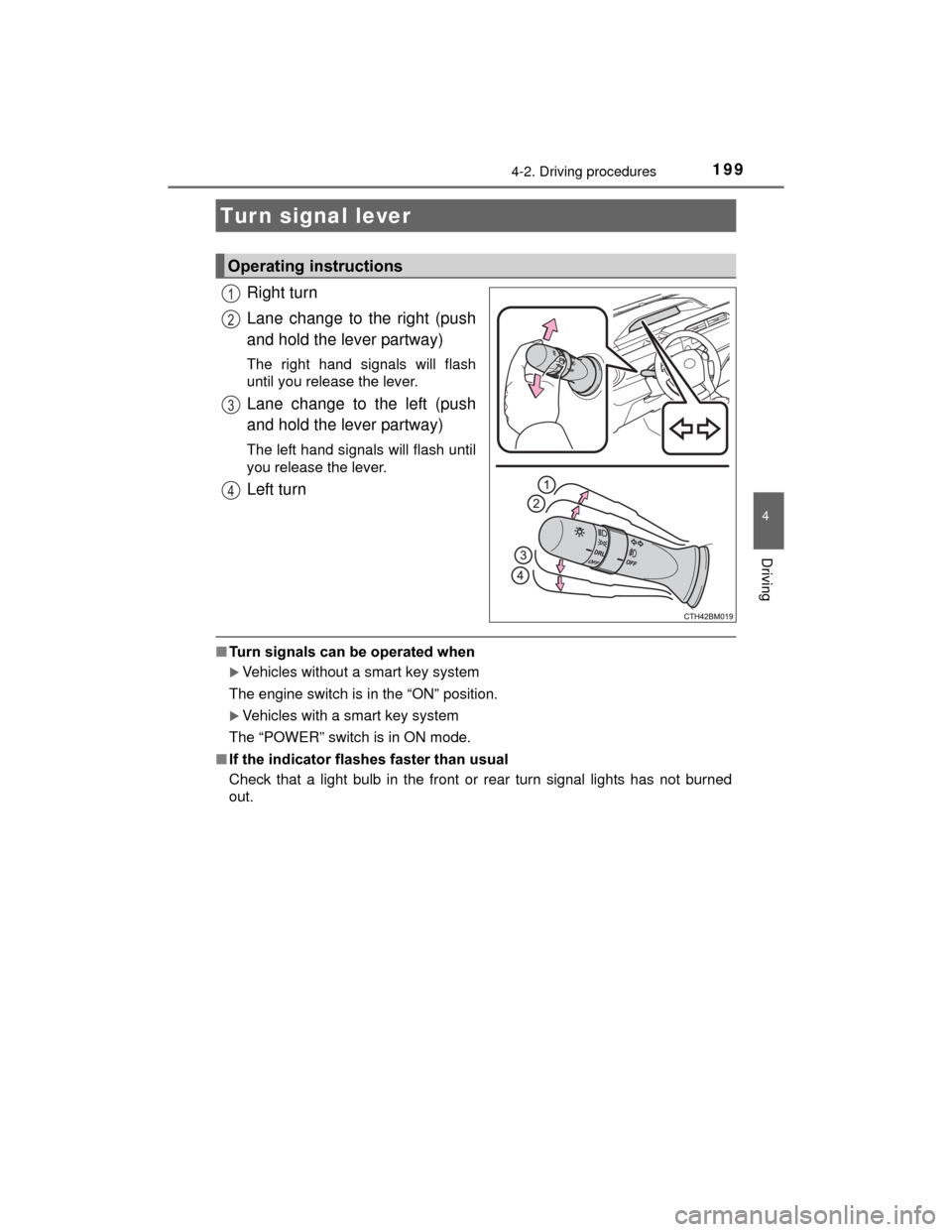
Right turn
Lane change to the right (push
and hold the lever partway)
The right hand signals will flash
until you release the lever.
Lane change to the left (push
and hold the lever partway)
The left hand signals will flash until
you release the lever.
Left turn
■Turn signals can be operated when
Vehicles without a smart key system
The engine switch is in the “ON” position.
Vehicles with a smart key system
The “POWER” switch is in ON mode.
■ If the indicator flashes faster than usual
Check that a light bulb in the front or rear turn signal lights has not burned
out.
Turn signal lever
Operating instructions
1
2
3
4
Page 265 of 552
2655-5. Using the radio (Multimedia system)
5
Audio system
PRIUS c_U (OM52E68U)
Search for desired stations by turning the “TUNE·SCROLL” knob or
pressing the “” or “ ” button on “SEEK/TRACK”.
Select “(add new)”.
To change the preset station to a different one, select and hold the preset
station.
Select “Yes”.
Select “OK” after setting the new preset station.
■Refreshing the station list
Select “Refresh” on the “Station List” screen.
To cancel the refresh, select “Cancel Refresh”.
■Reception sensitivity
●Maintaining perfect radio reception at all times is difficult due to the continu-
ally changing position of the antenna, differences in signal strength and sur-
rounding objects, such as trains, transmitters, etc.
● The radio antenna is mounted on the rear roof.
Setting station presets
1
2
3
4
1
Page 292 of 552
2925-8. Connecting Bluetooth® (Multimedia system)
PRIUS c_U (OM52E68U)
To turn auto connection mode on, set “Bluetooth* Power” to on.
( P. 294)
When you register a phone, auto connection will be activated. Always
set it to this mode and leave the Bluetooth
® phone in a place where a
connection can be established.
When the engine switch is turned to t he “ACC” or “ON” position (vehicles
without a smart key system) or the “POWER” switch is turned to ACCES-
SORY or ON mode (vehicles with a smart key system), the system will
search for a nearby cellular phone you have registered.
Next, the system automatically connects with the most recent of the
phones connected to in the past. Then, the connection result is displayed.
*: Bluetooth is a registered trademark of Bluetooth SIG, Inc.
When auto connection has failed or “Bluetooth* Power” is turned off,
you must connect the Bluetooth® device manually.
*: Bluetooth is a registered trademark of Bluetooth SIG, Inc.
Follow the steps in “Connecting a Bluetooth® device” from “STEP
1”. ( P. 291)
Registering an additional device
Select “Select Device” on the Bluetooth
® audio control screen.
For more information: P. 2 8 9
Selecting a registered device
Select “Select Device” on the Bluetooth
® audio control screen.
For more information: P. 2 9 1
■Reconnecting a Bluetooth® phone
If the system cannot connect due to poor signal strength with the engine
switch is turned to the “ACC” or “ON” position (vehicles without a smart key
system) or the “POWER” switch is turned to ACCESSORY or ON mode (vehi-
cles with a smart key system), the system will automatically attempt to recon-
nect.
If the phone is turned off, the system will not attempt to reconnect. In this
case, the connection must be made manually, or the phone must be rese-
lected.
Auto connection
Manual connection
Connecting a Bluetooth® audio player
1
1
2
1
2
Page 402 of 552

4027-3. Do-it-yourself maintenance
PRIUS c_U (OM52E68U)■
If the tire pressure warning system is not functioning
The tire pressure warning system will be disabled in the following condi-
tions:
(When the condition becomes normal, the system will work properly.)
●If tires not equipped with tire pressure warning valves and transmitters
are used
●If the ID code on the tire pressure warning valves and transmitters is not
registered in the tire pressure warning computer
●If the tire inflation pressure is 73 psi (500 kPa, 5.1 kgf/cm2 or bar) or
higher
The tire pressure warning system may be disabled in the following condi-
tions:
(When the condition becomes normal, the system will work properly.)
●If electronic devices or facilities using similar radio wave frequencies are
nearby
●If a radio set at a similar frequency is in use in the vehicle
●If a window tint that affects the radio wave signals is installed
●If there is a lot of snow or ice on the vehicle, particularly around the
wheels or wheel housings
●If non-genuine Toyota wheels are used (Even if you use Toyota wheels,
the tire pressure warning system may not work properly with some types
of tires.)
●If tire chains are used
■The initialization operation
●Make sure to carry out initialization after adjusting the tire inflation pres-
sure.
Also, make sure the tires are cold before carrying out initialization or tire
inflation pressure adjustment.
●If you have accidentally turned the power switch to off during initializa-
tion, it is not necessary to press the reset switch again as initialization
will restart automatically when the power switch has been turned to the
ON mode for the next time.
●If you accidentally press the reset switch when initialization is not neces-
sary, adjust the tire inflation pressure to the specified level when the
tires are cold, and conduct initialization again.
■When the initialization of the tire pressure warning system has failed
Initialization can be completed in a few minutes. However, in the following
cases, the settings have not been recorded and the system will not oper-
ate properly. If repeated attempts to record tire inflation pressure settings
are unsuccessful, have the vehicle inspected by your Toyota dealer.
●When operating the tire pressure wa rning reset switch, the tire pressure
warning light does not blink 3 times.
●After driving for a certain period of time since the initialization has been
completed, the warning light comes on after blinking for 1 minute.