Slip TOYOTA PRIUS C 2015 NHP10 / 1.G Quick Reference Guide
[x] Cancel search | Manufacturer: TOYOTA, Model Year: 2015, Model line: PRIUS C, Model: TOYOTA PRIUS C 2015 NHP10 / 1.GPages: 23, PDF Size: 1.3 MB
Page 4 of 23
OVERVIEW
FEATURES/OPERATIONS
SAFETY AND EMERGENCY FEATURES
45
OVERVIEW
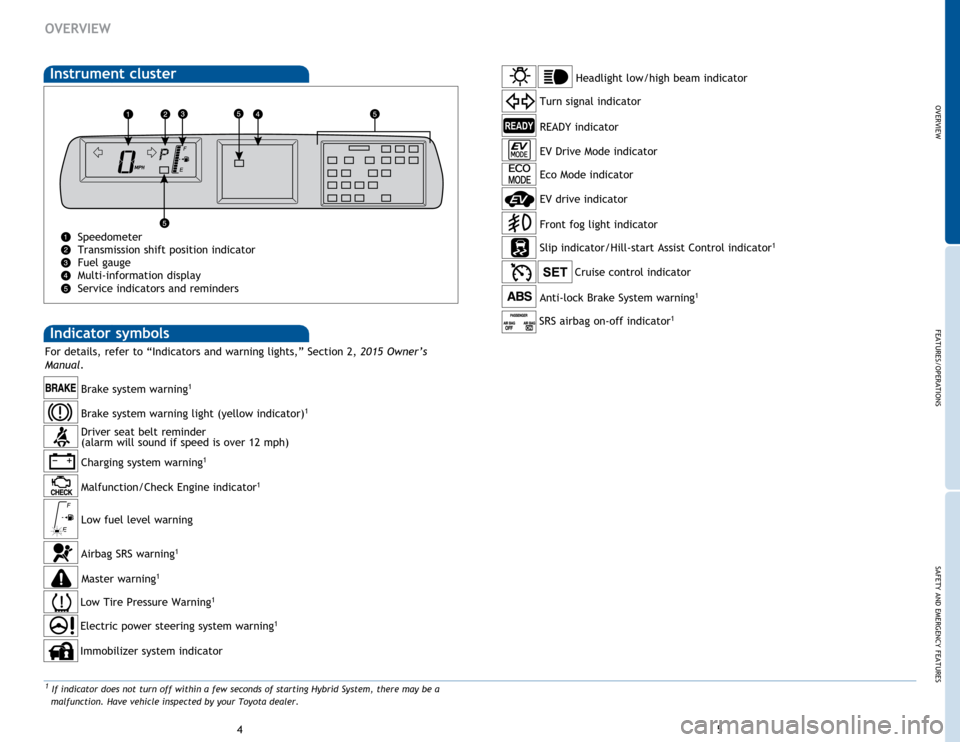
Indicator symbols
Instrument cluster
Speedometer
Transmission shift position indicator
Fuel gauge
Multi-information display
Service indicators and reminders
Charging system warning1
Brake system warning1
Anti-lock Brake System warning1
Headlight low/high beam indicator
Turn signal indicator
Slip indicator/Hill-start Assist Control indicator
1
Cruise control indicator
Low Tire Pressure Warning1
Immobilizer system indicator
Airbag SRS warning1
Master warning1
Driver seat belt reminder
(alarm will sound if speed is over 12 mph)
Malfunction/Check Engine indicator
1
Low fuel level warning
Electric power steering system warning1
READY indicator
Front fog light indicator
Brake system warning light (yellow indicator)1
Eco Mode indicator
EV Drive Mode indicator
1 If indicator does not turn off within a few seconds of starting Hybrid System, there may be a
malfunction. Have vehicle inspected by your Toyota dealer.
For details, refer to “Indicators and warning lights,” Section 2, 2015 Owner’s
Manual .
EV drive indicator
SRS airbag on-off indicator1
Page 13 of 23
OVERVIEW
FEATURES/OPERATIONS
SAFETY AND EMERGENCY FEATURES
23
22
FEATURES/OPERATIONS
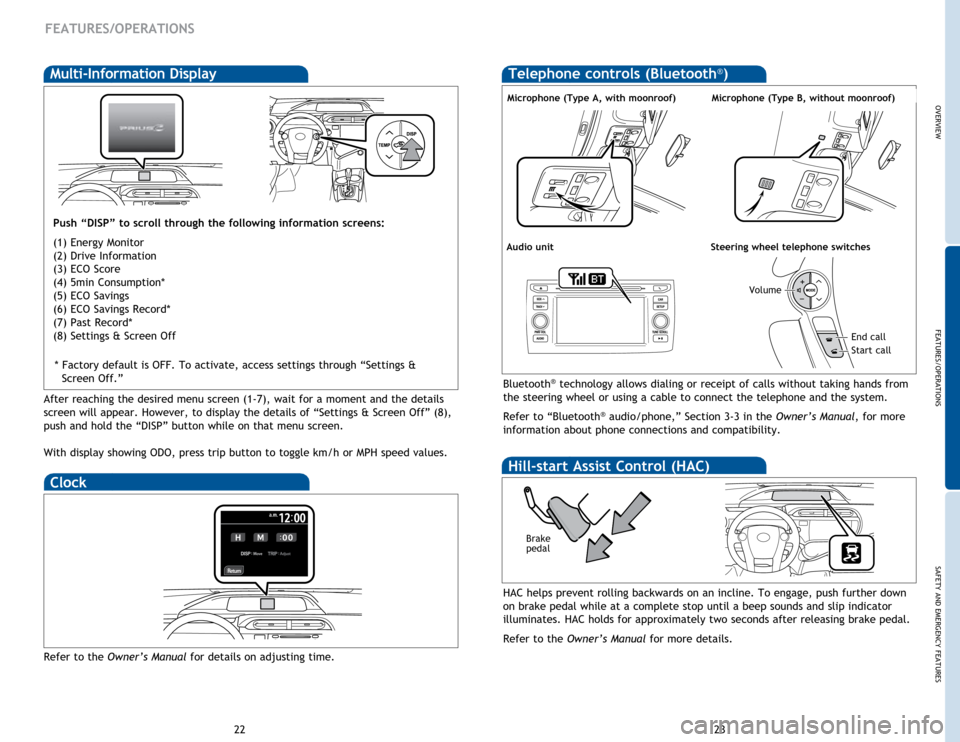
Multi-Information Display
Push “DISP” to scroll through the following information screens:
(1) Energy Monitor
(2) Drive Information
(3) ECO Score
(4) 5min Consumption*
(5) ECO Savings
(6) ECO Savings Record*
(7) Past Record*
(8) Settings & Screen Off
Bluetooth® technology allows dialing or receipt of calls without taking hands from
the steering wheel or using a cable to connect the telephone and the system.
Refer to “Bluetooth
® audio/phone,” Section 3-3 in the Owner’s Manual, for more
information about phone connections and compatibility.
Microphone (Type A, with moonroof)
Audio unitSteering wheel telephone switches
Volume
Start call
End call
Microphone (Type B, without moonroof)
Clock
Refer to the Owner’s Manual for details on adjusting time.
HAC helps prevent rolling backwards on an incline. To engage, push further down
on brake pedal while at a complete stop until a beep sounds and slip indicator
illuminates. HAC holds for approximately two seconds after releasing brake pedal.
Refer to the Owner’s Manual for more details.
Brake
pedal
Hill-start Assist Control (HAC)
Telephone controls (Bluetooth®)
After reaching the desired menu screen (1-7), wait for a moment and the details
screen will appear. However, to display the details of “Settings & Screen Off” (8),
push and hold the “DISP” button while on that menu screen.
With display showing ODO, press trip button to toggle km/h or MPH speed values.* Factory default is OFF. To activate, access settings through “Settings &
Screen Off.”
Page 15 of 23
OVERVIEW
FEATURES/OPERATIONS
SAFETY AND EMERGENCY FEATURES
27
26
Star Safety SystemTM
VSC helps prevent loss of traction during cornering by reducing Hybrid System
output and applying brake force to selected wheels.
Toyota’s VSC monitors steering angle and the direction your vehicle is traveling.
When it senses that the front or rear wheels begin to lose traction, VSC reduces
Hybrid System output and applies braking to selected wheels. This helps restore
traction and vehicle control.
Vehicle Stability Control (VSC)
Anti-Lock Brake System (ABS)
ABS helps prevent brakes from locking up by “pulsing” brake pressure to each
wheel. This limits brake lockup and helps provide directional control for the
current road conditions.
Toyota’s ABS sensors detect which wheels are locking up and limits wheel lockup
by “pulsing” each wheel’s brakes independently. Pulsing releases brake pressure
repeatedly for fractions of a second. This helps the tires attain the traction that
current road conditions will allow, helping you to stay in directional control.
Brake Assist (BA)
Brake Assist is designed to detect sudden or “panic” braking, and then add braking
pressure to help decrease the vehicle’s stopping distance. When there’s only a
split second to react, Brake Assist can add additional brake pressure more quickly
than just the driver alone can. VSC helps prevent loss of traction during cornering by reducing Hybrid System
output, and Traction Control helps maintain traction on loose gravel and wet, icy,
or uneven surfaces by applying brake force to the spinning wheel(s).
Toyota’s TRAC sensors are activated when one of the drive wheels starts to slip.
TRAC limits Hybrid System output and applies the brakes to the spinning wheel.
This transfers power to the wheels that still have traction to help keep you on
track.
Traction Control (TRAC)
Electronic Brake Force Distribution (EBD)
Toyota’s ABS technology has Electronic Brake-force Distribution (EBD) to help
maintain control and balance when braking. Abrupt stops can cause a vehicle
to tilt forward, reducing the braking power of the rear wheels. EBD responds to
sudden stops by redistributing brake force to enhance the braking effectiveness of
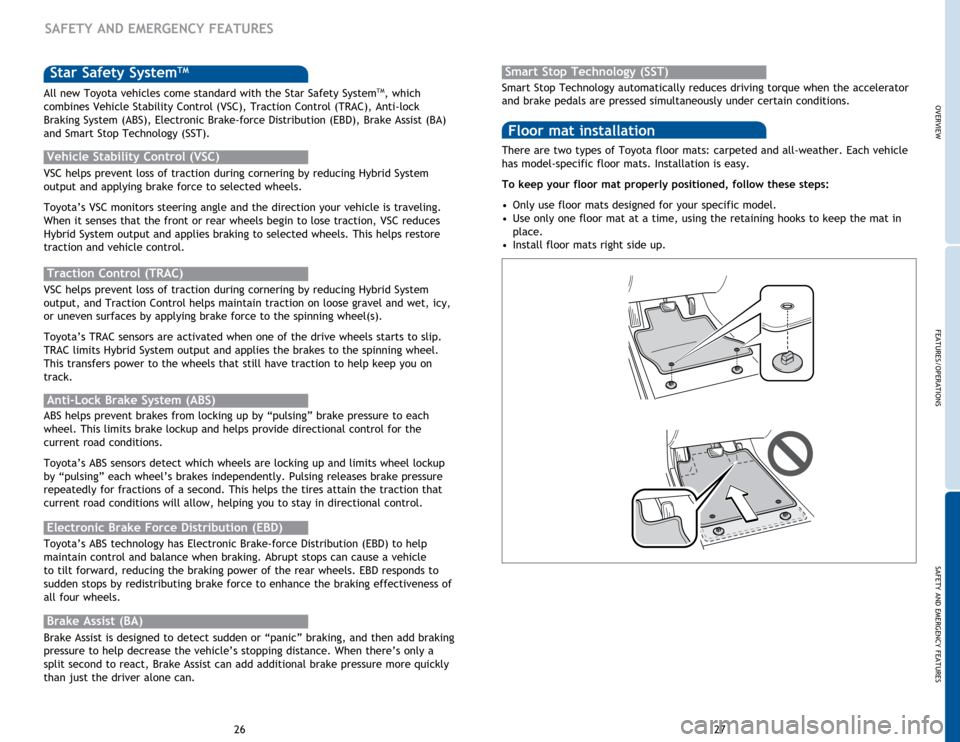
all four wheels. There are two types of Toyota floor mats: carpeted and all-weather. Each vehicle
has model-specific floor mats. Installation is easy.
To keep your floor mat properly positioned, follow these steps:
•
Only use floor mats designed for your specific model.
• Use only one floor mat at a time, using the retaining hooks to keep the mat in
place.
• Install floor mats right side up.
Floor mat installation
SAFETY AND EMERGENCY FEATURES
All new Toyota vehicles come standard with the Star Safety SystemTM, which
combines Vehicle Stability Control (VSC), Traction Control (TRAC), Anti-lock
Braking System (ABS), Electronic Brake-force Distribution (EBD), Brake Assist (BA)
and Smart Stop Technology (SST). Smart Stop Technology automatically reduces driving torque when the accelerator
and brake pedals are pressed simultaneously under certain conditions.
Smart Stop Technology (SST)