lock TOYOTA PRIUS C 2016 NHP10 / 1.G Owner's Manual
[x] Cancel search | Manufacturer: TOYOTA, Model Year: 2016, Model line: PRIUS C, Model: TOYOTA PRIUS C 2016 NHP10 / 1.GPages: 588, PDF Size: 12.75 MB
Page 100 of 588
1002. Instrument cluster
PRIUS c_U (OM52F96U)
Cruising range
Displays the estimated maximum distance that can be driven
with the quantity of fuel remaining.
• This distance is computed based on your average fuel consumption.
As a result, the actual distance that can be driven may differ from that
displayed.
• When only a small amount of fuel is added to the tank, the display
may not be updated.
Vehicles without a smart key system:
when refueling, turn the engine switch to the “LOCK” position. If the
vehicle is refueled without turning the engine switch to the “LOCK”
position, the display may not be updated.
Vehicles with a smart key system:
when refueling, turn the “POWER” switch off. If the vehicle is refueled
without turning the “POWER” switch off, the display may not be
updated.
Outside temperature
P. 3 8 7
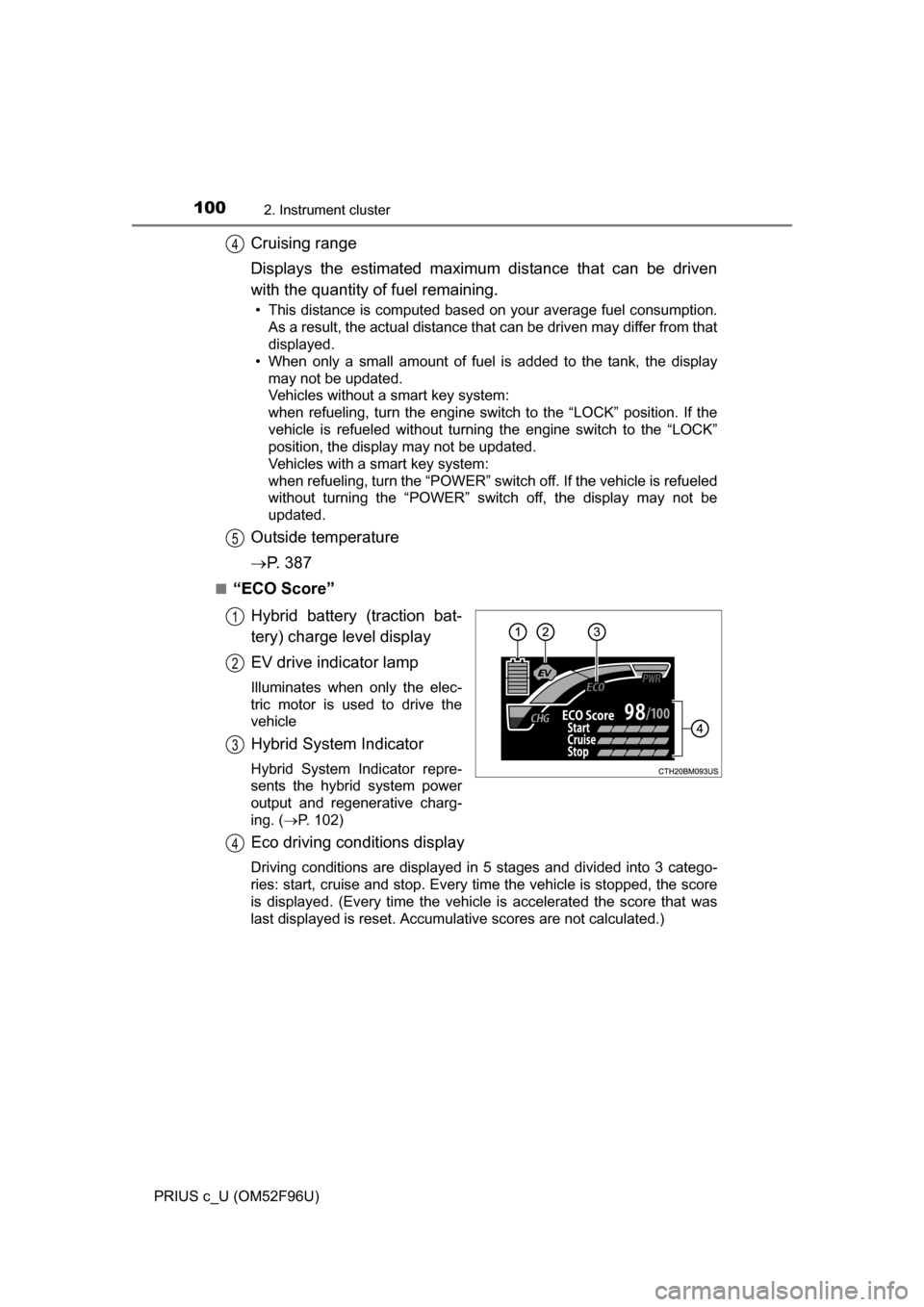
■“ECO Score”
Hybrid battery (traction bat-
tery) charge level display
EV drive indicator lamp
Illuminates when only the elec-
tric motor is used to drive the
vehicle
Hybrid System Indicator
Hybrid System Indicator repre-
sents the hybrid system power
output and regenerative charg-
ing. ( P. 102)
Eco driving conditions display
Driving conditions are displayed in 5 stages and divided into 3 catego-
ries: start, cruise and stop. Every time the vehicle is stopped, the score
is displayed. (Every time the vehicle is accelerated the score that was
last displayed is reset. Accumulative scores are not calculated.)
4
5
1
2
3
4
Page 103 of 588
1032. Instrument cluster
2
Instrument cluster
PRIUS c_U (OM52F96U)
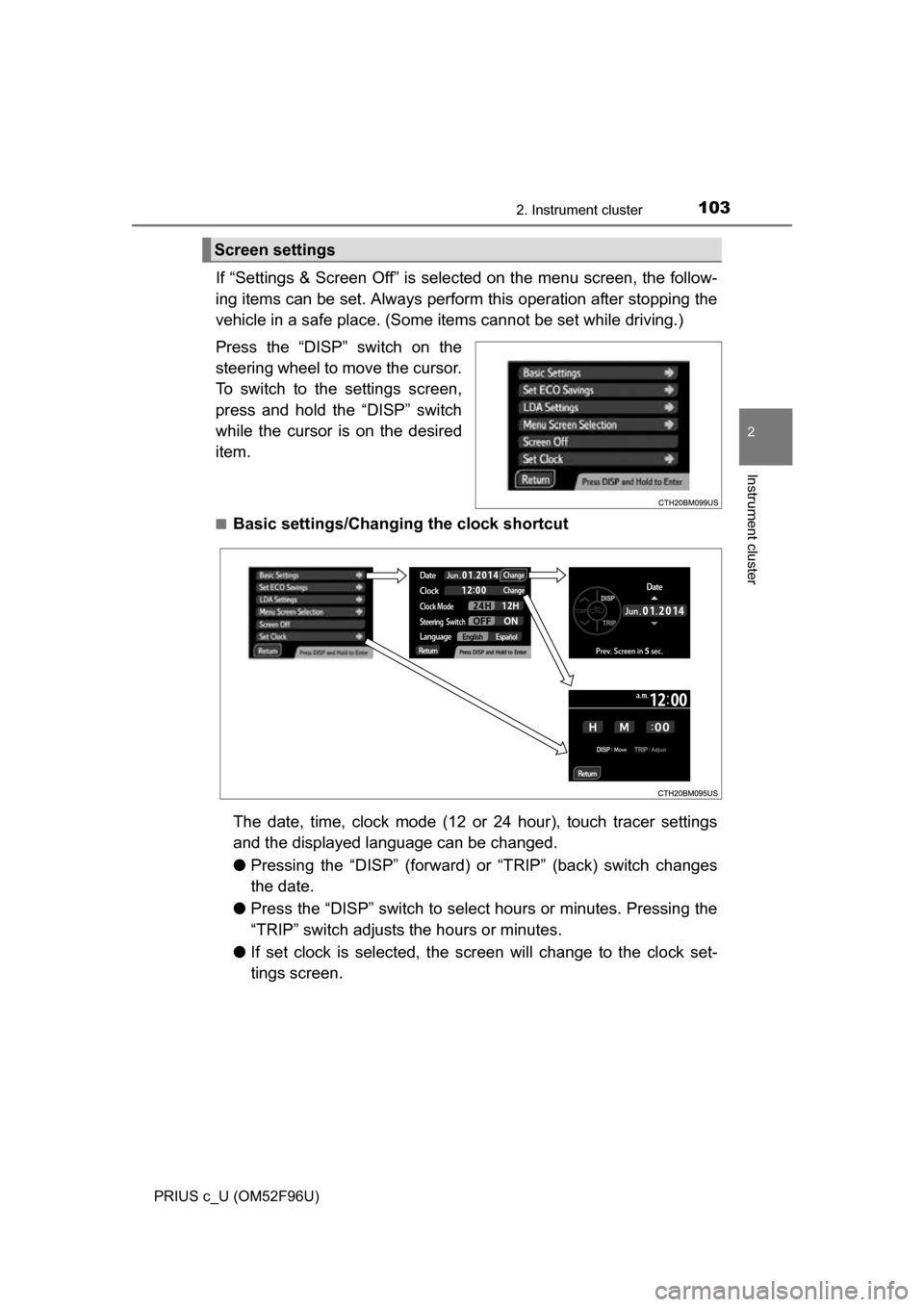
If “Settings & Screen Off” is selected on the menu screen, the follow-
ing items can be set. Always perform this operation after stopping the
vehicle in a safe place. (Some it ems cannot be set while driving.)
Press the “DISP” switch on the
steering wheel to move the cursor.
To switch to the settings screen,
press and hold the “DISP” switch
while the cursor is on the desired
item.
■Basic settings/Changing the clock shortcut
The date, time, clock mode (12 or 24 hour), touch tracer settings
and the displayed language can be changed.
● Pressing the “DISP” (forward) or “TRIP” (back) switch changes
the date.
● Press the “DISP” switch to sele ct hours or minutes. Pressing the
“TRIP” switch adjusts the hours or minutes.
● If set clock is sele cted, the screen will c hange to the clock set-
tings screen.
Screen settings
Page 105 of 588
1052. Instrument cluster
2
Instrument cluster
PRIUS c_U (OM52F96U)■
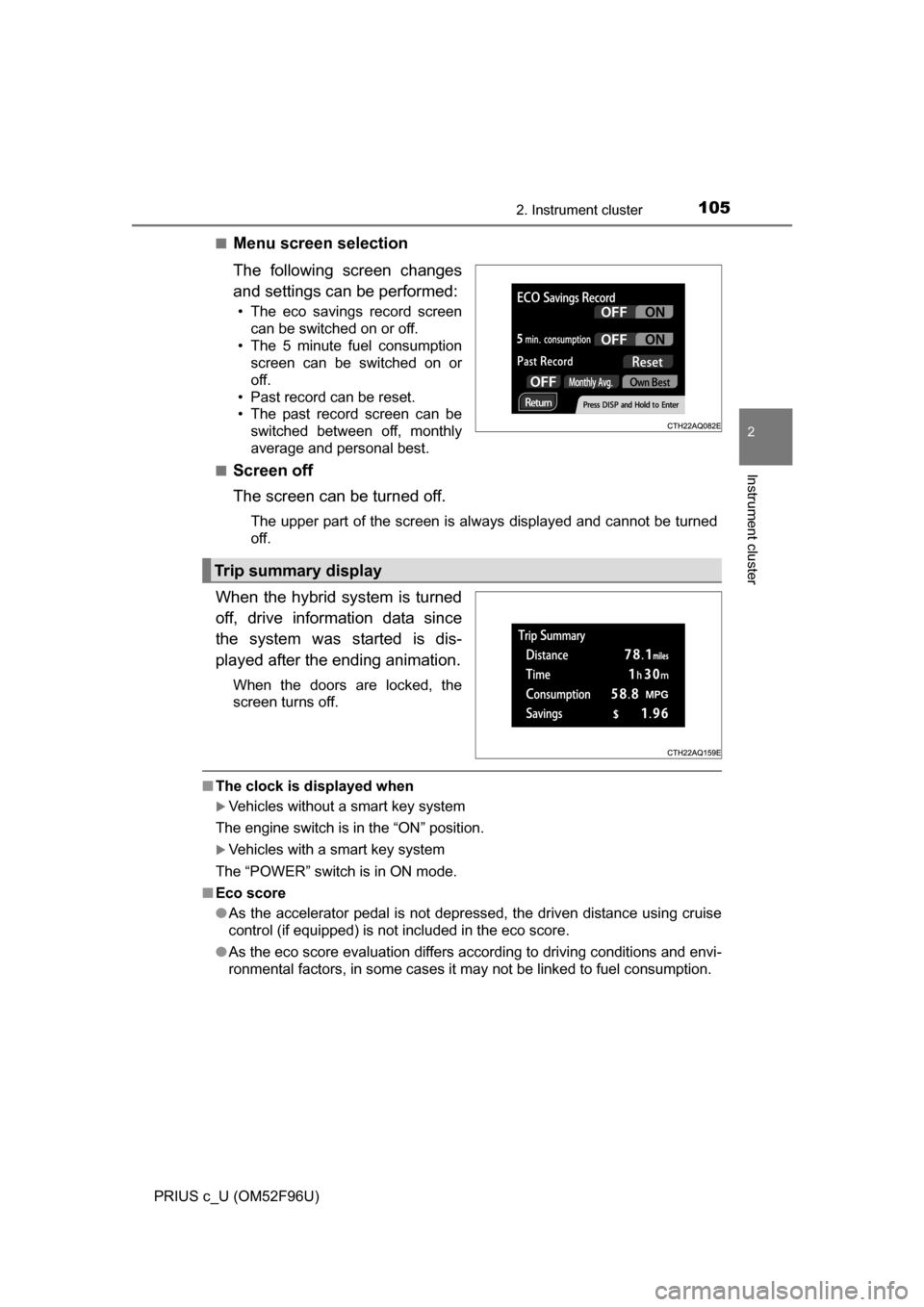
Menu screen selection
The following screen changes
and settings can be performed:
• The eco savings record screen
can be switched on or off.
• The 5 minute fuel consumption screen can be switched on or
off.
• Past record can be reset.
• The past record screen can be switched between off, monthly
average and personal best.
■
Screen off
The screen can be turned off.
The upper part of the screen is always displayed and cannot be turned
off.
When the hybrid system is turned
off, drive information data since
the system was started is dis-
played after the ending animation.
When the doors are locked, the
screen turns off.
■ The clock is displayed when
Vehicles without a smart key system
The engine switch is in the “ON” position.
Vehicles with a smart key system
The “POWER” switch is in ON mode.
■ Eco score
●As the accelerator pedal is not depressed, the driven distance using cruise
control (if equipped) is not included in the eco score.
● As the eco score evaluation differs according to driving conditions and envi-
ronmental factors, in some cases it may not be linked to fuel consumption.
Trip summary display
Page 106 of 588
1062. Instrument cluster
PRIUS c_U (OM52F96U)■
Eco savings
●Fuel cost and savings should be used as a guide only.
● Depending on refueling methods, driving conditions and environmental fac-
tors, the actual and displayed fuel costs may differ.
● In some cases, fuel cost and savings may not be linked to the eco score
evaluation.
■ When disconnecting and reconnect ing 12-volt battery terminals
The following information data will be reset:
● Clock
● Past record (aside from the top 3 results)
● Average fuel consumption
● Cruising range
● Average vehicle speed
● Driving time
● EV driving rate/EV driven distance
Additionally, some displays may return to their default settings.
■ Liquid crystal display
Small spots or light spots may appear on the display. This phenomenon is
characteristic of liquid crystal displays, and there is no problem continuing to
use the display.
WARNING
■Eco score
Eco score should be used as a guide only. Always drive safely in accor-
dance with road and traffic conditions.
■ The information display at low temperatures
Allow the interior of the vehicle to warm up before using the liquid crystal
information display. At extremely low temperatures, the display monitor may
respond slowly, and display changes may be delayed.
For example, there is a lag between the driver’s shifting and the new gear
number appearing on the display. This lag could cause the driver to down-
shift again, causing rapid and excessive engine braking and possibly an
accident resulting in death or injury.
■ Cautions during setting up the display
As the hybrid system needs to be running during setting up the display,
ensure that the vehicle is parked in a place with adequate ventilation. In a
closed area such as a garage, exhaust gases including harmful carbon
monoxide (CO) may collect and enter the vehicle. This may lead to death or
a serious health hazard.
Page 117 of 588
117
3
Operation of
each component
PRIUS c_U (OM52F96U) 3-1. Key information
Keys .................................. 118
3-2. Opening, closing and locking the doors
Side doors ......................... 124
Back door .......................... 133
Smart key system ............. 138
3-3. Adjusting the seats Front seats ........................ 145
Rear seats......................... 146
Head restraints.................. 150
3-4. Adjusting the steering wheel and mirrors
Steering wheel .................. 153
Inside rear view mirror ...... 155
Outside rear view mirrors ............................. 156
3-5. Opening and closing the windows
Power windows ................. 158
Moon roof .......................... 162
Page 119 of 588
1193-1. Key information
3
Operation of each component
PRIUS c_U (OM52F96U)
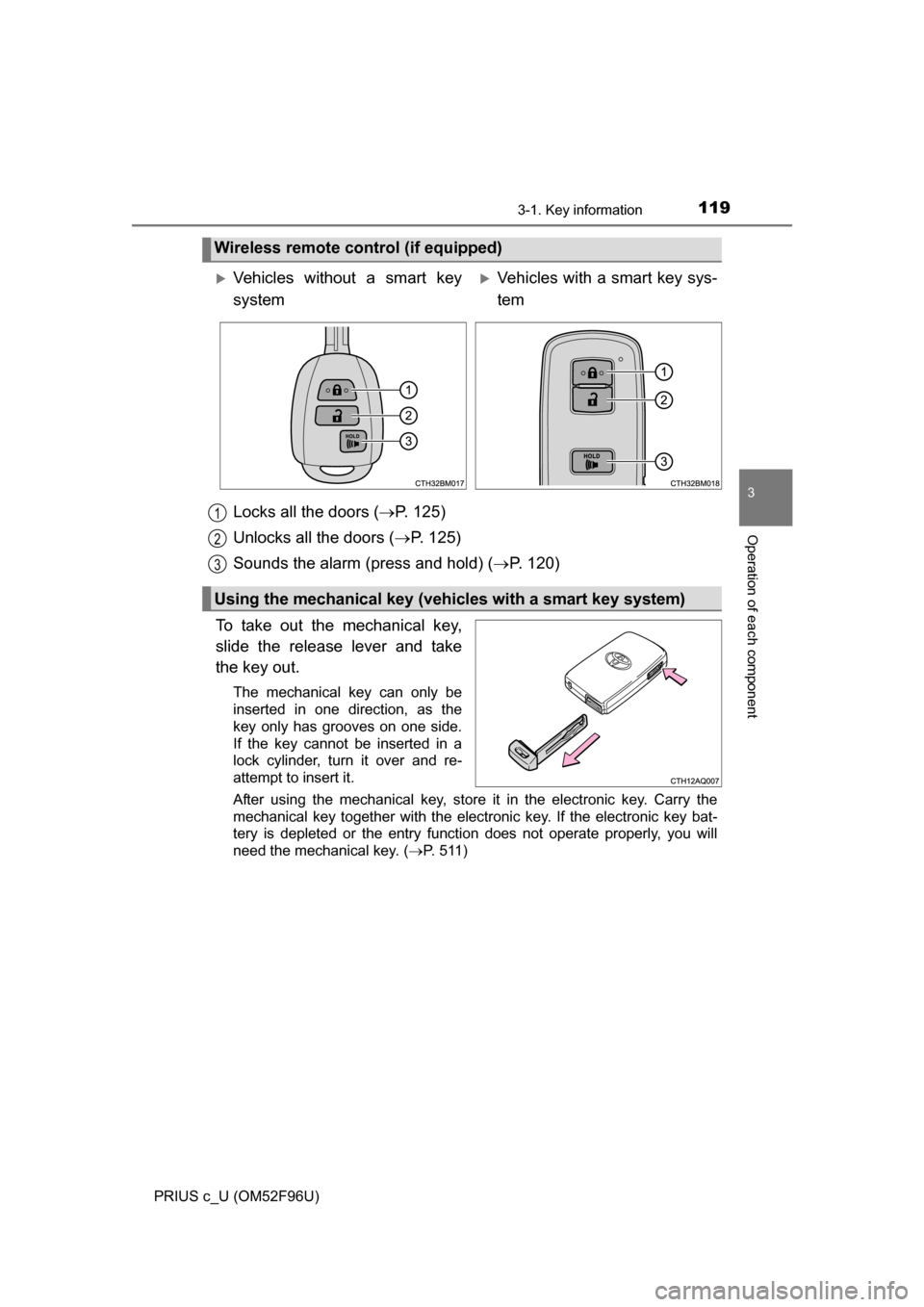
Locks all the doors (P. 125)
Unlocks all the doors ( P. 125)
Sounds the alarm (press and hold) ( P. 120)
To take out the mechanical key,
slide the release lever and take
the key out.
The mechanical key can only be
inserted in one direction, as the
key only has grooves on one side.
If the key cannot be inserted in a
lock cylinder, turn it over and re-
attempt to insert it.
After using the mechanical key, store it in the electronic key. Carry the
mechanical key together with the electronic key. If the electronic key bat-
tery is depleted or the entry function does not operate properly, you will
need the mechanical key.
( P. 511)
Wireless remote control (if equipped)
Vehicles without a smart key
systemVehicles with a smart key sys-
tem
Using the mechanical key (vehic les with a smart key system)
1
2
3
Page 124 of 588
124
PRIUS c_U (OM52F96U)
3-2. Opening, closing and locking the doors
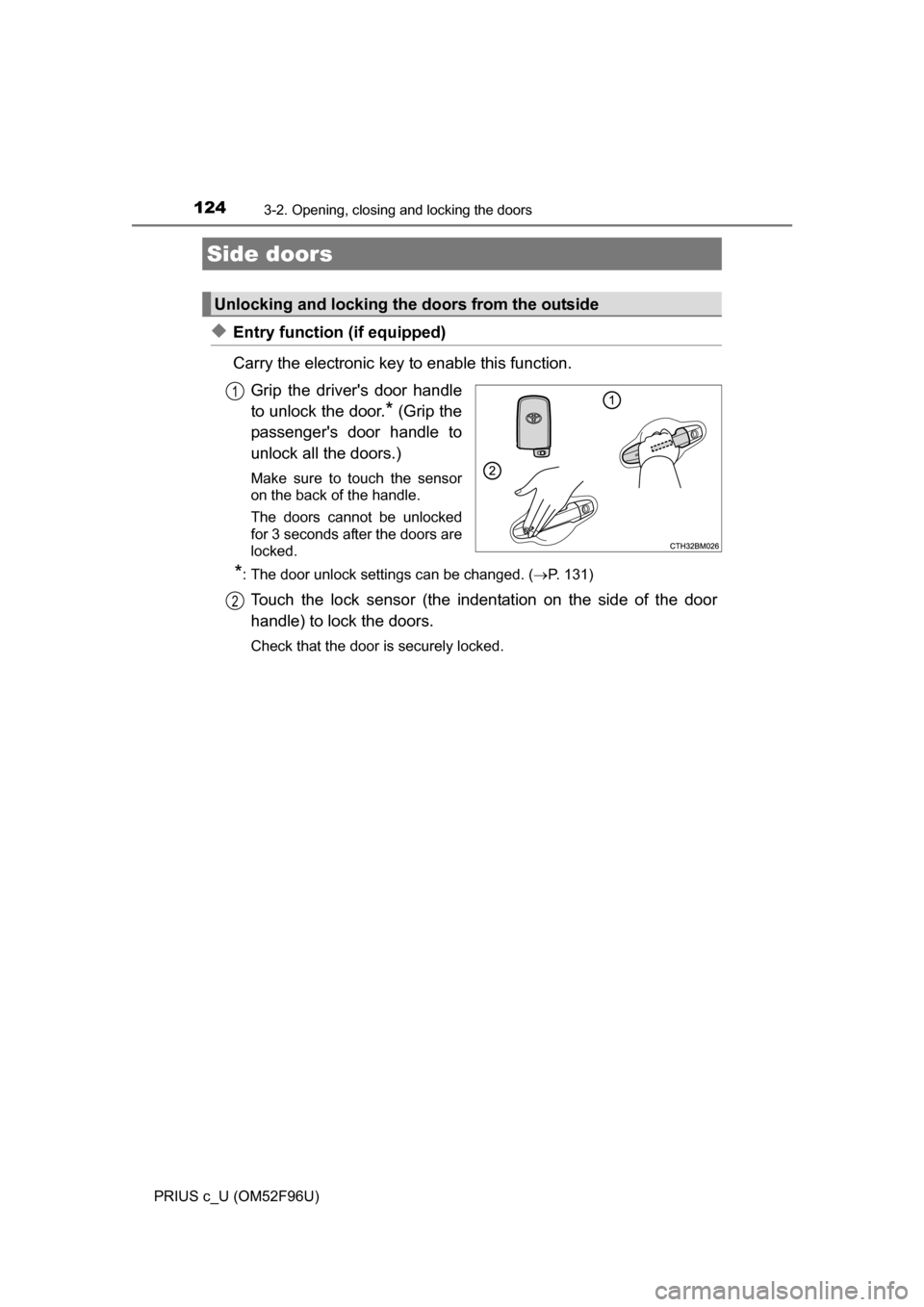
◆Entry function (if equipped)
Carry the electronic key to enable this function.Grip the driver's door handle
to unlock the door.
* (Grip the
passenger's door handle to
unlock all the doors.)
Make sure to touch the sensor
on the back of the handle.
The doors cannot be unlocked
for 3 seconds after the doors are
locked.
*: The door unlock settings can be changed. ( P. 131)
Touch the lock sensor (the indentation on the side of the door
handle) to lock the doors.
Check that the door is securely locked.
Side doors
Unlocking and locking the doors from the outside
1
2
Page 125 of 588
1253-2. Opening, closing and locking the doors
3
Operation of each component
PRIUS c_U (OM52F96U)
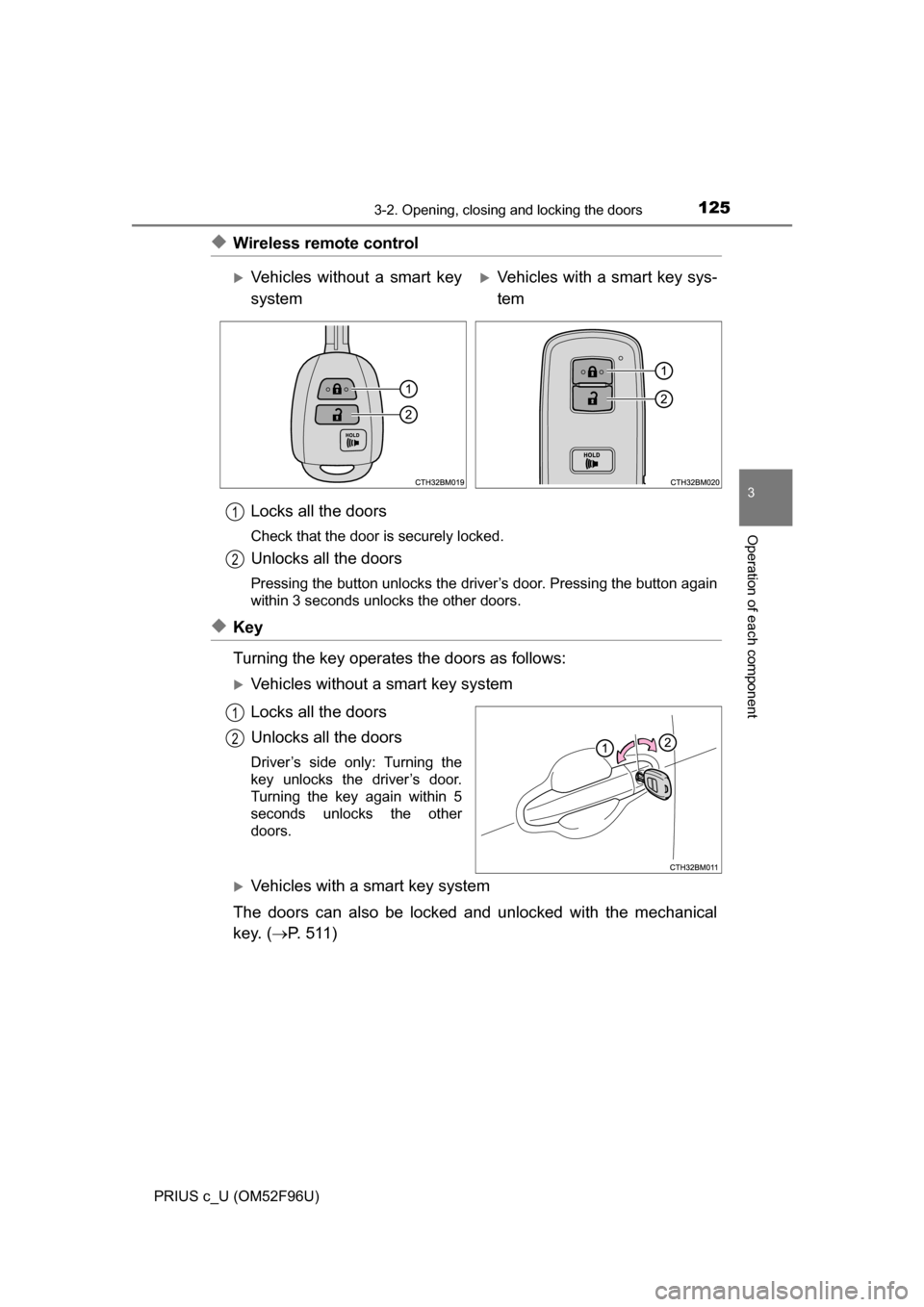
◆Wireless remote controlLocks all the doors
Check that the door is securely locked.
Unlocks all the doors
Pressing the button unlocks the driver’s door. Pressing the button again
within 3 seconds unlocks the other doors.
◆Key
Turning the key operates the doors as follows:
Vehicles without a smart key system
Locks all the doors
Unlocks all the doors
Driver’s side only: Turning the
key unlocks the driver’s door.
Turning the key again within 5
seconds unlocks the other
doors.
Vehicles with a smart key system
The doors can also be locked and unlocked with the mechanical
key. ( P. 511)
Vehicles without a smart key
systemVehicles with a smart key sys-
tem
1
2
1
2
Page 126 of 588
1263-2. Opening, closing and locking the doors
PRIUS c_U (OM52F96U)
■Operation signals
Vehicles without a smart key system
The emergency flashers flash to indicate that the doors have been locked/
unlocked. (Locked: once; Unlocked: twice)
Vehicles with a smart key system
A buzzer sounds and the emergency flashers flash to indicate that the doors
have been locked/unlocked. (Locked: once; Unlocked: twice)
■ Security feature
If a door is not opened within approximately 60 seconds after the vehicle is
unlocked, the security feature automatically locks the vehicle again. (How-
ever, depending on the location of the electronic key, the key may be
detected as being in the vehicle. In this case, vehicle may be unlocked.\
)
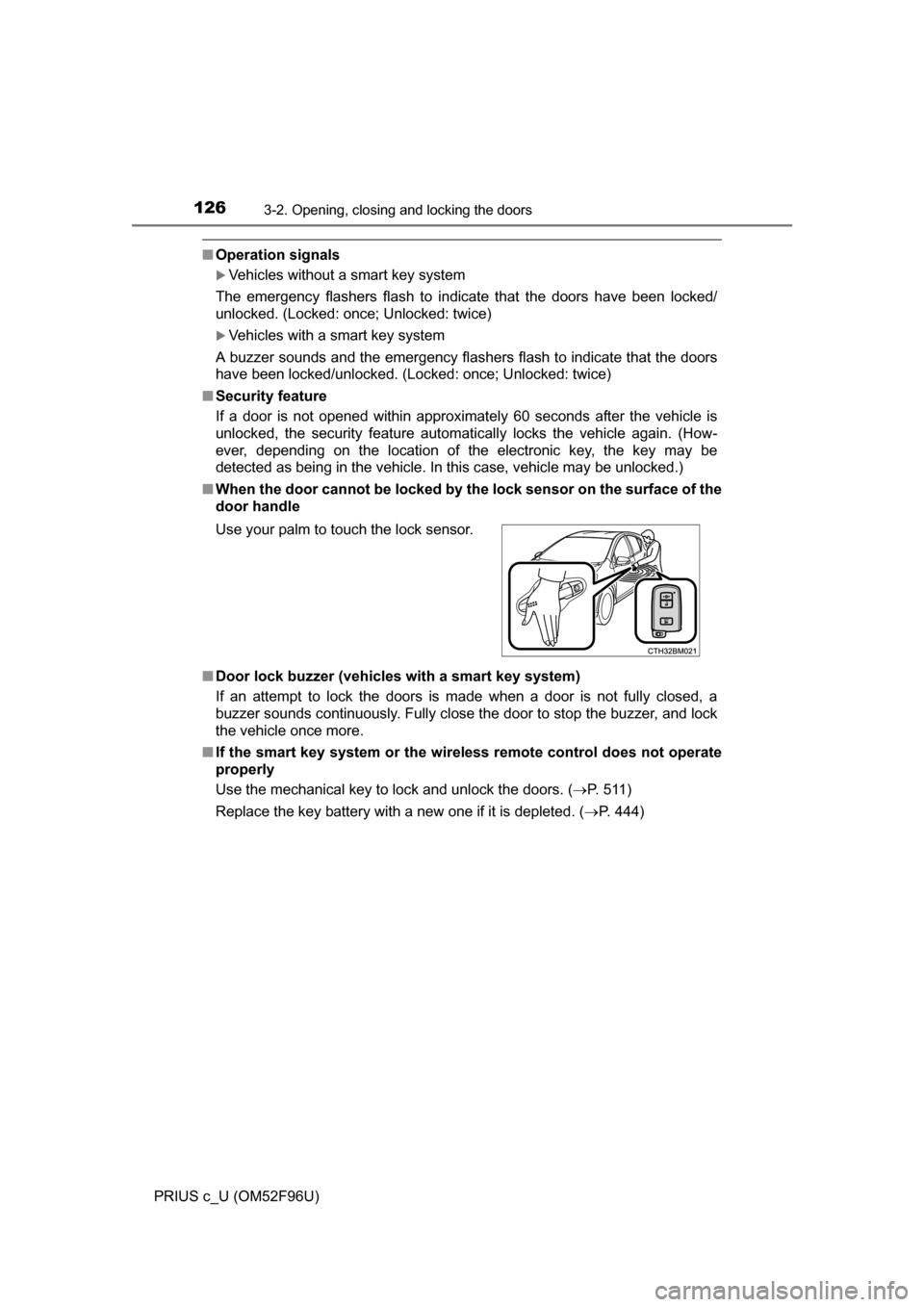
■ When the door cannot be locked by th e lock sensor on the surface of the
door handle
■ Door lock buzzer (vehicles with a smart key system)
If an attempt to lock the doors is made when a door is not fully closed, a
buzzer sounds continuously. Fully close the door to stop the buzzer, and lock
the vehicle once more.
■ If the smart key system or the wireless remote control does not operate
properly
Use the mechanical key to lock and unlock the doors. ( P. 511)
Replace the key battery with a new one if it is depleted. ( P. 444)
Use your palm to touch the lock sensor.
Page 127 of 588
1273-2. Opening, closing and locking the doors
3
Operation of each component
PRIUS c_U (OM52F96U)
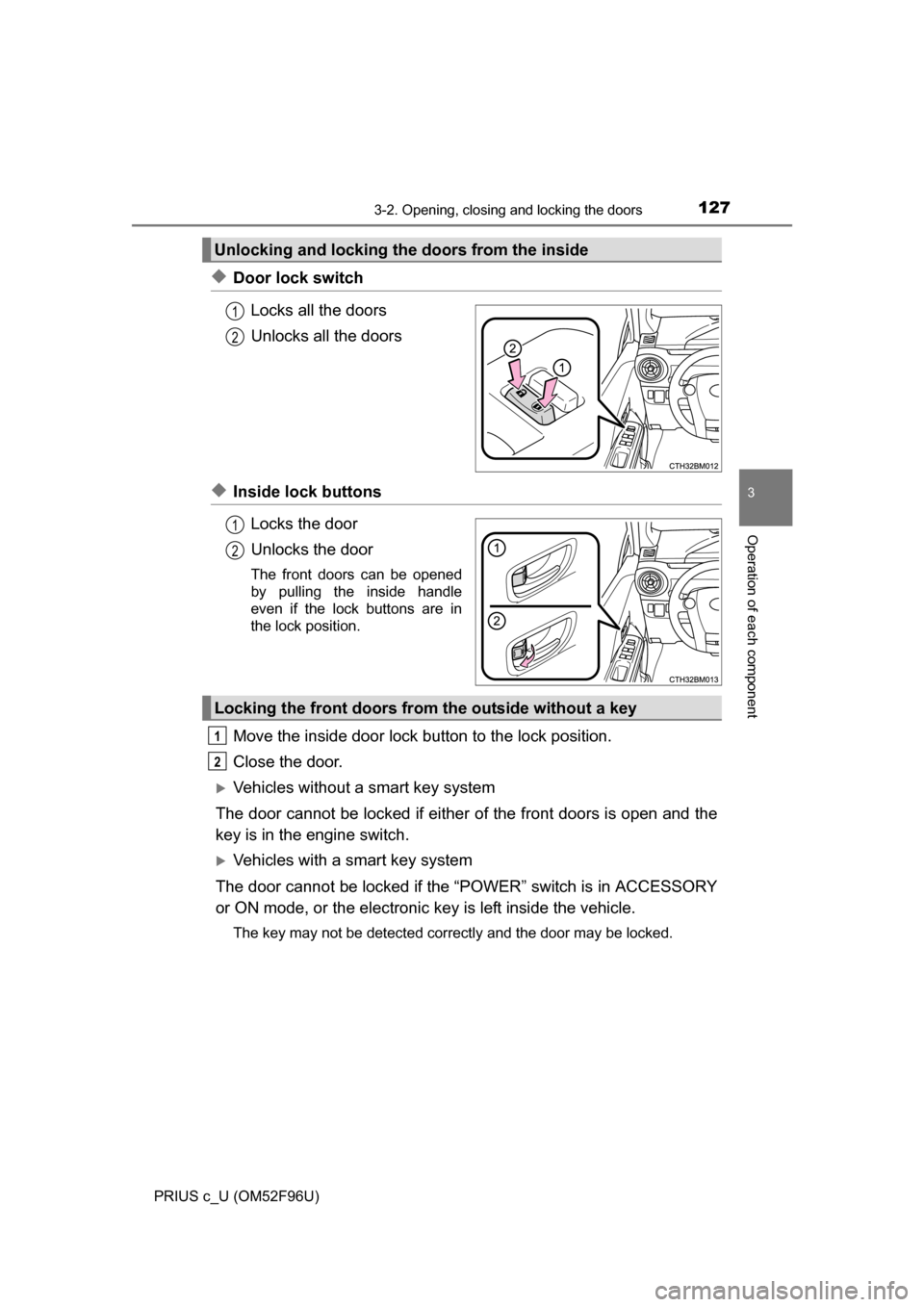
◆Door lock switchLocks all the doors
Unlocks all the doors
◆Inside lock buttonsLocks the door
Unlocks the door
The front doors can be opened
by pulling the inside handle
even if the lock buttons are in
the lock position.
Move the inside door lock button to the lock position.
Close the door.
Vehicles without a smart key system
The door cannot be locked if either of the front doors is open and the
key is in the engine switch.
Vehicles with a smart key system
The door cannot be locked if the “POWER” switch is in ACCESSORY
or ON mode, or the electronic key is left inside the vehicle.
The key may not be detected correctly and the door may be locked.
Unlocking and locking the doors from the inside
1
2
1
2
Locking the front doors from the outside without a key
1
2