AUX TOYOTA PRIUS C 2018 Owners Manual (in English)
[x] Cancel search | Manufacturer: TOYOTA, Model Year: 2018, Model line: PRIUS C, Model: TOYOTA PRIUS C 2018Pages: 600, PDF Size: 10.14 MB
Page 4 of 600

TABLE OF CONTENTS4
PRIUS c_U (OM52G95U)5-1. Using the audio system
Audio system types ........... 282
5-2. Basic Operations (Multimedia system)
Multimedia system ............ 283
Steering wheel audio switches .......................... 285
USB port/AUX port ............ 286
Basic audio operations ...... 288
5-3. Setup (Multimedia system)
Setup menu ....................... 290
General settings ................ 291
Audio settings.................... 293
Display settings ................. 294
Voice settings .................... 295
5-4. Using the Multimedia system
Selecting the audio source ............................. 296
List screen operation ......... 297
Optimal use of the multimedia system .......... 299
5-5. Using the radio (Multimedia system)
Radio operation ................. 300
5-6. Playing an audio CD and MP3/WMA/AAC discs
(Multimedia system)
CD player operation........... 302
5-7. Using an external device (Multimedia system)
Listening to an iPod ........... 308
Listening to a USB memory device ................ 313
Using the AUX port ............ 318
5-8. Connecting Bluetooth
®
(Multimedia system)
Preparations to use wireless
communication ................ 319
Registering a Bluetooth
®
audio player for the
first time ........................... 324
Registering a Bluetooth
®
phone for the first time..... 325
Registering a Bluetooth
®
device .............................. 326
Connecting a Bluetooth
®
device .............................. 328
Displaying a Bluetooth
®
device details................... 330
Detailed Bluetooth
®
system settings................ 331
5Audio system
Page 5 of 600
5
1
9 8 6 5
4
3
2
PRIUS c_U (OM52G95U)
10
7
5-9. Bluetooth® Audio
(Multimedia system)
Listening to Bluetooth
®
Audio ............................... 332
5-10. Bluetooth
® phone
(Multimedia system)
Using a Bluetooth
®
Phone.............................. 334
Making a call ..................... 337
Receiving a call ................. 340
Speaking on the phone ..... 341
Bluetooth
® phone
message function ............ 345
Using the steering wheel switches .......................... 350
Bluetooth
® phone
settings............................ 351
Contact/ Call History Settings........ 353
What to do if... (Troubleshooting) ............ 363
5-11. Bluetooth
®
(Multimedia system)
Bluetooth
®......................... 367
5-12. Using the voice command system
(Multimedia system)
Voice command system .... 372 6-1. Using the air
conditioning system
and defogger
Automatic air conditioning system ............................. 378
Seat heaters ...................... 386
6-2. Using the interior lights Interior lights list................. 387
• Interior lights.................. 388
• Personal lights............... 388
6-3. Using the storage features
List of storage features ...... 390
• Glove box ...................... 391
• Console box .................. 391
• Auxiliary boxes .............. 392
• Cup holders ................... 393
• Bottle holders ................ 394
6-4. Other interior features Other interior features........ 395
• Sun visors ..................... 395
• Vanity mirrors ................ 395
• Power outlet .................. 396
• Coat hooks .................... 397
• Assist grips .................... 398
• Luggage cover .............. 399
6Interior features
Page 20 of 600
20Pictorial index
PRIUS c_U (OM52G95U)
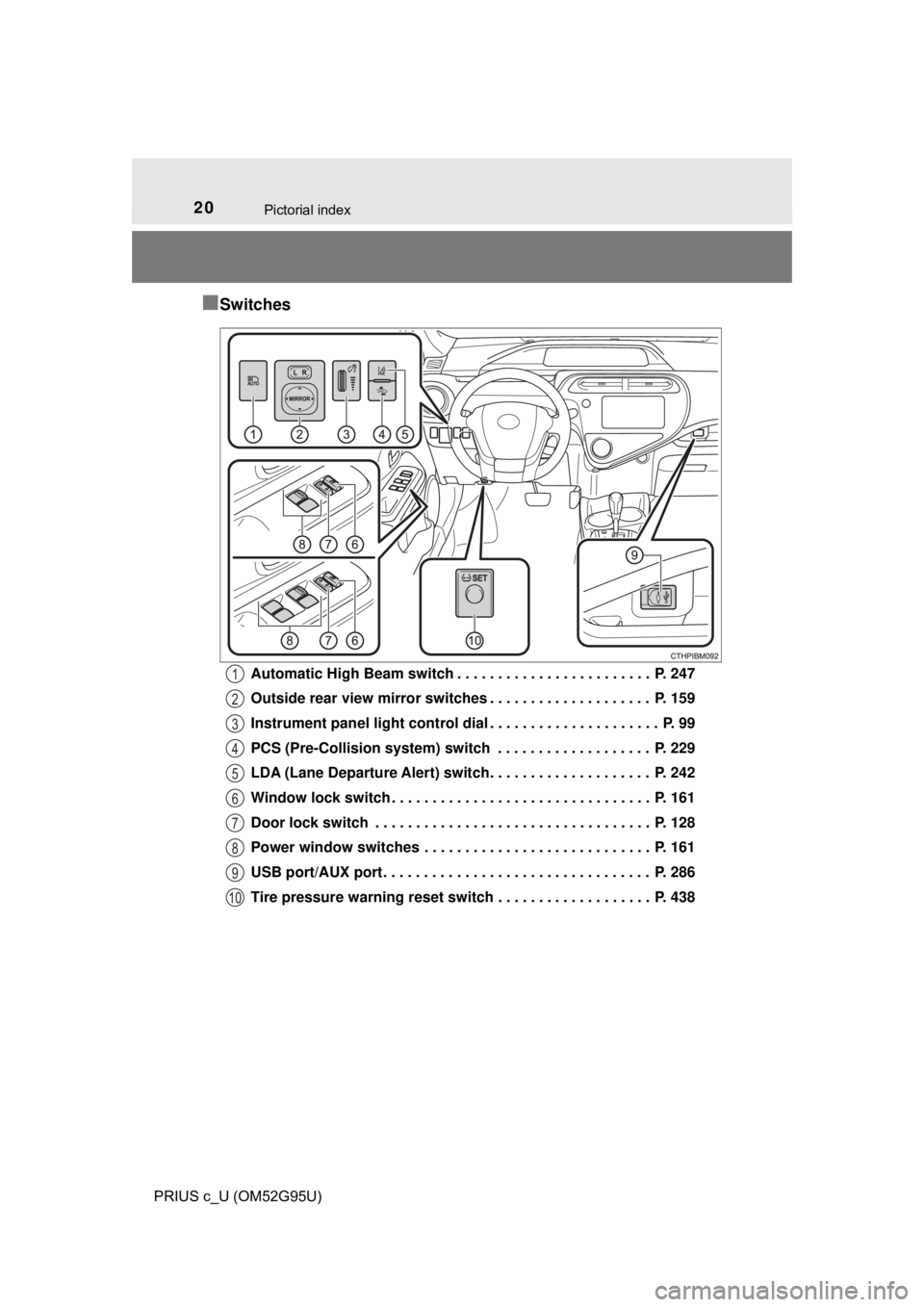
■Switches
Automatic High Beam switch . . . . . . . . . . . . . . . . . . . . . . . . P. 247
Outside rear view mirror switches . . . . . . . . . . . . . . . . . . . . P. 159
Instrument panel light control dial . . . . . . . . . . . . . . . . . . . . . P. 99
PCS (Pre-Collision system) switch . . . . . . . . . . . . . . . . . . . P. 229
LDA (Lane Departure Alert) switch. . . . . . . . . . . . . . . . . . . . P. 242
Window lock switch . . . . . . . . . . . . . . . . . . . . . . . . . . . . . . . . P. 161
Door lock switch . . . . . . . . . . . . . . . . . . . . . . . . . . . . . . . . . . P. 128
Power window switches . . . . . . . . . . . . . . . . . . . . . . . . . . . . P. 161
USB port/AUX port . . . . . . . . . . . . . . . . . . . . . . . . . . . . . . . . . P. 286
Tire pressure warning reset switch . . . . . . . . . . . . . . . . . . . P. 4381
2
3
4
5
6
7
8
9
10
Page 280 of 600

280
PRIUS c_U (OM52G95U)5-1. Using the audio system
Audio system types ........... 282
5-2. Basic Operations (Multimedia system)
Multimedia system ............ 283
Steering wheel audio switches .......................... 285
USB port/AUX port ............ 286
Basic audio operations...... 288
5-3. Setup (Multimedia system)
Setup menu....................... 290
General settings ................ 291
Audio settings ................... 293
Display settings ................. 294
Voice settings.................... 295
5-4. Using the Multimedia system
Selecting the audio source ............................. 296
List screen operation......... 297
Optimal use of the multimedia system .......... 299
5-5. Using the radio (Multimedia system)
Radio operation................. 300
5Audio system
Page 281 of 600

281
5Audio system
PRIUS c_U (OM52G95U)
5-6. Playing an audio CD and MP3/WMA/AAC discs
(Multimedia system)
CD player operation .......... 302
5-7. Using an external device (Multimedia system)
Listening to an iPod .......... 308
Listening to a USB memory device................ 313
Using the AUX port ........... 318
5-8. Connecting Bluetooth
®
(Multimedia system)
Preparations to use wireless
communication ................ 319
Registering a Bluetooth
®
audio player for the
first time .......................... 324
Registering a Bluetooth
®
phone for the
first time .......................... 325
Registering a Bluetooth
®
device.............................. 326
Connecting a Bluetooth
®
device.............................. 328
Displaying a Bluetooth
®
device details .................. 330
Detailed Bluetooth
®
system settings ............... 331 5-9. Bluetooth
® Audio
(Multimedia system)
Listening to Bluetooth
®
Audio............................... 332
5-10. Bluetooth
® phone
(Multimedia system)
Using a Bluetooth
®
Phone ............................. 334
Making a call ..................... 337
Receiving a call ................. 340
Speaking on the phone ..... 341
Bluetooth
® phone
message function ............ 345
Using the steering wheel switches ................ 350
Bluetooth
® phone
settings ........................... 351
Contact/ Call History Settings ....... 353
What to do if... (Troubleshooting) ............ 363
5-11. Bluetooth
®
(Multimedia system)
Bluetooth
®......................... 367
5-12. Using the voice command system
(Multimedia system)
Voice command system ............................ 372
Page 286 of 600
2865-2. Basic Operations (Multimedia system)
PRIUS c_U (OM52G95U)■
iPod
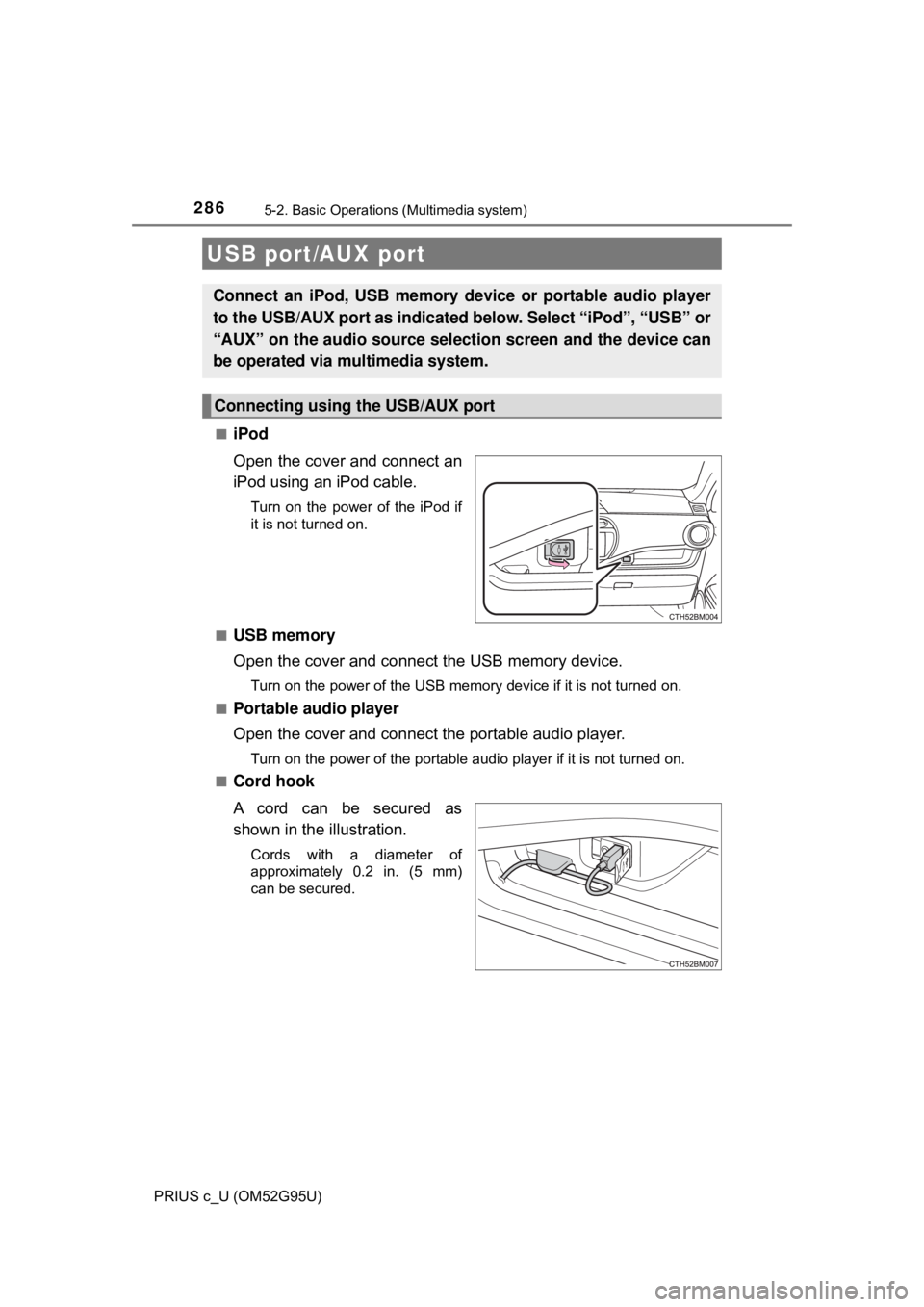
Open the cover and connect an
iPod using an iPod cable.
Turn on the power of the iPod if
it is not turned on.
■
USB memory
Open the cover and connect the USB memory device.
Turn on the power of the USB memory device if it is not turned on.
■
Portable audio player
Open the cover and connect the portable audio player.
Turn on the power of the portable audio player if it is not turned on.
■
Cord hook
A cord can be secured as
shown in the illustration.
Cords with a diameter of
approximately 0.2 in. (5 mm)
can be secured.
USB port/AUX port
Connect an iPod, USB memory device or portable audio player
to the USB/AUX port as indicated below. Select “iPod”, “USB” or
“AUX” on the audio sour ce selection screen and the device can
be operated via multimedia system.
Connecting using the USB/AUX port
Page 318 of 600
3185-7. Using an external device (Multimedia system)
PRIUS c_U (OM52G95U)
→P. 2 8 6
■Operating portable audio players co nnected to the multimedia system
The volume can be adjusted using the vehicle's audio controls. All other
adjustments must be made on the portable audio player itself.
■ When using a portable audio player connected to the power outlet
Noise may occur during playback. Use the power source of the portable
audio player.
Using the AUX port
To use the AUX port, connect a portable player, press the
“AUDIO” button, then select “AUX ” to display the audio control
screen.
Connecting a portable audio player
WARNING
■ While driving
Do not connect a portable audio player or operate the device controls.
Page 377 of 600

377
6Interior features
PRIUS c_U (OM52G95U)6-1. Using the air
conditioning system
and defogger
Automatic air conditioning system ............................ 378
Seat heaters...................... 386
6-2. Using the interior lights Interior lights list ................ 387
• Interior lights ................. 388
• Personal lights .............. 388
6-3. Using the storage features
List of storage features ..... 390
• Glove box...................... 391
• Console box .................. 391
• Auxiliary boxes.............. 392
• Cup holders .................. 393
• Bottle holders ................ 394
6-4. Other interior features Other interior features ....... 395
• Sun visors ..................... 395
• Vanity mirrors................ 395
• Power outlet .................. 396
• Coat hooks.................... 397
• Assist grips ................... 398
• Luggage cover .............. 399
Page 390 of 600
390
PRIUS c_U (OM52G95U)
6-3. Using the storage features
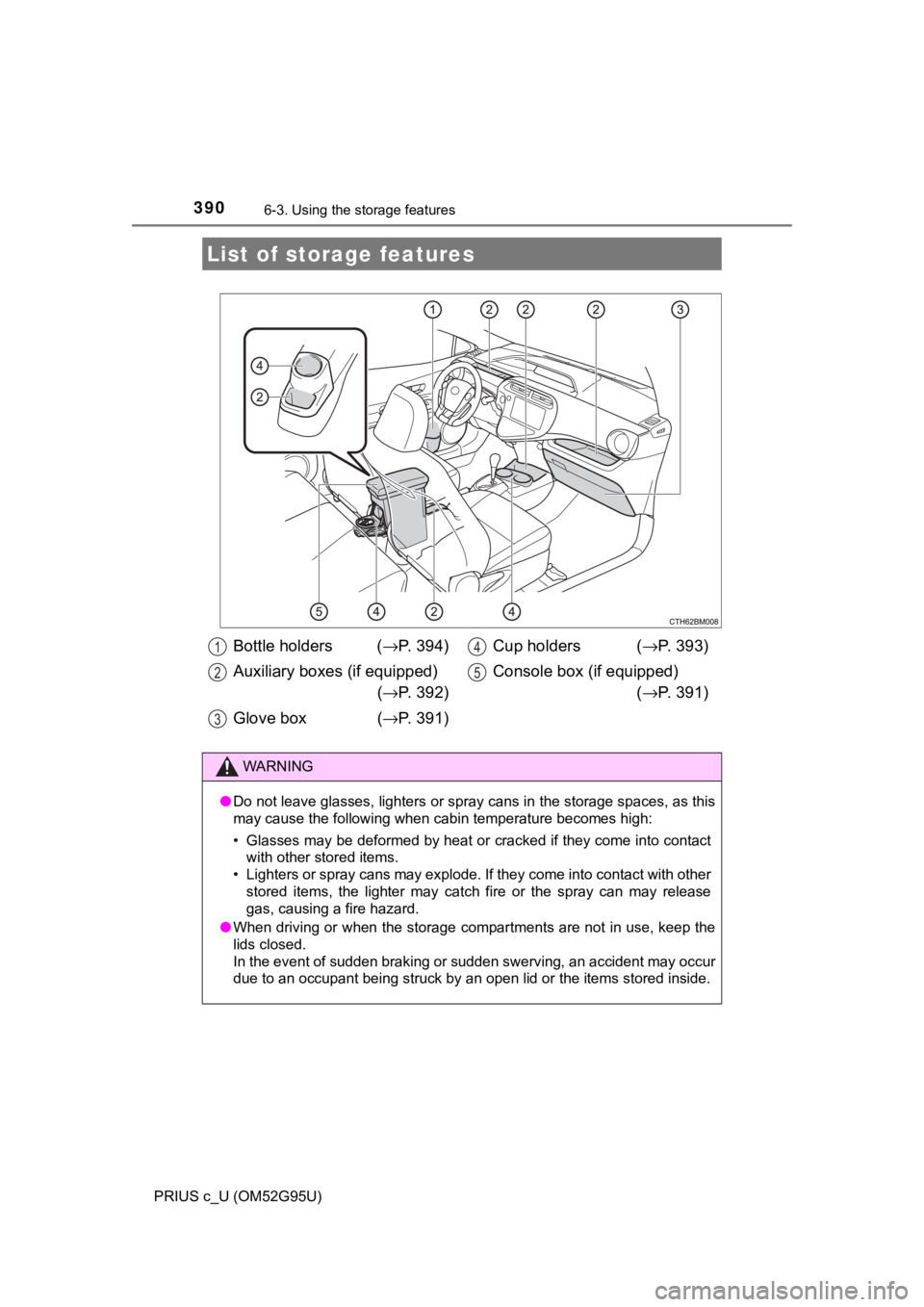
List of storage features
Bottle holders ( →P. 394)
Auxiliary boxes (if equipped) (→ P. 392)
Glove box ( →P. 391) Cup holders (
→P. 393)
Console box (if equipped) (→ P. 391)1
2
3
4
5
WARNING
●Do not leave glasses, lighters or spray cans in the storage spaces, as t\
his
may cause the following when cabin temperature becomes high:
• Glasses may be deformed by heat or cracked if they come into contact
with other stored items.
• Lighters or spray cans may explode. If they come into contact with other stored items, the lighter may catch fire or the spray can may release
gas, causing a fire hazard.
● When driving or when the storage com partments are not in use, keep the
lids closed.
In the event of sudden braking or sudden swerving, an accident may occur
due to an occupant being struck by an open lid or the items stored inside.
Page 392 of 600
3926-3. Using the storage features
PRIUS c_U (OM52G95U)
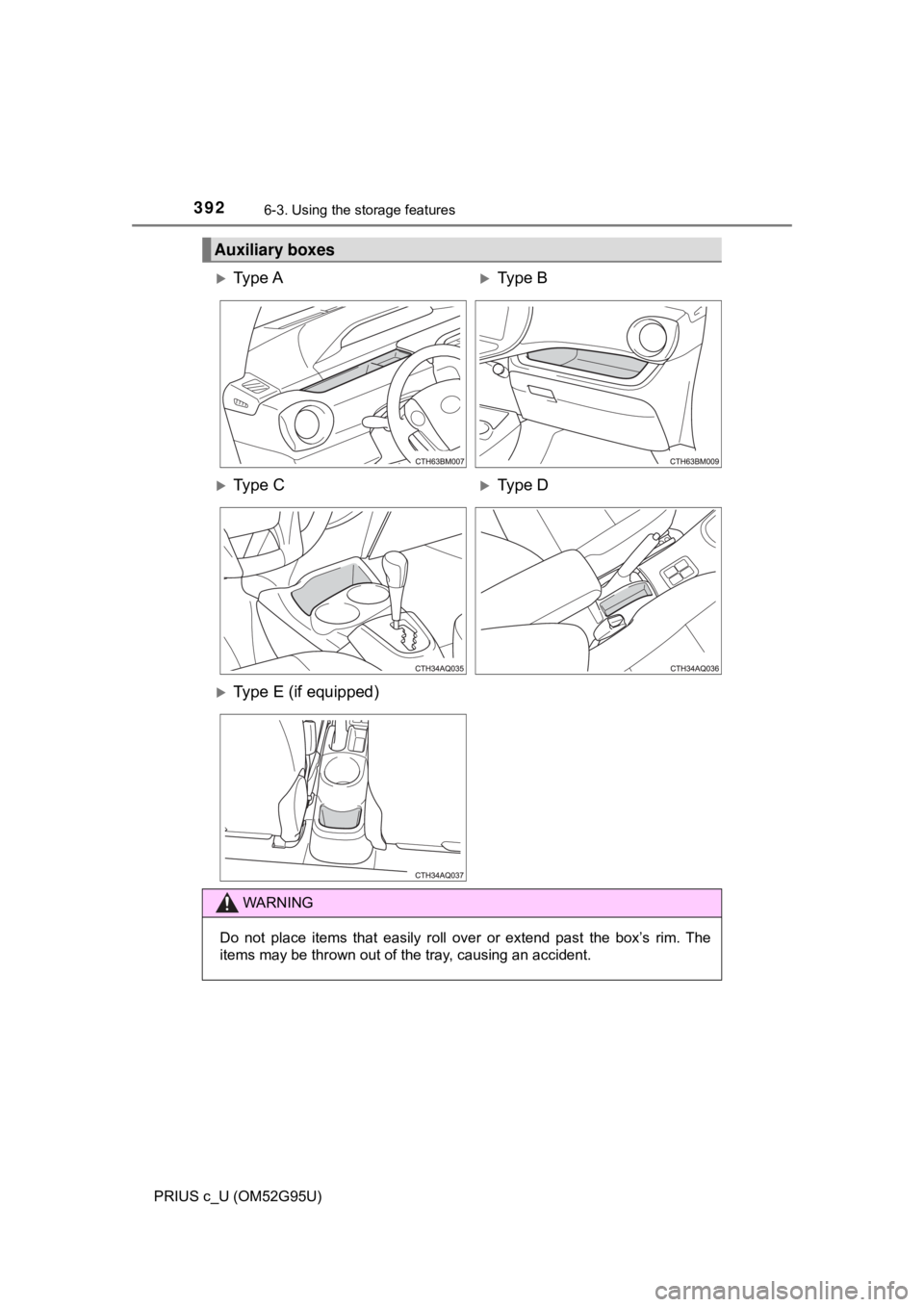
Auxiliary boxes
Ty p e AType B
Ty p e CType D
Type E (if equipped)
WARNING
Do not place items that easily roll over or extend past the box’s rim. The
items may be thrown out of the tray, causing an accident.