display TOYOTA PRIUS C 2018 Owners Manual (in English)
[x] Cancel search | Manufacturer: TOYOTA, Model Year: 2018, Model line: PRIUS C, Model: TOYOTA PRIUS C 2018Pages: 600, PDF Size: 10.14 MB
Page 2 of 600
TABLE OF CONTENTS2
PRIUS c_U (OM52G95U)For your information....................... 8
Reading this manual .................... 14
How to search .............................. 15
Pictorial index .............................. 16
1-1. For safe use
Before driving ...................... 26
For safe driving ................... 28
Seat belts ............................ 30
SRS airbags ........................ 39
Front passenger occupant classification system ......... 52
Safety information for children ............................. 57
Child restraint systems ........ 58
Installing child restraints ...... 62
Exhaust gas precautions ..... 73
1-2. Hybrid system Hybrid system features ....... 74
Hybrid system precautions ....................... 79
1-3. Theft deterrent system Immobilizer system ............. 86
Theft prevention labels ........ 89 2. Instrument cluster
Warning lights and indicators ........................... 92
Gauges and meters ............. 97
Multi-information display ............................. 101
Energy monitor/ consumption screen ........ 110
3-1. Key information Keys................................... 118
3-2. Opening, closing and locking the doors
Side doors ......................... 125
Back door .......................... 134
Smart key system .............. 139
3-3. Adjusting the seats Front seats......................... 148
Rear seats ......................... 149
Head restraints .................. 153
3-4. Adjusting the steering wheel and mirrors
Steering wheel ................... 156
Inside rear view mirror ....... 158
Outside rear view mirrors ............................. 159
3-5. Opening and closing the windows
Power windows.................. 161
Moon roof .......................... 165
1For safety and security
2Instrument cluster
3Operation of each
component
Page 4 of 600

TABLE OF CONTENTS4
PRIUS c_U (OM52G95U)5-1. Using the audio system
Audio system types ........... 282
5-2. Basic Operations (Multimedia system)
Multimedia system ............ 283
Steering wheel audio switches .......................... 285
USB port/AUX port ............ 286
Basic audio operations ...... 288
5-3. Setup (Multimedia system)
Setup menu ....................... 290
General settings ................ 291
Audio settings.................... 293
Display settings ................. 294
Voice settings .................... 295
5-4. Using the Multimedia system
Selecting the audio source ............................. 296
List screen operation ......... 297
Optimal use of the multimedia system .......... 299
5-5. Using the radio (Multimedia system)
Radio operation ................. 300
5-6. Playing an audio CD and MP3/WMA/AAC discs
(Multimedia system)
CD player operation........... 302
5-7. Using an external device (Multimedia system)
Listening to an iPod ........... 308
Listening to a USB memory device ................ 313
Using the AUX port ............ 318
5-8. Connecting Bluetooth
®
(Multimedia system)
Preparations to use wireless
communication ................ 319
Registering a Bluetooth
®
audio player for the
first time ........................... 324
Registering a Bluetooth
®
phone for the first time..... 325
Registering a Bluetooth
®
device .............................. 326
Connecting a Bluetooth
®
device .............................. 328
Displaying a Bluetooth
®
device details................... 330
Detailed Bluetooth
®
system settings................ 331
5Audio system
Page 6 of 600

TABLE OF CONTENTS6
PRIUS c_U (OM52G95U)7-1. Maintenance and care
Cleaning and protecting the vehicle exterior .......... 402
Cleaning and protecting the vehicle interior ........... 405
7-2. Maintenance Maintenance requirements ................... 411
General maintenance ........ 414
Emission inspection and maintenance (I/M)
programs ......................... 417
7-3. Do-it-yourself maintenance
Do-it-yourself service precautions ..................... 418
Hood.................................. 421
Positioning a floor jack ...... 423
Engine compartment ......... 424
12-volt battery ................... 433
Tires .................................. 437
Tire inflation pressure........ 446
Wheels .............................. 449
Air conditioning filter .......... 451
Wireless remote control/ electronic key battery ...... 453
Checking and replacing fuses ............................... 456
Light bulbs ......................... 460 8-1. Essential information
Emergency flashers ........... 470
If your vehicle has to be stopped in an
emergency....................... 471
8-2. Steps to take in an emergency
If your vehicle needs to be towed ...................... 473
If you think something is wrong............................... 480
If a warning light turns on or a warning buzzer
sounds ............................. 481
If a warning message is displayed ......................... 490
If you have a flat tire .......... 507
If the hybrid system will not start ........................... 520
If the electronic key does not operate properly ........ 522
If the vehicle 12-volt battery is discharged ....... 524
If your vehicle overheats......................... 531
If the vehicle becomes stuck ................................ 535
7Maintenance and care8When trouble arises
Page 18 of 600
18Pictorial index
PRIUS c_U (OM52G95U)
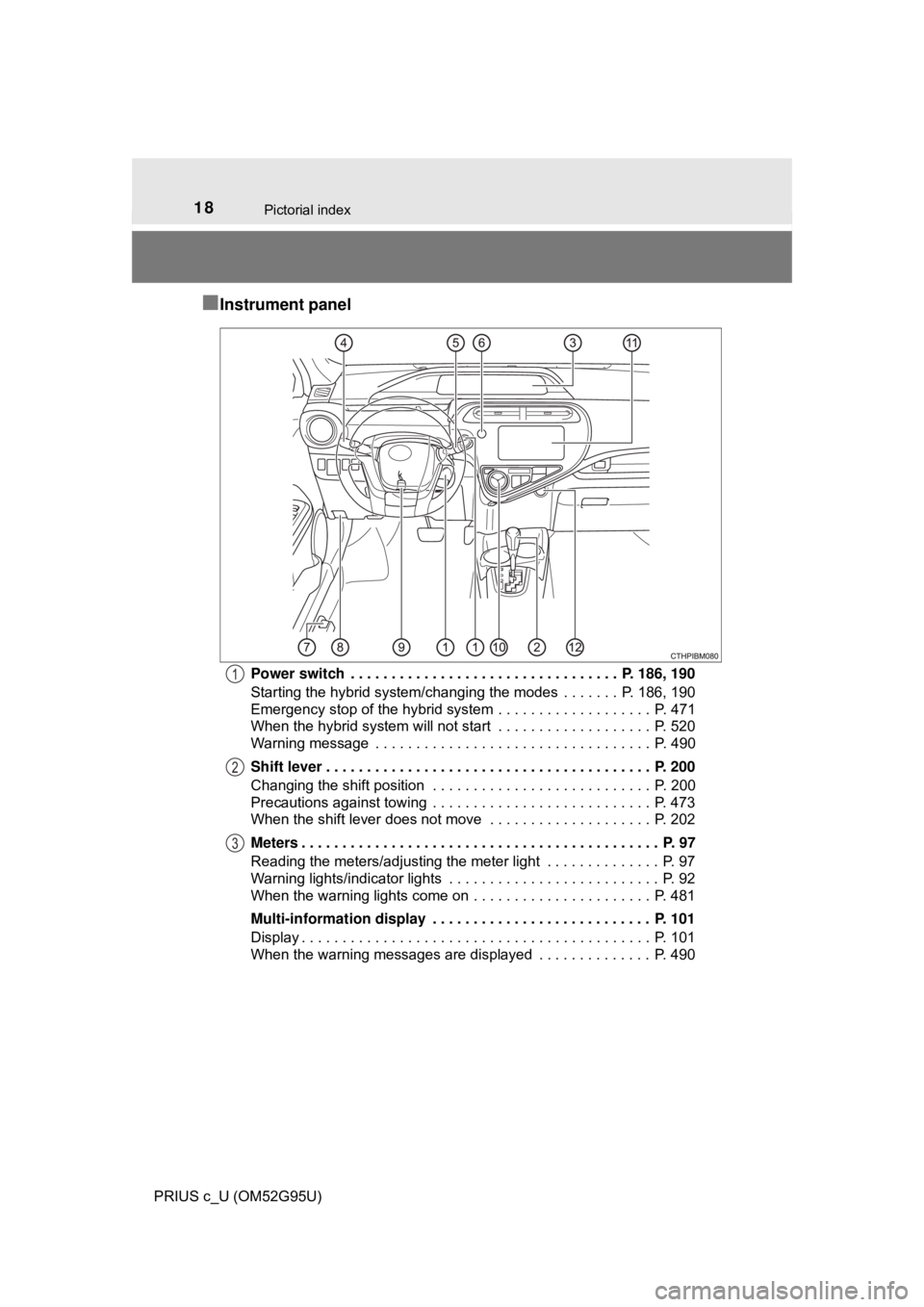
■Instrument panel
Power switch . . . . . . . . . . . . . . . . . . . . . . . . . . . . . . . . . P. 186, 190
Starting the hybrid system/changing the modes . . . . . . . P. 186, 190
Emergency stop of the hybrid system . . . . . . . . . . . . . . . . . . . P. 471
When the hybrid system will not start . . . . . . . . . . . . . . . . . . . P. 520
Warning message . . . . . . . . . . . . . . . . . . . . . . . . . . . . . . . . . . P. 490
Shift lever . . . . . . . . . . . . . . . . . . . . . . . . . . . . . . . . . . . . . . . . P. 200
Changing the shift position . . . . . . . . . . . . . . . . . . . . . . . . . . . P. 200
Precautions against towing . . . . . . . . . . . . . . . . . . . . . . . . . . . P. 473
When the shift lever does not move . . . . . . . . . . . . . . . . . . . . P. 202
Meters . . . . . . . . . . . . . . . . . . . . . . . . . . . . . . . . . . . . . . . . . . . . P. 97
Reading the meters/adjusting the meter light . . . . . . . . . . . . . . P. 97
Warning lights/indicator lights . . . . . . . . . . . . . . . . . . . . . . . . . . P. 92
When the warning lights come on . . . . . . . . . . . . . . . . . . . . . . P. 481
Multi-information display . . . . . . . . . . . . . . . . . . . . . . . . . . . P. 101
Display . . . . . . . . . . . . . . . . . . . . . . . . . . . . . . . . . . . . . . . . . . . P. 101
When the warning messages are displayed . . . . . . . . . . . . . . P. 4901
2
3
Page 62 of 600
621-1. For safe use
PRIUS c_U (OM52G95U)
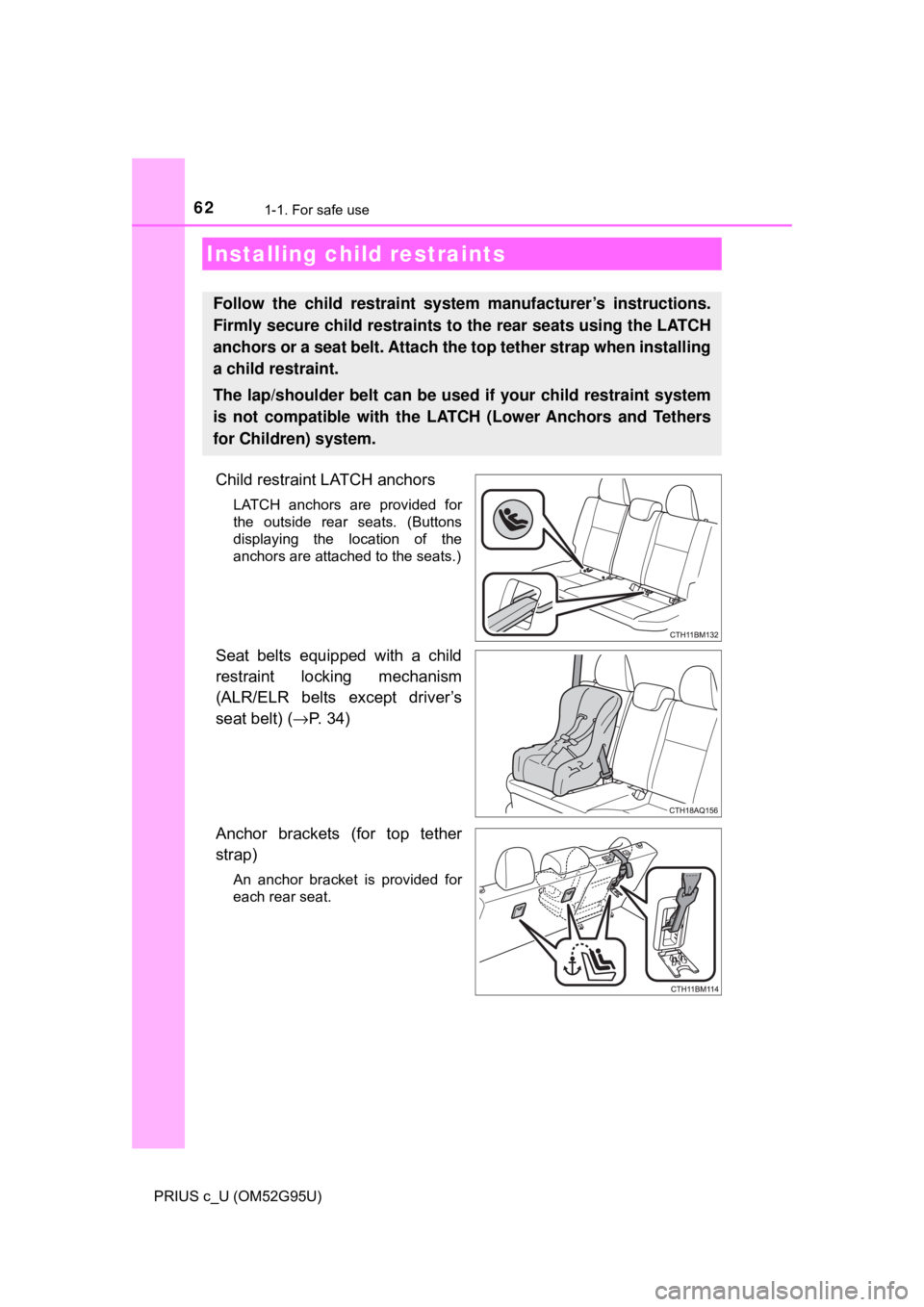
Child restraint LATCH anchors
LATCH anchors are provided for
the outside rear seats. (Buttons
displaying the location of the
anchors are attached to the seats.)
Seat belts equipped with a child
restraint locking mechanism
(ALR/ELR belts except driver’s
seat belt) (→P. 34)
Anchor brackets (for top tether
strap)
An anchor bracket is provided for
each rear seat.
Installing child restraints
Follow the child restraint system manufacturer’s instructions.
Firmly secure child restraints to the rear seats using the LATCH
anchors or a seat belt. Attach the top tether strap when installing
a child restraint.
The lap/shoulder belt can be used if your child restraint system
is not compatible with the LATCH (Lower Anchors and Tethers
for Children) system.
Page 80 of 600
801-2. Hybrid system
PRIUS c_U (OM52G95U)
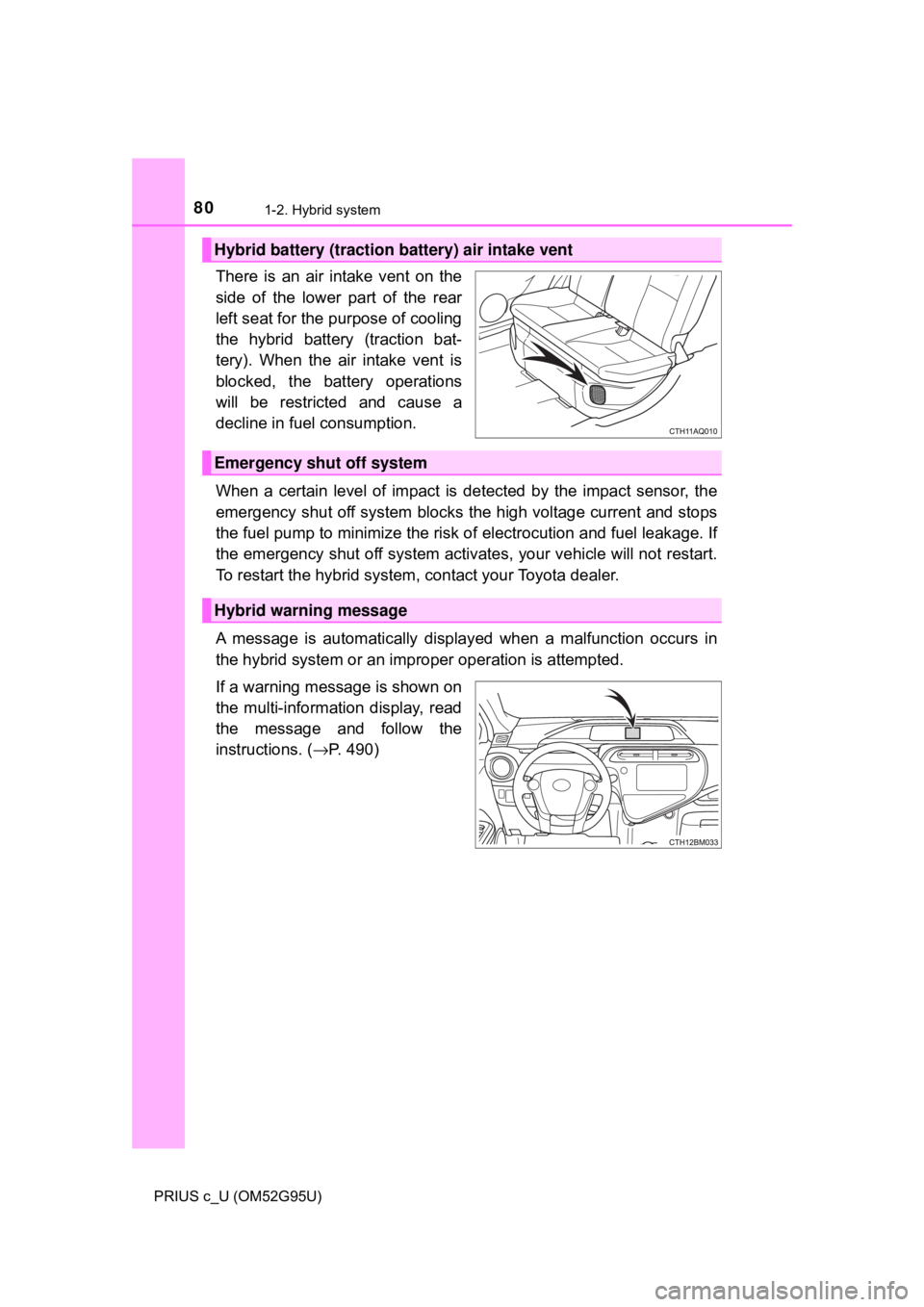
There is an air intake vent on the
side of the lower part of the rear
left seat for the purpose of cooling
the hybrid battery (traction bat-
tery). When the air intake vent is
blocked, the battery operations
will be restricted and cause a
decline in fuel consumption.
When a certain level of impact is detected by the impact sensor, the
emergency shut off system blocks the high voltage current and stops
the fuel pump to minimize the risk of electrocution and fuel leakage. If
the emergency shut off sy stem activates, your vehicle will not restart.
To restart the hybrid system, contact your Toyota dealer.
A message is automatically displa yed when a malfunction occurs in
the hybrid system or an improper operation is attempted.
If a warning message is shown on
the multi-information display, read
the message and follow the
instructions. ( →P. 490)
Hybrid battery (traction battery) air intake vent
Emergency shut off system
Hybrid warning message
Page 81 of 600

811-2. Hybrid system
1
For safety and security
PRIUS c_U (OM52G95U)
■If a warning light comes on, a warn ing message is displayed, or the 12-
volt battery has been disconnected
The hybrid system may not start. In this case, try to start the system again. If
the “READY” indicator does not come on, contact your Toyota dealer.
■ Running out of fuel
When the vehicle has run out of fuel and the hybrid system cannot be started,
refuel the vehicle with at least enough gasoline to make the low fuel le\
vel
warning light ( →P. 483) go off. If there is only a small amount of fuel, the
hybrid system may not be able to start. (The standard amount of fuel is about
1.3 gal. [5.0 L, 1.1 Imp. gal.] when the vehicle is on a level surface. This value
may vary when the vehicle is on a slope. Add extra fuel when the vehicle is
inclined.)
■ Electromagnetic waves
●High voltage parts and cables on hybrid vehicles incorporate electromag-
netic shielding, and therefore emit approximately the same amount of elec-
tromagnetic waves as conventional gasoline powered vehicles or home
electronic appliances.
● Your vehicle may cause sound interference in some third party-produced
radio parts.
■ Hybrid battery (traction battery)
The hybrid battery (traction battery) has a limited service life. The lifespan of
the hybrid battery (traction battery) can change in accordance with driving
style and driving conditions.
Page 91 of 600

91
Instrument cluster2
PRIUS c_U (OM52G95U)2. Instrument cluster
Warning lights and indicators .......................... 92
Gauges and meters ............ 97
Multi-information display............................. 101
Energy monitor/ consumption screen ........ 110
Page 97 of 600
972. Instrument cluster
2
Instrument cluster
PRIUS c_U (OM52G95U)
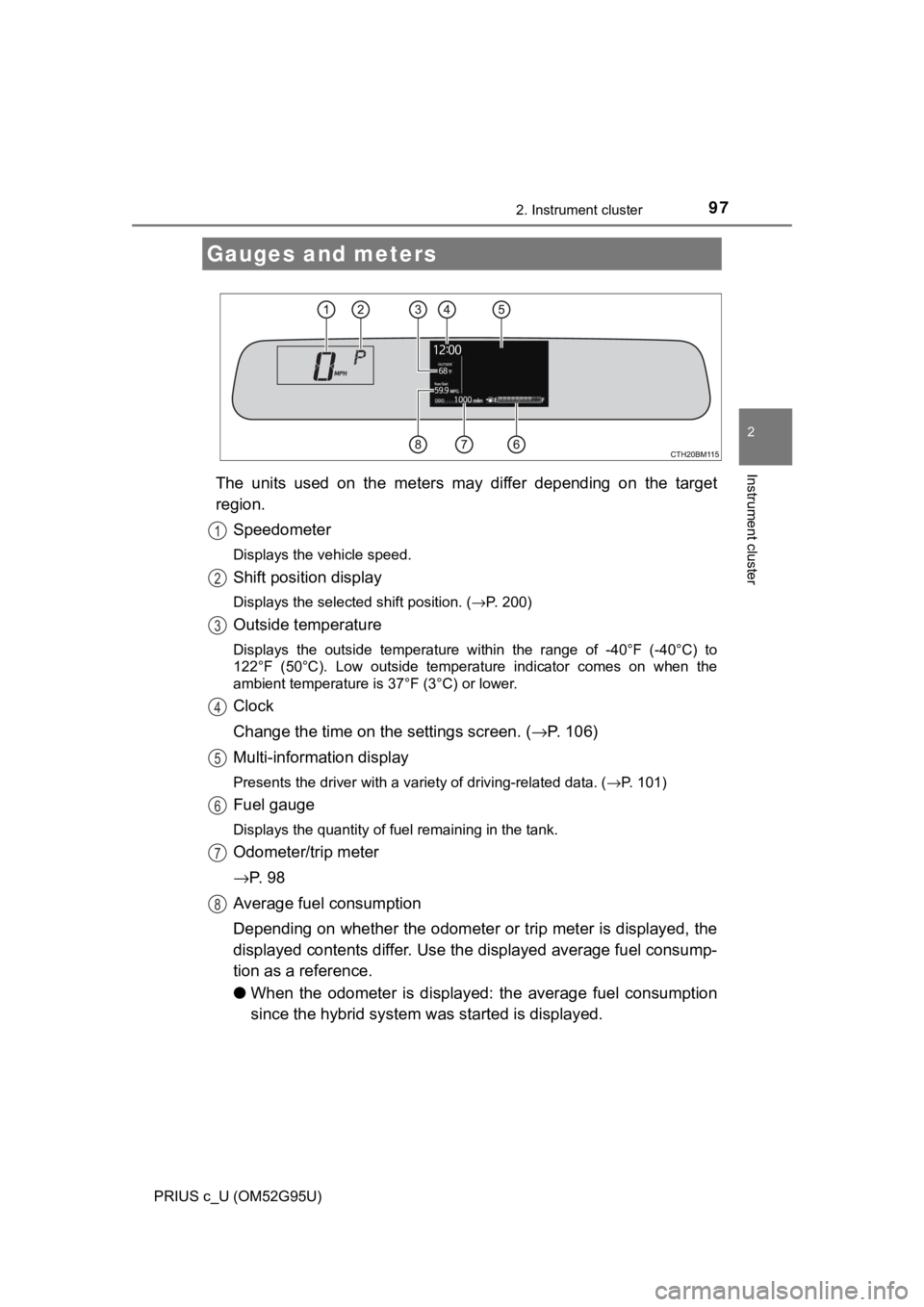
The units used on the meters may differ depending on the target
region.Speedometer
Displays the vehicle speed.
Shift position display
Displays the selected shift position. ( →P. 200)
Outside temperature
Displays the outside temperature within the range of -40°F (-40°C) to
122°F (50°C). Low outside temperature indicator comes on when the
ambient temperature is 37°F (3°C) or lower.
Clock
Change the time on the settings screen. ( →P. 106)
Multi-information display
Presents the driver with a variety of driving-related data. ( →P. 101)
Fuel gauge
Displays the quantity of fuel remaining in the tank.
Odometer/trip meter
→P. 9 8
Average fuel consumption
Depending on whether the odometer or trip meter is displayed, the
displayed contents differ. Use th e displayed average fuel consump-
tion as a reference.
● When the odometer is displayed: the average fuel consumption
since the hybrid system was started is displayed.
Gauges and meters
1
2
3
4
5
6
7
8
Page 98 of 600
982. Instrument cluster
PRIUS c_U (OM52G95U)
●When the trip meter is displayed: the average fuel consumption
since the trip meter was reset is displayed. The average fuel con-
sumption for trip mete r A and trip meter B is displayed separately.
When the trip meter is reset, average fuel consumption is also reset.
(→P. 98)
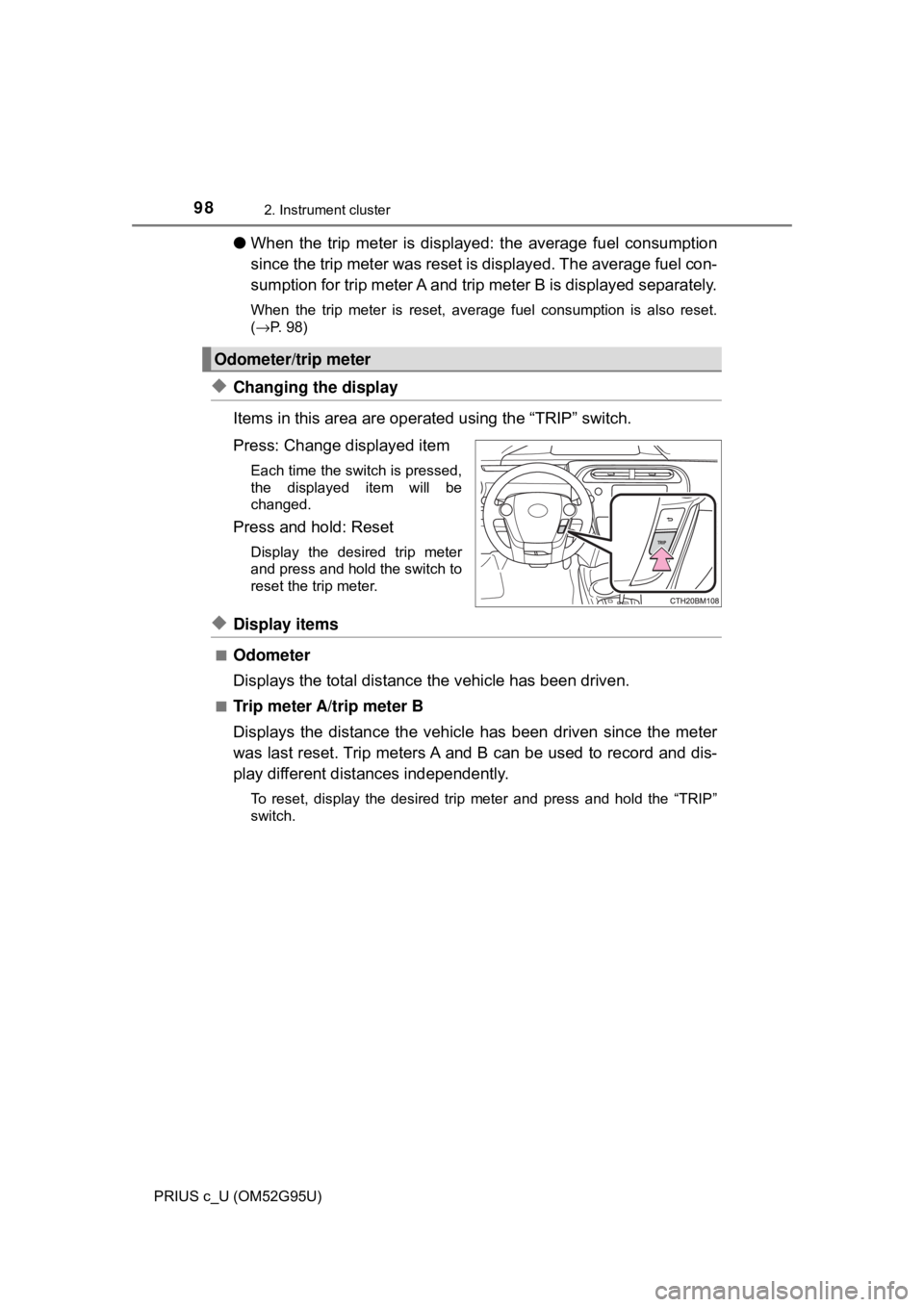
◆Changing the display
Items in this area are operat ed using the “TRIP” switch.
Press: Change displayed item
Each time the switch is pressed,
the displayed item will be
changed.
Press and hold: Reset
Display the desired trip meter
and press and hold the switch to
reset the trip meter.
◆Display items
■Odometer
Displays the total distance the vehicle has been driven.
■Trip meter A/trip meter B
Displays the distance the vehicl e has been driven since the meter
was last reset. Trip meters A and B can be used to record and dis-
play different distances independently.
To reset, display the desired trip meter and press and hold the “TRIP”
switch.
Odometer/trip meter