ESP TOYOTA PRIUS C 2018 Owners Manual (in English)
[x] Cancel search | Manufacturer: TOYOTA, Model Year: 2018, Model line: PRIUS C, Model: TOYOTA PRIUS C 2018Pages: 48, PDF Size: 1.92 MB
Page 12 of 48
 10
FEATURES & OPERATIONS
The Hybrid Synergy Drive System utilizes a computer-controlled gasoline \
engine
and electric motor to provide the most efficient combination of power fo\
r the
vehicle. To")
10
FEATURES & OPERATIONS
The Hybrid Synergy Drive System utilizes a computer-controlled gasoline \
engine
and electric motor to provide the most efficient combination of power fo\
r the
vehicle. To conserve energy, when the brakes are applied the braking for\
ce
generates electricity which is then sent to the traction battery. In add\
ition, the
engine shuts off when the vehicle is stopped. The benefits are better fu\
el economy,
reduced vehicle emissions and improved performance.
NOTE: Fuel consumption and energy information of the Hybrid System are shown on the multi-information display or the Display Audio System.
-Ensure tire pressures are maintained at levels specified in the Owner’\
s Manual.
-When possible, link trips to reduce engine cold starts.
-Avoid driving at speeds that are higher than necessary, especially on t\
he highway.
-When possible, avoid sudden stops to maximize regenerative braking ener\
gy.
-Minimize use of the Air Conditioning.
(1) Put the selector lever in “P.”
(2) Vehicles with Smart Key system:
Depress the brake pedal, and press the “POWER” switch briefly and \
firmly.
Vehicles without Smart Key system:
Depress the brake pedal, and turn the key to the “START” position.\
(3) The “READY” light will blink. After a few seconds, when the \
light remains
steady and a beep sounds, you may begin driving.
Hybrid Synergy Drive System
TIPS FOR IMPROVED FUEL ECONOMY
STARTING THE HYBRID SYSTEM
Page 28 of 48
 26
CHANGING THE PRE-COLLISION ALERT TIMING
DISABLING THE PRE-COLLISION SYSTEM (PCS)
Each time the PCS switch is pressed, the response to the PCS alert timin\
g changes.
To disable the system
Press the")
26
CHANGING THE PRE-COLLISION ALERT TIMING
DISABLING THE PRE-COLLISION SYSTEM (PCS)
Each time the PCS switch is pressed, the response to the PCS alert timin\
g changes.
To disable the system
Press the PCS switch for 3 seconds or more.
The
will turn on and a message will be displayed on the
Multi-Information Display (MID).
To enable the system
Press the PCS switch again.
The system is enabled.
Note: PCS is enabled each time the engine switch is turned to Ignition O\
n.
The system can be disabled/enabled and the alert timing of the system ca\
n be
changed. (Alert timing only, brake operation remains the same).
Far
Middle
(default)
Near
TOYOTA SAFETY SENSE™
Page 34 of 48
 32
SAFETY & EMERGENCY FEATURES
Star Safety System™
ANTI-LOCK BRAKE SYSTEM (ABS)
Toyota’s ABS sensors detect which wheels are locking up and limits wh\
eel lockup
by “pulsing” each wheel’s b")
32
SAFETY & EMERGENCY FEATURES
Star Safety System™
ANTI-LOCK BRAKE SYSTEM (ABS)
Toyota’s ABS sensors detect which wheels are locking up and limits wh\
eel lockup
by “pulsing” each wheel’s brakes independently. Pulsing release\
s brake pressure
repeatedly for fractions of a second. This helps the tires attain the tr\
action that
current road conditions will allow, helping you to stay in directional c\
ontrol.
BRAKE ASSIST (BA)
Brake Assist is designed to detect sudden or “panic” braking, and \
then add braking
pressure to help decrease the vehicle’s stopping distance. When there\
’s only a split
second to react, Brake Assist can add additional brake pressure more qui\
ckly than
just the driver alone can.
TRACTION CONTROL (TRAC)
VSC helps prevent loss of traction during cornering by reducing engine p\
ower, and
Traction Control helps maintain traction on loose gravel and wet, icy, o\
r uneven
surfaces by applying brake force to the spinning wheel(s).
Toyota’s TRAC sensors are activated when one of the drive wheels star\
ts to slip.
TRAC limits engine output and applies the brakes to the spinning wheel. \
This
transfers power to the wheels that still have traction to help keep you \
on track.
ELECTRONIC BRAKE FORCE DISTRIBUTION (EBD)
Toyota’s ABS technology has Electronic Brake-force Distribution (EBD\
) to help
maintain control and balance when braking. Abrupt stops can cause a vehi\
cle to tilt
forward, reducing the braking power of the rear wheels. EBD responds to \
sudden
stops by redistributing brake force to enhance the braking effectiveness\
of all four
wheels.
All new Toyota vehicles come standard with the Star Safety System
TM, which
combines Anti-lock Braking System (ABS), Brake Assist (BA), Electron\
ic Brake-
force Distribution (EBD), Smart Stop Technology (SST), Traction Cont\
rol (TRAC) and
Vehicle Stability Control (VSC),
Refer to the Owner’s Manual for more details and important information on limitations
to these systems.
SMART STOP TECHNOLOGY (SST)
Smart Stop Technology automatically reduces engine power when the accele\
rator
and brake pedals are pressed simultaneously under certain conditions.
SST engages when the accelerator is depressed first and the brakes are a\
pplied
firmly for longer than one-half second at speeds greater than five miles\
per hour.
SST doesn’t engage if the brake pedal is depressed before the acceler\
ator pedal,
allowing vehicles to start on a steep hill and safely accelerate without\
rolling
backward.
Page 39 of 48
37
Initiate Bluetooth® on your Entune™ Multimedia Head Unit
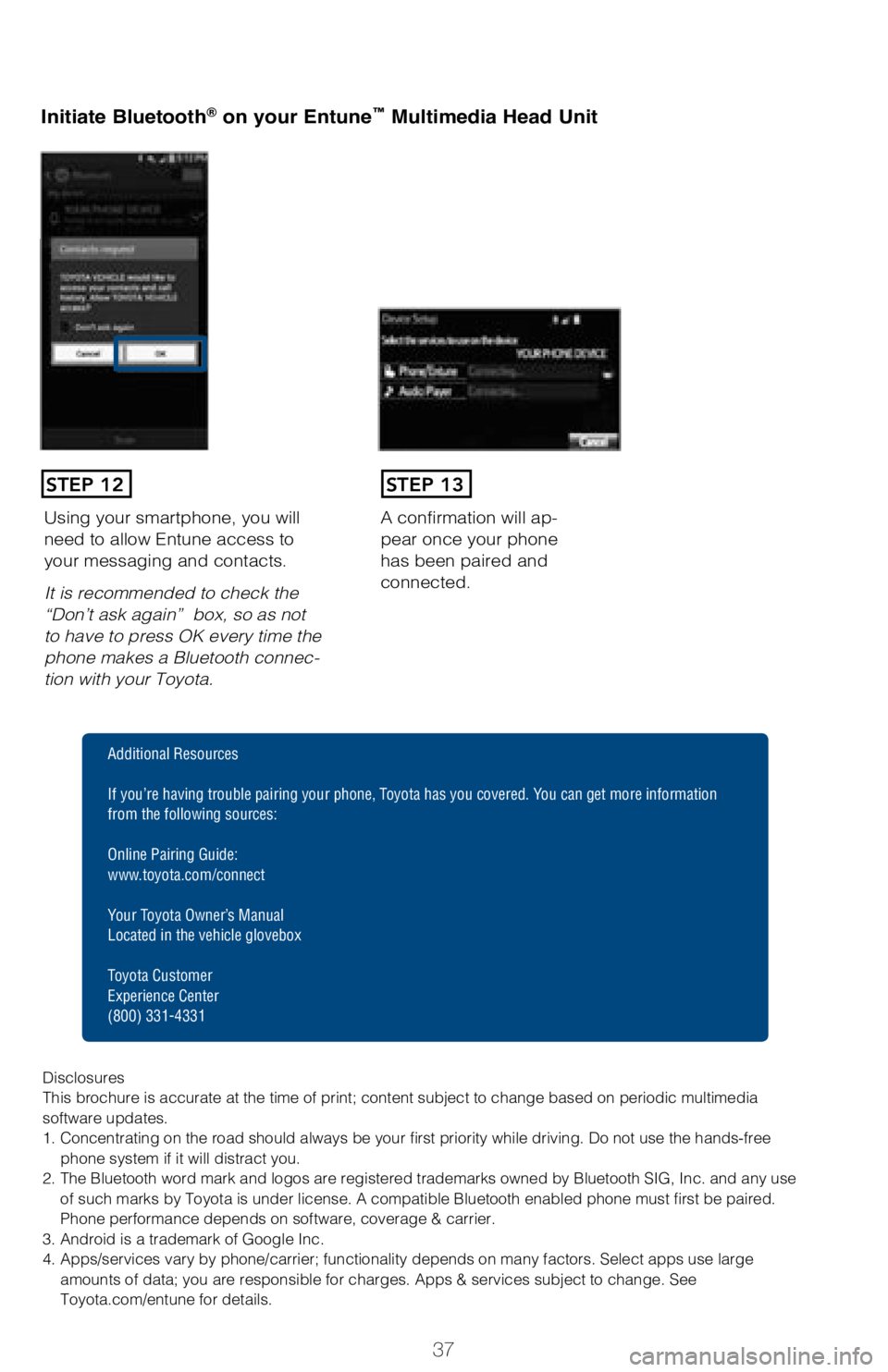
A confirmation will ap-
pear once your phone
has been paired and
connected.Using your smartphone, you will
need to allow Entune access to
your messaging and contacts.
It is recommended to check the
“Don’t ask again” box, so as not
to have to press OK every time the
phone makes a Bluetooth connec
-
tion with your Toyota.
STEP 12STEP 13
Additional Resources
If you’re having trouble pairing your phone, Toyota has you covered. You can get more information
from the following sources:
Online Pairing Guide:
www.toyota.com/connect
Your Toyota Owner’s Manual
Located in the vehicle glovebox
Toyota Customer
Experience Center
(800) 331-4331
Disclosures
This brochure is accurate at the time of print; content subject to chang\
e based on periodic multimedia
software updates.
1. Concentrating on the road should always be your first priority while driving. Do not use the hands-free phone system if it will distract you.
2. The Bluetooth word mark and logos are registered trademarks owned by \
Bluetooth SIG, Inc. and any use of such marks by Toyota is under license. A compatible Bluetooth enabled phone must first be paired.
Phone performance depends on software, coverage & carrier.
3. Android is a trademark of Google Inc.
4. Apps/services vary by phone/carrier; functionality depends on many fa\
ctors. Select apps use large amounts of data; you are responsible for charges. Apps & services subjec\
t to change. See
Toyota.com/entune for details.
Page 42 of 48
40
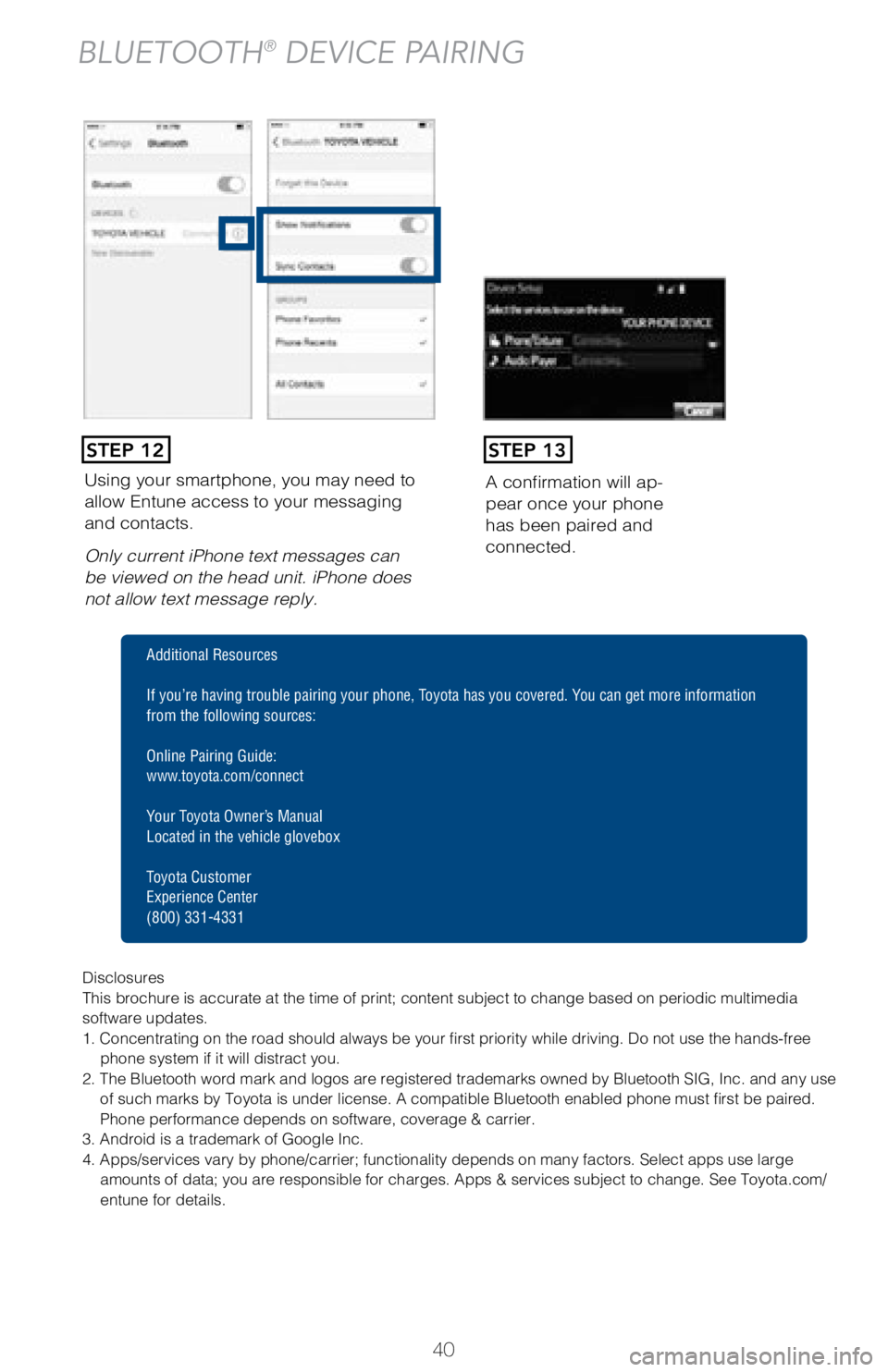
Using your smartphone, you may need to
allow Entune access to your messaging
and contacts.
Only current iPhone text messages can
be viewed on the head unit. iPhone does
not allow text message reply.A confirmation will ap
-
pear once your phone
has been paired and
connected.
STEP 12STEP 13
BLUETOOTH® DEVICE PAIRING
Disclosures
This brochure is accurate at the time of print; content subject to chang\
e based on periodic multimedia
software updates.
1. Concentrating on the road should always be your first priority while driving. Do not use the hands-free
phone system if it will distract you.
2. The Bluetooth word mark and logos are registered trademarks owned by \
Bluetooth SIG, Inc. and any use of such marks by Toyota is under license. A compatible Bluetooth enabled phone must first be paired.
Phone performance depends on software, coverage & carrier.
3. Android is a trademark of Google Inc.
4. Apps/services vary by phone/carrier; functionality depends on many fa\
ctors. Select apps use large amounts of data; you are responsible for charges. Apps & services subjec\
t to change. See Toyota.com/
entune for details.
Additional Resources
If you’re having trouble pairing your phone, Toyota has you covered. You can get more information
from the following sources:
Online Pairing Guide:
www.toyota.com/connect
Your Toyota Owner’s Manual
Located in the vehicle glovebox
Toyota Customer
Experience Center
(800) 331-4331
Page 45 of 48
43
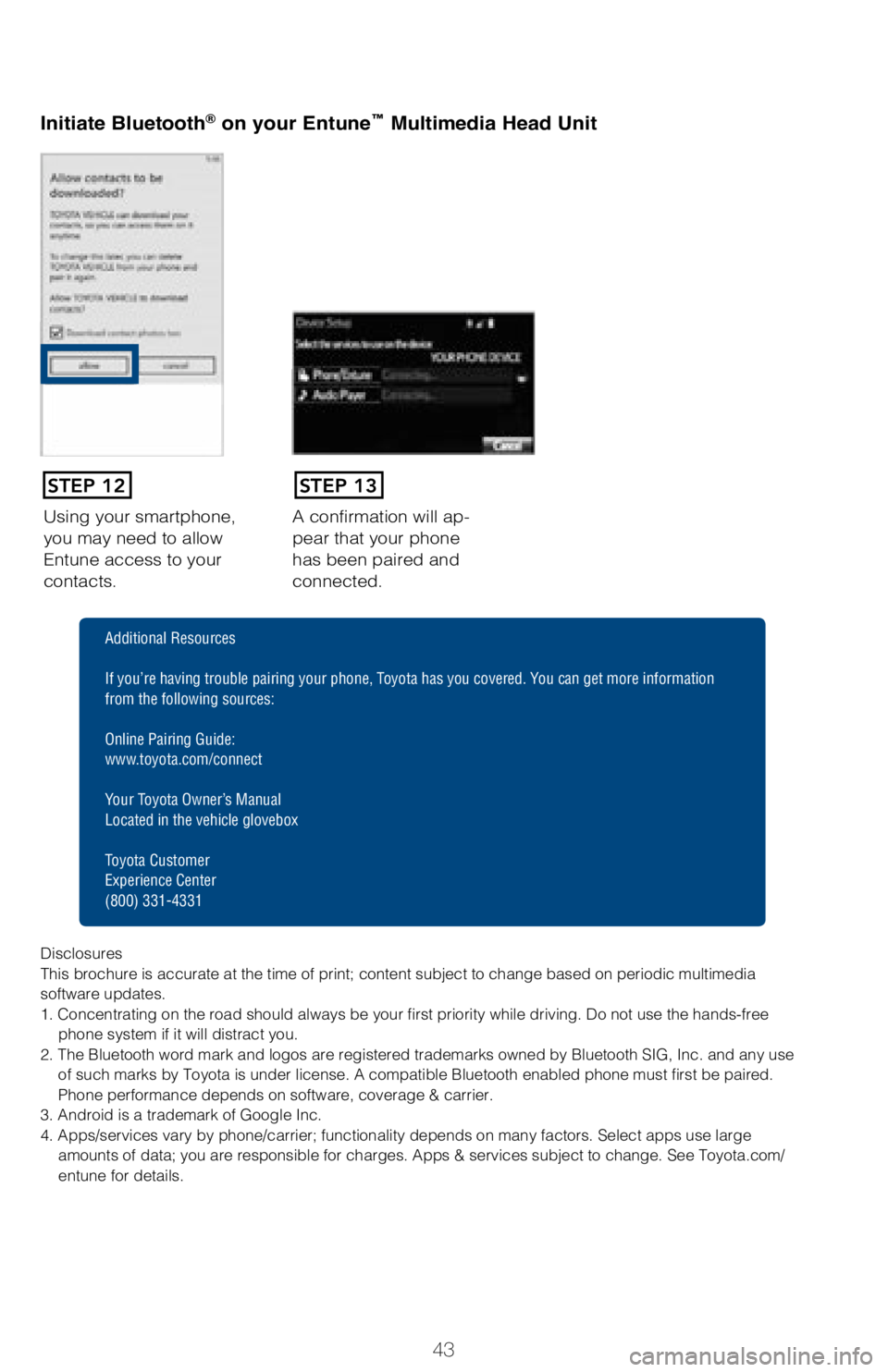
Using your smartphone,
you may need to allow
Entune access to your
contacts.A confirmation will ap-
pear that your phone
has been paired and
connected.
Initiate Bluetooth® on your Entun
e™ Multimedia Head Unit
STEP 12STEP 13
Disclosures
This brochure is accurate at the time of print; content subject to chang\
e based on periodic multimedia
software updates.
1. Concentrating on the road should always be your first priority while driving. Do not use the hands-free
phone system if it will distract you.
2. The Bluetooth word mark and logos are registered trademarks owned by \
Bluetooth SIG, Inc. and any use of such marks by Toyota is under license. A compatible Bluetooth enabled phone must first be paired.
Phone performance depends on software, coverage & carrier.
3. Android is a trademark of Google Inc.
4. Apps/services vary by phone/carrier; functionality depends on many fa\
ctors. Select apps use large amounts of data; you are responsible for charges. Apps & services subjec\
t to change. See Toyota.com/
entune for details.
Additional Resources
If you’re having trouble pairing your phone, Toyota has you covered. You can get more information
from the following sources:
Online Pairing Guide:
www.toyota.com/connect
Your Toyota Owner’s Manual
Located in the vehicle glovebox
Toyota Customer
Experience Center
(800) 331-4331