light TOYOTA PRIUS C 2020 Owners Manual
[x] Cancel search | Manufacturer: TOYOTA, Model Year: 2020, Model line: PRIUS C, Model: TOYOTA PRIUS C 2020Pages: 600, PDF Size: 12.02 MB
Page 271 of 600
271
4
Driving
PRIUS c_U
4-7. Driving tips
◆Using Eco drive mode
When using Eco drive mode, the torque corresponding to the accel-
erator pedal depression amount can be generated more smoothly
than it is in normal conditions. In addition, the operation of the air
conditioning system (heating/coo ling) will be minimized, improving
the fuel economy. ( P. 203)
◆Use of Hybrid System Indicator
The Eco-friendly driving is possible by keeping the needle of H ybrid
System Indicator within Eco area. ( P. 110)
◆Shift lever operation
Shift the shift lever to D when stopped at a traffic light, or driving in
heavy traffic etc. Shift the shift lever to P when parking. When using
the N, there is no positive effe ct on fuel consumption. In the N, the
gasoline engine operates but e lectricity cannot be generated. A lso,
when using the air conditioning s ystem, etc., the hybrid battery
(traction battery) power is consumed.
◆Accelerator pedal/brake pedal operation
● Drive your vehicle smoothly. Avoid abrupt acceleration and
deceleration. Gradual accelerat ion and deceleration will make
more effective use of the electric motor (traction motor) witho ut
having to use gaso line engine power.
● Avoid repeated acceleration. Repeated acceleration consumes
hybrid battery (tracti on battery) power, resulting in poor fuel con-
sumption. Battery power can be restored by driving with the
accelerator pedal slightly released.
◆When braking
Make sure to operate the brakes gently and in a timely manner. A
greater amount of electrical energy can be regenerated when slow-
ing down.
Hybrid vehicle driving tips
For economical and ecological dri ving, pay attention to the fol-
lowing points:
Page 272 of 600

2724-7. Driving tips
PRIUS c_U
◆Delays
Repeated acceleration and deceleration, as well as long waits at
traffic lights, will lead to bad fuel economy. Check traffic re ports
before leaving and avoid delays as much as possible. When drivi ng
in a traffic jam, gently release the brake pedal to allow the v ehicle to
move forward slightly while avoiding overuse of the accelerator
pedal. Doing so can help control excessive gasoline consumption.
◆Highway driving
Control and maintain the vehicle at a constant speed. Before st op-
ping at a toll booth or similar, allow plenty of time to releas e the
accelerator and gently apply the brakes. A greater amount of el ec-
trical energy can be regenerated when slowing down.
◆Air conditioning
Use the air conditioning only when necessary. Doing so can help
reduce excessive gasoline consumption.
In summer: When the ambient tempe rature is high, use the recircu-
lated air mode. Doing so will help to reduce the burden on the air
conditioning system and reduce fuel consumption as well.
In winter: Because the gasolin e engine will not automatically cut out
until it and the interior of the vehicle are warm, it will cons ume fuel.
Also, fuel consumption can be improved by avoiding overuse of t he
heater.
◆Checking tire inflation pressure
Make sure to check the tire inflation pressure frequently. Impr oper
tire inflation pressure can cause poor fuel economy.
Also, as snow tires can cause large amounts of friction, their use on
dry roads can lead to poor fuel economy. Use tires that are app ro-
priate for the season.
◆Luggage
Carrying heavy luggage will lead to poor fuel economy. Avoid carry-
ing unnecessary luggage. Installing a large roof rack will also cause
poor fuel economy.
Page 274 of 600
2744-7. Driving tips
PRIUS c_U
●Use fluids that are appropriate t o the prevailing outside tempera-
tures. • Engine oil
• Engine/power control unit coolant
• Washer fluid
● Have a service technician inspect the condition of the 12-volt bat-
tery.
● Have the vehicle fitted with four snow tires or purchase a set of tire
chains for the front tires.
Ensure that all tires are the same size and brand, and that cha ins match
the size of the tires.
Perform the following according to the driving conditions:
● Do not try to forcibly open a window or move a wiper that is fr ozen.
Pour warm water over the frozen area to melt the ice. Wipe away
the water immediately to p revent it from freezing.
● To ensure proper operation of the climate control system fan,
remove any snow that has accumulated on the air inlet vents in
front of the windshield.
● Check for and remove any excess ic e or snow that may have accu-
mulated on the exterior lights, vehicle's roof, chassis, around the
tires or on the brakes.
● Remove any snow or mud from the bottom of your shoes before
getting in the vehicle.
Accelerate the vehicle slowly, keep a safe distance between you and
the vehicle ahead, and drive at a reduced speed suitable to roa d con-
ditions.
Winter driving tips
Carry out the necessary preparations and inspections before
driving the vehicle in winter. Always drive the vehicle in a ma n-
ner appropriate to the prevailing weather conditions.
Pre-winter preparations
Before driving the vehicle
When driving the vehicle
Page 282 of 600

2825-2. Basic Operations (Multimedia system)
PRIUS c_U
By touching the screen with your finger, you can control the mu ltime-
dia system, etc.
■Drag*
Touch the screen with your finger, and move the screen to the
desired position.
● Scrolling the lists
■Flick*
Touch the screen with your finger and quickly move the screen b y
flicking your finger.
● Scrolling the main screen page
*: The above operations may not be performed on all screens.
■When using the touch screen
●If the screen is cold, the display may be dark, or the system may seem to be
operating slightly slower than normal.
● The screen may seem dark and hard to see when viewed through su n-
glasses. Change your angle of viewing, adjust the display on th e “Display
Settings” screen ( P. 292) or remove your sunglasses.
● Flick operations may not be performed smoothly in high altitude s.
Operating the touch screen
NOTICE
■To avoid damaging the touch screen
● To prevent damaging the screen, lightly touch the screen button s with your
finger.
● Do not use objects other than your finger to touch the screen.
● Wipe off fingerprints using a glass cleaning cloth. Do not use chemical
cleaners to clean the screen, as they may damage the touch scre en.
Page 292 of 600
2925-3. Setup (Multimedia system)
PRIUS c_U
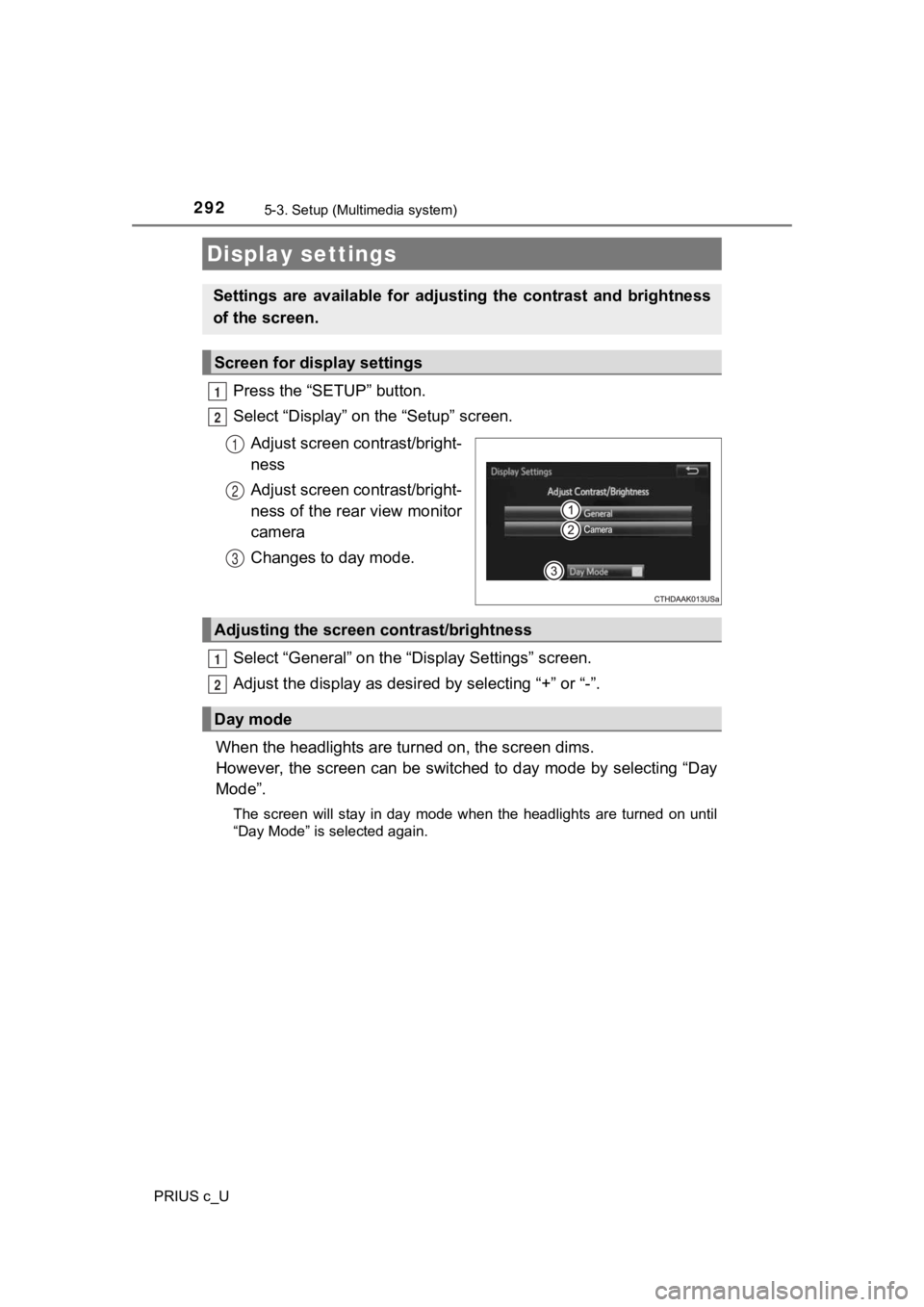
Press the “SETUP” button.
Select “Display” on the “Setup” screen.Adjust screen contrast/bright-
ness
Adjust screen contrast/bright-
ness of the rear view monitor
camera
Changes to day mode.
Select “General” on the “D isplay Settings” screen.
Adjust the display as desir ed by selecting “+” or “-”.
When the headlights are tur ned on, the screen dims.
However, the screen can be switched to day mode by selecting “D ay
Mode”.
The screen will stay in day mode when the headlights are turned on until
“Day Mode” is selected again.
Display settings
Settings are available for adjus ting the contrast and brightness
of the screen.
Screen for display settings
1
2
1
2
3
Adjusting the screen contrast/brightness
Day mode
1
2
Page 295 of 600
2955-4. Using the Multimedia system
5
Audio system
PRIUS c_U
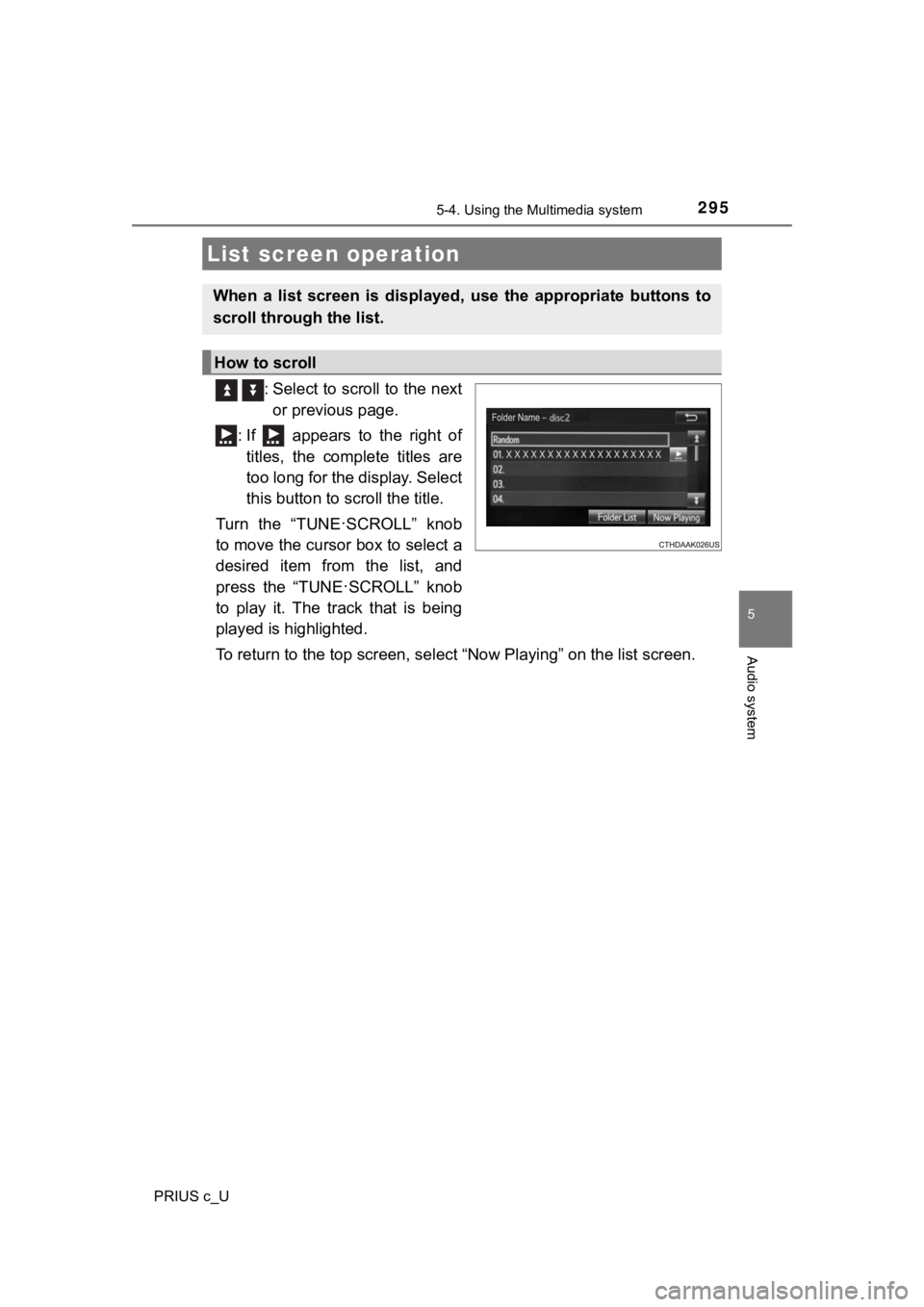
: Select to scroll to the next
or previous page.
: If appears to the right of titles, the complete titles are
too long for the display. Select
this button to scroll the title.
Turn the “TUNE
·SCROLL” knob
to move the cursor box to select a
desired item from the list, and
press the “TUNE
·SCROLL” knob
to play it. The track that is being
played is highlighted.
To return to the top screen, se lect “Now Playing” on the list s creen.
List screen operation
When a list screen is displayed, use the appropriate buttons to
scroll through the list.
How to scroll
Page 305 of 600
3055-6. Playing an audio CD and MP3/WMA/AAC discs (Multimedia system)
5
Audio system
PRIUS c_U
NOTICE
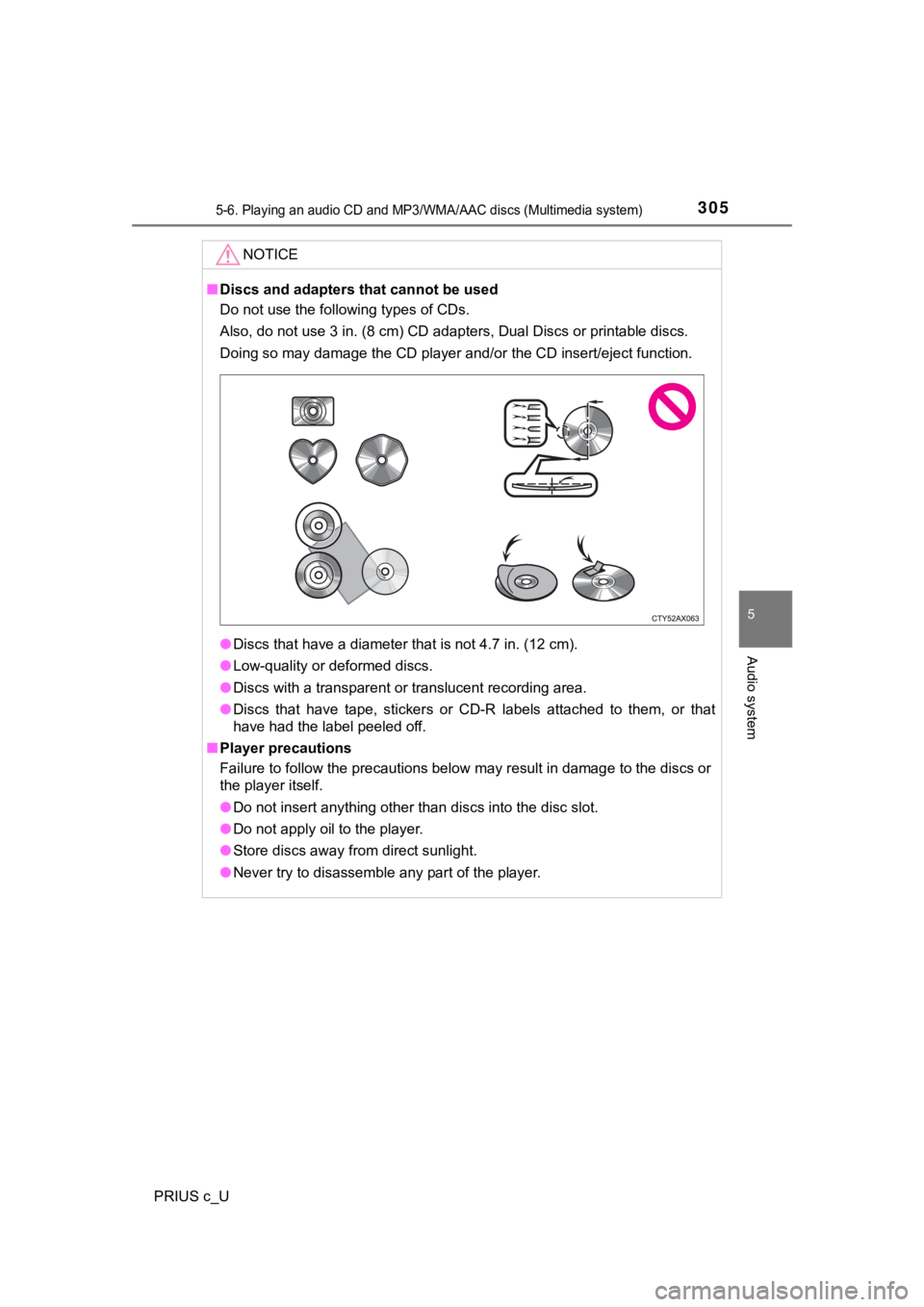
■Discs and adapters that cannot be used
Do not use the following types of CDs.
Also, do not use 3 in. (8 cm) CD adapters, Dual Discs or printa ble discs.
Doing so may damage the CD player and/or the CD insert/eject fu nction.
● Discs that have a diameter that is not 4.7 in. (12 cm).
● Low-quality or deformed discs.
● Discs with a transparent or translucent recording area.
● Discs that have tape, stickers or CD-R labels attached to them, or that
have had the label peeled off.
■ Player precautions
Failure to follow the precautions below may result in damage to the discs or
the player itself.
● Do not insert anything other than discs into the disc slot.
● Do not apply oil to the player.
● Store discs away from direct sunlight.
● Never try to disassemble any part of the player.
Page 308 of 600

3085-7. Using an external device (Multimedia system)
PRIUS c_U
■Cord hook
P. 284
■ About iPod
●“Made for iPod” and “Made for iPhone” mean that an electronic a ccessory
has been designed to connect specifically to iPod or iPhone, re spectively,
and has been certified by the developer to meet Apple performance stan-
dards.
● Apple is not responsible for the operation of this device or it s compliance
with safety and regulatory standards. Please note that the use of this acces-
sory with iPod or iPhone may affect wireless performance.
● iPhone, iPod, iPod classic, iPod nano, and iPod touch are trade marks of
Apple Inc., registered in the U.S. and other countries. Lightning is a trade-
mark of Apple Inc.
■ iPod cover art
●Depending on the iPod and songs in the iPod, iPod cover art may be dis-
played.
● This function can be changed to on/off. ( P. 291)
● It may take time to display iPod cover art, and the iPod may no t be operated
while the cover art display is in process.
● Only iPod cover art that is saved in JPEG format can be display ed.
Page 365 of 600

365
5
Audio system
PRIUS c_U
5-11. Bluetooth® (Multimedia system)
■When using the Bluetooth® audio system
● In the following conditions, the system may not function.
• If the portable audio player is turned off
• If the portable audio player is not connected
• If the portable audio player’s battery is low
● There may be a delay if a cellular phone connection is made dur ing
Bluetooth
® audio play.
● Depending on the type of portable audio player that is connecte d to the sys-
tem, operation may differ slightly and certain functions may no t be available.
■ When using the hands-free system
●The multimedia system is muted when making a call.
● If both parties speak at the same time, it may be difficult to hear.
● If the received call volume is overly loud, an echo may be heard.
If the Bluetooth
® phone is too close to the system, quality of the sound may
deteriorate and connection status may deteriorate.
● In the following circumstances, it may be difficult to hear the other party:
• When driving on unpaved roads
• When driving at high speeds
• If a roof or window is open
• If the air conditioning is blowing directly on the microphone
• If there is interference from the network of the cellular phon e
■ Conditions under which the system will not operate
●If using a cellular phone that does not support Bluetooth
®
●If the cellular phone is turned off
● If you are outside of cellular phone service coverage
● If the cellular phone is not connected
● If the cellular phone’s battery is low
● When outgoing calls are controlled, due to heavy traffic on tel ephone lines,
etc.
● When the cellular phone itself cannot be used
● When transferring contact data from the cellular phone
Bluetooth®
Page 375 of 600

375
6Interior features
PRIUS c_U6-1. Using the air
conditioning system
and defogger
Automatic air conditioning system ........ 376
Seat heaters...................... 384
6-2. Using the interior lights Interior lights list ................ 385
• Interior lights ................. 386
• Personal lights .............. 386
6-3. Using the storage features
List of storage features ..... 388
• Glove box...................... 389
• Console box .................. 389
• Auxiliary boxes.............. 390
• Cup holders .................. 391
• Bottle holders ................ 392
6-4. Other interior features Other interior features ....... 393
• Sun visors ..................... 393
• Vanity mirrors................ 393
• Power outlet .................. 394
• Coat hooks.................... 395
• Assist grips ................... 396
• Luggage cover .............. 397