headlights TOYOTA PRIUS C 2020 User Guide
[x] Cancel search | Manufacturer: TOYOTA, Model Year: 2020, Model line: PRIUS C, Model: TOYOTA PRIUS C 2020Pages: 600, PDF Size: 12.02 MB
Page 245 of 600
2454-5. Toyota Safety Sense C
4
Driving
PRIUS c_U■
Conditions in which functions may not operate properly
In the following situations, the front sensor may not detect wh ite (yellow) lines
and various functions may not operate normally.
● There are shadows on the road that run parallel with, or cover, the white
(yellow) lines.
● The vehicle is driven in an area without white (yellow) lines, such as in front
of a tollgate or checkpoint, or at an intersection, etc.
● The white (yellow) lines are cracked, “Botts’ dots”, “Raised pa vement
marker” or stones are present.
● The white (yellow) lines cannot be seen or are difficult to see due to sand,
etc.
● The vehicle is driven on a road surface that is wet due to rain , puddles, etc.
● The traffic lines are yellow (which may be more difficult to re cognize than
lines that are white).
● The white (yellow) lines cross over a curb, etc.
● The vehicle is driven on a bright surface, such as concrete.
● The vehicle is driven on a surface that is bright due to reflec ted light, etc.
● The vehicle is driven in an area where the brightness changes s uddenly,
such as at the entrances and exits of tunnels, etc.
● Light from the headlights of an oncoming vehicle, the sun, etc. , enters the
camera.
● The vehicle is driven where the road diverges, merges, etc.
● The vehicle is driven on a slope.
● The vehicle is driven on a road which tilts left or right, or a winding road.
● The vehicle is driven on an unpaved or rough road.
● The vehicle is driven around a sharp curve.
● The traffic lane is excessively narrow or wide.
● The vehicle is extremely tilted due to carrying heavy luggage or having
improper tire pressure.
● The distance to the preceding vehicle is extremely short.
● The vehicle is moving up and down a large amount due to road co nditions
during driving (poor roads or road seams).
● The headlight lenses are dirty and emit a faint amount of light at night, or the
beam axis has deviated.
● The vehicle has just changed lanes or crossed an intersection.
■ Warning messages
Warning messages are used to indicate a system malfunction or to inform the
driver of the need for caution while driving. ( P. 488)
■ Customization
P. 108
Page 248 of 600
2484-5. Toyota Safety Sense C
PRIUS c_U
■High beam automatic turning on or off conditions
●When all of the following conditions are fulfilled, the high be am will be auto-
matically turned on (after approximately 1 second):
• Vehicle speed is approximately 21 mph (33 km/h) or more.
• The area ahead of the vehicle is dark.
• There are no vehicles ahead with headlights or tail lights turned on.
• There are few streetlights on the road ahead.
● If any of the following conditions is met, the high beams will turn off automat-
ically:
• Vehicle speed is below approx imately 17 mph (27 km/h).
• The area ahead of the vehicle is not dark.
• Vehicles ahead have their headlights or tail lights turned on.
• There are many streetlights on the road ahead.
■ Front sensor detection information
●The high beam may not be automatically turned off in the following situa-
tions:
• When vehicles ahead suddenly appear from a curve
• When the vehicle is cut in front of by another vehicle
• When vehicles ahead are hidden from sight due to repeated curv es, road
dividers or roadside trees
• When vehicles ahead appear from the faraway lane on wide road
• When vehicles ahead have no lights
● The high beam may be turned off if a vehicle ahead that is usin g fog lights
without using the headlights is detected.
● House lights, street lights, traffic signals, and illuminated billboards or signs
may cause the high beam to switch to the low beams, or the low beams to
remain on.
● The following factors may affect the amount of time taken to tu rn the high
beam on or off:
• The brightness of headlights, fog lights, and tail lights of v ehicles ahead
• The movement and direction of vehicles ahead
• When a vehicle ahead only has operational lights on one side
• When a vehicle ahead is a two-wheeled vehicle
• The condition of the road (gradient, curve, condition of the r oad surface,
etc.)
• The number of passengers and amount of luggage
● The high beam may be turned on or off when the driver does not expect it.
● Bicycles or similar objects may not be detected.
Page 249 of 600

2494-5. Toyota Safety Sense C
4
Driving
PRIUS c_U●
In the situations shown below, the system may not be able to accurately
detect surrounding brightness levels. This may cause the low be ams to
remain on or the high beams to cause problems for pedestrians, vehicles
ahead or other parties. In these cases, manually switch between the high
and low beams.
• In bad weather (rain, snow, fog, sandstorms, etc.)
• The windshield is obscured by fog, mist, ice, dirt, etc.
• The windshield is cracked or damaged.
• The front sensor is deformed or dirty.
• The front sensor temperature is extremely high.
• Surrounding brightness levels are equal to those of headlights , tail lights
or fog lights.
• Vehicles ahead have headlights or tail lights that are either switched off,
dirty, are changing color, or are not aimed properly.
• When driving through an area of intermittently changing brightness and darkness.
• When frequently and repeatedly driving ascending/descending roads, or roads with rough, bumpy or uneven surfaces (such as stone-paved
roads, gravel tracks, etc.).
• When frequently and repeatedly taking curves or driving on a w inding
road.
• There is a highly reflective object ahead of the vehicle, such as a sign or
a mirror.
• The back of a vehicle ahead is highly reflective, such as a co ntainer on a
truck.
• The vehicle’s headlights are damaged or dirty, or are not aime d properly.
• The vehicle is listing or titling due to a flat tire, a traile r being towed, etc.
• The high beam and low beam are repeatedly being switched betwe en in
an abnormal manner.
• The driver believes that the high beam may be causing problems or dis-
tress to other drivers or pedestrians nearby.
Page 250 of 600
2504-5. Toyota Safety Sense C
PRIUS c_U■
Temporarily lowering sensor sensitivity
The sensitivity of the sensor can be temporarily lowered.
Vehicles without a smart key system: Turn the power switch off while the
following conditions are met.
Vehicles with a smart key system: Turn the power switch off whi le the fol-
lowing conditions are met
• The headlight switch is in .
• The headlight switch lever is in high beam position.
• Automatic High Beam switch is on.
Vehicles without a smart key system: Turn the power switch to t he “ON”
position.
Vehicles with a smart key system: Turn the power switch to ON m ode.
Within 60 seconds after , repeat pulling the headlight switch l ever to the
original position then pushing it to the high beam position qui ckly 10 times,
then leave the lever in high beam position.
If the sensitivity is changed, the Automatic High Beam indicato r is turn on
and off 3 times.
Automatic High Beam (headlights) may turn on even the vehicle i s stopped.
1
2
32
4
Page 262 of 600
2624-6. Using the driving support systems
PRIUS c_U■
If you notice any symptoms
If you notice any of the followi
ng symptoms, refer to the likel y cause
and the solution, and re-check.
If the symptom is not resolved by the solution, have the vehicl e
inspected by your Toyota dealer.
Things you should know
Likely causeSolution
The image is difficult to see
• The vehicle is in a dark area
• The temperature around the lens
is either high or low
• The outside temperature is low
• There are water droplets on the camera
• It is raining or humid
• Foreign matter (mud etc.) is adhering to the camera
• Sunlight or headlights are shining directly into the camera
• The vehicle is under fluorescent
lights, sodium lights, mercury
lights etc.
If this happens due to these causes,
it does not indicate a malfunction.
Back up while visually checking the
vehicle’s surroundings. (Use the
monitor again once conditions have
been improved.)
To adjust the image on the rear view
monitor system screen. ( P. 292)
The image is blurry
Dirt or foreign matter (such as water
droplets, snow, mud etc.) is adher-
ing to the camera.Flush the camera with a large quan-
tity of water and wipe the camera
lens clean with a soft and wet cloth.
The image is out of alignment
The camera or surrounding area has
received a strong impact.Have the vehicle inspected by your
Toyota dealer.
The fixed guide lines are very far out of alignment
• The vehicle is tilted (there is a
heavy load on the vehicle, tire
pressure is low due to a tire punc-
ture, etc.)
• The vehicle is used on an incline.If this happens due to these causes,
it does not indicate a malfunction.
Back up while visually checking the
vehicle's surroundings.
The camera position is out of align-
ment.Have the vehicle inspected by your
Toyota dealer.
Page 292 of 600
2925-3. Setup (Multimedia system)
PRIUS c_U
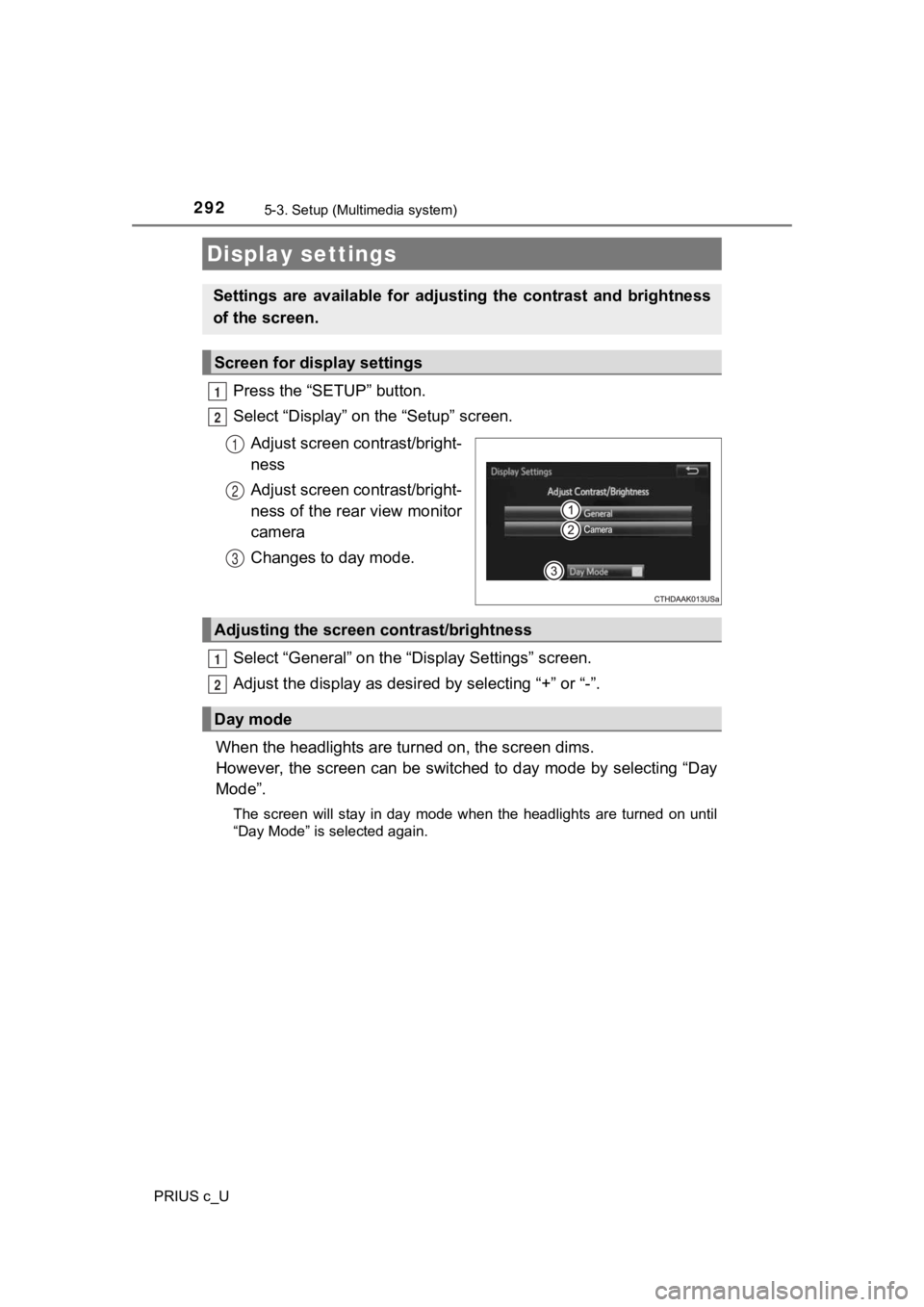
Press the “SETUP” button.
Select “Display” on the “Setup” screen.Adjust screen contrast/bright-
ness
Adjust screen contrast/bright-
ness of the rear view monitor
camera
Changes to day mode.
Select “General” on the “D isplay Settings” screen.
Adjust the display as desir ed by selecting “+” or “-”.
When the headlights are tur ned on, the screen dims.
However, the screen can be switched to day mode by selecting “D ay
Mode”.
The screen will stay in day mode when the headlights are turned on until
“Day Mode” is selected again.
Display settings
Settings are available for adjus ting the contrast and brightness
of the screen.
Screen for display settings
1
2
1
2
3
Adjusting the screen contrast/brightness
Day mode
1
2
Page 464 of 600
4647-3. Do-it-yourself maintenance
PRIUS c_U
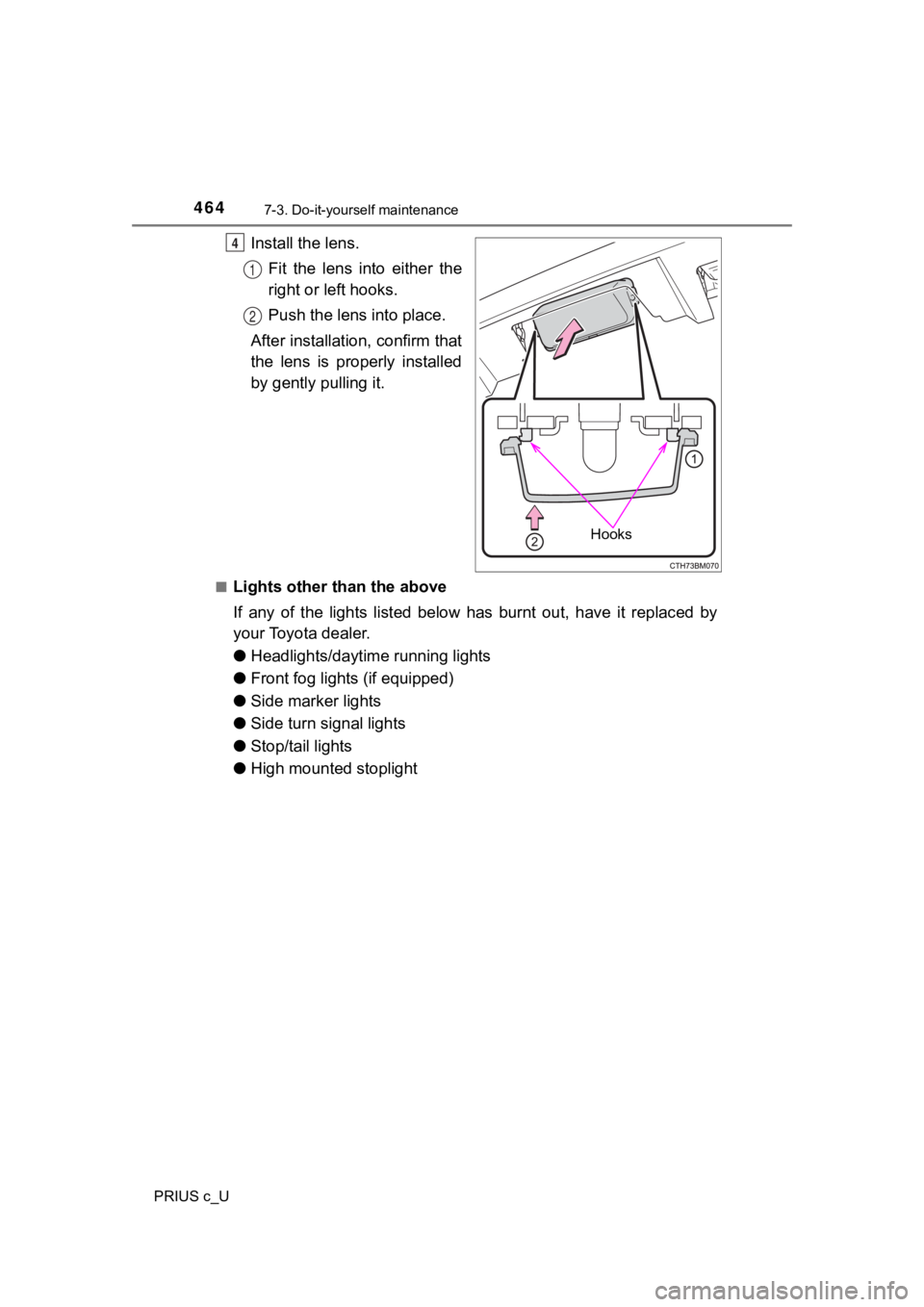
Install the lens.Fit the lens into either the
right or left hooks.
Push the lens into place.
After installation, confirm that
the lens is properly installed
by gently pulling it.
■Lights other than the above
If any of the lights listed below has burnt out, have it replac ed by
your Toyota dealer.
● Headlights/daytime running lights
● Front fog lights (if equipped)
● Side marker lights
● Side turn signal lights
● Stop/tail lights
● High mounted stoplight
Hooks
4
1
2
Page 465 of 600
4657-3. Do-it-yourself maintenance
7
Maintenance and care
PRIUS c_U
■LED light bulbs
The headlights/daytime running lights, front fog lights (if equipped), side
marker lights, side turn signal lights, stop/tail lights and hi gh mounted stop-
light consist of a number of LEDs. If any of the LEDs burn out, take your vehi-
cle to your Toyota dealer to have the light replaced.
■ Condensation build-up on the inside of the lens
Temporary condensation build-up on the inside of the headlight lens does not
indicate a malfunction. Contact your Toyota dealer for more information in the
following situations:
● Large drops of water have built up on the inside of the lens.
● Water has built up inside the headlight.
WARNING
■Replacing light bulbs
● Turn off the lights. Do not attempt to replace the bulb immedia tely after
turning off the lights.
The bulbs become very hot and may cause burns.
● Do not touch the glass portion of the light bulb with bare hands. When it is
unavoidable to hold the glass portion, use and hold with a clea n dry cloth
to avoid getting moisture and oils on the bulb.
Also, if the bulb is scratched or dropped, it may blow out or crack.
● Fully install light bulbs and any parts used to secure them. Fa ilure to do so
may result in heat damage, fire, or water entering the headligh t unit. This
may damage the headlights or cause condensation to build up on the lens.
■ To prevent damage or fire
Make sure bulbs are fully seated and locked.
Page 493 of 600
4938-2. Steps to take in an emergency
8
When trouble arises
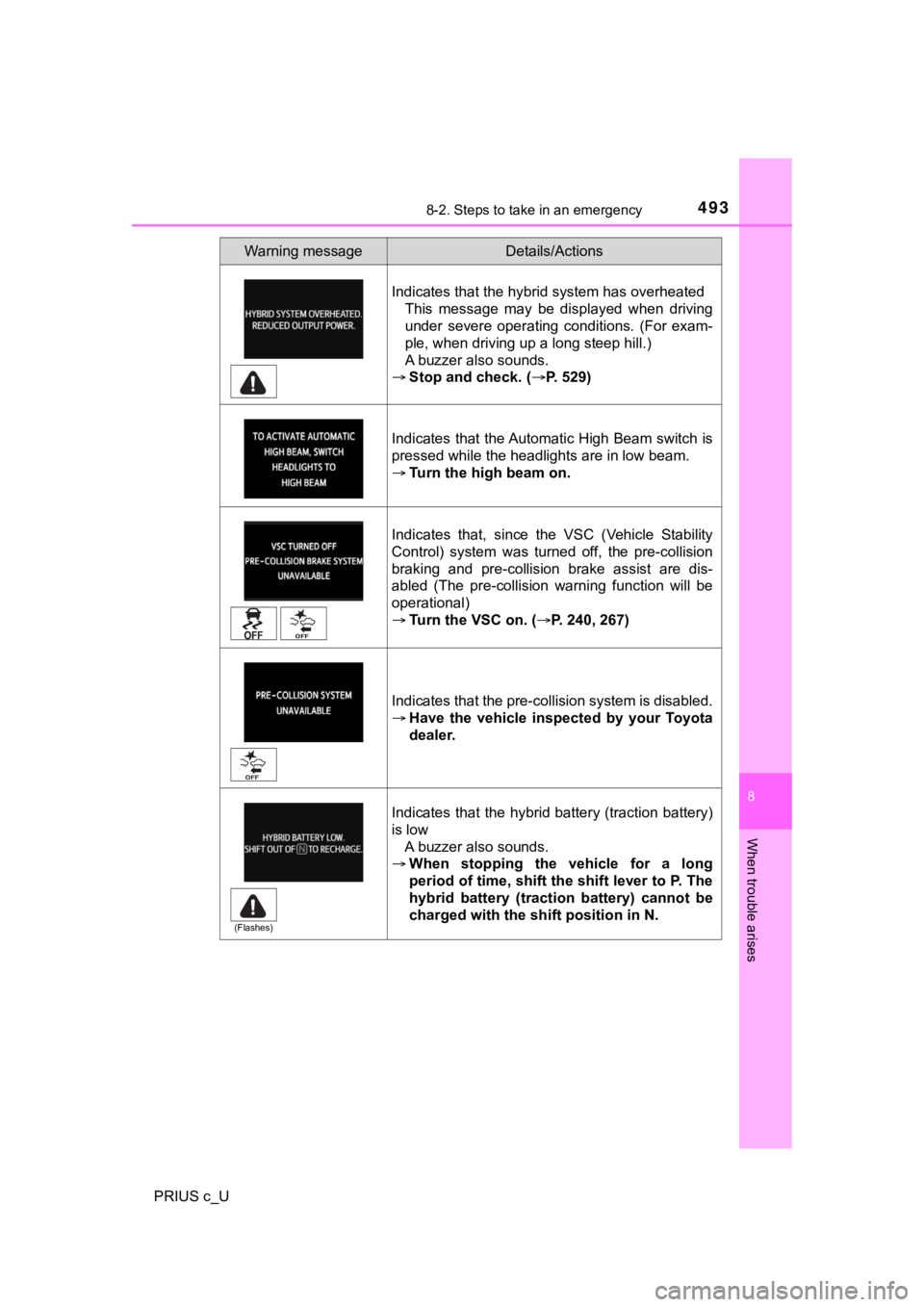
PRIUS c_UIndicates that the hybrid system has overheated
This message may be displayed when driving
under severe operating conditions. (For exam-
ple, when driving up a long steep hill.)
A buzzer also sounds.
Stop and check. ( P. 529)
Indicates that the Automatic High Beam switch is
pressed while the headlights are in low beam.
Turn the high beam on.
Indicates that, since the VSC (Vehicle Stability
Control) system was turned off, the pre-collision
braking and pre-collision brake assist are dis-
abled (The pre-collision warning function will be
operational)
Turn the VSC on. ( P. 240, 267)
Indicates that the pre-collision system is disabled.
Have the vehicle inspected by your Toyota
dealer.
Indicates that the hybrid battery (traction battery)
is low A buzzer also sounds.
When stopping the vehicle for a long
period of time, shift the shift lever to P. The
hybrid battery (traction battery) cannot be
charged with the shift position in N.
Warning messageDetails/Actions
(Flashes)
Page 518 of 600
5188-2. Steps to take in an emergency
PRIUS c_U
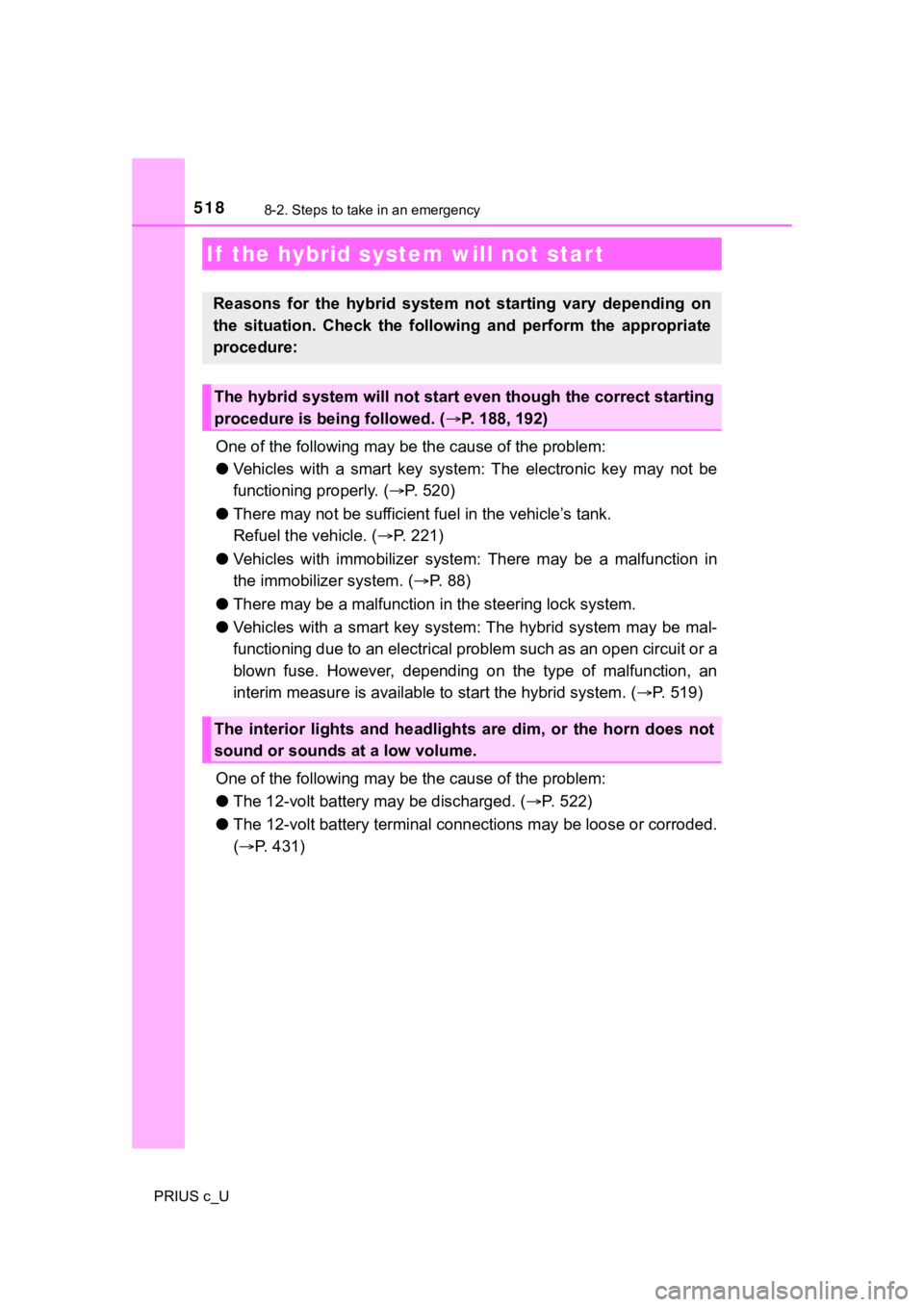
One of the following may be the cause of the problem:
● Vehicles with a smart key system: The electronic key may not be
functioning properly. ( P. 520)
● There may not be sufficient f uel in the vehicle’s tank.
Refuel the vehicle. ( P. 221)
● Vehicles with immobilizer syste m: There may be a malfunction in
the immobilizer system. ( P. 8 8 )
● There may be a malfunction i n the steering lock system.
● Vehicles with a smart key system : The hybrid system may be mal-
functioning due to an electrical problem such as an open circui t or a
blown fuse. However, depending on the type of malfunction, an
interim measure is available to start the hybrid system. (P. 519)
One of the following may be the cause of the problem:
● The 12-volt battery may be discharged. ( P. 522)
● The 12-volt battery terminal conn ections may be loose or corroded.
( P. 431)
If the hybrid system will not start
Reasons for the hybrid system not starting vary depending on
the situation. Check the followi ng and perform the appropriate
procedure:
The hybrid system will not start even though the correct starting
procedure is being followed. ( P. 188, 192)
The interior lights and headlights are dim, or the horn does no t
sound or sounds at a low volume.