radio TOYOTA PRIUS C 2020 User Guide
[x] Cancel search | Manufacturer: TOYOTA, Model Year: 2020, Model line: PRIUS C, Model: TOYOTA PRIUS C 2020Pages: 600, PDF Size: 12.02 MB
Page 144 of 600

1443-2. Opening, closing and locking the doors
PRIUS c_U■
Notes for the entry function
●Even when the electronic key is within the effective range (det ection areas),
the system may not operate properly in the following cases:
• The electronic key is too close to the window or outside door handle, near
the ground, or in a high place when the doors are locked or unl ocked.
• The electronic key is on the instrument panel, luggage cover o r floor, in
the door pockets or glove box when the hybrid system is started or power
switch modes are changed.
● Do not exit the vehicle with the electronic key placed on the i nstrument
panel or near the door pockets. Depending on the radio wave reception con-
ditions, it may be detected by the antenna outside the cabin and the door
will become lockable from the outside, possibly trapping the electronic key
inside the vehicle.
● As long as the electronic key is within the effective range, th e doors may be
locked or unlocked by anyone. However, only the doors detecting the elec-
tronic key can be used to unlock the vehicle.
● Whether or not the electronic key is inside the vehicle, the hy brid system
could be started if the electronic key is near the window.
● The doors may unlock if a large amount of water splashes on the door han-
dle, such as in the rain or in a car wash when the electronic k ey is within the
effective range. (The door will automatically be locked after a pproximately
60 seconds if the doors are not opened and closed.)
● The lock and unlock sensors may not work properly if they come into con-
tact with ice, snow, mud, etc. Clean the sensors and attempt to operate
them again.
● If the wireless remote control is used to lock the doors when t he electronic
key is near the vehicle, there is a possibility that the door m ay not be
unlocked by the entry function. (Using the wireless remote cont rol to unlock
the doors may resume the function.)
● If the door handle becomes wet while the electronic key is with in the effec-
tive range, the door may lock and unlock repeatedly. In that ca se, follow the
following correction procedures to wash the vehicle:
• Place the electronic key in a location 6 ft. (2 m) or more awa y from the
vehicle. (Take care to ensure that the key is not stolen.)
• Set the electronic key to battery-saving mode to disable the s mart key
system. ( P. 142)
Page 149 of 600

1493-2. Opening, closing and locking the doors
3
Operation of each component
PRIUS c_U
WARNING
■Caution regarding interfer ence with electronic devices
● People with implantable cardiac pacemakers, cardiac resynchroni zation
therapy-pacemakers or implantable cardioverter defibrillators s hould keep
away from the smart key system antennas. ( P. 141)
The radio waves may affect the operation of such devices. If ne cessary,
the entry function can be disabled. Ask your Toyota dealer for details, such
as the frequency of radio waves and timing of the emitted radio waves.
Then, consult your doctor to see if you should disable the entr y function.
● User of any electrical medical device other than implantable ca rdiac pace-
makers, cardiac resynchronization therapy-pacemakers or implant able
cardioverter defibrillators should consult the manufacturer of the device for
information about its operation under the influence of radio wa ves.
Radio waves could have unexpected effects on the operation of such
medical devices.
Ask your Toyota dealer for details for disabling the entry func tion.
Page 278 of 600

278
PRIUS c_U5-1. Using the audio system
Audio system types ........... 280
5-2. Basic Operations (Multimedia system)
Multimedia system ............ 281
Steering wheel audio switches ................ 283
USB port/AUX port ............ 284
Basic audio operations...... 286
5-3. Setup (Multimedia system)
Setup menu....................... 288
General settings ................ 289
Audio settings ................... 291
Display settings ................. 292
Voice settings.................... 293
5-4. Using the Multimedia system
Selecting the audio source ................... 294
List screen operation......... 295
Optimal use of the multimedia system .......... 297
5-5. Using the radio (Multimedia system)
Radio operation................. 298
5Audio system
Page 283 of 600
2835-2. Basic Operations (Multimedia system)
5
Audio system
PRIUS c_U
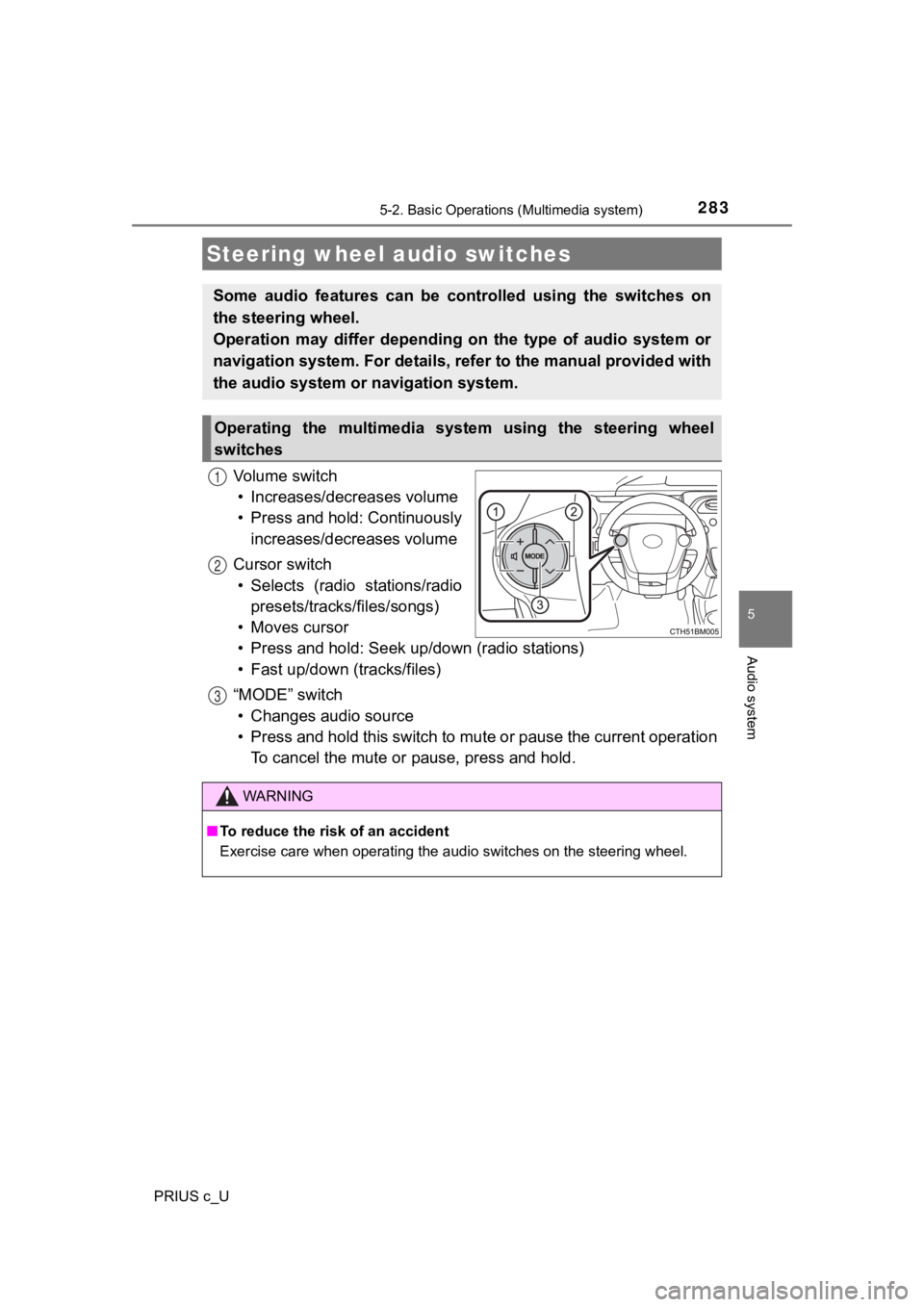
Vo l u m e s w i t c h• Increases/dec reases volume
• Press and hold: Continuously increases/decreases volume
Cursor switch • Selects (radio stations/radio presets/tracks/files/songs)
• Moves cursor
• Press and hold: Seek up /down (radio stations)
• Fast up/down (tracks/files)
“MODE” switch • Changes audio source
• Press and hold this switch to mute or pause the current operat ion
To cancel the mute or pause, press and hold.
Steering wheel audio switches
Some audio features can be cont rolled using the switches on
the steering wheel.
Operation may differ depending on the type of audio system or
navigation system. For details, refer to the manual provided with
the audio system or navigation system.
Operating the multimedia system using the steering wheel
switches
1
12
3
WARNING
■To reduce the risk of an accident
Exercise care when operating the audio switches on the steering wheel.
Page 286 of 600
2865-2. Basic Operations (Multimedia system)
PRIUS c_U
Basic audio operations
Basic audio operations and func tions common to each mode are
explained in this section.
Operating the multimedia system
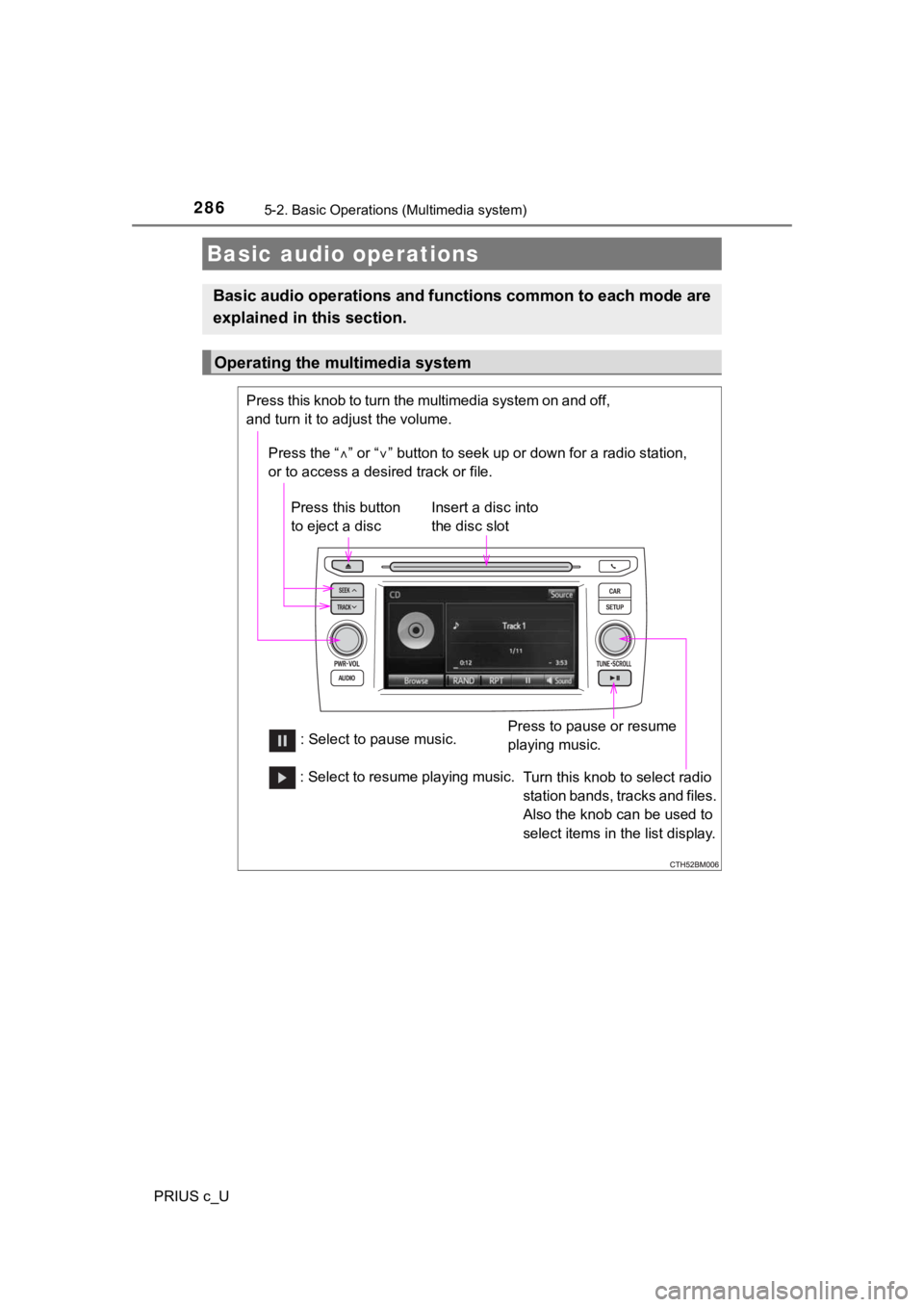
Press the “ ” or “ ” button to seek up or down for a radio station,
or to access a desired track or file.
Press this knob to turn the multimedia system on and off,
and turn it to adjust the volume.
Press this button
to eject a disc
Press to pause or resume
playing music.
Insert a disc into
the disc slot
: Select to pause music. Turn this knob to select radio
station bands, tracks and files.
Also the knob can be used to
select items in the list display.
: Select to resume playing music.
Page 291 of 600
2915-3. Setup (Multimedia system)
5
Audio system
PRIUS c_U
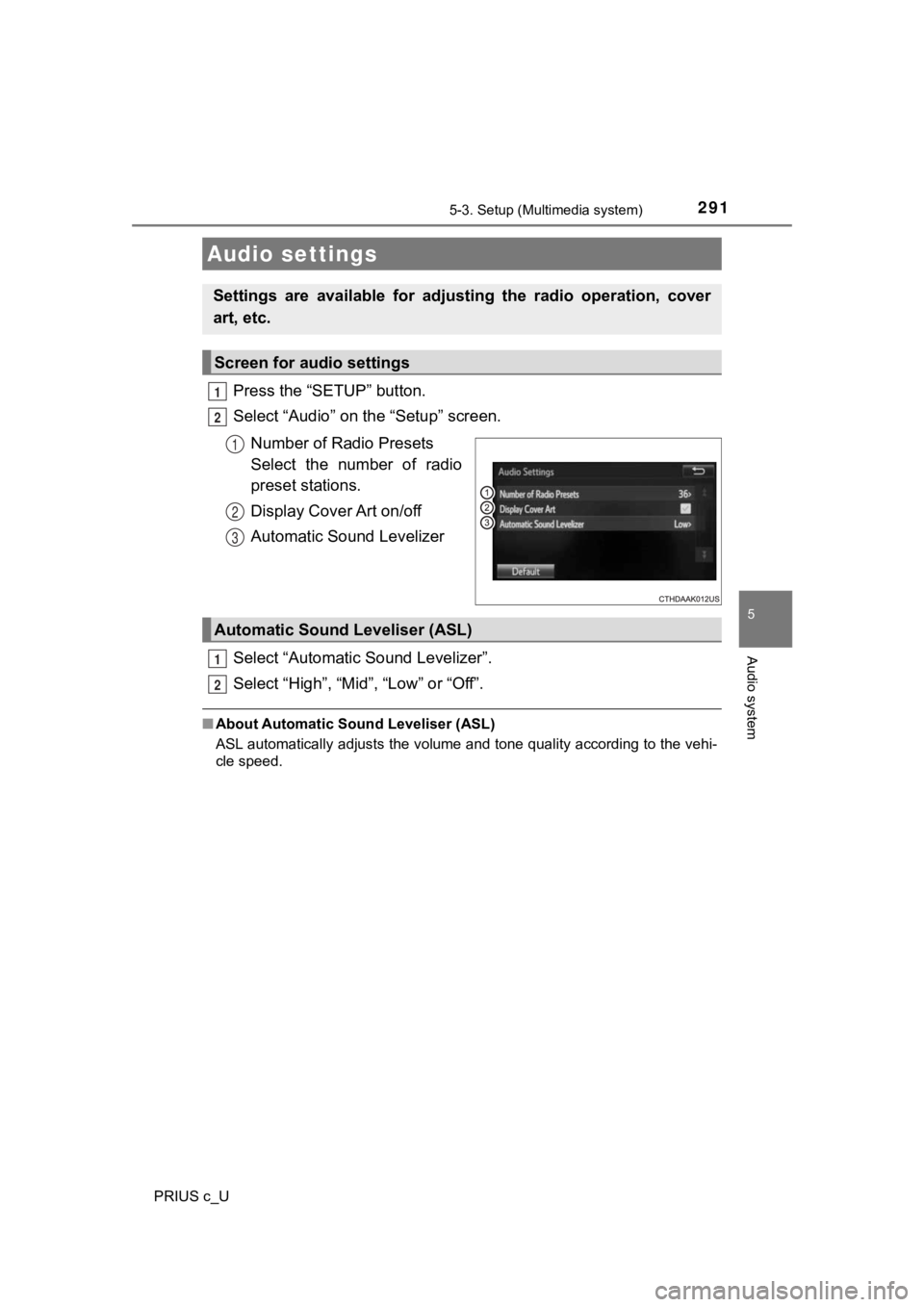
Press the “SETUP” button.
Select “Audio” on the “Setup” screen.Number of Radio Presets
Select the number of radio
preset stations.
Display Cover Art on/off
Automatic Sound Levelizer
Select “Automatic Sound Levelizer”.
Select “High”, “Mid”, “Low” or “Off”.
■ About Automatic So und Leveliser (ASL)
ASL automatically adjusts the volume and tone quality according to the vehi-
cle speed.
Audio settings
Settings are available for adjusting the radio operation, cover
art, etc.
Screen for audio settings
1
2
1
2
3
Automatic Sound Leveliser (ASL)
1
2
Page 294 of 600
294
PRIUS c_U
5-4. Using the Multimedia system
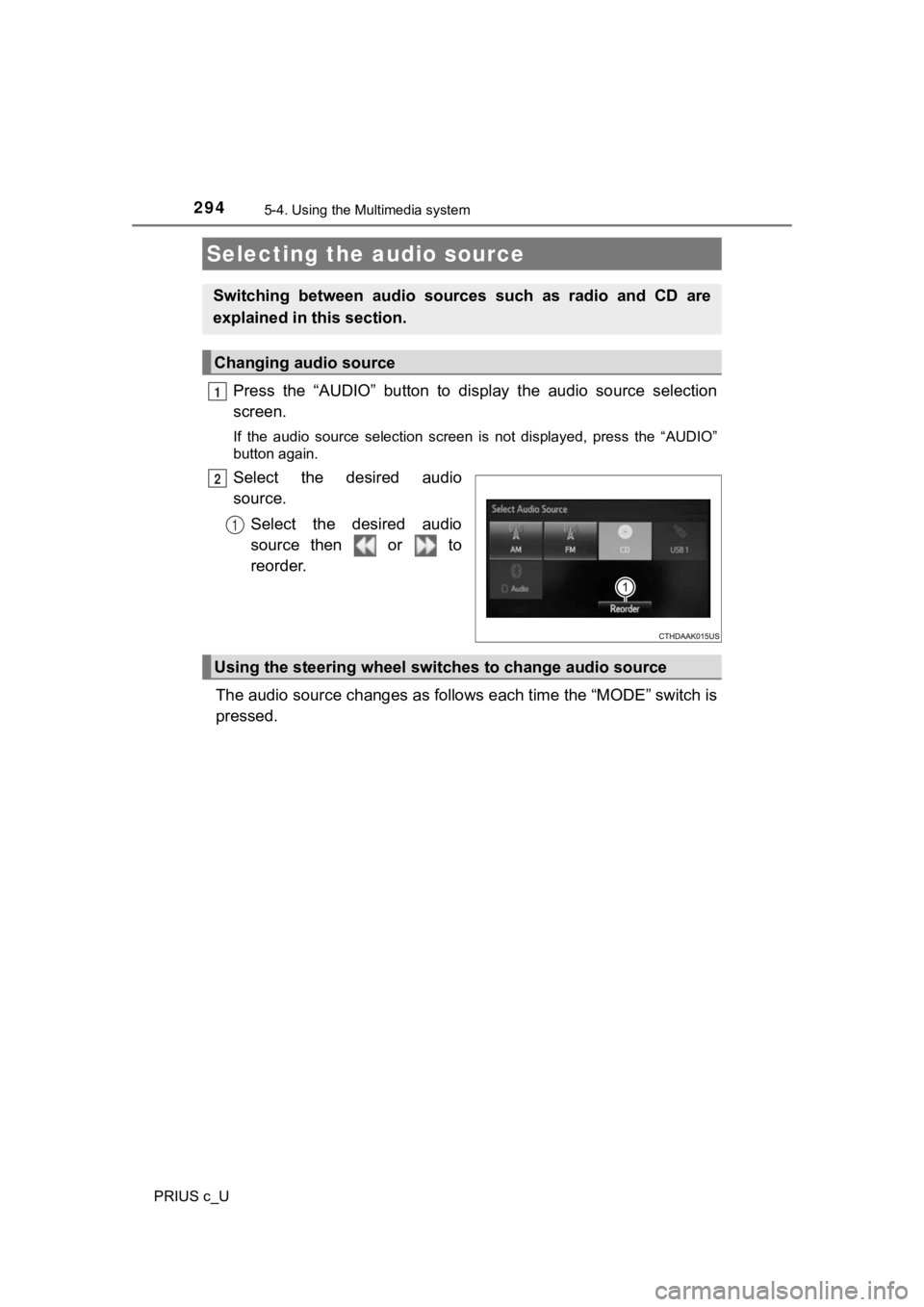
Press the “AUDIO” button to display the audio source selection
screen.
If the audio source selection screen is not displayed, press the “AUDIO”
button again.
Select the desired audio
source.
Select the desired audio
source then or to
reorder.
The audio source changes as follows each time the “MODE” switch is
pressed.
Selecting the audio source
Switching between audio sources such as radio and CD are
explained in t his section.
Changing audio source
1
2
1
Using the steering wheel switches to change audio source
Page 298 of 600
298
PRIUS c_U
5-5. Using the radio (Multimedia system)
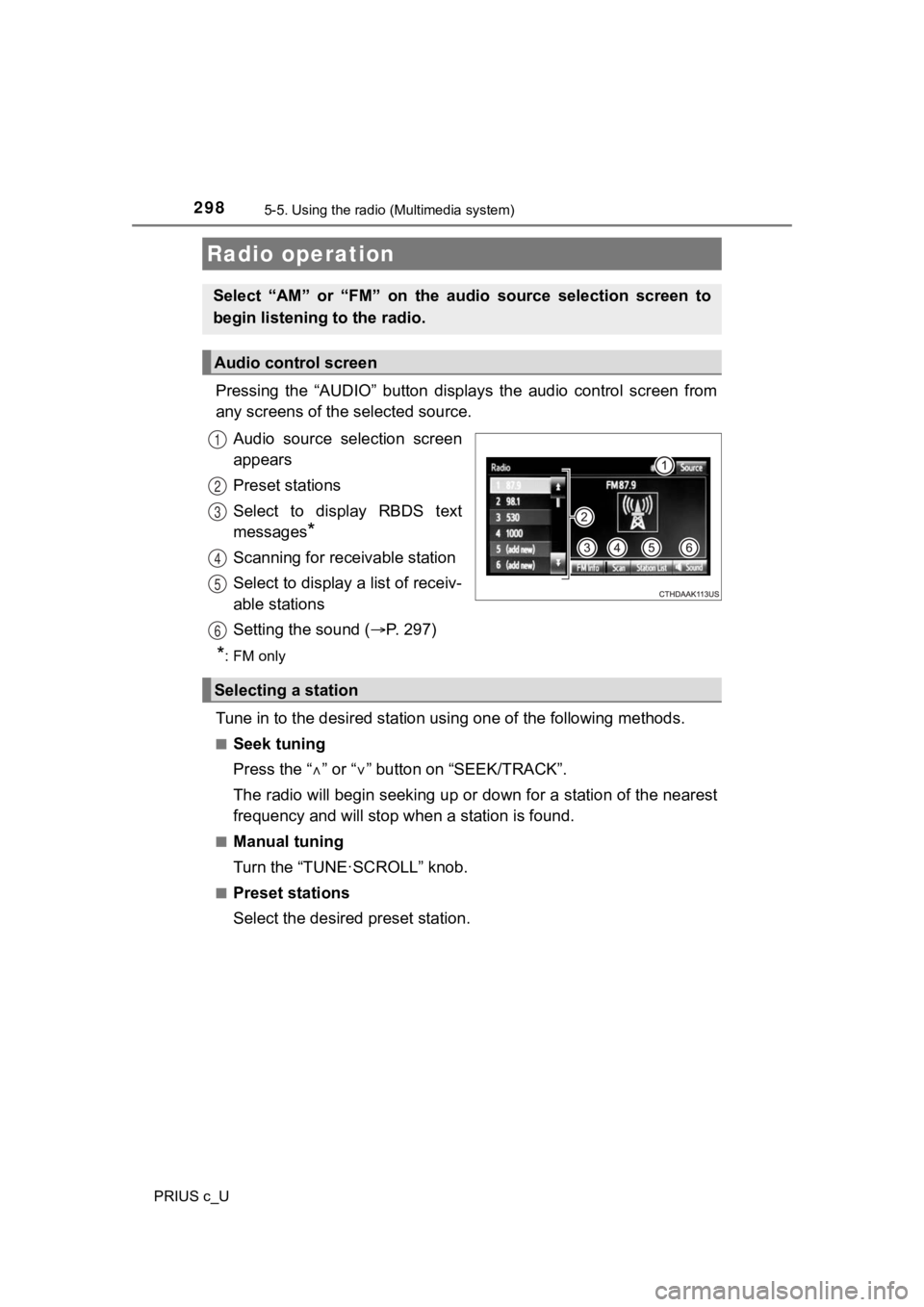
Pressing the “AUDIO” button disp lays the audio control screen from
any screens of the selected source.
Audio source selection screen
appears
Preset stations
Select to display RBDS text
messages
*
Scanning for receivable station
Select to display a list of receiv-
able stations
Setting the sound ( P. 2 9 7 )
*:FM only
Tune in to the desired station us ing one of the following methods.
■Seek tuning
Press the “” or “ ” button on “SEEK/TRACK”.
The radio will begin seeking up or down for a station of the ne arest
frequency and will stop when a station is found.
■Manual tuning
Turn the “TUNE·SCROLL” knob.
■Preset stations
Select the desired preset station.
Radio operation
Select “AM” or “FM” on the audio source selection screen to
begin listening to the radio.
Audio control screen
1
2
3
4
5
Selecting a station
6
Page 299 of 600
2995-5. Using the radio (Multimedia system)
5
Audio system
PRIUS c_U
Search for desired stations by turning the “TUNE·SCROLL” knob or
pressing the “ ” or “ ” button on “SEEK/TRACK”.
Select “(add new)”.
To change the preset station to a different one, select and hol d the preset
station.
Select “Yes”.
Select “OK” after setting the new preset station.
■Refreshing the station list
Select “Refresh” on the “Station List” screen.
To cancel the refresh, select “Cancel Refresh”.
■Reception sensitivity
●Maintaining perfect radio reception at all times is difficult d ue to the continu-
ally changing position of the antenna, differences in signal strength and sur-
rounding objects, such as trains, transmitters, etc.
● The radio antenna is mounted on the rear roof.
Setting station presets
1
2
3
4
1
Page 369 of 600
3695-11. Bluetooth® (Multimedia system)
5
Audio system
PRIUS c_U
WARNING
■While driving
Do not use the portable audio player, cellular phone or connect a device to
the Bluetooth
® system.
■ Caution regarding interfer ence with electronic devices
● Your audio unit is fitted with Bluetooth
® antennas. People with implantable
cardiac pacemakers, cardiac resynchronization therapy-pacemaker s or
implantable cardioverter defibrillators should maintain a reaso nable dis-
tance between themselves and the Bluetooth
® antennas. The radio waves
may affect the operation of such devices.
● Before using Bluetooth
® devices, users of any electrical medical device
other than implantable cardiac pacemakers, cardiac resynchroniz ation
therapy-pacemakers or implantable cardioverter defibrillators should con-
sult the manufacturer of the device for information about its o peration
under the influence of radio waves. Radio waves could have unex pected
effects on the operation of such medical devices.
NOTICE
■ When leaving the vehicle
Do not leave your portable audio player or cellular phone in th e vehicle. The
inside of the vehicle may become hot, causing damage to the por table
audio player or cellular phone.