phone TOYOTA PRIUS C 2020 Repair Manual
[x] Cancel search | Manufacturer: TOYOTA, Model Year: 2020, Model line: PRIUS C, Model: TOYOTA PRIUS C 2020Pages: 600, PDF Size: 12.02 MB
Page 371 of 600
3715-12. Using the voice command system (Multimedia system)
5
Audio system
PRIUS c_U
■Microphone
P. 333
■ When using the microphone
●It is unnecessary to speak directly into the microphone when gi ving a com-
mand.
● When “Voice Prompt Interrupt” set to on, it is not necessary to wait for the
confirmation beep before speaking a command. ( P. 293)
● Voice commands may not be recognized if:
• Spoken too quickly.
• Spoken at a low or high volume.
• The roof or windows are open.
• Passengers are talking while voice commands are spoken.
• The air conditioning speed is set high.
• The air conditioning vents are turned towards the microphone.
● In the following conditions, the system may not recognize the command
properly and using voice commands may not be possible:
• The command is incorrect or unclear. Note that certain words, accents or
speech patterns may be difficult for the system to recognize.
• There is excessive background noise, such as wind noise.
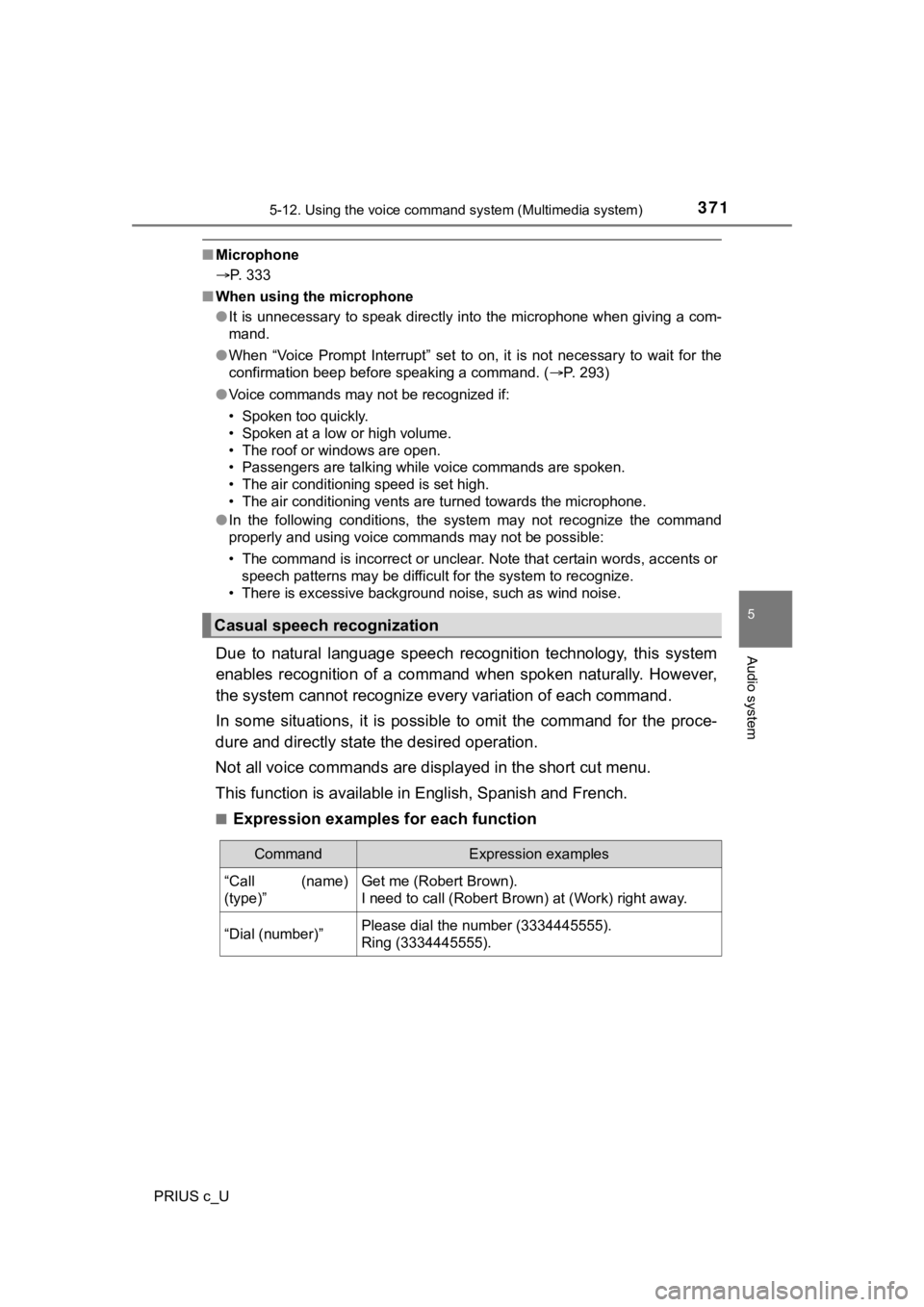
Due to natural language speech recognition technology, this sys tem
enables recognition of a command when spoken naturally. However ,
the system cannot recognize ever y variation of each command.
In some situations, it is possi ble to omit the command for the proce-
dure and directly state the desired operation.
Not all voice commands are displayed in the short cut menu.
This function is available in English, Spanish and French.
■Expression examples for each function
Casual speech recognization
CommandExpression examples
“Call (name)
(type)”Get me (Robert Brown).
I need to call (Robert Brown) at (Work) right away.
“Dial (number)”Please dial the number (3334445555).
Ring (3334445555).
Page 372 of 600
3725-12. Using the voice command system (Multimedia system)
PRIUS c_U
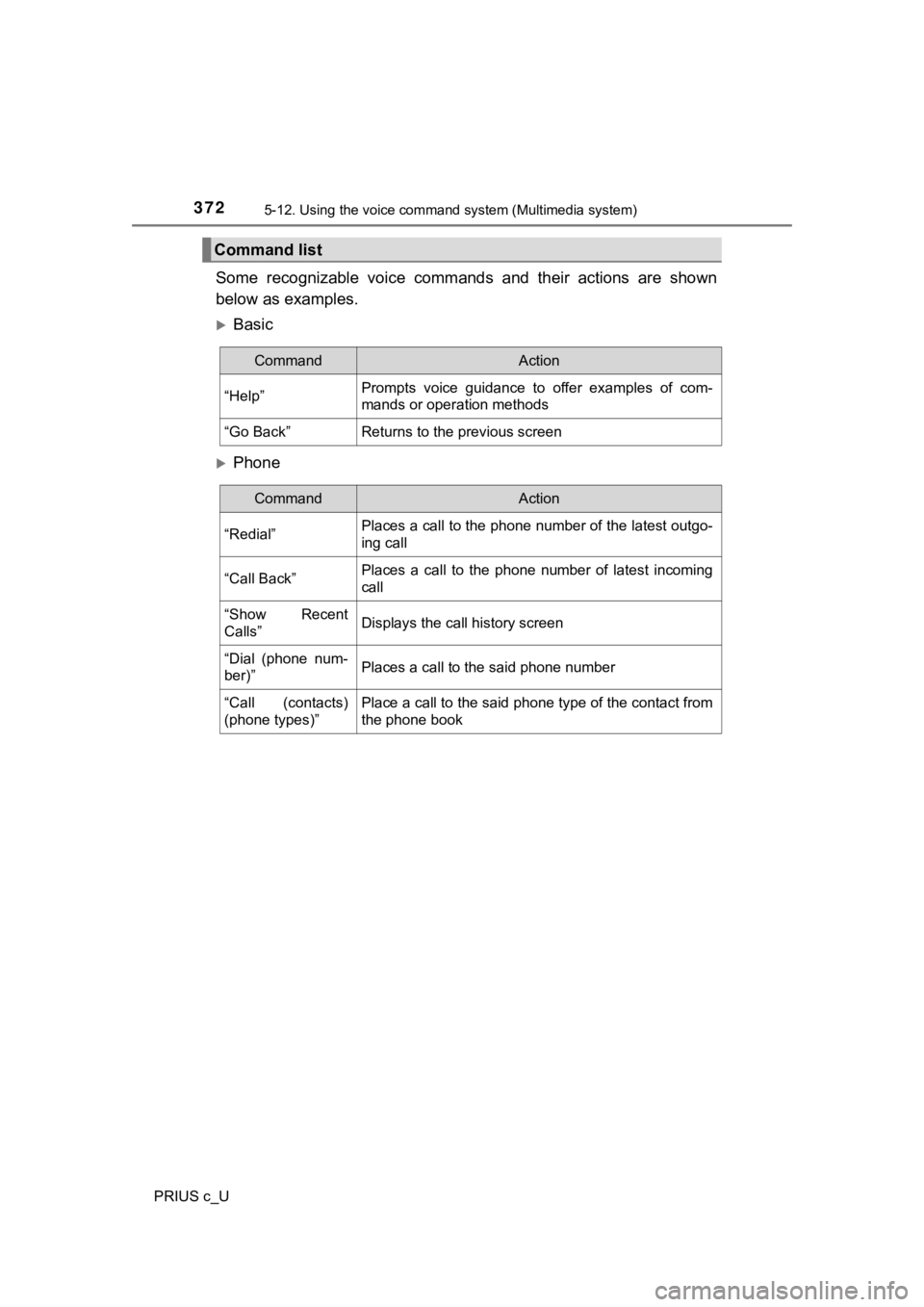
Some recognizable voice commands and their actions are shown
below as examples.
Basic
Phone
Command list
CommandAction
“Help”Prompts voice guidance to offer examples of com-
mands or operation methods
“Go Back”Returns to the previous screen
CommandAction
“Redial”Places a call to the phone number of the latest outgo-
ing call
“Call Back”Places a call to the phone number of latest incoming
call
“Show Recent
Calls”Displays the call history screen
“Dial (phone num-
ber)”Places a call to the said phone number
“Call (contacts)
(phone types)”Place a call to the said phone type of the contact from
the phone book
Page 373 of 600
3735-12. Using the voice command system (Multimedia system)
5
Audio system
PRIUS c_U
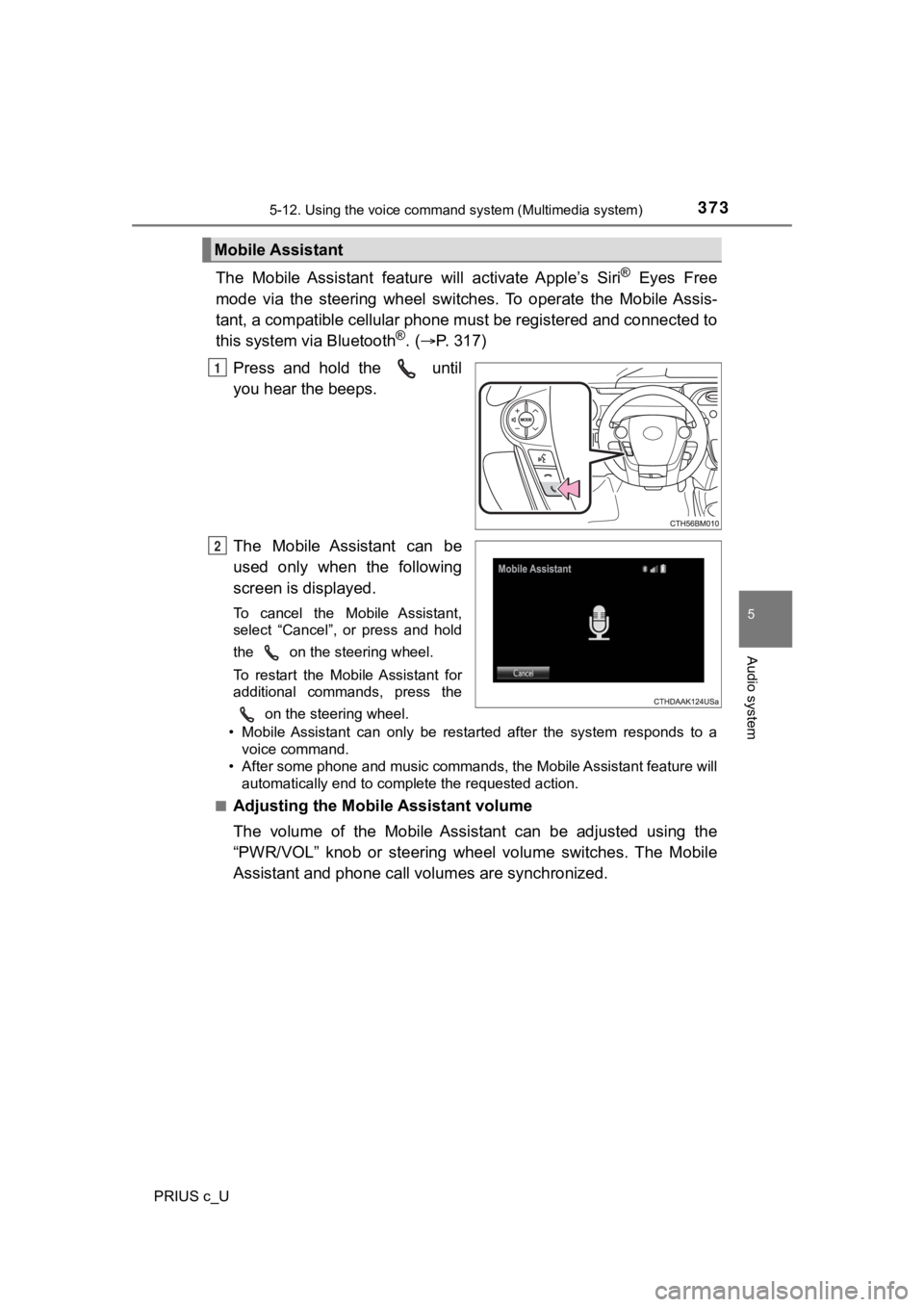
The Mobile Assistant feature will activate Apple’s Siri® Eyes Free
mode via the steering wheel switches. To operate the Mobile Ass is-
tant, a compatible cellular phone must be registered and connec ted to
this system via Bluetooth
®. ( P. 3 1 7 )
Press and hold the until
you hear the beeps.
The Mobile Assistant can be
used only when the following
screen is displayed.
To cancel the Mobile Assistant,
select “Cancel”, or press and hold
the on the steering wheel.
To restart the Mobile Assistant for
additional commands, press the on the steering wheel.
• Mobile Assistant can only be restarted after the system responds to a voice command.
• After some phone and music commands, the Mobile Assistant feat ure will
automatically end to complete the requested action.
■
Adjusting the Mobile Assistant volume
The volume of the Mobile Assistant can be adjusted using the
“PWR/VOL” knob or steering wheel volume switches. The Mobile
Assistant and phone call vo lumes are synchronized.
Mobile Assistant
1
2
Page 374 of 600

3745-12. Using the voice command system (Multimedia system)
PRIUS c_U
■ Notes about Mobile Assistant
●The available features and functions may vary based on the iOS version
installed on the connected device.
● Some Siri features are limited in Eyes Free mode. If you attempt to use an
unavailable function, Siri will inform you that the function is not available.
● If Siri is not enabled on the cellular phone connected via Bluetooth
®, an
error message will be displayed on the screen.
● While a phone call is active, the Mobile Assistant cannot be us ed.
● If using the navigation feature of the cellular phone, ensure t he active audio
source is Bluetooth
® audio or iPod in order to hear turn by turn direction
prompts.
Page 588 of 600

588Alphabetical index
PRIUS c_U
Back door ................................. 136
Back-up lightsReplacing light bulbs............. 461
Wattage ................................ 544
Battery
Checking ............................... 431
Hybrid battery (traction battery) ................... 81
If the vehicle 12-volt battery is discharged .......... 522
Preparing and checking
before winter....................... 274
Bluetooth
® audio
Bluetooth® audio................... 330
Portable player...................... 317
Set up ................................... 322
Using the Bluetooth
®
audio................................... 330
Bluetooth
® phone
Making a phone call .............. 335
Set up ................................... 323
Bottle holders .......................... 392
Brake Fluid ...................................... 542
Parking brake........................ 207
Brake assist ............................. 265
Break-in tips ............................. 174 Care
Exterior ................................. 400
Interior .................................. 403
Seat belts.............................. 406
Cargo capacity......................... 185
CD player.................................. 300
Chains ...................................... 275
Child-protectors ...................... 131
Child restraint system
Booster seats, installation....... 68
Convertible seats, installation ............................ 66
Front passenger occupant classification syst em ............ 52
Infant seat, definition .............. 61
Infant seats, installation .......... 65
Installing CRS with LATCH system ..................... 71
Installing CRS with seat belts .............................. 65
Installing CRS with top tether straps ................... 74
LATCH anchors ...................... 71
BC
Page 594 of 600
594Alphabetical index
PRIUS c_U
MaintenanceDo-it-yourself
maintenance ....................... 416
Emission inspection and maintenance (I/M)
programs ............................ 415
General maintenance ........... 412
Maintenance data ................. 536
Maintenance requirements ... 409
Meter Instrument panel light
control................................. 101
Meters ..................................... 99
Microphone .............................. 333
Mirrors
Inside rear view mirror .......... 160
Outside rear view mirror defogger ............................. 378
Outside rear view mirrors...... 161
Vanity mirrors........................ 393
Moon roof ................................. 167
MP3 disc ................................... 300
Multi-information display ........ 103
Navigation system
*
Noise from under vehicle............ 8 Odometer ................................. 100
Oil
Engine oil .............................. 539
Opener Back door ............................. 136
Fuel filler door ....................... 221
Hood ..................................... 419
Outside rear view mirrors
Adjusting and folding ............ 161
Defogger ............................... 378
Outside temperature
display.................................... 101
Overheating, Hybrid system.................................... 529
Parking brake........................... 207
Parking lights Replacing light bulbs ............ 460
Switch ................................... 208
Wattage ................................ 544
PCS (Pre-Collision system) .... 231 PCS (Pre-Collision
system) switch...... .............. 234
Warning light......................... 482
Personal lights Switch ................................... 386
Wattage ................................ 544
Power outlet ............................. 394
Power switch ................... 188, 192
Power windows ....................... 163
Pre-Collision system (PCS) .... 231 PCS (Pre-Collision
system) switch...... .............. 234
Warning light......................... 482
M
N
O
P