display TOYOTA PRIUS PHV 2012 Owners Manual
[x] Cancel search | Manufacturer: TOYOTA, Model Year: 2012, Model line: PRIUS PHV, Model: TOYOTA PRIUS PHV 2012Pages: 684, PDF Size: 12.16 MB
Page 564 of 684
564 5-2. Steps to take in an emergency
PRIUS PHV_OM_OM47818U_(U)
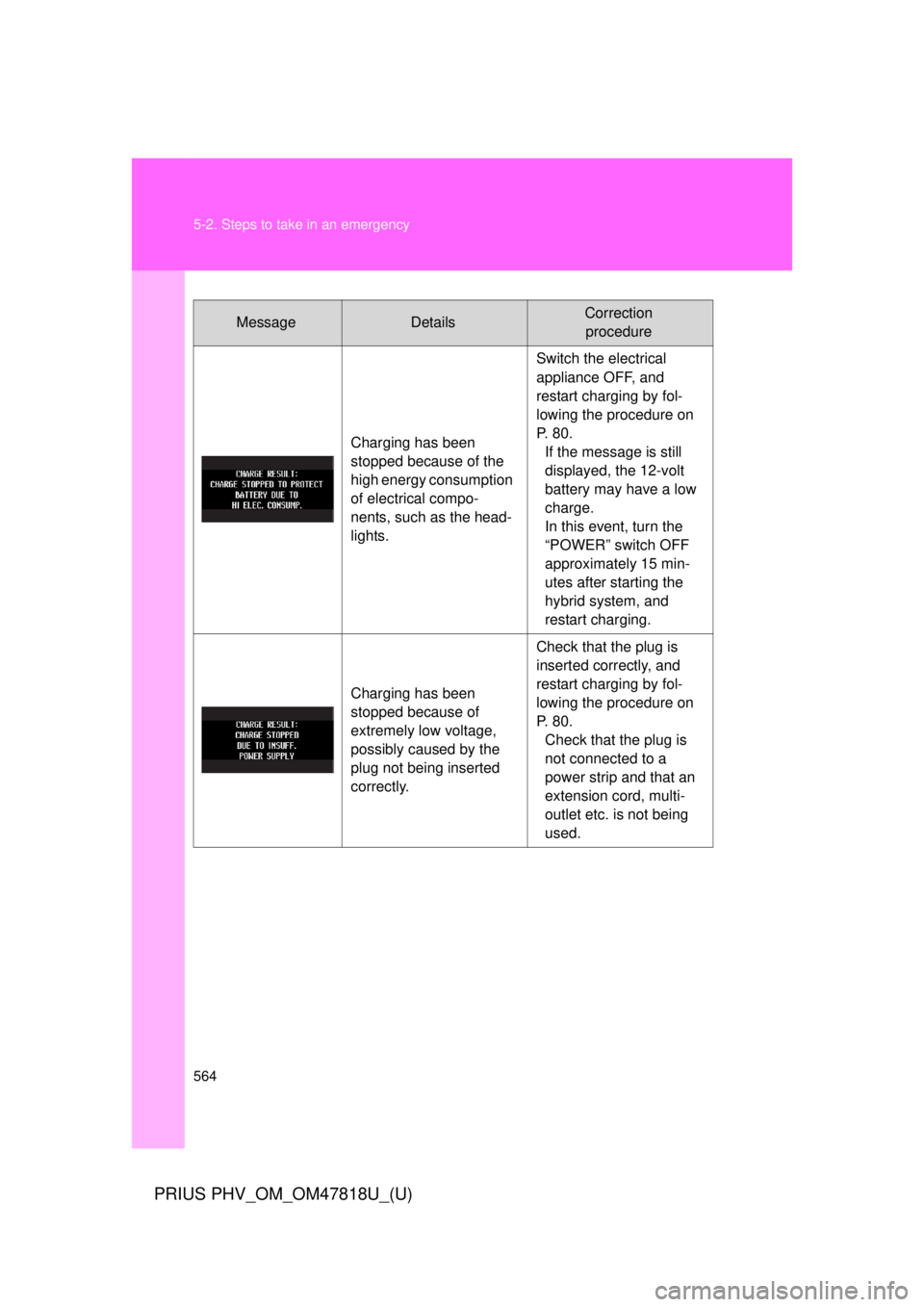
MessageDetailsCorrection procedure
Charging has been
stopped because of the
high energy consumption
of electrical compo-
nents, such as the head-
lights. Switch the electrical
appliance OFF, and
restart charging by fol-
lowing the procedure on
P. 80.
If the message is still
displayed, the 12-volt
battery may have a low
charge.
In this event, turn the
“POWER” switch OFF
approximately 15 min-
utes after starting the
hybrid system, and
restart charging.
Charging has been
stopped because of
extremely low voltage,
possibly caused by the
plug not being inserted
correctly. Check that the plug is
inserted correctly, and
restart charging by fol-
lowing the procedure on
P. 80.
Check that the plug is
not connected to a
power strip and that an
extension cord, multi-
outlet etc. is not being
used.
Page 565 of 684
5
When trouble arises
565
5-2. Steps to take in an emergency
PRIUS PHV_OM_OM47818U_(U)
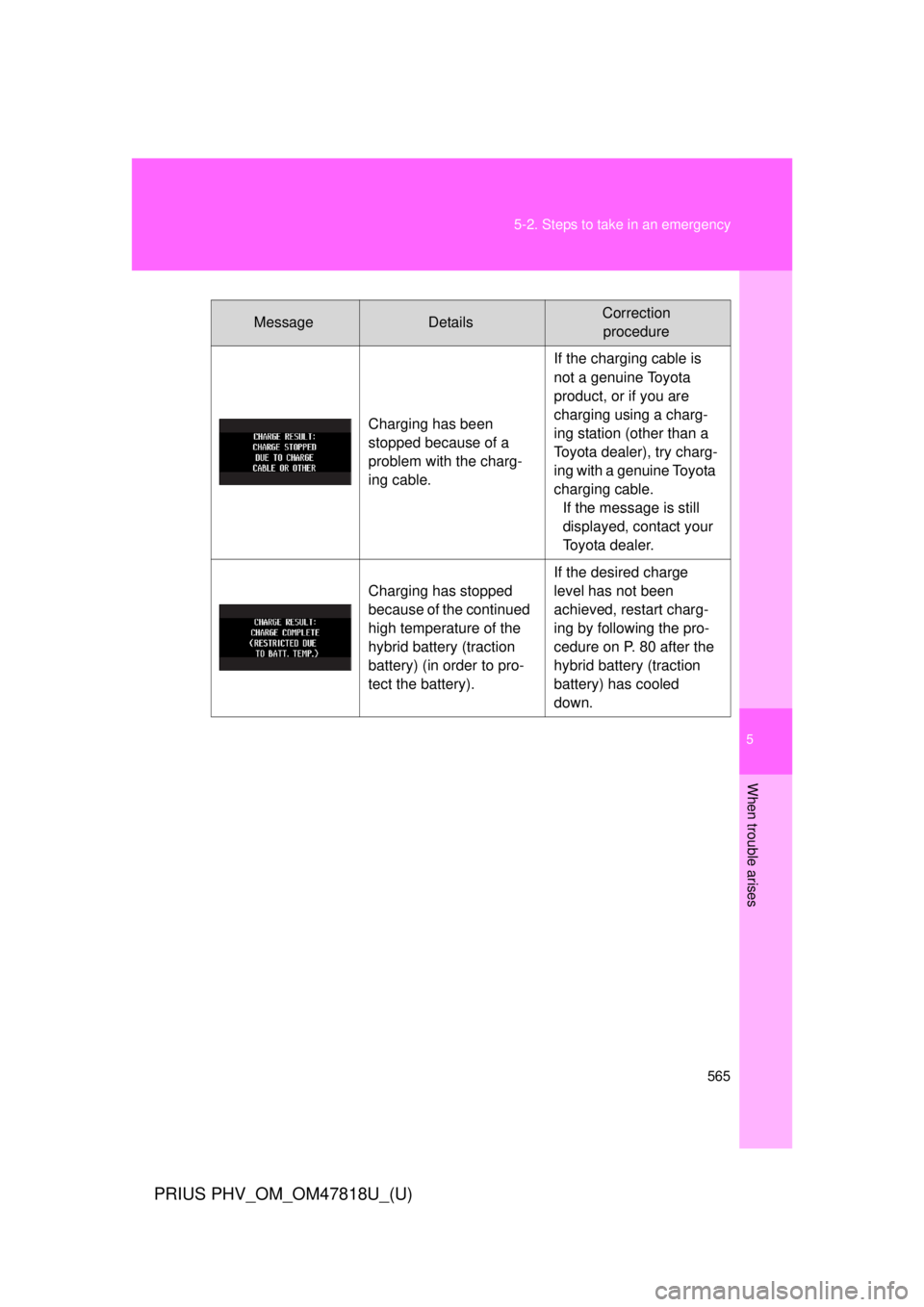
MessageDetailsCorrection
procedure
Charging has been
stopped because of a
problem with the charg-
ing cable. If the charging cable is
not a genuine Toyota
product, or if you are
charging using a charg-
ing station (other than a
Toyota dealer), try charg-
ing with a genuine Toyota
charging cable.
If the message is still
displayed, contact your
Toyota dealer.
Charging has stopped
because of the continued
high temperature of the
hybrid battery (traction
battery) (in order to pro-
tect the battery). If the desired charge
level has not been
achieved, restart charg-
ing by following the pro-
cedure on P. 80 after the
hybrid battery (traction
battery) has cooled
down.
Page 600 of 684
600
5-2. Steps to take in an emergency
PRIUS PHV_OM_OM47818U_(U)
If your vehicle overheats
Correction procedures■ If the high coolant temperatur e warning light comes on or
flashes
Stop the vehicle in a safe place and turn off the air condition-
ing system, and then stop the hybrid system.
If you see steam: Carefully lift the hood after the steam subsides.
If you do not see steam: Carefully lift the hood.
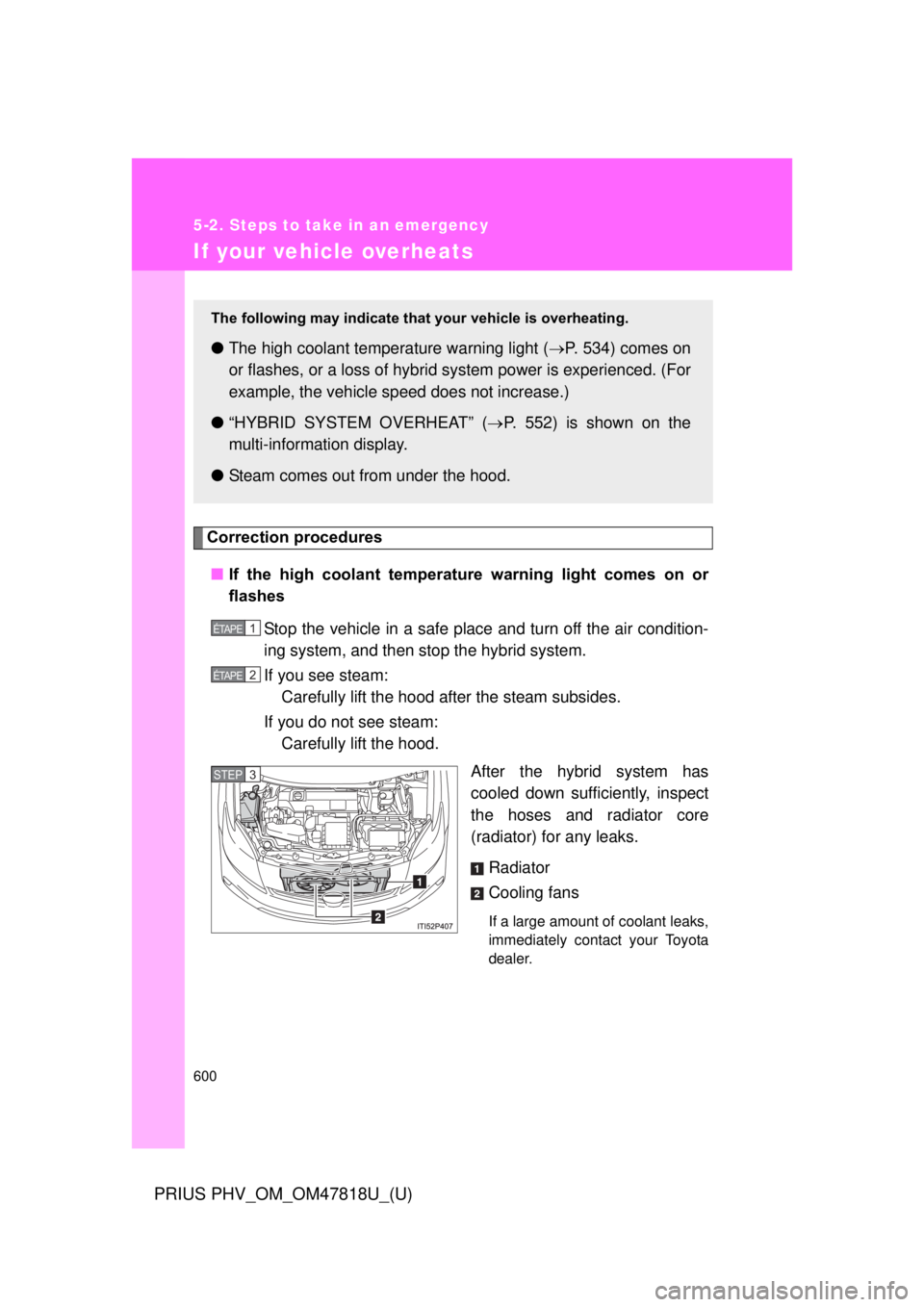
After the hybrid system has
cooled down sufficiently, inspect
the hoses and radiator core
(radiator) for any leaks.
Radiator
Cooling fans
If a large amount of coolant leaks,
immediately contact your Toyota
dealer.
The following may indicate that your vehicle is overheating.
●The high coolant temperature warning light ( P. 534) comes on
or flashes, or a loss of hybrid system power is experienced. (For
example, the vehicle s peed does not increase.)
● “HYBRID SYSTEM OVERHEAT” ( P. 552) is shown on the
multi-informat ion display.
● Steam comes out from under the hood.
1 ÉTAPE
2 ÉTAPE
STEP 3
Page 602 of 684
602 5-2. Steps to take in an emergency
PRIUS PHV_OM_OM47818U_(U)
■If “HYBRID SYSTEM OVERHEAT” is shown on the multi-infor-
mation display
Stop the vehicle in a safe place.
Stop the hybrid system and carefully lift the hood.
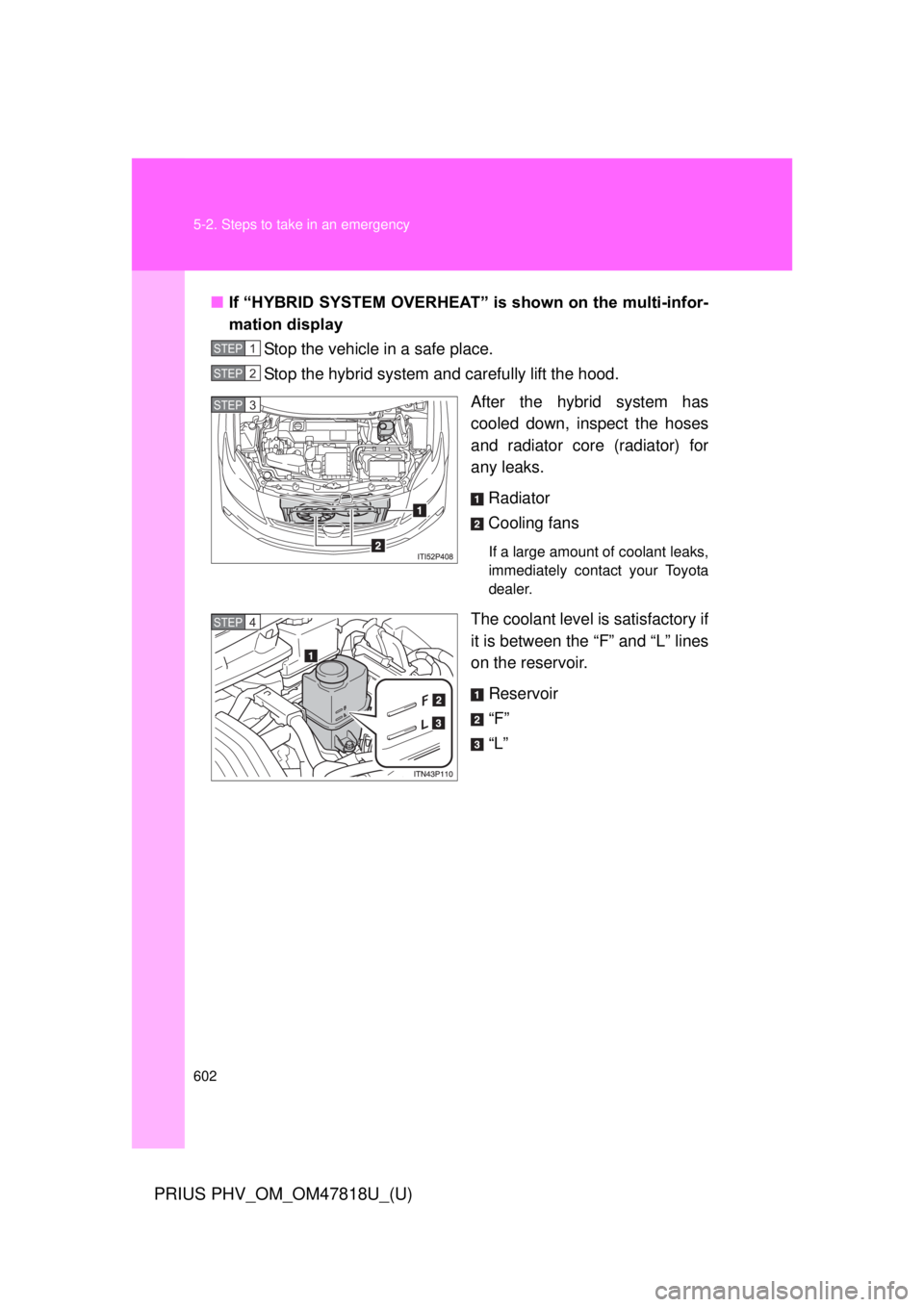
After the hybrid system has
cooled down, inspect the hoses
and radiator core (radiator) for
any leaks.
Radiator
Cooling fans
If a large amount of coolant leaks,
immediately contact your Toyota
dealer.
The coolant level is satisfactory if
it is between the “F” and “L” lines
on the reservoir.Reservoir
“F”
“L”
STEP 1
STEP 2
STEP 3
STEP 4
Page 603 of 684
5
When trouble arises
603
5-2. Steps to take in an emergency
PRIUS PHV_OM_OM47818U_(U)
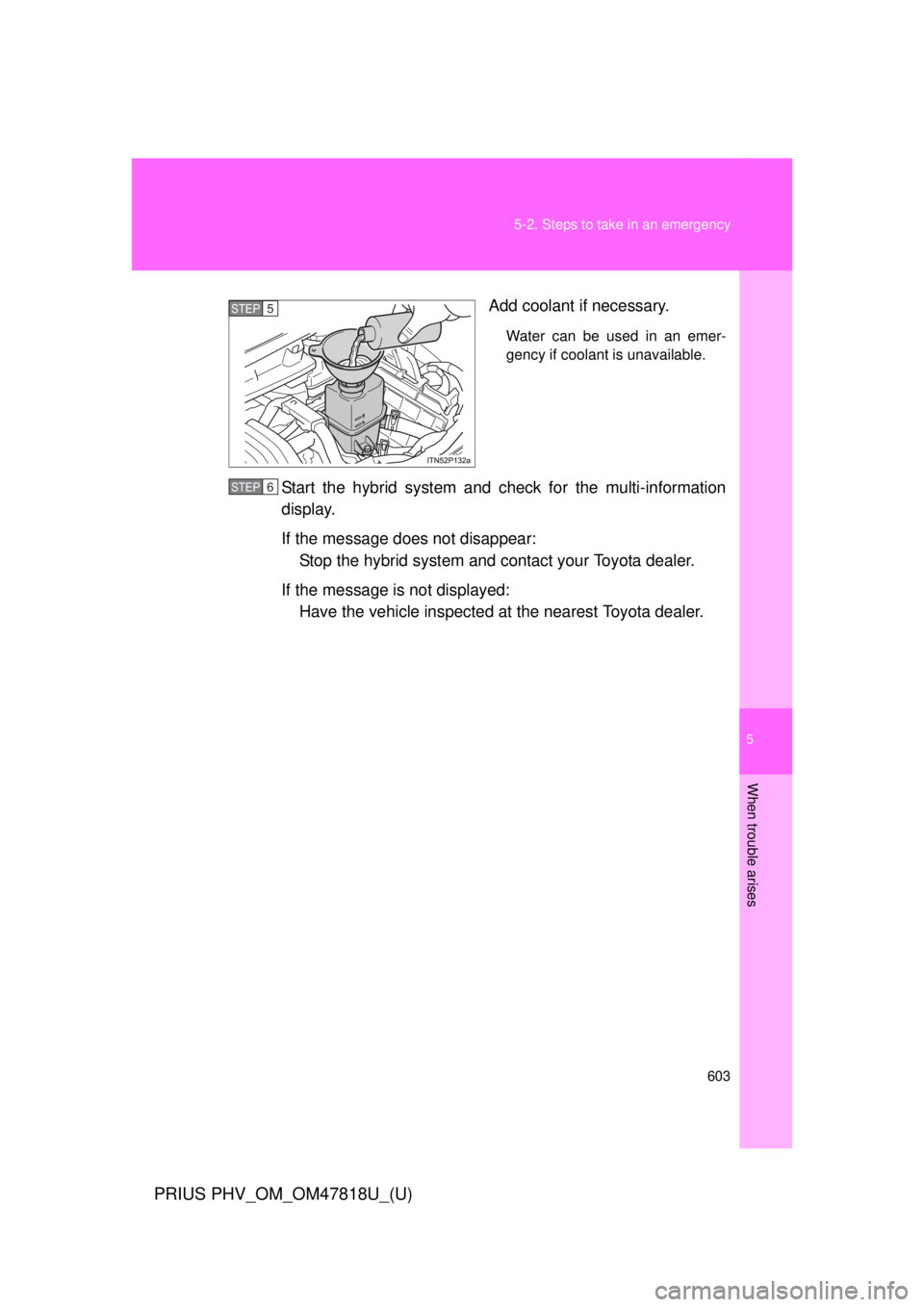
Add coolant if necessary.
Water can be used in an emer-
gency if coolant is unavailable.
Start the hybrid system and check for the multi-information
display.
If the message does not disappear:
Stop the hybrid system and c ontact your Toyota dealer.
If the message is not displayed: Have the vehicle inspected at the nearest Toyota dealer.
STEP 5
STEP 6
Page 639 of 684
639
6
Vehicle specifications
PRIUS PHV_OM_OM47818U_(U)
6-2. Customization
Customizable features
Customizable featuresVehicles with a Display Audio system: Settings that can be
changed using the Display Audio system
(For further information on customizing settings using the “Display
Audio”, refer to the “Display Audio System Owner’s Manual”.)
Vehicles with a navigation syst em: Settings that can be changed
using the navi gation system
(For further information on cust omizing settings using the naviga-
tion system, refer to the “Navig ation System Owner’s Manual”.)
Settings that can be chan ged by your Toyota dealer
Definition of symbols: O = Available, — = Not available
Your vehicle includes a variety of electronic features that can be per-
sonalized to suit your prefer ences. Programming these preferences
requires specialized equipment and may be performed by your
Toyota dealer.
Some function settings are changed simultaneously with other functions
being customized. Contact your Toyota dealer for further details.
Page 646 of 684
646 6-2. Customization
PRIUS PHV_OM_OM47818U_(U)
Multi-information display (P. 266)
ItemFunctionDefault set-
tingCustom-ized
setting
Reverse
warning
buzzer
( P. 250) Operation sig-
nals (Buzzer)
when shifting
into R
Beeps
repeatedly Beeps
once ––O
Seat belt
reminder
( P. 539) Vehicle speed
linked seat belt
reminder buzzer
ON OFF – – O
Available languagesEnglish, French and Spanish
Page 665 of 684
Index
665
PRIUS PHV_OM_OM47818U_(U)
Abbreviation list ..................... 666
Alphabetical index .................. 668
What to do if... ........................ 680
Vehicles with a Display Audio system:
For details of equipment related to the Display Audio
system, such as the audio system, refer to the “Display
Audio System Owner’s Manual”.
Vehicles with a navigation system:
For details of equipment related to the navigation sys-
tem, such as the audio system, refer to the “Navigation
System Owner’s Manual”.
Page 666 of 684
666
PRIUS PHV_OM_OM47818U_(U)
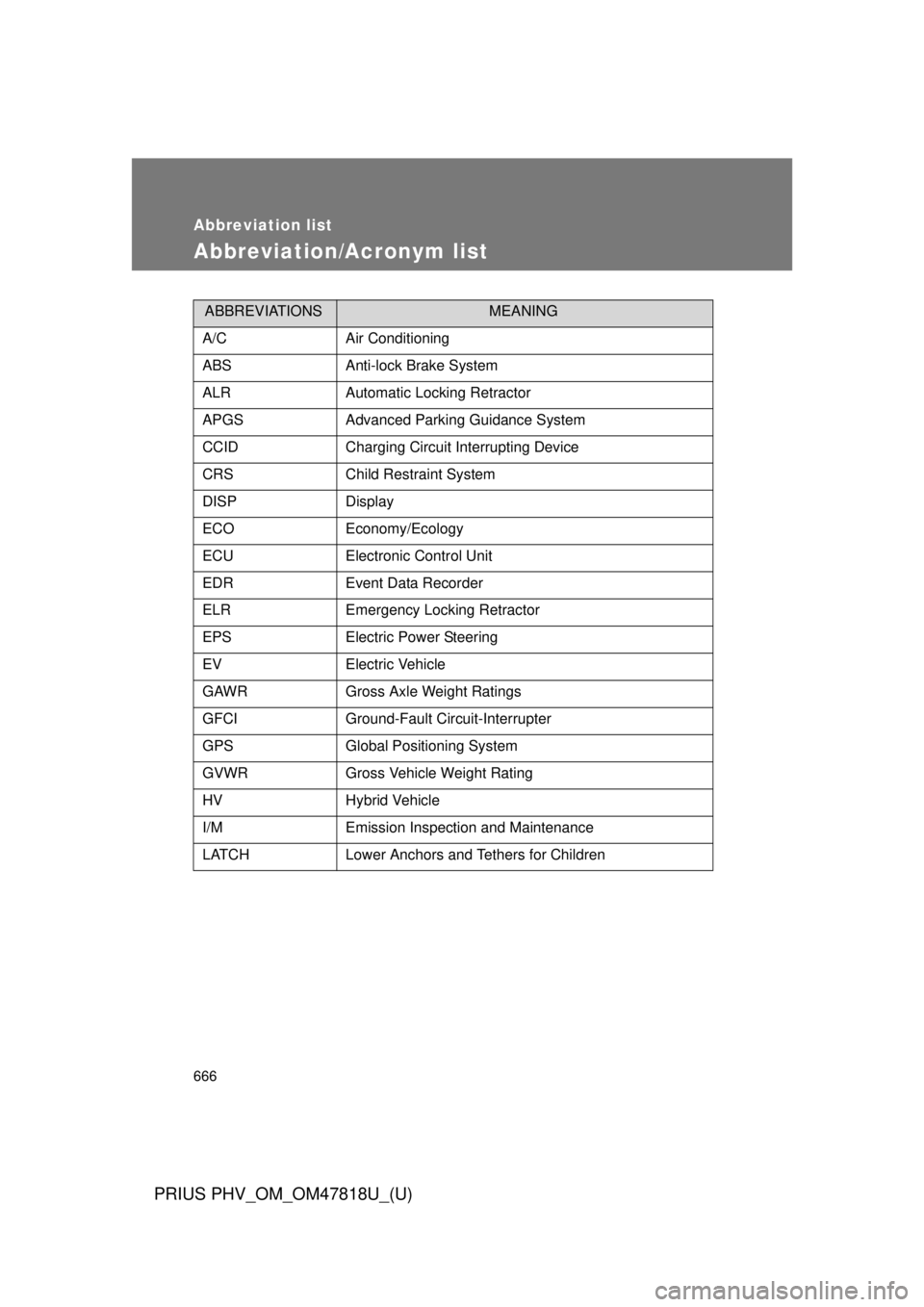
Abbreviation list
Abbreviation/Acronym list
ABBREVIATIONSMEANING
A/CAir Conditioning
ABSAnti-lock Brake System
ALRAutomatic Locking Retractor
APGSAdvanced Parking Guidance System
CCIDCharging Circuit Interrupting Device
CRSChild Restraint System
DISPDisplay
ECOEconomy/Ecology
ECUElectronic Control Unit
EDREvent Data Recorder
ELREmergency Locking Retractor
EPSElectric Power Steering
EVElectric Vehicle
GAWRGross Axle Weight Ratings
GFCIGround-Fault Circuit-Interrupter
GPSGlobal Positioning System
GVWRGross Vehicle Weight Rating
HVHybrid Vehicle
I/MEmission Inspection and Maintenance
LATCHLower Anchors and Tethers for Children
Page 669 of 684

669
Alphabetical index
PRIUS PHV_OM_OM47818U_(U)
Back door
Back door ............................. 140
Smart key system ... .............. 108
Wireless remote control........ 132
Back-up lights Replacing light bulbs ............ 507
Wattage ................................ 620
Battery Checking .............................. 471
If the 12-volt battery is
discharged ......................... 594
Preparing and checking
before winter ...................... 349
Bluetooth
®*
Bottle holders .......................... 390
Brake Fluid...................................... 619
Parking brake ....................... 255
Brake assist ............................. 328
Break-in tips ............................ 226
Brightness control Instrument panel light
control ................................ 260 Camera
*
Care
Exterior ..................................424
Interior ...................................428
Seat belts ..............................429
Cargo capacity .........................348
Cargo hooks .............................403
CD player
*
Chains .......................................351
Charging
Charging cable ........................74
Charging equipment ................73
Charging messages ..............562
Charging precautions ..............94
Charging procedure ................80
Charging timer function ...........86
Charging time will increase when.......................93
High voltage components........44
Information related to charging display ....................89
Maintenance..........................103
Power sources precautions .....79
Power sources that can be used ......................................77
Safety functions.................75, 91
When charging cannot be carried out .............................98
BC
GW Refer to