key battery TOYOTA PRIUS PHV 2012 User Guide
[x] Cancel search | Manufacturer: TOYOTA, Model Year: 2012, Model line: PRIUS PHV, Model: TOYOTA PRIUS PHV 2012Pages: 684, PDF Size: 12.16 MB
Page 242 of 684

242 2-1. Driving procedures
PRIUS PHV_OM_OM47818U_(U)
■When the “POWER” switch in dicator flashes in amber
The system may be malfunctioning. Have the vehicle inspected by your
Toyota dealer immediately.
■ If the “READY” indicator does not come on
If the “READY” indicator does not come on when you press the “POWER”
switch with the shift position in P and the brake pedal depressed, contact
your Toyota dealer immediately.
■ If the hybrid system is malfunctioning
P. 535
■ If the electronic key battery is depleted
P. 493
■ Operation of the “POWER” switch
● When operating the “POWER” switch, one short, firm press is enough. If
the switch is pressed improperly, the hybrid system may not start or the
“POWER” switch mode may not change. It is not necessary to press and
hold the switch.
● If attempting to restart the hybrid system immediately after turning the
“POWER” switch off, the hybrid system may not start in some cases.
After turning the “POWER” switch off, please wait a few seconds before
restarting the hybrid system.
■ Automatically P position selection function
P. 250
Page 373 of 684
373
3-1. Using the air conditioning system
and defogger
PRIUS PHV_OM_OM47818U_(U)
3
Interior features
■Security feature
Any unlocked doors will be automatically locked when the system is operat-
ing. The buzzer will beep and the emergency flashers flash when the doors
have been locked or the system has been turned off.
(The doors locked: Once; The system turned off: Twice)
■ Conditions aff ecting operation
P. 1 1 9
■ When using the Remote Air Conditioning System
A charging message will be displayed on the multi-information display. Dif-
ferent messages will be displayed depending on when the Remote Air Con-
ditioning System was started (after charging or during charging).
( P. 562)
■ While the Remote Air Conditio ning System is operating
● Depending on the operating condition of the Remote Air Conditioning
System, the electric fan may spin and an operating noise may be heard.
However, this does not indicate a malfunction.
● The Remote Air Conditioning System may stop operating temporarily if
other features that use electricity (for example, the seat heater, lights,
windshield wipers) are in operation or if the charge level of the 12-volt
battery becomes low.
■ Electronic key battery depletion
P. 123
■ When the electronic key battery is fully depleted
P. 123
■ Customization
Setting (e.g. Operation using the on the wireless remote control) can
be changed.
(Customizable features P. 645)
Page 384 of 684
384 3-3. Using the interior lights
PRIUS PHV_OM_OM47818U_(U)
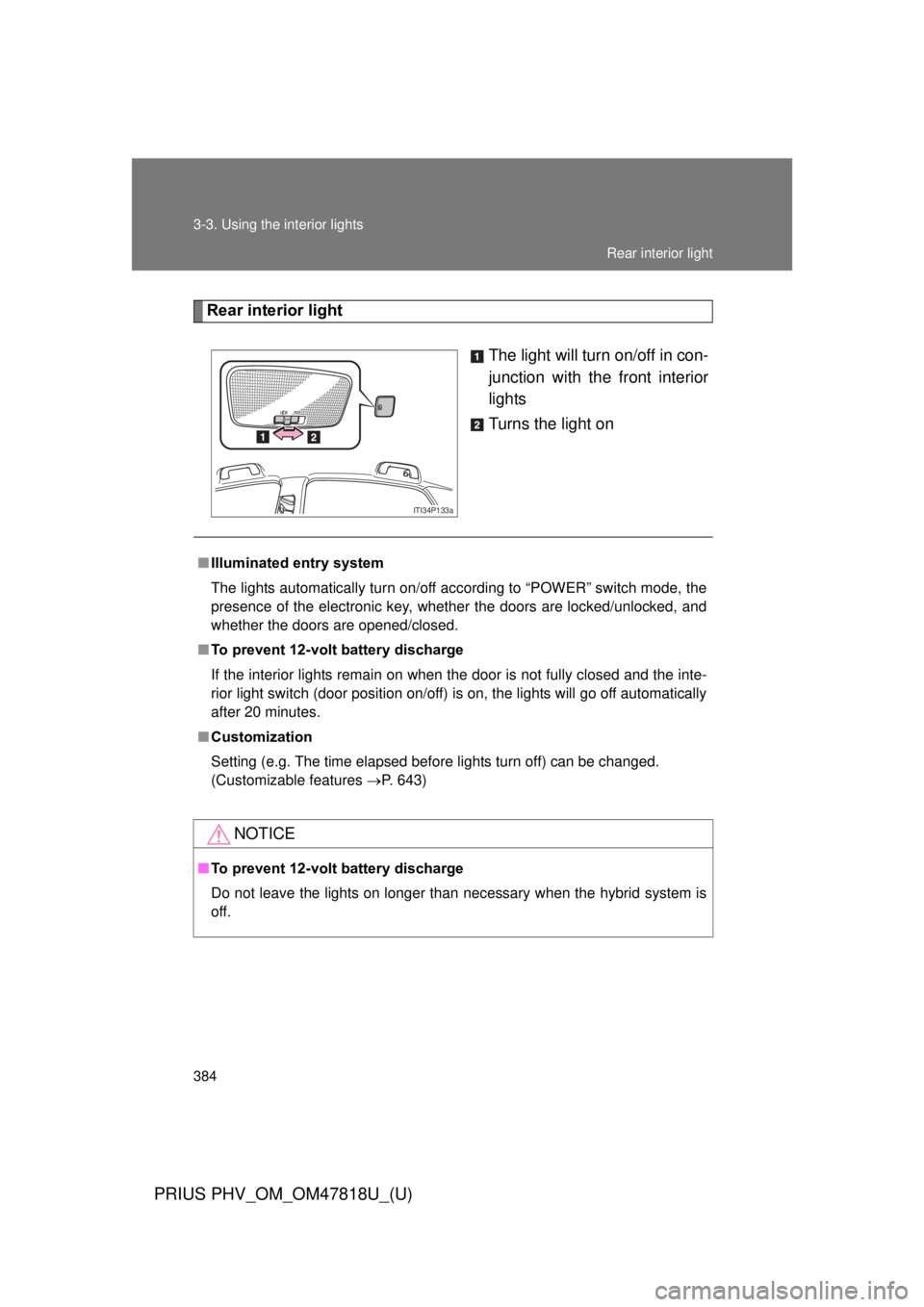
Rear interior lightThe light will turn on/off in con-
junction with the front interior
lights
Turns the light on
ITI34P133a
■Illuminated entry system
The lights automatically turn on/off according to “POWER” switch mode, the
presence of the electronic key, whether the doors are locked/unlocked, and
whether the doors are opened/closed.
■ To prevent 12-volt battery discharge
If the interior lights remain on when the door is not fully closed and the inte-
rior light switch (door position on/off) is on, the lights will go off automatically
after 20 minutes.
■ Customization
Setting (e.g. The time elapsed before lights turn off) can be changed.
(Customizable features P. 643)
NOTICE
■To prevent 12-volt battery discharge
Do not leave the lights on longer than necessary when the hybrid system is
off.
Rear interior light
Page 423 of 684
Maintenance and care4
423
PRIUS PHV_OM_OM47818U_(U)
4-1. Maintenance and careCleaning and protecting the vehicle exterior ......... 424
Cleaning and protecting the vehicle interior .......... 428
4-2. Maintenance Maintenance requirements .................. 431
General maintenance....... 434
Emission inspection and maintenance (I/M)
programs ........................ 438
4-3. Do-it-yourself maintenance Do-it-yourself service precautions .................... 439
Hood ................................ 442
Positioning a floor jack ..... 445
Replacing the tire ............. 448
Engine compartment ........ 459
12-volt battery .................. 471
Tires ................................. 476
Tire inflation pressure ...... 486
Wheels ............................. 490
Electronic key battery....... 493
Checking and replacing fuses .............................. 495
Light bulbs........................ 507
Page 473 of 684
473
4-3. Do-it-yourself maintenance
PRIUS PHV_OM_OM47818U_(U)
4
Maintenance and care
■
After charging/reconnecting the 12-volt battery
● Unlocking the doors using the smart key system may not be possible
immediately after reconnecting the 12-volt battery. If this happens, use
the wireless remote control or the mechanical key to lock/unlock the
doors.
● Start the hybrid system with the “POWER” switch in ACCESSORY mode.
The hybrid system may not start with the “POWER” switch turned off.
However, the hybrid system wi ll operate normally from the second
attempt.
● The “POWER” switch mode is recorded by the vehicle. If the 12-volt bat-
tery is reconnected, the vehicle will return the “POWER” switch mode to
the status it was in before the 12-volt battery was disconnected. Make
sure to turn off the power before disconnect the 12-volt battery. Take
extra care when connecting the 12-volt battery if the “POWER” switch
mode prior to discharge is unknown.
● Restart the hybrid system, depress the brake pedal, and confirm that it is
possible to shift into each shift position.
If the system will not start even after multiple attempts at all methods above,
contact your Toyota dealer.
Page 493 of 684
493
4-3. Do-it-yourself maintenance
PRIUS PHV_OM_OM47818U_(U)
4
Maintenance and care
Electronic key batter y
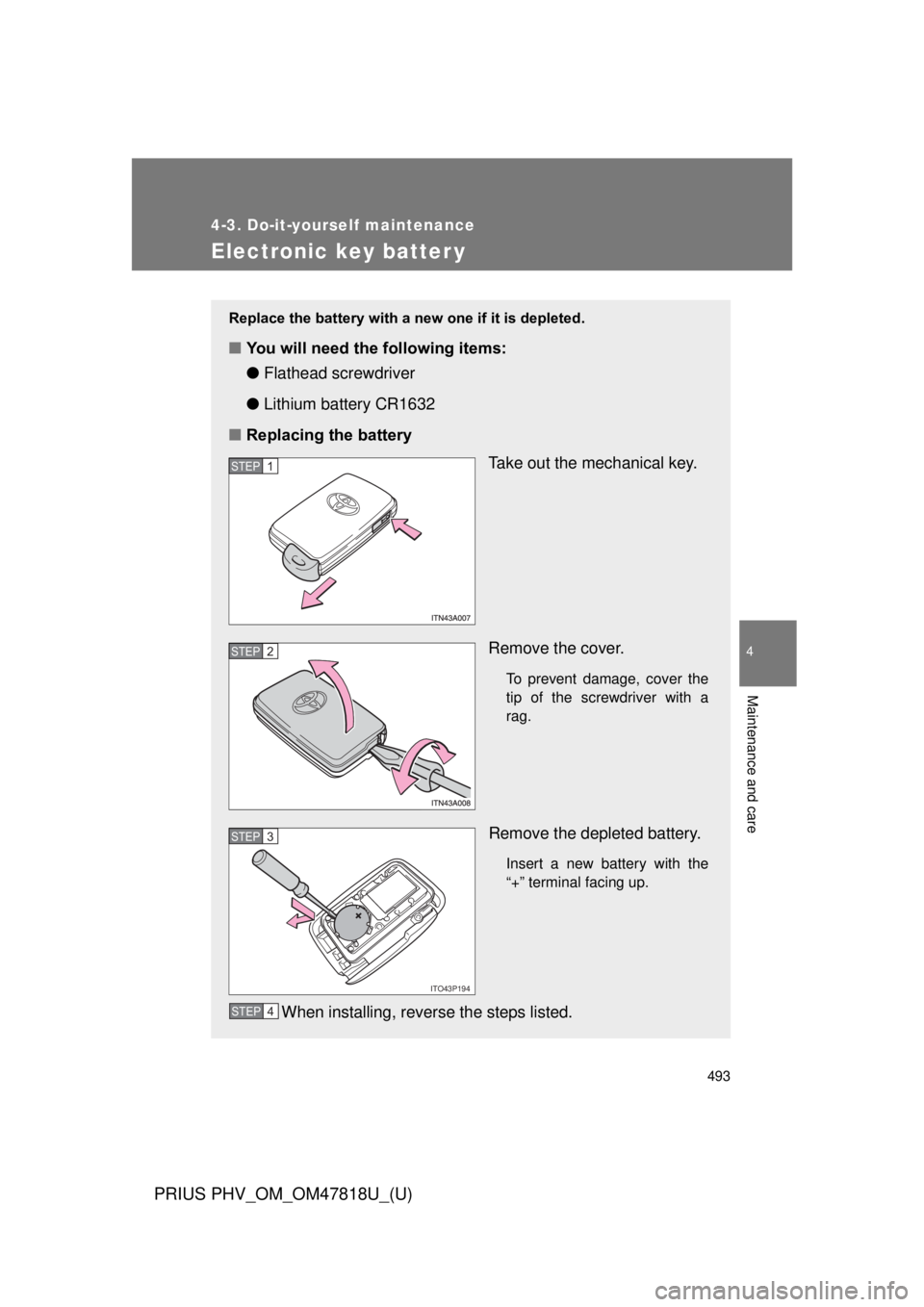
Replace the battery with a new one if it is depleted.
■You will need the following items:
●Flathead screwdriver
● Lithium battery CR1632
■ Replacing the battery
Take out the mechanical key.
Remove the cover.
To prevent damage, cover the
tip of the screwdriver with a
rag.
Remove the depleted battery.
Insert a new battery with the
“+” terminal facing up.
When installing, reverse the steps listed.
STEP 1
STEP 2
ITO43P194
STEP 3
STEP 4
Page 494 of 684
494 4-3. Do-it-yourself maintenance
PRIUS PHV_OM_OM47818U_(U)
■Use a CR1632 lithium battery
● Batteries can be purchased at your Toyota dealer, local electrical appli-
ance shops or camera stores.
● Replace only with the same or equivalent type recommended by the
manufacturer.
● Dispose of used batteries according to local laws.
■ If the electronic key battery is depleted
The following symptoms may occur:
● The smart key system and wireless remote control will not function prop-
erly.
● The operational range will be reduced.
CAUTION
■Removed battery and other parts
These parts are small and if swallowed by a child, they can cause choking.
Keep away from children. Failure to do so could result in death or serious
injury.
NOTICE
■For normal operation after replacing the battery
Observe the following precautions to prevent accidents:
● Always work with dry hands.
Moisture may cause the battery to rust.
● Do not touch or move any other component inside the remote control.
● Do not bend either of the battery terminals.
Page 523 of 684
When trouble arises5
523
PRIUS PHV_OM_OM47818U_(U)
5-1. Essential informationEmergency flashers ......... 524
If your vehicle needs to be towed ........................ 525
If you think something is wrong ......................... 532
5-2. Steps to take in an emergency
If a warning light turns on or a warning buzzer
sounds ........................... 533
If a warning message is displayed .................... 546
If you have a flat tire......... 566
If the hybrid system will not start .......................... 588
If you lose your keys ........ 590
If the electronic key does not operate properly....... 591
If the 12-volt battery is discharged ..................... 594
If your vehicle overheats ....................... 600
If the vehicle becomes stuck .............................. 605
If your vehicle has to be stopped in an
emergency ..................... 607
Page 525 of 684
5
When trouble arises
525
5-1. Essential information
PRIUS PHV_OM_OM47818U_(U)
If your vehicle needs to be towed
Before towingThe following may indicate a problem with your hybrid transmission.
Contact your Toyota dealer before towing.
● The hybrid system is operating but the vehicle will not move.
● The vehicle makes an abnormal sound.
If there is a malfunction in the P position control system, the smart
key system or the immobilizer system , or if the 12-volt battery is dis-
charged, the vehicle cannot be tow ed with the front wheels on the
ground, as the front wheels may be locked. In this case, transport the
vehicle with both front wheels or all four wheels lifted.
If towing is necessary, we recommend having your vehicle towed by
your Toyota dealer or a commerci al towing service, using a lift-type
truck or flat bed truck.
Use a safety chain system for all to wing, and abide by all state/pro-
vincial and local laws.
Page 560 of 684
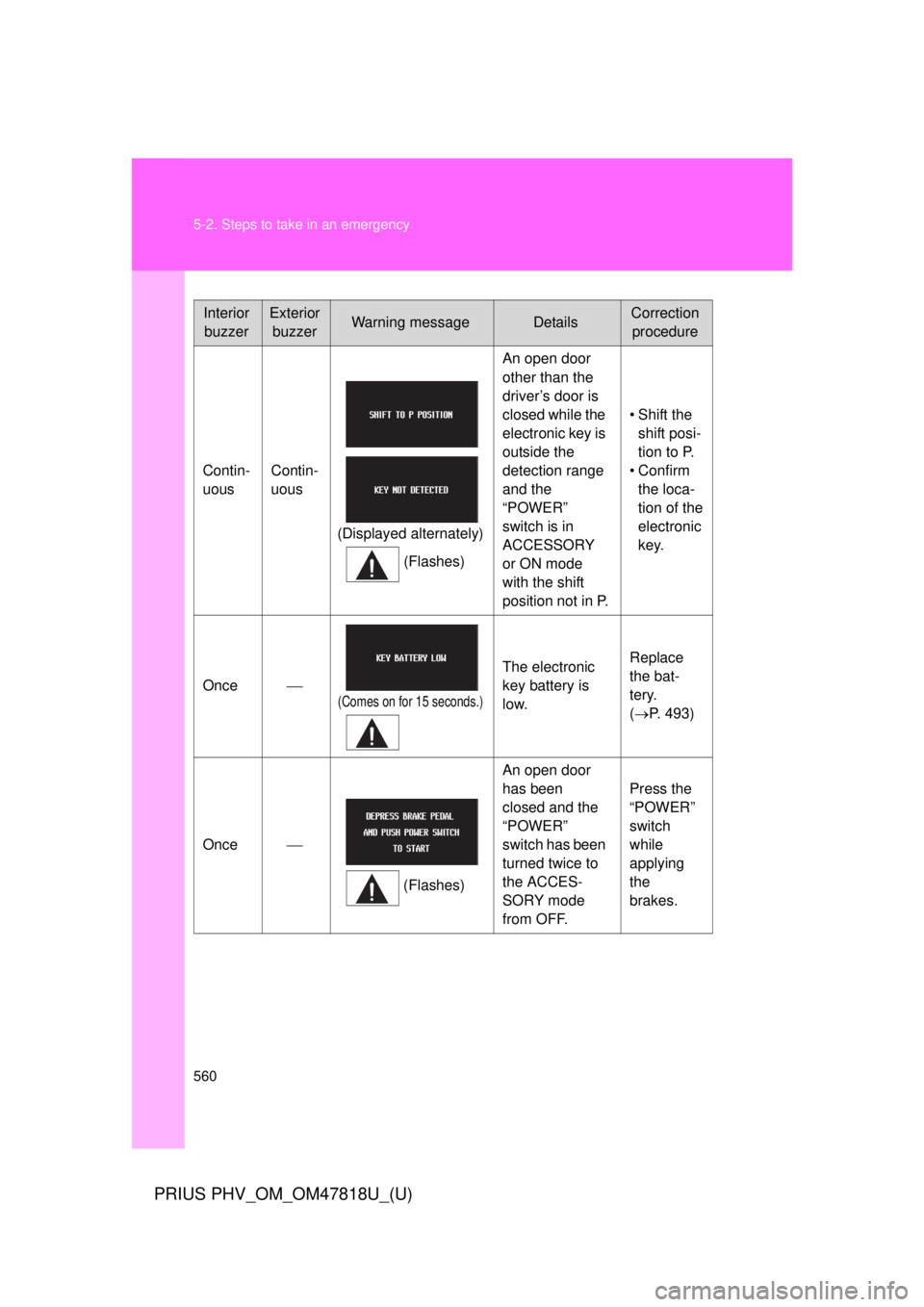
560 5-2. Steps to take in an emergency
PRIUS PHV_OM_OM47818U_(U)
InteriorbuzzerExterior buzzerWarning messageDetailsCorrection procedure
Contin-
uous Contin-
uous
(Displayed alternately) (Flashes) An open door
other than the
driver’s door is
closed while the
electronic key is
outside the
detection range
and the
“POWER”
switch is in
ACCESSORY
or ON mode
with the shift
position not in P.
• Shift the
shift posi-
tion to P.
• Confirm the loca-
tion of the
electronic
key.
Once
(Comes on for 15 seconds.)
The electronic
key battery is
low. Replace
the bat-
tery.
(
P. 493)
Once
(Flashes)An open door
has been
closed and the
“POWER”
switch has been
turned twice to
the ACCES-
SORY mode
from OFF. Press the
“POWER”
switch
while
applying
the
brakes.