remote control TOYOTA PRIUS PHV 2012 User Guide
[x] Cancel search | Manufacturer: TOYOTA, Model Year: 2012, Model line: PRIUS PHV, Model: TOYOTA PRIUS PHV 2012Pages: 684, PDF Size: 12.16 MB
Page 134 of 684

134
1-4. Opening, closing and locking the doors
PRIUS PHV_OM_OM47818U_(U)
Side doors
The vehicle can be locked and unlocked using the entry function,
wireless remote control or door lock switch.
■Entry function (if equipped)
P. 108
■ Wireless remote control
P. 132
■ Door lock switch
Locks all the doors
Unlocks all the doors
■ Inside lock buttons
Locks the door
Unlocks the door
The front doors can be opened
by pulling the inside handle
even if the lock buttons are in
the lock position.
Page 140 of 684
140
1-4. Opening, closing and locking the doors
PRIUS PHV_OM_OM47818U_(U)
Back door
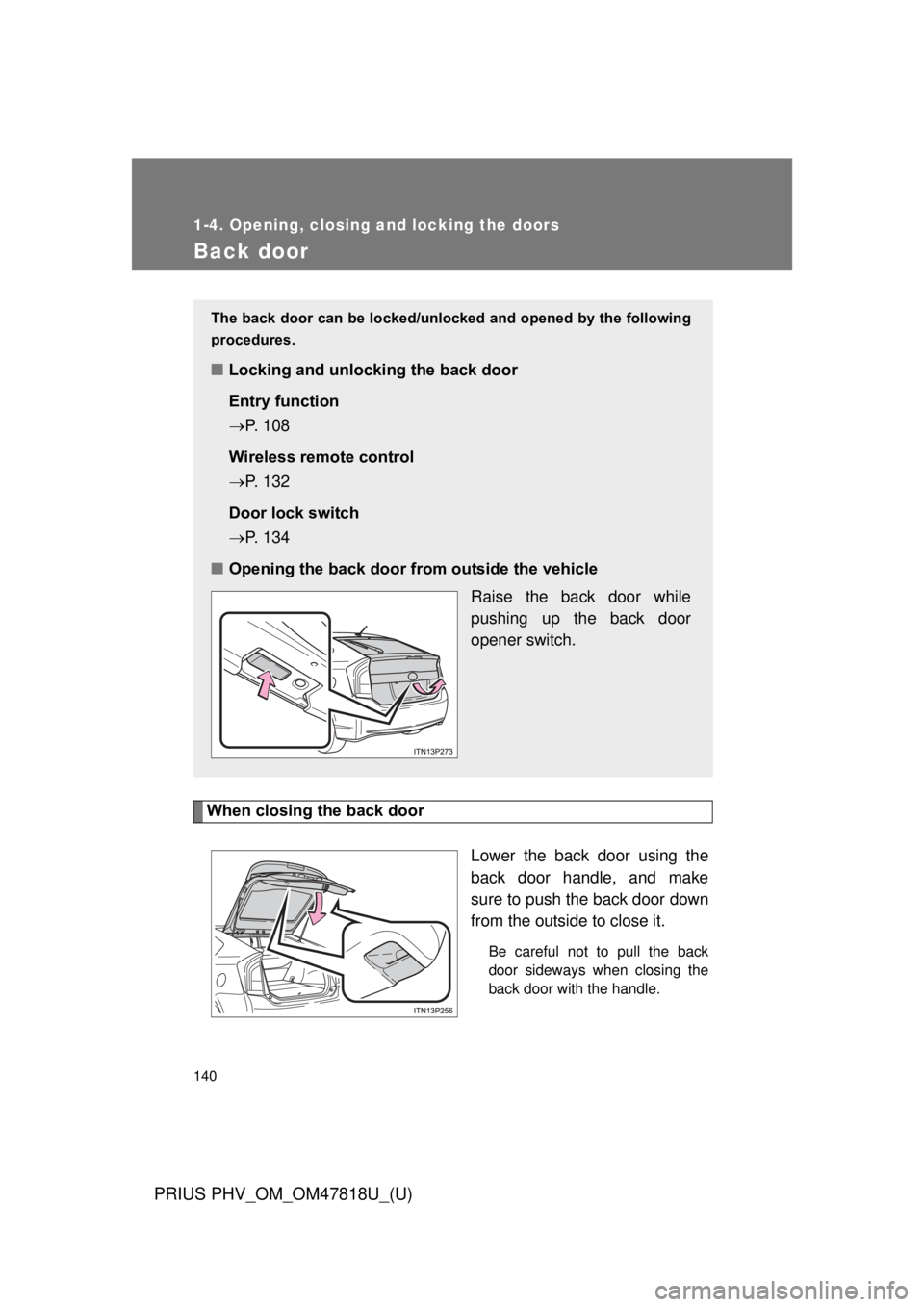
When closing the back doorLower the back door using the
back door handle, and make
sure to push the back door down
from the outside to close it.
Be careful not to pull the back
door sideways when closing the
back door with the handle.
The back door can be locked/unlo cked and opened by the following
procedures.
■ Locking and unlocking the back door
Entry function
P. 108
Wireless remote control
P. 132
Door lock switch
P. 134
■ Opening the back door from outside the vehicle
Raise the back door while
pushing up the back door
opener switch.
Page 357 of 684
Interior features3
357
PRIUS PHV_OM_OM47818U_(U)
3-1.Using the air conditioning
system
and defogger
Air conditioning system .... 358
Using the steering wheel climate remote control
switches ......................... 369
Remote Air Conditioning System ........................... 371
Rear window and outside rear view mirror defoggers
switch ............................. 375
3-2. Using the audio system Audio system types .......... 376
Using the AUX port/USB port................................. 381
3-3. Using the interior lights Interior lights list ............... 382
• Front interior lights ......... 383
• Personal lights ............... 383
• Rear interior light ........... 384 3-4. Using the storage features
List of storage features .... 385
• Glove boxes ................... 386
• Console box ................... 387
• Cup holders ................... 388
• Bottle holders ................. 390
• Auxiliary boxes ............... 391
3-5. Other interior features Sun visors ........................ 392
Vanity mirrors ................... 393
Outside temperature display............................ 394
Power outlets ................... 395
Seat heaters..................... 397
Armrest ............................ 399
Assist grips....................... 400
Floor mats ........................ 401
Luggage compartment features .......................... 403
Garage door opener......... 407
Safety Connect ................ 415
Page 369 of 684
369
3-1. Using the air conditioning system and defogger
PRIUS PHV_OM_OM47818U_(U)
3
Interior features
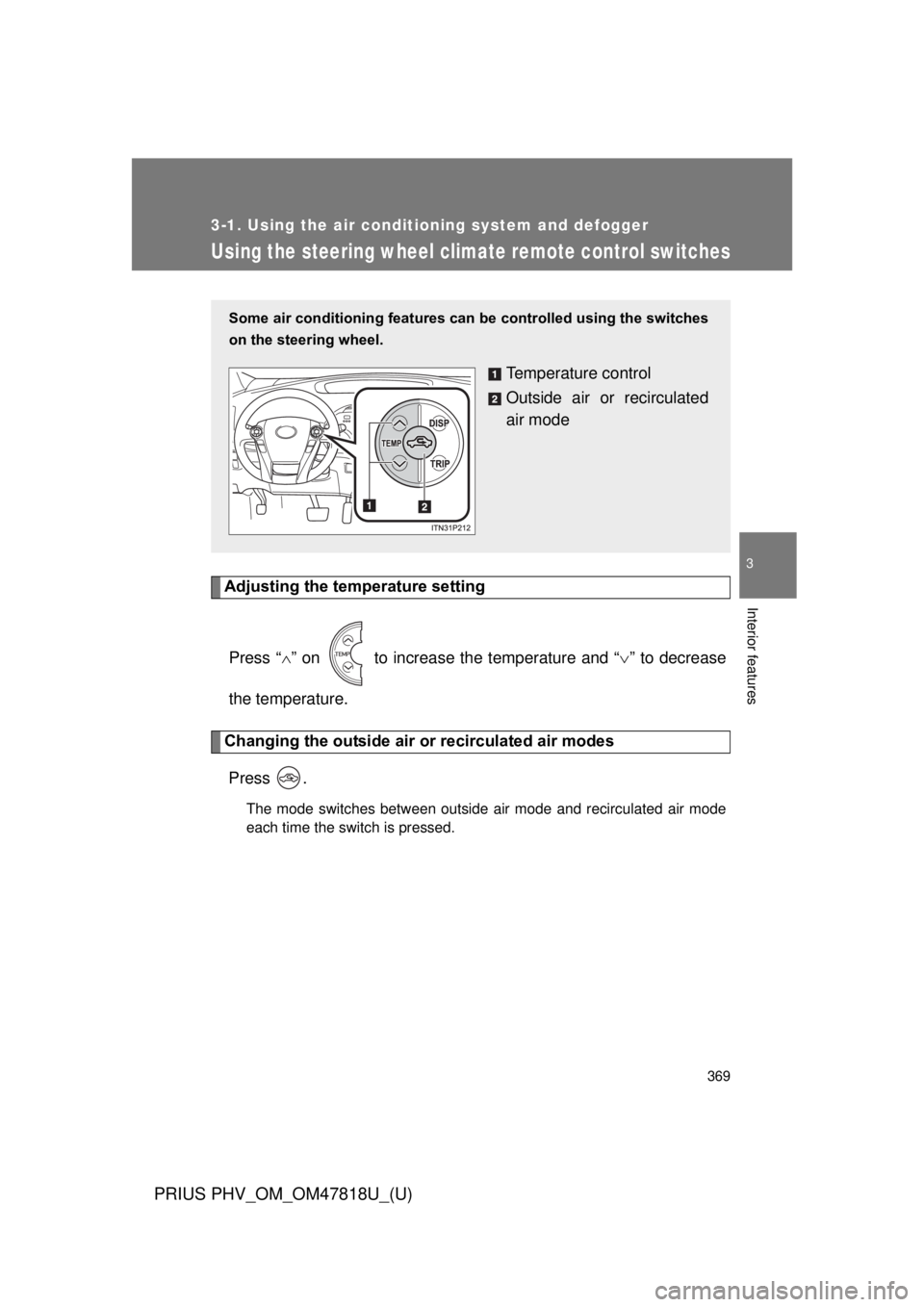
Using the steering wheel climate remote control switches
Adjusting the temperature settingPress “ ” on to increase the temperature and “ ” to decrease
the temperature.
Changing the outside air or recirculated air modes
Press .
The mode switches between outside air mode and recirculated air mode
each time the switch is pressed.
Some air conditioning features can be controlled using the switches
on the steering wheel.
Temperature control
Outside air or recirculated
air mode
Page 371 of 684
371
3-1. Using the air conditioning system and defogger
PRIUS PHV_OM_OM47818U_(U)
3
Interior features
Remote Air Conditioning System
The Remote Air Conditioning System uses electrical energy stored
in the hybrid battery (traction batt ery) and allows the air conditioning
to be operated by remote control.
If the Remote Air Conditioning System is used while the charging
cable is connected to the vehicle, the reduction of charge in the
hybrid battery (traction battery) will be suppressed to allow you to
use electricity from an external power source.
Charging will be conducted automatically after the Remote Air Condi-
tioning System is stopped.
■ Before leaving the vehicle
Check the temperature setting of the air conditioning system.
The Remote Air Conditioning System will operate in accordance with
the temperature settings of the air conditioning system.
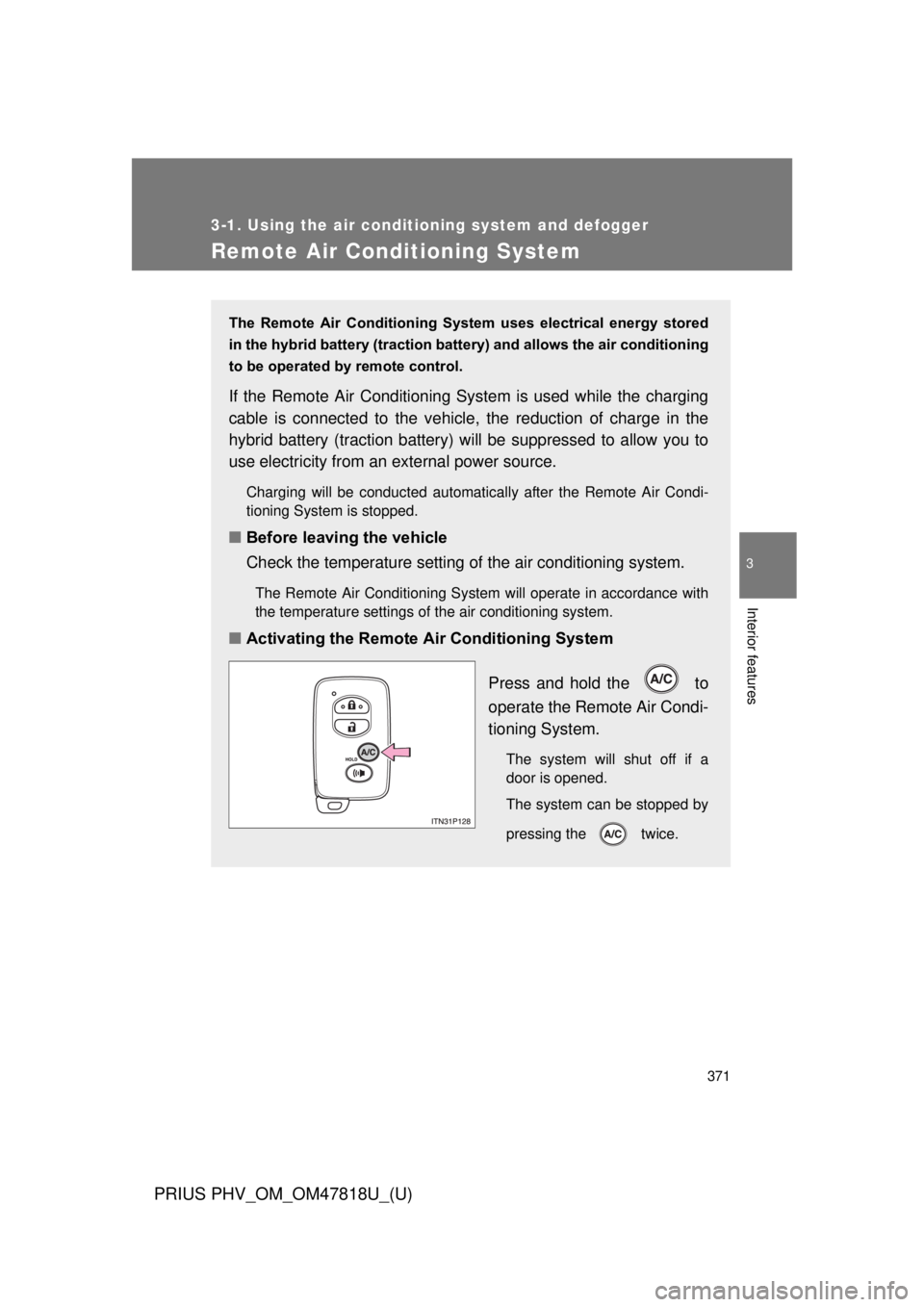
■Activating the Remote Air Conditioning System
Press and hold the to
operate the Remote Air Condi-
tioning System.
The system will shut off if a
door is opened.
The system can be stopped by
pressing the twice.
Page 373 of 684
373
3-1. Using the air conditioning system
and defogger
PRIUS PHV_OM_OM47818U_(U)
3
Interior features
■Security feature
Any unlocked doors will be automatically locked when the system is operat-
ing. The buzzer will beep and the emergency flashers flash when the doors
have been locked or the system has been turned off.
(The doors locked: Once; The system turned off: Twice)
■ Conditions aff ecting operation
P. 1 1 9
■ When using the Remote Air Conditioning System
A charging message will be displayed on the multi-information display. Dif-
ferent messages will be displayed depending on when the Remote Air Con-
ditioning System was started (after charging or during charging).
( P. 562)
■ While the Remote Air Conditio ning System is operating
● Depending on the operating condition of the Remote Air Conditioning
System, the electric fan may spin and an operating noise may be heard.
However, this does not indicate a malfunction.
● The Remote Air Conditioning System may stop operating temporarily if
other features that use electricity (for example, the seat heater, lights,
windshield wipers) are in operation or if the charge level of the 12-volt
battery becomes low.
■ Electronic key battery depletion
P. 123
■ When the electronic key battery is fully depleted
P. 123
■ Customization
Setting (e.g. Operation using the on the wireless remote control) can
be changed.
(Customizable features P. 645)
Page 408 of 684
408 3-5. Other interior features
PRIUS PHV_OM_OM47818U_(U)
■Programming HomeLink®
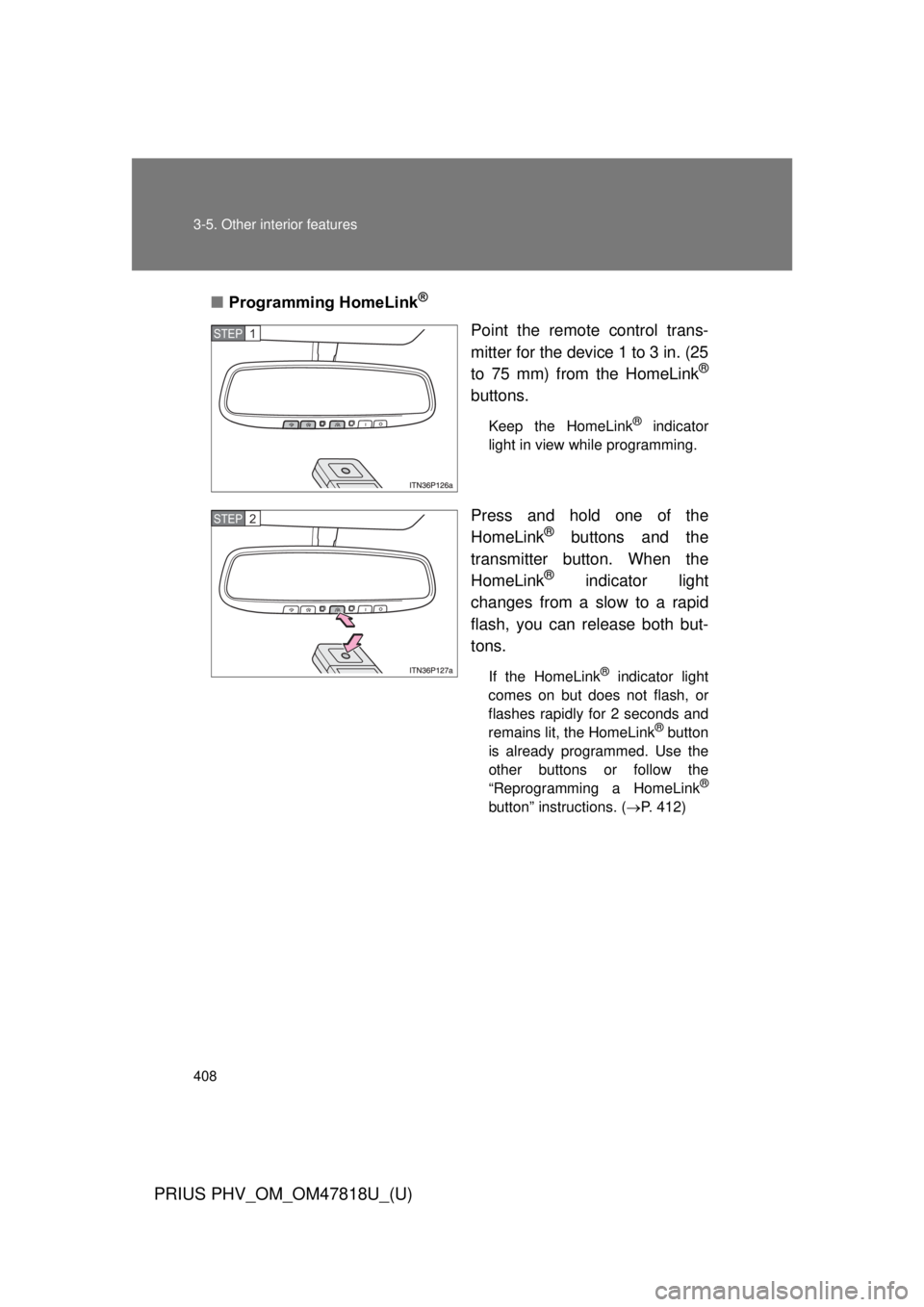
Point the remote control trans-
mitter for the device 1 to 3 in. (25
to 75 mm) from the HomeLink
®
buttons.
Keep the HomeLink® indicator
light in view while programming.
Press and hold one of the
HomeLink® buttons and the
transmitter button. When the
HomeLink
® indicator light
changes from a slow to a rapid
flash, you can release both but-
tons.
If the HomeLink® indicator light
comes on but does not flash, or
flashes rapidly for 2 seconds and
remains lit, the HomeLink
® button
is already programmed. Use the
other buttons or follow the
“Reprogramming a HomeLink
®
button” instructions. ( P. 412)
STEP 1
STEP 2
Page 409 of 684
409
3-5. Other interior features
PRIUS PHV_OM_OM47818U_(U)
3
Interior features
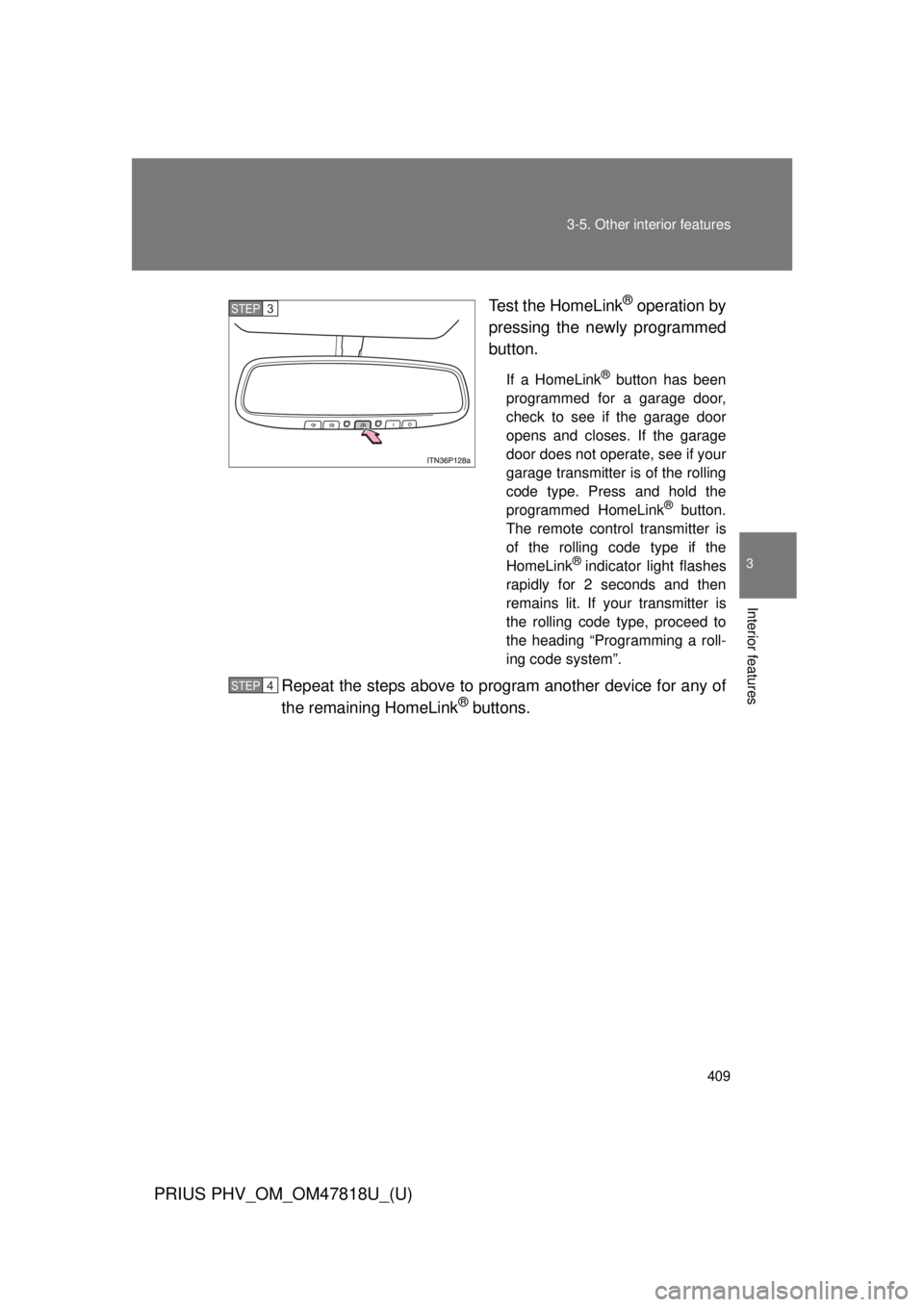
Test the HomeLink® operation by
pressing the newly programmed
button.
If a HomeLink® button has been
programmed for a garage door,
check to see if the garage door
opens and closes. If the garage
door does not operate, see if your
garage transmitter is of the rolling
code type. Press and hold the
programmed HomeLink
® button.
The remote control transmitter is
of the rolling code type if the
HomeLink
® indicator light flashes
rapidly for 2 seconds and then
remains lit. If your transmitter is
the rolling code type, proceed to
the heading “Programming a roll-
ing code system”.
Repeat the steps above to program another device for any of
the remaining HomeLink® buttons.
STEP 3
STEP 4
Page 411 of 684
411
3-5. Other interior features
PRIUS PHV_OM_OM47818U_(U)
3
Interior features
■
Programming an entry gate (f or U.S.A. owners)/Programming
a devices in the Canadian market
Place the remote control transmitter 1 to 3 in. (25 to 75 mm)
away from the HomeLink
® buttons.
Keep the HomeLink® indicator light in view while programming.
Press and hold the selected HomeLink® button.
Repeatedly press and release (cycle) the remote control
transmitter for 2 seconds each until step 4 is completed.
When the HomeLink
® indicator light starts to flash rapidly,
release the buttons.
Test the HomeLink
® operation by pressing the newly pro-
grammed button. Check to see if the gate/device operates
correctly.
Repeat the steps above to program another device for any of
the remaining HomeLink
® buttons.
■ Programming other devices
To program other devices such as home security systems, home
door locks and lighting, contact your Toyota dealer for assistance.
■ Reprogramming a button
The individual HomeLink
® buttons cannot be erased but can be
reprogrammed. To reprogram a button, follow the “Reprogramming
a HomeLink
® button” instructions.
STEP 1
STEP 2
STEP 3
STEP 4
STEP 5
STEP 6
Page 413 of 684
413
3-5. Other interior features
PRIUS PHV_OM_OM47818U_(U)
3
Interior features
■
Before programming
● Install a new battery in the remote control transmitter.
● The battery side of the remote control transmitter must be pointed away
from the HomeLink
® button.
■ Certification for the garage door opener
For vehicles sold in the U.S.A.
FCC ID: NZLOBIHL4
NOTE:
This device complies with Part 15 of the FCC Rules.
Operation is subject to the following two conditions: (1) this device may not
cause harmful interference, and (2) this device must accept any interference
received, including interference that may cause undesired operation.
FCC WARNING:
Changes or modifications not expressly approved by the party responsible
for compliance could void the user’s authority to operate the equipment.
For vehicles sold in Canada
IC ID: 4112A-OBIHL4
NOTE:
Operation is subject to the following two conditions: (1) this device may not
cause interference, and (2) this device must accept any interference, includ-
ing interference that may cause undesired operation of the device.
■ When support is necessary
Visit on the web at www.homelink.com
or call 1-800-355-3515.