air condition TOYOTA PRIUS PHV 2012 Owner's Manual
[x] Cancel search | Manufacturer: TOYOTA, Model Year: 2012, Model line: PRIUS PHV, Model: TOYOTA PRIUS PHV 2012Pages: 684, PDF Size: 12.16 MB
Page 350 of 684
350 2-5. Driving information
PRIUS PHV_OM_OM47818U_(U)
■Before driving the vehicle
Perform the following according to the driving conditions:
●Do not try to forcibly open a window or move a wiper that is
frozen. Pour warm water over the frozen area to melt the ice.
Wipe away the water immediately to prevent it from freezing.
● To ensure proper operation of th e climate control system fan,
remove any snow that has accumulated on the air inlet vents
in front of the windshield.
● Check for and remove any excess ice or snow that may have
accumulated on the exterior lights, vehicle’s roof, chassis,
around the tires or on the brakes.
● Remove snow or mud from the bottom of your shoes before
getting in the vehicle.
■ When driving the vehicle
Accelerate the vehicle slowly, keep a safe distance between you
and the vehicle ahead, and drive at a reduced speed suitable to
road conditions.
■ When parking the vehicle
Park the vehicle and shift the shift position to P and block the
wheel under the vehicle without setting the parking brake. The
parking brake may freeze up, preventing it from being released.
If necessary, block the wheels to prevent inadvertent sliding or
creeping.
Page 357 of 684
Interior features3
357
PRIUS PHV_OM_OM47818U_(U)
3-1.Using the air conditioning
system
and defogger
Air conditioning system .... 358
Using the steering wheel climate remote control
switches ......................... 369
Remote Air Conditioning System ........................... 371
Rear window and outside rear view mirror defoggers
switch ............................. 375
3-2. Using the audio system Audio system types .......... 376
Using the AUX port/USB port................................. 381
3-3. Using the interior lights Interior lights list ............... 382
• Front interior lights ......... 383
• Personal lights ............... 383
• Rear interior light ........... 384 3-4. Using the storage features
List of storage features .... 385
• Glove boxes ................... 386
• Console box ................... 387
• Cup holders ................... 388
• Bottle holders ................. 390
• Auxiliary boxes ............... 391
3-5. Other interior features Sun visors ........................ 392
Vanity mirrors ................... 393
Outside temperature display............................ 394
Power outlets ................... 395
Seat heaters..................... 397
Armrest ............................ 399
Assist grips....................... 400
Floor mats ........................ 401
Luggage compartment features .......................... 403
Garage door opener......... 407
Safety Connect ................ 415
Page 358 of 684
358
PRIUS PHV_OM_OM47818U_(U)
3-1. Using the air conditioning system and defogger
Air conditioning system
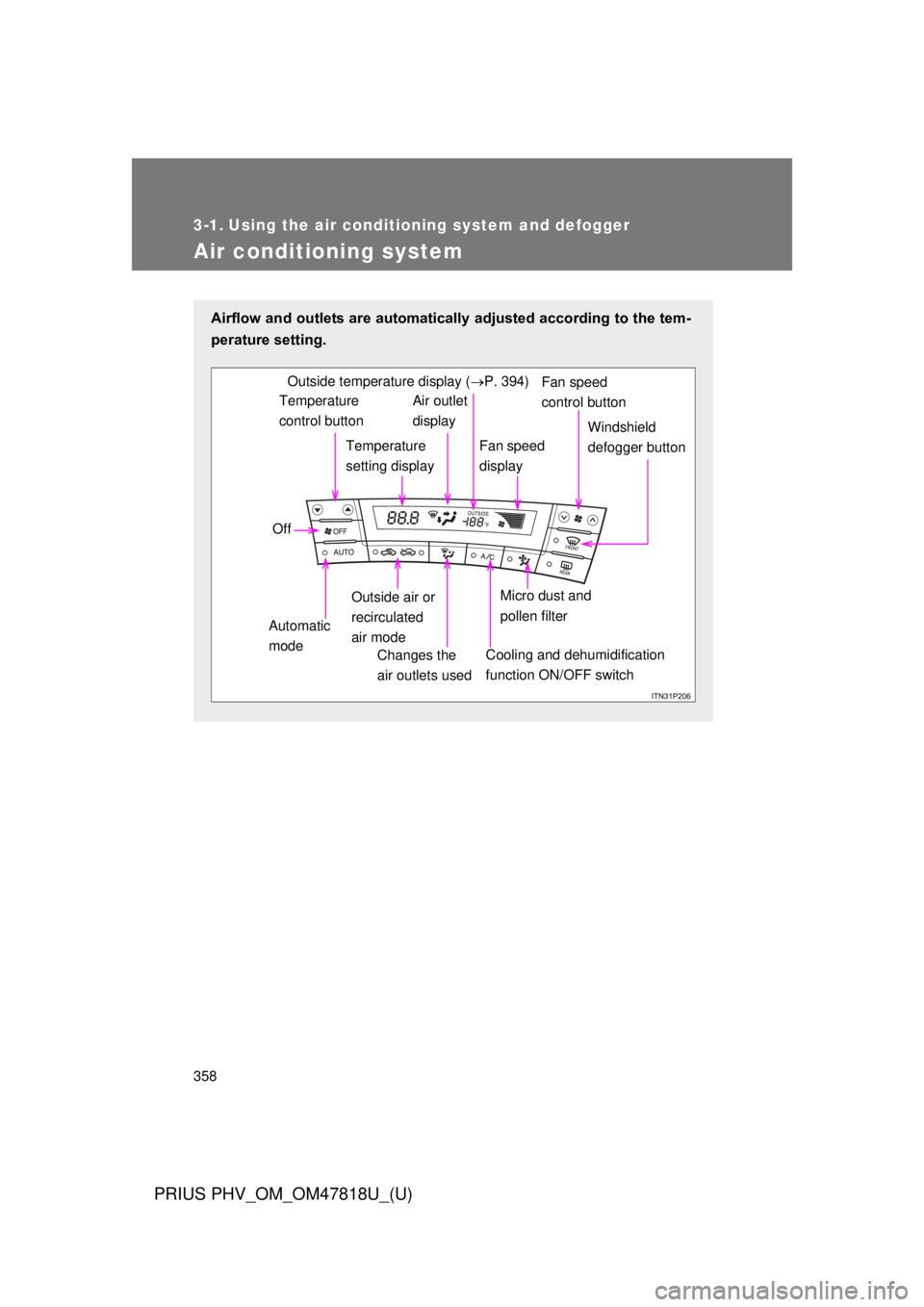
Airflow and outlets are automatically adjusted according to the tem-
perature setting.
Temperature
control buttonTemperature
setting displayAir outlet
display
Fan speed
display Windshield
defogger button
Off
Automatic
mode Outside air or
recirculated
air mode
Changes the
air outlets used
Fan speed
control buttonOutside temperature display ( P. 394)
Micro dust and
pollen filter
Cooling and dehumidification
function ON/OFF switch
Page 359 of 684
359
3-1. Using the air conditioning system
and defogger
PRIUS PHV_OM_OM47818U_(U)
3
Interior features
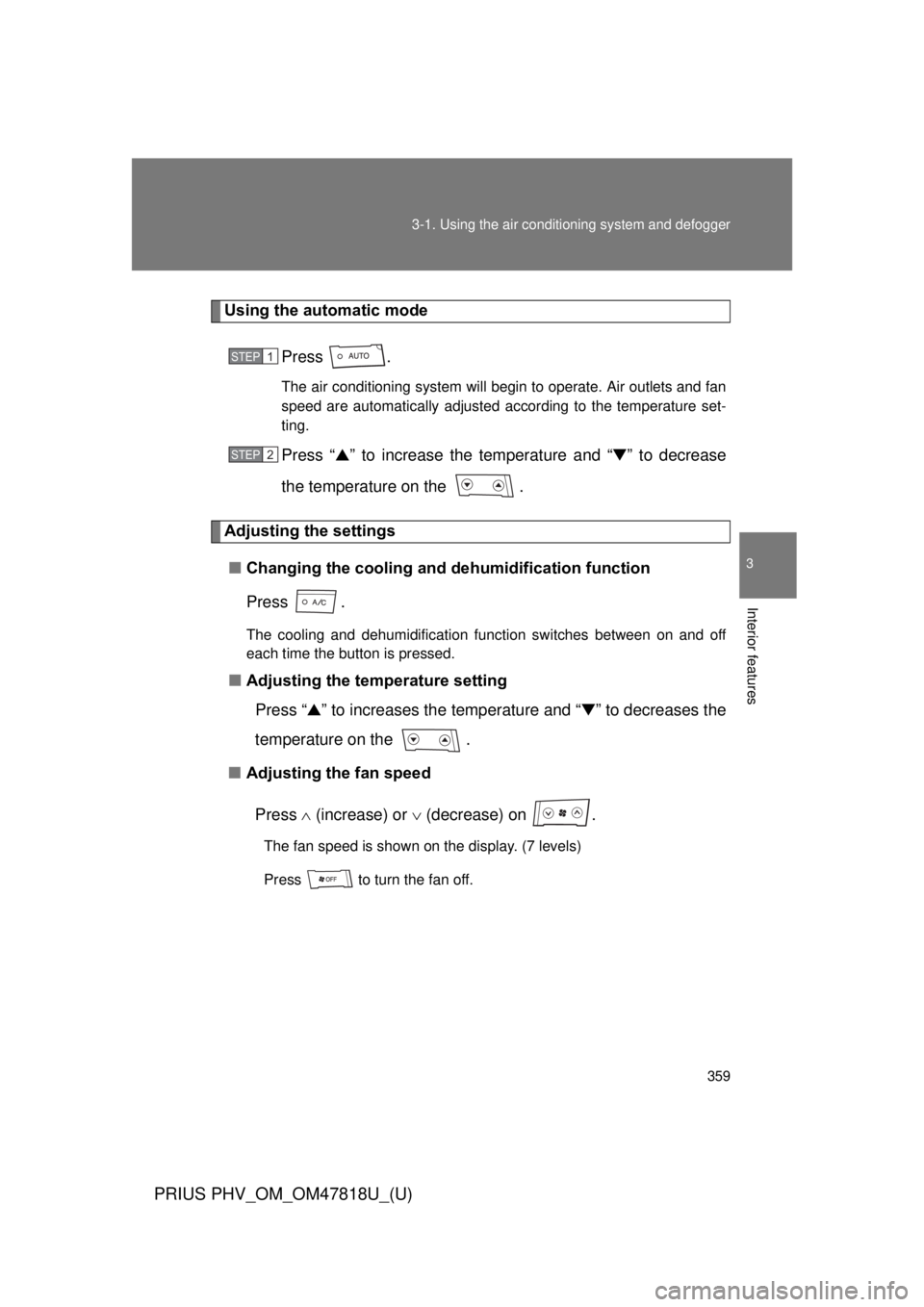
Using the automatic mode
Press .
The air conditioning system will begin to operate. Air outlets and fan
speed are automatically adjusted according to the temperature set-
ting.
Press “▲” to increase the temperature and “ ▼” to decrease
the temperature on the .
Adjusting the settings
■ Changing the cooling and dehumidification function
Press .
The cooling and dehumidification function switches between on and off
each time the button is pressed.
■Adjusting the temperature setting
Press “ ▲” to increases the temperature and “ ▼” to decreases the
temperature on the .
■ Adjusting the fan speed
Press (increase) or (decrease) on .
The fan speed is shown on the display. (7 levels)
Press to turn the fan off.
STEP 1
STEP 2
Page 360 of 684
360 3-1. Using the air conditioning system and defogger
PRIUS PHV_OM_OM47818U_(U)
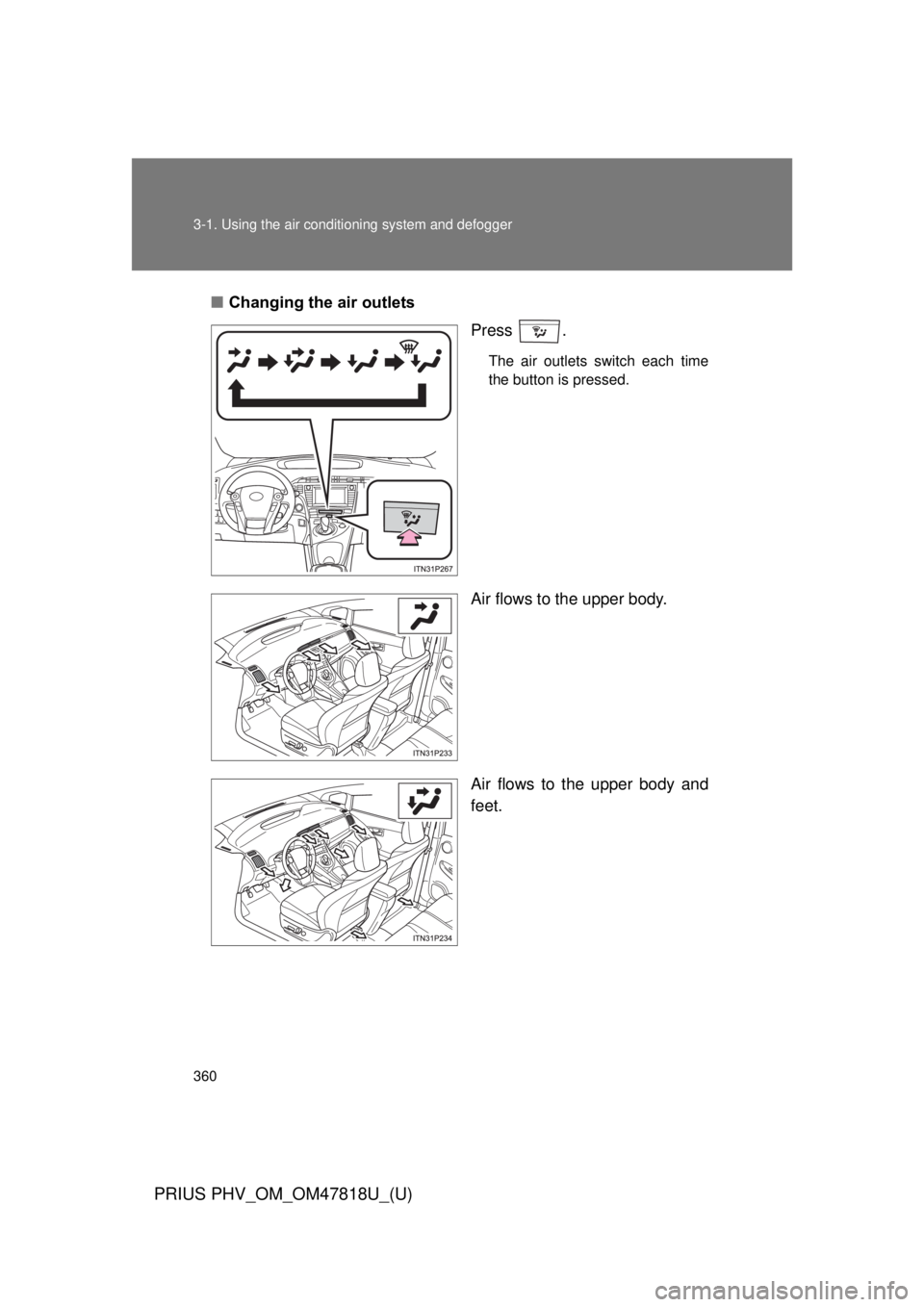
■Changing the air outlets
Press .
The air outlets switch each time
the button is pressed.
Air flows to the upper body.
Air flows to the upper body and
feet.
ITO31P105
Page 361 of 684
361
3-1. Using the air conditioning system
and defogger
PRIUS PHV_OM_OM47818U_(U)
3
Interior features
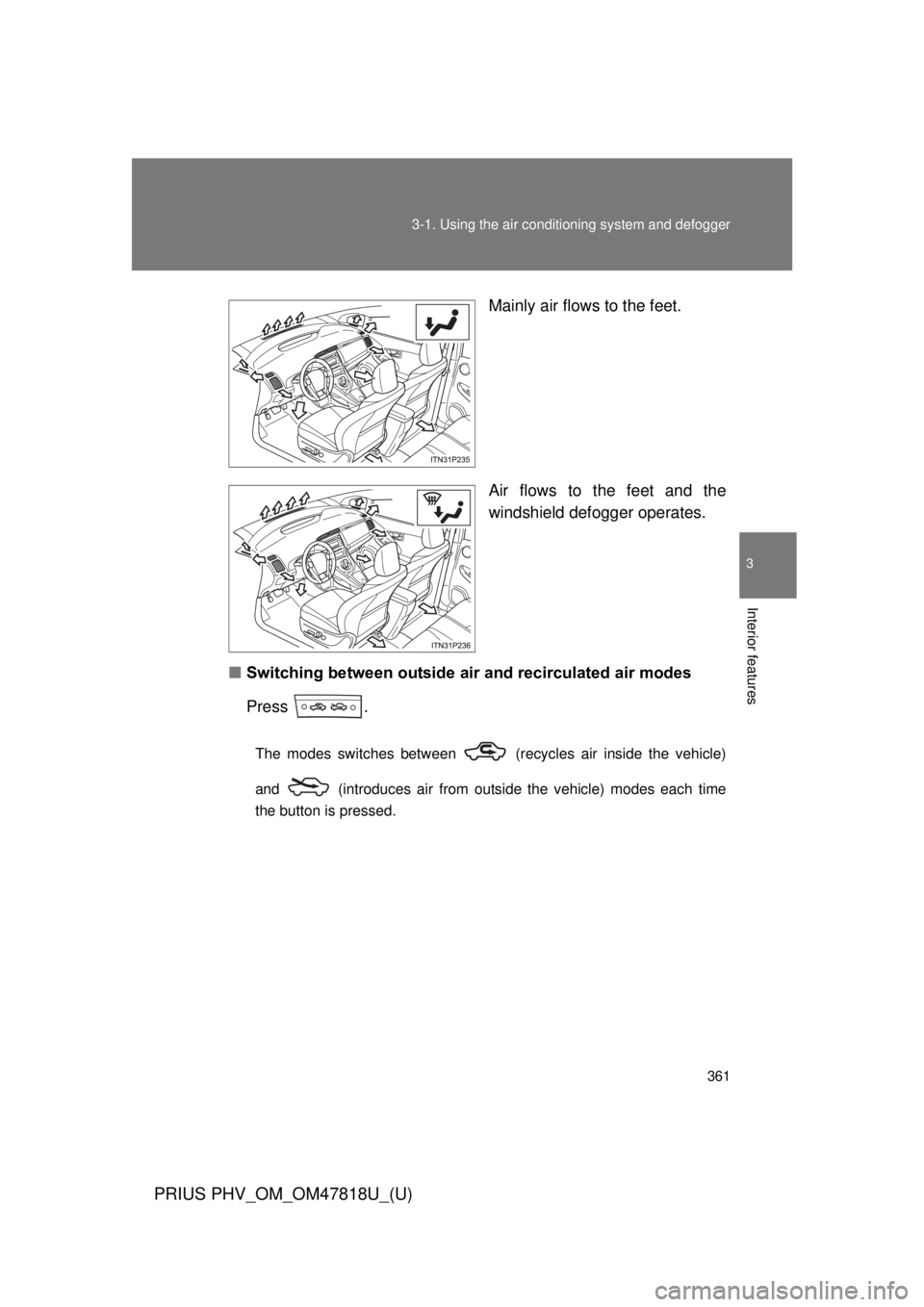
Mainly air flows to the feet.
Air flows to the feet and the
windshield defogger operates.
■ Switching between outside air and recirculated air modes
Press .
The modes switches between (recycles air inside the vehicle)
and (introduces air from outside the vehicle) modes each time
the button is pressed.
Page 362 of 684
362 3-1. Using the air conditioning system and defogger
PRIUS PHV_OM_OM47818U_(U)
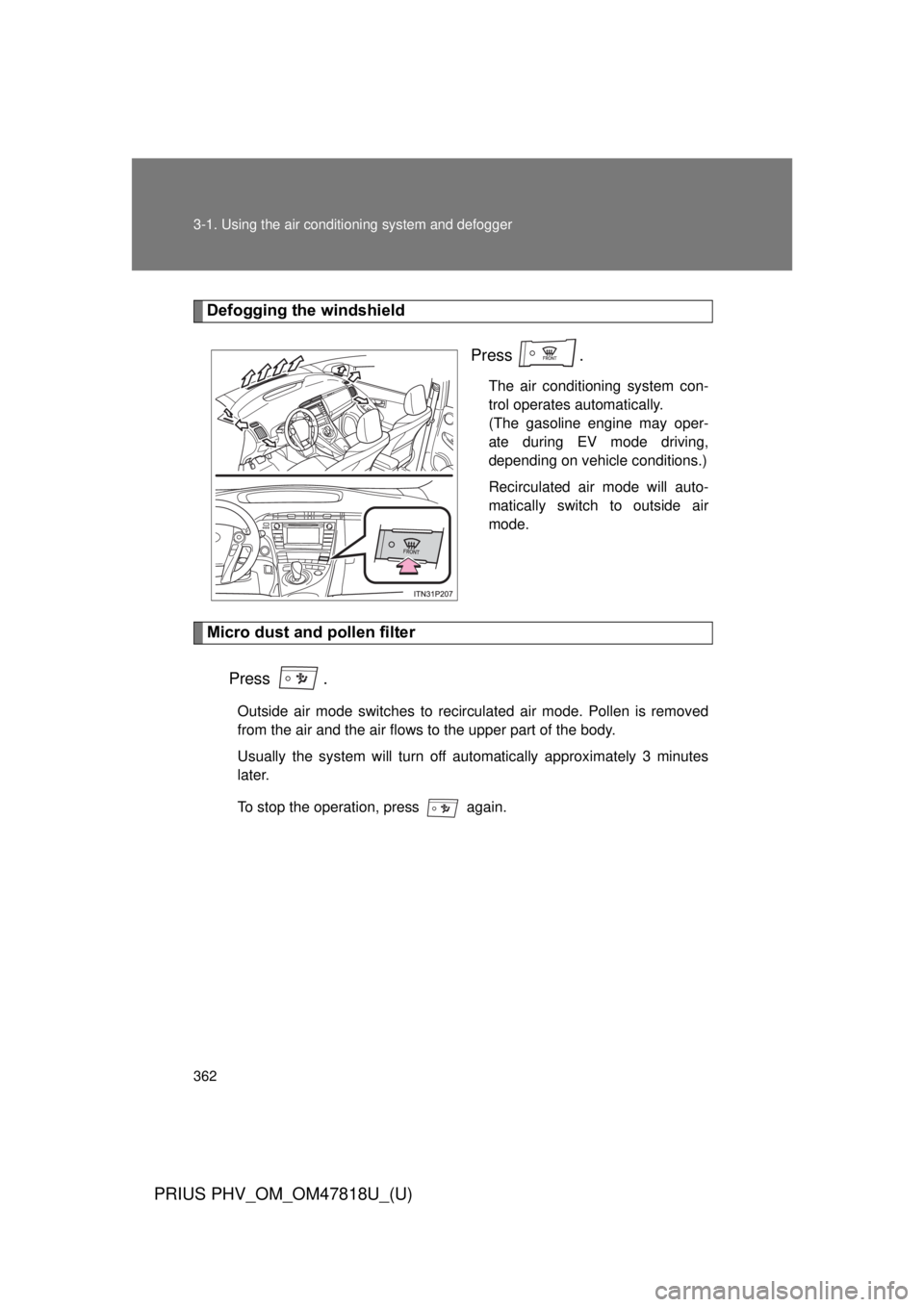
Defogging the windshield
Press .
The air conditioning system con-
trol operates automatically.
(The gasoline engine may oper-
ate during EV mode driving,
depending on vehicle conditions.)
Recirculated air mode will auto-
matically switch to outside air
mode.
Micro dust and pollen filter
Press .
Outside air mode switches to recirculated air mode. Pollen is removed
from the air and the air flows to the upper part of the body.
Usually the system will turn off automatically approximately 3 minutes
later.
To stop the operation, press again.
Page 363 of 684
363
3-1. Using the air conditioning system
and defogger
PRIUS PHV_OM_OM47818U_(U)
3
Interior features
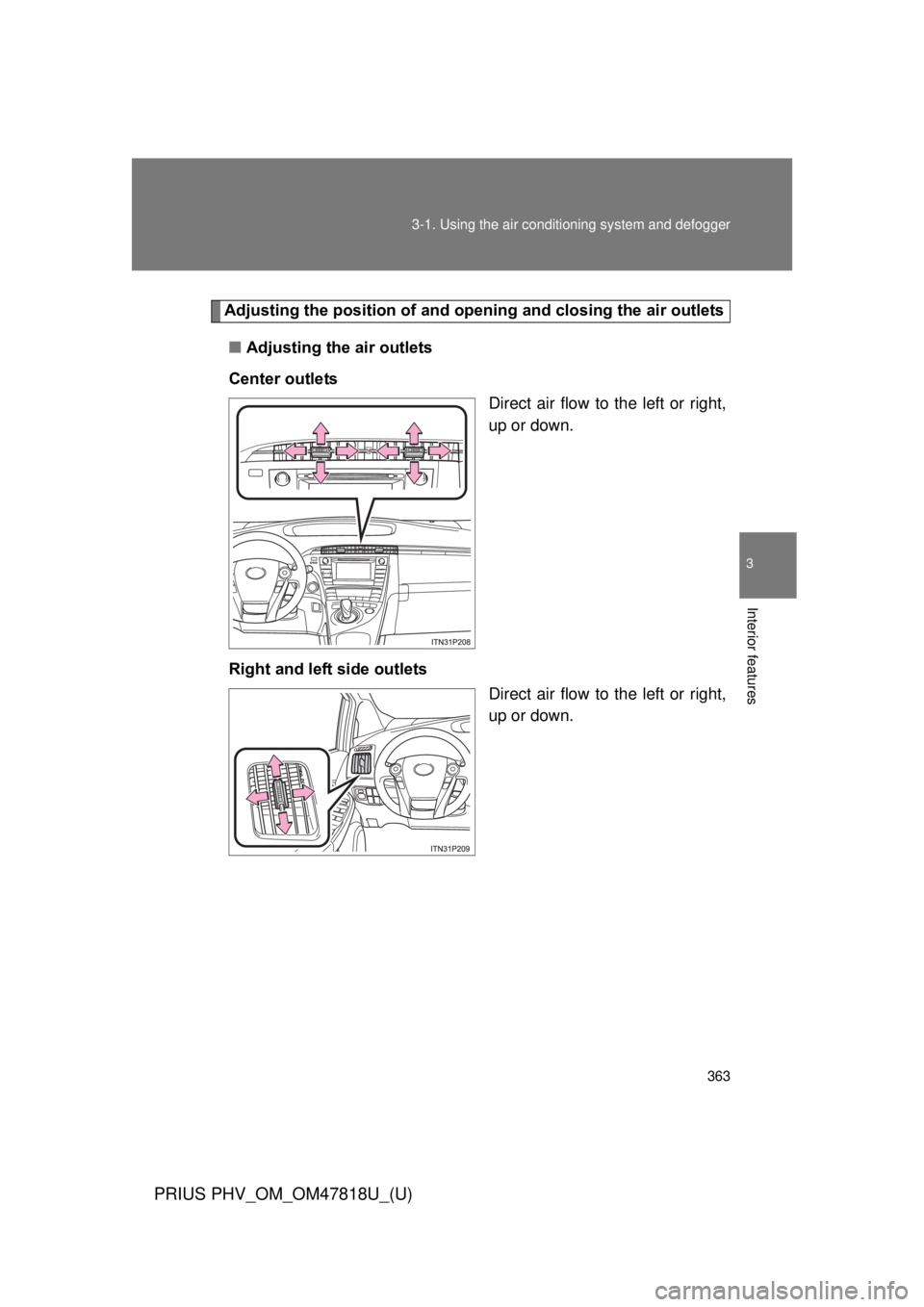
Adjusting the position of and opening and closing the air outlets
■ Adjusting the air outlets
Center outlets Direct air flow to the left or right,
up or down.
Right and left side outlets Direct air flow to the left or right,
up or down.
Page 364 of 684
364 3-1. Using the air conditioning system and defogger
PRIUS PHV_OM_OM47818U_(U)
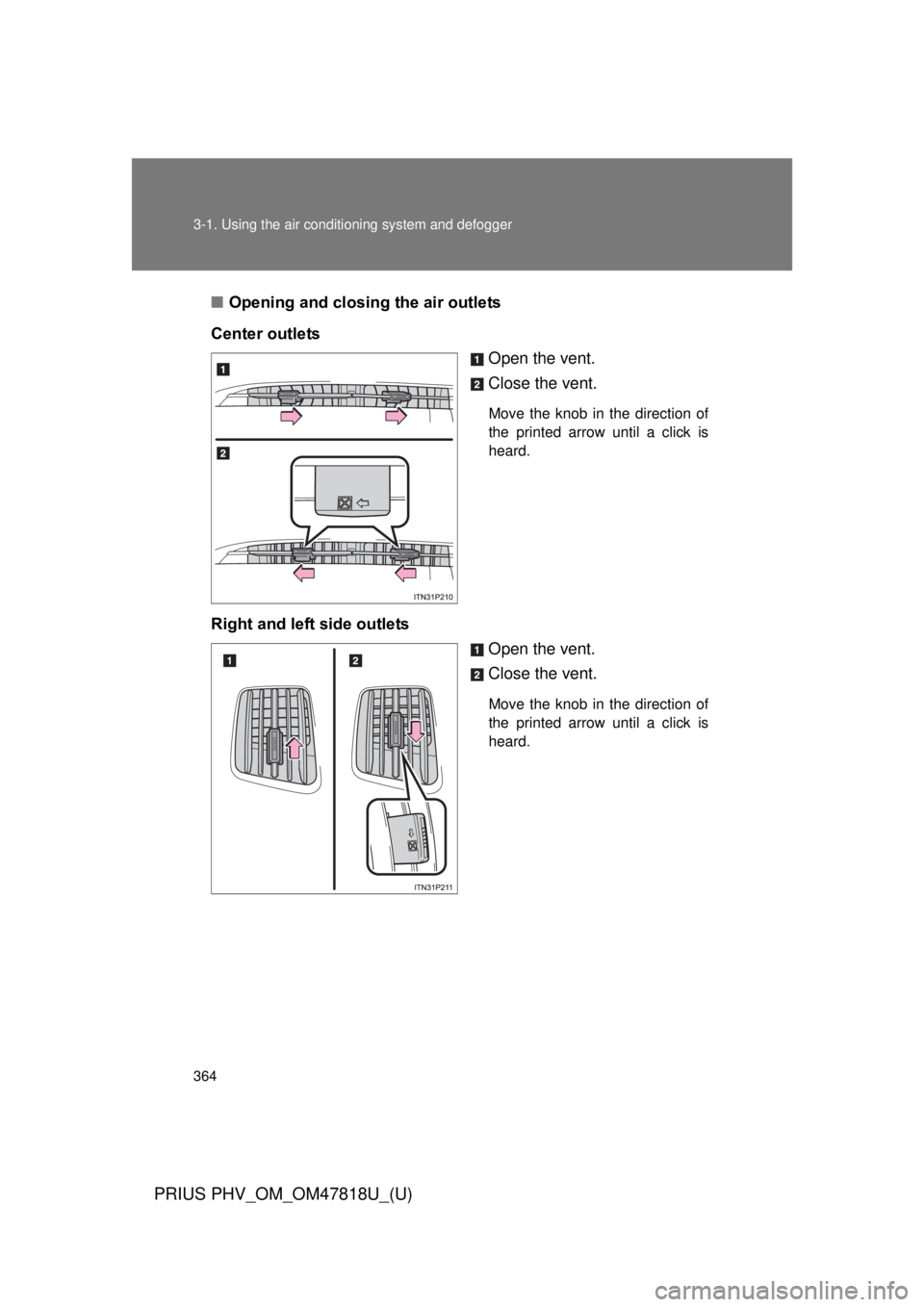
■Opening and closing the air outlets
Center outlets Open the vent.
Close the vent.
Move the knob in the direction of
the printed arrow until a click is
heard.
Right and left side outletsOpen the vent.
Close the vent.
Move the knob in the direction of
the printed arrow until a click is
heard.
Page 365 of 684
365
3-1. Using the air conditioning system
and defogger
PRIUS PHV_OM_OM47818U_(U)
3
Interior features
■Using the automatic mode
Fan speed is adjusted automatically in accordance with the temperature set-
ting and ambient conditions, etc. As a result, the following may occur.
● Immediately after
is pressed, the fan may stop for a while until
warm or cool air is ready to flow.
● Cool air may flow to the area around the upper body when the heater is
on.
■ Switching between outside air and recirculated air modes
Recirculated air mode or outside air mode may be automatically switched to
in accordance with under these condition, such as temperature setting and
inside temperature.
Also, outside air mode may be automatically switched to when the outside
temperature is low.
■ When the outside temperature exceeds 75 °F (24 °C) and the air condi-
tioning system is on
● In order to reduce the air conditioning power consumption, the air condi-
tioning system may switch to recirculated air mode automatically. This
may also reduce fuel consumption.
● Recirculated air mode is selected as a default mode when the “POWER”
switch is turned to ON mode.
● It is possible to switch to outside air mode at any time by pressing
.
■ Using the system in recirculated air mode
The windows will fog up more easily if the recirculated air mode is used.