headlights TOYOTA PRIUS PHV 2012 Owner's Manual
[x] Cancel search | Manufacturer: TOYOTA, Model Year: 2012, Model line: PRIUS PHV, Model: TOYOTA PRIUS PHV 2012Pages: 684, PDF Size: 12.16 MB
Page 512 of 684
512 4-3. Do-it-yourself maintenance
PRIUS PHV_OM_OM47818U_(U)
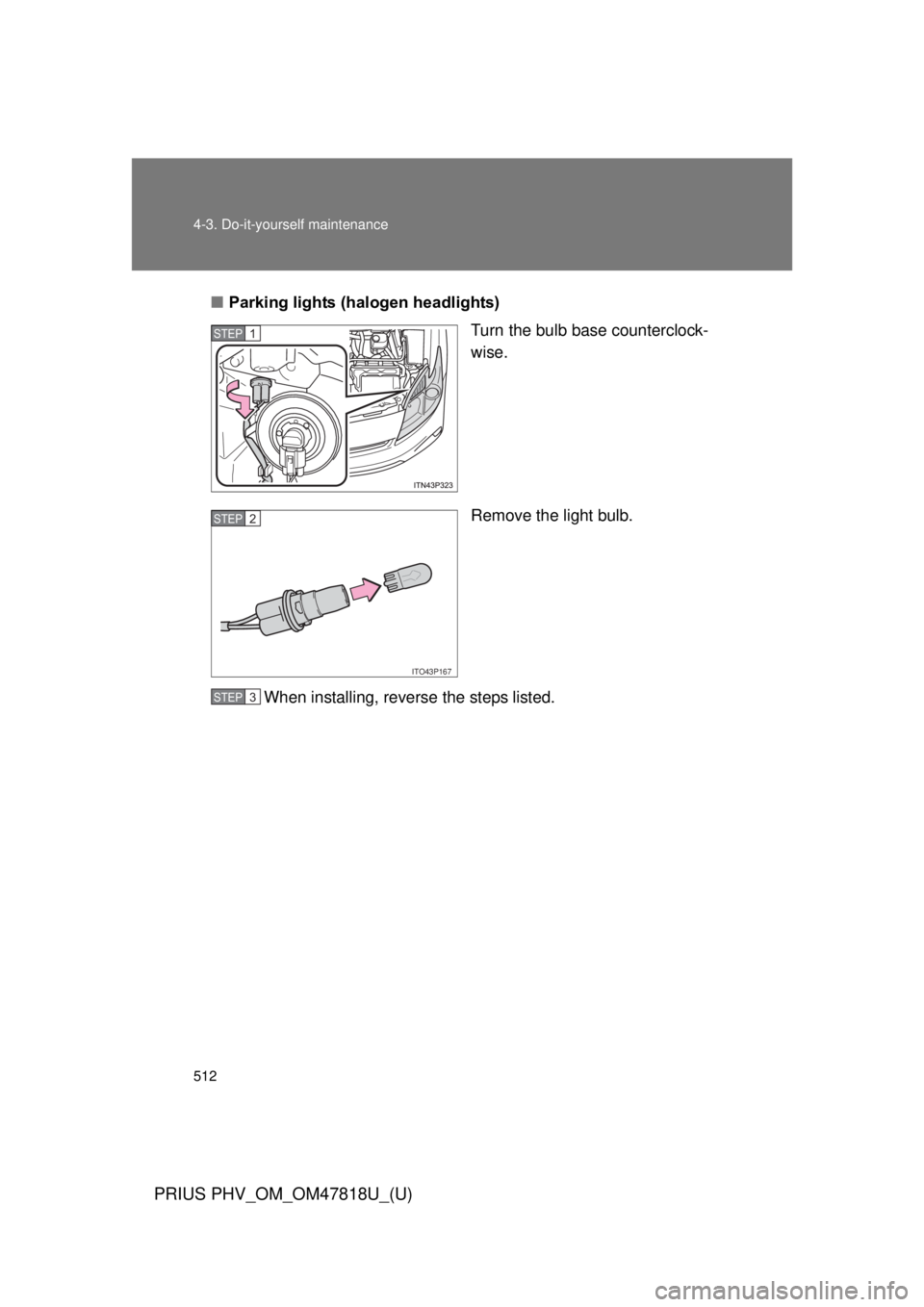
■Parking lights (halogen headlights)
Turn the bulb base counterclock-
wise.
Remove the light bulb.
When installing, reverse the steps listed.
STEP 1
ITO43P167
STEP 2
STEP 3
Page 513 of 684
513
4-3. Do-it-yourself maintenance
PRIUS PHV_OM_OM47818U_(U)
4
Maintenance and care
■
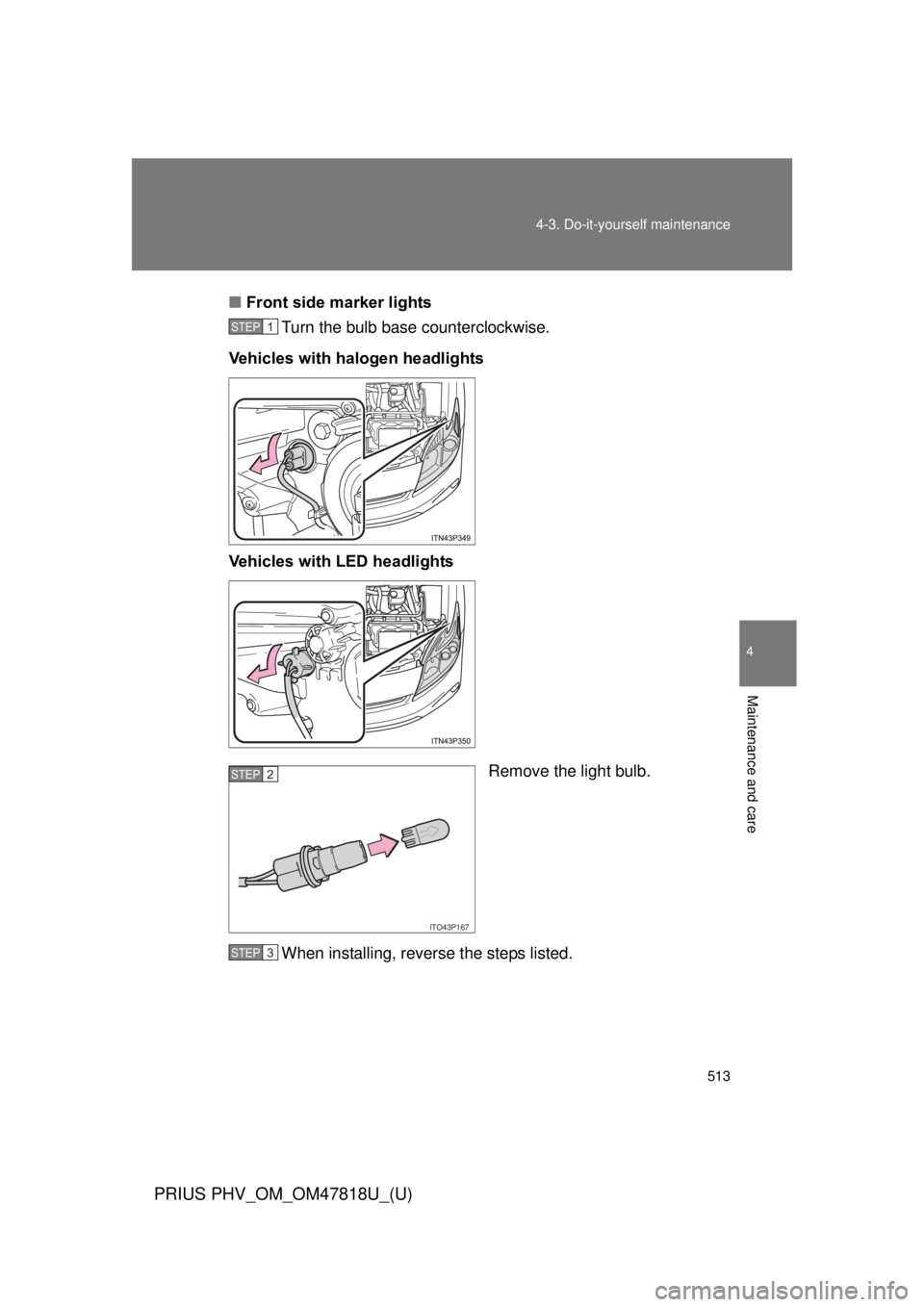
Front side marker lights
Turn the bulb base counterclockwise.
Vehicles with halogen headlights
Vehicles with LED headlights
Remove the light bulb.
When installing, reverse the steps listed.
STEP 1
ITO43P167
STEP 2
STEP 3
Page 520 of 684

520 4-3. Do-it-yourself maintenance
PRIUS PHV_OM_OM47818U_(U)
■Replacing the following bulbs
If any of the lights listed below has burnt out, have it replaced by
your Toyota dealer.
● Headlight low beams (LED headlights)
● Parking lights (LED headlights)
● Stop lights
● Tail lights
● High mounted stoplight
● Daytime running lights (except for Canada)
■LED lights
The headlight low beams (LED headlights), parking lights (LED headlights),
stop lights, tail lights, high mounted stoplight and daytime running lights
(except for Canada) consist of a number of LEDs. If any of the LEDs burn
out, take your vehicle to your Toyota dealer to have the light replaced.
■ Condensation build-up on the inside of the lens
Contact your Toyota dealer for more information in the following situations.
Temporary condensation build-up on the inside of the headlight lens does
not indicate a malfunction.
● Large drops of water have built up on the inside of the lens.
● Water has built up inside the headlight.
■ When replacing light bulbs
P. 505
Page 521 of 684
521
4-3. Do-it-yourself maintenance
PRIUS PHV_OM_OM47818U_(U)
4
Maintenance and care
CAUTION
■
Replacing light bulbs
● Be sure to stop the hybrid system and turn off the lights. Do not attempt to
replace the bulb immediately after turning off the lights.
The bulbs become very hot and may cause burns.
● Do not touch the glass portion of the light bulb with bare hands. Hold the
bulb by the plastic or metal portion.
If the bulb is scratched or dropped, it may blow out or crack.
● Fully install light bulbs and any parts used to secure them. Failure to do so
may result in heat damage, fire, or water entering the headlight unit. This
may damage the headlights or cause condensation to build up on the lens.
■ To prevent damage or fire
Make sure bulbs are fully seated and locked.
Page 589 of 684
5
When trouble arises
589
5-2. Steps to take in an emergency
PRIUS PHV_OM_OM47818U_(U)
Emergency start function
When the hybrid system does not start, the following steps can be
used as an interim measure to st art the hybrid system if the
“POWER” switch is functioning normally:
Set the parking brake.
Turn the “POWER” switch to ACCESSORY mode.
Press and hold the “POWER” switch for about 15 seconds
while depressing the brake pedal firmly.
Even if the hybrid system can be started using the above steps, the
system may be malfunctioning. Have the vehicle inspected by your
Toyota dealer.
■ The interior lights and headlights do not turn on, or the horn
does not sound
One of the following may be the cause of the problem:
●One or both of the 12-volt ba ttery terminals may be discon-
nected.
● The 12-volt battery may be discharged. ( P. 594)
Contact your Toyota dealer if the problem cannot be repaired, or if
repair procedures are unknown.
STEP 1
STEP 2
STEP 3
Page 597 of 684

5
When trouble arises
597
5-2. Steps to take in an emergency
PRIUS PHV_OM_OM47818U_(U)
■
Starting the hybrid system when the 12-volt battery is discharged
The hybrid system cannot be started by push-starting.
■ To prevent 12-volt battery discharge
● Turn off the headlights and the audio system while the hybrid system is
off.
● Turn off any unnecessary electrical components when the vehicle is run-
ning at a low speed for an extended period, such as in heavy traffic.
■ When the 12-volt battery is removed or discharged
● The hybrid system may not start. ( P. 473)
● If the 12-volt battery is depleted with the shift position in P, it will not be
possible to shift the shift position other than P. In this case, the vehicle
cannot be towed without lifting both front wheels because the front
wheels are locked by the parking lock. ( P. 525)
● When the 12-volt battery is reconnected, start the hybrid system, depress
the brake pedal, and confirm that it is possible to shift into each shift posi-
tion.
■ Charging the 12-volt battery
The electricity stored in the 12-volt battery will discharge gradually even
when the vehicle is not in use, due to natural discharge and the draining
effects of certain electrical appliances. If the vehicle is left for a long time, the
12-volt battery may discharge, and the hybrid system may be unable to start.
(The 12-volt battery charges automatically while the hybrid system is operat-
ing.)
Page 620 of 684
620 6-1. Specifications
PRIUS PHV_OM_OM47818U_(U)
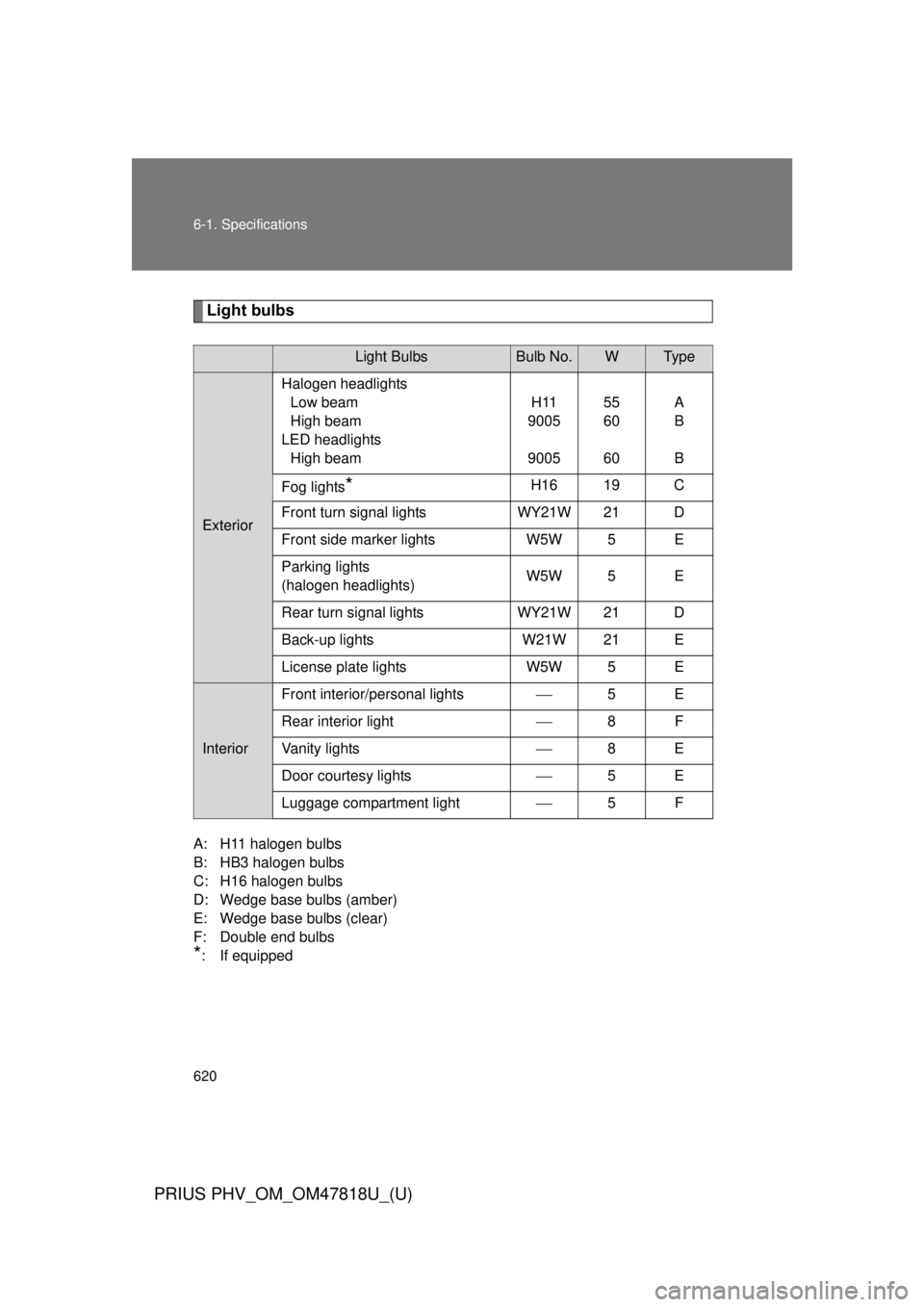
Light bulbs
A: H11 halogen bulbs
B: HB3 halogen bulbs
C: H16 halogen bulbs
D: Wedge base bulbs (amber)
E: Wedge base bulbs (clear)
F: Double end bulbs
*
: If equipped
Light BulbsBulb No.WTy p e
Exterior Halogen headlights
Low beam
High beam
LED headlights High beam H11
9005
9005 55
60
60A
B
B
Fog lights
*H16 19 C
Front turn signal lights WY21W 21 D
Front side marker lights W5W 5 E
Parking lights
(halogen headlights) W5W 5 E
Rear turn signal lights WY21W 21 D
Back-up lights W21W 21 E
License plate lights W5W 5 E
InteriorFront interior/personal lights
5E
Rear interior light 8F
Vanity lights 8E
Door courtesy lights 5E
Luggage compartment light 5F
Page 673 of 684
673
Alphabetical index
PRIUS PHV_OM_OM47818U_(U)
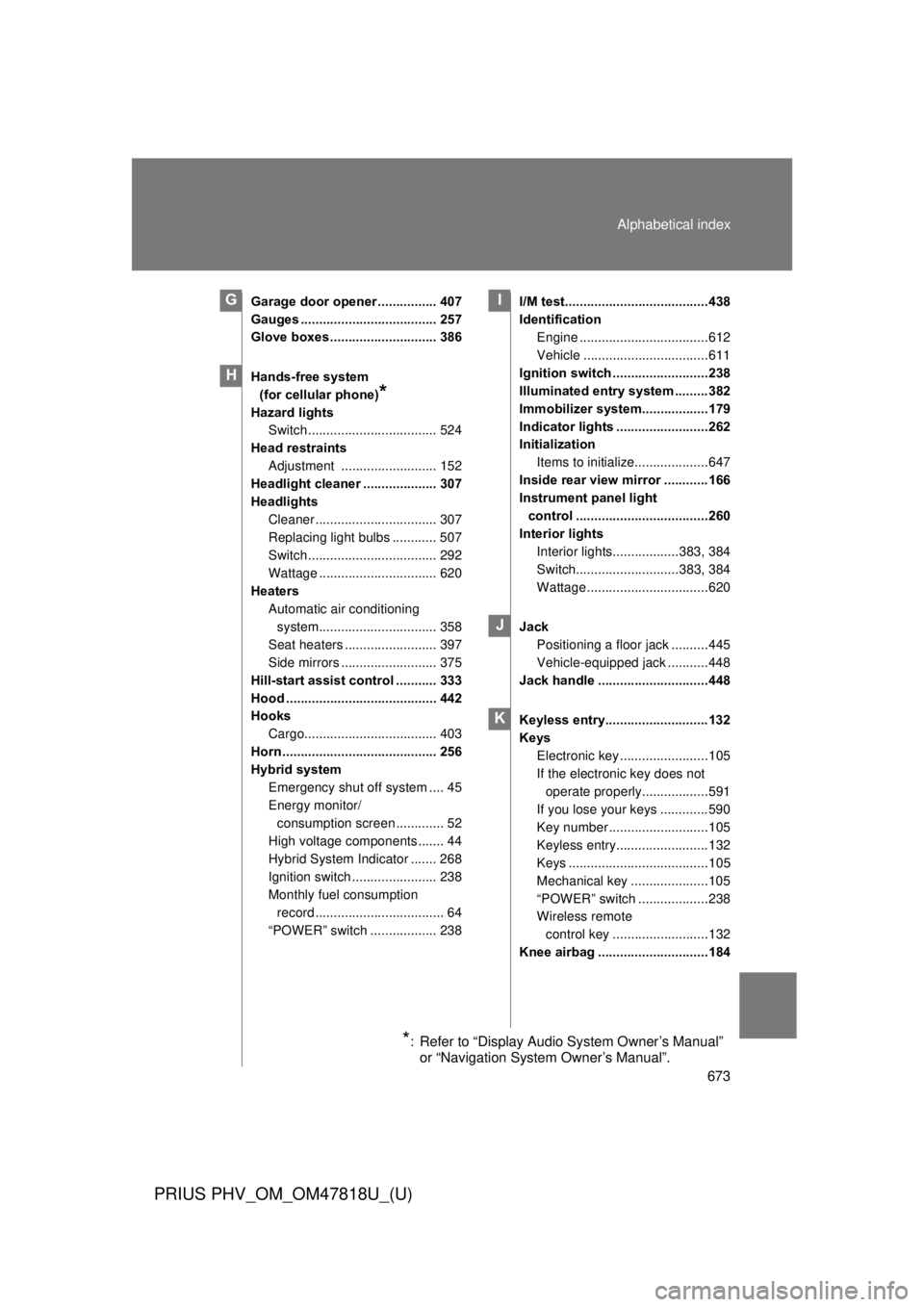
Garage door opener ................ 407
Gauges ..................................... 257
Glove boxes ............................. 386
Hands-free system
(for cellular phone)
*
Hazard lights Switch ................................... 524
Head restraints Adjustment .......................... 152
Headlight cleaner .................... 307
Headlights
Cleaner ................................. 307
Replacing light bulbs ............ 507
Switch ................................... 292
Wattage ................................ 620
Heaters
Automatic air conditioning system................................ 358
Seat heaters ......................... 397
Side mirrors .......................... 375
Hill-start assist control ........... 333
Hood ......................................... 442
Hooks Cargo.................................... 403
Horn .......................................... 256
Hybrid system Emergency shut off system .... 45
Energy monitor/consumption screen ............. 52
High voltage components ....... 44
Hybrid System Indicator ....... 268
Ignition switch ....................... 238
Monthly fuel consumption record ................................... 64
“POWER” switch .................. 238 I/M test.......................................438
Identification
Engine ...................................612
Vehicle ..................................611
Ignition switch ..........................238
Illuminated entry system .........382
Immobilizer system..................179
Indicator lights .........................262
Initialization Items to initialize....................647
Inside rear view mirror ............166
Instrument panel light control ....................................260
Interior lights Interior lights..................383, 384
Switch............................383, 384
Wattage .................................620
Jack Positioning a floor jack ..........445
Vehicle-equipped jack ...........448
Jack handle ..............................448
Keyless entry............................132
Keys Electronic key ........................105
If the electronic key does not
operate properly..................591
If you lose your keys .............590
Key number ...........................105
Keyless entry.........................132
Keys ......................................105
Mechanical key .....................105
“POWER” switch ...................238
Wireless remote
control key ..........................132
Knee airbag ..............................184
G
H
I
J
K
*: Refer to “Display Audio System Owner’s Manual” or “Navigation System Owner’s Manual”.