charging TOYOTA PRIUS PHV 2013 User Guide
[x] Cancel search | Manufacturer: TOYOTA, Model Year: 2013, Model line: PRIUS PHV, Model: TOYOTA PRIUS PHV 2013Pages: 684, PDF Size: 12.83 MB
Page 57 of 684
57
1-1. Plug-in hybrid system
1
Before driving
PRIUS PHV_OM_OM47787U_(U)
These images are examples only, and may va
ry slightly from actual conditions.
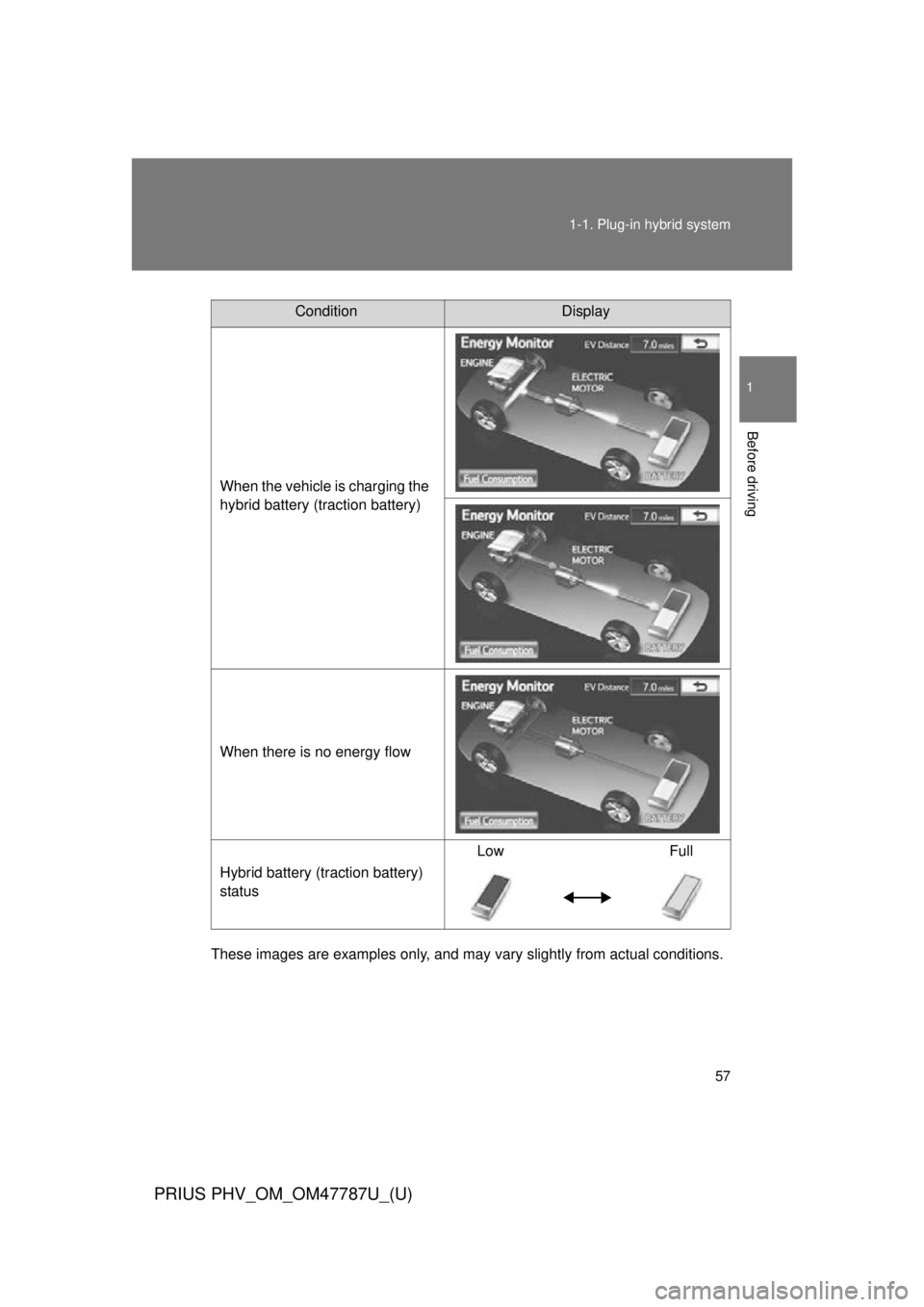
ConditionDisplay
When the vehicle is charging the
hybrid battery (traction battery)
When there is no energy flow
Hybrid battery (traction battery)
status Low Full
Page 59 of 684
59
1-1. Plug-in hybrid system
1
Before driving
PRIUS PHV_OM_OM47787U_(U)
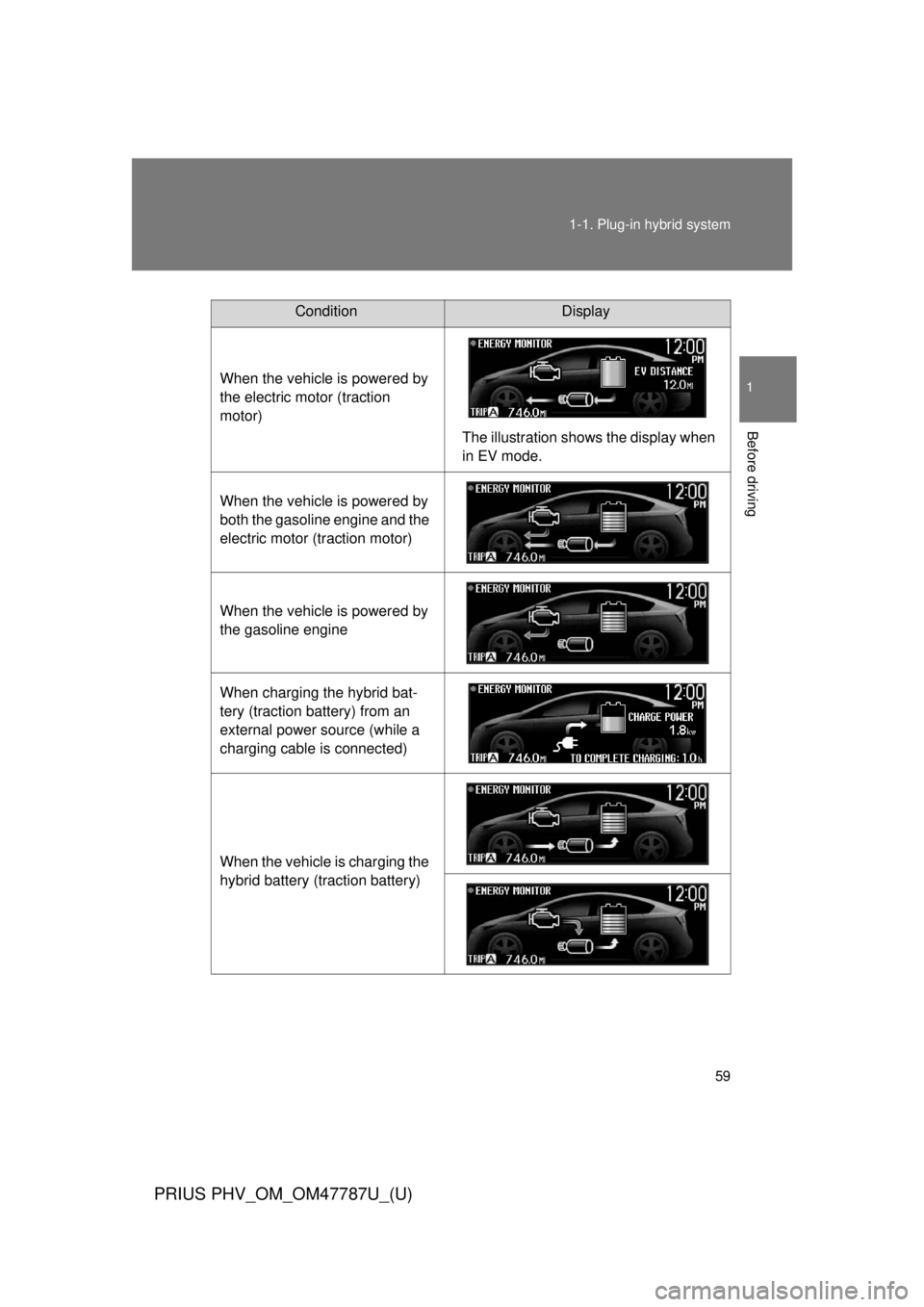
ConditionDisplay
When the vehicle is powered by
the electric motor (traction
motor) The illustration shows the display when
in EV mode.
When the vehicle is powered by
both the gasoline engine and the
electric motor (traction motor)
When the vehicle is powered by
the gasoline engine
When charging the hybrid bat-
tery (traction battery) from an
external power source (while a
charging cable is connected)
When the vehicle is charging the
hybrid battery (traction battery)
Page 68 of 684
68 1-1. Plug-in hybrid system
PRIUS PHV_OM_OM47787U_(U)
■Highway driving
Control your speed and keep at a constant speed. Also, before
stopping at a toll booth or similar, allow plenty of time to release
the accelerator and gently apply the brakes. A greater amount of
electrical energy can be reta ined when slowing down.
Electricity consumptio n will increase substantially when driving
at high speeds in EV mode. If ther e will be a long distance to the
next external charging point afte r leaving a freeway, driving in
HV mode while on the freeway and in EV mode after leaving the
freeway is recommended.
■ Air conditioning on/off
●Switch the air conditioning ( ) to off when it is not
needed. Doing so can help cont rol excessive electricity and
fuel consumption.
In summer: In high temperatures, use the recirculated air
mode. Doing so will help to reduce the burden on the air con-
ditioner and reduce fuel consumption as well.
In winter: Because the gasoli ne engine will not automatically
cut out until the gasoline engine and the interior of the vehicle
are warm, it will consume fuel. Also, fuel consumption can be
improved by avoiding overuse of the heater.
● For efficiency, use the Remo te Air Conditioning System
before departing while the c harging cable is connected.
Page 70 of 684
70
1-1. Plug-in hybrid system
PRIUS PHV_OM_OM47787U_(U)
Plug-in Hybrid Applications
Plug-in Hybrid Applications operationThe following functions can be us ed with the navigation system.
● Download of nearby charging stat ions to the map screen (Type A)
● View list of nearby charging stations and corresponding charging
station information (such as voltage supported) (Type B)
The function of Type B is a function added to Entune.
For details about the function, re fer to http://www.toyota.com/entune/
.
Plug-in Hybrid Applications is a service for plug-in hybrid vehicles.
These are added to the Safety Connect and Entune products.
The contents provide charge su pport, comfort support and drive
support via the vehicle’s navigati on system and the owner’s Smart-
phone.
Both of the following accounts are required for the services.
● Active Safety Connect account
● Active Toyota Entune account
For Safety Connect and Entune, refer to the following page.
Page 71 of 684
71
1-1. Plug-in hybrid system
1
Before driving
PRIUS PHV_OM_OM47787U_(U)
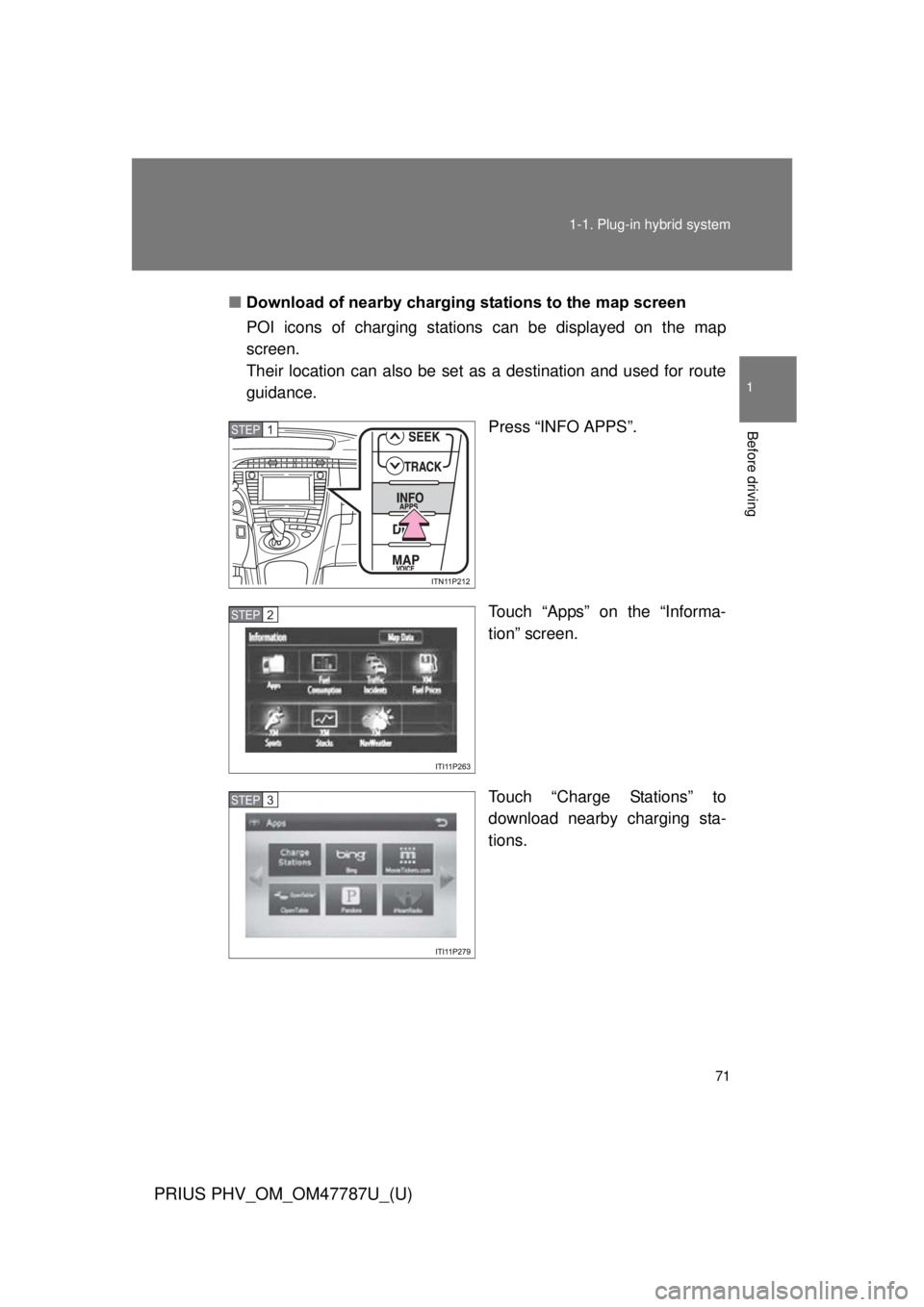
■
Download of nearby charging stations to the map screen
POI icons of charging stations can be displayed on the map
screen.
Their location can also be set as a destination and used for route
guidance.
Press “INFO APPS”.
Touch “Apps” on the “Informa-
tion” screen.
Touch “Charge Stations” to
download nearby charging sta-
tions.
STEP 1
STEP 2
STEP 3
Page 72 of 684
72 1-1. Plug-in hybrid system
PRIUS PHV_OM_OM47787U_(U)
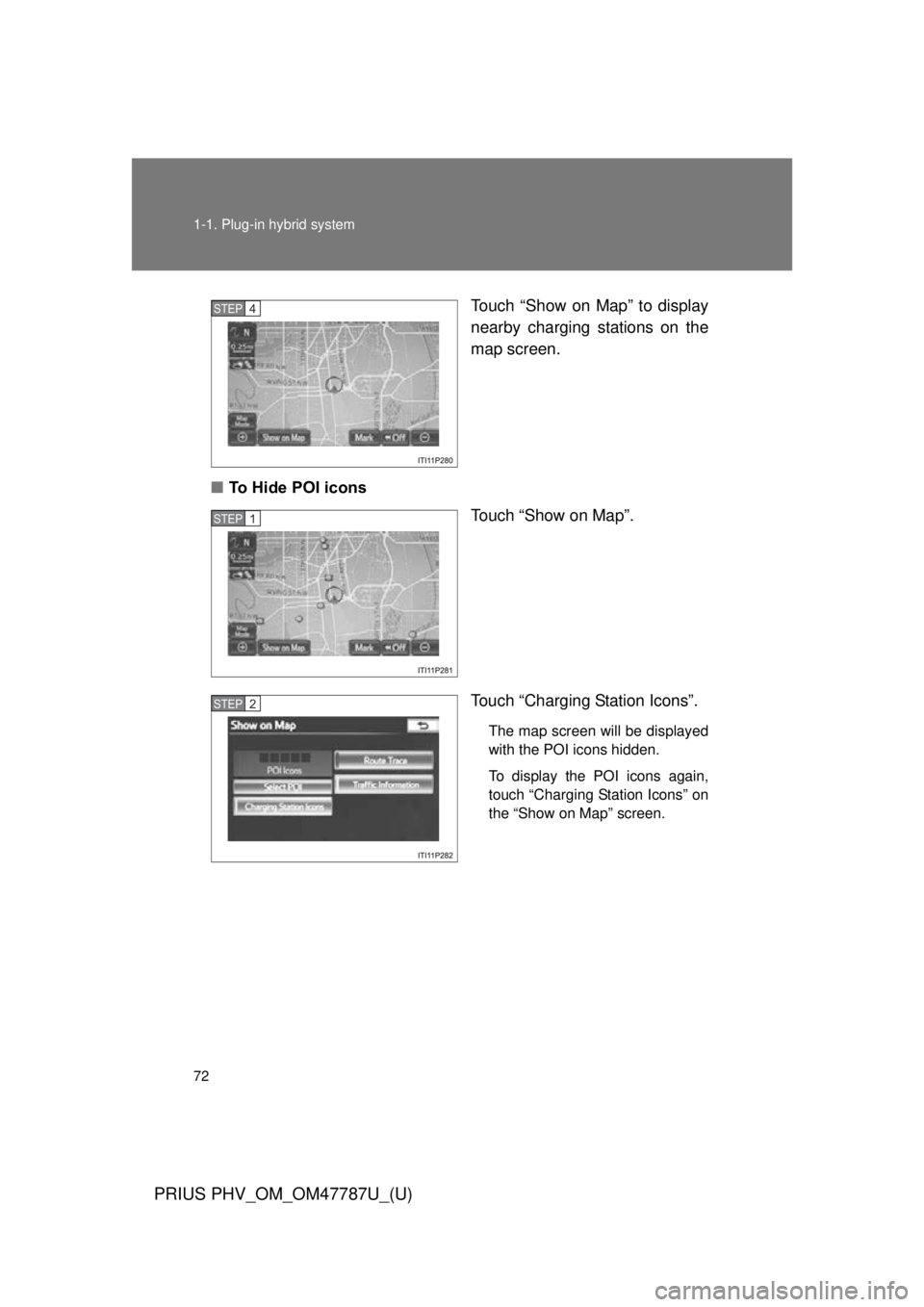
Touch “Show on Map” to display
nearby charging stations on the
map screen.
■ To Hide POI icons
Touch “Show on Map”.
Touch “Charging Station Icons”.
The map screen will be displayed
with the POI icons hidden.
To display the POI icons again,
touch “Charging Station Icons” on
the “Show on Map” screen.
STEP 4
STEP 1
STEP 2
Page 73 of 684
73
1
Before driving
PRIUS PHV_OM_OM47787U_(U)
1-2. Charging
Charging equipment
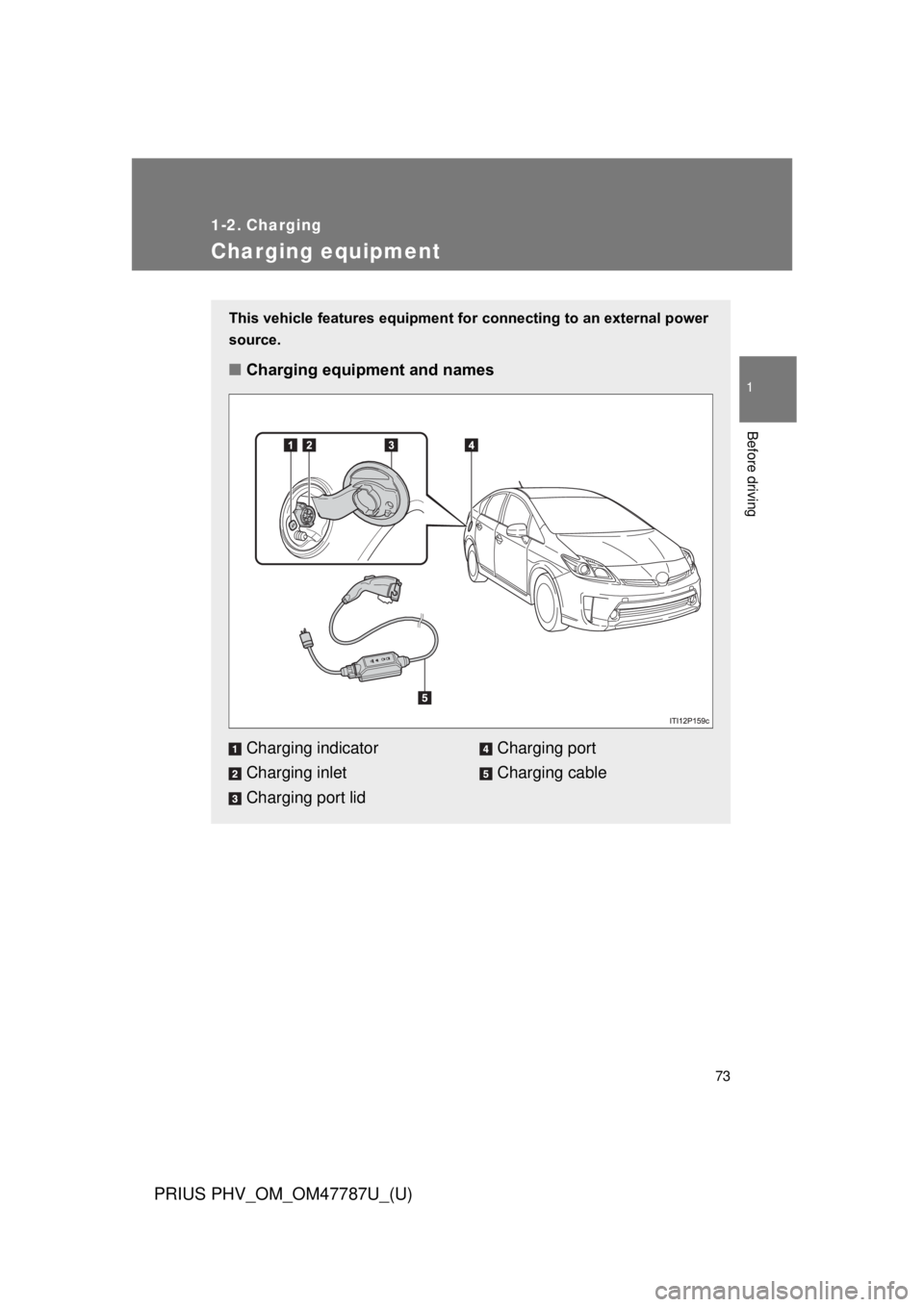
This vehicle features equipment for connecting to an external power
source.
■ Charging equipment and names
Charging indicator
Charging inlet
Charging port lidCharging port
Charging cable
Page 74 of 684
74 1-2. Charging
PRIUS PHV_OM_OM47787U_(U)
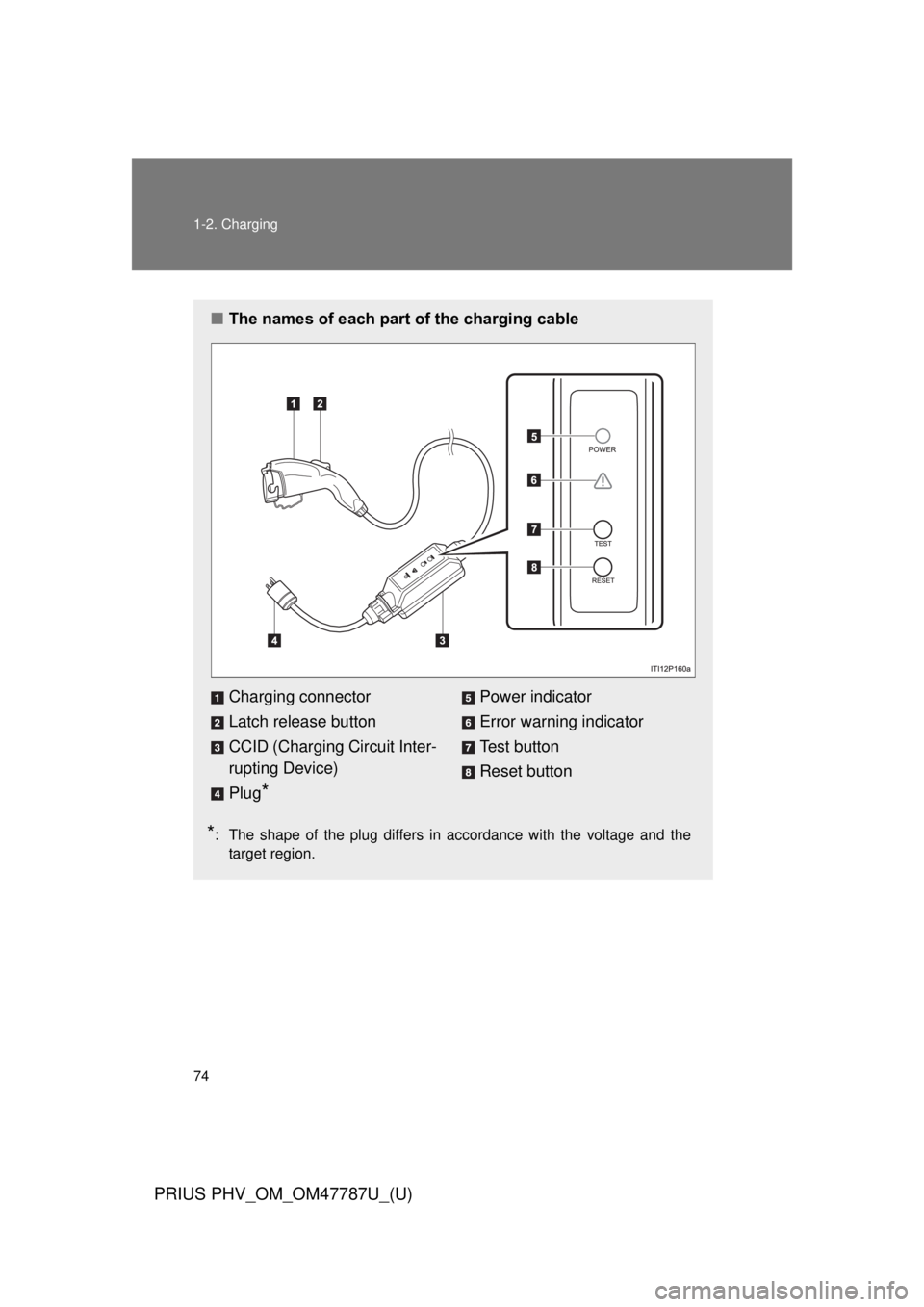
■The names of each part of the charging cable
*: The shape of the plug differs in accordance with the voltage and the
target region.
Charging connector
Latch release button
CCID (Charging Circuit Inter-
rupting Device)
Plug
*
Power indicator
Error warning indicator
Test button
Reset button
Page 75 of 684

75
1-2. Charging
1
Before driving
PRIUS PHV_OM_OM47787U_(U)
Safety functions
The CCID (Charging Circuit Interrupting Device) has the following
safety features.
■ Electrical leakage detection function
If an electrical leakage is de tected during charging, the power
source will be automatically interr upted, thus preventing fires or
electrical shocks caused by electrical leakage.
If the power source is interrupted, the error warning indicator will illumi-
nate.
If the power source is interrupted: P. 102
■ Electrical leakage test function
The electrical leakage detection function can be tested prior to
charging to confirm that it is operating correctly.
When the test button is pressed while the plug is connected to an exter-
nal power source, the error warning indicator should illuminate.
(P. 103)
■ Conditions for supplying current to the vehicle
The CCID (Charging Circuit Interrupting Device) is designed to
prevent electrical current from being supplied to the charging con-
nector when it is not connected to the vehicle, even if the plug is
inserted into the outlet.
Page 76 of 684
76 1-2. Charging
PRIUS PHV_OM_OM47787U_(U)
CAUTION
■When using the charging cable and CCID (Charging Circuit Interrupt-
ing Device)
Observe the following precautions.
If you do not follow them, fire, electrical shock or damage may occur, possi-
bly resulting in death or serious injury.
● Do not attempt to disassemble or repair the charging cable, charging con-
nector, plug or CCID (Charging Circuit Interrupting Device).
If a problem arises with the charging cable or the CCID (Charging Circuit
Interrupting Device), stop charging immediately and contact your Toyota
dealer.
● Do not subject the charging cable, charging connector, plug or CCID
(Charging Circuit Interrupting Device) to strong force or impact.
● Do not forcefully fold the charging cable or damage the charging cable
with sharp objects.
● Do not fold the charging connector or plug or insert foreign objects into
them.
● Do hold the body of the charging connector or plug when removing or
inserting.
● Remove the charging connector from the vehicle’s charging inlet FIRST,
before removing the plug from the outlet.
● Avoid exposure of plug to water or moisture.