change time TOYOTA PRIUS PLUG-IN 2014 User Guide
[x] Cancel search | Manufacturer: TOYOTA, Model Year: 2014, Model line: PRIUS PLUG-IN, Model: TOYOTA PRIUS PLUG-IN 2014Pages: 724, PDF Size: 20.28 MB
Page 138 of 724

95
1-2. Charging
1
Before driving
PRIUS PHV_OM_OM47856U_(U)
■Safety functions
●The hybrid system will not start while the charging cable is attached to
the vehicle, even if the “POWER” switch is operated.
●If the charging cable is connected while the “READY” indicator is illumi-
nated, the hybrid system will stop automatically and driving will not be
possible.
●When the charging cable is connected to the vehicle, the shift position
cannot be changed from P to another position.
●If the latch release button is pressed, charging will not begin even if the
charging cable is connected.
Also, charging will be stopped if the latch release button is pressed and
held for several seconds during charging. When restarting charging, rein-
sert the charging connector after pulling it out, and check that the charg-
ing indicator illuminates.
■For correct operation of the charging timer function
Check the following points.
●Check that the time is correct.
●Check that the “POWER” switch is OFF.
●Do not use a connector which has an electricity interruption function
(including timer functions).
(Use a connector which supplies electricity normally.)
■Automatic cancelation of the charging timer function
●If the Remote Air Conditioning System is operated while the charging
cable is connected, the charging timer function will be canceled. Charg-
ing will commence after the Remote Air Conditioning System has been
turned off.
●Charging will not commence if the “POWER” switch is not OFF, even at
the set time.
Page 164 of 724
121
1-4. Opening, closing and locking the doors
1
Before driving
PRIUS PHV_OM_OM47856U_(U)
■Security feature
If a door is not opened within approximately 60 seconds after the vehicle is
unlocked, the security feature automatically locks the vehicle again.
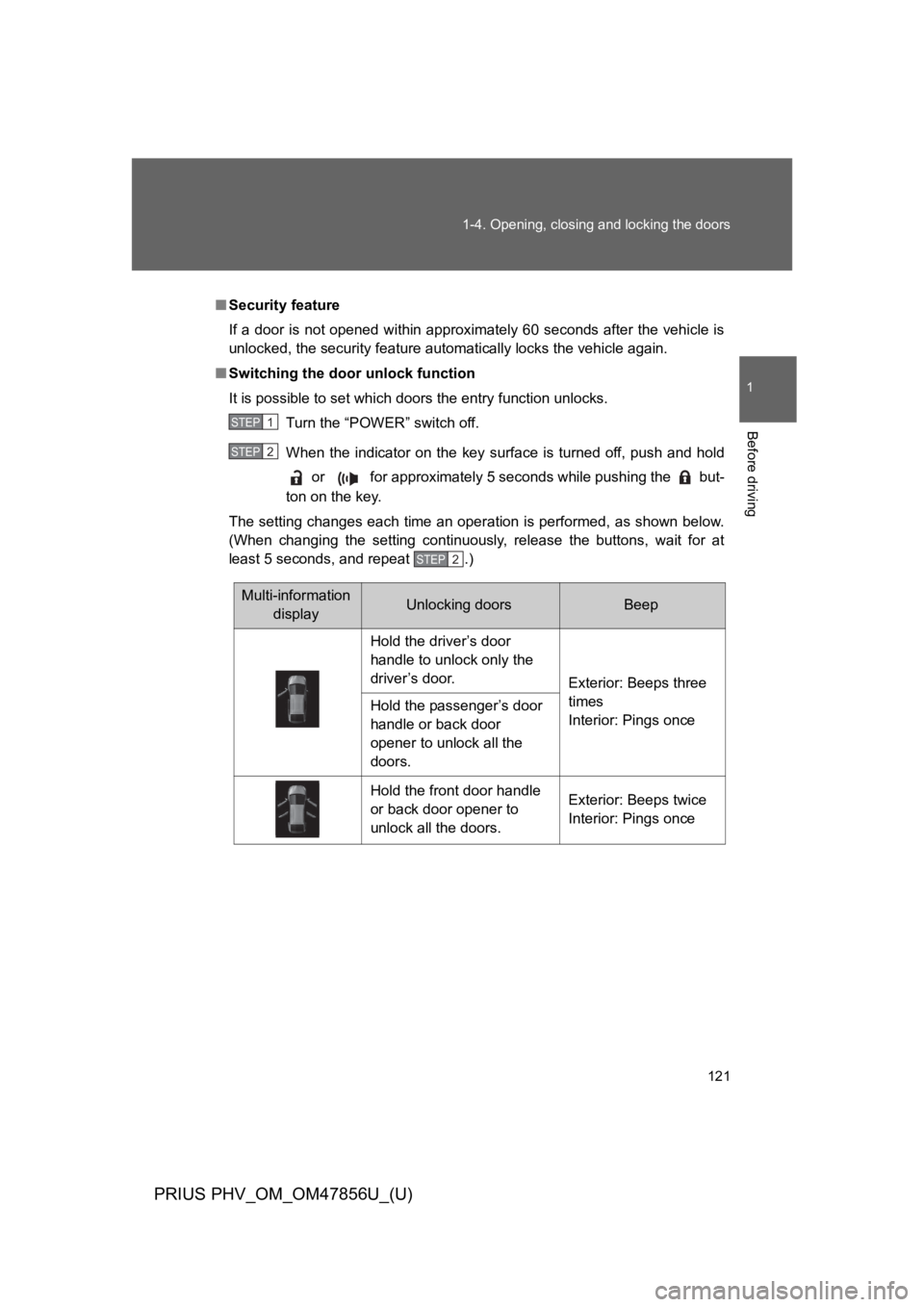
■Switching the door unlock function
It is possible to set which doors the entry function unlocks.
Turn the “POWER” switch off.
When the indicator on the key surface is turned off, push and hold
or for approximately 5 seconds while pushing the but-
ton on the key.
The setting changes each time an operation is performed, as shown below.
(When changing the setting continuously, release the buttons, wait for at
least 5 seconds, and repeat .)
STEP 1
STEP 2
STEP 2
Multi-information
displayUnlocking doorsBeep
Hold the driver’s door
handle to unlock only the
driver’s door.Exterior: Beeps three
times
Interior: Pings onceHold the passenger’s door
handle or back door
opener to unlock all the
doors.
Hold the front door handle
or back door opener to
unlock all the doors.
Exterior: Beeps twice
Interior: Pings once
Page 177 of 724
134
1-4. Opening, closing and locking the doors
PRIUS PHV_OM_OM47856U_(U)
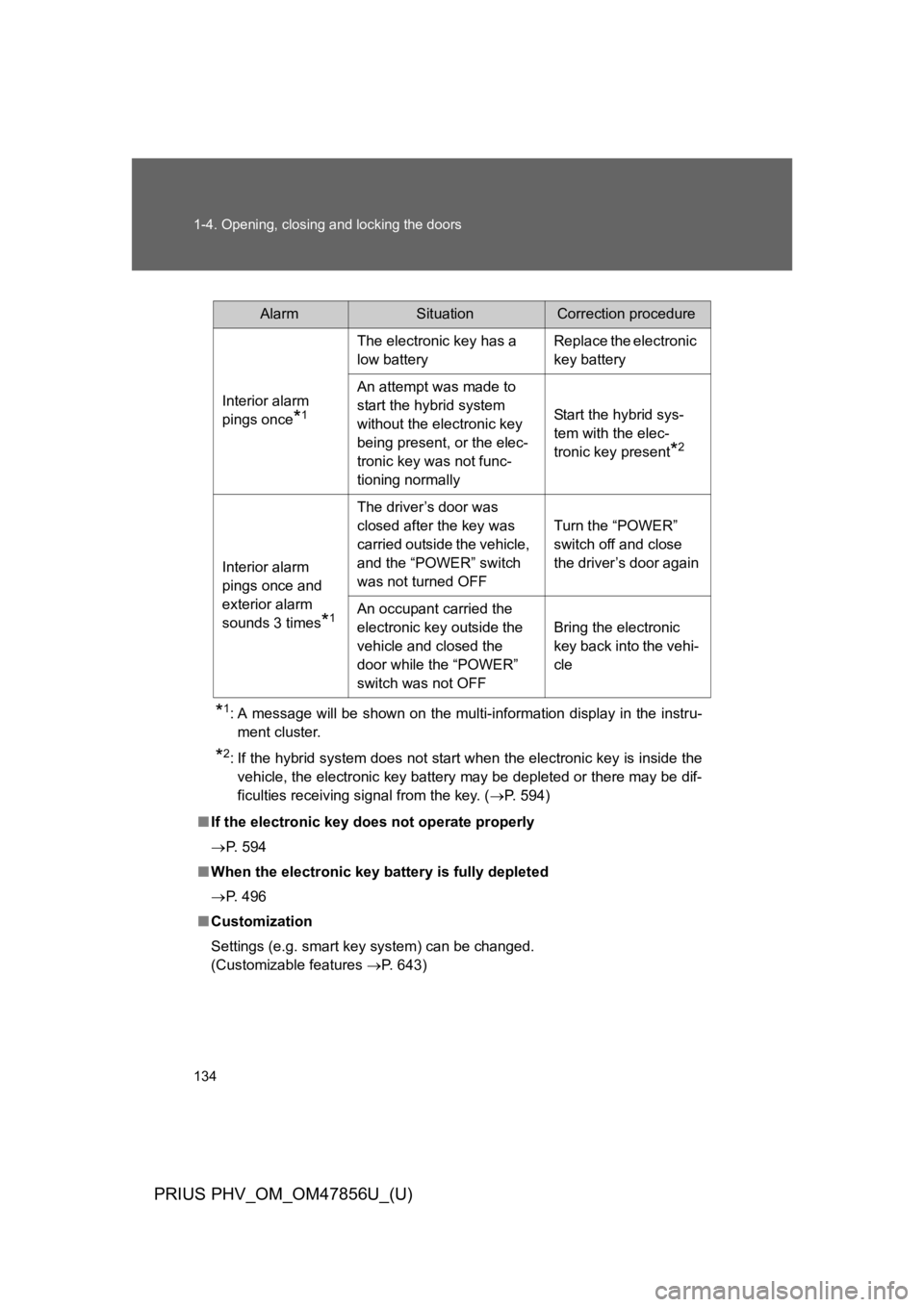
*1:A message will be shown on the multi-information display in the instru-
ment cluster.
*2:If the hybrid system does not start when the electronic key is inside the
vehicle, the electronic key battery may be depleted or there may be dif-
ficulties receiving signal from the key. (→P. 5 9 4 )
■If the electronic key does not operate properly
→P. 5 9 4
■When the electronic key battery is fully depleted
→P. 4 9 6
■Customization
Settings (e.g. smart key system) can be changed.
(Customizable features →P. 6 4 3 )
AlarmSituationCorrection procedure
Interior alarm
pings once*1
The electronic key has a
low battery
Replace the electronic
key battery
An attempt was made to
start the hybrid system
without the electronic key
being present, or the elec-
tronic key was not func-
tioning normally
Start the hybrid sys-
tem with the elec-
tronic key present*2
Interior alarm
pings once and
exterior alarm
sounds 3 times*1
The driver’s door was
closed after the key was
carried outside the vehicle,
and the “POWER” switch
was not turned OFF
Turn the “POWER”
switch off and close
the driver’s door again
An occupant carried the
electronic key outside the
vehicle and closed the
door while the “POWER”
switch was not OFF
Bring the electronic
key back into the vehi-
cle
Page 225 of 724

182
1-7. Refueling
PRIUS PHV_OM_OM47856U_(U)
NOTICE
■Refueling
●Finish refueling within 30 minutes. If more than 30 minutes passes, the
internal valve closes. In this condition, fuel may spill out if you continue to
refuel the vehicle. About 5 minutes after the valve is closed, a message
“CLOSE FUEL LID” will appear on the multi-information display. To refuel
the vehicle again, tighten fuel tank cap and close the fuel filler door, and
then press the fuel filler door opener switch again.
●Do not spill fuel during refueling.
Doing so may damage the vehicle, such as causing the emission control
system to operate abnormally or damaging fuel system components or the
vehicle’s painted surface.
■Notice about fuel
For plug-in hybrid vehicles, fuel may remain in the tank for a long time and
undergo changes in quality depending on the how the vehicle is used.
Refuel at least 5.3 gal.(20 L, 4.4 Imp.gal.) of fuel every 6 months (refuel a
total of at least 5.3 gal. [20 L, 4.4 Imp.gal.] over a 6-month period), as this
may affect components of the fuel system or the gasoline engine.
Page 284 of 724
242
2-1. Driving procedures
PRIUS PHV_OM_OM47856U_(U)
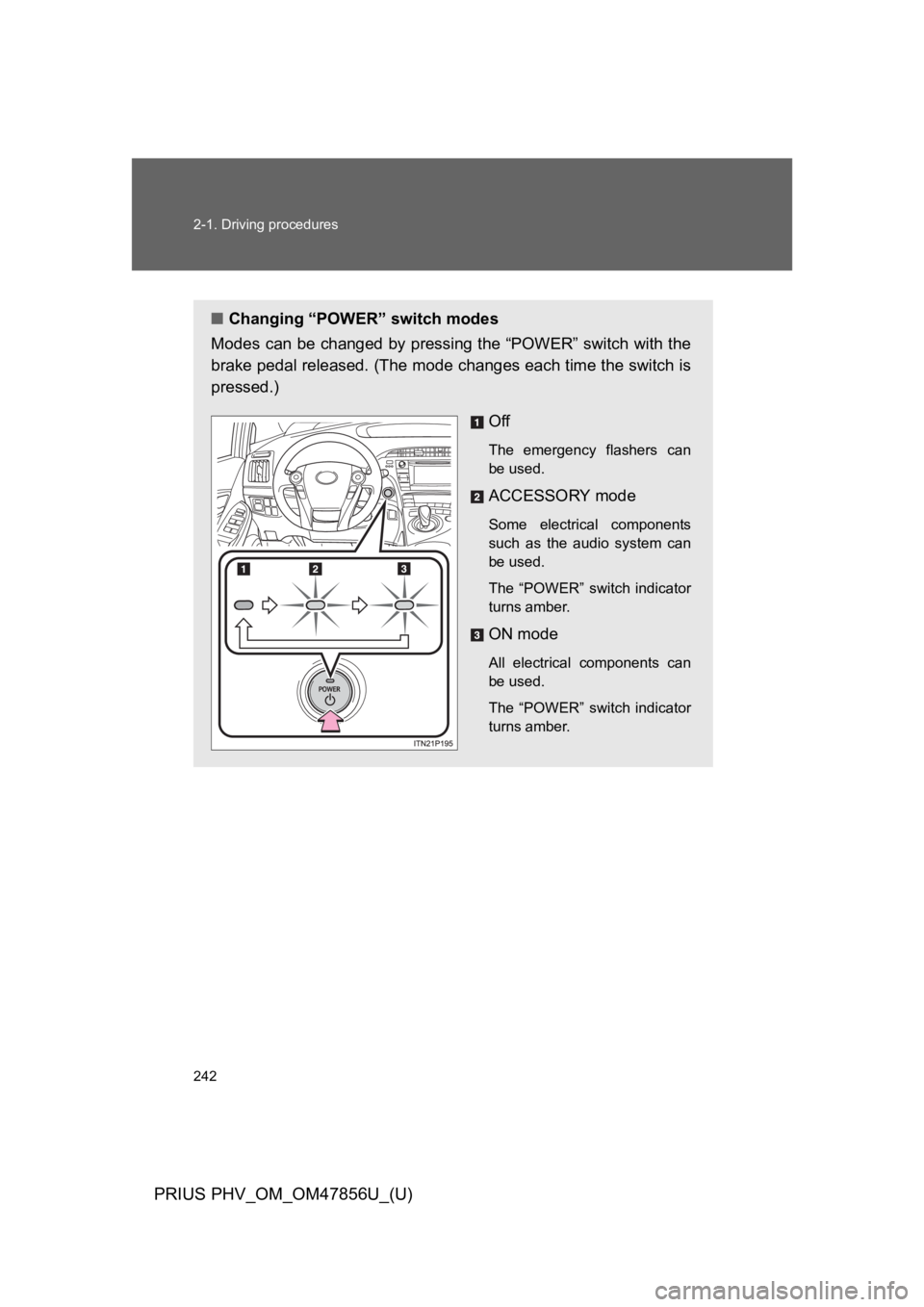
■Changing “POWER” switch modes
Modes can be changed by pressing the “POWER” switch with the
brake pedal released. (The mode changes each time the switch is
pressed.)
Off
The emergency flashers can
be used.
ACCESSORY mode
Some electrical components
such as the audio system can
be used.
The “POWER” switch indicator
turns amber.
ON mode
All electrical components can
be used.
The “POWER” switch indicator
turns amber.
Page 297 of 724
255
2-1. Driving procedures
PRIUS PHV_OM_OM47856U_(U)
2
When driving
NOTICE
■Hybrid battery (traction battery) charge
If the shift position is in N, the hybrid battery (traction battery) will not be
charged. To help prevent the battery from discharging, avoid leaving the N
position selected for an extended period of time.
■Situations where P position control system malfunctions are possible
If any of the following situations occurs, P position control system malfunc-
tions are possible.
Immediately stop the vehicle in a safe place on level ground, apply the park-
ing brake, and then contact your Toyota dealer.
●When the “P LOCK MALFUNCTION” warning message appears on the
multi-information display. (→P. 5 5 0 )
●When the shift position indicator remains off.
■Notes regarding shift lever and P position switch operation
Avoid repeatedly operating the shift lever and P position switch in quick suc-
cession.
The system protection function may activate and it will temporarily not be
possible to shift the shift position other than P. If this happens, please wait
for a while before attempting to change the shift position again.
Page 317 of 724
275
2-2. Instrument cluster
PRIUS PHV_OM_OM47856U_(U)
2
When driving
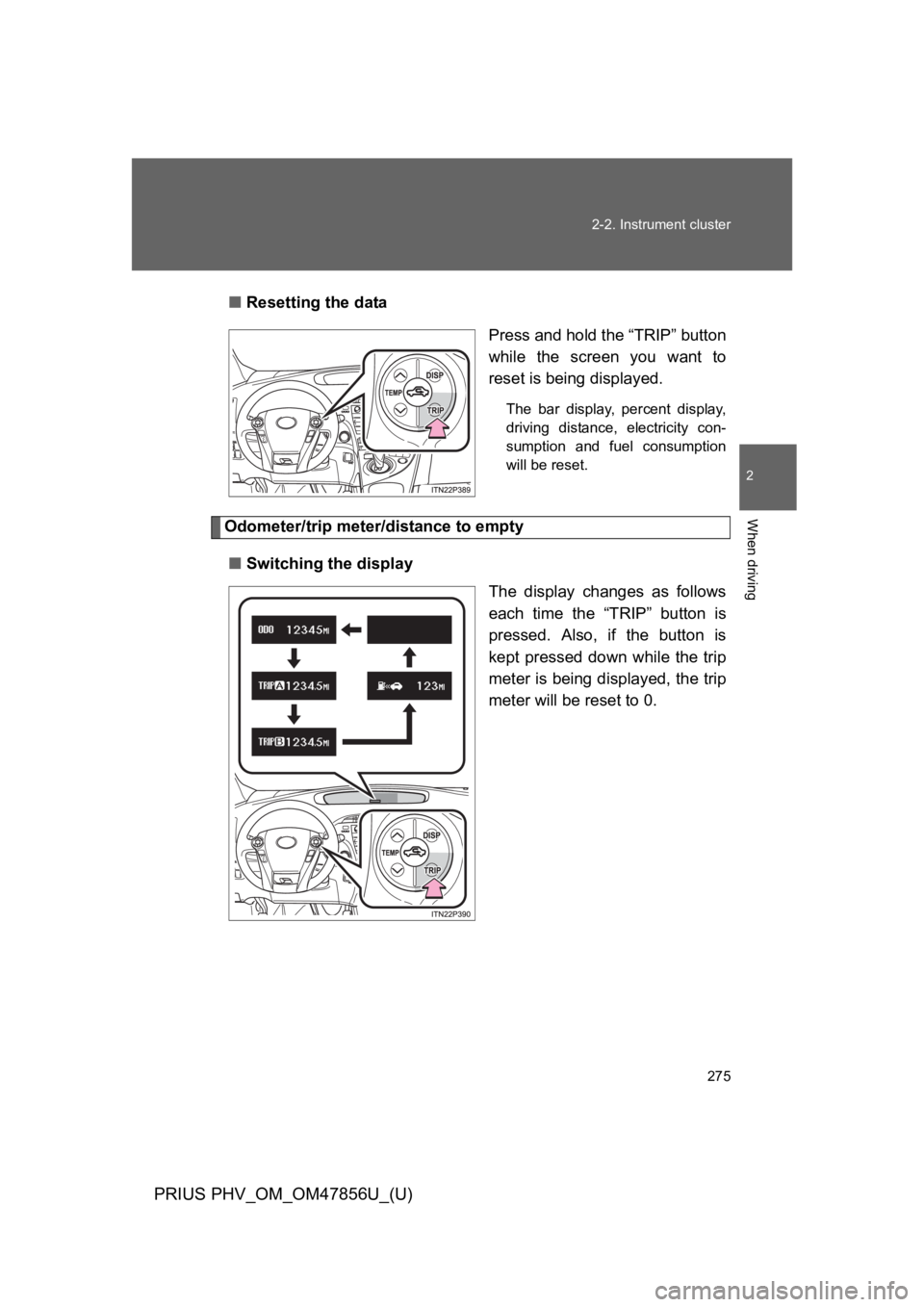
■Resetting the data
Press and hold the “TRIP” button
while the screen you want to
reset is being displayed.
The bar display, percent display,
driving distance, electricity con-
sumption and fuel consumption
will be reset.
Odometer/trip meter/distance to empty
■Switching the display
The display changes as follows
each time the “TRIP” button is
pressed. Also, if the button is
kept pressed down while the trip
meter is being displayed, the trip
meter will be reset to 0.
Page 319 of 724
277
2-2. Instrument cluster
PRIUS PHV_OM_OM47856U_(U)
2
When driving
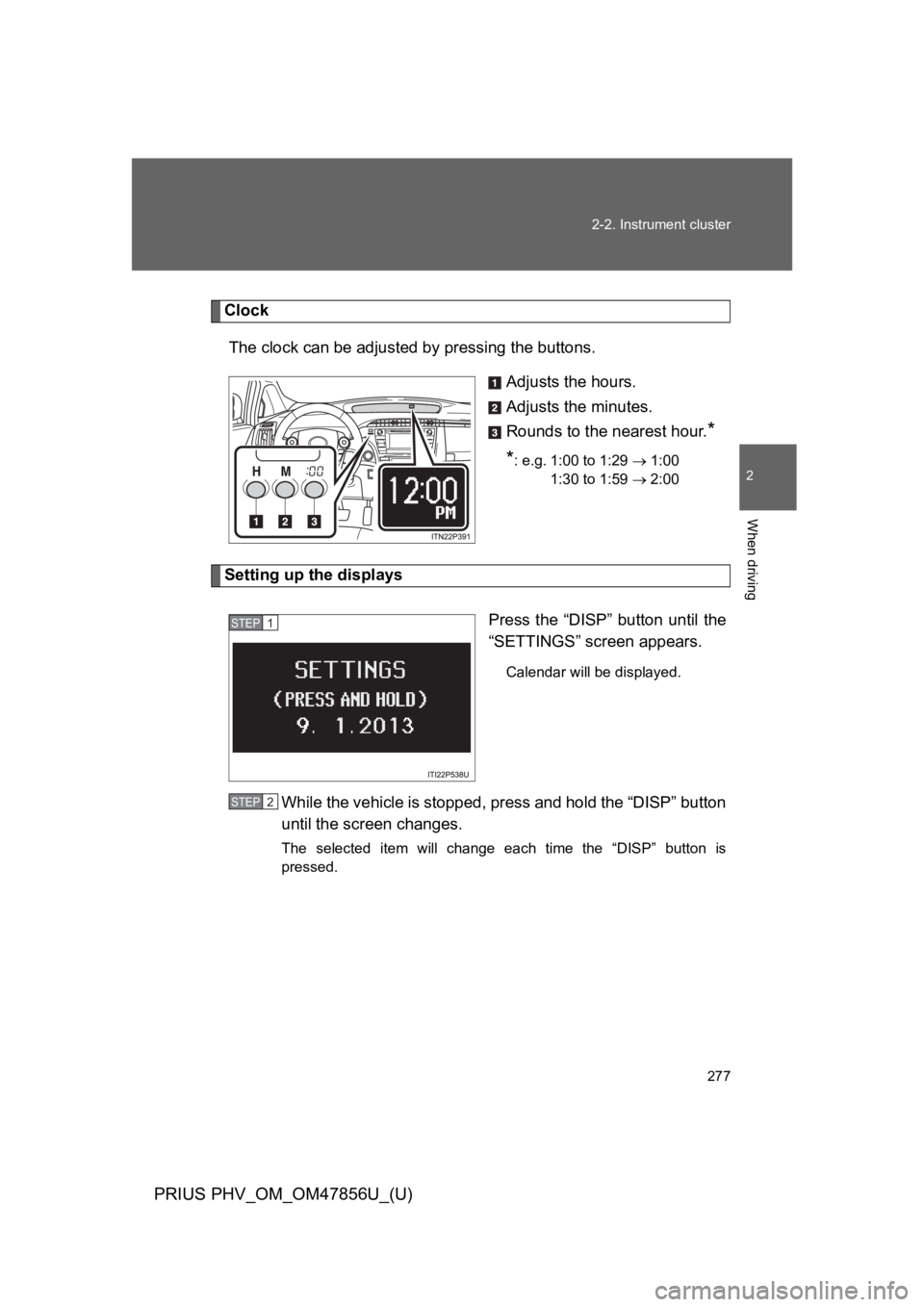
Clock
The clock can be adjusted by pressing the buttons.
Adjusts the hours.
Adjusts the minutes.
Rounds to the nearest hour.*
*: e.g. 1:00 to 1:29 → 1:00
1:30 to 1:59 → 2:00
Setting up the displays
Press the “DISP” button until the
“SETTINGS” screen appears.
Calendar will be displayed.
While the vehicle is stopped, press and hold the “DISP” button
until the screen changes.
The selected item will change each time the “DISP” button is
pressed.
STEP 1
STEP 2
Page 327 of 724
285
2-2. Instrument cluster
PRIUS PHV_OM_OM47856U_(U)
2
When driving
■Driving in Eco drive mode
The multi-information display will automatically switch the display to Hybrid
System Indicator, regardless of which display is currently being shown.
(→P. 2 7 0 )
■To u c h t r a c e r d i s p l a y ( i f e q u i p p e d )
●The touch tracer display can be set to not display even if the steering
switches are touched.
●Only the circular, rubber-covered switches have a built-in touch sensor.
To u c h i n g a n y o f t h e o t h e r s w i t c h e s w i l l n o t d i s p l a y t h e t o u c h t r a c e r d i s -
play.
■Display settings can be changed when
The vehicle speed is less than approximately 5 mph (8 km/h).
■Engine speed
On hybrid vehicles, engine speed is precisely controlled in order to help
improve fuel efficiency and reduce exhaust emissions etc. There are times
when the engine speed that is displayed may differ even when vehicle oper-
ation and driving conditions are the same.
■When the 12-volt battery is disconnected
The following data will be reset.
●Average fuel consumption
●Distance to empty
●Average vehicle speed
●EV driving ratio
●Clock
●Display settings
●Trip meter
Page 334 of 724
292
2-2. Instrument cluster
PRIUS PHV_OM_OM47856U_(U)
■When driving on snowy roads or in other bright environments
When the highest level of brightness has been reached, the display can be
made even brighter by pressing and holding “∧” on the brightness control
button.
Pressing “∨” on the brightness control button or turning the “POWER” switch
off will cause the brightness level to revert to the original level.
■Display speed setting function
The speedometer can be set to display only when a desired vehicle speed is
reached.
Press and hold the “HUD” main switch while the vehicle is stopped
and while the head-up display is showing only the speedometer.
The speedometer will begin to flash.
Set the desired display speed on the speedometer by pressing “∧”
and “∨” on the display position adjustment button.
Press “∧” to raise the speed and “∨” to lower. The speed will change
by 1 mph (1.6 km/h) each time the button is pressed, and continu-
ously by 10 mph (16 km/h) when the button is pressed and held.
Press and hold the “HUD” main switch to finish setting.
■Head-up display
The head-up display may seem dark and hard to see when viewed through
sunglasses, especially polarized sunglasses.
Adjust the brightness of the head-up display or remove your sunglasses.
■When the 12-volt battery is disconnected
The head-up display settings will be reset.
STEP 1
STEP 2
STEP 3