key TOYOTA PRIUS PLUG-IN 2014 Workshop Manual
[x] Cancel search | Manufacturer: TOYOTA, Model Year: 2014, Model line: PRIUS PLUG-IN, Model: TOYOTA PRIUS PLUG-IN 2014Pages: 724, PDF Size: 20.28 MB
Page 630 of 724
5
When trouble arises
591
5-2. Steps to take in an emergency
PRIUS PHV_OM_OM47856U_(U)
If the hybrid system will not start
Reasons for the hybrid system not starting vary depending on the
situation. Check the following and perform the appropriate proce-
dure:
■The hybrid system will not start even though the correct
starting procedure is being followed (→P. 2 4 0 )
One of the following may be the cause of the problem:
●The charging cable may be attached to the vehicle. (→P. 9 5 )
●The electronic key may not be functioning properly.*
(→P. 5 9 4 )
●There may not be sufficient fuel in the vehicle’s tank.
Refuel the vehicle. (→P. 4 6 )
●There may be a malfunction in the immobilizer system.*
(→P. 1 8 3 )
●There may be a malfunction in the P position control system.*
(→P. 2 4 5 , 5 5 0 )
*:It may not be possible to shift the shift position from P to other posi-
tion.
■The interior lights and headlights are dim, or the horn does
not sound or sounds at a low volume
One of the following may be the cause of the problem:
●The 12-volt battery may be discharged. (→P. 5 9 7 )
●The 12-volt battery terminal connections may be loose or cor-
roded.
Page 632 of 724

5
When trouble arises
593
5-2. Steps to take in an emergency
PRIUS PHV_OM_OM47856U_(U)
If you lose your keys
New genuine keys can be made by your Toyota dealer using the
other key and the key number stamped on your key number plate.
Page 633 of 724
594
5-2. Steps to take in an emergency
PRIUS PHV_OM_OM47856U_(U)
If the electronic key does not operate properly
Locking and unlocking the doors
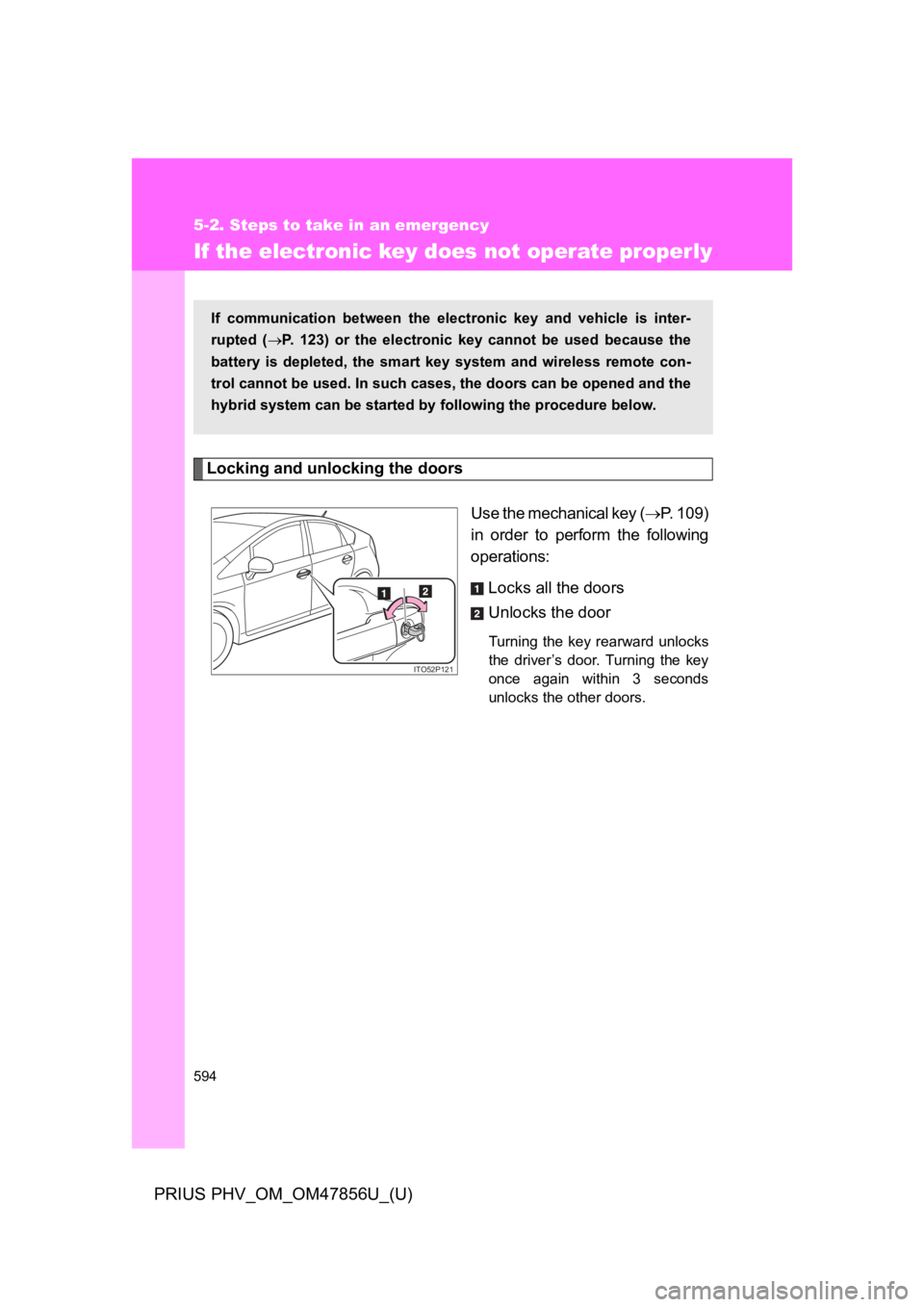
Use the mechanical key (→P. 1 0 9 )
in order to perform the following
operations:
Locks all the doors
Unlocks the door
Turning the key rearward unlocks
the driver’s door. Turning the key
once again within 3 seconds
unlocks the other doors.
If communication between the electronic key and vehicle is inter-
rupted (→P. 1 2 3 ) o r t h e e l e c t r o n i c k e y cannot be used because the
battery is depleted, the smart key system and wireless remote con-
trol cannot be used. In such cases, the doors can be opened and the
hybrid system can be started by following the procedure below.
ITO52P121
Page 634 of 724
5
When trouble arises
595
5-2. Steps to take in an emergency
PRIUS PHV_OM_OM47856U_(U)
Starting the hybrid system
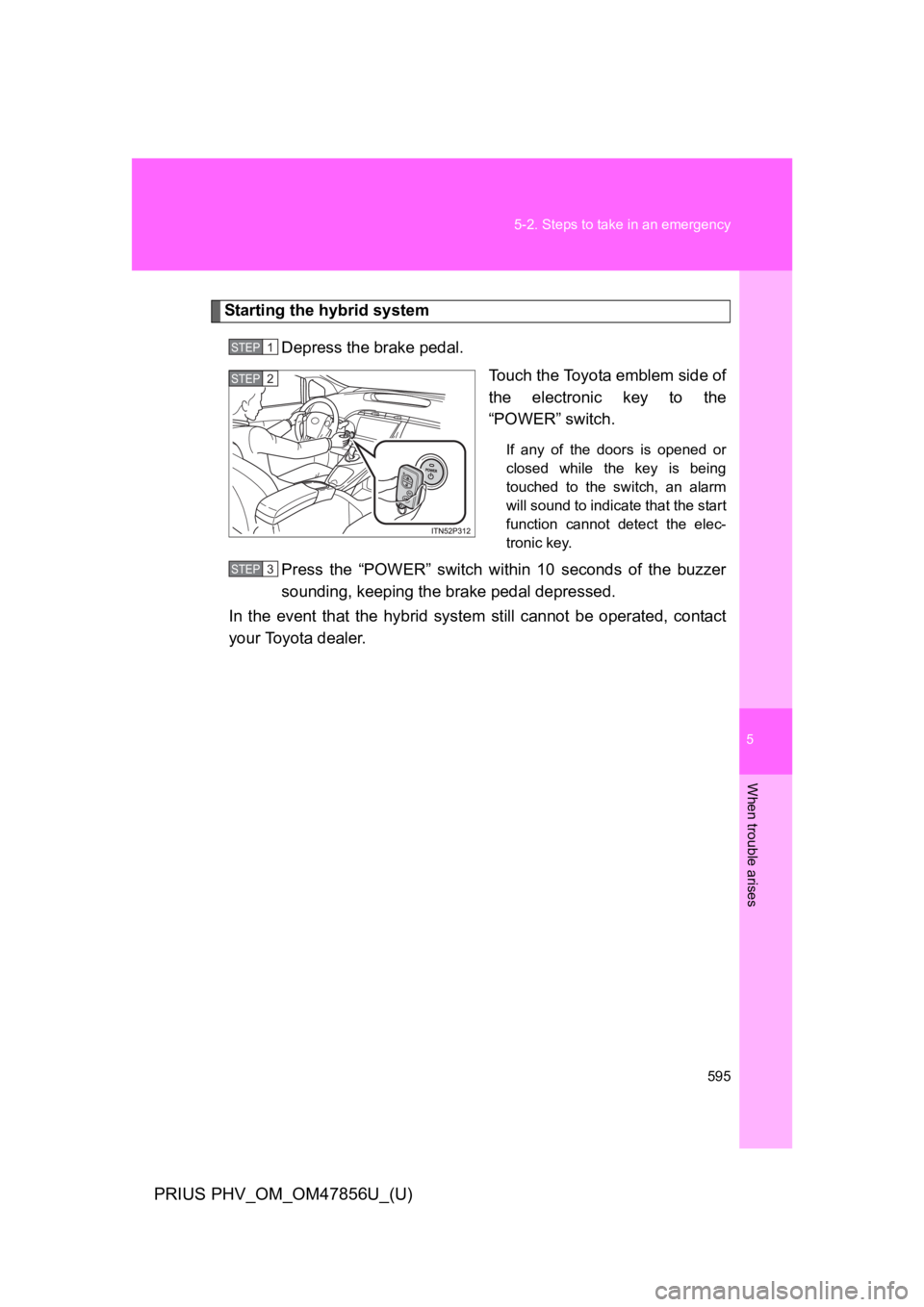
Depress the brake pedal.
To u c h t h e To y o t a e m b l e m s i d e o f
the electronic key to the
“POWER” switch.
If any of the doors is opened or
closed while the key is being
touched to the switch, an alarm
will sound to indicate that the start
function cannot detect the elec-
tronic key.
Press the “POWER” switch within 10 seconds of the buzzer
sounding, keeping the brake pedal depressed.
In the event that the hybrid system still cannot be operated, contact
your Toyota dealer.
STEP 1
STEP 2
STEP 3
Page 635 of 724

596
5-2. Steps to take in an emergency
PRIUS PHV_OM_OM47856U_(U)
■Stopping the hybrid system
Set the parking brake, shift the shift position to P and press the “POWER”
switch as you normally do when stopping the hybrid system.
■Replacing the key battery
As the above procedure is a temporary measure, it is recommended that the
electronic key battery be replaced immediately when the battery is depleted.
(→P. 4 9 6 )
■Changing “POWER” switch modes
Within 10 seconds of the buzzer sounding, release the brake pedal and
press the “POWER” switch.
The hybrid system does not start and modes will be changed each time the
switch is pressed. (→P. 2 4 2 )
Page 682 of 724

644
6-2. Customization
PRIUS PHV_OM_OM47856U_(U)
ItemFunctionDefault
setting
Custom-
ized
setting
Smart key
system
(→P. 1 1 2 )
Smart key
systemON OFF O O O
Select doors to
unlock
Driver’s
doorAll doors O O O
Wireless
remote
control
(→P. 1 3 6 )
Wireless remote
control ON OFF – – O
Unlocking
operation
Driver’s
door
unlocked in
1-step, all
doors
unlocked
in 2-step
All doors
unlocked
in 1-step
OOO
Panic function ON OFF – – O
Buzzer sounds
when pushing
with any
door not closed
ON OFF – – O
Page 683 of 724
645
6-2. Customization
6
Vehicle specifications
PRIUS PHV_OM_OM47856U_(U)
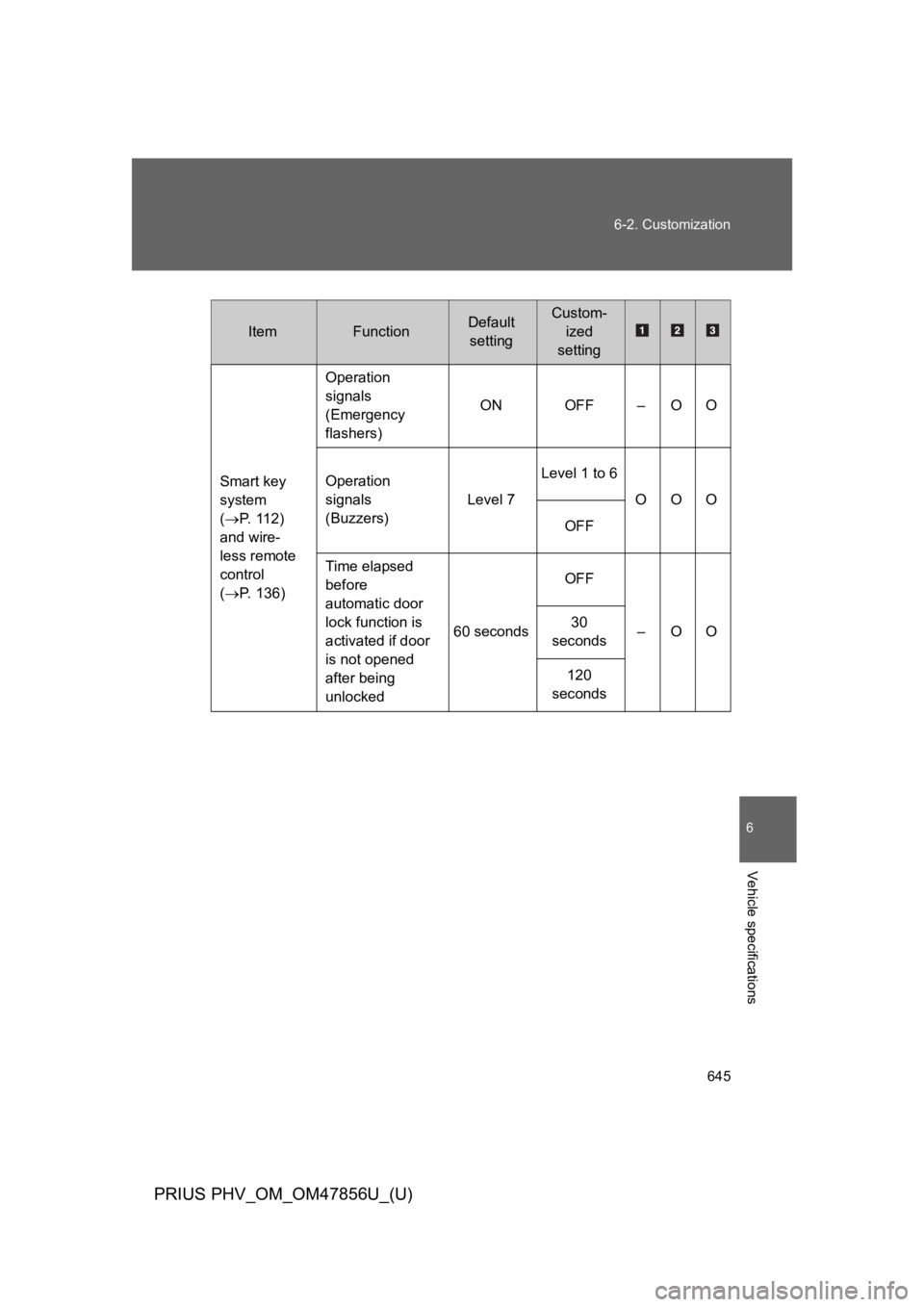
ItemFunctionDefault
setting
Custom-
ized
setting
Smart key
system
(→P. 1 1 2 )
and wire-
less remote
control
(→P. 1 3 6 )
Operation
signals
(Emergency
flashers)
ON OFF – O O
Operation
signals
(Buzzers)
Level 7
Level 1 to 6
OOO
OFF
Time elapsed
before
automatic door
lock function is
activated if door
is not opened
after being
unlocked
60 seconds
OFF
–OO30
seconds
120
seconds
Page 684 of 724

646
6-2. Customization
PRIUS PHV_OM_OM47856U_(U)
*:This function cannot be customized for vehicles sold in Canada.
ItemFunctionDefault set-
ting
Custom-
ized
setting
Door lock
(→P. 1 3 8 ,
594)
Unlocking using
a key
Driver’s
door
unlocked in
1-step, all
doors
unlocked in
2-step
All doors
unlocked in
1-step
–OO
Speed-detecting
automatic door
lock function
OFF ON O O O
Shifting the shift
position to any
position other
than P locks all
doors
ON OFF O O O
Shifting the shift
position to P
unlocks all doors
ON OFF O O O
Opening driver’s
door unlocks all
doors
OFF ON – O O
Automatic
light control
system
(→P. 2 9 4 )
Light sensor
sensitivityLevel 3Levels 1 to
5OOO
Time elapsed
before head-
lights automati-
cally turn off after
doors are closed
30 seconds
0 seconds
OOO60 seconds
90 seconds
Daytime running
lights*ON OFF O O O
Page 685 of 724
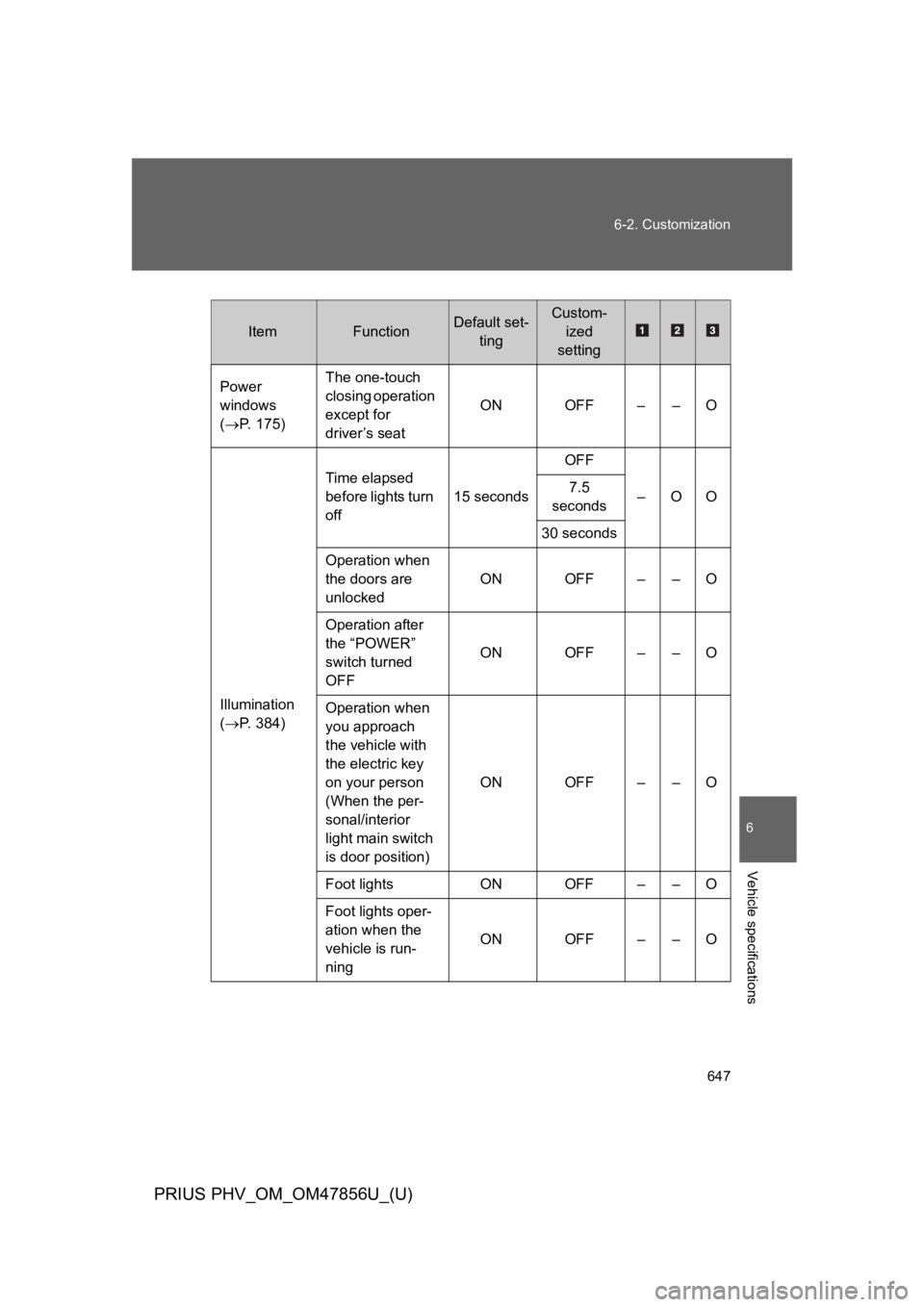
647
6-2. Customization
6
Vehicle specifications
PRIUS PHV_OM_OM47856U_(U)
ItemFunctionDefault set-
ting
Custom-
ized
setting
Power
windows
(→P. 1 7 5 )
The one-touch
closing operation
except for
driver’s seat
ON OFF – – O
Illumination
(→P. 3 8 4 )
Time elapsed
before lights turn
off
15 seconds
OFF
–OO7.5
seconds
30 seconds
Operation when
the doors are
unlocked
ON OFF – – O
Operation after
the “POWER”
switch turned
OFF
ON OFF – – O
Operation when
you approach
the vehicle with
the electric key
on your person
(When the per-
sonal/interior
light main switch
is door position)
ON OFF – – O
Foot lights ON OFF – – O
Foot lights oper-
ation when the
vehicle is run-
ning
ON OFF – – O
Page 709 of 724

673
Alphabetical index
PRIUS PHV_OM_OM47856U_(U)
Back door
Back door ............................. 144
Smart key system ................. 112
Wireless remote control........ 136
Back-up lights
Replacing light bulbs ............ 510
Wattage ................................ 624
Battery
Checking .............................. 474
If the 12-volt battery is
discharged ......................... 597
Preparing and checking
before winter ...................... 351
Bluetooth®*
Bottle holders .......................... 392
Brake
Fluid...................................... 623
Parking brake ....................... 257
Brake assist ............................. 330
Break-in tips ............................ 228
Brightness control
Instrument panel light
control ................................ 262
Camera*
Care
Exterior ..................................426
Interior ...................................430
Seat belts ..............................431
Cargo capacity .........................350
Cargo hooks .............................405
CD player*
Chains .......................................353
Charging
Charging cable ........................78
Charging equipment ................77
Charging messages ..............565
Charging precautions ..............98
Charging procedure ................84
Charging timer function ...........90
Charging time will
increase when.......................97
High voltage components........44
Information related to
charging display ....................93
Maintenance..........................107
Power sources precautions .....83
Power sources that can be
used ......................................81
Safety functions.................79, 95
When charging cannot be
carried out ...........................102
BC
*:Refer to “DISPLAY AUDIO SYSTEM OWNER’S MANUAL”
or “NAVIGATION SYSTEM OWNER’S MANUAL”.