steering TOYOTA PRIUS PLUG-IN HYBRID 2017 User Guide
[x] Cancel search | Manufacturer: TOYOTA, Model Year: 2017, Model line: PRIUS PLUG-IN HYBRID, Model: TOYOTA PRIUS PLUG-IN HYBRID 2017Pages: 744, PDF Size: 84.41 MB
Page 45 of 744
451-1. For safe use
1
PRIUS PHV_OM_OM47A89E_(EE)
For safety and security
■If the SRS airbags deploy (inflate)
● Slight abrasions, burns, bruising etc., may be sustained from SRS airbags,
due to the extremely high speed deployment (inflation) by hot gases.
● A loud noise and white powder will be emitted.
● Parts of the airbag module (steering wheel hub, airbag cover and inflator) as
well as the front seats, parts of the front and rear pillars, and roof side rails,
may be hot for several minutes. The airbag itself may also be hot.
● The windshield may crack.
■ SRS airbag deployment conditions (SRS front airbags)
● The SRS front airbags will deploy in the event of an impact that exceeds the
set threshold level (the level of force corresponding to an approximately 20 -
30 km/h [12 - 18 mph] frontal collision with a fixed wall that does not move or
deform).
However, this threshold velocity will be considerably higher in the following
situations:
• If the vehicle strikes an object, such as a parked vehicle or sign pole,
which can move or deform on impact
• If the vehicle is involved in an underride collision, such as a collision in
which the front of the vehicle “underrides”, or goes under, the bed of a
truck
● Depending on the type of collision, it is possible that only the seat belt pre-
tensioners will activate.
■ SRS airbag deployment conditions (SRS side and curtain shield airbags)
● The SRS side and curtain shield airbags will deploy in the event of an
impact that exceeds the set threshold level (the level of force corresponding
to the impact force produced by an approximately 1500 kg [3300 lb.] vehicle
colliding with the vehicle cabin from a direction perpendicular to the vehicle
orientation at an approximate speed of 20 - 30 km/h [12 - 18 mph]).
● The SRS side and curtain shield airbags will deploy in the event of a severe
frontal collision.
Page 48 of 744
481-1. For safe use
PRIUS PHV_OM_OM47A89E_(EE)
■ When to contact any authorized Toyota dealer or repairer, or another
duly qualified and equipped professional
In the following cases, the vehicle will require inspection and/or repair. Con-
tact any authorized Toyota dealer or repairer, or another duly qualified and
equipped professional as soon as possible.
● Any of the SRS airbags have been inflated.
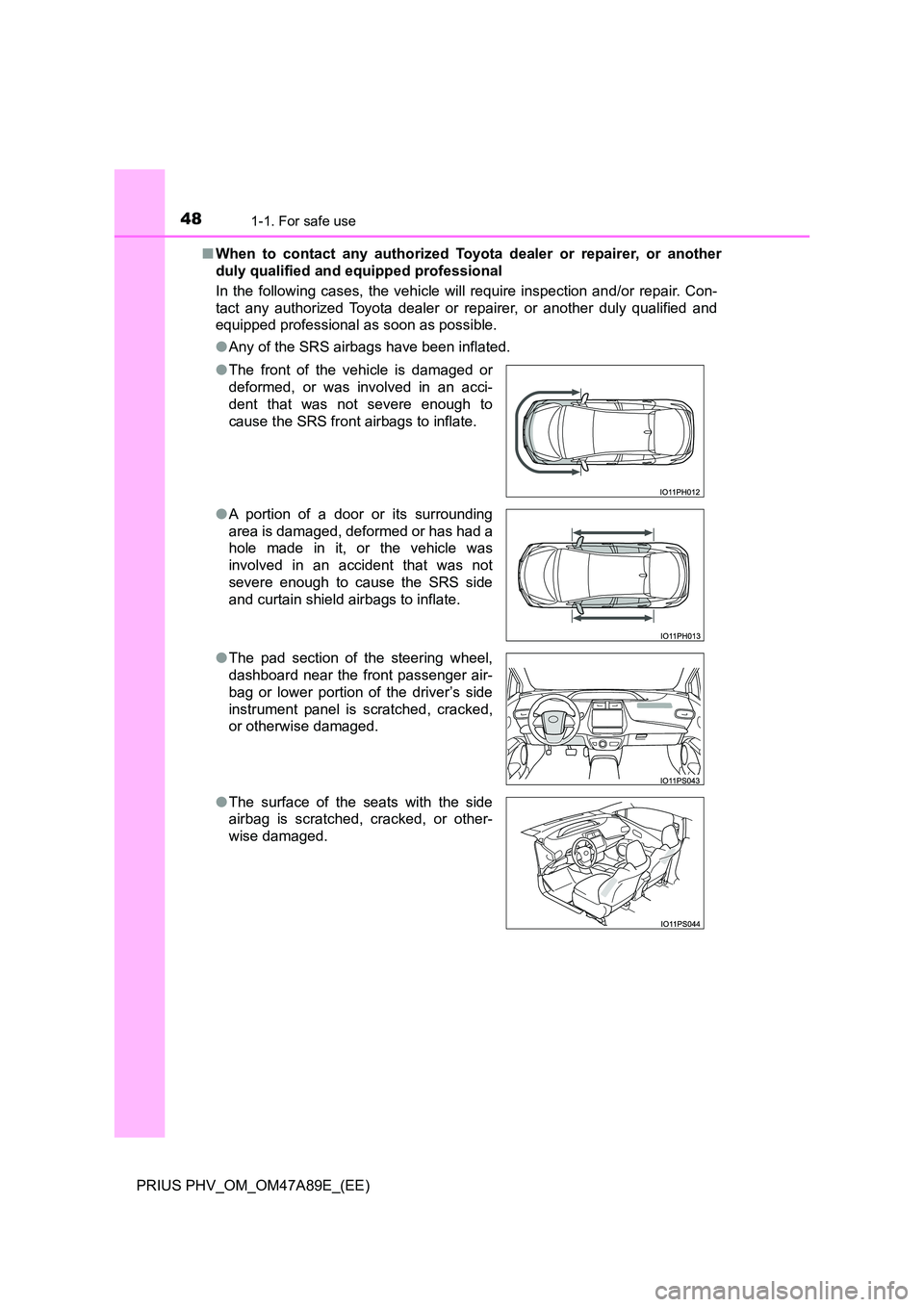
● The front of the vehicle is damaged or
deformed, or was involved in an acci-
dent that was not severe enough to
cause the SRS front airbags to inflate.
● A portion of a door or its surrounding
area is damaged, deformed or has had a
hole made in it, or the vehicle was
involved in an accident that was not
severe enough to cause the SRS side
and curtain shield airbags to inflate.
● The pad section of the steering wheel,
dashboard near the front passenger air-
bag or lower portion of the driver’s side
instrument panel is scratched, cracked,
or otherwise damaged.
● The surface of the seats with the side
airbag is scratched, cracked, or other-
wise damaged.
Page 84 of 744
841-3. Theft deterrent system
PRIUS PHV_OM_OM47A89E_(EE)
The intrusion sensor detects intruders or movement in the vehicle.
This system is designed to deter and prevent vehicle theft but does
not guarantee absolute security against all intrusions.
■Setting the intrusion sensor
The intrusion sensor will be set automatically when the alarm is set.
( P. 8 1 )
■Canceling the intrusion sensor
If you are leaving pets or other moving things inside the vehicle,
make sure to disable the intrusion sensor before setting the alarm,
as they will respond to movement inside the vehicle.
Turn the power switch off.
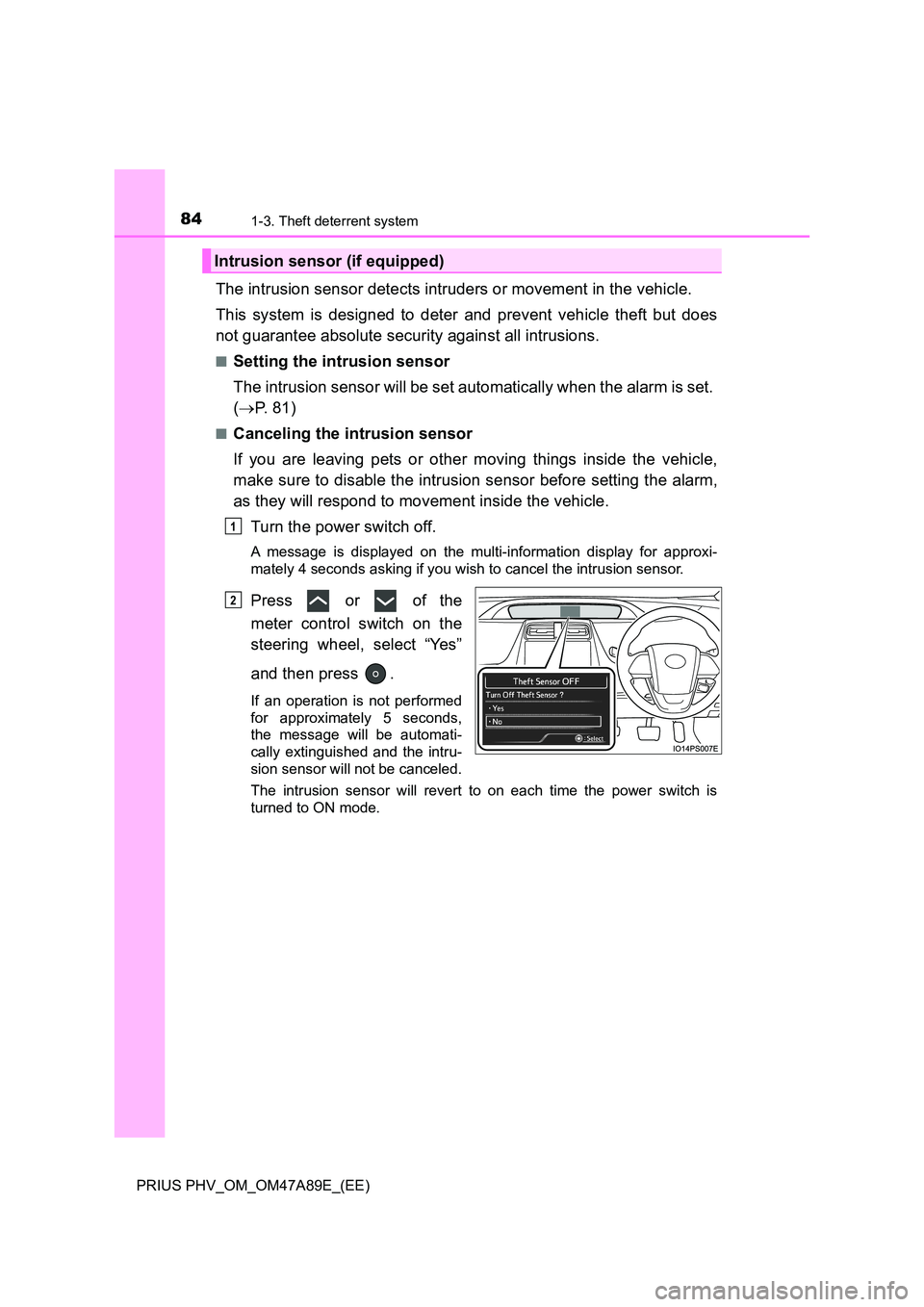
A message is displayed on the multi-information display for approxi-
mately 4 seconds asking if you wish to cancel the intrusion sensor.
Press or of the
meter control switch on the
steering wheel, select “Yes”
and then press .
If an operation is not performed
for approximately 5 seconds,
the message will be automati-
cally extinguished and the intru-
sion sensor will not be canceled.
The intrusion sensor will revert to on each time the power switch is
turned to ON mode.
Intrusion sensor (if equipped)
1
2
Page 191 of 744
1913. Instrument cluster
3
Instrument cluster
PRIUS PHV_OM_OM47A89E_(EE)
The meter control switches equipped on the steering wheel can be
used to switch the screen display and change settings related to func-
tions displayed on the screen.
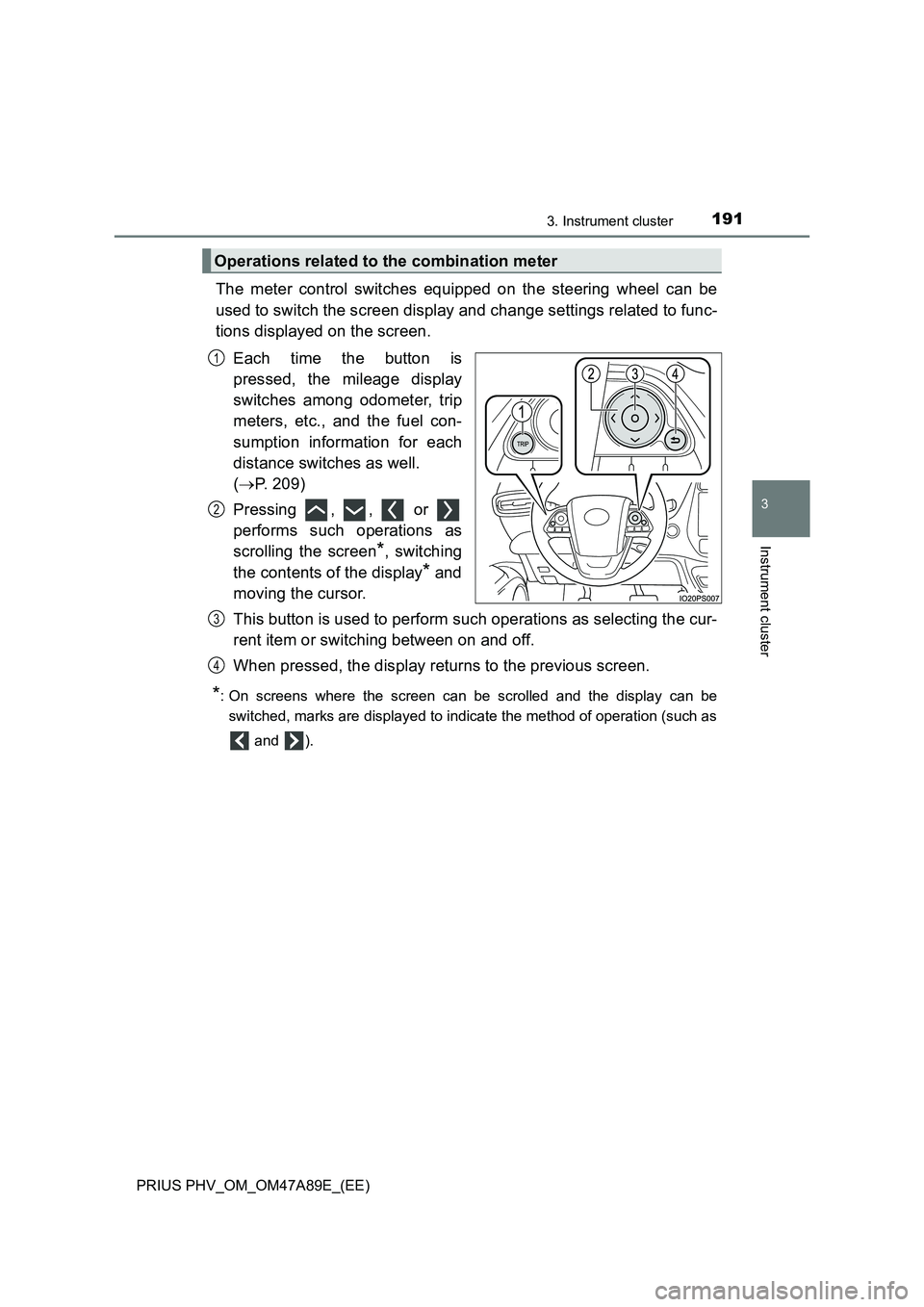
Each time the button is
pressed, the mileage display
switches among odometer, trip
meters, etc., and the fuel con-
sumption information for each
distance switches as well.
(P. 209)
Pressing , , or
performs such operations as
scrolling the screen
*, switching
the contents of the display
* and
moving the cursor.
This button is used to perform such operations as selecting the cur-
rent item or switching between on and off.
When pressed, the display returns to the previous screen.
*: On screens where the screen can be scrolled and the display can be
switched, marks are displayed to indicate the method of operation (such as
and ).
Operations related to the combination meter
1
2
3
4
Page 198 of 744
1983. Instrument cluster
PRIUS PHV_OM_OM47A89E_(EE)
■ Liquid crystal display
Small spots or light spots may appear on the display. This phenomenon is
characteristic of liquid crystal displays, and there is no problem continuing to
use the display.
■ Pop-up display
Some functions, such as the driving mode select switch and air conditioning
system, are operation-linked and display pop-up screens on the multi-infor-
mation display. If the pop-up screens of these functions are not desired, they
can be turned off in the “Meter Customize” settings. ( P. 245)
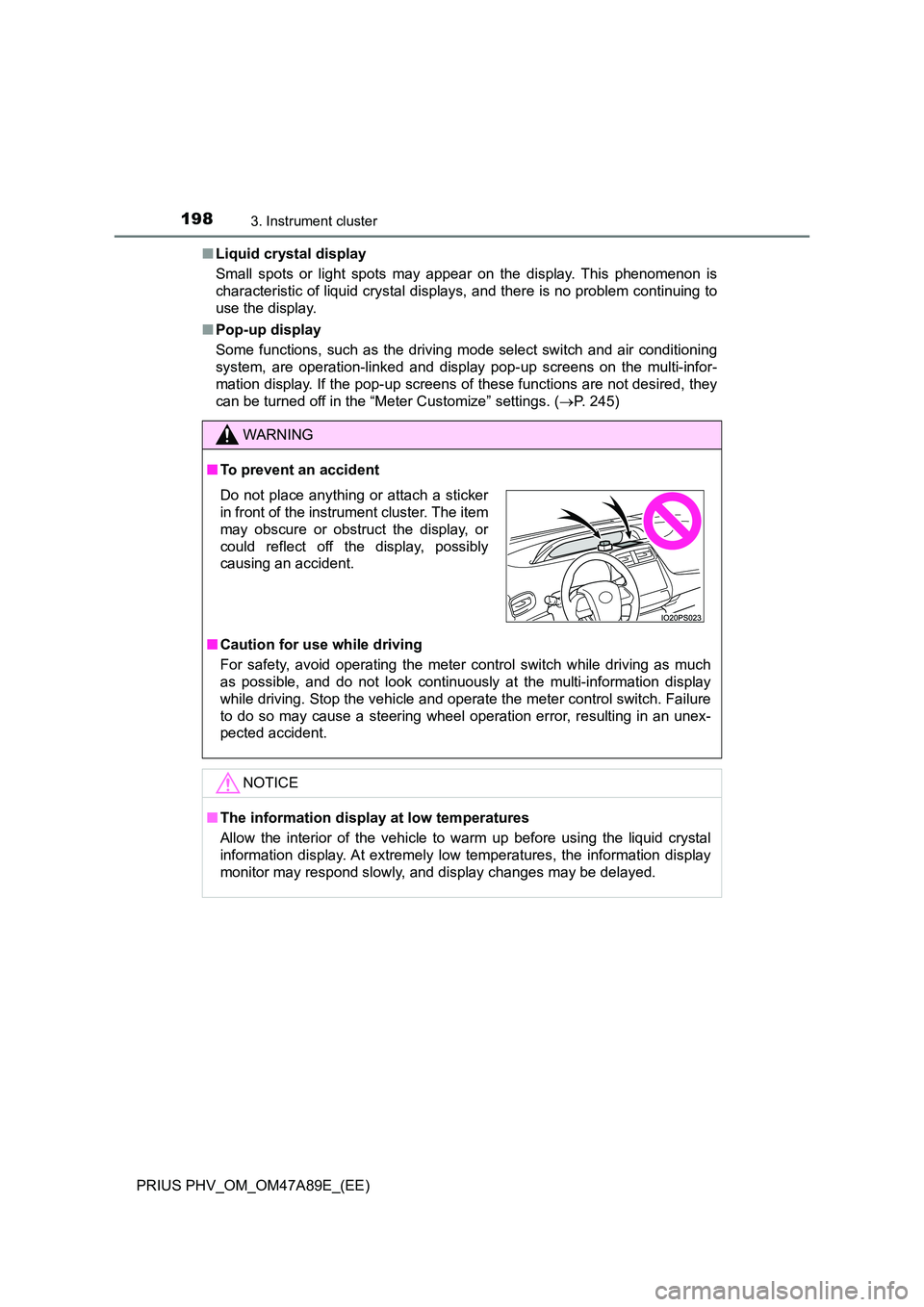
WARNING
■To prevent an accident
■ Caution for use while driving
For safety, avoid operating the meter control switch while driving as much
as possible, and do not look continuously at the multi-information display
while driving. Stop the vehicle and operate the meter control switch. Failure
to do so may cause a steering wheel operation error, resulting in an unex-
pected accident.
NOTICE
■ The information display at low temperatures
Allow the interior of the vehicle to warm up before using the liquid crystal
information display. At extremely low temperatures, the information display
monitor may respond slowly, and display changes may be delayed.
Do not place anything or attach a sticker
in front of the instrument cluster. The item
may obscure or obstruct the display, or
could reflect off the display, possibly
causing an accident.
Page 200 of 744
2003. Instrument cluster
PRIUS PHV_OM_OM47A89E_(EE)
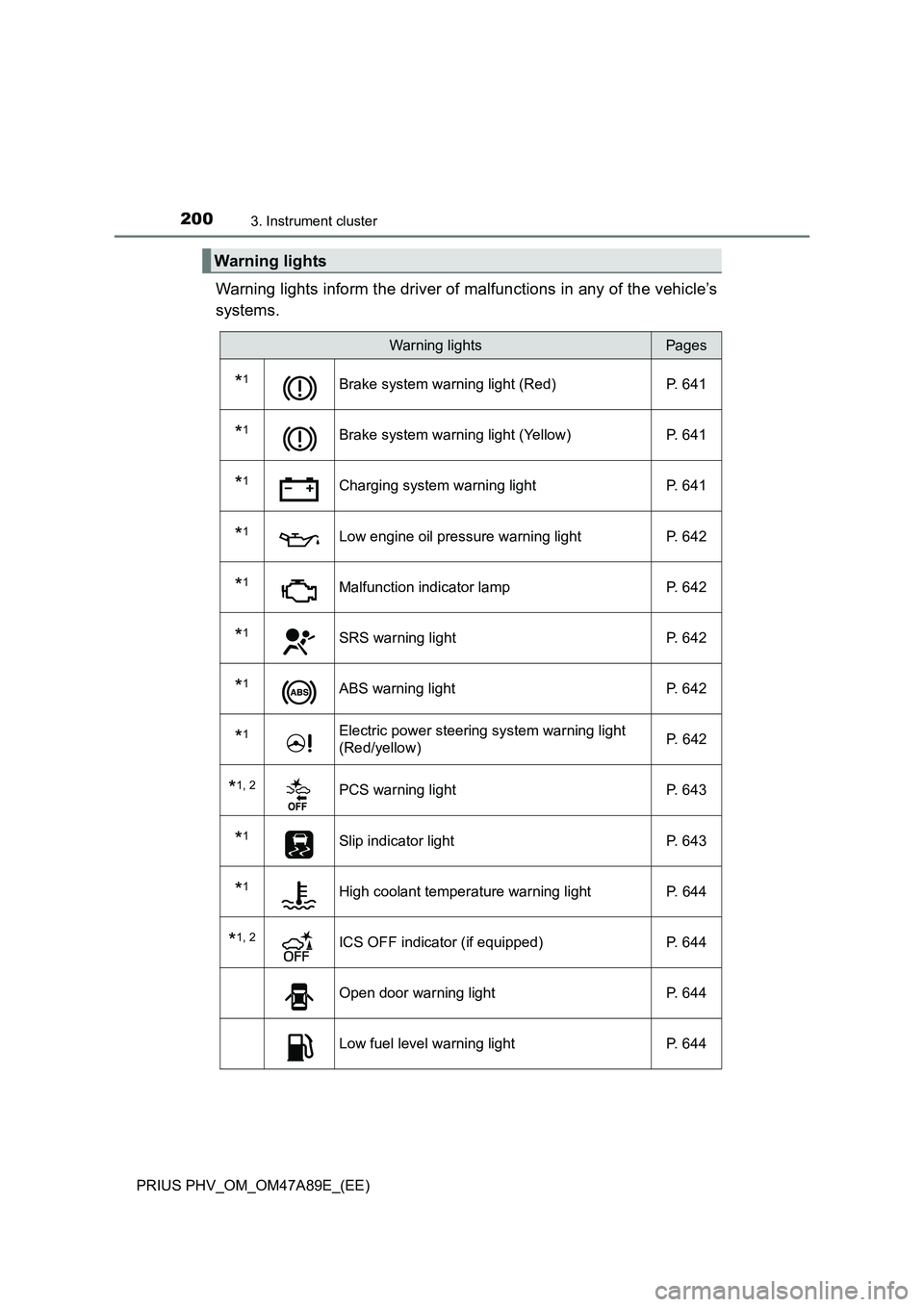
Warning lights inform the driver of malfunctions in any of the vehicle’s
systems.
Warning lights
Warning lightsPages
*1Brake system warning light (Red) P. 641
*1Brake system warning light (Yellow) P. 641
*1Charging system warning light P. 641
*1Low engine oil pressure warning light P. 642
*1Malfunction indicator lamp P. 642
*1SRS warning light P. 642
*1ABS warning light P. 642
*1Electric power steering system warning light
(Red/yellow) P. 642
*1, 2PCS warning light P. 643
*1Slip indicator light P. 643
*1High coolant temperature warning light P. 644
*1, 2ICS OFF indicator (if equipped) P. 644
Open door warning light P. 644
Low fuel level warning light P. 644
Page 202 of 744
2023. Instrument cluster
PRIUS PHV_OM_OM47A89E_(EE)
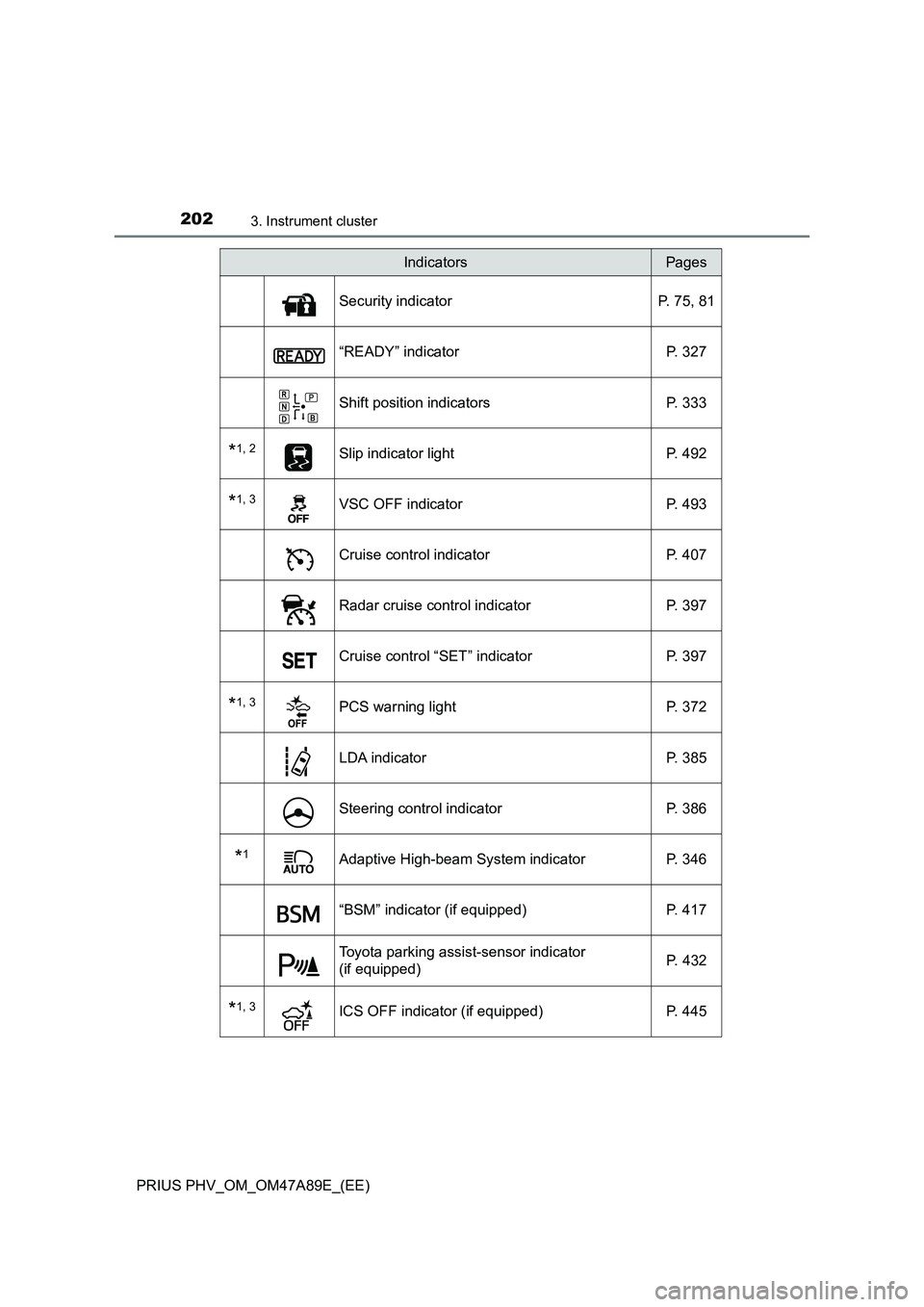
Security indicator P. 75, 81
“READY” indicator P. 327
Shift position indicators P. 333
*1, 2Slip indicator light P. 492
*1, 3VSC OFF indicator P. 493
Cruise control indicator P. 407
Radar cruise control indicator P. 397
Cruise control “SET” indicator P. 397
*1, 3PCS warning light P. 372
LDA indicator P. 385
Steering control indicator P. 386
*1Adaptive High-beam System indicator P. 346
“BSM” indicator (if equipped) P. 417
Toyota parking assist-sensor indicator
(if equipped) P. 432
*1, 3ICS OFF indicator (if equipped) P. 445
IndicatorsPages
Page 205 of 744
2053. Instrument cluster
3
Instrument cluster
PRIUS PHV_OM_OM47A89E_(EE)■
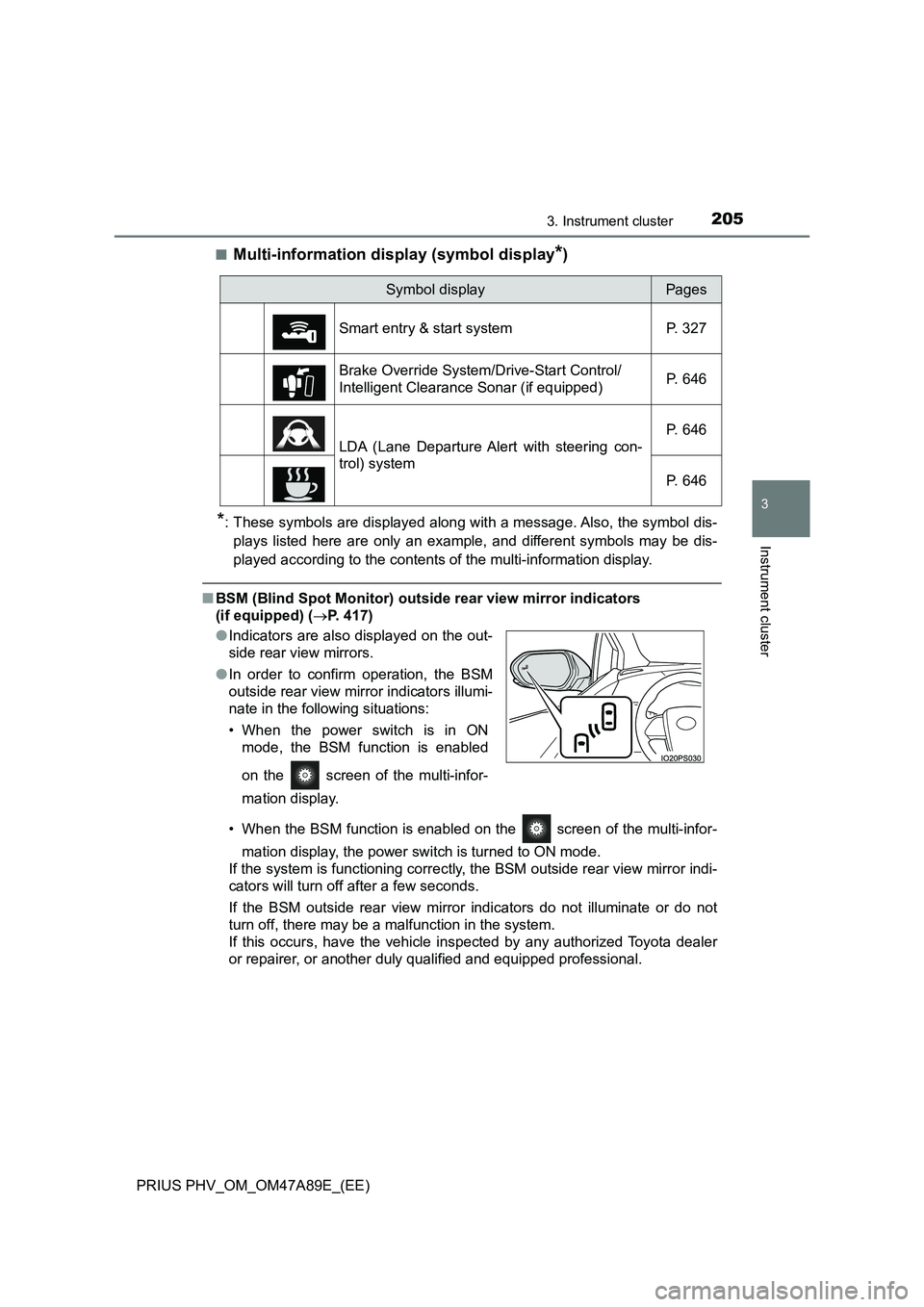
Multi-information display (symbol display*)
*: These symbols are displayed along with a message. Also, the symbol dis-
plays listed here are only an example, and different symbols may be dis-
played according to the contents of the multi-information display.
■BSM (Blind Spot Monitor) outside rear view mirror indicators
(if equipped) (P. 417)
• When the BSM function is enabled on the screen of the multi-infor-
mation display, the power switch is turned to ON mode.
If the system is functioning correctly, the BSM outside rear view mirror indi-
cators will turn off after a few seconds.
If the BSM outside rear view mirror indicators do not illuminate or do not
turn off, there may be a malfunction in the system.
If this occurs, have the vehicle inspected by any authorized Toyota dealer
or repairer, or another duly qualified and equipped professional.
Symbol displayPages
Smart entry & start system P. 327
Brake Override System/Drive-Start Control/
Intelligent Clearance Sonar (if equipped)P. 646
LDA (Lane Departure Alert with steering con-
trol) systemP. 646
P. 646
●Indicators are also displayed on the out-
side rear view mirrors.
●In order to confirm operation, the BSM
outside rear view mirror indicators illumi-
nate in the following situations:
• When the power switch is in ON
mode, the BSM function is enabled
on the screen of the multi-infor-
mation display.
Page 216 of 744
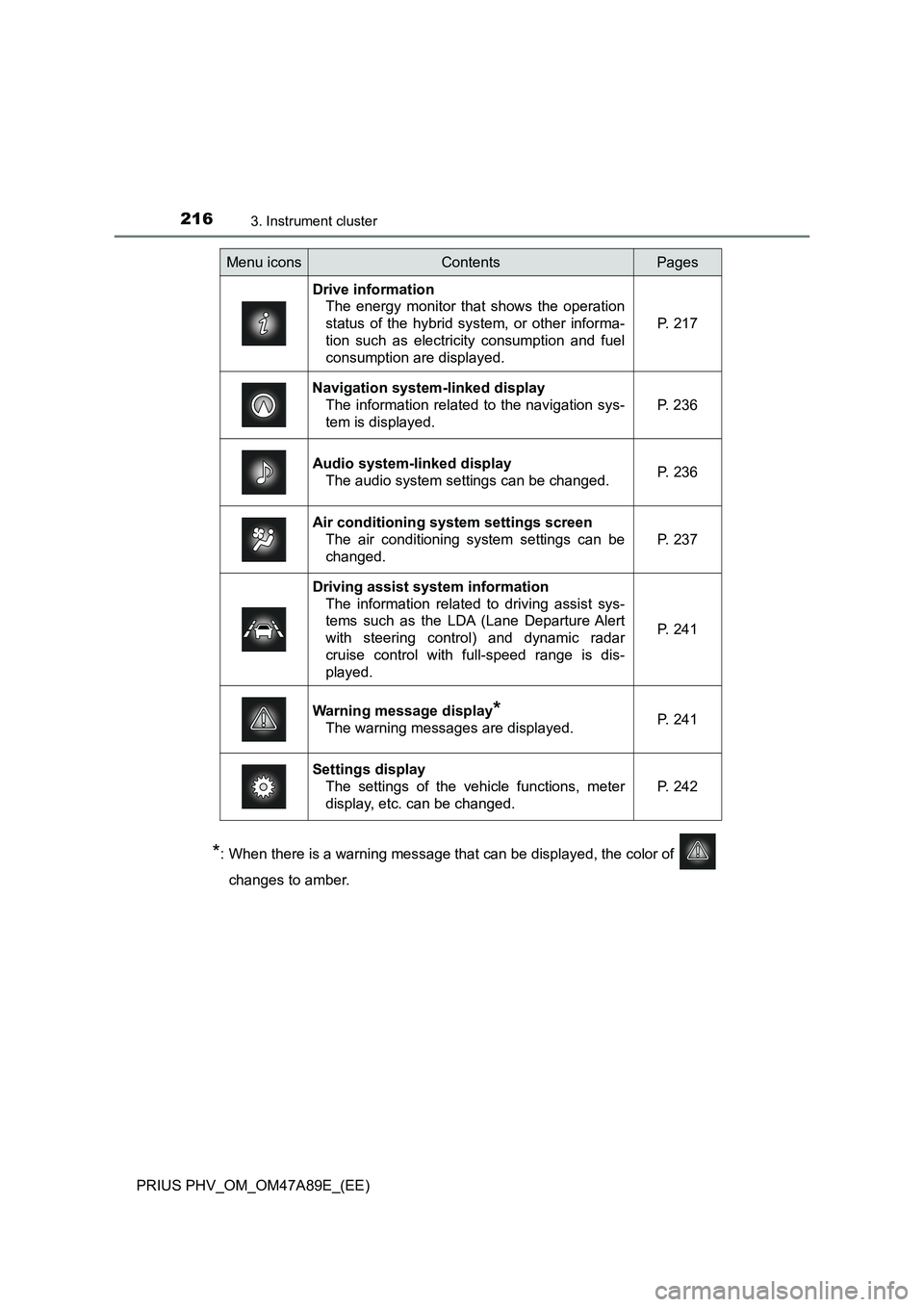
2163. Instrument cluster
PRIUS PHV_OM_OM47A89E_(EE)
*: When there is a warning message that can be displayed, the color of
changes to amber.
Menu iconsContentsPages
Drive information
The energy monitor that shows the operation
status of the hybrid system, or other informa-
tion such as electricity consumption and fuel
consumption are displayed.P. 217
Navigation system-linked display
The information related to the navigation sys-
tem is displayed.P. 236
Audio system-linked display
The audio system settings can be changed.P. 236
Air conditioning system settings screen
The air conditioning system settings can be
changed.
P. 237
Driving assist system information
The information related to driving assist sys-
tems such as the LDA (Lane Departure Alert
with steering control) and dynamic radar
cruise control with full-speed range is dis-
played.
P. 241
Warning message display*
The warning messages are displayed.P. 241
Settings display
The settings of the vehicle functions, meter
display, etc. can be changed.
P. 242
Page 243 of 744
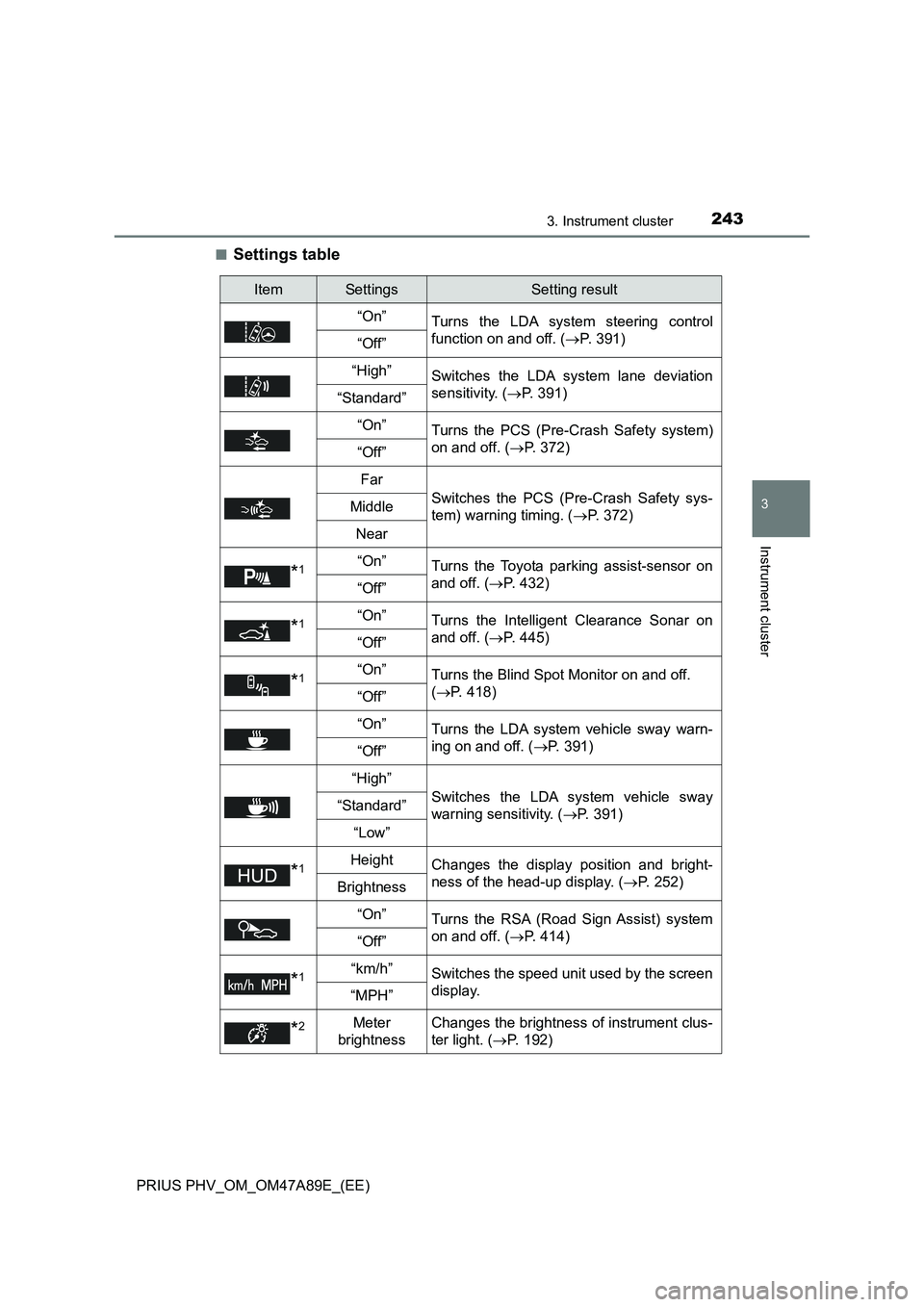
2433. Instrument cluster
3
Instrument cluster
PRIUS PHV_OM_OM47A89E_(EE)■
Settings table
ItemSettingsSetting result
“On”
Turns the LDA system steering control
function on and off. (P. 391)
“Off”
“High”Switches the LDA system lane deviation
sensitivity. (P. 391)
“Standard”
“On”
Turns the PCS (Pre-Crash Safety system)
on and off. (P. 372)
“Off”
Far
Switches the PCS (Pre-Crash Safety sys-
tem) warning timing. (P. 372)Middle
Near
*1“On”Turns the Toyota parking assist-sensor on
and off. (P. 432)
“Off”
*1“On”Turns the Intelligent Clearance Sonar on
and off. (P. 445)
“Off”
*1“On”Turns the Blind Spot Monitor on and off.
(P. 418)
“Off”
“On”
Turns the LDA system vehicle sway warn-
ing on and off. (P. 391)
“Off”
“High”
Switches the LDA system vehicle sway
warning sensitivity. (P. 391)“Standard”
“Low”
*1HeightChanges the display position and bright-
ness of the head-up display. (P. 252)
Brightness
“On”
Turns the RSA (Road Sign Assist) system
on and off. (P. 414)
“Off”
*1“km/h”Switches the speed unit used by the screen
display.
“MPH”
*2Meter
brightnessChanges the brightness of instrument clus-
ter light. (P. 192)