navigation system TOYOTA PRIUS PLUG-IN HYBRID 2018 Owners Manual
[x] Cancel search | Manufacturer: TOYOTA, Model Year: 2018, Model line: PRIUS PLUG-IN HYBRID, Model: TOYOTA PRIUS PLUG-IN HYBRID 2018Pages: 772, PDF Size: 107.88 MB
Page 6 of 772
TABLE OF CONTENTS6
PRIUS PHV_OM_OM47C99E_(EE)9-1. Specifications
Maintenance data
(fuel, oil level, etc.)...........726
Fuel information .................736
9-2. Customization
Customizable features .......738
9-3. Initialization
Items to initialize ................747
What to do if...
(Troubleshooting) .....................750
Alphabetical index ......................754
9Vehicle specifications
Index
For information regarding the equipment listed below, refer to the
“Navigation system Owner’s manual”.
• Navigation system
• Audio system• Hands-free system
(for cellular phone)
• Toyota parking assist monitor
Toyota Motor Europe NV/SA, Avenue du Bourget 60 - 1140
Brussels, Belgium www.toyota-europe.com
Page 17 of 772
17Pictorial index
PRIUS PHV_OM_OM47C99E_(EE)Multi-information display . . . . . . . . . . . . . . . . . . . . . . . . . . . P. 223
Display . . . . . . . . . . . . . . . . . . . . . . . . . . . . . . . . . . . . . . . . . . . P. 223
Energy monitor . . . . . . . . . . . . . . . . . . . . . . . . . . . . . . . . . . . . P. 226
When the warning messages are displayed . . . . . . . . . . . . . . P. 680
Parking brake . . . . . . . . . . . . . . . . . . . . . . . . . . . . . . . . . . . . . P. 364
Applying/releasing . . . . . . . . . . . . . . . . . . . . . . . . . . . . . . . . . . P. 364
Precautions against winter season . . . . . . . . . . . . . . . . . . . . . P. 525
Warning buzzer . . . . . . . . . . . . . . . . . . . . . . . . . . . . . . . . . . . . P. 364
Turn signal lever . . . . . . . . . . . . . . . . . . . . . . . . . . . . . . . . . . P. 363
Headlight switch . . . . . . . . . . . . . . . . . . . . . . . . . . . . . . . . . . P. 365
Headlights/front position lights/tail lights/
daytime running lights . . . . . . . . . . . . . . . . . . . . . . . . . . . . . . . P. 365
Front fog lights/rear fog lights . . . . . . . . . . . . . . . . . . . . . . . . . P. 375
Windshield wipers and washer switch . . . . . . . . . . . . . . . . P. 376
Usage . . . . . . . . . . . . . . . . . . . . . . . . . . . . . . . . . . . . . . . . . . . P. 376
Adding washer fluid . . . . . . . . . . . . . . . . . . . . . . . . . . . . . . . . . P. 604
Emergency flasher switch . . . . . . . . . . . . . . . . . . . . . . . . . . P. 662
Fuel filler door opener. . . . . . . . . . . . . . . . . . . . . . . . . . . . . . P. 381
Hood lock release lever . . . . . . . . . . . . . . . . . . . . . . . . . . . . P. 589
Tilt and telescopic steering lock release lever . . . . . . . . . . P. 324
Air conditioning system . . . . . . . . . . . . . . . . . . . . . . . . . . . . P. 530
Usage . . . . . . . . . . . . . . . . . . . . . . . . . . . . . . . . . . . . . . . . . . . P. 530
Rear window defogger. . . . . . . . . . . . . . . . . . . . . . . . . . . . . . . P. 535
Audio system
*
*
: Refer to “Navigation system Owner’s manual”.
5
6
7
8
9
10
11
12
13
14
Page 19 of 772
19Pictorial index
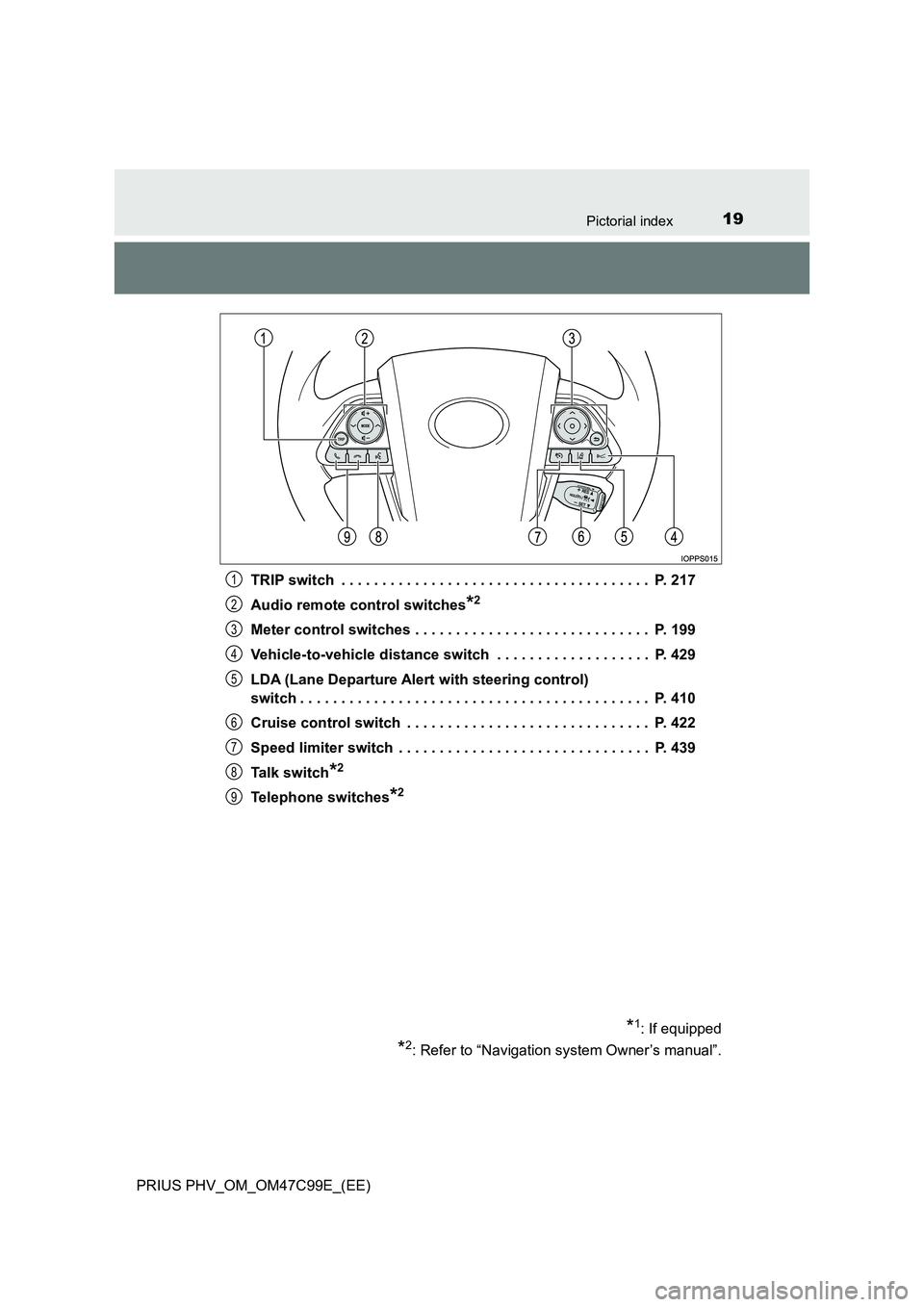
PRIUS PHV_OM_OM47C99E_(EE)TRIP switch . . . . . . . . . . . . . . . . . . . . . . . . . . . . . . . . . . . . . . P. 217
Audio remote control switches
*2
Meter control switches . . . . . . . . . . . . . . . . . . . . . . . . . . . . . P. 199
Vehicle-to-vehicle distance switch . . . . . . . . . . . . . . . . . . . P. 429
LDA (Lane Departure Alert with steering control)
switch . . . . . . . . . . . . . . . . . . . . . . . . . . . . . . . . . . . . . . . . . . . P. 410
Cruise control switch . . . . . . . . . . . . . . . . . . . . . . . . . . . . . . P. 422
Speed limiter switch . . . . . . . . . . . . . . . . . . . . . . . . . . . . . . . P. 439
Talk switch
*2
Telephone switches*2
*1: If equipped
*2: Refer to “Navigation system Owner’s manual”.
1
2
3
4
5
6
7
8
9
Page 23 of 772
23Pictorial index
PRIUS PHV_OM_OM47C99E_(EE)Multi-information display . . . . . . . . . . . . . . . . . . . . . . . . . . . P. 223
Display . . . . . . . . . . . . . . . . . . . . . . . . . . . . . . . . . . . . . . . . . . . P. 223
Energy monitor . . . . . . . . . . . . . . . . . . . . . . . . . . . . . . . . . . . . P. 226
When the warning messages are displayed . . . . . . . . . . . . . . P. 680
Parking brake . . . . . . . . . . . . . . . . . . . . . . . . . . . . . . . . . . . . . P. 364
Applying/releasing . . . . . . . . . . . . . . . . . . . . . . . . . . . . . . . . . . P. 364
Precautions against winter season . . . . . . . . . . . . . . . . . . . . . P. 525
Warning buzzer . . . . . . . . . . . . . . . . . . . . . . . . . . . . . . . . . . . . P. 364
Turn signal lever . . . . . . . . . . . . . . . . . . . . . . . . . . . . . . . . . . P. 363
Headlight switch . . . . . . . . . . . . . . . . . . . . . . . . . . . . . . . . . . P. 365
Headlights/front position lights/tail lights/
daytime running lights . . . . . . . . . . . . . . . . . . . . . . . . . . . . . . . P. 365
Front fog lights/rear fog lights . . . . . . . . . . . . . . . . . . . . . . . . . P. 375
Windshield wipers and washer switch . . . . . . . . . . . . . . . . P. 376
Usage . . . . . . . . . . . . . . . . . . . . . . . . . . . . . . . . . . . . . . . . . . . P. 376
Adding washer fluid . . . . . . . . . . . . . . . . . . . . . . . . . . . . . . . . . P. 604
Emergency flasher switch . . . . . . . . . . . . . . . . . . . . . . . . . . P. 662
Fuel filler door opener. . . . . . . . . . . . . . . . . . . . . . . . . . . . . . P. 381
Hood lock release lever . . . . . . . . . . . . . . . . . . . . . . . . . . . . P. 589
Tilt and telescopic steering lock release lever . . . . . . . . . . P. 324
Air conditioning system . . . . . . . . . . . . . . . . . . . . . . . . . . . . P. 530
Usage . . . . . . . . . . . . . . . . . . . . . . . . . . . . . . . . . . . . . . . . . . . P. 530
Rear window defogger. . . . . . . . . . . . . . . . . . . . . . . . . . . . . . . P. 535
Audio system
*
*
: Refer to “Navigation system Owner’s manual”.
5
6
7
8
9
10
11
12
13
14
Page 25 of 772
25Pictorial index
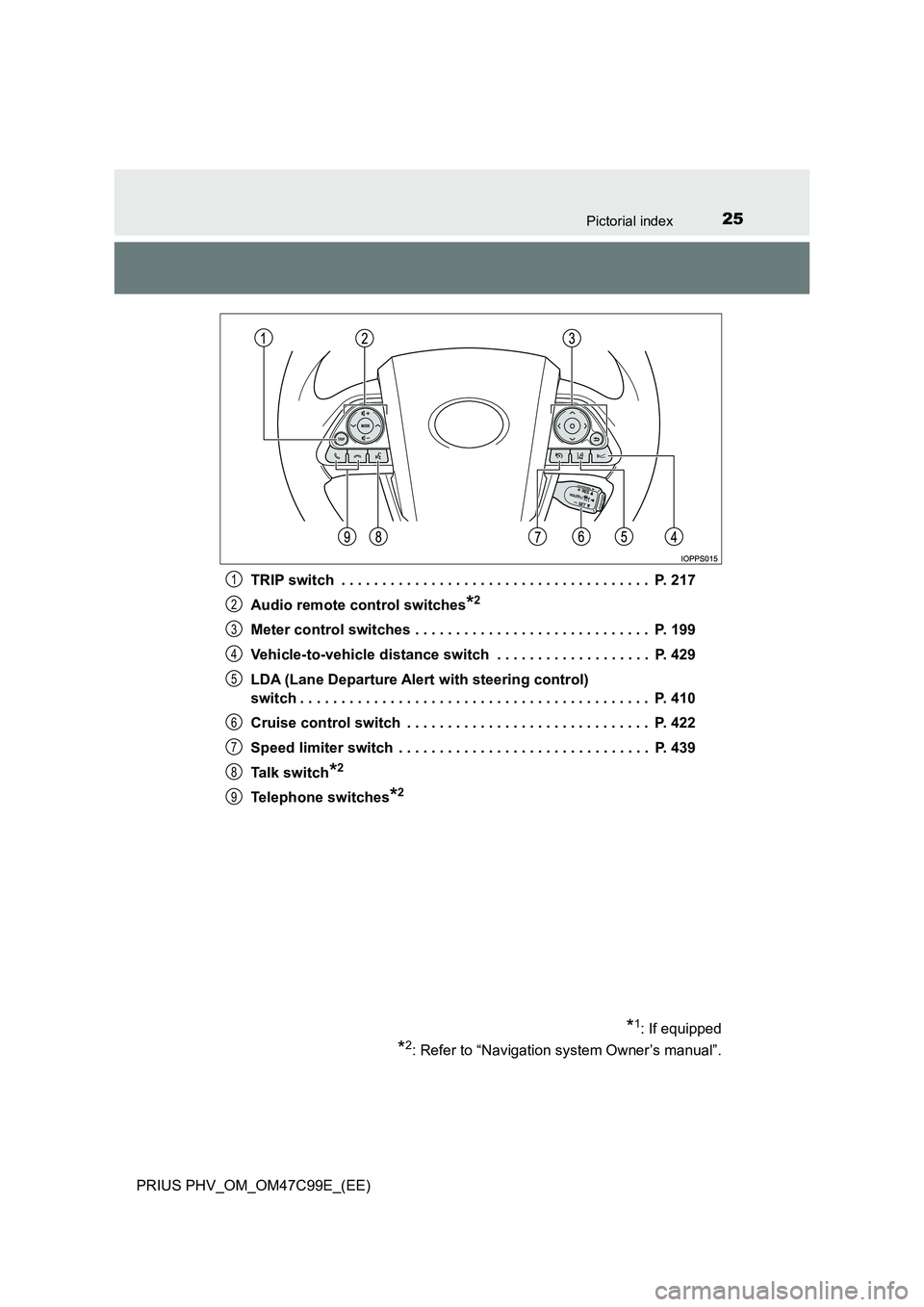
PRIUS PHV_OM_OM47C99E_(EE)TRIP switch . . . . . . . . . . . . . . . . . . . . . . . . . . . . . . . . . . . . . . P. 217
Audio remote control switches
*2
Meter control switches . . . . . . . . . . . . . . . . . . . . . . . . . . . . . P. 199
Vehicle-to-vehicle distance switch . . . . . . . . . . . . . . . . . . . P. 429
LDA (Lane Departure Alert with steering control)
switch . . . . . . . . . . . . . . . . . . . . . . . . . . . . . . . . . . . . . . . . . . . P. 410
Cruise control switch . . . . . . . . . . . . . . . . . . . . . . . . . . . . . . P. 422
Speed limiter switch . . . . . . . . . . . . . . . . . . . . . . . . . . . . . . . P. 439
Talk switch
*2
Telephone switches*2
*1: If equipped
*2: Refer to “Navigation system Owner’s manual”.
1
2
3
4
5
6
7
8
9
Page 224 of 772
2243. Instrument cluster
PRIUS PHV_OM_OM47C99E_(EE)
*: When there is a warning message that can be displayed, the color of
changes to amber.
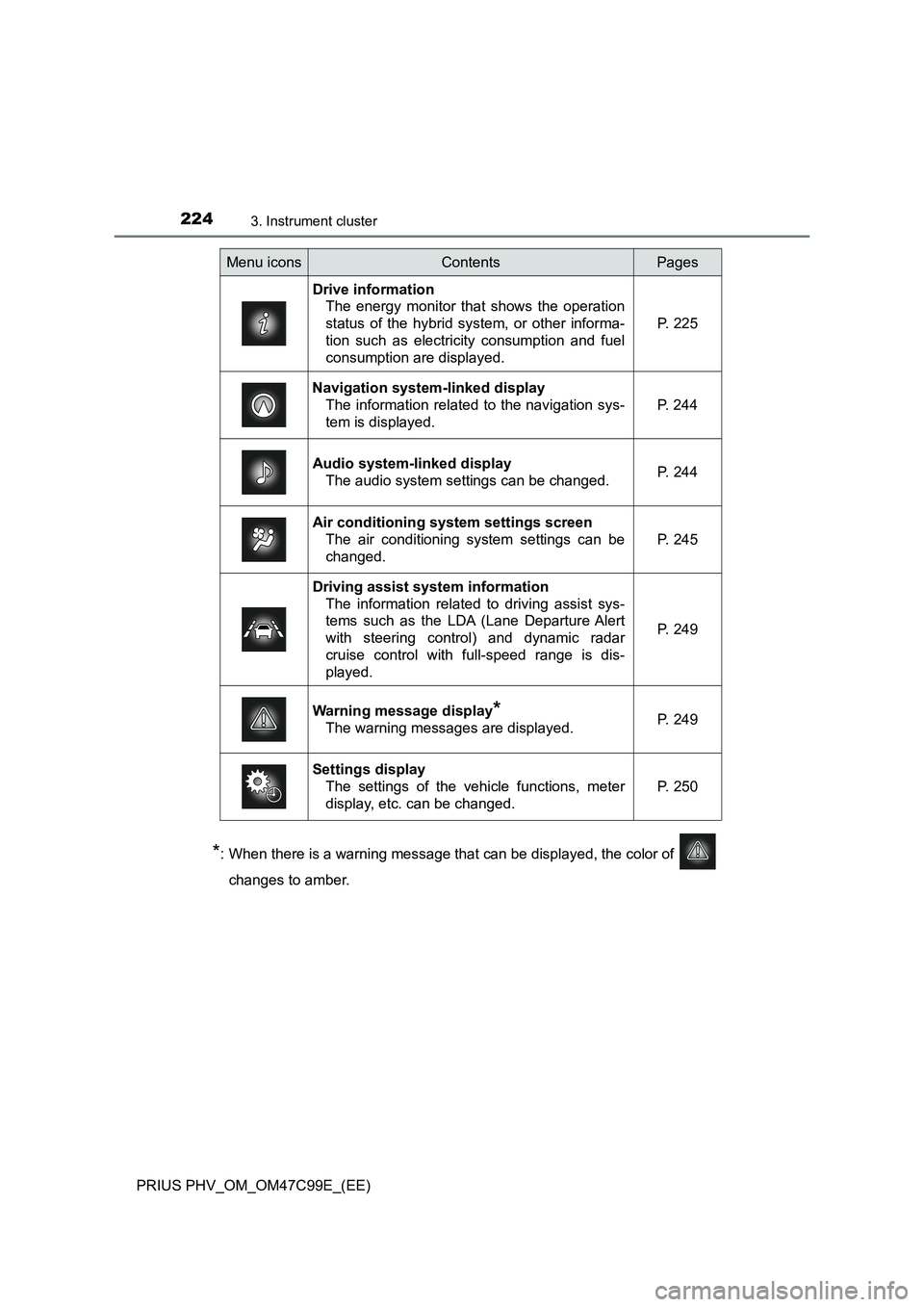
Menu iconsContentsPages
Drive information
The energy monitor that shows the operation
status of the hybrid system, or other informa-
tion such as electricity consumption and fuel
consumption are displayed.P. 225
Navigation system-linked display
The information related to the navigation sys-
tem is displayed.P. 244
Audio system-linked display
The audio system settings can be changed.P. 244
Air conditioning system settings screen
The air conditioning system settings can be
changed.
P. 245
Driving assist system information
The information related to driving assist sys-
tems such as the LDA (Lane Departure Alert
with steering control) and dynamic radar
cruise control with full-speed range is dis-
played.
P. 249
Warning message display*
The warning messages are displayed.P. 249
Settings display
The settings of the vehicle functions, meter
display, etc. can be changed.
P. 250
Page 244 of 772

2443. Instrument cluster
PRIUS PHV_OM_OM47C99E_(EE)
Displays a compass linked with
the navigation system. Also, when
the navigation system is perform-
ing intersection guidance during
destination guidance, the inter-
section guidance is also displayed
on the multi-information display.
The illustration is only an example
and may differ from the actual
screen.
For details on how to set the destination and switch the map direction,
refer to the “Navigation system Owner’s Manual”.
The information about the cur-
rently selected audio source is
displayed.
The illustration is only an example
and may differ from the actual
screen.
To switch the audio source, press
to display the audio source
selection screen, press or
of the meter control switches and
select the desired audio source,
and then press .
To stop audio source selection, press on the audio source selection
screen.
Navigation system-linked display
Audio system-linked display
Page 421 of 772
4215-5. Using the driving support systems
PRIUS PHV_OM_OM47C99E_(EE)
5
Driving
●Side road speed signs may be detected and displayed (if positioned in sight
of the camera sensor) while the vehicle is traveling on the main road.
●Roundabout exit road speed signs may be detected and displayed (if posi-
tioned in sight of the camera sensor) while traveling on a roundabout.
●The speed information displayed on the meter and that displayed on the
navigation system may be different due to the navigation system using map
data.
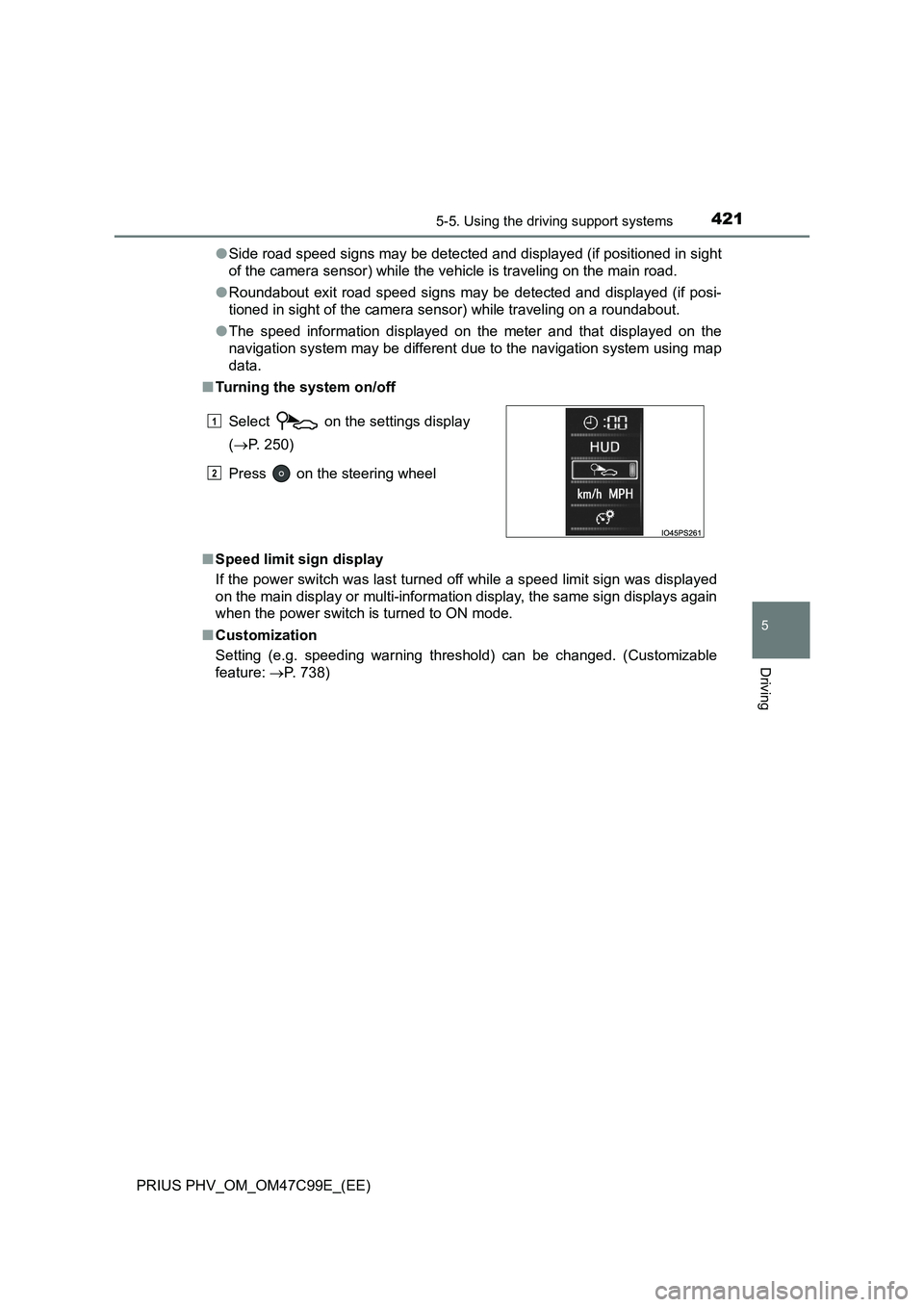
■Turning the system on/off
■Speed limit sign display
If the power switch was last turned off while a speed limit sign was displayed
on the main display or multi-information display, the same sign displays again
when the power switch is turned to ON mode.
■Customization
Setting (e.g. speeding warning threshold) can be changed. (Customizable
feature: P. 738) Select on the settings display
(P. 250)
Press on the steering wheel
1
2
Page 738 of 772
7389-2. Customization
PRIUS PHV_OM_OM47C99E_(EE)
Customizable features
When customizing vehicle features, ensure that the vehicle is parked
in a safe place with the parking brake set and the shift position in P.
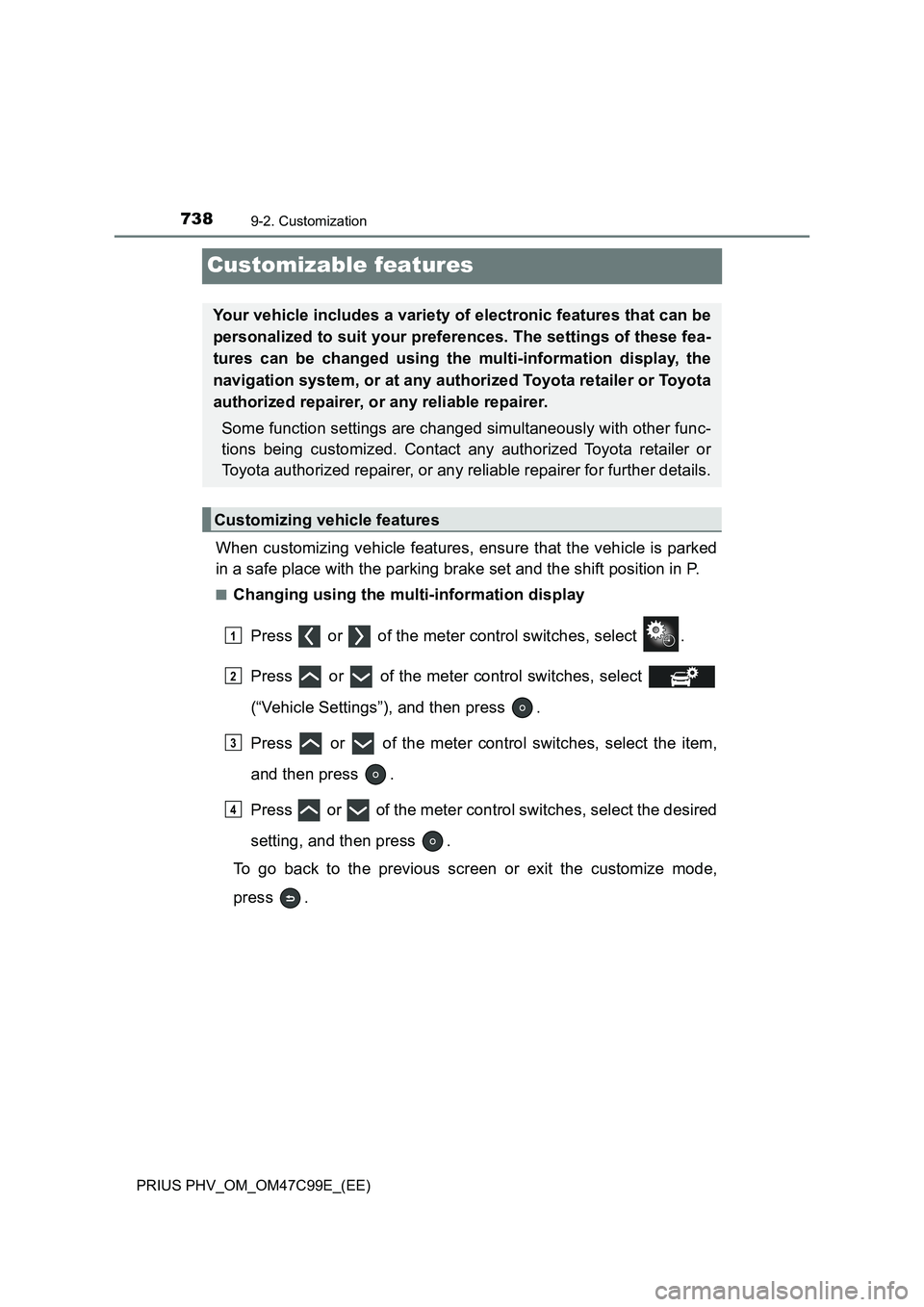
■Changing using the multi-information display
Press or of the meter control switches, select .
Press or of the meter control switches, select
(“Vehicle Settings”), and then press .
Press or of the meter control switches, select the item,
and then press .
Press or of the meter control switches, select the desired
setting, and then press .
To go back to the previous screen or exit the customize mode,
press .
Your vehicle includes a variety of electronic features that can be
personalized to suit your preferences. The settings of these fea-
tures can be changed using the multi-information display, the
navigation system, or at any authorized Toyota retailer or Toyota
authorized repairer, or any reliable repairer.
Some function settings are changed simultaneously with other func-
tions being customized. Contact any authorized Toyota retailer or
Toyota authorized repairer, or any reliable repairer for further details.
Customizing vehicle features
1
2
3
4
Page 739 of 772
7399-2. Customization
PRIUS PHV_OM_OM47C99E_(EE)
9
Vehicle specifications
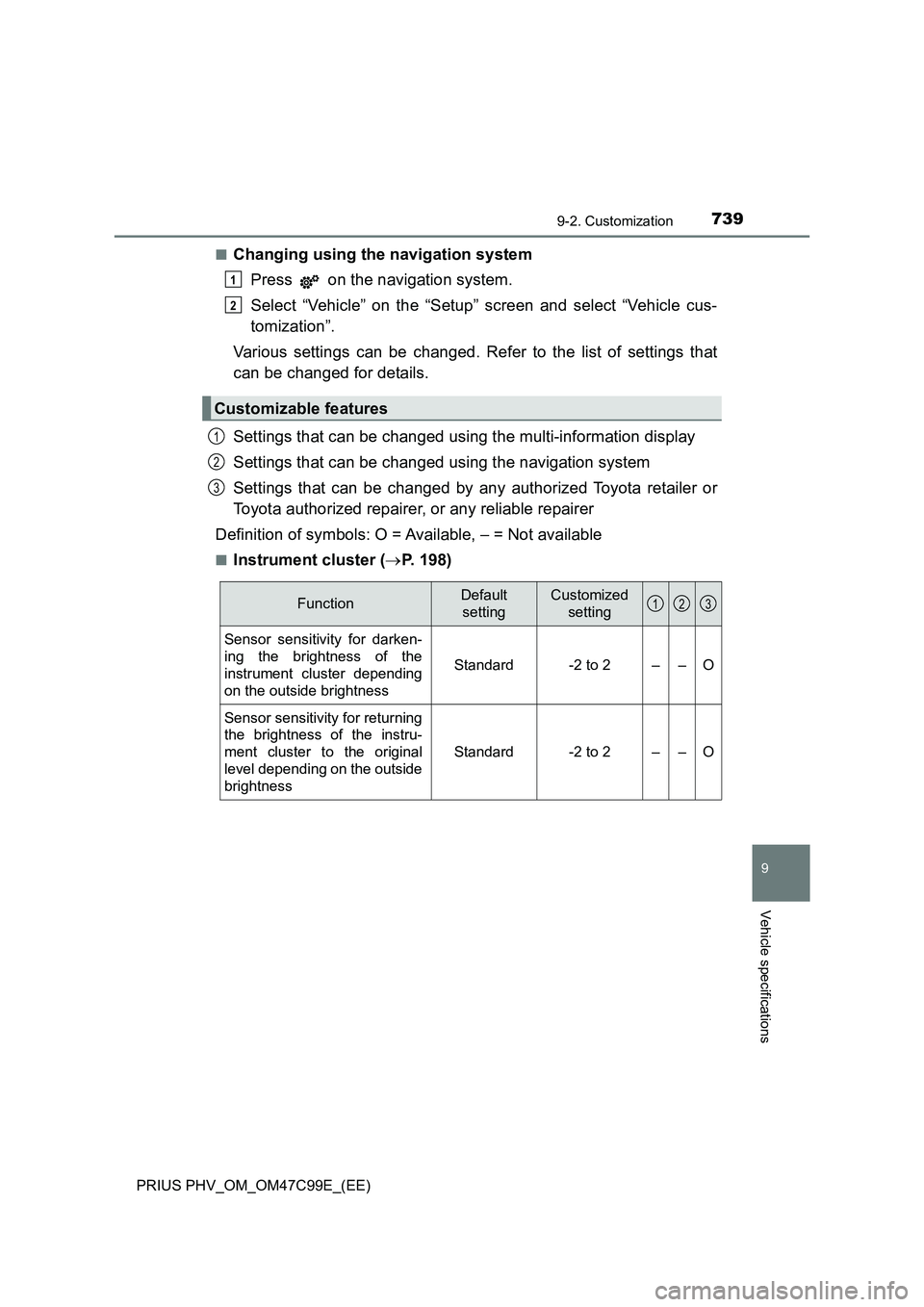
■Changing using the navigation system
Press on the navigation system.
Select “Vehicle” on the “Setup” screen and select “Vehicle cus-
tomization”.
Various settings can be changed. Refer to the list of settings that
can be changed for details.
Settings that can be changed using the multi-information display
Settings that can be changed using the navigation system
Settings that can be changed by any authorized Toyota retailer or
Toyota authorized repairer, or any reliable repairer
Definition of symbols: O = Available, – = Not available
■Instrument cluster (P. 198)
Customizable features
1
2
1
2
3
FunctionDefault
settingCustomized
setting
Sensor sensitivity for darken-
ing the brightness of the
instrument cluster depending
on the outside brightness
Standard-2 to 2––O
Sensor sensitivity for returning
the brightness of the instru-
ment cluster to the original
level depending on the outside
brightness
Standard-2 to 2––O
123