brake light TOYOTA PRIUS PLUG-IN HYBRID 2021 User Guide
[x] Cancel search | Manufacturer: TOYOTA, Model Year: 2021, Model line: PRIUS PLUG-IN HYBRID, Model: TOYOTA PRIUS PLUG-IN HYBRID 2021Pages: 816, PDF Size: 132.85 MB
Page 357 of 816
357
5Driving
Prius Plug-in Hybrid_OM_OM47D72E_(EE)
5-1. Before driving
Driving the vehicle ............. 358
Cargo and luggage ............ 370
Trailer towing ..................... 372
5-2. Driving procedures
Power (ignition) switch ....... 373
Hybrid transmission ........... 379
Turn signal lever ................ 385
Parking brake .................... 386
5-3. Operating the lights
and wipers
Headlight switch ................ 387
AHS (Adaptive High-beam
System) ........................... 391
Fog light switch .................. 397
Windshield wipers and
washer ............................. 398
5-4. Refueling
Opening the fuel tank
cap ................................... 4015-5. Using the driving
support systems
Toyota Safety Sense ......... 405
PCS (Pre-Collision
System) ........................... 418
LTA (Lane Tracing
Assist) .............................. 429
RSA (Road Sign Assist)..... 445
Dynamic radar cruise
control with full-speed
range ............................... 451
Driving mode select
switch............................... 468
Speed limiter ...................... 470
BSM
(Blind Spot Monitor) ......... 473
• The Blind Spot Monitor
function .......................... 489
• The Rear Crossing
Traffic Alert function ...... 493
Toyota parking
assist-sensor ................... 499
Parking Support Brake
function ............................ 510
S-IPA (Simple Intelligent
Parking Assist
System) ........................... 523
GPF (Gasoline Particulate
Filter) system ................... 558
Driving assist systems ....... 559
5-6. Driving tips
Winter driving tips .............. 566
Page 362 of 816
3625-1. Before driving
Prius Plug-in Hybrid_OM_OM47D72E_(EE)
WARNING
Observe the following precautions.
Failure to do so may result in death or serious injury.
■ When starting the vehicle
Always keep your foot on the brake pedal while stopped with the “READY”
indicator is illuminated. This prevents the vehicle from creeping.
■ When driving the vehicle
● Do not drive if you are unfamiliar with the location of the brake and accel-
erator pedals to avoid depressing the wrong pedal.
• Accidentally depressing the accelerator pedal instead of the brake
pedal will result in sudden acceleration that may lead to an accident.
• When backing up, you may twist your body around, leading to a diffi-
culty in operating the pedals. Make sure to operate the pedals properly.
• Make sure to keep a correct driving posture even when moving the
vehicle only slightly. This allows you to depress the brake and accelera-
tor pedals properly.
• Depress the brake pedal using your right foot. Depressing the brake
pedal using your left foot may delay response in an emergency, result-
ing in an accident.
● The driver should pay extra attention to pedestrians when the vehicle is
powered only by the electric motor (traction motor). As there is no engine
noise, the pedestrians may misjudge the vehicle’s movement. Even
though the vehicle is equipped with the vehicle proximity notification sys-
tem, drive with care as pedestrians in the vicinity may still not notice the
vehicle if the surrounding area is noisy.
● Do not drive the vehicle over or stop the vehicle near flammable materials
such as leaves, paper or rags.
The exhaust system and exhaust gases can be extremely hot. These hot
parts may cause a fire if there is any flammable material nearby.
● During normal driving, do not turn off the hybrid system. Turning the hybrid
system off while driving will not cause loss of steering or braking control,
however, power assist to the steering will be lost. This will make it more
difficult to steer smoothly, so you should pull over and stop the vehicle as
soon as it is safe to do so.
In the event of an emergency, such as if it becomes impossible to stop the
vehicle in the normal way: P. 705
Page 366 of 816
3665-1. Before driving
Prius Plug-in Hybrid_OM_OM47D72E_(EE)
WARNING
Observe the following precautions.
Failure to do so may result in death or serious injury.
■ When the vehicle is parked
● Do not leave glasses, cigarette lighters, spray cans, or soft drink cans in
the vehicle when it is in the sun.
Doing so may result in the following:
• Gas may leak from a cigarette lighter or spray can, and may lead to a
fire.
• The temperature inside the vehicle may cause the plastic lenses and
plastic material of glasses to deform or crack.
• Soft drink cans may fracture, causing the contents to spray over the
interior of the vehicle, and may also cause a short circuit in the vehicle’s
electrical components.
● Do not leave cigarette lighters in the vehicle. If a cigarette lighter is in a
place such as the glove box or on the floor, it may be lit accidentally when
luggage is loaded or the seat is adjusted, causing a fire.
● Do not attach adhesive discs to the windshield or windows. Do not place
containers such as air fresheners on the instrument panel or dashboard.
Adhesive discs or containers may act as lenses, causing a fire in the vehi-
cle.
● Do not leave a door or window open if the curved glass is coated with a
metallized film such as a silver-colored one. Reflected sunlight may cause
the glass to act as a lens, causing a fire.
● Always apply the parking brake, shift the shift position to P, stop the hybrid
system and lock the vehicle.
Do not leave the vehicle unattended while the “READY” indicator is illumi-
nated.
If the vehicle is parked with the shift position in P but the parking brake is
not set, the vehicle may start to move, possibly leading to an accident.
● Do not touch the exhaust pipe while the “READY” indicator is illuminated
or immediately after turning the hybrid system off.
Doing so may cause burns.
Page 373 of 816
3735-2. Driving procedures
Prius Plug-in Hybrid_OM_OM47D72E_(EE)
5
Driving
Power (ignition) switch
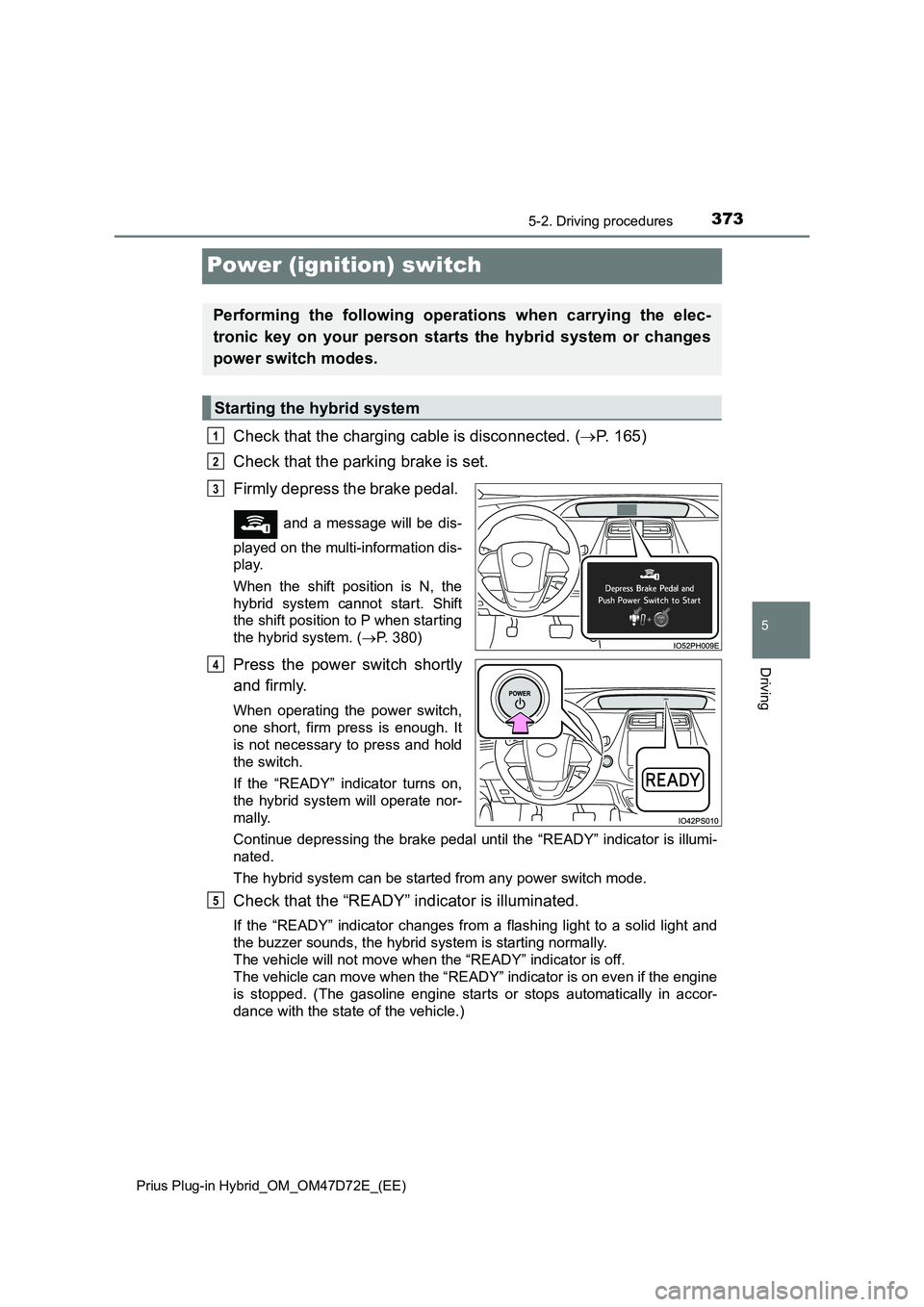
Check that the charging cable is disconnected. (P. 165)
Check that the parking brake is set.
Firmly depress the brake pedal.
and a message will be dis-
played on the multi-information dis-
play.
When the shift position is N, the
hybrid system cannot start. Shift
the shift position to P when starting
the hybrid system. (P. 380)
Press the power switch shortly
and firmly.
When operating the power switch,
one short, firm press is enough. It
is not necessary to press and hold
the switch.
If the “READY” indicator turns on,
the hybrid system will operate nor-
mally.
Continue depressing the brake pedal until the “READY” indicator is illumi-
nated.
The hybrid system can be started from any power switch mode.
Check that the “READY” indicator is illuminated.
If the “READY” indicator changes from a flashing light to a solid light and
the buzzer sounds, the hybrid system is starting normally.
The vehicle will not move when the “READY” indicator is off.
The vehicle can move when the “READY” indicator is on even if the engine
is stopped. (The gasoline engine starts or stops automatically in accor-
dance with the state of the vehicle.)
Performing the following operations when carrying the elec-
tronic key on your person starts the hybrid system or changes
power switch modes.
Starting the hybrid system
1
2
3
4
5
Page 379 of 816
3795-2. Driving procedures
Prius Plug-in Hybrid_OM_OM47D72E_(EE)
5
Driving
Hybrid transmission
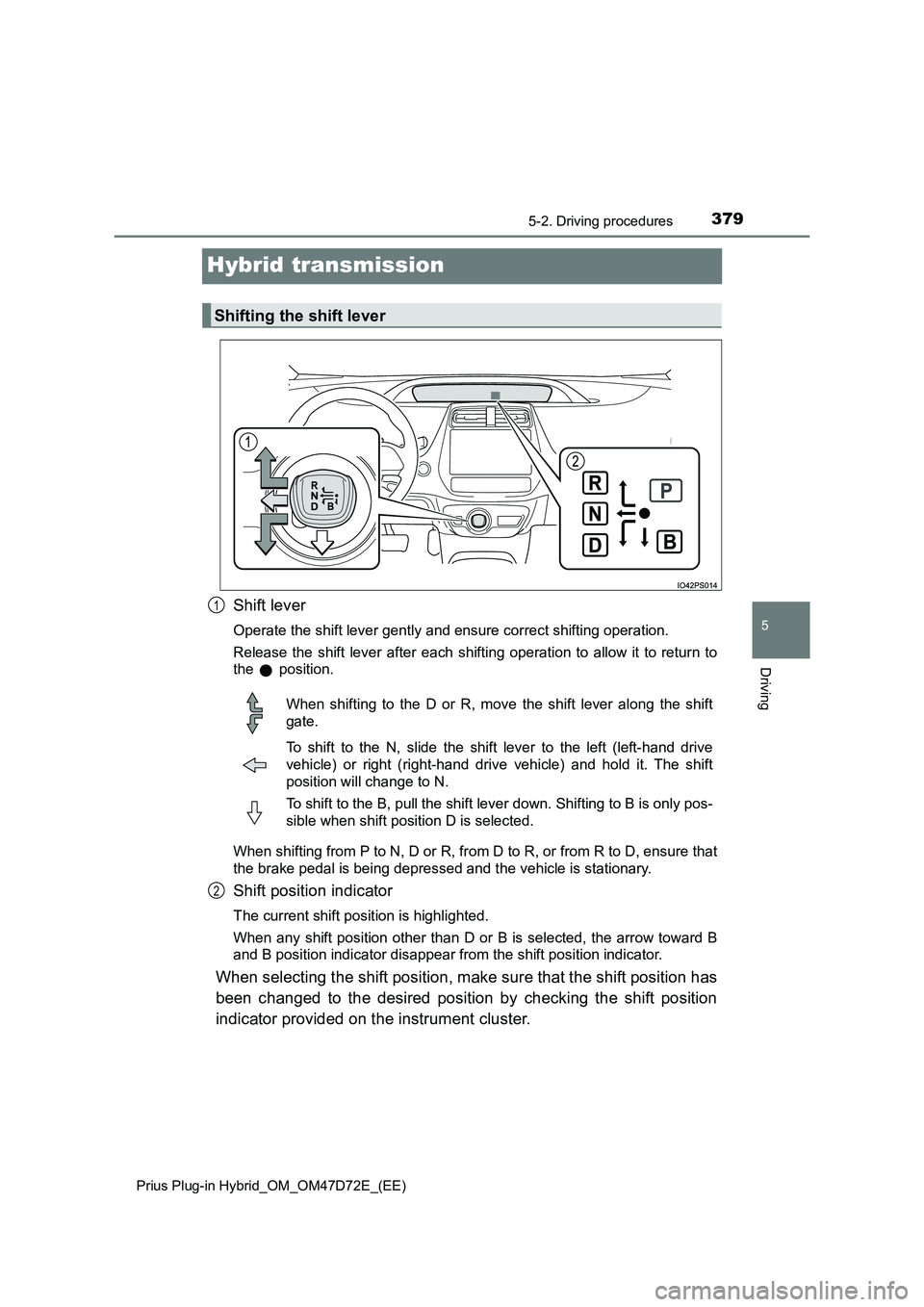
Shift lever
Operate the shift lever gently and ensure correct shifting operation.
Release the shift lever after each shifting operation to allow it to return to
the position.
When shifting from P to N, D or R, from D to R, or from R to D, ensure that
the brake pedal is being depressed and the vehicle is stationary.
Shift position indicator
The current shift position is highlighted.
When any shift position other than D or B is selected, the arrow toward B
and B position indicator disappear from the shift position indicator.
When selecting the shift position, make sure that the shift position has
been changed to the desired position by checking the shift position
indicator provided on the instrument cluster.
Shifting the shift lever
1
When shifting to the D or R, move the shift lever along the shift
gate.
To shift to the N, slide the shift lever to the left (left-hand drive
vehicle) or right (right-hand driv e vehicle) and hold it. The shift
position will change to N.
To shift to the B, pull the shift lever down. Shifting to B is only pos-
sible when shift position D is selected.
2
Page 380 of 816
3805-2. Driving procedures
Prius Plug-in Hybrid_OM_OM47D72E_(EE)
*: For good fuel economy and noise reduction, the D position should usually
be used.
P. 4 6 8
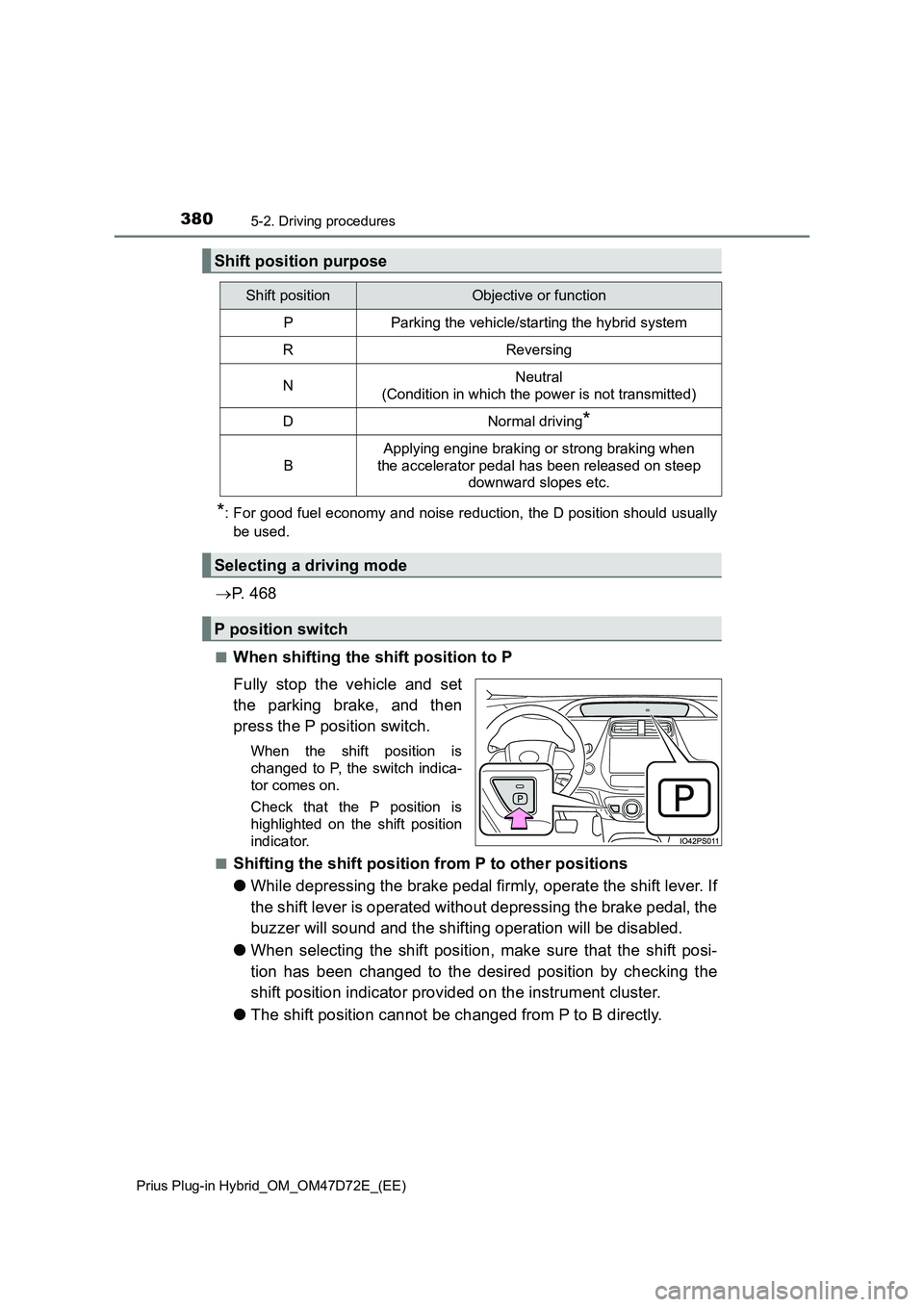
■When shifting the shift position to P
Fully stop the vehicle and set
the parking brake, and then
press the P position switch.
When the shift position is
changed to P, the switch indica-
tor comes on.
Check that the P position is
highlighted on the shift position
indicator.
■
Shifting the shift position from P to other positions
●While depressing the brake pedal firmly, operate the shift lever. If
the shift lever is operated without depressing the brake pedal, the
buzzer will sound and the shifting operation will be disabled.
●When selecting the shift position, make sure that the shift posi-
tion has been changed to the desired position by checking the
shift position indicator provided on the instrument cluster.
●The shift position cannot be changed from P to B directly.
Shift position purpose
Shift positionObjective or function
PParking the vehicle/starting the hybrid system
RReversing
NNeutral
(Condition in which the power is not transmitted)
DNormal driving*
B
Applying engine braking or strong braking when
the accelerator pedal has been released on steep
downward slopes etc.
Selecting a driving mode
P position switch
Page 381 of 816
3815-2. Driving procedures
Prius Plug-in Hybrid_OM_OM47D72E_(EE)
5
Driving
■For the shift positions
●When the power switch is off, the shift position cannot be changed.
●When the power switch is in ON mode (the hybrid system is not operating),
the shift position can only be changed to N. The shift position will be
changed to N even if the shift lever is shifted to D or R and held in that posi-
tion.
●When the “READY” indicator is on, the shift position can be changed from P
to D, N or R.
●When the “READY” indicator is flashing, the shift position cannot be
changed from P to another position even if the shift lever is operated. Wait
until the “READY” indicator changes from a flashing to a solid light, and then
operate the shift lever again.
●The shift position can only be changed to B directly from D.
In addition, if an attempt is made to change the shift position by moving the
shift lever or by pressing the P position switch in any of the following situa-
tions, the buzzer will sound and the shifting operation will be disabled or the
shift position will automatically change to N. When this happens, select an
appropriate shift position.
●Situations where the shifting operation will be disabled:
• When an attempt is made to change the shift position from P to another
position by moving the shift lever without depressing the brake pedal.
• When an attempt is made to change the shift position from P or N to B by
moving the shift lever.
• When an attempt is made to change the shift position from P to another
position by moving the shift lever while the charging cable is connected to
the vehicle.
●Situations where the shift position will automatically change to N:
• When the P position switch is pressed while the vehicle is running.
*1
• When an attempt is made to select the R position by moving the shift
lever when the vehicle is moving forward.
*2
• When an attempt is made to select the D position by moving the shift
lever when the vehicle is moving in reverse.
*3
• When an attempt is made to change the shift position from R to B by
moving the shift lever.
*1: Shift position may be changed to P when driving at extremely low
speeds.
*2: Shift position may be changed to R when driving at low speeds.
*3: Shift position may be changed to D when driving at low speeds.
●If N is selected while driving at a certain speed, even if the shift lever is not
held in the N position, the shift position changes to N. In this situation, the
buzzer sounds and a confirmation message is displayed on the multi-infor-
mation display to inform the driver that the shift position has changed to N.
Page 388 of 816
3885-3. Operating the lights and wipers
Prius Plug-in Hybrid_OM_OM47D72E_(EE)
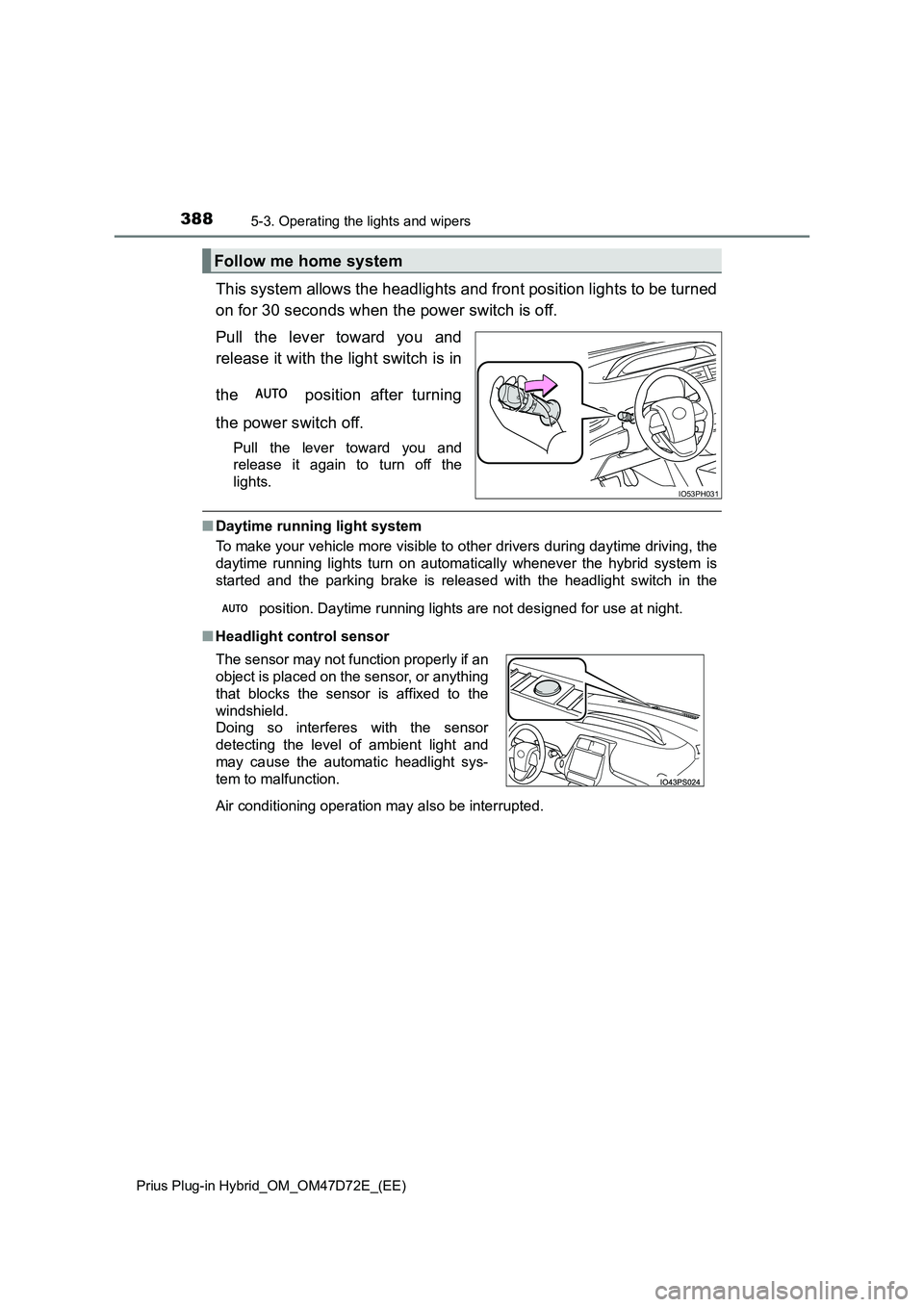
This system allows the headlights and front position lights to be turned
on for 30 seconds when the power switch is off.
Pull the lever toward you and
release it with the light switch is in
the position after turning
the power switch off.
Pull the lever toward you and
release it again to turn off the
lights.
■ Daytime running light system
To make your vehicle more visible to other drivers during daytime driving, the
daytime running lights turn on automatically whenever the hybrid system is
started and the parking brake is released with the headlight switch in the
position. Daytime running lights are not designed for use at night.
■ Headlight control sensor
Follow me home system
IO53PH031
The sensor may not function properly if an
object is placed on the sensor, or anything
that blocks the sensor is affixed to the
windshield.
Doing so interferes with the sensor
detecting the level of ambient light and
may cause the automatic headlight sys-
tem to malfunction.
Air conditioning operation may also be interrupted.
Page 428 of 816
4285-5. Using the driving support systems
Prius Plug-in Hybrid_OM_OM47D72E_(EE)
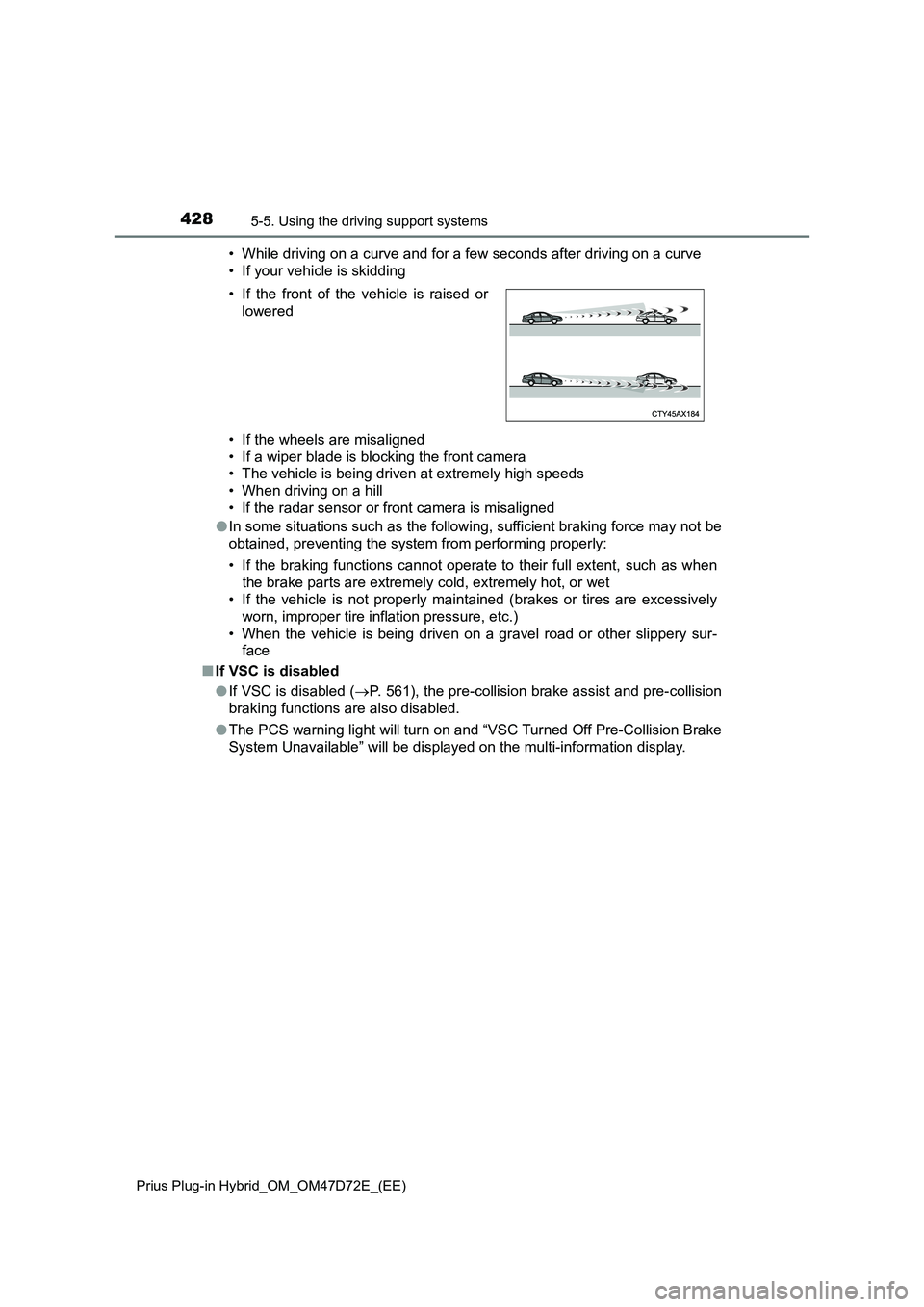
• While driving on a curve and for a few seconds after driving on a curve
• If your vehicle is skidding
• If the wheels are misaligned
• If a wiper blade is blocking the front camera
• The vehicle is being driven at extremely high speeds
• When driving on a hill
• If the radar sensor or front camera is misaligned
●In some situations such as the following, sufficient braking force may not be
obtained, preventing the system from performing properly:
• If the braking functions cannot operate to their full extent, such as when
the brake parts are extremely cold, extremely hot, or wet
• If the vehicle is not properly maintained (brakes or tires are excessively
worn, improper tire inflation pressure, etc.)
• When the vehicle is being driven on a gravel road or other slippery sur-
face
■If VSC is disabled
●If VSC is disabled (P. 561), the pre-collision brake assist and pre-collision
braking functions are also disabled.
●The PCS warning light will turn on and “VSC Turned Off Pre-Collision Brake
System Unavailable” will be displayed on the multi-information display. • If the front of the vehicle is raised or
lowered
Page 456 of 816
4565-5. Using the driving support systems
Prius Plug-in Hybrid_OM_OM47D72E_(EE)
Example of constant speed cruising
When there are no vehicles ahead
The vehicle travels at the speed set by the driver.
Example of deceleration cruising and follow-up cruising
When a preceding vehicle driving slower than the set speed
appears
When a vehicle is detected running ahead of you, the system automatically
decelerates your vehicle. When a greater reduction in vehicle speed is
necessary, the system applies the brakes (the stop lights will come on at
this time). The system will respond to changes in the speed of the vehicle
ahead in order to maintain the vehicle-to-vehicle distance set by the driver.
Approach warning warns you when the system cannot decelerate suffi-
ciently to prevent your vehicle from closing in on the vehicle ahead.
When the vehicle ahead of you stops, your vehicle will also stop (vehicle is
stopped by system control). After the vehicle ahead starts off, pushing the
cruise control lever up or depressing the accelerator pedal (start-off opera-
tion) will resume follow-up cruising. If the start-off operation is not per-
formed, system control continues to keep your vehicle stopped.
When the turn signal lever is operated and your vehicle moves to an over-
taking lane while driving at 80 km/h (50 mph) or more, the vehicle will
accelerate to help to overtake a passing vehicle.
The system’s identification of what is an overtaking lane may be deter-
mined solely based on the location of the steering wheel in the vehicle (left
side driver position versus right side driver position.) If the vehicle is driven
to a region where the overtaking lane is on a different side from where the
vehicle is normally driven, the vehicle may accelerate when the turn signal
lever is operated in the opposite direction to the overtaking lane (e.g., if the
driver normally operates the vehicle in a region where the overtaking lane
is to the right but then drives to a region where the overtaking lane is to the
left, the vehicle may accelerate when the right turn signal is activated).
Example of acceleration
When there are no longer any preceding vehicles driving slower
than the set speed
The system accelerates until the set speed is reached. The system then
returns to constant speed cruising.
1
2
3