change time TOYOTA PRIUS PLUS 2017 User Guide
[x] Cancel search | Manufacturer: TOYOTA, Model Year: 2017, Model line: PRIUS PLUS, Model: TOYOTA PRIUS PLUS 2017Pages: 509, PDF Size: 27.68 MB
Page 286 of 509
2865-1. Using the air conditioning system and defogger
PRIUS +_OM_OM47B24E_(EE)■
When the outside temperature is low
The dehumidification function may not operate even when is pressed.
■ Operation of the air conditioning system in Eco drive mode
●In the Eco drive mode, the air conditioning system is controlled as follows to
prioritize fuel efficiency
• Engine speed and compressor operation controlled to restrict heating/
cooling capacity
• Fan speed restricted when automatic mode is selected
● To improve air conditioning performance, perform the following operations
• Adjust the fan speed
• Turn off Eco drive mode
• Customize the air conditioning control of Eco drive mode. ( →P. 480)
■ Ventilation and air conditioning odors
●To let fresh air in, set the air conditioning system to the outside air mode.
● During use, various odors from inside and outside the vehicle may enter into
and accumulate in the air conditioning system. This may then cause odor to
be emitted from the vents.
● To reduce potential odors from occurring:
• It is recommended that the air condi tioning system be set to outside air
mode prior to turning the vehicle off.
• The start timing of the blower may be delayed for a short period of time
immediately after the air conditioning system is started in automatic
mode.
■ Air conditioning filter
→ P. 357
■ Customization
Settings (e.g. A/C auto switching operation) can be changed.
(Customizable features: →P. 477)
Page 288 of 509
2885-1. Using the air conditioning system and defogger
PRIUS +_OM_OM47B24E_(EE)
Using the steering wheel climate remote
control switches
∗
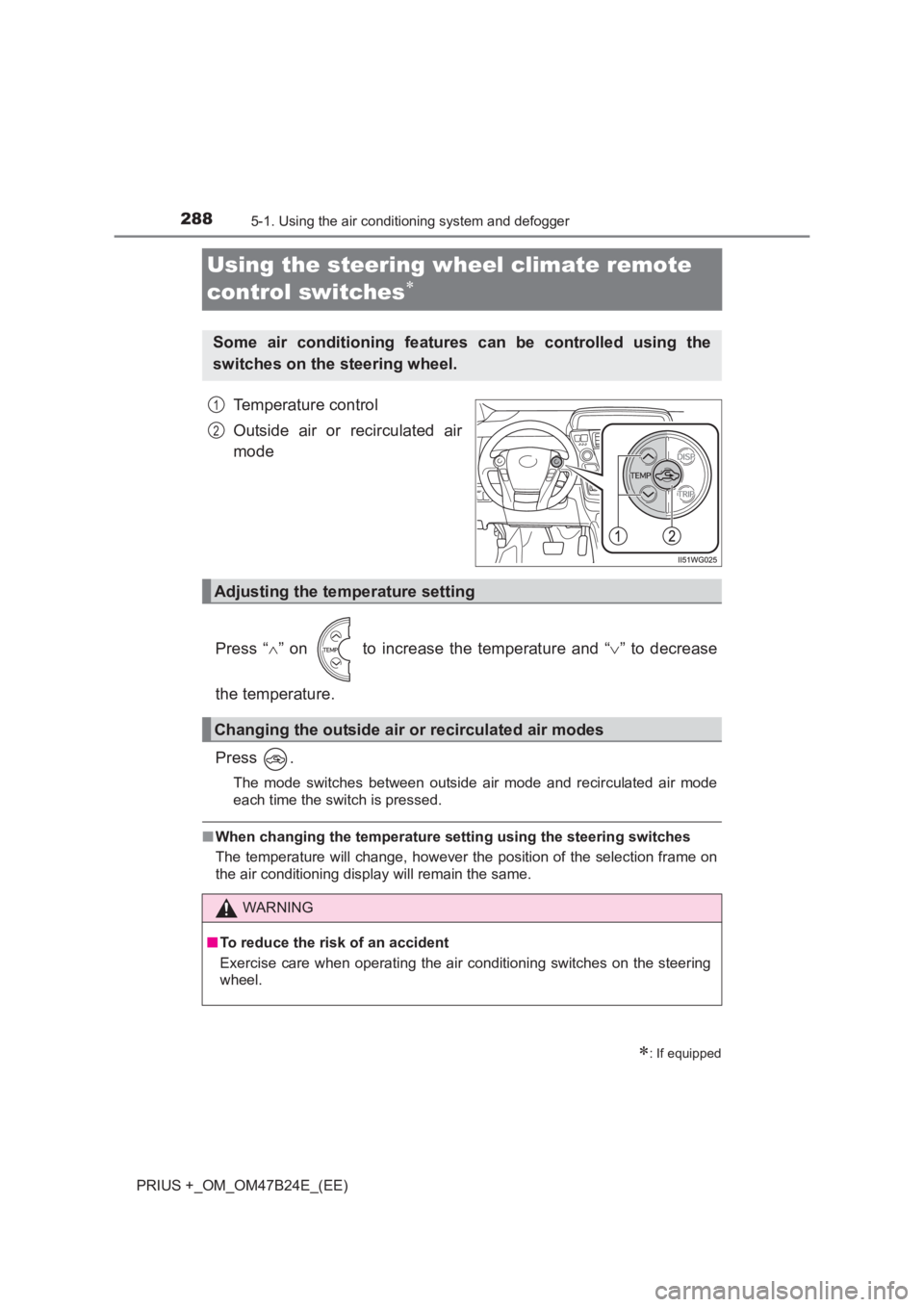
Temperature control
Outside air or recirculated air
mode
Press “ ∧” on to increase the temperature and “ ∨” to decrease
the temperature.
Press .
The mode switches between outside air mode and recirculated air mode
each time the switch is pressed.
■ When changing the temperature se tting using the steering switches
The temperature will change, however the position of the selection frame on
the air conditioning display will remain the same.
∗: If equipped
Some air conditioning features can be controlled using the
switches on the steering wheel.
1
2
Adjusting the temperature setting
Changing the outside air or recirculated air modes
WARNING
■ To reduce the risk of an accident
Exercise care when operating the air conditioning switches on the steering
wheel.
Page 292 of 509
2925-2. Using the interior lights
PRIUS +_OM_OM47B24E_(EE)
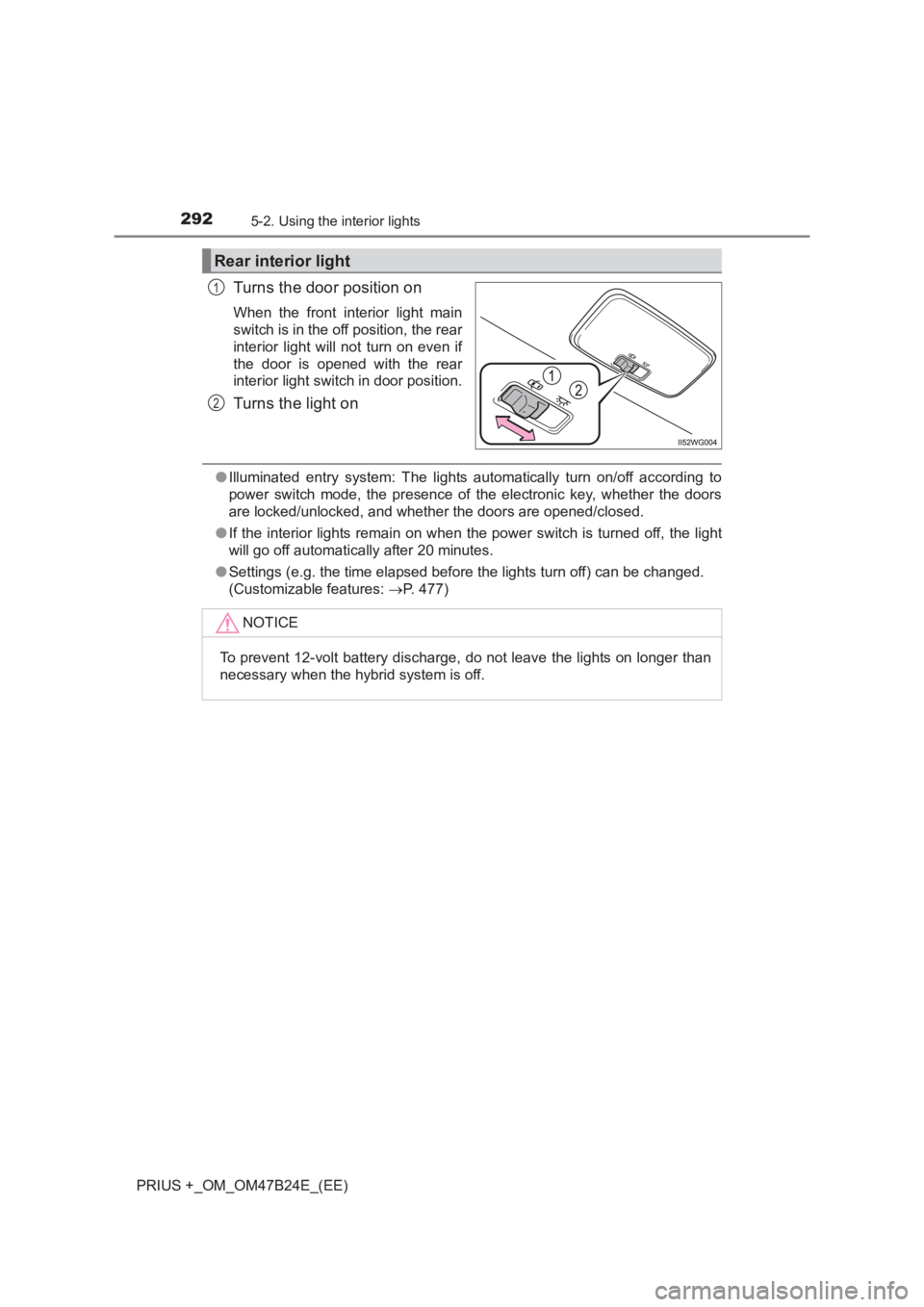
Turns the door position on
When the front interior light main
switch is in the off position, the rear
interior light will not turn on even if
the door is opened with the rear
interior light switch in door position.
Turns the light on
●Illuminated entry system: The lights automatically turn on/off according to
power switch mode, the presence of the electronic key, whether the doors
are locked/unlocked, and whether the doors are opened/closed.
● If the interior lights remain on when the power switch is turned off, the light
will go off automatically after 20 minutes.
● Settings (e.g. the time elapsed before the lights turn off) can be changed.
(Customizable features: →P. 477)
Rear interior light
1
2
NOTICE
To prevent 12-volt battery discharge, do not leave the lights on longer than
necessary when the hybrid system is off.
Page 346 of 509
3466-3. Do-it-yourself maintenance
PRIUS +_OM_OM47B24E_(EE)■
The initialization operation
●Make sure to carry out initialization after adjusting the tire inflation pressure.
Also, make sure the tires are cold before carrying out initialization or tire
inflation pressure adjustment.
● If you have accidentally turned the power switch off during initialization, it is
not necessary to press the reset switch again as initialization will restart
automatically when the power switch has been turned to ON mode for the
next time.
● If you accidentally press the reset switch when initialization is not necessary,
adjust the tire inflation pressure to the specified level when the tires are
cold, and conduct initialization again.
■ Warning performance of the tire pressure warning system
The warning of the tire pressure warning system will change in accordance
with the conditions under which it was initialized. For this reason, the system
may give a warning even if the tire pressure does not reach a low enough
level, or if the pressure is higher than the pressure that was adjusted to when
the system was initialized.
■ When initialization of the tire pressure warning system has failed
Initialization can be completed in a few minutes. However, in the following
cases, the settings have not been recorded and the system will not operate
properly. If repeated attempts to record tire inflation pressure settings are
unsuccessful, have the vehicle inspected by any authorized Toyota dealer or
repairer, or another duly qualified and equipped professional.
● When operating the tire pressure warning reset switch, the tire pressure
warning light does not blink 3 times.
● After carrying out the initialization procedure, the tire pressure warning light
blinks for 1 minute then stays on after driving for 20 minutes.
■ Registering ID codes
The ID codes of the tire pressure wa rning valve and transmitters for two sets
of wheels can be registered.
It is not necessary to register the ID codes when replacing normal tires with
snow tires, if the ID codes for the wheels of both normal tires and snow tires
are registered beforehand.
For information about changing ID codes, ask any authorized Toyota dealer
or repairer, or another duly qualified and equipped professional.
Page 391 of 509
3917-2. Steps to take in an emergency
PRIUS +_OM_OM47B24E_(EE)
7
When trouble arises
(If equipped)
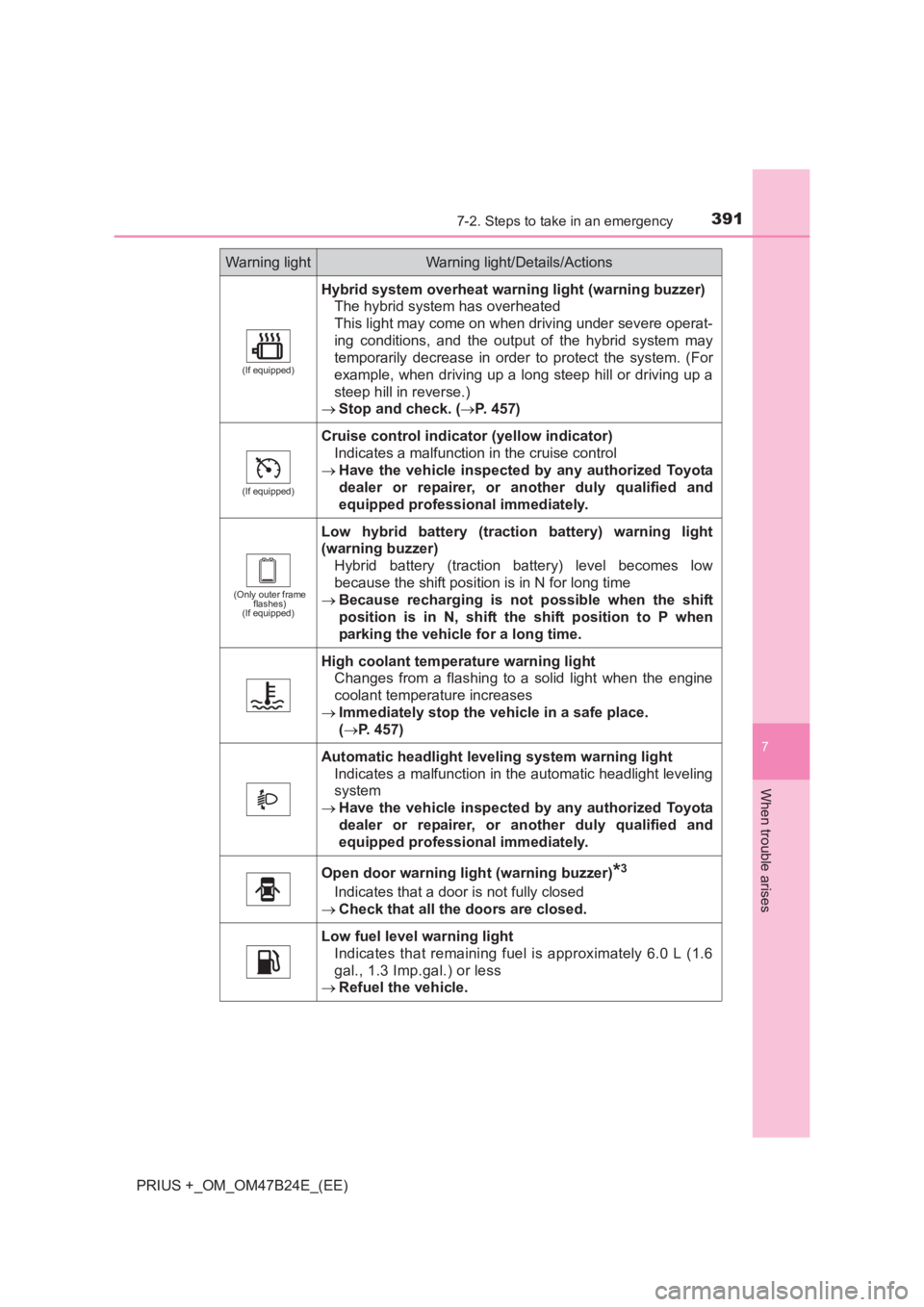
Hybrid system overheat warning light (warning buzzer)The hybrid system has overheated
This light may come on when driving under severe operat-
ing conditions, and the output of the hybrid system may
temporarily decrease in order to protect the system. (For
example, when driving up a long steep hill or driving up a
steep hill in reverse.)
→ Stop and check. ( →P. 457)
(If equipped)
Cruise control indicator (yellow indicator)
Indicates a malfunction in the cruise control
→ Have the vehicle inspected by any authorized Toyota
dealer or repairer, or another duly qualified and
equipped professional immediately.
(Only outer frame flashes)
(If equipped)
Low hybrid battery (traction battery) warning light
(warning buzzer)
Hybrid battery (traction battery) level becomes low
because the shift position is in N for long time
→ Because recharging is not possible when the shift
position is in N, shift the shift position to P when
parking the vehicle for a long time.
High coolant temperature warning light
Changes from a flashing to a solid light when the engine
coolant temperature increases
→ Immediately stop the vehicle in a safe place.
(→ P. 457)
Automatic headlight leveling system warning light
Indicates a malfunction in the automatic headlight leveling
system
→ Have the vehicle inspected by any authorized Toyota
dealer or repairer, or another duly qualified and
equipped professional immediately.
Open door warning light (warning buzzer)*3
Indicates that a door is not fully closed
→ Check that all the doors are closed.
Low fuel level warning light
Indicates that remaining fuel is approximately 6.0 L (1.6
gal., 1.3 Imp.gal.) or less
→ Refuel the vehicle.
Warning lightWarning light/Details/Actions
Page 397 of 509
3977-2. Steps to take in an emergency
PRIUS +_OM_OM47B24E_(EE)
7
When trouble arises
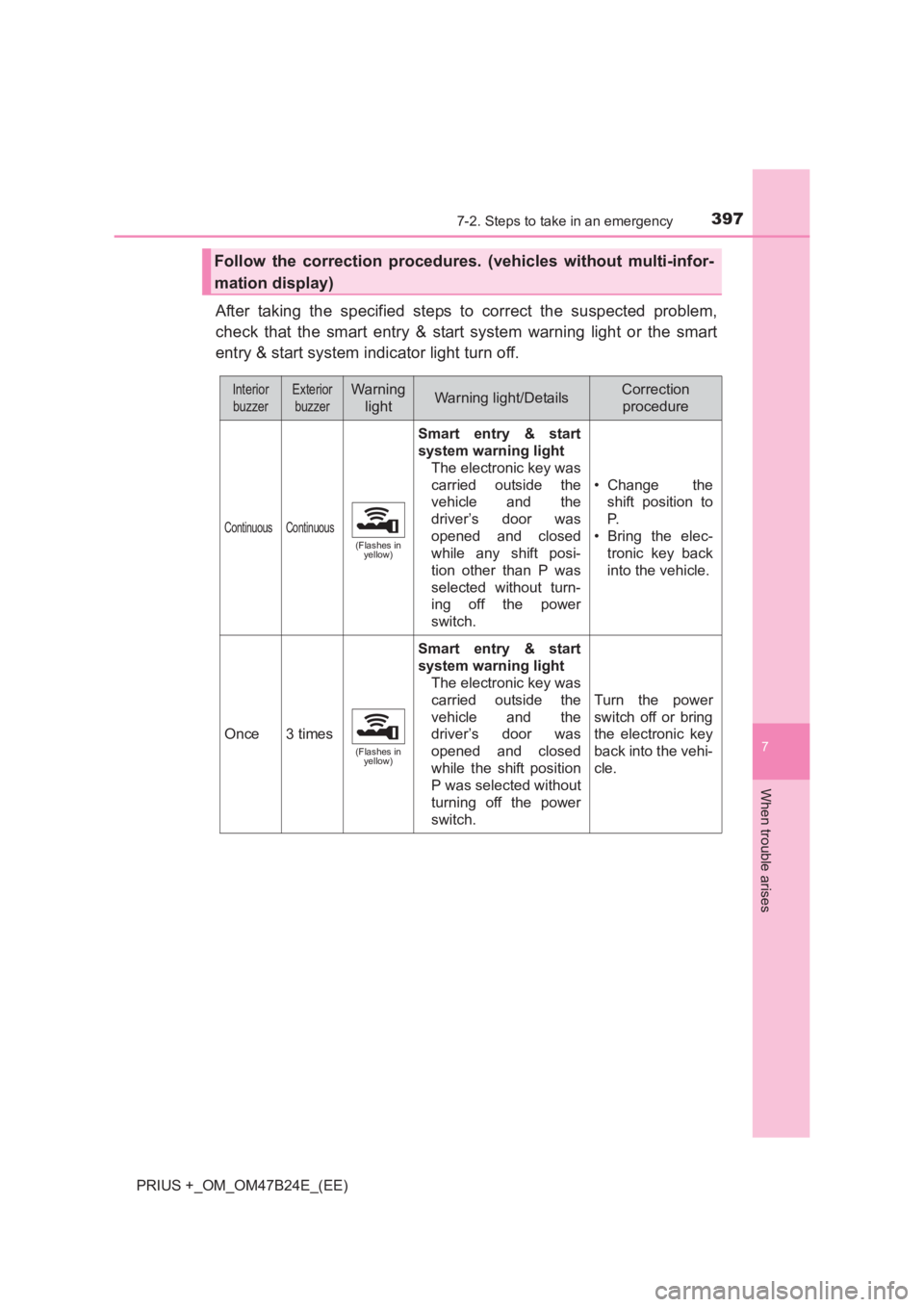
After taking the specified steps to correct the suspected problem,
check that the smart entry & start system warning light or the smart
entry & start system indicator light turn off.
Follow the correction procedures. (vehicles without multi-infor-
mation display)
InteriorbuzzerExterior buzzerWarning lightWarning light/DetailsCorrection procedure
Continuous Continuous
(Flashes in yellow)
Smart entry & start
system warning light
The electronic key was
carried outside the
vehicle and the
driver’s door was
opened and closed
while any shift posi-
tion other than P was
selected without turn-
ing off the power
switch. • Change the
shift position to
P.
• Bring the elec- tronic key back
into the vehicle.
Once3 times
(Flashes in yellow)
Smart entry & start
system warning light
The electronic key was
carried outside the
vehicle and the
driver’s door was
opened and closed
while the shift position
P was selected without
turning off the power
switch.
Turn the power
switch off or bring
the electronic key
back into the vehi-
cle.
Page 404 of 509
4047-2. Steps to take in an emergency
PRIUS +_OM_OM47B24E_(EE)
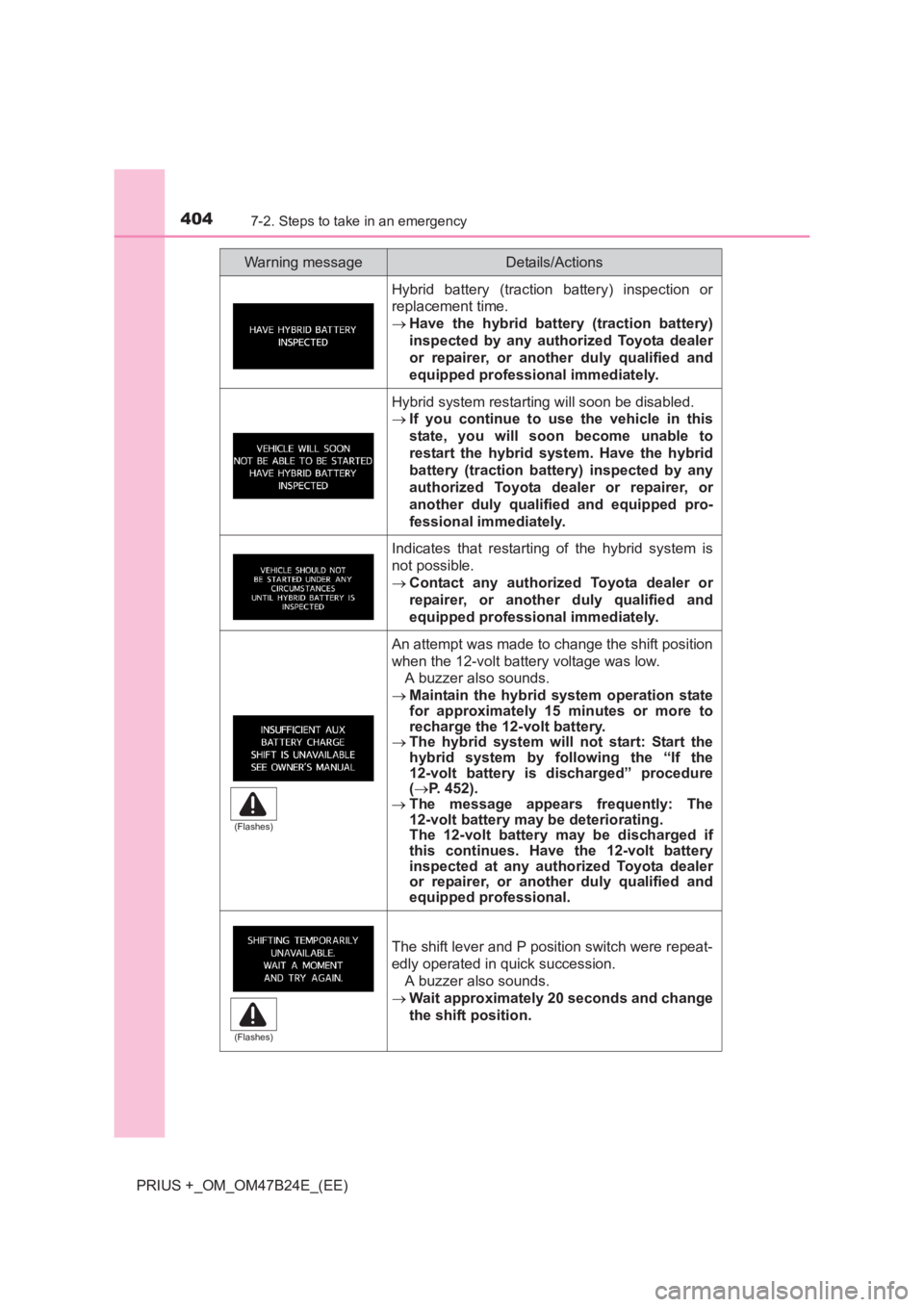
Hybrid battery (traction battery) inspection or
replacement time.
→Have the hybrid battery (traction battery)
inspected by any authorized Toyota dealer
or repairer, or another duly qualified and
equipped professional immediately.
Hybrid system restarting will soon be disabled.
→If you continue to use the vehicle in this
state, you will soon become unable to
restart the hybrid system. Have the hybrid
battery (traction battery) inspected by any
authorized Toyota dealer or repairer, or
another duly qualified and equipped pro-
fessional immediately.
Indicates that restarting of the hybrid system is
not possible.
→Contact any authorized Toyota dealer or
repairer, or another duly qualified and
equipped professional immediately.
An attempt was made to change the shift position
when the 12-volt battery voltage was low.
A buzzer also sounds.
→ Maintain the hybrid system operation state
for approximately 15 minutes or more to
recharge the 12-volt battery.
→ The hybrid system will not start: Start the
hybrid system by following the “If the
12-volt battery is discharged” procedure
(→ P. 452).
→ The message appears frequently: The
12-volt battery may be deteriorating.
The 12-volt battery may be discharged if
this continues. Have the 12-volt battery
inspected at any auth orized Toyota dealer
or repairer, or another duly qualified and
equipped professional.
The shift lever and P position switch were repeat-
edly operated in quick succession.
A buzzer also sounds.
→ Wait approximately 20 seconds and change
the shift position.
Warning messageDetails/Actions
(Flashes)
(Flashes)
Page 451 of 509
4517-2. Steps to take in an emergency
PRIUS +_OM_OM47B24E_(EE)
7
When trouble arises
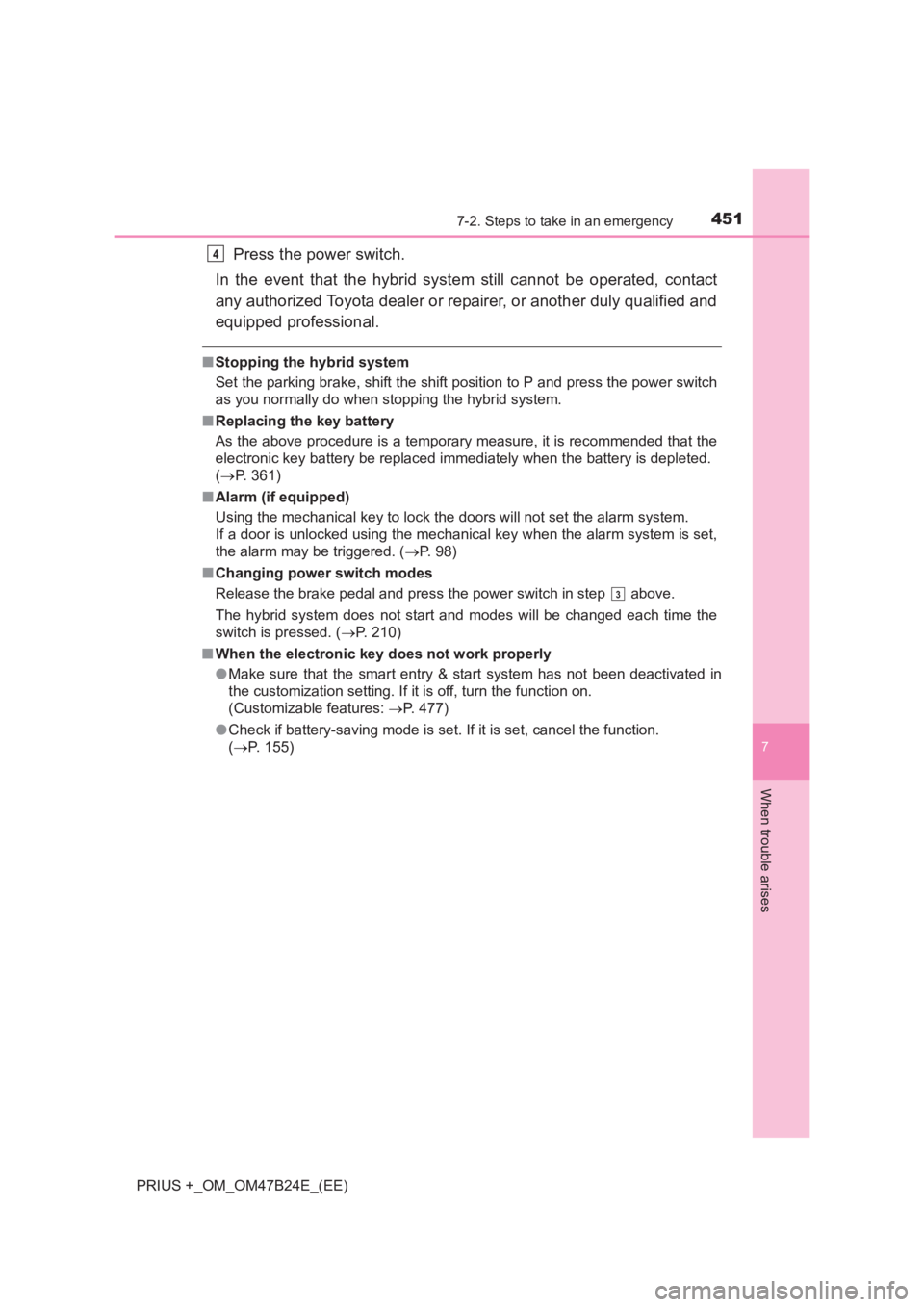
Press the power switch.
In the event that the hybrid system still cannot be operated, contact
any authorized Toyota dealer or repairer, or another duly qualified and
equipped professional.
■ Stopping the hybrid system
Set the parking brake, shift the shift position to P and press the power switch
as you normally do when stopping the hybrid system.
■ Replacing the key battery
As the above procedure is a temporary measure, it is recommended that the
electronic key battery be replaced imm ediately when the battery is depleted.
( → P. 361)
■ Alarm (if equipped)
Using the mechanical key to lock the doors will not set the alarm system.
If a door is unlocked using the mechanical key when the alarm system is set,
the alarm may be triggered. ( →P. 98)
■ Changing power switch modes
Release the brake pedal and press the power switch in step
above.
The hybrid system does not start and modes will be changed each time the
switch is pressed. ( →P. 210)
■ When the electronic key does not work properly
●Make sure that the smart entry & start system has not been deactivated in
the customization setting. If it is off, turn the function on.
(Customizable features: →P. 477)
● Check if battery-saving mode is set. If it is set, cancel the function.
(→ P. 155)
4
3
Page 455 of 509
4557-2. Steps to take in an emergency
PRIUS +_OM_OM47B24E_(EE)
7
When trouble arises
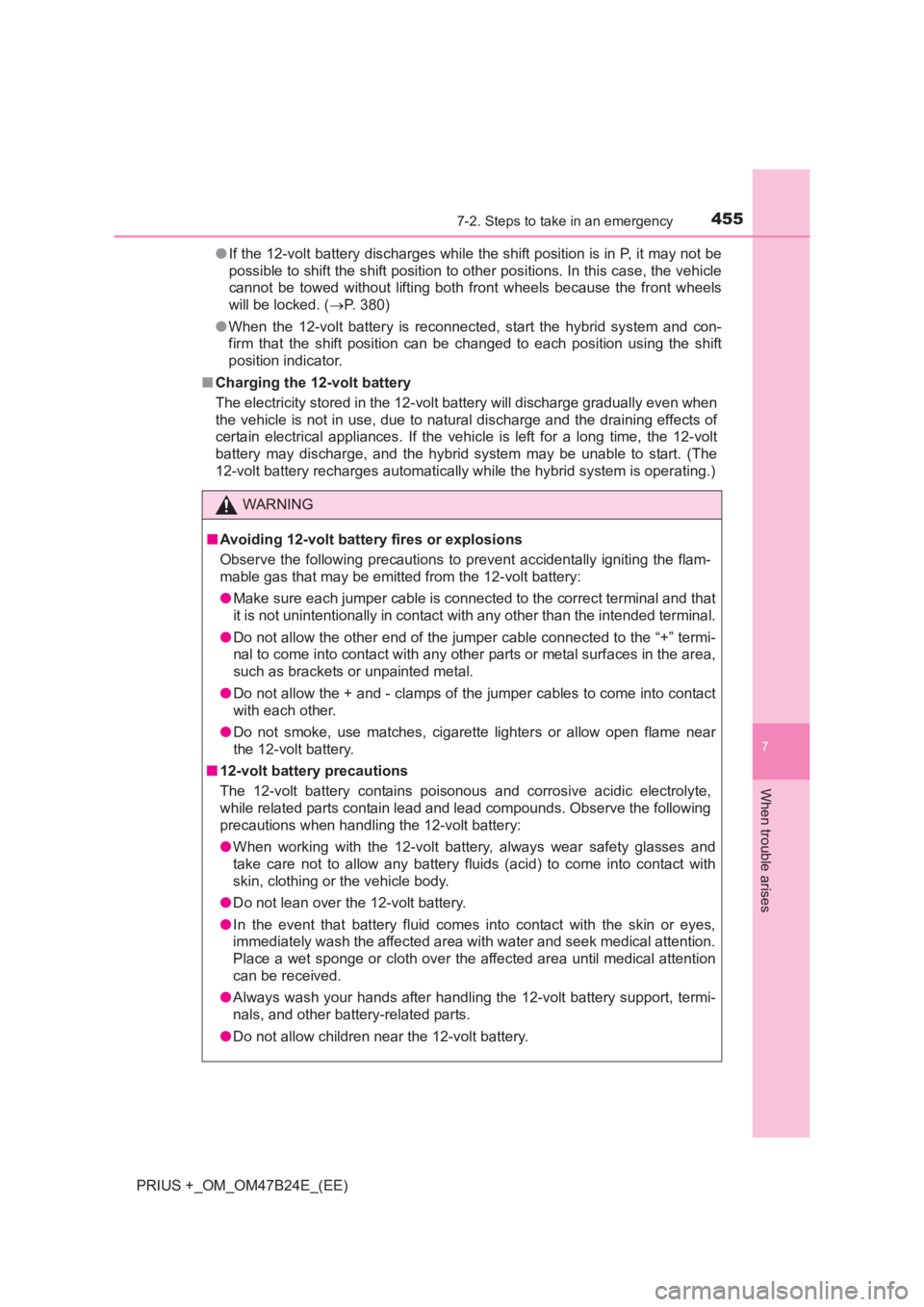
●If the 12-volt battery discharges while the shift position is in P, it may not be
possible to shift the shift position to other positions. In this case, the vehicle
cannot be towed without lifting both front wheels because the front wheels
will be locked. ( →P. 380)
● When the 12-volt battery is reconnected, start the hybrid system and con-
firm that the shift position can be changed to each position using the shift
position indicator.
■ Charging the 12-volt battery
The electricity stored in the 12-volt battery will discharge gradually even when
the vehicle is not in use, due to natural discharge and the draining effects of
certain electrical appliances. If the vehicle is left for a long time, the 12-volt
battery may discharge, and the hybrid system may be unable to start. (The
12-volt battery recharges automatically while the hybrid system is operating.)
WARNING
■ Avoiding 12-volt battery fires or explosions
Observe the following precautions to prevent accidentally igniting the flam-
mable gas that may be emitted from the 12-volt battery:
● Make sure each jumper cable is connected to the correct terminal and that
it is not unintentionally in contact with any other than the intended terminal.
● Do not allow the other end of the jumper cable connected to the “+” termi-
nal to come into contact with any other parts or metal surfaces in the area,
such as brackets or unpainted metal.
● Do not allow the + and - clamps of the jumper cables to come into contact
with each other.
● Do not smoke, use matches, cigarette lighters or allow open flame near
the 12-volt battery.
■ 12-volt battery precautions
The 12-volt battery contains poisonous and corrosive acidic electrolyte,
while related parts contain lead and lead compounds. Observe the following
precautions when handling the 12-volt battery:
●When working with the 12-volt battery , always wear safety glasses and
take care not to allow any battery fluids (acid) to come into contact with
skin, clothing or the vehicle body.
● Do not lean over the 12-volt battery.
● In the event that battery fluid comes into contact with the skin or eyes,
immediately wash the affected area with water and seek medical attention.
Place a wet sponge or cloth over the affected area until medical attention
can be received.
● Always wash your hands after handling the 12-volt battery support, termi-
nals, and other battery-related parts.
● Do not allow children near the 12-volt battery.
Page 478 of 509
4788-2. Customization
PRIUS +_OM_OM47B24E_(EE)
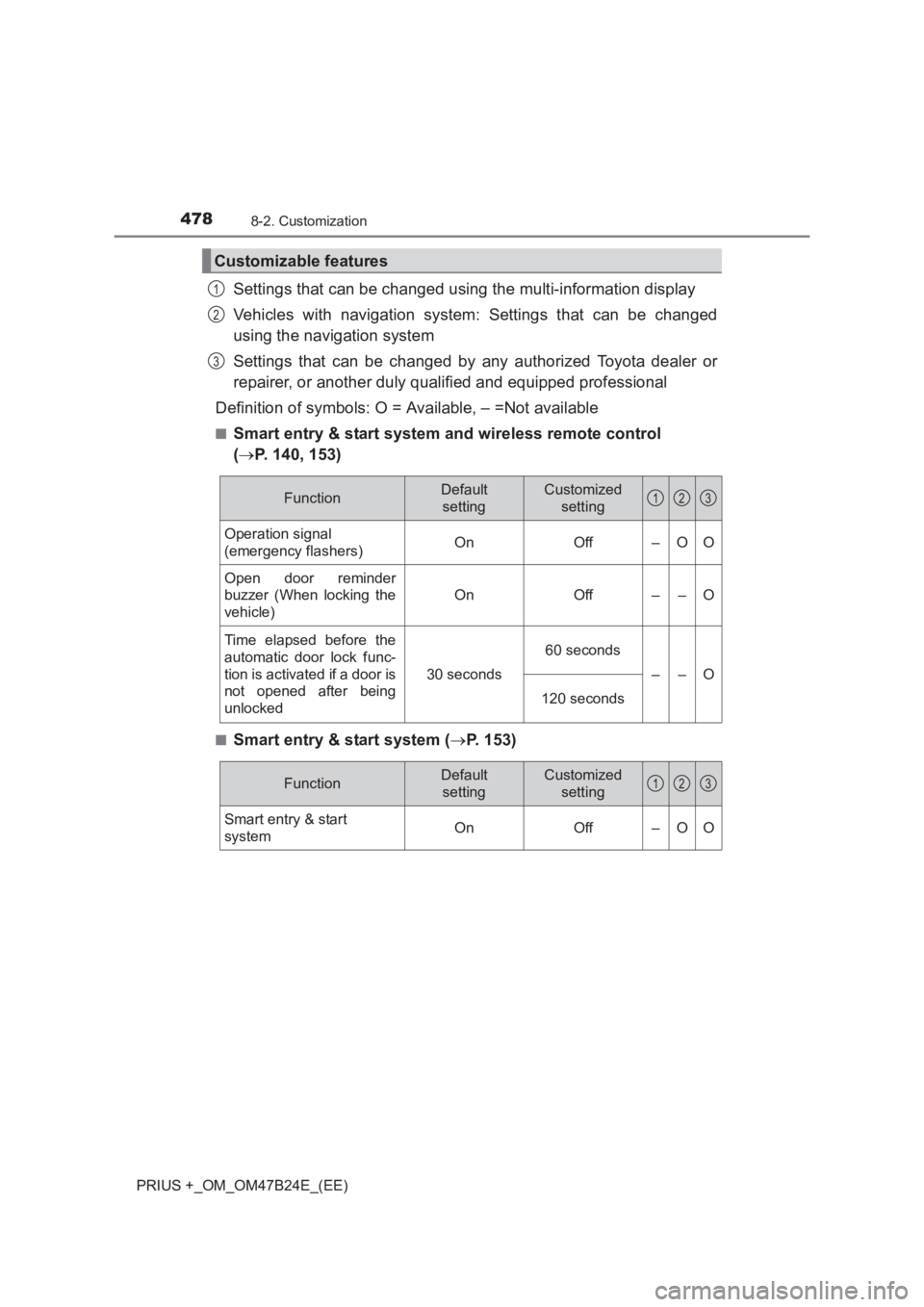
Settings that can be changed using the multi-information display
Vehicles with navigation system: Settings that can be changed
using the navigation system
Settings that can be changed by any authorized Toyota dealer or
repairer, or another duly qualified and equipped professional
Definition of symbols: O = Available, – =Not available
■Smart entry & start system and wireless remote control
( → P. 140, 153)
■Smart entry & start system ( →P. 153)
Customizable features
1
2
3
FunctionDefault
settingCustomized setting
Operation signal
(emergency flashers)OnOff–OO
Open door reminder
buzzer (When locking the
vehicle)
OnOff––O
Time elapsed before the
automatic door lock func-
tion is activated if a door is
not opened after being
unlocked
30 seconds
60 seconds
––O
120 seconds
123
FunctionDefault
settingCustomized setting
Smart entry & start
system On Off – O O
123