buttons TOYOTA PRIUS PLUS 2017 Owners Manual
[x] Cancel search | Manufacturer: TOYOTA, Model Year: 2017, Model line: PRIUS PLUS, Model: TOYOTA PRIUS PLUS 2017Pages: 509, PDF Size: 27.68 MB
Page 19 of 509
19Pictorial index
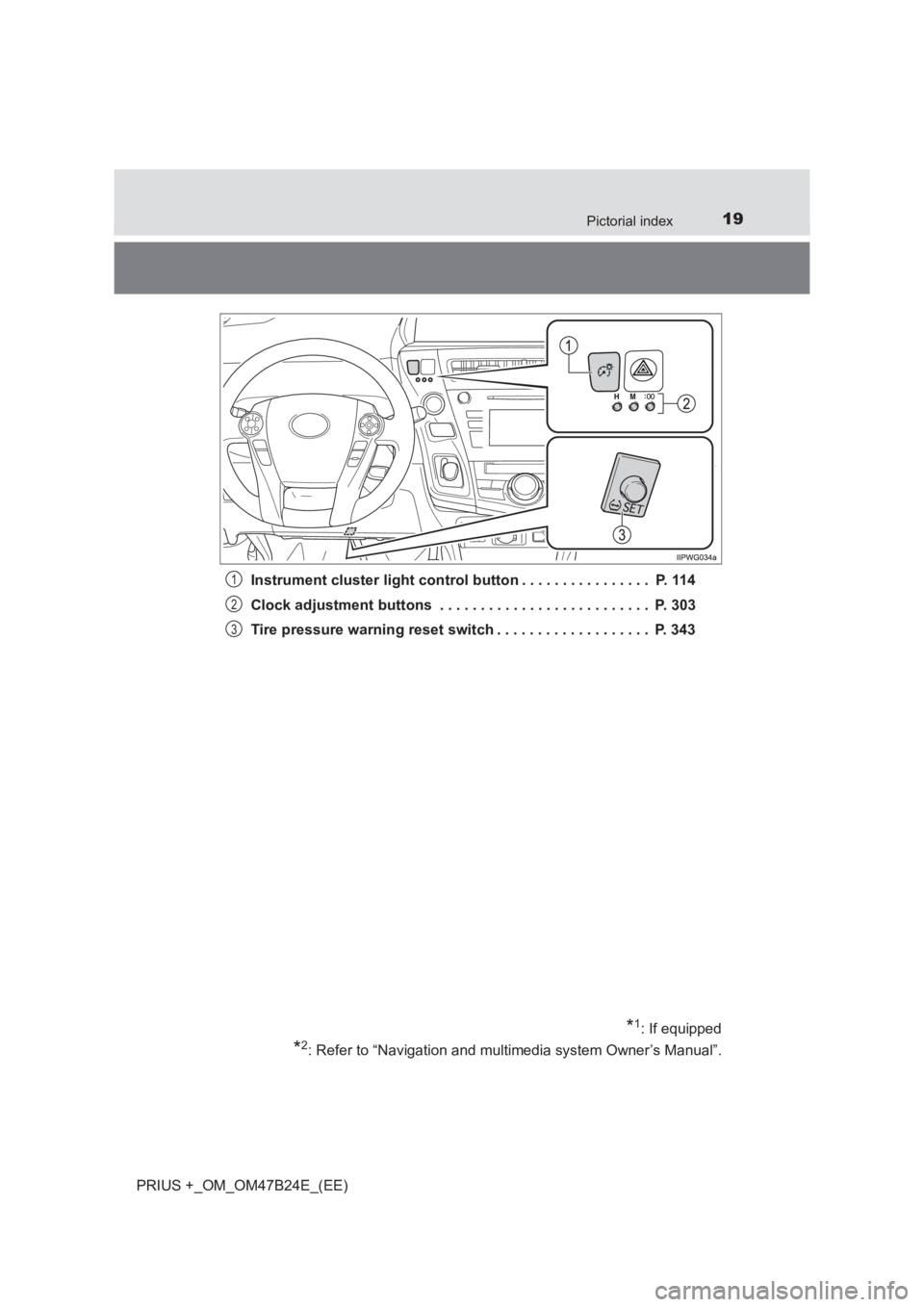
PRIUS +_OM_OM47B24E_(EE)Instrument cluster light control button . . . . . . . . . . . . . . . . P. 114
Clock adjustment buttons . . . . . . . . . . . . . . . . . . . . . . . . . . P. 303
Tire pressure warning reset switch . . . . . . . . . . . . . . . . . . . P. 343
*1: If equipped
*2: Refer to “Navigation and multimedia system Owner’s Manual”.
1
2
3
Page 22 of 509
22Pictorial index
PRIUS +_OM_OM47B24E_(EE)
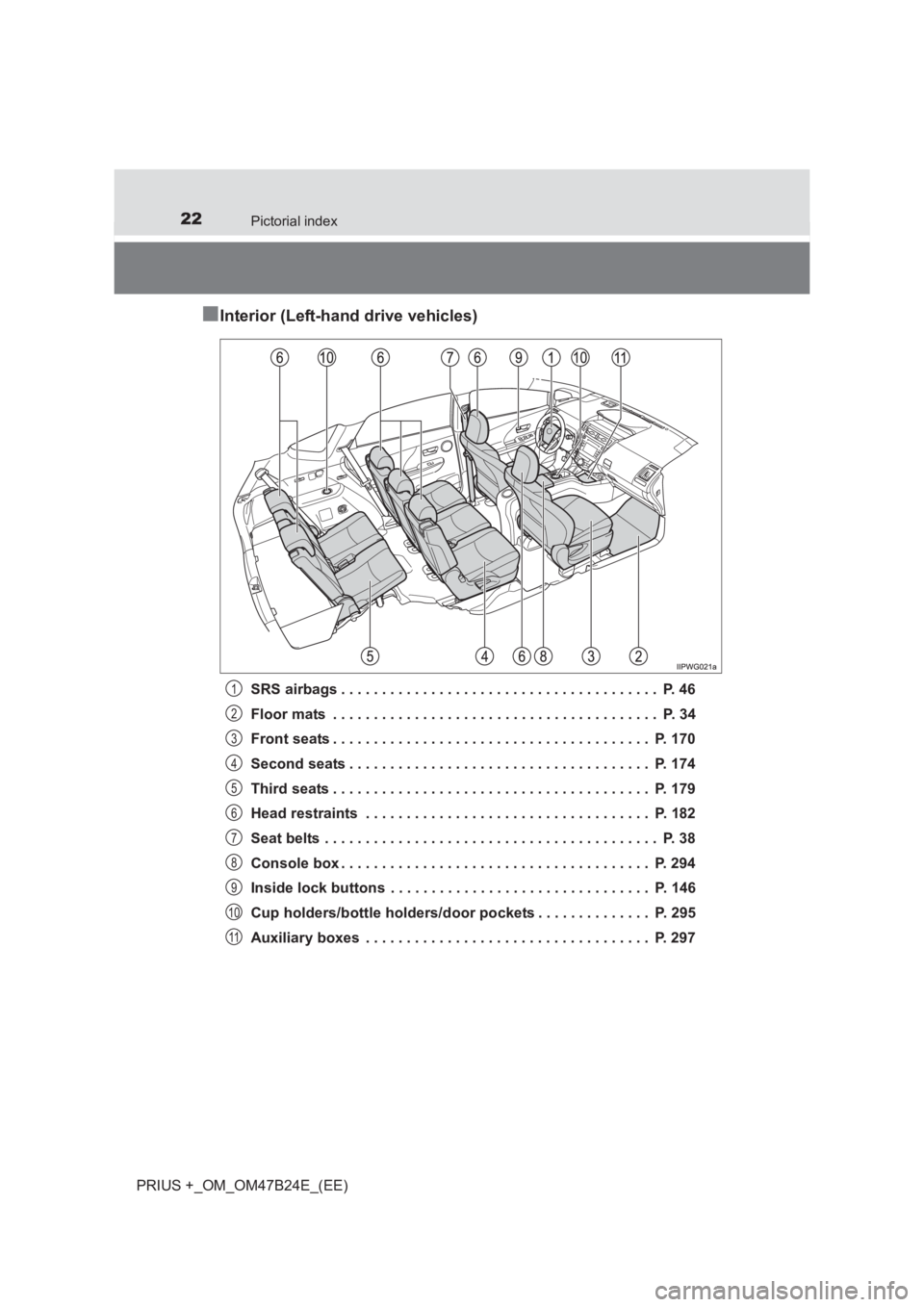
■Interior (Left-hand drive vehicles)
SRS airbags . . . . . . . . . . . . . . . . . . . . . . . . . . . . . . . . . . . . . . . P. 46
Floor mats . . . . . . . . . . . . . . . . . . . . . . . . . . . . . . . . . . . . . . . . P. 34
Front seats . . . . . . . . . . . . . . . . . . . . . . . . . . . . . . . . . . . . . . . P. 170
Second seats . . . . . . . . . . . . . . . . . . . . . . . . . . . . . . . . . . . . . P. 174
Third seats . . . . . . . . . . . . . . . . . . . . . . . . . . . . . . . . . . . . . . . P. 179
Head restraints . . . . . . . . . . . . . . . . . . . . . . . . . . . . . . . . . . . P. 182
Seat belts . . . . . . . . . . . . . . . . . . . . . . . . . . . . . . . . . . . . . . . . . P. 38
Console box . . . . . . . . . . . . . . . . . . . . . . . . . . . . . . . . . . . . . . P. 294
Inside lock buttons . . . . . . . . . . . . . . . . . . . . . . . . . . . . . . . . P. 146
Cup holders/bottle holders/door pockets . . . . . . . . . . . . . . P. 295
Auxiliary boxes . . . . . . . . . . . . . . . . . . . . . . . . . . . . . . . . . . . P. 2971
2
3
4
5
6
7
8
9
10
11
Page 27 of 509
27Pictorial index
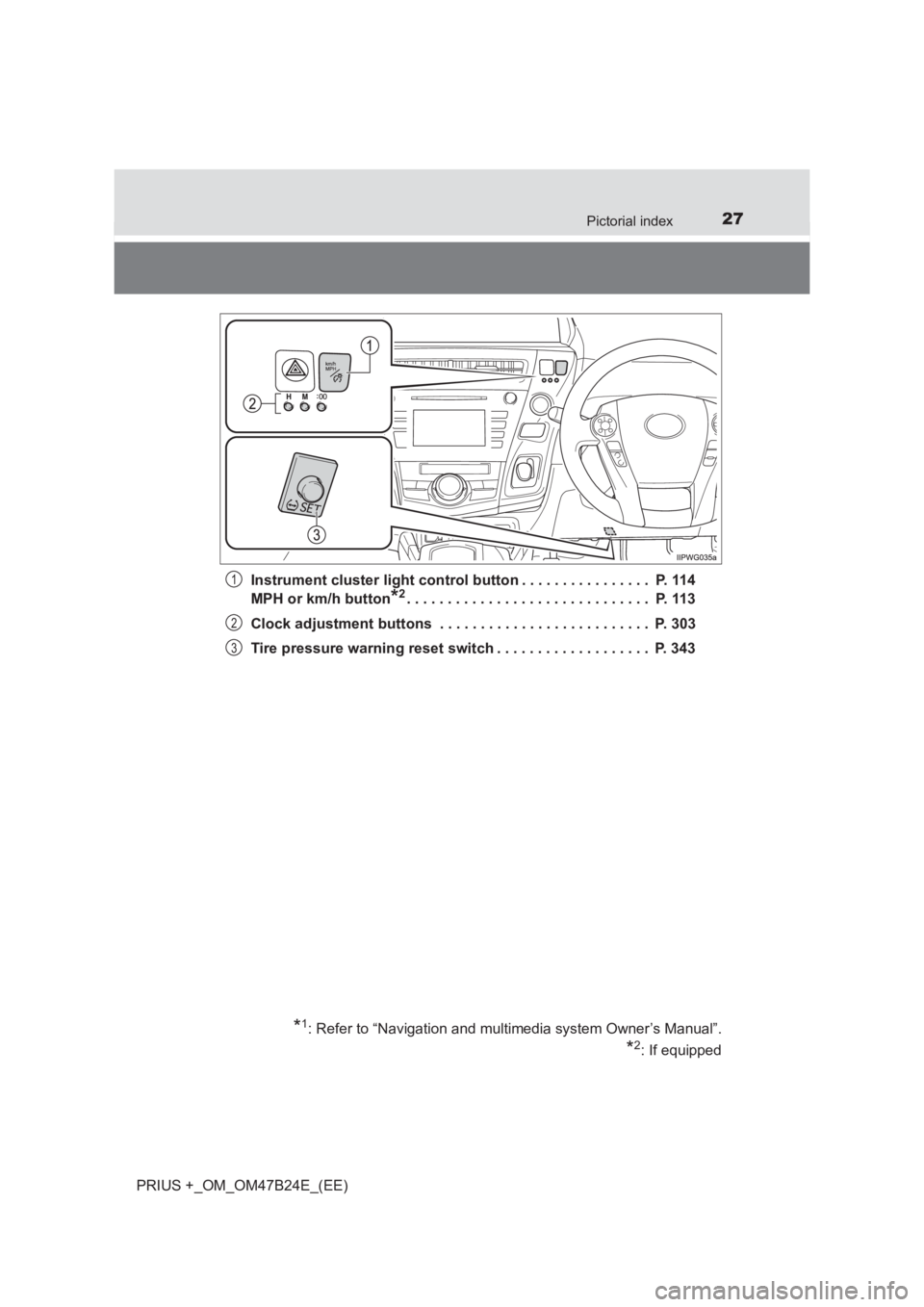
PRIUS +_OM_OM47B24E_(EE)Instrument cluster light control button . . . . . . . . . . . . . . . . P. 114
MPH or km/h button
*2. . . . . . . . . . . . . . . . . . . . . . . . . . . . . . P. 113
Clock adjustment buttons . . . . . . . . . . . . . . . . . . . . . . . . . . P. 303
Tire pressure warning reset switch . . . . . . . . . . . . . . . . . . . P. 343
*1: Refer to “Navigation and multimedia system Owner’s Manual”.
*2: If equipped
1
2
3
Page 30 of 509
30Pictorial index
PRIUS +_OM_OM47B24E_(EE)
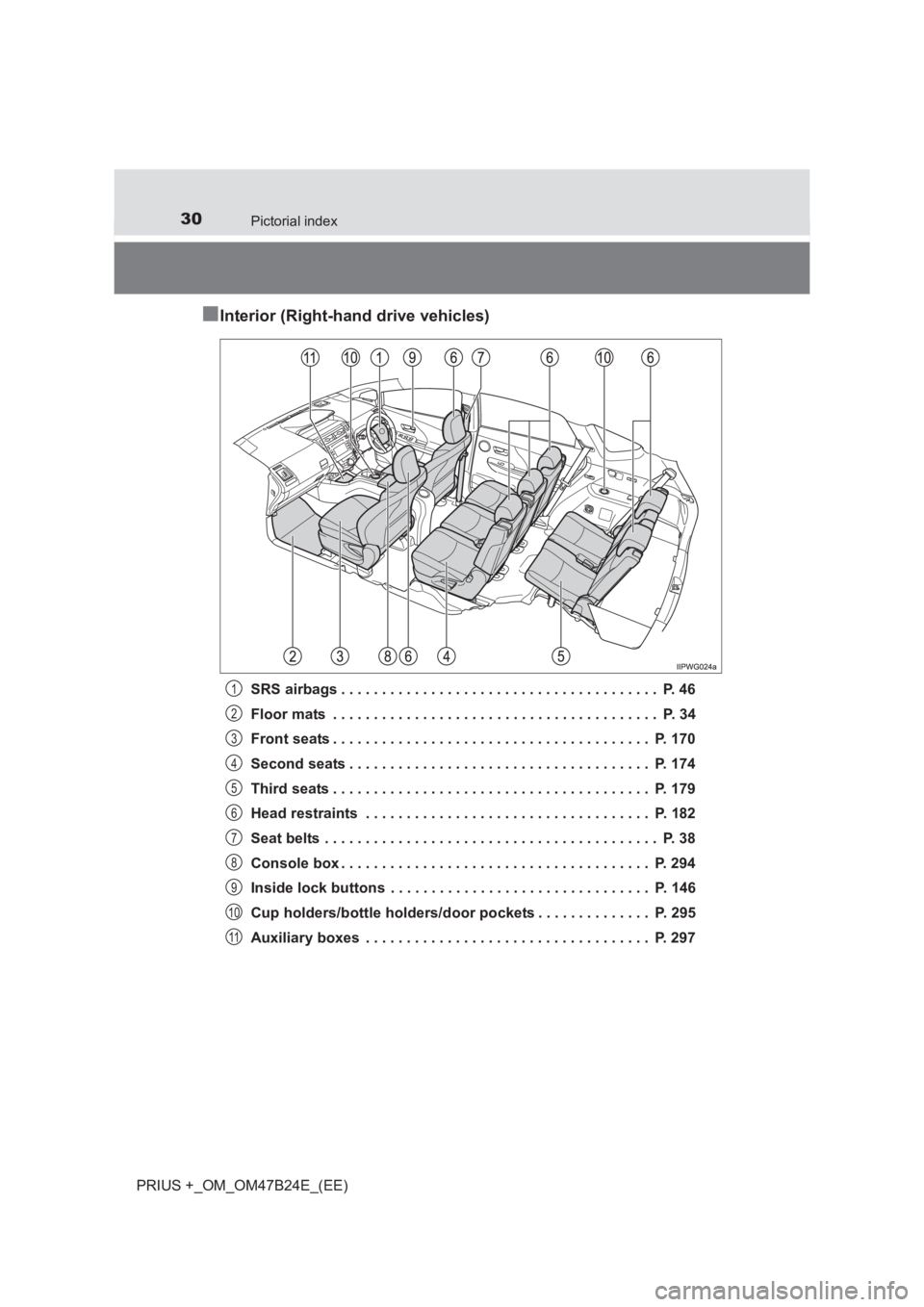
■Interior (Right-hand drive vehicles)
SRS airbags . . . . . . . . . . . . . . . . . . . . . . . . . . . . . . . . . . . . . . . P. 46
Floor mats . . . . . . . . . . . . . . . . . . . . . . . . . . . . . . . . . . . . . . . . P. 34
Front seats . . . . . . . . . . . . . . . . . . . . . . . . . . . . . . . . . . . . . . . P. 170
Second seats . . . . . . . . . . . . . . . . . . . . . . . . . . . . . . . . . . . . . P. 174
Third seats . . . . . . . . . . . . . . . . . . . . . . . . . . . . . . . . . . . . . . . P. 179
Head restraints . . . . . . . . . . . . . . . . . . . . . . . . . . . . . . . . . . . P. 182
Seat belts . . . . . . . . . . . . . . . . . . . . . . . . . . . . . . . . . . . . . . . . . P. 38
Console box . . . . . . . . . . . . . . . . . . . . . . . . . . . . . . . . . . . . . . P. 294
Inside lock buttons . . . . . . . . . . . . . . . . . . . . . . . . . . . . . . . . P. 146
Cup holders/bottle holders/door pockets . . . . . . . . . . . . . . P. 295
Auxiliary boxes . . . . . . . . . . . . . . . . . . . . . . . . . . . . . . . . . . . P. 2971
2
3
4
5
6
7
8
9
10
11
Page 141 of 509
1413-1. Key information
3
Operation of each component
PRIUS +_OM_OM47B24E_(EE)
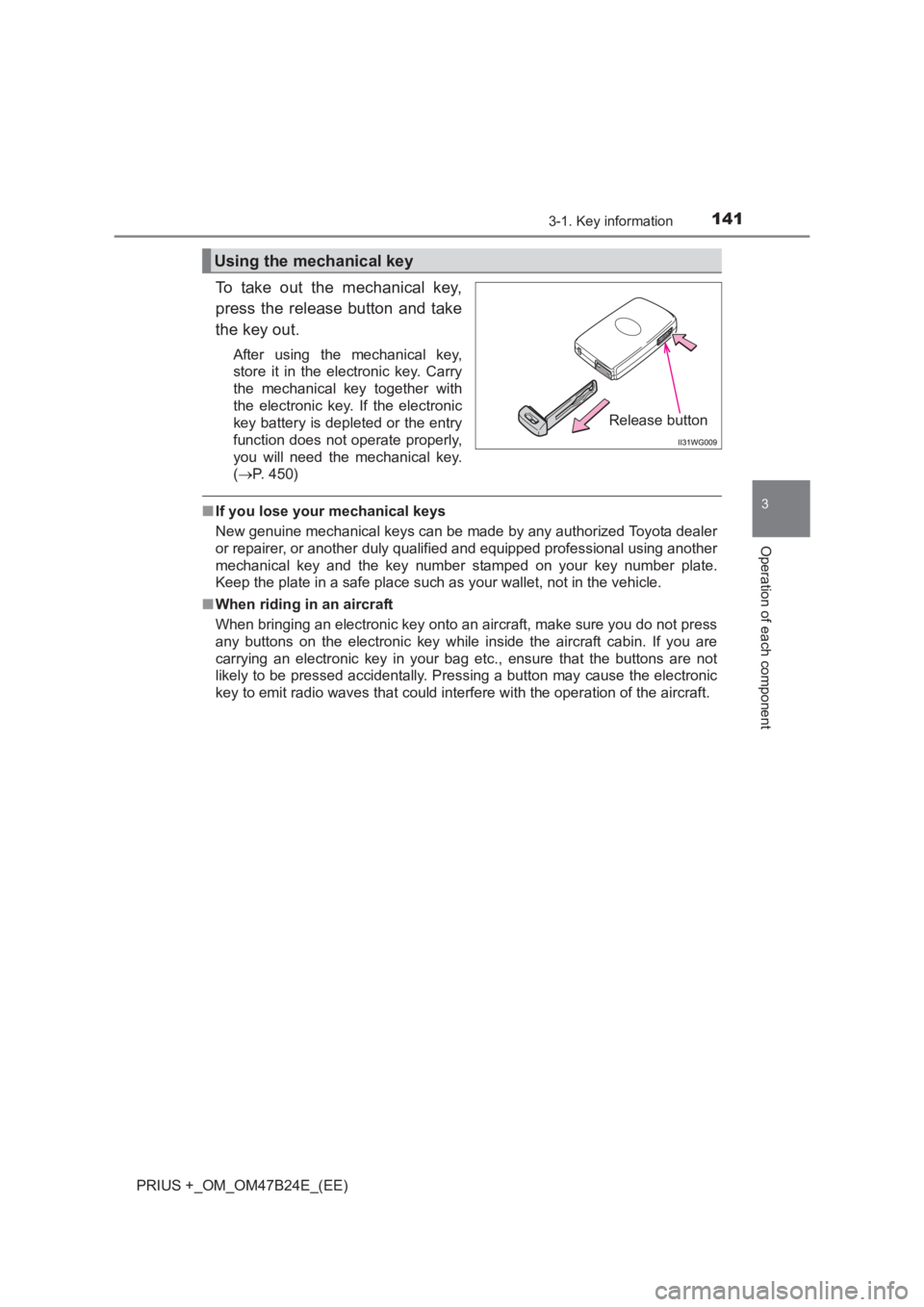
To take out the mechanical key,
press the release button and take
the key out.
After using the mechanical key,
store it in the electronic key. Carry
the mechanical key together with
the electronic key. If the electronic
key battery is depleted or the entry
function does not operate properly,
you will need the mechanical key.
(→ P. 450)
■If you lose your mechanical keys
New genuine mechanical keys can be made by any authorized Toyota dealer
or repairer, or another duly qualified and equipped professional using another
mechanical key and the key number stamped on your key number plate.
Keep the plate in a safe place such as your wallet, not in the vehicle.
■ When riding in an aircraft
When bringing an electronic key onto an aircraft, make sure you do not press
any buttons on the electronic key while inside the aircraft cabin. If you are
carrying an electronic key in your bag etc., ensure that the buttons are not
likely to be pressed accidentally. Pressing a button may cause the electronic
key to emit radio waves that could interfere with the operation of the aircraft.
Using the mechanical key
Release button
Page 146 of 509
1463-2. Opening, closing and locking the doors
PRIUS +_OM_OM47B24E_(EE)
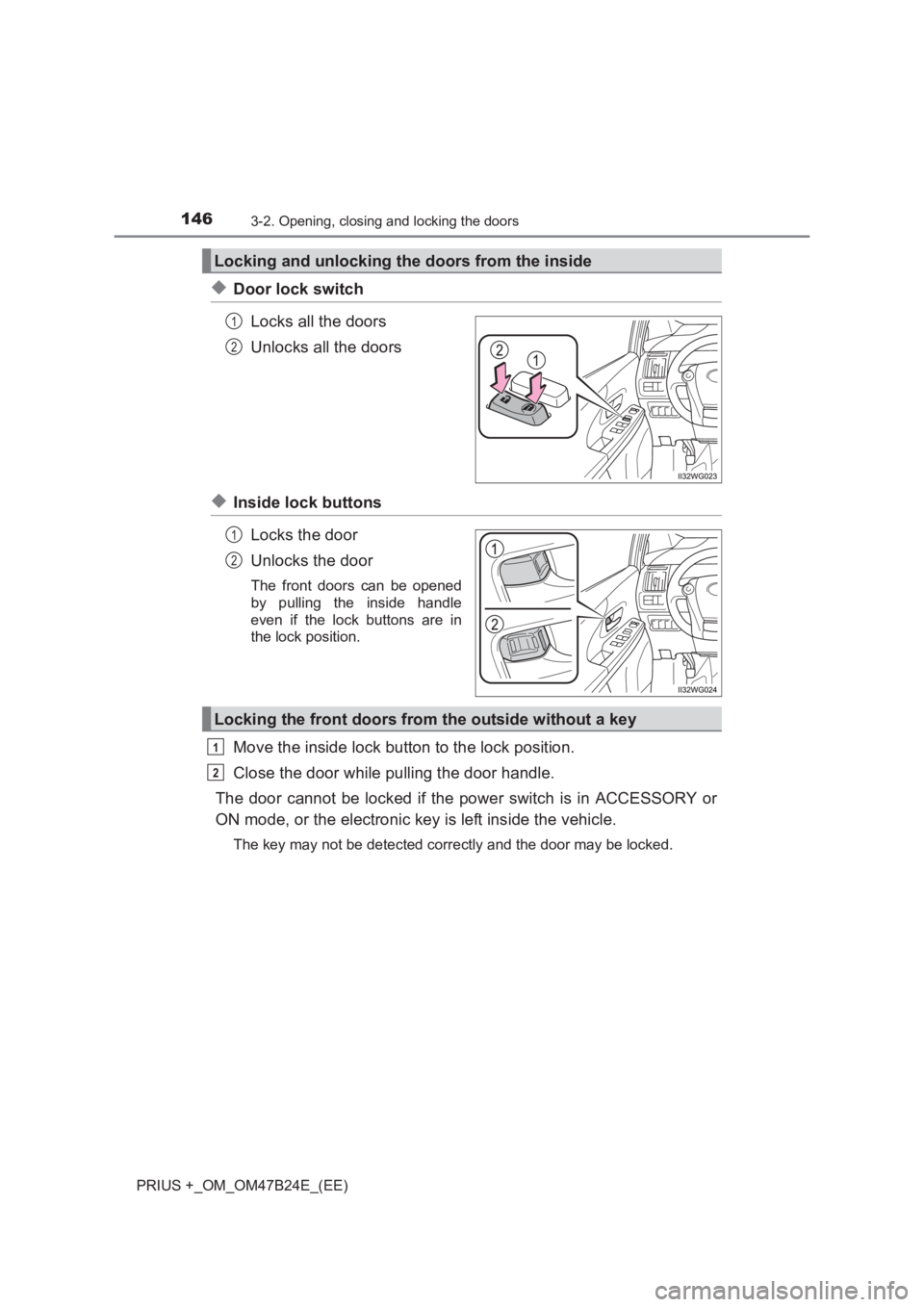
◆Door lock switchLocks all the doors
Unlocks all the doors
◆Inside lock buttonsLocks the door
Unlocks the door
The front doors can be opened
by pulling the inside handle
even if the lock buttons are in
the lock position.
Move the inside lock button to the lock position.
Close the door while pulling the door handle.
The door cannot be locked if the power switch is in ACCESSORY or
ON mode, or the electronic key is left inside the vehicle.
The key may not be detected correctly and the door may be locked.
Locking and unlocking the doors from the inside
1
2
1
2
Locking the front doors from the outside without a key
1
2
Page 147 of 509
1473-2. Opening, closing and locking the doors
3
Operation of each component
PRIUS +_OM_OM47B24E_(EE)
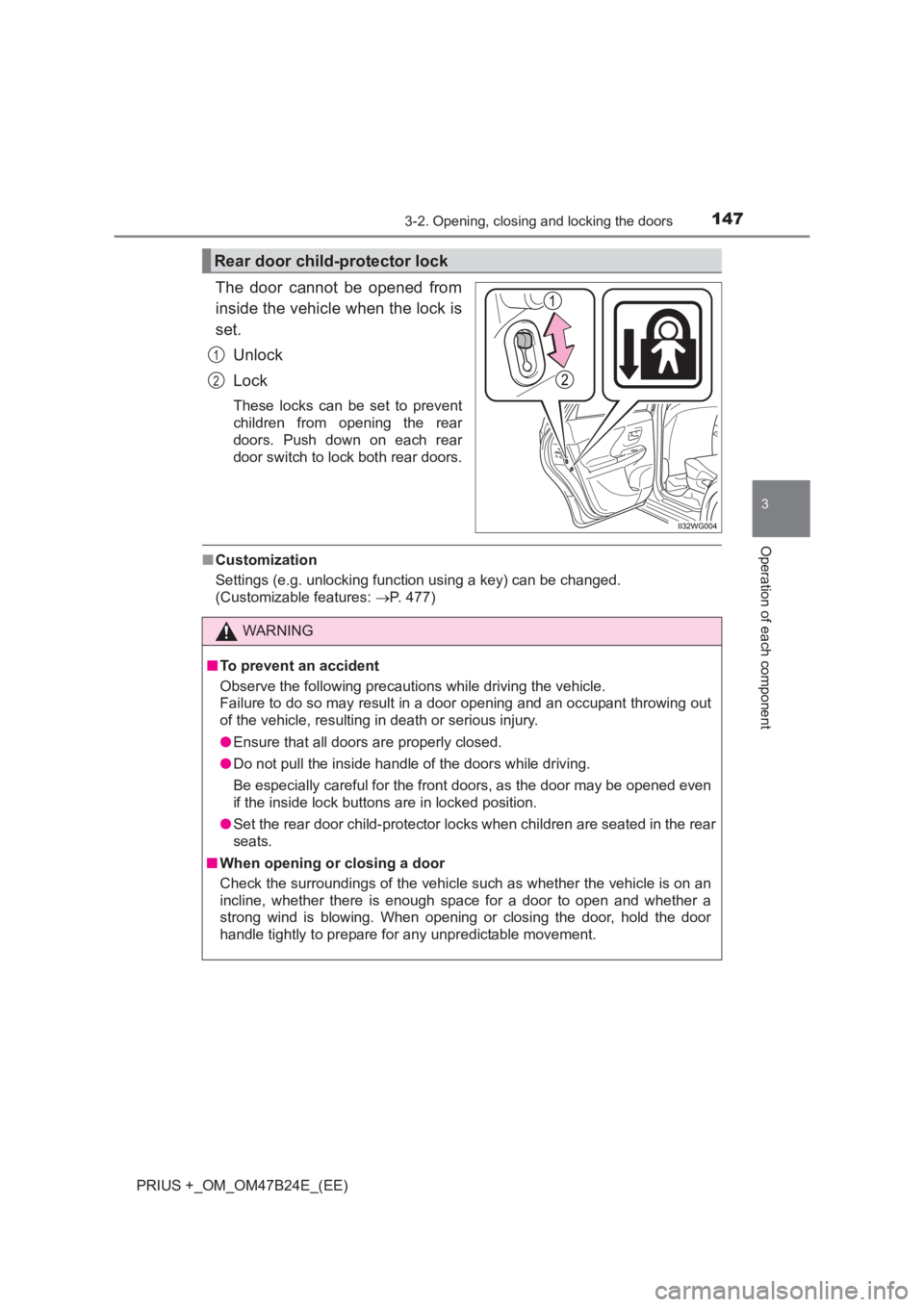
The door cannot be opened from
inside the vehicle when the lock is
set.Unlock
Lock
These locks can be set to prevent
children from opening the rear
doors. Push down on each rear
door switch to lock both rear doors.
■Customization
Settings (e.g. unlocking function using a key) can be changed.
(Customizable features: →P. 477)
Rear door child-protector lock
1
2
WARNING
■ To prevent an accident
Observe the following precautions while driving the vehicle.
Failure to do so may result in a door opening and an occupant throwing out
of the vehicle, resulting in death or serious injury.
●Ensure that all doors are properly closed.
● Do not pull the inside handle of the doors while driving.
Be especially careful for the front doors, as the door may be opened even
if the inside lock buttons are in locked position.
● Set the rear door child-protector loc ks when children are seated in the rear
seats.
■ When opening or closing a door
Check the surroundings of the vehicle such as whether the vehicle is on an
incline, whether there is enough space for a door to open and whether a
strong wind is blowing. When opening or closing the door, hold the door
handle tightly to prepare for any unpredictable movement.
Page 155 of 509
1553-2. Opening, closing and locking the doors
3
Operation of each component
PRIUS +_OM_OM47B24E_(EE)■
Battery-saving function
The battery-saving function will be activated in order to prevent the electronic
key battery and the 12-volt battery from being discharged while the vehicle is
not in operation for a long time.
●In the following situations, the smart entry & start system may take some
time to unlock the doors.
• The electronic key has been left in an area of approximately 2 m (6 ft.) of
the outside of the vehicle for 10 minutes or longer.
• The smart entry & start system has not been used for 5 days or longer.
● If the smart entry & start system has not been used for 14 days or longer,
the doors cannot be unlocked at any doors except the driver’s door. In this
case, take hold of the driver’s door handle, or use the wireless remote con-
trol or the mechanical key, to unlock the doors.
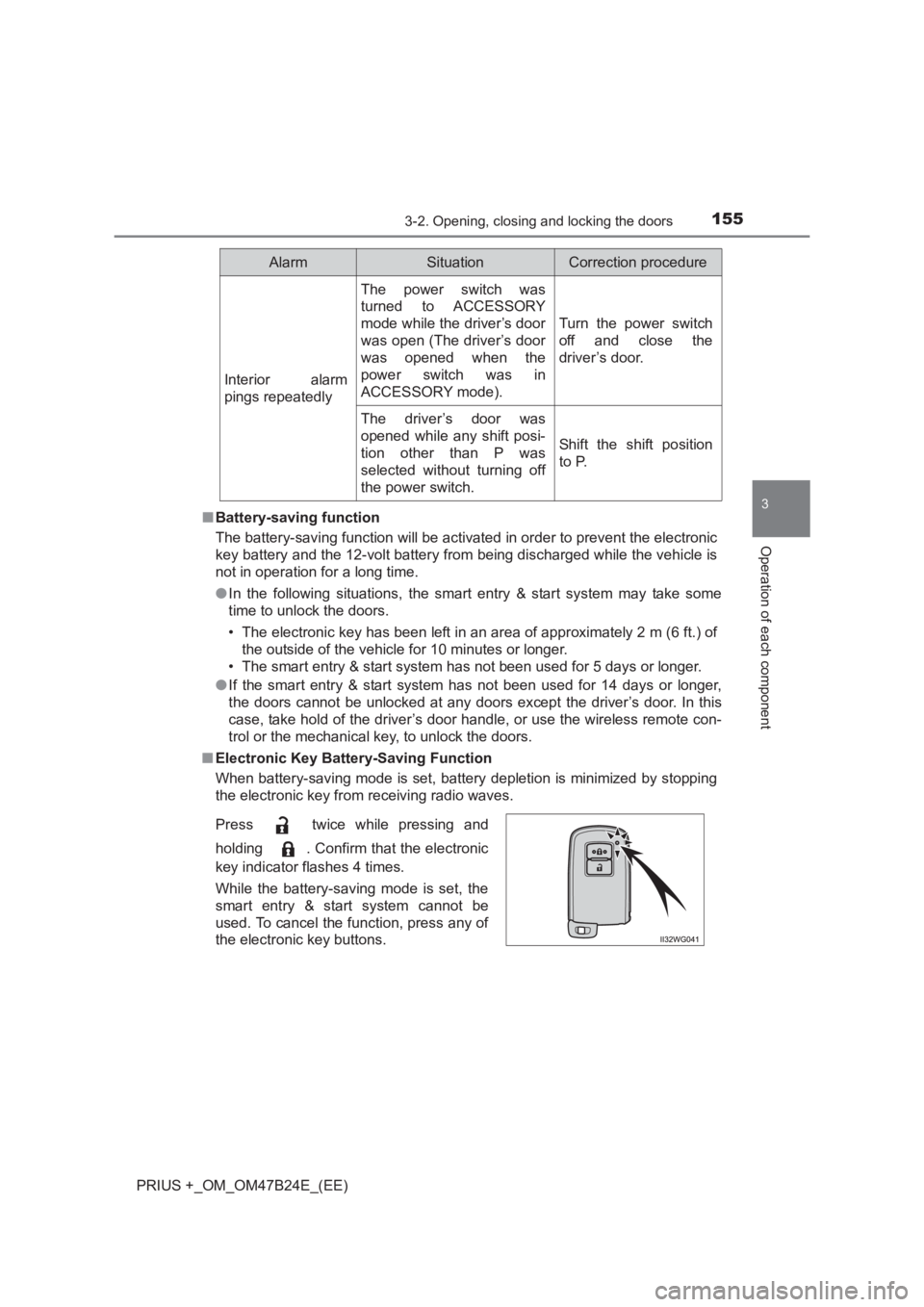
■ Electronic Key Battery-Saving Function
When battery-saving mode is set, battery depletion is minimized by stopping
the electronic key from receiving radio waves.
Interior alarm
pings repeatedly
The power switch was
turned to ACCESSORY
mode while the driver’s door
was open (The driver’s door
was opened when the
power switch was in
ACCESSORY mode).
Turn the power switch
off and close the
driver’s door.
The driver’s door was
opened while any shift posi-
tion other than P was
selected without turning off
the power switch.
Shift the shift position
to P.
Press twice while pressing and
holding . Confirm that the electronic
key indicator flashes 4 times.
While the battery-saving mode is set, the
smart entry & start system cannot be
used. To cancel the function, press any of
the electronic key buttons.
AlarmSituationCorrection procedure
Page 303 of 509
3035-4. Using the other interior features
PRIUS +_OM_OM47B24E_(EE)
5
Interior features
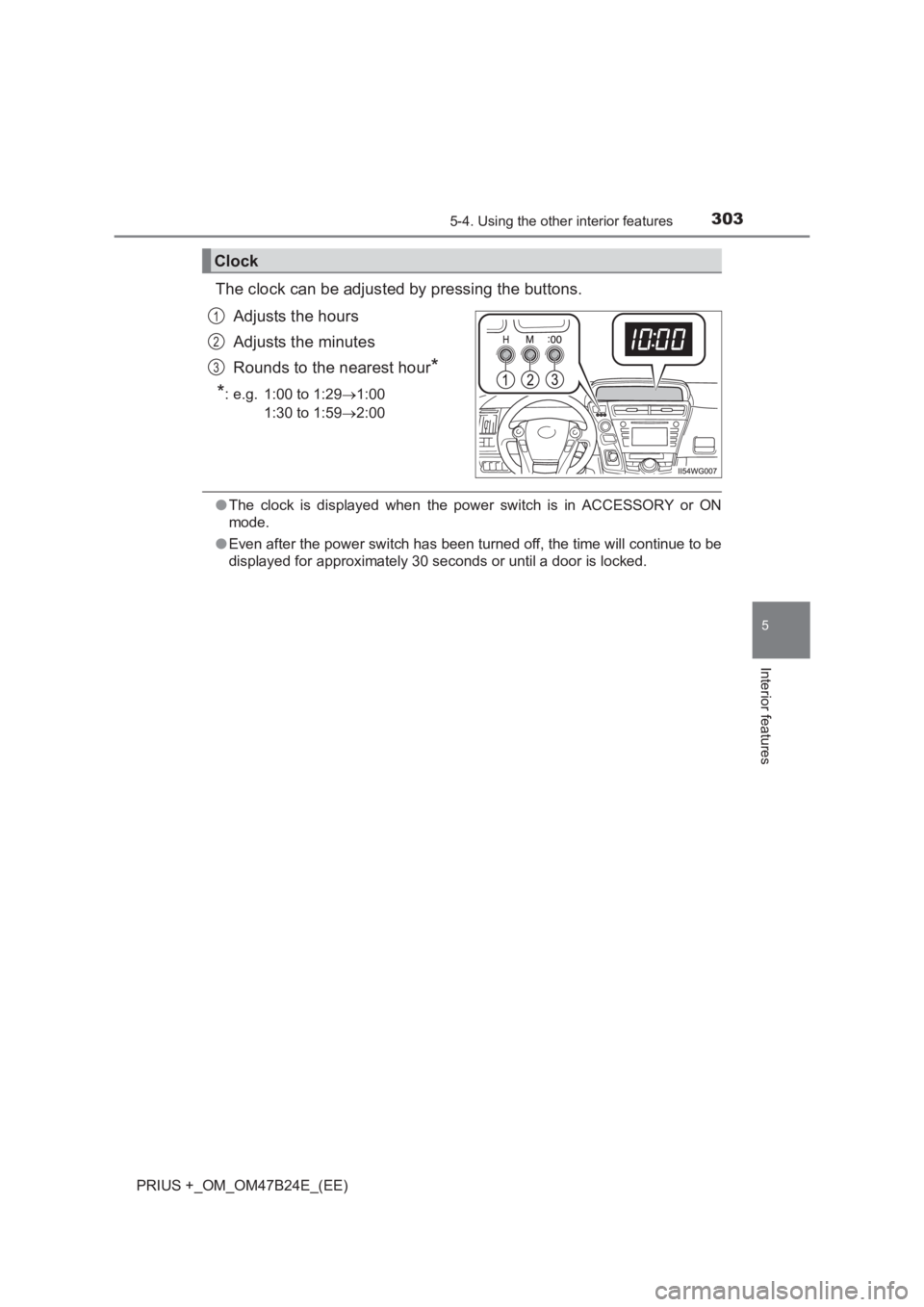
The clock can be adjusted by pressing the buttons.Adjusts the hours
Adjusts the minutes
Rounds to the nearest hour
*
*
: e.g. 1:00 to 1:29 →1:00
1:30 to 1:59 →2:00
●The clock is displayed when the power switch is in ACCESSORY or ON
mode.
● Even after the power switch has been turned off, the time will continue to be
displayed for approximately 30 seconds or until a door is locked.
Clock
1
2
3
Page 502 of 509
502Alphabetical index
PRIUS +_OM_OM47B24E_(EE)
Steering wheelAdjustment ............................ 185
Audio switches
*
DISP button........................... 115
Meter control switches .......... 120
Telephone switches
*
TRIP button........................... 114
Stop/tail lights .......................... 374
Storage feature ........................ 293
Storage precautions ................ 293
Stuck If the vehicle becomes
stuck ................................... 462
Sun visors ................................ 302
Sunshade Panoramic roof shades ......... 306
Rear door .............................. 308
Switch
Audio remote control switches
*
Climate remote control switches.............................. 288
Clock adjustment buttons...... 303
Cruise control switch ..... 235, 239
DISP button........................... 115
Door lock switch .................... 146
Driving mode select switch ... 255
Emergency flashers switch ... 378
Engine switch ........................ 207
EV drive mode switch ........... 214
Fog light switch ..................... 226 Intrusion sensor cancel
switch ................................. 101
Ignition switch ....................... 207
Light switches ....................... 223
Meter control switches .......... 120
MPH or km/h button .............. 113
Outside rear view mirror switches.............................. 189
Panoramic roof shades ......... 306
PCS switch ........................... 263
Power door lock switch ......... 146
Power switch......................... 207
Power window switch............ 191
Rear window wiper and washer switch..................... 231
Rear window and outside rear view mirror defoggers
switch ................................. 283
Seat heater switches ............ 289
Talk switch
*
Telephone switches*
Tire pressure warning reset switch ........................ 343
TRIP button........................... 114
Vehicle-to-vehicle distance
button ................................. 242
Window lock switch............... 191
Windshield wipers and washer switch..................... 227