alarm TOYOTA PRIUS PLUS 2019 User Guide
[x] Cancel search | Manufacturer: TOYOTA, Model Year: 2019, Model line: PRIUS PLUS, Model: TOYOTA PRIUS PLUS 2019Pages: 568, PDF Size: 73.58 MB
Page 155 of 568
1553-2. Opening, closing and locking the doors
3
Operation of each component
PRIUS +_OM_OM47D30E_(EE)■Battery-saving function
The battery-saving function will be activated in order to prevent the electronic
key battery and the 12-volt battery from being discharged while the vehicle is
not in operation for a long time.
●In the following situations, the smart entry & start system may take some
time to unlock the doors.
• The electronic key has been left in an area of approximately 2 m (6 ft.) of
the outside of the vehicle for 10 minutes or longer.
• The smart entry & start system has not been used for 5 days or longer.
●If the smart entry & start system has not been used for 14 days or longer,
the doors cannot be unlocked at any doors except the driver’s door. In this
case, take hold of the driver’s door handle, or use the wireless remote con-
trol or the mechanical key, to unlock the doors.
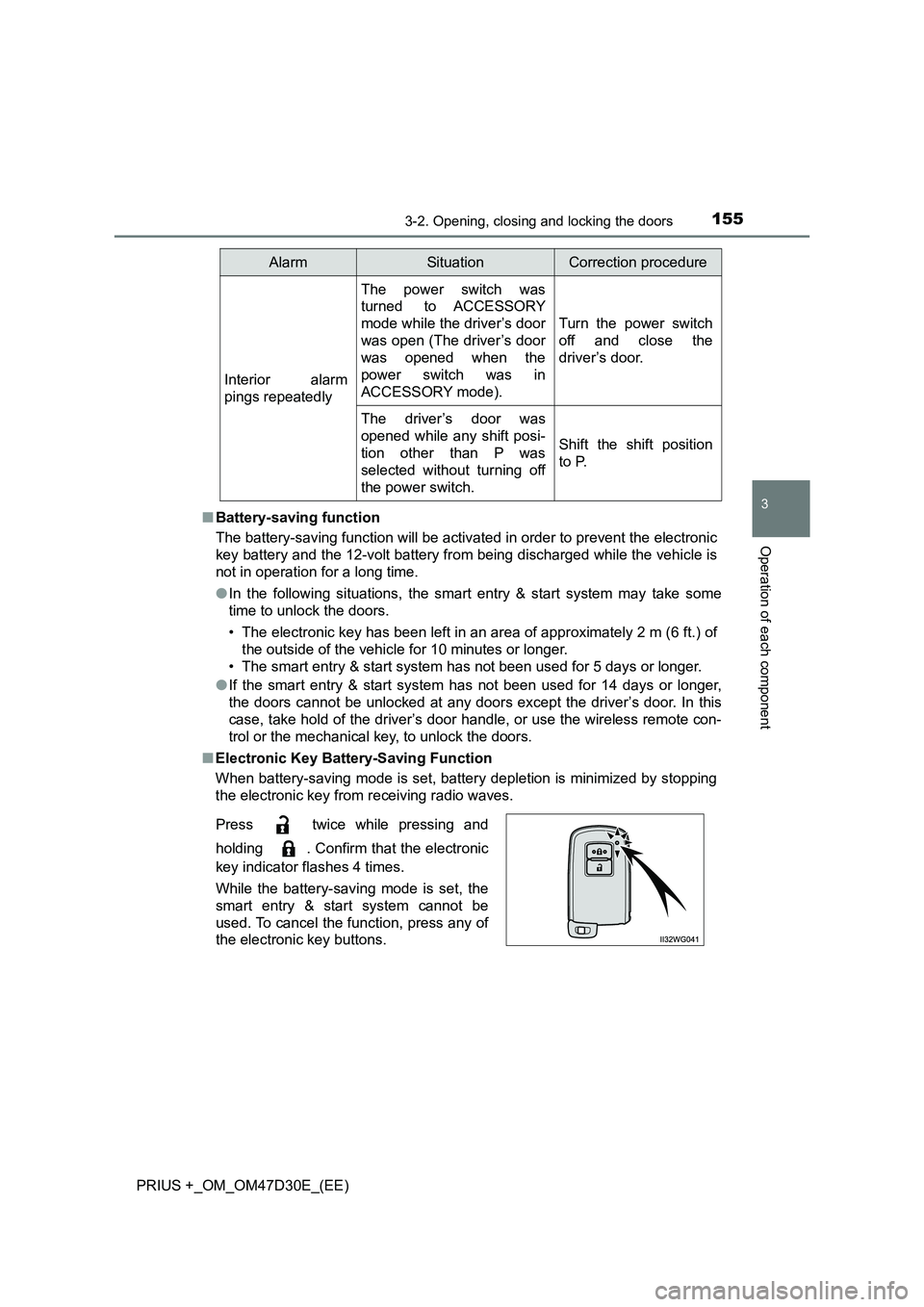
■Electronic Key Battery-Saving Function
When battery-saving mode is set, battery depletion is minimized by stopping
the electronic key from receiving radio waves.
Interior alarm
pings repeatedly
The power switch was
turned to ACCESSORY
mode while the driver’s door
was open (The driver’s door
was opened when the
power switch was in
ACCESSORY mode).
Turn the power switch
off and close the
driver’s door.
The driver’s door was
opened while any shift posi-
tion other than P was
selected without turning off
the power switch.
Shift the shift position
to P.
Press twice while pressing and
holding . Confirm that the electronic
key indicator flashes 4 times.
While the battery-saving mode is set, the
smart entry & start system cannot be
used. To cancel the function, press any of
the electronic key buttons.
AlarmSituationCorrection procedure
Page 157 of 568
1573-2. Opening, closing and locking the doors
3
Operation of each component
PRIUS +_OM_OM47D30E_(EE)■Note for the entry function
●Even when the electronic key is within the effective range (detection areas),
the system may not operate properly in the following cases:
• The electronic key is too close to the window or outside door handle, near
the ground, or in a high place when the doors are locked or unlocked.
• The electronic key is on the instrument panel, luggage room, floor, or in
the door pockets or glove box when the hybrid system is started or power
switch modes are changed.
●Do not leave the electronic key on top of the instrument panel or near the
door pockets when exiting the vehicle. Depending on the radio wave recep-
tion conditions, it may be detected by the antenna outside the cabin and the
door will become lockable from the outside, possibly trapping the electronic
key inside the vehicle.
●As long as the electronic key is within the effective range, the doors may be
unlocked or locked by anyone. However, only the doors detecting the elec-
tronic key can be used to unlock the vehicle.
●Even if the electronic key is not inside the vehicle, it may be possible to start
the hybrid system if the electronic key is near the window.
●The doors may unlock if a large amount of water splashes on the door han-
dle, such as in the rain or in a car wash when the electronic key is within the
effective range. (The doors will automatically be locked after approximately
30 seconds if the doors are not opened and closed.)
●If the wireless remote control is used to lock the doors when the electronic
key is near the vehicle, there is a possibility that the door may not be
unlocked by the entry function. (Use the wireless remote control to unlock
the doors.)
●Touching the door lock or unlock sensor while wearing gloves may delay or
prevent lock or unlock operation.
●If the door handle becomes wet while the electronic key is within the effec-
tive range, the door may lock and unlock repeatedly. In that case, follow the
following correction procedures to wash the vehicle:
• Place the electronic key in a location 2 m (6 ft.) or more away from the
vehicle. (Take care to ensure that the key is not stolen.)
• Set the electronic key to battery-saving mode to disable the smart entry &
start system. (P. 155)
●If the electronic key is inside the vehicle and a door handle becomes wet
during a car wash, a message may be shown on the multi-information dis-
play (if equipped) and a buzzer will sound outside the vehicle. To turn off the
alarm, lock all the doors.
●The lock sensor may not work properly if it comes into contact with ice,
snow, mud, etc. Clean the lock sensor and attempt to operate it again, or
use the lock sensor on the lower part of the door handle.
Page 158 of 568
1583-2. Opening, closing and locking the doors
PRIUS +_OM_OM47D30E_(EE)●A sudden approach to the effective range or door handle may prevent the
doors from being unlocked. In this case, return the door handle to the origi-
nal position and check that the doors unlock before pulling the door handle
again.
●If there is another electronic key in the detection area, it may take slightly
longer to unlock the doors after the door handle is gripped.
■When the vehicle is not driven for extended periods
●To prevent theft of the vehicle, do not leave the electronic key within 2 m
(6 ft.) of the vehicle.
●The smart entry & start system can be deactivated in advance. (P. 539)
■To operate the system properly
Make sure to carry the electronic key when operating the system. Do not get
the electronic key too close to the vehicle when operating the system from the
outside of the vehicle.
Depending on the position and holding condition of the electronic key, the key
may not be detected correctly and the system may not operate properly. (The
alarm may go off accidentally, or the door lock prevention may not operate.)
■If the smart entry & start system does not operate properly
●Locking and unlocking the doors: Use the mechanical key. (P. 511)
●Starting the hybrid system: P. 5 11
■Customization
Settings (e.g. smart entry & start system) can be changed.
(Customizable features: P. 539)
■If the smart entry & start system has been deactivated in a customized
setting
●Unlocking and locking the doors:
Use the wireless remote control or mechanical key. (P. 144, 511)
●Starting the hybrid system and changing power switch modes: P. 5 1 1
●Stopping the hybrid system: P. 226
Page 512 of 568
5127-2. Steps to take in an emergency
PRIUS +_OM_OM47D30E_(EE)
Press the power switch.
In the event that the hybrid system still cannot be operated, contact
any authorized Toyota retailer or Toyota authorized repairer, or any
reliable repairer.
■ Stopping the hybrid system
Set the parking brake, shift the shift position to P and press the power switch
as you normally do when stopping the hybrid system.
■ Replacing the key battery
As the above procedure is a temporary measure, it is recommended that the
electronic key battery be replaced imm ediately when the battery is depleted.
( P. 417)
■ Alarm (if equipped)
Using the mechanical key to lock the doors will not set the alarm system.
If a door is unlocked using the mechanical key when the alarm system is set,
the alarm may be triggered. ( P. 104)
■ Changing power switch modes
Release the brake pedal and press the power switch in step above.
The hybrid system does not start and modes will be changed each time the
switch is pressed. ( P. 227)
■ When the electronic key does not work properly
● Make sure that the smart entry & start system has not been deactivated in
the customization setting. If it is off, turn the function on.
(Customizable features: P. 539)
● Check if battery-saving mode is set. If it is set, cancel the function.
( P. 155)
4
3
Page 513 of 568
5137-2. Steps to take in an emergency
PRIUS +_OM_OM47D30E_(EE)
7
When trouble arises
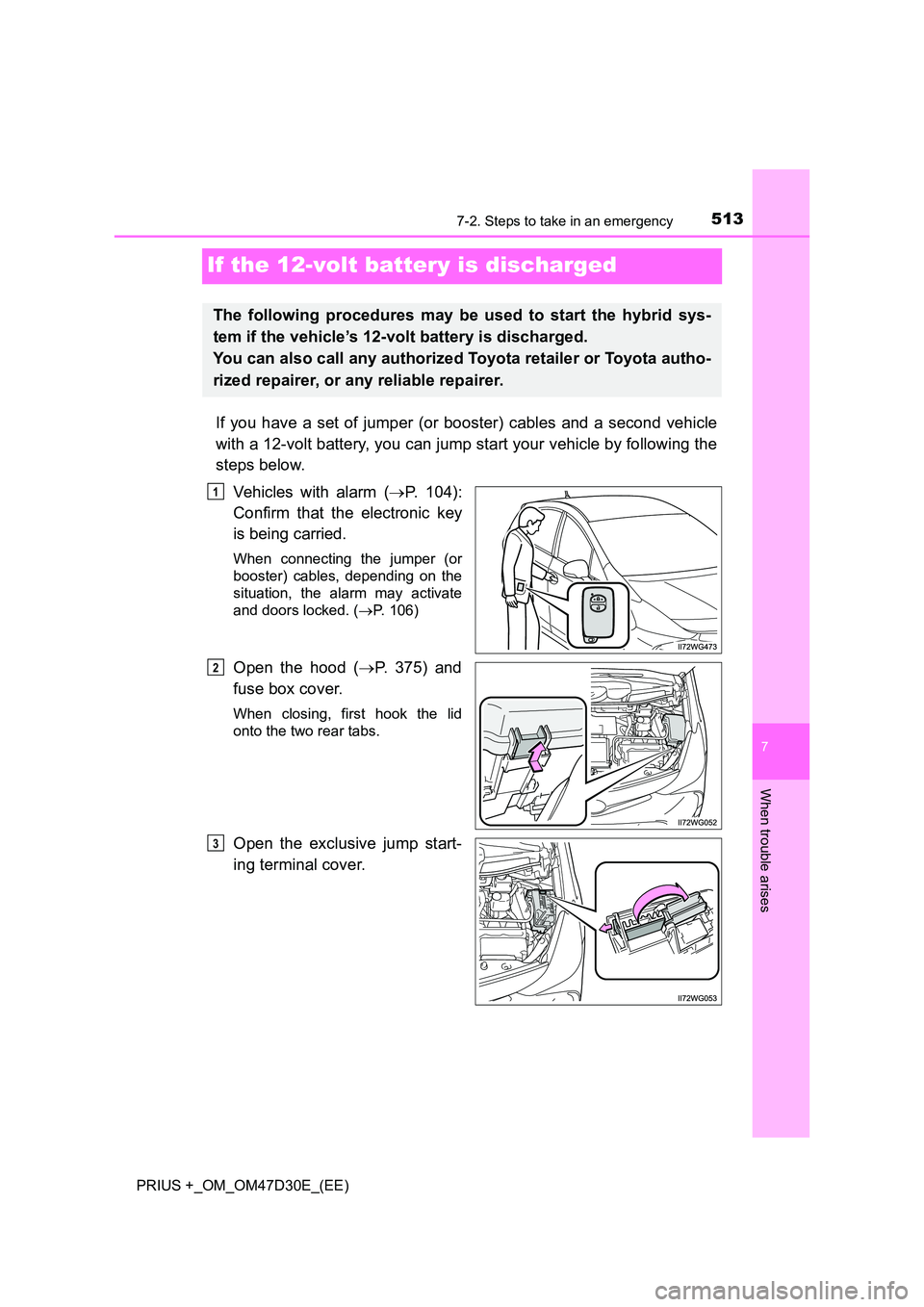
If the 12-volt battery is discharged
If you have a set of jumper (or booster) cables and a second vehicle
with a 12-volt battery, you can jump start your vehicle by following the
steps below.
Vehicles with alarm ( P. 104):
Confirm that the electronic key
is being carried.
When connecting the jumper (or
booster) cables, depending on the
situation, the alarm may activate
and doors locked. ( P. 106)
Open the hood (P. 375) and
fuse box cover.
When closing, first hook the lid
onto the two rear tabs.
Open the exclusive jump start-
ing terminal cover.
The following procedures may be used to start the hybrid sys-
tem if the vehicle’s 12-volt battery is discharged.
You can also call any authorized Toyota retailer or Toyota autho-
rized repairer, or any reliable repairer.
1
2
3
Page 544 of 568
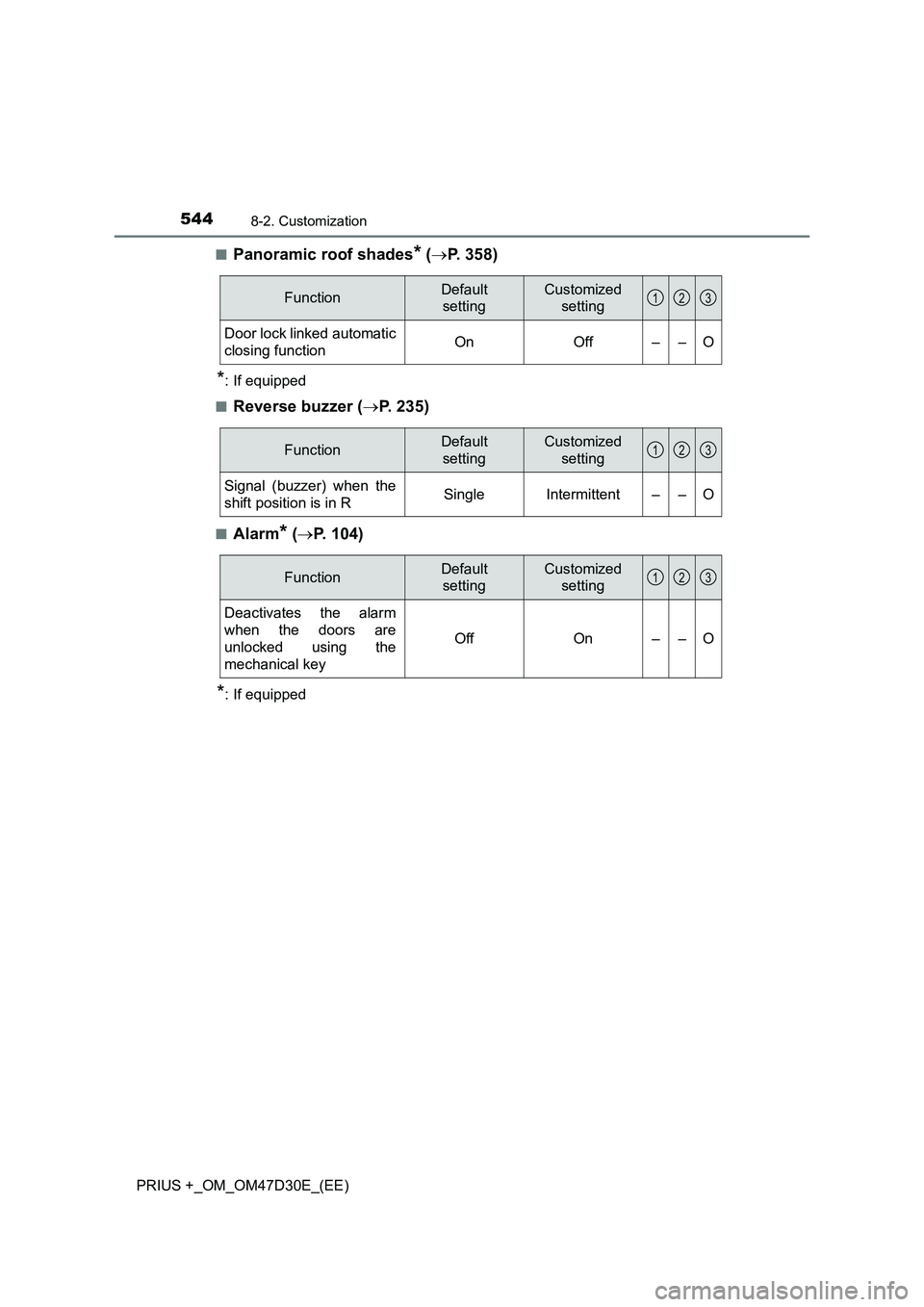
5448-2. Customization
PRIUS +_OM_OM47D30E_(EE)■
Panoramic roof shades* (P. 358)
*: If equipped
■
Reverse buzzer (P. 235)
■Alarm* (P. 104)
*: If equipped
FunctionDefault
settingCustomized
setting
Door lock linked automatic
closing functionOnOff––O
123
FunctionDefault
settingCustomized
setting
Signal (buzzer) when the
shift position is in RSingleIntermittent––O
123
FunctionDefault
settingCustomized
setting
Deactivates the alarm
when the doors are
unlocked using the
mechanical key
OffOn––O
123
Page 550 of 568
550What to do if... (Troubleshooting)
PRIUS +_OM_OM47D30E_(EE)
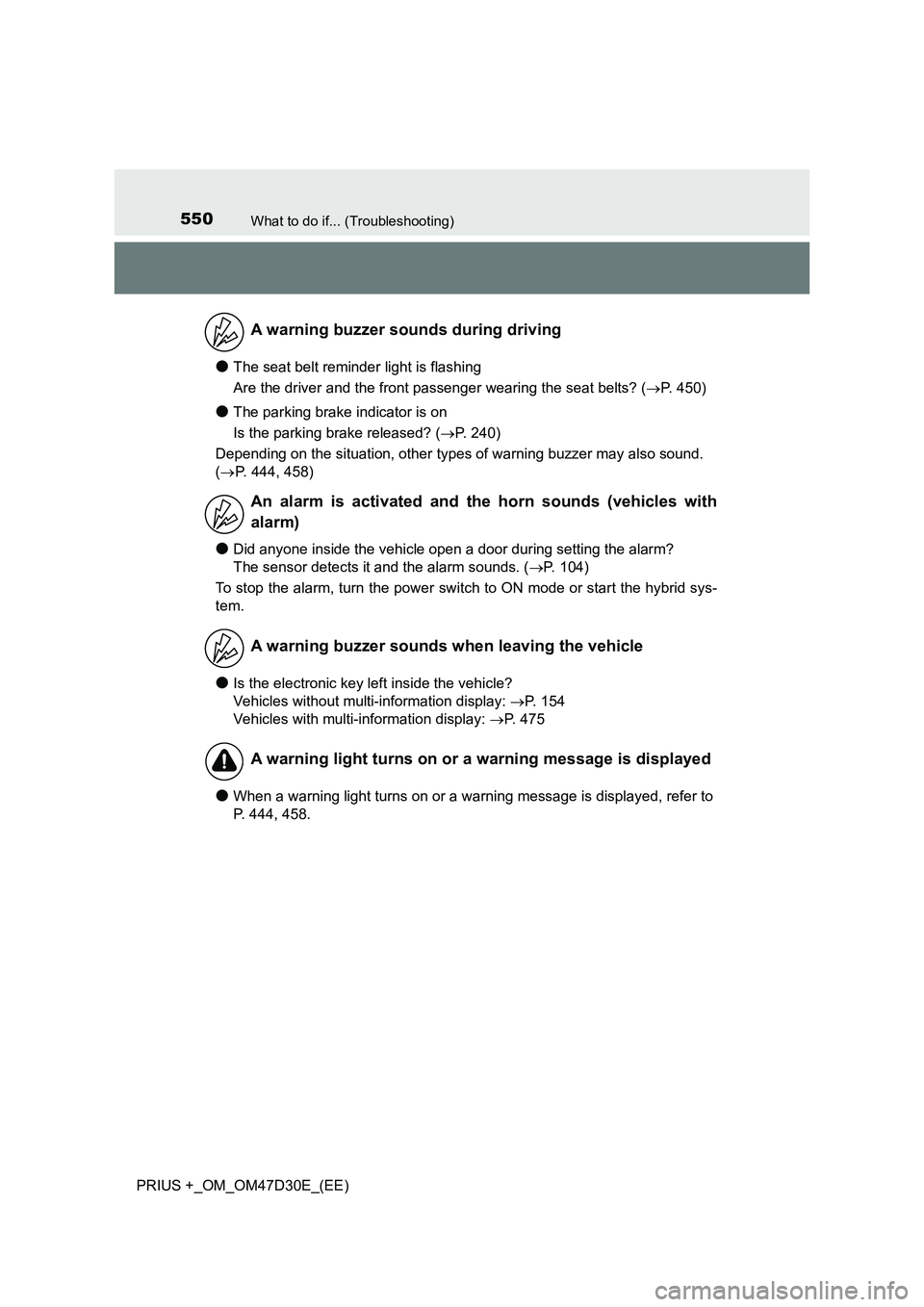
●The seat belt reminder light is flashing
Are the driver and the front passenger wearing the seat belts? (P. 450)
●The parking brake indicator is on
Is the parking brake released? (P. 240)
Depending on the situation, other types of warning buzzer may also sound.
(P. 444, 458)
●Did anyone inside the vehicle open a door during setting the alarm?
The sensor detects it and the alarm sounds. (P. 104)
To stop the alarm, turn the power switch to ON mode or start the hybrid sys-
tem.
●Is the electronic key left inside the vehicle?
Vehicles without multi-information display: P. 154
Vehicles with multi-information display: P. 475
●When a warning light turns on or a warning message is displayed, refer to
P. 444, 458.
A warning buzzer sounds during driving
An alarm is activated and the horn sounds (vehicles with
alarm)
A warning buzzer sounds when leaving the vehicle
A warning light turns on or a warning message is displayed
Page 553 of 568
553Alphabetical index
PRIUS +_OM_OM47D30E_(EE)
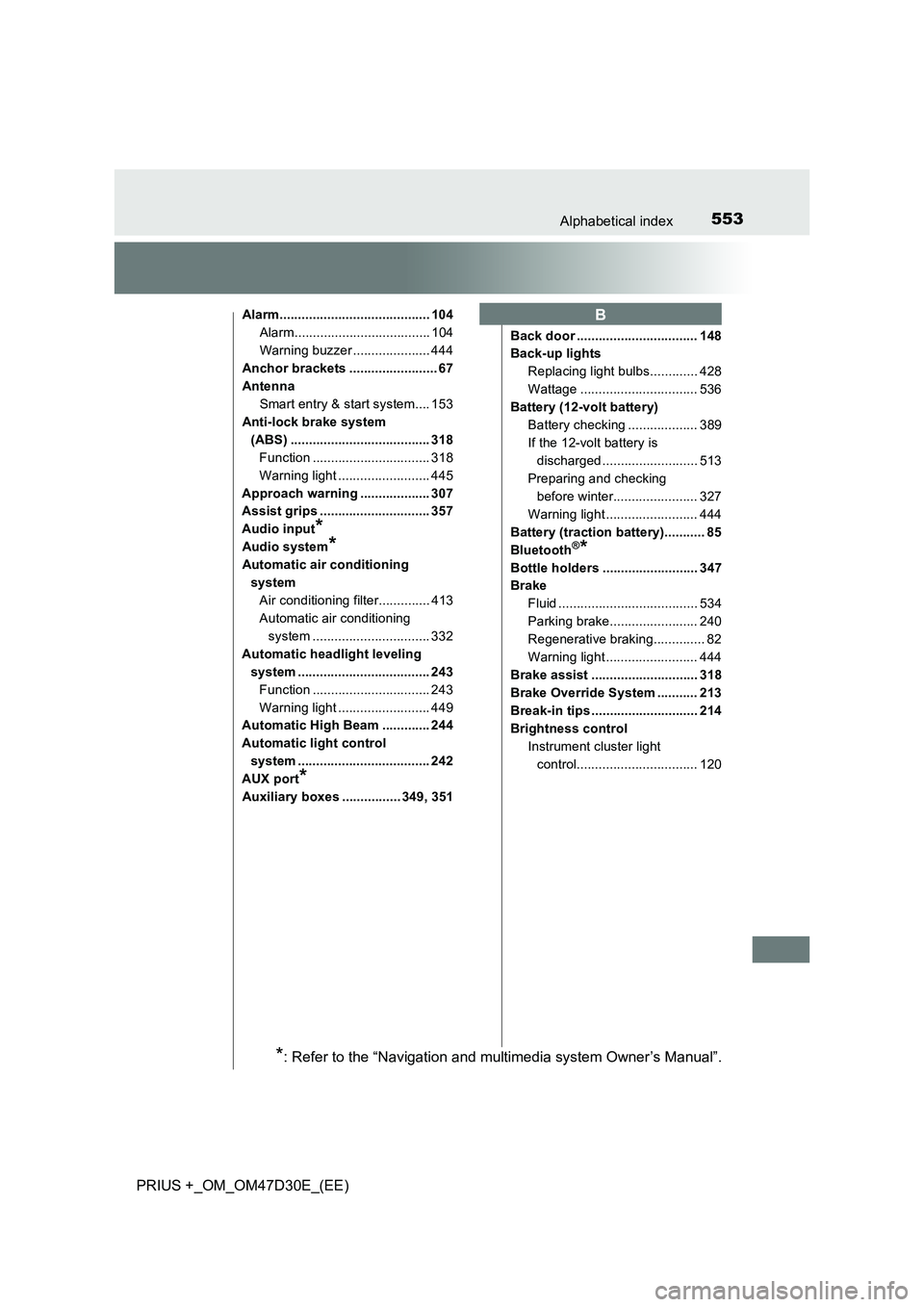
Alarm......................................... 104
Alarm..................................... 104
Warning buzzer ..................... 444
Anchor brackets ........................ 67
Antenna
Smart entry & start system.... 153
Anti-lock brake system
(ABS) ...................................... 318
Function ................................ 318
Warning light ......................... 445
Approach warning ................... 307
Assist grips .............................. 357
Audio input
*
Audio system*
Automatic air conditioning
system
Air conditioning filter.............. 413
Automatic air conditioning
system ................................ 332
Automatic headlight leveling
system .................................... 243
Function ................................ 243
Warning light ......................... 449
Automatic High Beam ............. 244
Automatic light control
system .................................... 242
AUX port
*
Auxiliary boxes ................ 349, 351Back door ................................. 148
Back-up lights
Replacing light bulbs............. 428
Wattage ................................ 536
Battery (12-volt battery)
Battery checking ................... 389
If the 12-volt battery is
discharged .......................... 513
Preparing and checking
before winter....................... 327
Warning light ......................... 444
Battery (traction battery)........... 85
Bluetooth
®*
Bottle holders .......................... 347
Brake
Fluid ...................................... 534
Parking brake........................ 240
Regenerative braking.............. 82
Warning light ......................... 444
Brake assist ............................. 318
Brake Override System ........... 213
Break-in tips ............................. 214
Brightness control
Instrument cluster light
control................................. 120
B
*: Refer to the “Navigation and multimedia system Owner’s Manual”.
Page 564 of 568
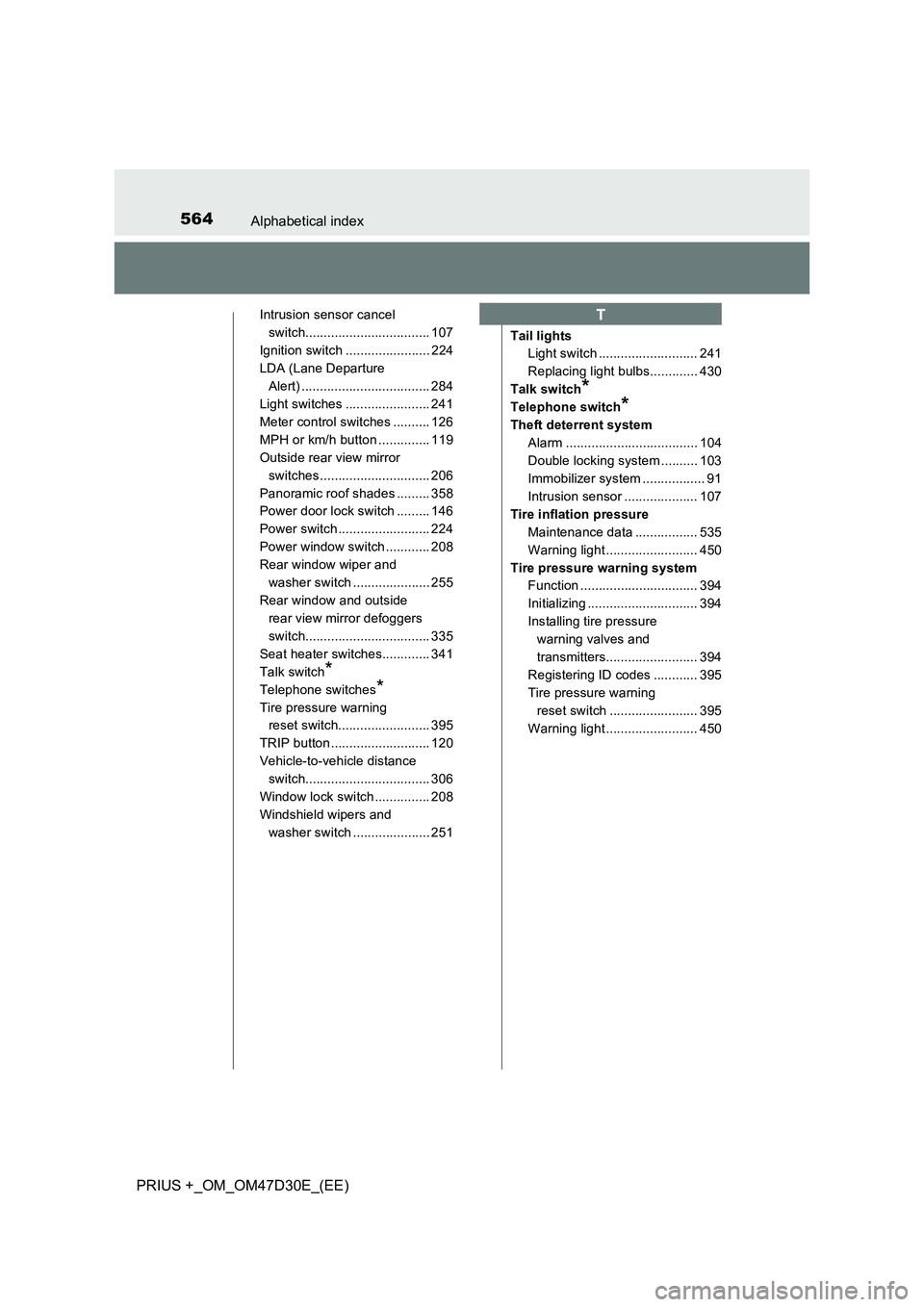
564Alphabetical index
PRIUS +_OM_OM47D30E_(EE)
Intrusion sensor cancel
switch.................................. 107
Ignition switch ....................... 224
LDA (Lane Departure
Alert) ................................... 284
Light switches ....................... 241
Meter control switches .......... 126
MPH or km/h button .............. 119
Outside rear view mirror
switches.............................. 206
Panoramic roof shades ......... 358
Power door lock switch ......... 146
Power switch ......................... 224
Power window switch ............ 208
Rear window wiper and
washer switch ..................... 255
Rear window and outside
rear view mirror defoggers
switch.................................. 335
Seat heater switches............. 341
Talk switch
*
Telephone switches*
Tire pressure warning
reset switch......................... 395
TRIP button ........................... 120
Vehicle-to-vehicle distance
switch.................................. 306
Window lock switch ............... 208
Windshield wipers and
washer switch ..................... 251Tail lights
Light switch ........................... 241
Replacing light bulbs............. 430
Talk switch
*
Telephone switch*
Theft deterrent system
Alarm .................................... 104
Double locking system .......... 103
Immobilizer system ................. 91
Intrusion sensor .................... 107
Tire inflation pressure
Maintenance data ................. 535
Warning light ......................... 450
Tire pressure warning system
Function ................................ 394
Initializing .............................. 394
Installing tire pressure
warning valves and
transmitters......................... 394
Registering ID codes ............ 395
Tire pressure warning
reset switch ........................ 395
Warning light ......................... 450
T