remote start TOYOTA PRIUS PLUS 2019 User Guide
[x] Cancel search | Manufacturer: TOYOTA, Model Year: 2019, Model line: PRIUS PLUS, Model: TOYOTA PRIUS PLUS 2019Pages: 568, PDF Size: 73.58 MB
Page 358 of 568
358
PRIUS +_OM_OM47D30E_(EE)
5-4. Using the other interior features
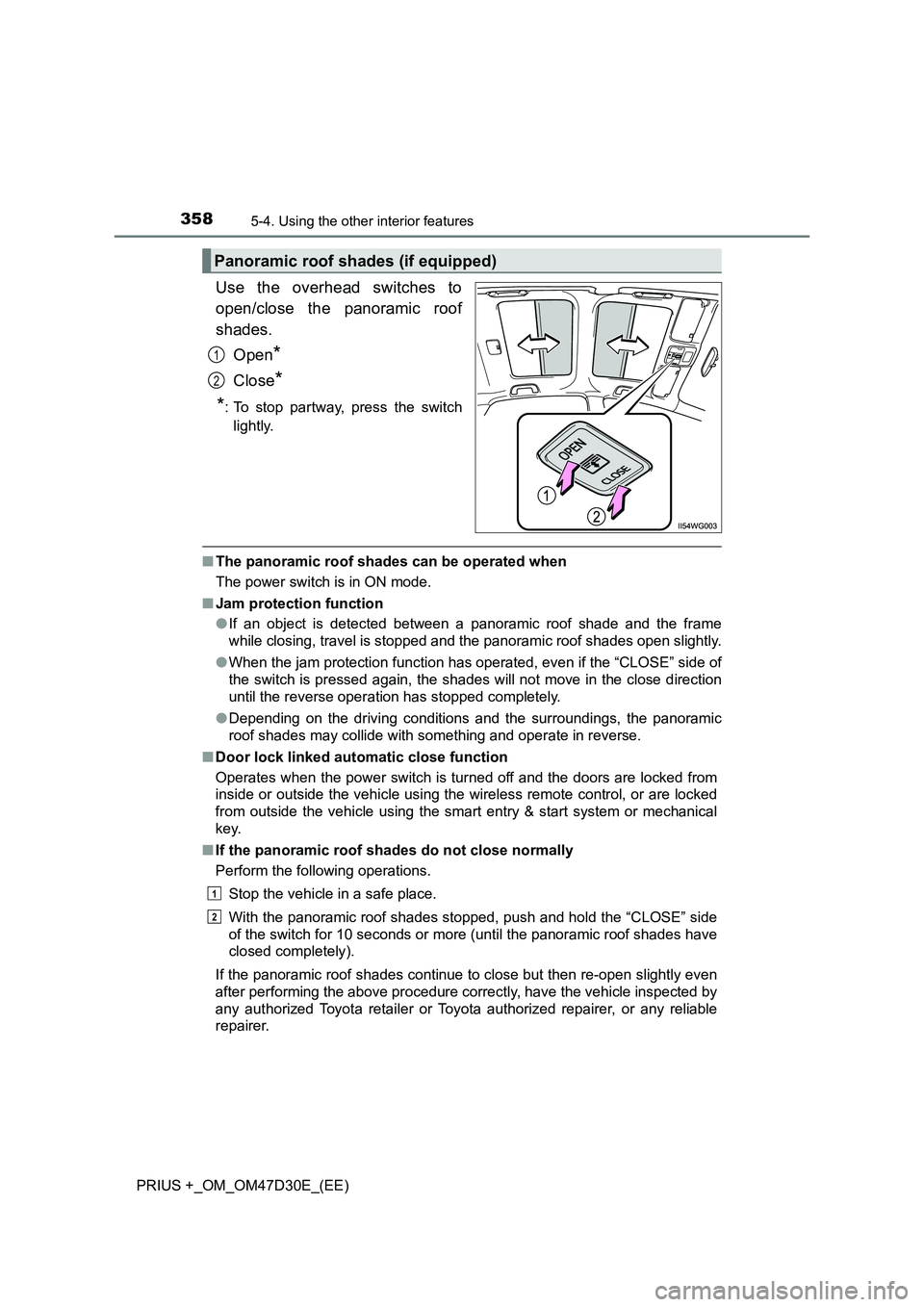
Use the overhead switches to
open/close the panoramic roof
shades.
Open*
Close*
*: To stop partway, press the switch
lightly.
■ The panoramic roof shades can be operated when
The power switch is in ON mode.
■ Jam protection function
● If an object is detected between a panoramic roof shade and the frame
while closing, travel is stopped and the panoramic roof shades open slightly.
● When the jam protection function has operated, even if the “CLOSE” side of
the switch is pressed again, the shades will not move in the close direction
until the reverse operation has stopped completely.
● Depending on the driving conditions and the surroundings, the panoramic
roof shades may collide with something and operate in reverse.
■ Door lock linked automatic close function
Operates when the power switch is turned off and the doors are locked from
inside or outside the vehicle using the wireless remote control, or are locked
from outside the vehicle using the smart entry & start system or mechanical
key.
■ If the panoramic roof shades do not close normally
Perform the following operations.
Stop the vehicle in a safe place.
With the panoramic roof shades stopped, push and hold the “CLOSE” side
of the switch for 10 seconds or more (until the panoramic roof shades have
closed completely).
If the panoramic roof shades continue to close but then re-open slightly even
after performing the above procedure correctly, have the vehicle inspected by
any authorized Toyota retailer or Toyota authorized repairer, or any reliable
repairer.
Panoramic roof shades (if equipped)
1
2
1
2
Page 390 of 568
3906-3. Do-it-yourself maintenance
PRIUS +_OM_OM47D30E_(EE)
■Before recharging
When recharging, the 12-volt battery produces hydrogen gas which is flam-
mable and explosive. Therefore, observe the following precautions before
recharging:
●If recharging with the 12-volt battery installed on the vehicle, be sure to dis-
connect the ground cable.
●Make sure the power switch on the charger is off when connecting and dis-
connecting the charger cables to the 12-volt battery.
■After recharging/reconnecting the 12-volt battery
●Unlocking the doors using the smart entry & start system may not be possi-
ble immediately after reconnecting the 12-volt battery. If this happens, use
the wireless remote control or the mechanical key to lock/unlock the doors.
●Start the hybrid system with the power switch in ACCESSORY mode. The
hybrid system may not start with the power switch turned off. However, the
hybrid system will operate normally from the second attempt.
●The power switch mode is recorded by the vehicle. If the 12-volt battery is
reconnected, the vehicle will return the power switch mode to the status it
was in before the 12-volt battery was disconnected. Make sure to turn off
the power before disconnect the 12-volt battery. Take extra care when con-
necting the 12-volt battery if the power switch mode prior to discharge is
unknown.
●Restart the hybrid system, depress the brake pedal, and confirm that it is
possible to shift into each shift position.
If the system will not start even after multiple attempts at all methods above,
contact any authorized Toyota retailer or Toyota authorized repairer, or any
reliable repairer.
Page 418 of 568
4186-3. Do-it-yourself maintenance
PRIUS +_OM_OM47D30E_(EE)
■Use a CR2032 lithium battery
● Batteries can be purchased at any authorized Toyota retailer or Toyota
authorized repairer, or any reliable repairer, local electrical appliance shops
or camera stores.
● Replace only with the same or equivalent type recommended by the manu-
facturer.
● Dispose of used batteries according to the local laws.
■ If the electronic key battery is depleted
The following symptoms may occur:
● The smart entry & start system and wireless remote control will not function
properly.
● The operational range will be reduced.
WARNING
■Removed battery and other parts
These parts are small and if swallowed by a child, they can cause choking.
Keep away from children. Failure to do so could result in death or serious
injury.
■ Certification for the smart entry & start system
CAUTION
RISK OF EXPLOSION IF BATTERY IS REPLACED BY AN INCORRECT
TYPE.
DISPOSE OF USED BATTERIES ACCORDING TO THE INSTRUCTIONS
NOTICE
■ For normal operation after replacing the battery
Observe the following precautions to prevent accidents:
● Always work with dry hands.
Moisture may cause the battery to rust.
● Do not touch or move any other component inside the remote control.
● Do not bend either of the battery terminals.
Page 511 of 568
5117-2. Steps to take in an emergency
PRIUS +_OM_OM47D30E_(EE)
7
When trouble arises
If the electronic key does not operate
properly
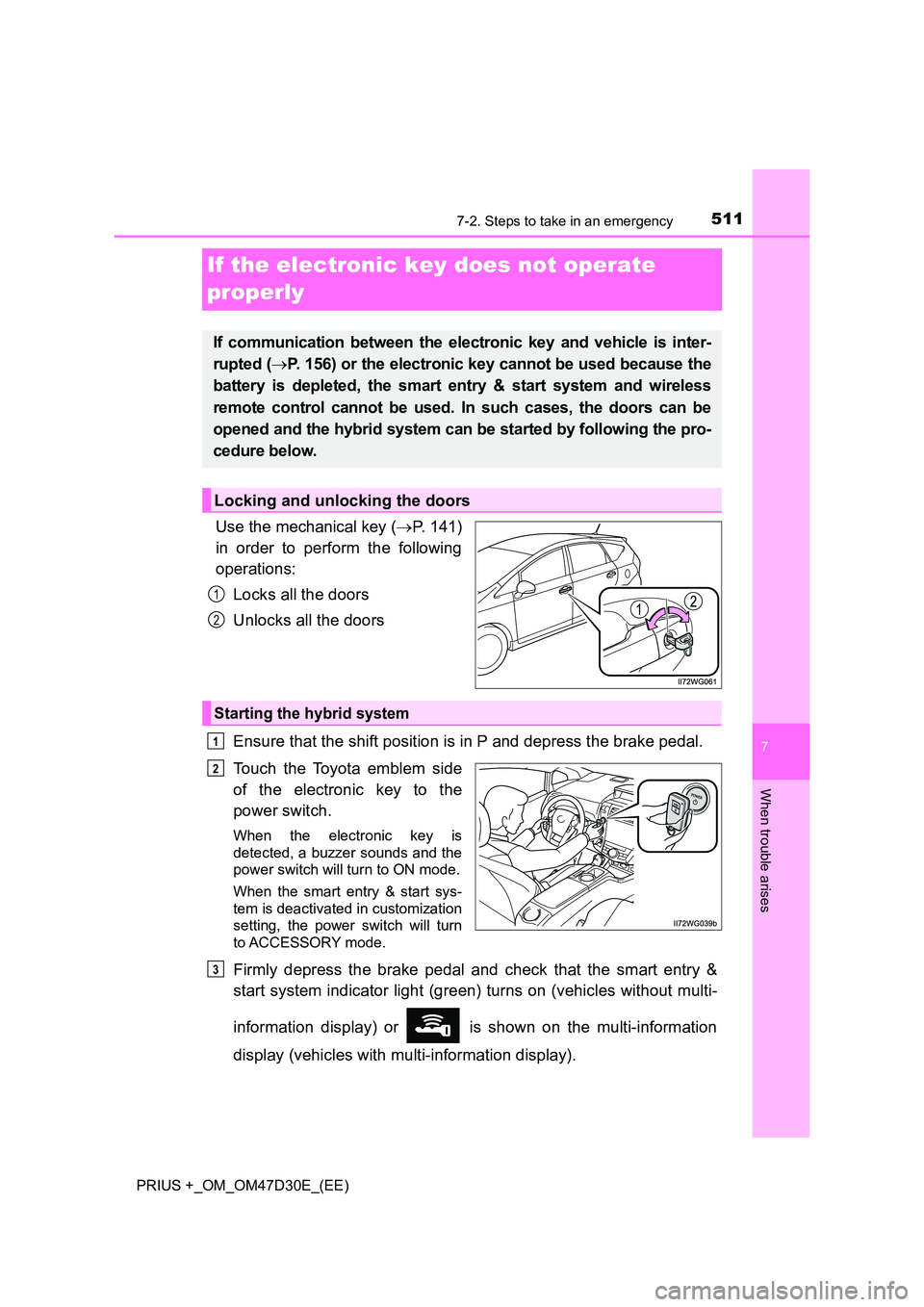
Use the mechanical key ( P. 141)
in order to perform the following
operations:
Locks all the doors
Unlocks all the doors
Ensure that the shift position is in P and depress the brake pedal.
Touch the Toyota emblem side
of the electronic key to the
power switch.
When the electronic key is
detected, a buzzer sounds and the
power switch will turn to ON mode.
When the smart entry & start sys-
tem is deactivated in customization
setting, the power switch will turn
to ACCESSORY mode.
Firmly depress the brake pedal and check that the smart entry &
start system indicator light (green) turns on (vehicles without multi-
information display) or is shown on the multi-information
display (vehicles with multi-information display).
If communication between the electronic key and vehicle is inter-
rupted ( P. 156) or the electronic key cannot be used because the
battery is depleted, the smart entry & start system and wireless
remote control cannot be used. In such cases, the doors can be
opened and the hybrid system can be started by following the pro-
cedure below.
Locking and unlocking the doors
1
2
Starting the hybrid system
1
2
3
Page 515 of 568
5157-2. Steps to take in an emergency
PRIUS +_OM_OM47D30E_(EE)
7
When trouble arises
Start the engine of the second vehicle. Increase the engine speed
slightly and maintain at that level for approximately 5 minutes to
recharge the 12-volt battery of your vehicle.
Maintain the engine speed of the second vehicle and start the
hybrid system of your vehicle by turning the power switch to ON
mode.
Make sure the “READY” indicator comes on. If the indicator light
does not come on, contact any authorized Toyota retailer or Toyota
authorized repairer, or any reliable repairer.
Once the hybrid system has started, remove the jumper cables in
the exact reverse order from which they were connected.
Close the exclusive jump starting terminal cover, and reinstall the
fuse box cover to its original position.
When installing, first hook the fuse box cover onto the two rear tabs.
Once the hybrid system starts, have the vehicle inspected at any
authorized Toyota retailer or Toyota authorized repairer, or any reliable
repairer as soon as possible.
■ Starting the hybrid system when the 12-volt battery is discharged
The hybrid system cannot be started by push-starting.
■ To prevent 12-volt battery discharge
● Turn off the headlights and the audio system while the hybrid system is off.
● Turn off any unnecessary electrical components when the vehicle is running
at a low speed for an extended period, such as in heavy traffic.
■ When the 12-volt battery is removed or discharged
● In some cases, it may not be possible to unlock the doors using the smart
entry & start system when the 12-volt battery is discharged. Use the wire-
less remote control or the mechanical key to lock or unlock the doors.
● The hybrid system may not start on the first attempt after the 12-volt battery
has recharged but will start normally after the second attempt. This is not a
malfunction.
● The power switch mode is memorized by the vehicle. When the 12-volt bat-
tery is reconnected, the system will return to the mode it was in before the
12-volt battery was discharged. Before disconnecting the 12-volt battery,
turn the power switch off. If you are unsure what mode the power switch was
in before the 12-volt battery discharged, be especially careful when recon-
necting the 12-volt battery.
5
6
7
8
9
Page 540 of 568
5408-2. Customization
PRIUS +_OM_OM47D30E_(EE)
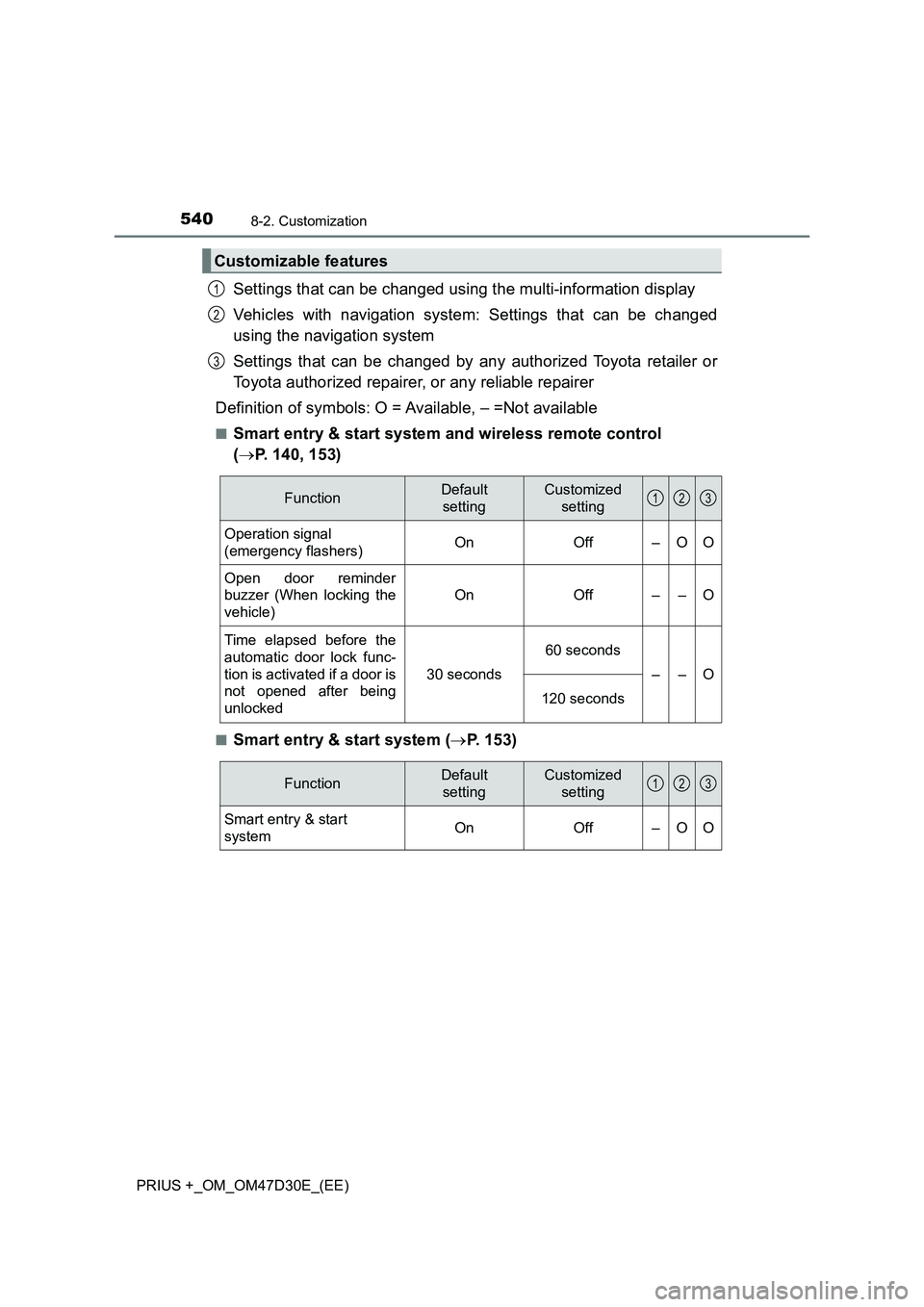
Settings that can be changed using the multi-information display
Vehicles with navigation system: Settings that can be changed
using the navigation system
Settings that can be changed by any authorized Toyota retailer or
Toyota authorized repairer, or any reliable repairer
Definition of symbols: O = Available, – =Not available
■Smart entry & start system and wireless remote control
(P. 140, 153)
■Smart entry & start system (P. 153)
Customizable features
1
2
3
FunctionDefault
settingCustomized
setting
Operation signal
(emergency flashers)OnOff–OO
Open door reminder
buzzer (When locking the
vehicle)
OnOff––O
Time elapsed before the
automatic door lock func-
tion is activated if a door is
not opened after being
unlocked
30 seconds
60 seconds
––O
120 seconds
123
FunctionDefault
settingCustomized
setting
Smart entry & start
systemOn Off – O O
123
Page 541 of 568
5418-2. Customization
PRIUS +_OM_OM47D30E_(EE)
8
Vehicle specifications
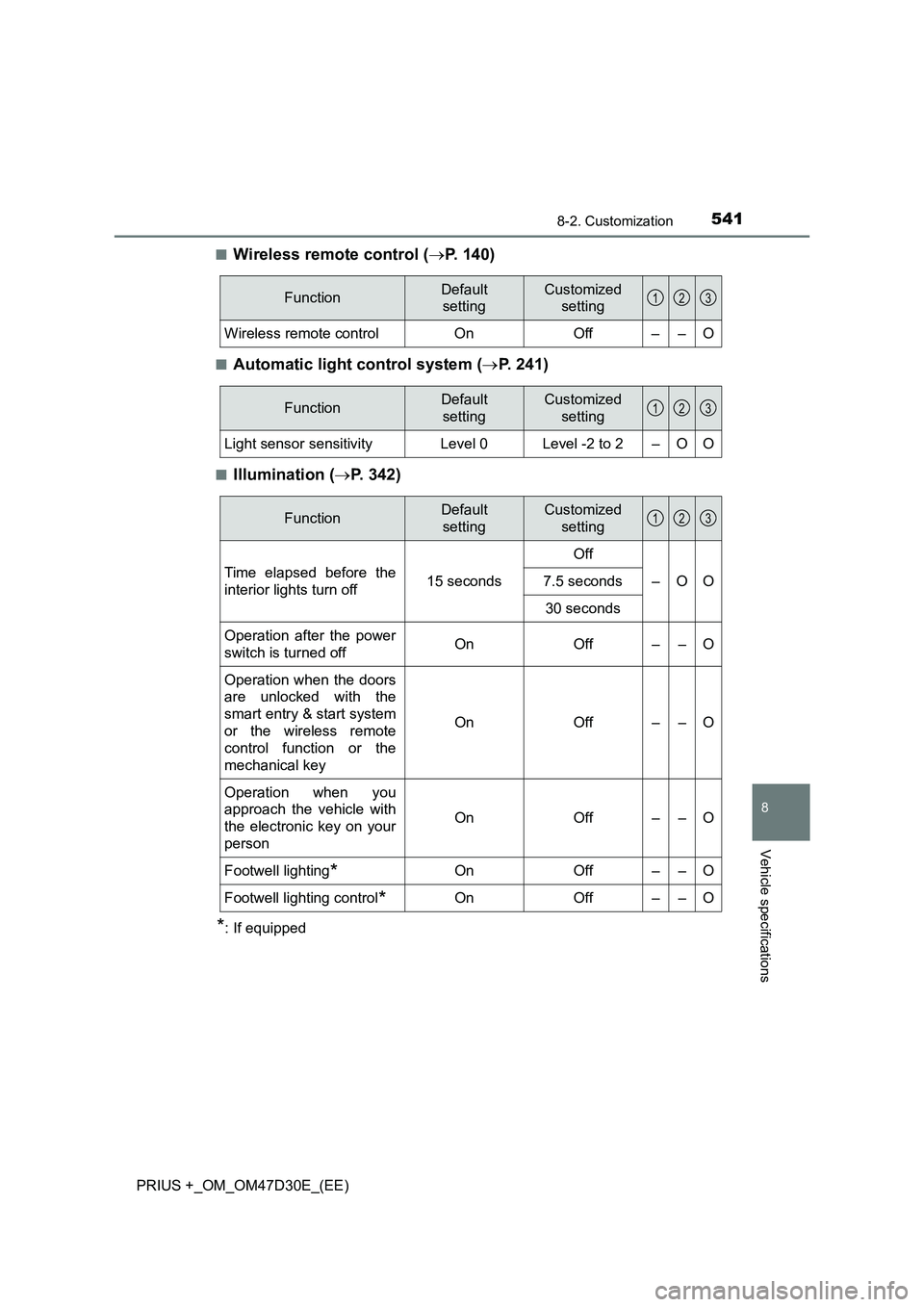
■Wireless remote control (P. 140)
■Automatic light control system (P. 241)
■Illumination (P. 342)
*: If equipped
FunctionDefault
settingCustomized
setting
Wireless remote control On Off – – O
123
FunctionDefault
settingCustomized
setting
Light sensor sensitivityLevel 0Level -2 to 2–OO
123
FunctionDefault
settingCustomized
setting
Time elapsed before the
interior lights turn off15 secondsOff
–OO 7.5 seconds
30 seconds
Operation after the power
switch is turned offOnOff––O
Operation when the doors
are unlocked with the
smart entry & start system
or the wireless remote
control function or the
mechanical key
OnOff––O
Operation when you
approach the vehicle with
the electronic key on your
person
OnOff––O
Footwell lighting
*On Off – – O
Footwell lighting control
*On Off – – O
123
Page 559 of 568
559Alphabetical index
PRIUS +_OM_OM47D30E_(EE)
Identification
Engine ................................... 528
Vehicle .................................. 527
Ignition switch
(Power switch) ....................... 224
Auto power off function ......... 228
Changing the power switch
modes................................. 227
If your vehicle has to be
stopped in an emergency ... 435
Starting the hybrid
system ................................ 224
Ignition switch light
(power switch light)............... 342
Illuminated entry system......... 344
Immobilizer system ................... 91
Indicators.................................. 112
Initialization
Item to initialize ..................... 546
Tire pressure warning
system ................................ 395
Inside rear view mirror ............ 204
Instrument cluster light
control .................................... 120
Interior lights ............................ 342
Switch ........................... 343, 344
Wattage................................. 536
Intrusion sensor....................... 107
ISOFIX rigid anchors ................. 67Jack
Positioning a floor jack .......... 377
Vehicle-equipped jack... 479, 494
Jack handle ...................... 479, 494
Jam protection function
Panoramic roof shades ......... 358
Power windows ..................... 208
Keyless entry
Smart entry & start system ... 153
Wireless remote control ........ 140
Keys .......................................... 140
Electronic key ....................... 140
Engine switch........................ 224
If the electronic key does not
operate properly ................. 511
If you lose your keys ............. 143
Key number plate.................. 140
Keyless entry ........................ 140
Keys ...................................... 140
Mechanical key ..................... 140
Power switch......................... 224
Replacing the battery ............ 417
Warning buzzer..................... 154
Wireless remote control
key...................................... 140
Knee airbags .............................. 46
IJ
K
Page 563 of 568
563Alphabetical index
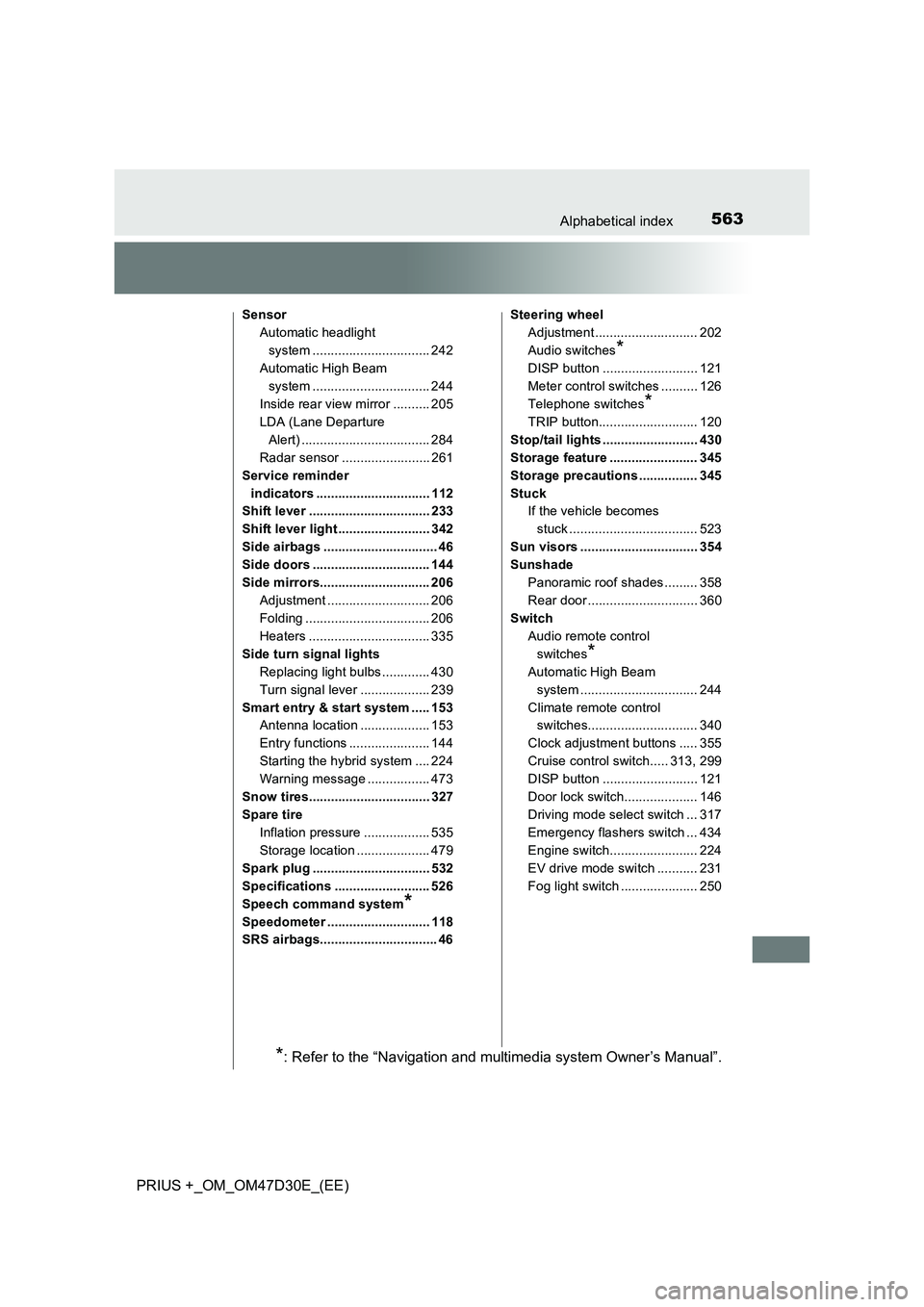
PRIUS +_OM_OM47D30E_(EE)
Sensor
Automatic headlight
system ................................ 242
Automatic High Beam
system ................................ 244
Inside rear view mirror .......... 205
LDA (Lane Departure
Alert) ................................... 284
Radar sensor ........................ 261
Service reminder
indicators ............................... 112
Shift lever ................................. 233
Shift lever light ......................... 342
Side airbags ............................... 46
Side doors ................................ 144
Side mirrors.............................. 206
Adjustment ............................ 206
Folding .................................. 206
Heaters ................................. 335
Side turn signal lights
Replacing light bulbs ............. 430
Turn signal lever ................... 239
Smart entry & start system ..... 153
Antenna location ................... 153
Entry functions ...................... 144
Starting the hybrid system .... 224
Warning message ................. 473
Snow tires................................. 327
Spare tire
Inflation pressure .................. 535
Storage location .................... 479
Spark plug ................................ 532
Specifications .......................... 526
Speech command system
*
Speedometer ............................ 118
SRS airbags................................ 46Steering wheel
Adjustment ............................ 202
Audio switches
*
DISP button .......................... 121
Meter control switches .......... 126
Telephone switches
*
TRIP button........................... 120
Stop/tail lights .......................... 430
Storage feature ........................ 345
Storage precautions ................ 345
Stuck
If the vehicle becomes
stuck ................................... 523
Sun visors ................................ 354
Sunshade
Panoramic roof shades ......... 358
Rear door .............................. 360
Switch
Audio remote control
switches
*
Automatic High Beam
system ................................ 244
Climate remote control
switches.............................. 340
Clock adjustment buttons ..... 355
Cruise control switch..... 313, 299
DISP button .......................... 121
Door lock switch.................... 146
Driving mode select switch ... 317
Emergency flashers switch ... 434
Engine switch........................ 224
EV drive mode switch ........... 231
Fog light switch ..................... 250
*: Refer to the “Navigation and multimedia system Owner’s Manual”.
Page 566 of 568
566Alphabetical index
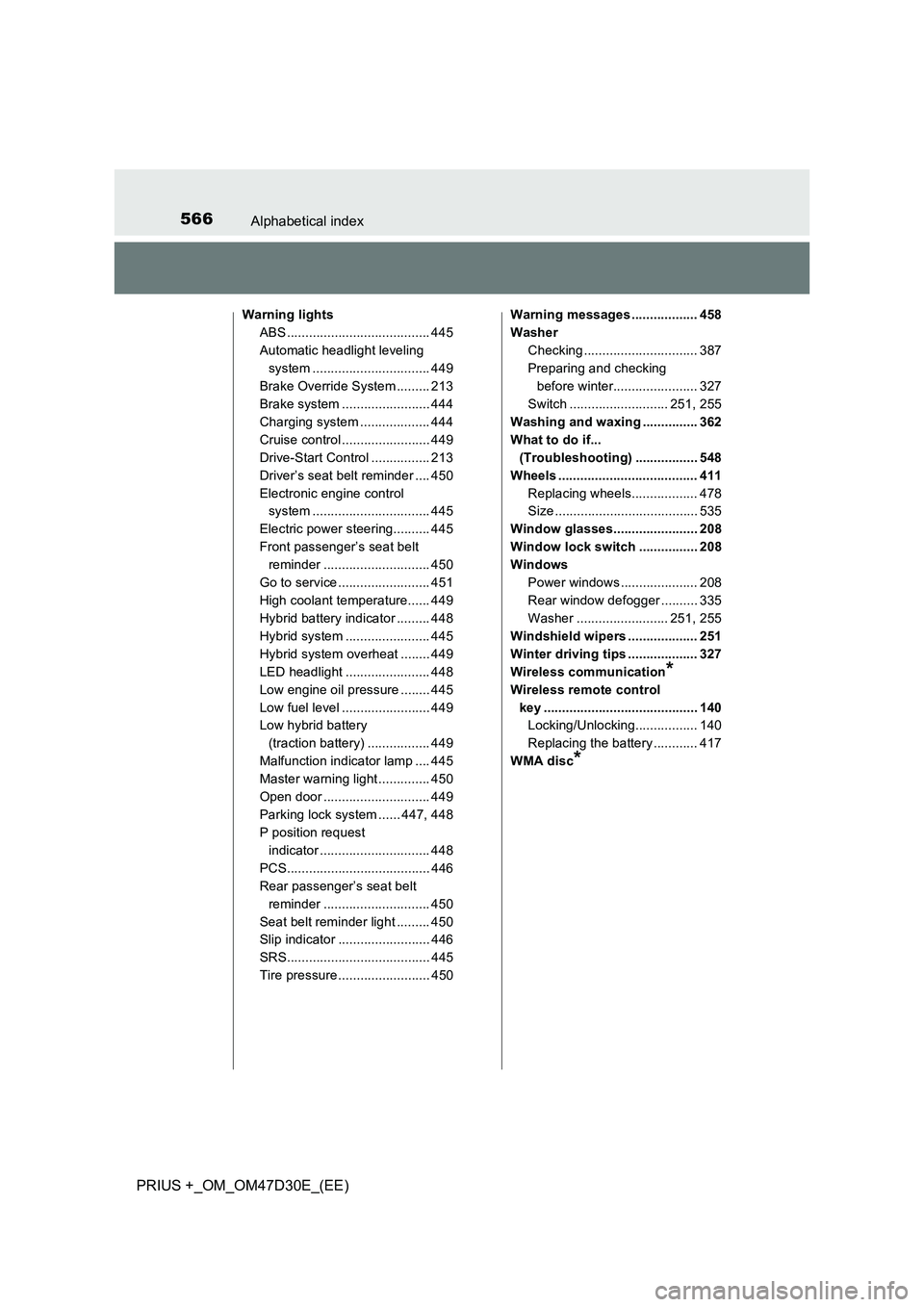
PRIUS +_OM_OM47D30E_(EE)
Warning lights
ABS ....................................... 445
Automatic headlight leveling
system ................................ 449
Brake Override System ......... 213
Brake system ........................ 444
Charging system ................... 444
Cruise control ........................ 449
Drive-Start Control ................ 213
Driver’s seat belt reminder .... 450
Electronic engine control
system ................................ 445
Electric power steering.......... 445
Front passenger’s seat belt
reminder ............................. 450
Go to service ......................... 451
High coolant temperature...... 449
Hybrid battery indicator ......... 448
Hybrid system ....................... 445
Hybrid system overheat ........ 449
LED headlight ....................... 448
Low engine oil pressure ........ 445
Low fuel level ........................ 449
Low hybrid battery
(traction battery) ................. 449
Malfunction indicator lamp .... 445
Master warning light .............. 450
Open door ............................. 449
Parking lock system ...... 447, 448
P position request
indicator .............................. 448
PCS....................................... 446
Rear passenger’s seat belt
reminder ............................. 450
Seat belt reminder light ......... 450
Slip indicator ......................... 446
SRS....................................... 445
Tire pressure ......................... 450Warning messages .................. 458
Washer
Checking ............................... 387
Preparing and checking
before winter....................... 327
Switch ........................... 251, 255
Washing and waxing ............... 362
What to do if...
(Troubleshooting) ................. 548
Wheels ...................................... 411
Replacing wheels.................. 478
Size ....................................... 535
Window glasses....................... 208
Window lock switch ................ 208
Windows
Power windows ..................... 208
Rear window defogger .......... 335
Washer ......................... 251, 255
Windshield wipers ................... 251
Winter driving tips ................... 327
Wireless communication
*
Wireless remote control
key .......................................... 140
Locking/Unlocking................. 140
Replacing the battery ............ 417
WMA disc
*