warning lights TOYOTA PRIUS PLUS 2019 User Guide
[x] Cancel search | Manufacturer: TOYOTA, Model Year: 2019, Model line: PRIUS PLUS, Model: TOYOTA PRIUS PLUS 2019Pages: 568, PDF Size: 73.58 MB
Page 113 of 568
1132. Instrument cluster
2
Instrument cluster
PRIUS +_OM_OM47D30E_(EE)
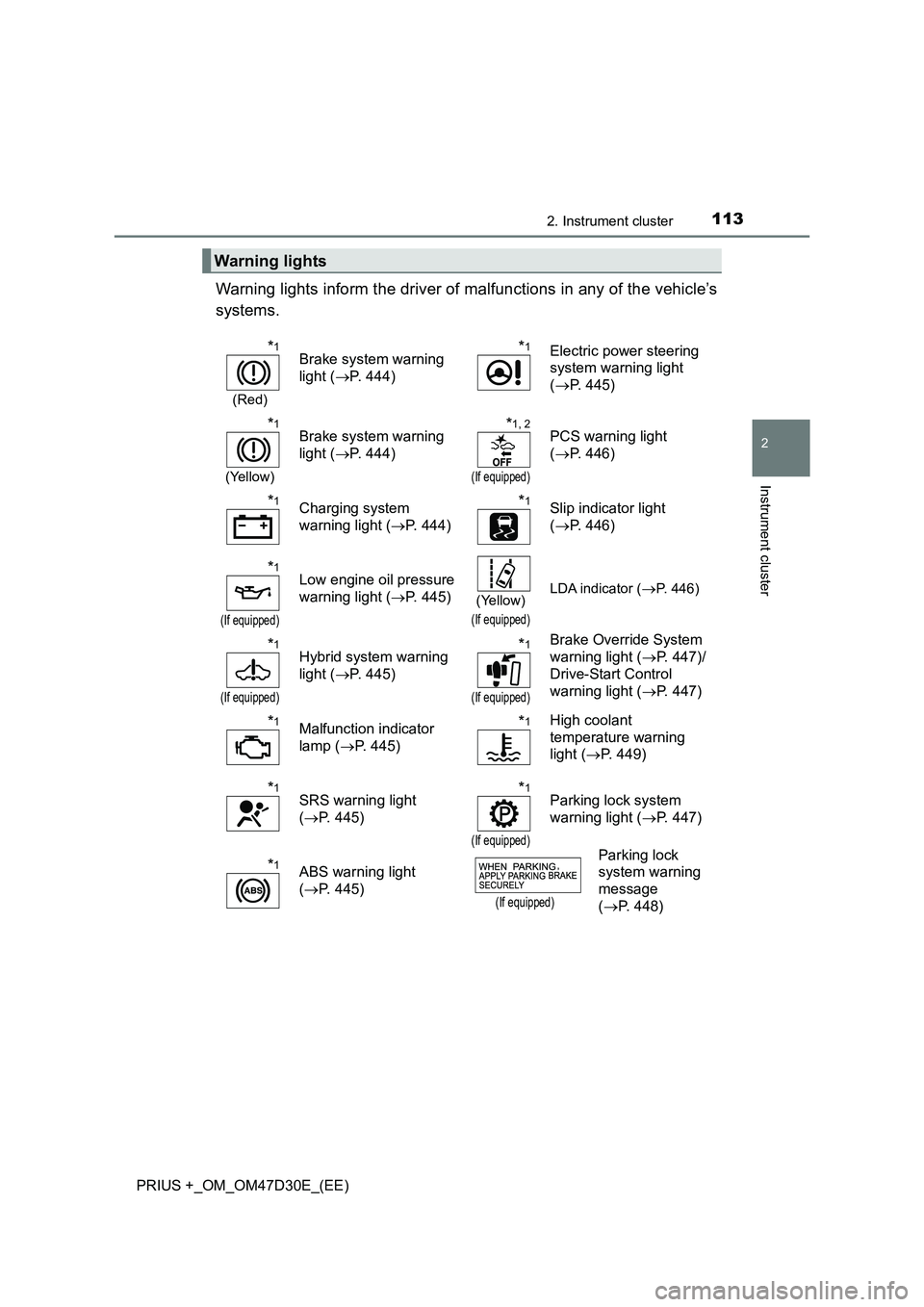
Warning lights inform the driver of malfunctions in any of the vehicle’s
systems.
Warning lights
*1
(Red)
Brake system warning
light ( P. 444)
*1Electric power steering
system warning light
( P. 445)
*1
(Yellow)
Brake system warning
light ( P. 444)
*1, 2
(If equipped)
PCS warning light
( P. 446)
*1Charging system
warning light ( P. 444)
*1Slip indicator light
( P. 446)
*1
(If equipped)
Low engine oil pressure
warning light ( P. 445)(Yellow)
(If equipped)
LDA indicator (P. 446)
*1
(If equipped)
Hybrid system warning
light ( P. 445)
*1
(If equipped)
Brake Override System
warning light ( P. 447)/
Drive-Start Control
warning light ( P. 447)
*1Malfunction indicator
lamp ( P. 445)
*1High coolant
temperature warning
light ( P. 449)
*1SRS warning light
( P. 445)
*1
(If equipped)
Parking lock system
warning light ( P. 447)
*1ABS warning light
( P. 445)(If equipped)
Parking lock
system warning
message
( P. 448)
Page 114 of 568
1142. Instrument cluster
PRIUS +_OM_OM47D30E_(EE)
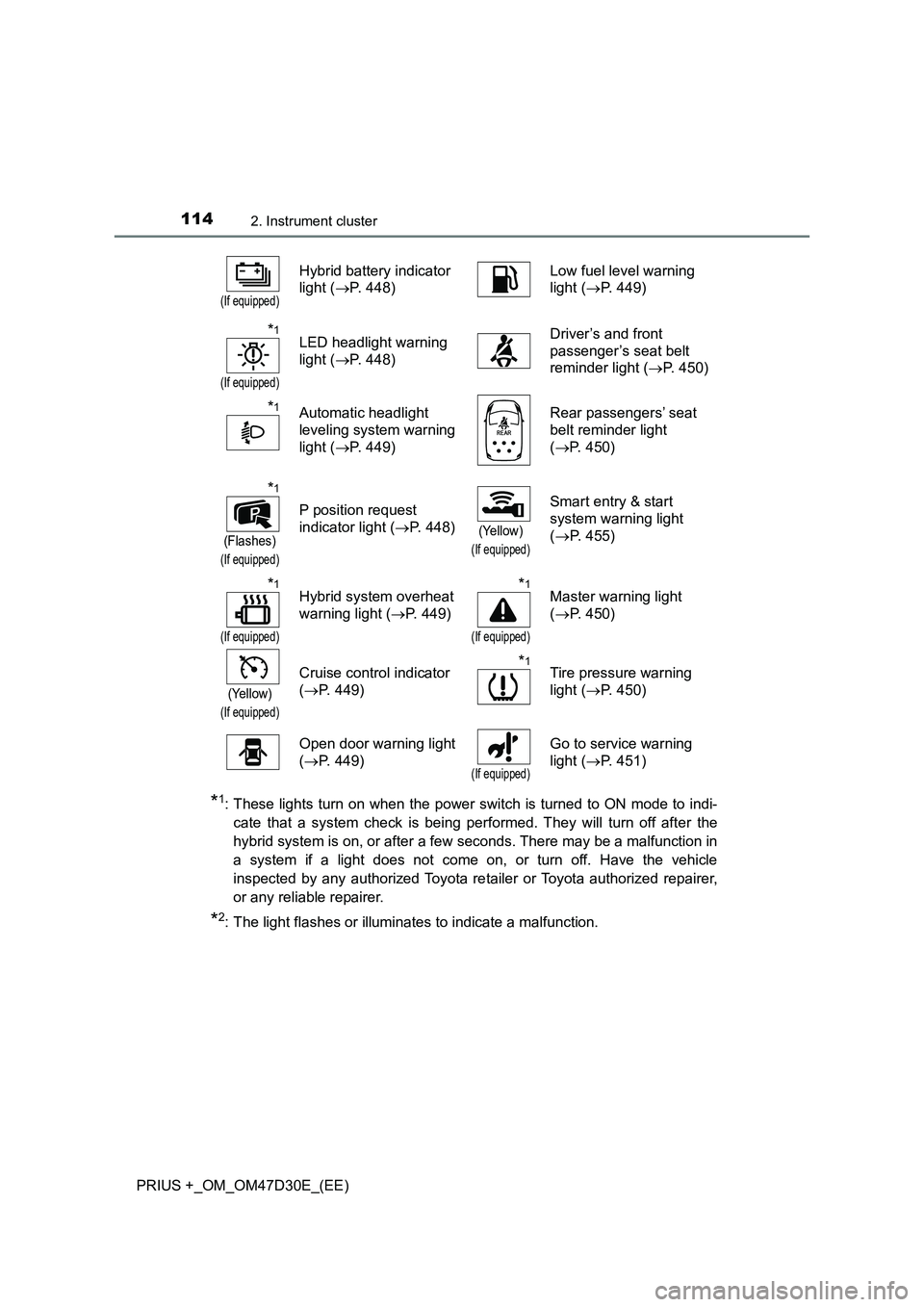
*1: These lights turn on when the power switch is turned to ON mode to indi-
cate that a system check is being performed. They will turn off after the
hybrid system is on, or after a few seconds. There may be a malfunction in
a system if a light does not come on, or turn off. Have the vehicle
inspected by any authorized Toyota retailer or Toyota authorized repairer,
or any reliable repairer.
*2: The light flashes or illuminates to indicate a malfunction.
(If equipped)
Hybrid battery indicator
light (P. 448)Low fuel level warning
light (P. 449)
*1
(If equipped)
LED headlight warning
light (P. 448)Driver’s and front
passenger’s seat belt
reminder light (P. 450)
*1Automatic headlight
leveling system warning
light (P. 449)Rear passengers’ seat
belt reminder light
(P. 450)
*1
(Flashes)
(If equipped)
P position request
indicator light (P. 448)
(Yellow)
(If equipped)
Smart entry & start
system warning light
(P. 455)
*1
(If equipped)
Hybrid system overheat
warning light (P. 449)*1
(If equipped)
Master warning light
(P. 450)
(Yellow)
(If equipped)
Cruise control indicator
(P. 449)*1Tire pressure warning
light (P. 450)
Open door warning light
(P. 449)
(If equipped)
Go to service warning
light (P. 451)
Page 116 of 568
1162. Instrument cluster
PRIUS +_OM_OM47D30E_(EE)
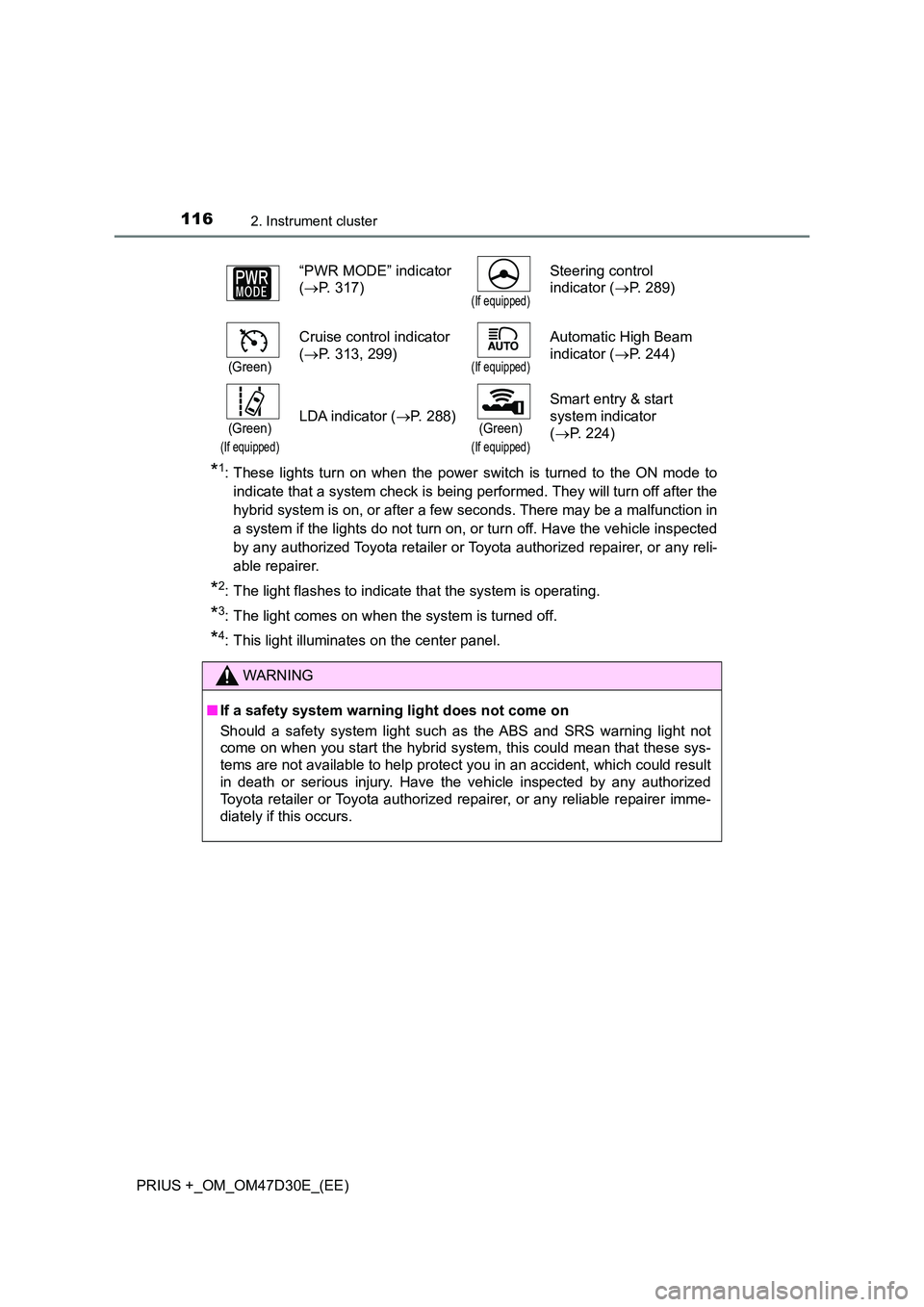
*1: These lights turn on when the power switch is turned to the ON mode to
indicate that a system check is being performed. They will turn off after the
hybrid system is on, or after a few seconds. There may be a malfunction in
a system if the lights do not turn on, or turn off. Have the vehicle inspected
by any authorized Toyota retailer or Toyota authorized repairer, or any reli-
able repairer.
*2: The light flashes to indicate that the system is operating.
*3: The light comes on when the system is turned off.
*4: This light illuminates on the center panel.
“PWR MODE” indicator
( P. 317)(If equipped)
Steering control
indicator ( P. 289)
(Green)
Cruise control indicator
( P. 313, 299)(If equipped)
Automatic High Beam
indicator ( P. 244)
(Green)
(If equipped)
LDA indicator (P. 288)(Green)
(If equipped)
Smart entry & start
system indicator
( P. 224)
WARNING
■If a safety system warning light does not come on
Should a safety system light such as the ABS and SRS warning light not
come on when you start the hybrid system, this could mean that these sys-
tems are not available to help protect you in an accident, which could result
in death or serious injury. Have the vehicle inspected by any authorized
Toyota retailer or Toyota authorized repairer, or any reliable repairer imme-
diately if this occurs.
Page 125 of 568
1252. Instrument cluster
2
Instrument cluster
PRIUS +_OM_OM47D30E_(EE)
■ Remaining hybrid battery (traction battery) charge display
The charge amount of the hybrid battery (traction battery) is automatically
controlled by the hybrid system. For this reason, even if electricity is recov-
ered via the regenerative braking, or el ectricity is generated via the gasoline
engine, the displayed hybrid battery (traction battery) charge amount may not
reach the highest level (level 8). However, this does not indicate a malfunc-
tion.
■ Engine speed
On hybrid vehicles, engine speed is precisely controlled in order to help
improve fuel efficiency and reduce exhaust emissions etc.
■ Brightness of the instrument panel light
If the headlight switch is turned to ON while the surrounding area is dark, the
instrument cluster lights will dim.
■ When disconnecting and reconnecting 12-volt battery terminals
The fuel consumption display and average vehicle speed will be reset.
NOTICE
■ To prevent damage to the engine and its components
The engine may be overheating if the high coolant temperature warning
light comes on or flashes. In this case, immediately stop the vehicle in a
safe place, and check the engine after it has cooled completely. ( P. 518)
■ The trip information display at low temperatures
Allow the interior of the vehicle to warm up before using the liquid crystal
information display. At extremely low temperatures, the information display
monitor may respond slowly, and display changes may be delayed.
Page 205 of 568
2053-4. Adjusting the steering wheel and mirrors
3
Operation of each component
PRIUS +_OM_OM47D30E_(EE)
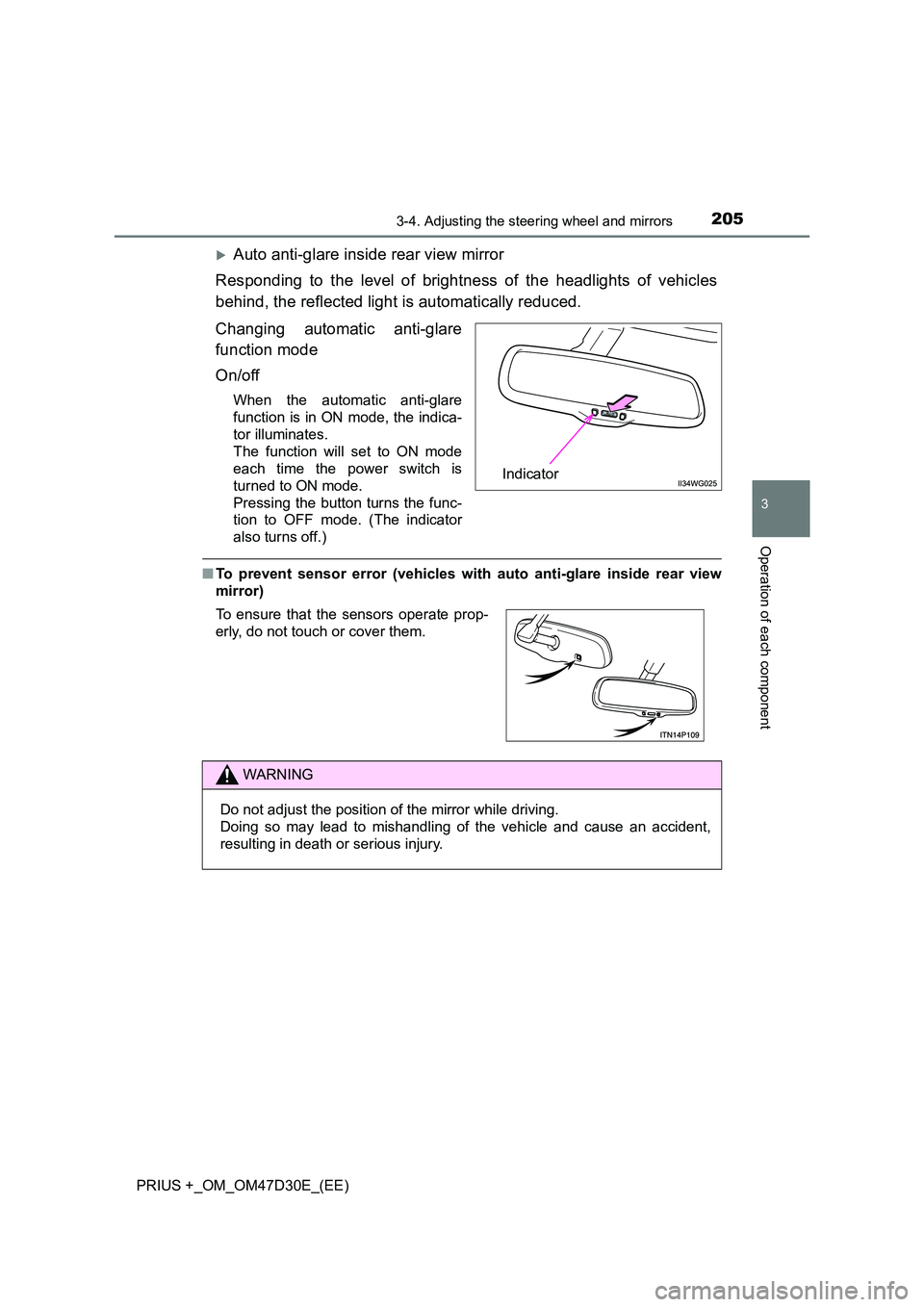
Auto anti-glare inside rear view mirror
Responding to the level of brightness of the headlights of vehicles
behind, the reflected light is automatically reduced.
Changing automatic anti-glare
function mode
On/off
When the automatic anti-glare
function is in ON mode, the indica-
tor illuminates.
The function will set to ON mode
each time the power switch is
turned to ON mode.
Pressing the button turns the func-
tion to OFF mode. (The indicator
also turns off.)
■ To prevent sensor error (vehicles with auto anti-glare inside rear view
mirror)
Indicator
To ensure that the sensors operate prop-
erly, do not touch or cover them.
WARNING
Do not adjust the position of the mirror while driving.
Doing so may lead to mishandling of the vehicle and cause an accident,
resulting in death or serious injury.
Page 248 of 568
2484-3. Operating the lights and wipers
PRIUS +_OM_OM47D30E_(EE)
● In the situations below, the system may not be able to correctly detect the
surrounding brightness levels, and may flash or expose nearby pedestrians
to the high beam. Therefore, you should consider turning the high beams on
or off manually rather than relying on the Automatic High Beam system.
• In bad weather (rain, snow, fog, sandstorms etc.)
• The windshield is obscured by fog, mist, ice, dirt etc.
• The windshield is cracked or damaged.
• The camera sensor is deformed or dirty.
• The camera sensor temperature is extremely high.
• Surrounding brightness levels are equal to those of headlights, tail lights
or fog lights.
• Vehicles ahead have headlights that are either switched off, dirty, are
changing color, or have are not aimed properly.
• When driving through an area of intermittently changing brightness and
darkness.
• When frequently and repeatedly driving ascending/descending roads, or
roads with rough, bumpy or uneven surfaces (such as stone-paved
roads, gravel tracks etc.).
• When frequently and repeatedly taking curves or driving on a winding
road.
• There is a highly reflective object ahead of the vehicle, such as a sign or
a mirror.
• The back of a vehicle ahead is highly reflective, such as a container on a
truck.
• The vehicle’s headlights are damaged or dirty.
• The vehicle is listing or tilting, due to a flat tire, a trailer being towed etc.
• The high beam and low beam are repeatedly being switched between in
an abnormal manner.
• The driver believes that the high beam may be causing problems or dis-
tress to other drivers or pedestrians nearby.
WARNING
■ Limitations of the Automatic High Beam
Do not rely on the Automatic High Beam. Always drive safely, taking care to
observe your surroundings and turning high beam on or off manually if nec-
essary.
Page 254 of 568
2544-3. Operating the lights and wipers
PRIUS +_OM_OM47D30E_(EE)
WARNING
■Caution regarding the use of windshield wipers in AUTO mode (vehi-
cles with rain-sensing windshield wipers)
The windshield wipers may operate unexpectedly if the sensor is touched or
the windshield is subject to vibration in AUTO mode. Take care that your fin-
gers etc. do not become caught in the windshield wipers.
■ Caution regarding the use of washer fluid
When it is cold, do not use the washer fluid until the windshield becomes
warm. The fluid may freeze on the windshield and cause low visibility. This
may lead to an accident, resulting in death or serious injury.
NOTICE
■ When the windshield is dry
Do not use the wipers, as they may damage the windshield.
■ When the washer fluid tank is empty
Do not operate the switch continually as the washer fluid pump may over-
heat.
■ When a nozzle becomes blocked
In this case, contact any authorized Toyota retailer or Toyota authorized
repairer, or any reliable repairer.
Do not try to clear it with a pin or other object. The nozzle will be damaged.
■ To prevent 12-volt battery discharge
Do not leave the wipers on longer than necessary when the hybrid system
is off.
Page 263 of 568
2634-5. Using the driving support systems
4
Driving
PRIUS +_OM_OM47D30E_(EE)
WARNING
■To avoid malfunction of the camera sensor
Observe the following precautions.
Otherwise, the camera sensor may not operate properly, possibly leading to
an accident resulting in death or serious injury.
● Keep the windshield clean at all times.
• If the windshield is dirty or cover ed with an oily film, water droplets,
snow, etc., clear the windshield.
• If a glass coating agent is applied to t he windshield, it will still be neces-
sary to use the windshield wipers to remove water droplets, etc. from
the area of the windshield in front of the camera sensor.
• If the inner side of the windshield where the camera sensor is installed
is dirty, contact any authorized Toyota retailer or Toyota authorized
repairer, or any reliable repairer.
● If the part of the windshield in front of the camera sensor is fogged up or
covered with condensation or ice, use the windshield defogger to remove
the fog, condensation or ice. ( P. 335)
● If water droplets cannot be properly removed from the area of the wind-
shield in front of the camera sensor by the windshield wipers, replace the
wiper insert or wiper blade.
• To replace the wiper insert: P. 415
• If the wiper blades need to be replaced, contact any authorized Toyota
retailer or Toyota authorized re pairer, or any reliable repairer.
● Do not attach window tinting to the windshield.
● Replace the windshield if it is damaged or cracked.
If the windshield needs to be replaced, contact any authorized Toyota
retailer or Toyota authorized repairer, or any reliable repairer.
● Do not get the camera sensor wet.
● Do not allow bright lights to shine into the camera sensor.
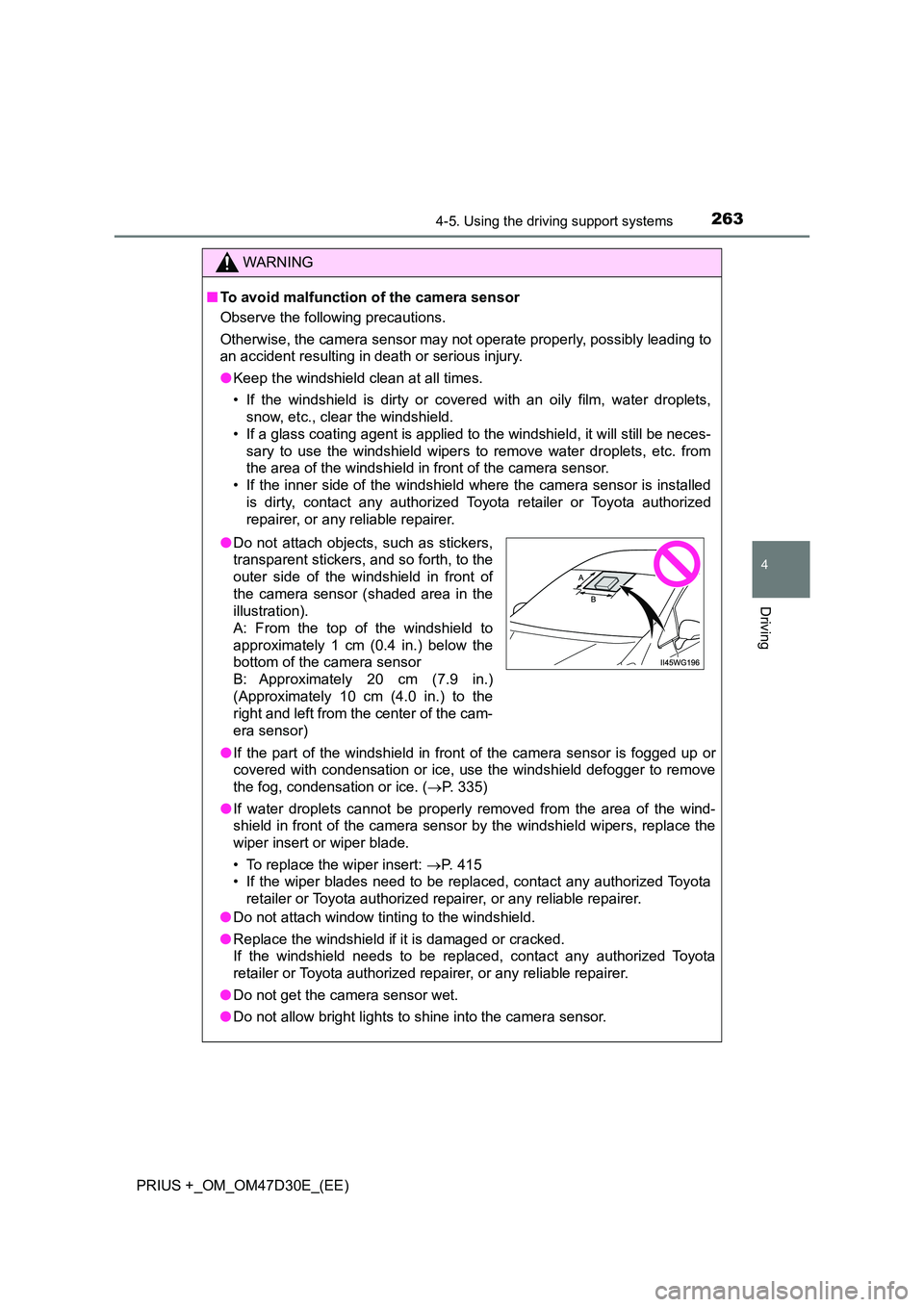
●Do not attach objects, such as stickers,
transparent stickers, and so forth, to the
outer side of the windshield in front of
the camera sensor (shaded area in the
illustration).
A: From the top of the windshield to
approximately 1 cm (0.4 in.) below the
bottom of the camera sensor
B: Approximately 20 cm (7.9 in.)
(Approximately 10 cm (4.0 in.) to the
right and left from the center of the cam-
era sensor)
Page 264 of 568
2644-5. Using the driving support systems
PRIUS +_OM_OM47D30E_(EE)
WARNING
●Do not dirty or damage the camera sensor.
When cleaning the inside of the windshi eld, do not allow glass cleaner to
contact the lens. Also, do not touch the lens.
If the lens is dirty or damaged, contact any authorized Toyota retailer or
Toyota authorized repairer, or any reliable repairer.
● Do not subject the camera sensor to a strong impact.
● Do not change the installation position or direction of the camera sensor or
remove it.
● Do not disassemble the camera sensor.
● Do not modify any components of the vehicle around the camera sensor
(inside rear view mirror, etc.) or ceiling.
● Do not attach any accessories that may obstruct the camera sensor to the
hood, front grille or front bumper. C ontact any authorized Toyota retailer or
Toyota authorized repairer, or any reliable repairer for details.
● If a surfboard or other long object is to be mounted on the roof, make sure
that it will not obstruct the camera sensor.
● Do not modify the headlights or other lights.
Page 288 of 568
2884-5. Using the driving support systems
PRIUS +_OM_OM47D30E_(EE)
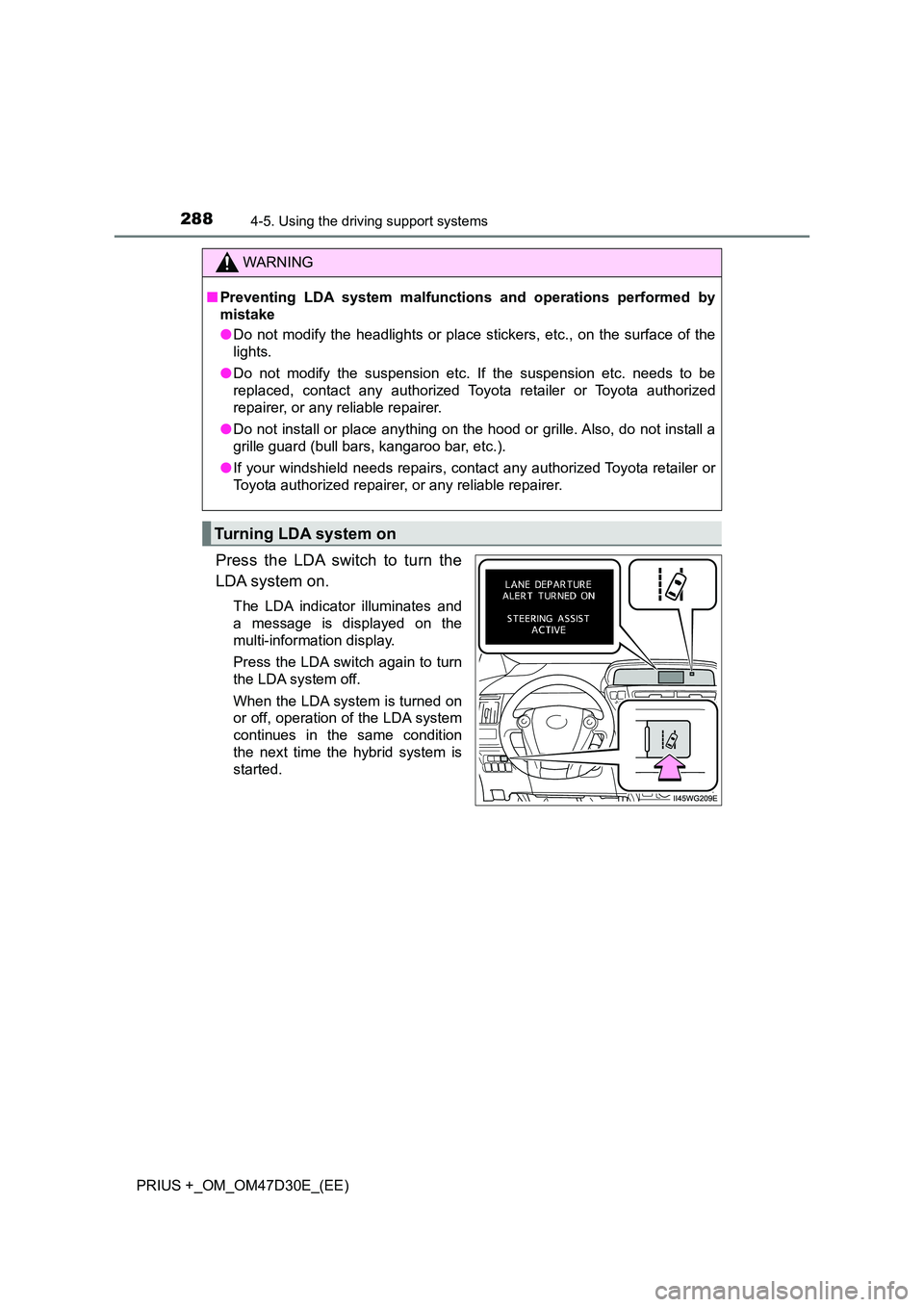
Press the LDA switch to turn the
LDA system on.
The LDA indicator illuminates and
a message is displayed on the
multi-information display.
Press the LDA switch again to turn
the LDA system off.
When the LDA system is turned on
or off, operation of the LDA system
continues in the same condition
the next time the hybrid system is
started.
WARNING
■ Preventing LDA system malfunctions and operations performed by
mistake
● Do not modify the headlights or place stickers, etc., on the surface of the
lights.
● Do not modify the suspension etc. If the suspension etc. needs to be
replaced, contact any authorized Toyota retailer or Toyota authorized
repairer, or any reliable repairer.
● Do not install or place anything on the hood or grille. Also, do not install a
grille guard (bull bars, kangaroo bar, etc.).
● If your windshield needs repairs, contact any authorized Toyota retailer or
Toyota authorized repairer, or any reliable repairer.
Turning LDA system on