ECO mode TOYOTA PRIUS PLUS 2019 Owner's Manual
[x] Cancel search | Manufacturer: TOYOTA, Model Year: 2019, Model line: PRIUS PLUS, Model: TOYOTA PRIUS PLUS 2019Pages: 568, PDF Size: 73.58 MB
Page 324 of 568
3244-6. Driving tips
PRIUS +_OM_OM47D30E_(EE)
Hybrid vehicle driving tips
◆Using Eco drive mode
When using Eco drive mode, the torque corresponding to the accel-
erator pedal depression amount can be generated more smoothly
than it is in normal conditions. In addition, the operation of the air
conditioning system (heating/cooling) will be minimized, improving
the fuel economy. (P. 317)
◆Use of Hybrid System Indicator
The Eco-friendly driving is possible by keeping the Hybrid System
Indicator within Eco area. (P. 124)
◆Shift position operation
Shift the shift position to D when stopped at a traffic light, or driving
in heavy traffic etc. Shift the shift position to P when parking. When
using the N, there is no positive effect on fuel consumption. In the
N, the gasoline engine operates but electricity cannot be gener-
ated. Also, when using the air conditioning system, etc., the hybrid
battery (traction battery) power is consumed.
◆Accelerator pedal/brake pedal operation
●Drive your vehicle smoothly. Avoid abrupt acceleration and
deceleration. Gradual acceleration and deceleration will make
more effective use of the electric motor (traction motor) without
having to use gasoline engine power.
●Avoid repeated acceleration. Repeated acceleration consumes
hybrid battery (traction battery) power, resulting in poor fuel con-
sumption. Battery power can be restored by driving with the
accelerator pedal slightly released.
For economical and ecological driving, pay attention to the fol-
lowing points:
Page 325 of 568
3254-6. Driving tips
4
Driving
PRIUS +_OM_OM47D30E_(EE)
◆When braking
Make sure to operate the brakes gently and in a timely manner. A
greater amount of electrical energy can be regenerated when slow-
ing down.
◆Delays
Repeated acceleration and deceleration, as well as long waits at
traffic lights, will lead to bad fuel economy. Check traffic reports
before leaving and avoid delays as much as possible. When driving
in a traffic jam, gently release the brake pedal to allow the vehicle to
move forward slightly while avoiding overuse of the accelerator
pedal. Doing so can help control excessive gasoline consumption.
◆Highway driving
Control and maintain the vehicle at a constant speed. Before stop-
ping at a toll booth or similar, allow plenty of time to release the
accelerator and gently apply the brakes. A greater amount of elec-
trical energy can be regenerated when slowing down.
◆Air conditioning
Use the air conditioning only when necessary. Doing so can help
reduce excessive gasoline consumption.
In summer: When the ambient temperature is high, use the recircu-
lated air mode. Doing so will help to reduce the burden on the air
conditioning system and reduce fuel consumption as well.
In winter: Because the gasoline engine will not automatically cut out
until it and the interior of the vehicle are warm, it will consume fuel.
Fuel consumption can be improved by avoiding overuse of the
heater.
Page 337 of 568
3375-1. Using the air conditioning system and defogger
PRIUS +_OM_OM47D30E_(EE)
5
Interior features
■Using automatic mode
Fan speed is adjusted automatically according to the temperature setting and
the ambient conditions.
Therefore, the fan may stop for a while until warm or cool air is ready to flow
immediately after is pressed.
■ After pressing
The selection frame will automatically move to the fan speed display.
■ Fogging up of the windows
● The windows will easily fog up when the humidity in the vehicle is high.
Pressing on will dehumidify the air from the outlets and defog the
windshield effectively.
● If you turn off, the windows may fog up more easily.
● The windows may fog up if the recirculated air mode is used.
■ When driving on dusty roads
Close all windows. If dust thrown up by the vehicle is still drawn into the vehi-
cle after closing the windows, it is recommended that the air intake mode be
set to outside air mode and the fan speed to any setting except off.
■ Outside/recirculated air mode
● Setting to the recirculated air mode temporarily is recommended in prevent-
ing dirty air from entering the vehicle interior and helping to cool the vehicle
when the outside air temperature is high.
● Outside/recirculated air mode may automatically switch depending on the
temperature setting or the inside temperature.
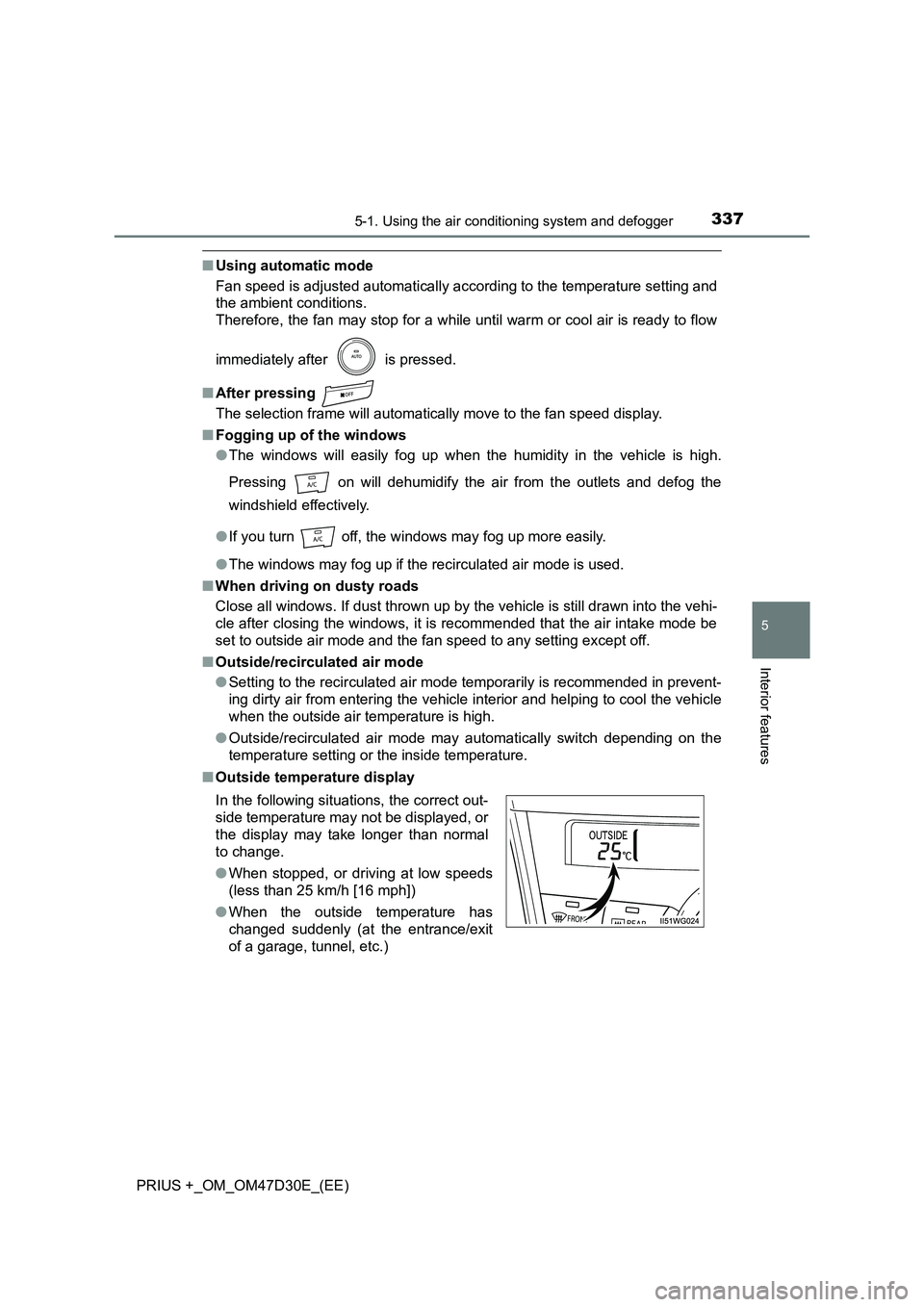
■ Outside temperature display
In the following situations, the correct out-
side temperature may not be displayed, or
the display may take longer than normal
to change.
● When stopped, or driving at low speeds
(less than 25 km/h [16 mph])
● When the outside temperature has
changed suddenly (at the entrance/exit
of a garage, tunnel, etc.)
Page 338 of 568
3385-1. Using the air conditioning system and defogger
PRIUS +_OM_OM47D30E_(EE)■When the outside temperature is low
The dehumidification function may not operate even when is pressed.
■Operation of the air conditioning system in Eco drive mode
●In the Eco drive mode, the air conditioning system is controlled as follows to
prioritize fuel efficiency
• Engine speed and compressor operation controlled to restrict heating/
cooling capacity
• Fan speed restricted when automatic mode is selected
●To improve air conditioning performance, perform the following operations
• Adjust the fan speed
• Turn off Eco drive mode
• Customize the air conditioning control of Eco drive mode. (P. 543)
■Ventilation and air conditioning odors
●To let fresh air in, set the air conditioning system to the outside air mode.
●During use, various odors from inside and outside the vehicle may enter into
and accumulate in the air conditioning system. This may then cause odor to
be emitted from the vents.
●To reduce potential odors from occurring:
• It is recommended that the air conditioning system be set to outside air
mode prior to turning the vehicle off.
• The start timing of the blower may be delayed for a short period of time
immediately after the air conditioning system is started in automatic
mode.
■Air conditioning filter
P. 413
■Customization
Settings (e.g. A/C auto switching operation) can be changed.
(Customizable features: P. 539)
Page 355 of 568
3555-4. Using the other interior features
PRIUS +_OM_OM47D30E_(EE)
5
Interior features
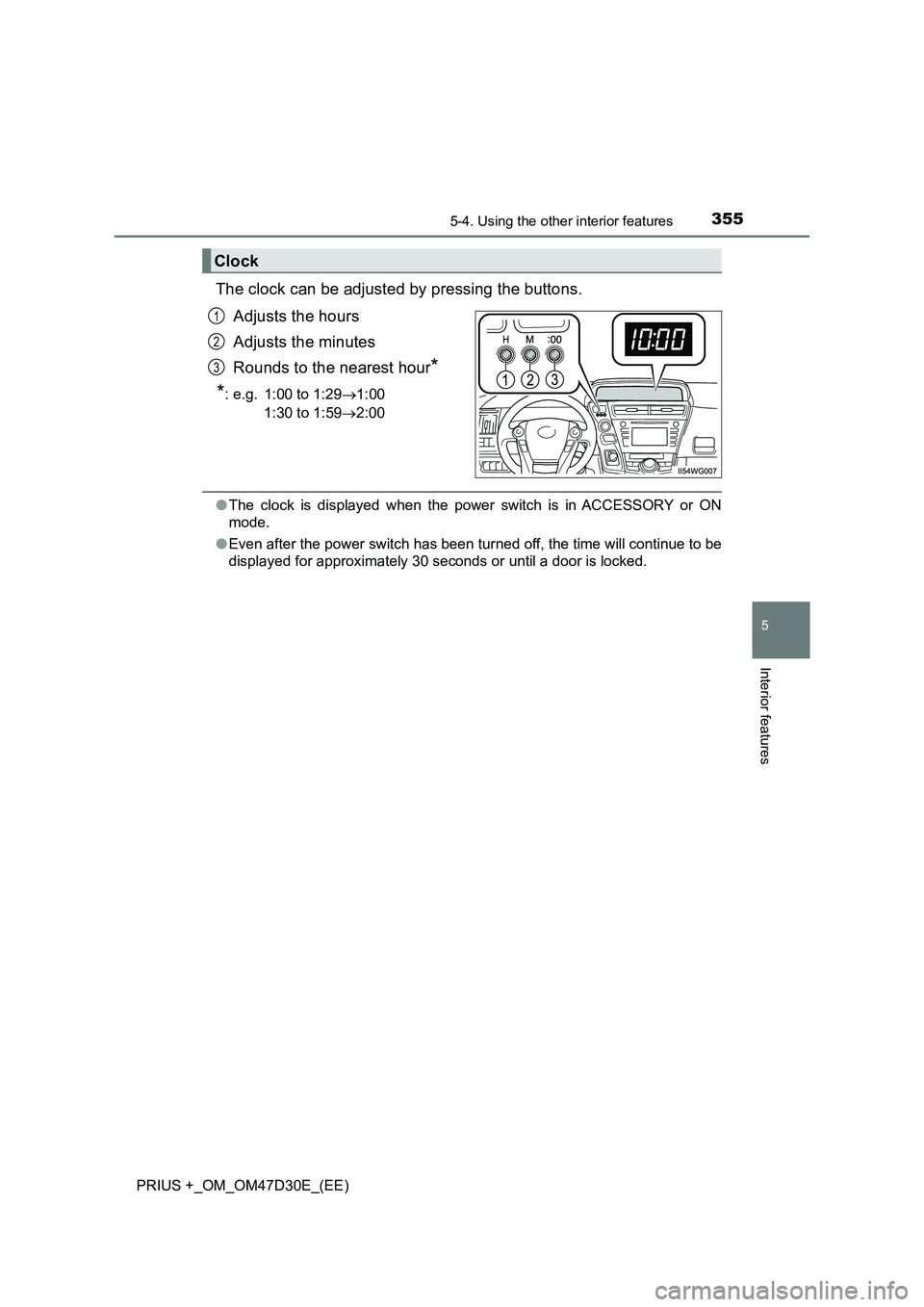
The clock can be adjusted by pressing the buttons.
Adjusts the hours
Adjusts the minutes
Rounds to the nearest hour*
*: e.g. 1:00 to 1:29 1:00
1:30 to 1:59 2:00
●The clock is displayed when the power switch is in ACCESSORY or ON
mode.
● Even after the power switch has been turned off, the time will continue to be
displayed for approximately 30 seconds or until a door is locked.
Clock
1
2
3
Page 358 of 568
358
PRIUS +_OM_OM47D30E_(EE)
5-4. Using the other interior features
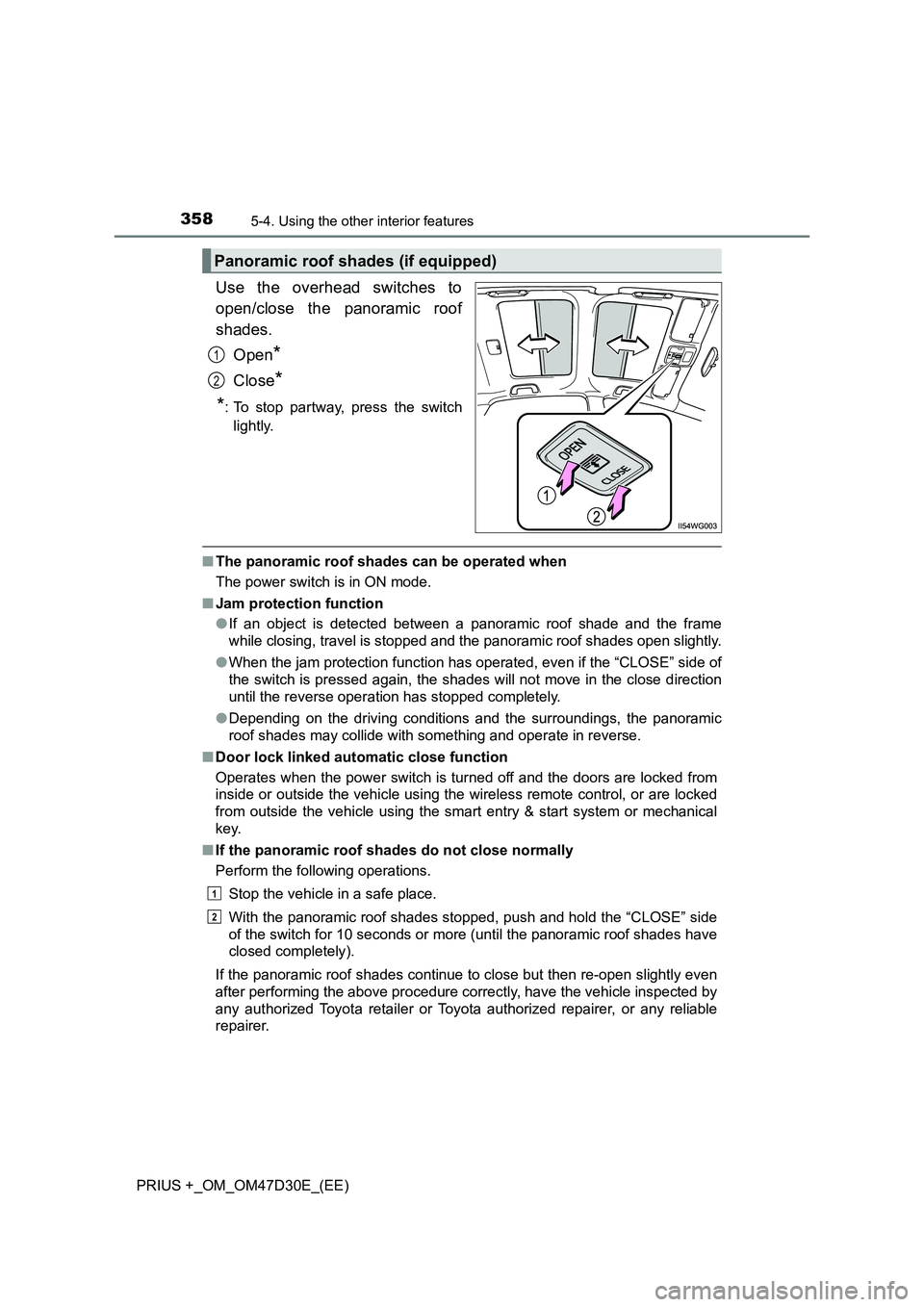
Use the overhead switches to
open/close the panoramic roof
shades.
Open*
Close*
*: To stop partway, press the switch
lightly.
■ The panoramic roof shades can be operated when
The power switch is in ON mode.
■ Jam protection function
● If an object is detected between a panoramic roof shade and the frame
while closing, travel is stopped and the panoramic roof shades open slightly.
● When the jam protection function has operated, even if the “CLOSE” side of
the switch is pressed again, the shades will not move in the close direction
until the reverse operation has stopped completely.
● Depending on the driving conditions and the surroundings, the panoramic
roof shades may collide with something and operate in reverse.
■ Door lock linked automatic close function
Operates when the power switch is turned off and the doors are locked from
inside or outside the vehicle using the wireless remote control, or are locked
from outside the vehicle using the smart entry & start system or mechanical
key.
■ If the panoramic roof shades do not close normally
Perform the following operations.
Stop the vehicle in a safe place.
With the panoramic roof shades stopped, push and hold the “CLOSE” side
of the switch for 10 seconds or more (until the panoramic roof shades have
closed completely).
If the panoramic roof shades continue to close but then re-open slightly even
after performing the above procedure correctly, have the vehicle inspected by
any authorized Toyota retailer or Toyota authorized repairer, or any reliable
repairer.
Panoramic roof shades (if equipped)
1
2
1
2
Page 363 of 568
3636-1. Maintenance and care
PRIUS +_OM_OM47D30E_(EE)
6
Maintenance and care
■Note for a smart entry & start system
If the door handle becomes wet while the electronic key is within the effective
range, the door may lock and unlock repeatedly. In that case, follow the fol-
lowing correction procedures to wash the vehicle:
●Place the key in a position 2 m (6 ft.) or more separate from the vehicle
while the vehicle is being washed. (Take care to ensure that the key is not
stolen.)
●Set the electronic key to battery-saving mode to disable the smart entry &
start system. (P. 155)
■Aluminum wheels
●Remove any dirt immediately by using a neutral detergent.
●Wash detergent off with water immediately after use.
●To protect the paint from damage, make sure to observe the following pre-
cautions.
• Do not use acidic, alkaline or abrasive detergent
• Do not use hard brushes
• Do not use detergent on the wheels when they are hot, such as after driv-
ing or parking in hot weather
■Bumpers
Do not scrub with abrasive cleaners.
■Front side windows water-repellent coating (if equipped)
The following precautions can extend the effectiveness of the water-repellent
coating.
●Remove any dirt, etc. from the front side windows regularly.
●Do not allow dirt and dust to accumulate on the windows for a long period.
Clean the windows with a soft, damp cloth as soon as possible.
●Do not use wax or glass cleaners that contain abrasives when cleaning the
windows.
●Do not use any metallic objects to remove condensation build up.
Page 374 of 568
3746-3. Do-it-yourself maintenance
PRIUS +_OM_OM47D30E_(EE)
WARNING
The engine compartment contains many mechanisms and fluids that may
move suddenly, become hot, or become el ectrically energized. To avoid death
or serious injury, observe the following precautions.
■ When working on the engine compartment
● Make sure that the “POWER ON” on the multi-information display or the
smart entry & start system indicator, and the “READY” indicator are both
off.
● Keep hands, clothing and tools away from the moving fan.
● Be careful not to touch the engine, power control unit, radiator, exhaust
manifold, etc. right after driving as they may be hot. Oil and other fluids
may also be hot.
● Do not leave anything that may burn easily, such as paper and rags, in the
engine compartment.
● Do not smoke, cause sparks or expose an open flame to fuel. Fuel fumes
are flammable.
● Take care because brake fluid can harm your hands or eyes and damage
painted surfaces. If fluid gets on your hands or in your eyes, flush the
affected area with clean water immediately. If you still experience discom-
fort, consult a doctor.
■ When working near the electric cooling fans or radiator grille
Be sure the power switch is off.
With the power switch in ON mode, the electric cooling fans may automati-
cally start to run if the air conditioning is on and/or the coolant temperature
is high. ( P. 386)
■ Safety glasses
Wear safety glasses to prevent flying or falling material, fluid spray, etc.
from getting in your eyes.
NOTICE
■ If you remove the air cleaner filter
Driving with the air cleaner filter removed may cause excessive engine wear
due to dirt in the air.
■ If the brake fluid level is low or high
It is normal for the brake fluid level to go down slightly as the brake pads
wear or when the fluid level in the accumulator is high.
If the reservoir needs frequent refilling, it may indicate a serious problem.
Page 390 of 568
3906-3. Do-it-yourself maintenance
PRIUS +_OM_OM47D30E_(EE)
■Before recharging
When recharging, the 12-volt battery produces hydrogen gas which is flam-
mable and explosive. Therefore, observe the following precautions before
recharging:
●If recharging with the 12-volt battery installed on the vehicle, be sure to dis-
connect the ground cable.
●Make sure the power switch on the charger is off when connecting and dis-
connecting the charger cables to the 12-volt battery.
■After recharging/reconnecting the 12-volt battery
●Unlocking the doors using the smart entry & start system may not be possi-
ble immediately after reconnecting the 12-volt battery. If this happens, use
the wireless remote control or the mechanical key to lock/unlock the doors.
●Start the hybrid system with the power switch in ACCESSORY mode. The
hybrid system may not start with the power switch turned off. However, the
hybrid system will operate normally from the second attempt.
●The power switch mode is recorded by the vehicle. If the 12-volt battery is
reconnected, the vehicle will return the power switch mode to the status it
was in before the 12-volt battery was disconnected. Make sure to turn off
the power before disconnect the 12-volt battery. Take extra care when con-
necting the 12-volt battery if the power switch mode prior to discharge is
unknown.
●Restart the hybrid system, depress the brake pedal, and confirm that it is
possible to shift into each shift position.
If the system will not start even after multiple attempts at all methods above,
contact any authorized Toyota retailer or Toyota authorized repairer, or any
reliable repairer.
Page 398 of 568
3986-3. Do-it-yourself maintenance
PRIUS +_OM_OM47D30E_(EE)■The initialization operation
●Make sure to carry out initialization after adjusting the tire inflation pressure.
Also, make sure the tires are cold before carrying out initialization or tire
inflation pressure adjustment.
●If you have accidentally turned the power switch off during initialization, it is
not necessary to press the reset switch again as initialization will restart
automatically when the power switch has been turned to ON mode for the
next time.
●If you accidentally press the reset switch when initialization is not necessary,
adjust the tire inflation pressure to the specified level when the tires are
cold, and conduct initialization again.
■Warning performance of the tire pressure warning system
The warning of the tire pressure warning system will change in accordance
with the conditions under which it was initialized. For this reason, the system
may give a warning even if the tire pressure does not reach a low enough
level, or if the pressure is higher than the pressure that was adjusted to when
the system was initialized.
■When initialization of the tire pressure warning system has failed
Initialization can be completed in a few minutes. However, in the following
cases, the settings have not been recorded and the system will not operate
properly. If repeated attempts to record tire inflation pressure settings are
unsuccessful, have the vehicle inspected by any authorized Toyota retailer or
Toyota authorized repairer, or any reliable repairer.
●When operating the tire pressure warning reset switch, the tire pressure
warning light does not blink 3 times.
●After carrying out the initialization procedure, the tire pressure warning light
blinks for 1 minute then stays on after driving for 20 minutes.
■Registering ID codes
The ID codes of the tire pressure warning valve and transmitters for two sets
of wheels can be registered.
It is not necessary to register the ID codes when replacing normal tires with
snow tires, if the ID codes for the wheels of both normal tires and snow tires
are registered beforehand.
For information about changing ID codes, ask any authorized Toyota retailer
or Toyota authorized repairer, or any reliable repairer.