display TOYOTA PRIUS PLUS 2019 Workshop Manual
[x] Cancel search | Manufacturer: TOYOTA, Model Year: 2019, Model line: PRIUS PLUS, Model: TOYOTA PRIUS PLUS 2019Pages: 568, PDF Size: 73.58 MB
Page 296 of 568
2964-5. Using the driving support systems
PRIUS +_OM_OM47D30E_(EE)
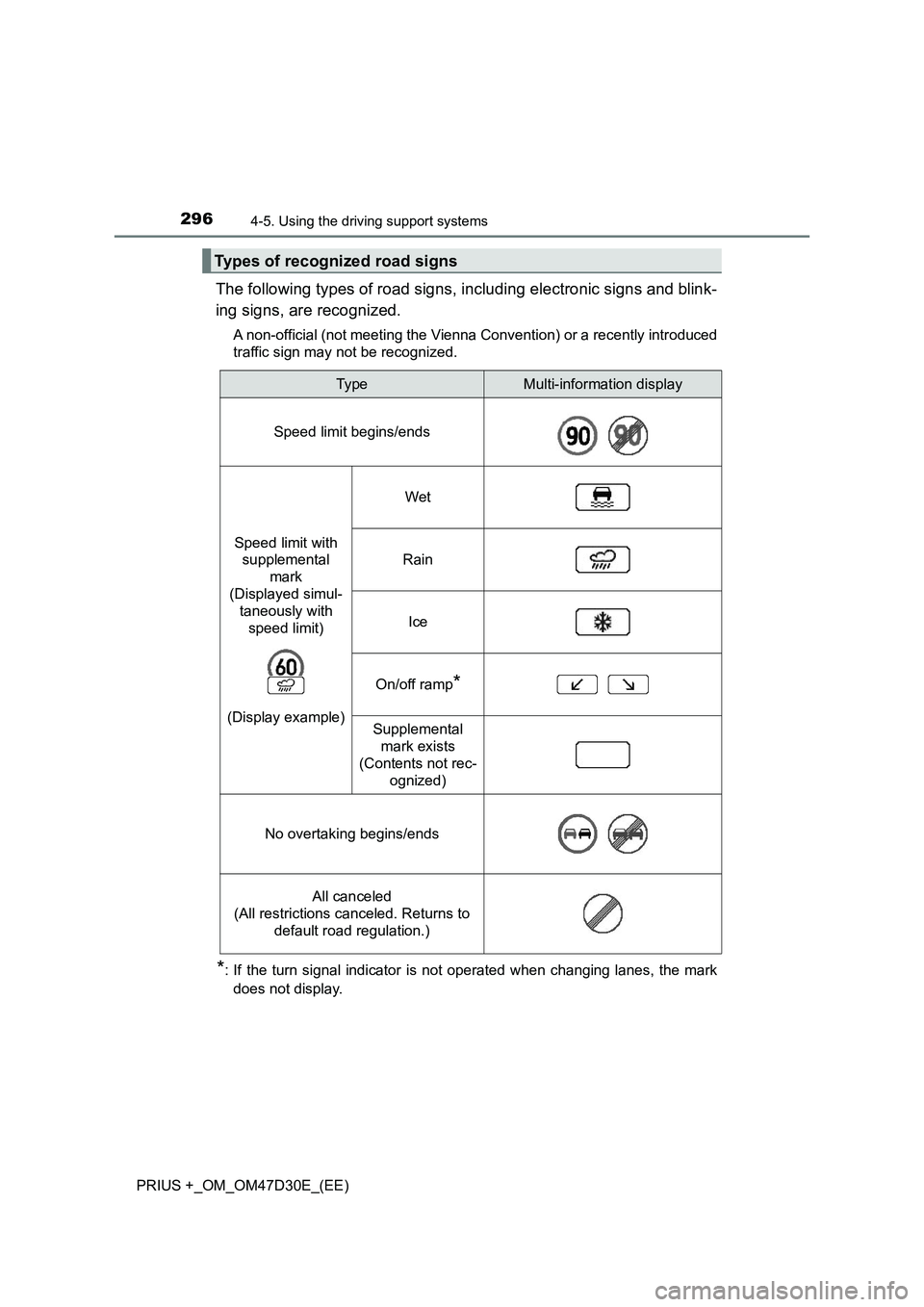
The following types of road signs, including electronic signs and blink-
ing signs, are recognized.
A non-official (not meeting the Vienna Convention) or a recently introduced
traffic sign may not be recognized.
*: If the turn signal indicator is not operated when changing lanes, the mark
does not display.
Types of recognized road signs
Typ eMulti-information display
Speed limit begins/ends
Speed limit with
supplemental
mark
(Displayed simul-
taneously with
speed limit)
(Display example)
Wet
Rain
Ice
On/off ramp*
Supplemental
mark exists
(Contents not rec-
ognized)
No overtaking begins/ends
All canceled
(All restrictions canceled. Returns to
default road regulation.)
Page 297 of 568
2974-5. Using the driving support systems
4
Driving
PRIUS +_OM_OM47D30E_(EE)
In the following situations, the RSA system alerts the driver using a
warning display.
●When the vehicle speed exceeds the speed warning threshold
applied to the speed limit of the sign displayed on the main display
or multi-information display, the sign color becomes inverted.
●If it is detected that your vehicle is overtaking when a no overtaking
sign is displayed on the multi-information display, the sign flashes.
Depending on the situation, traffic environment (traffic direction,
speed, unit) may be detected incorrectly and a warning display may
not operate properly.
■Automatic turn-off of RSA sign display
One or more signs automatically turn off in the following situations.
●A new sign is not recognized for a certain distance.
●The road changes due to a left or right turn, etc.
■Conditions in which the function may not operate or detect correctly
In the following situations, RSA does not operate normally and may not rec-
ognize signs, display the incorrect sign, etc. However, this does not indicate a
malfunction.
●The camera sensor is misaligned due to a strong impact being applied to
the sensor, etc.
●Dirt, snow, stickers, etc., are on the windshield near the camera sensor.
●In inclement weather such as heavy rain, fog, snow or sand storms
●Light from an oncoming vehicle, the sun, etc., enters the camera sensor.
●The sign is dirty, faded, tilted or bent, and if an electronic sign, the contrast
is poor.
●All or part of the sign is hidden by the leaves of a tree, a pole, etc.
●The sign is only visible to the camera sensor for a short amount of time.
●The driving scene (turning, lane change, etc.) is judged incorrectly.
●Even if it is a sign not appropriate for the currently traveled lane, such a sign
exists directly after a freeway branches, or in an adjacent lane just before
merging.
●Stickers are attached to the rear of the preceding vehicle.
●A sign resembling a system compatible sign is recognized.
●The vehicle is driven in a country with a different direction of traffic.
●Side road speed signs may be detected and displayed (if positioned in sight
of the camera sensor) while the vehicle is traveling on the main road.
Warning display
Page 298 of 568
2984-5. Using the driving support systems
PRIUS +_OM_OM47D30E_(EE)●Roundabout exit road speed signs may be detected and displayed (if posi-
tioned in sight of the camera sensor) while traveling on a roundabout.
●The speed information displayed on the meter and that displayed on the
navigation system may be different due to the navigation system using map
data.
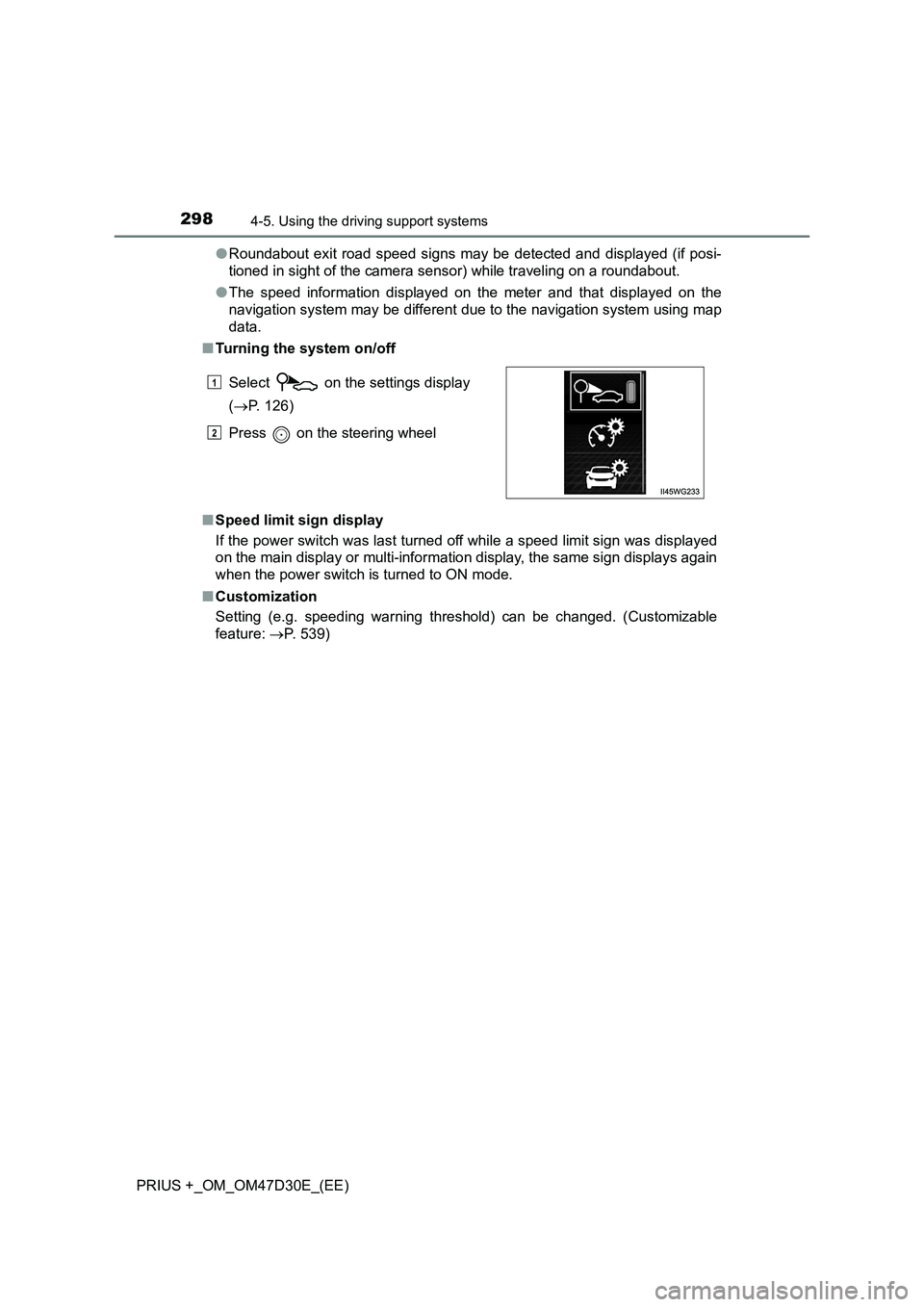
■Turning the system on/off
■Speed limit sign display
If the power switch was last turned off while a speed limit sign was displayed
on the main display or multi-information display, the same sign displays again
when the power switch is turned to ON mode.
■Customization
Setting (e.g. speeding warning threshold) can be changed. (Customizable
feature: P. 539) Select on the settings display
(P. 126)
Press on the steering wheel
1
2
Page 299 of 568
299
4
4-5. Using the driving support systems
Driving
PRIUS +_OM_OM47D30E_(EE)
Dynamic radar cruise control
In vehicle-to-vehicle distance control mode, the vehicle automatically
accelerates and decelerates to match the speed changes of the pre-
ceding vehicle even if the accelerator pedal is not depressed. In con-
stant speed control mode, the vehicle runs at a fixed speed.
Use the dynamic radar cruise control on freeways and highways.
● Vehicle-to-vehicle distance control mode (P. 302)
● Constant speed control mode (P. 308)
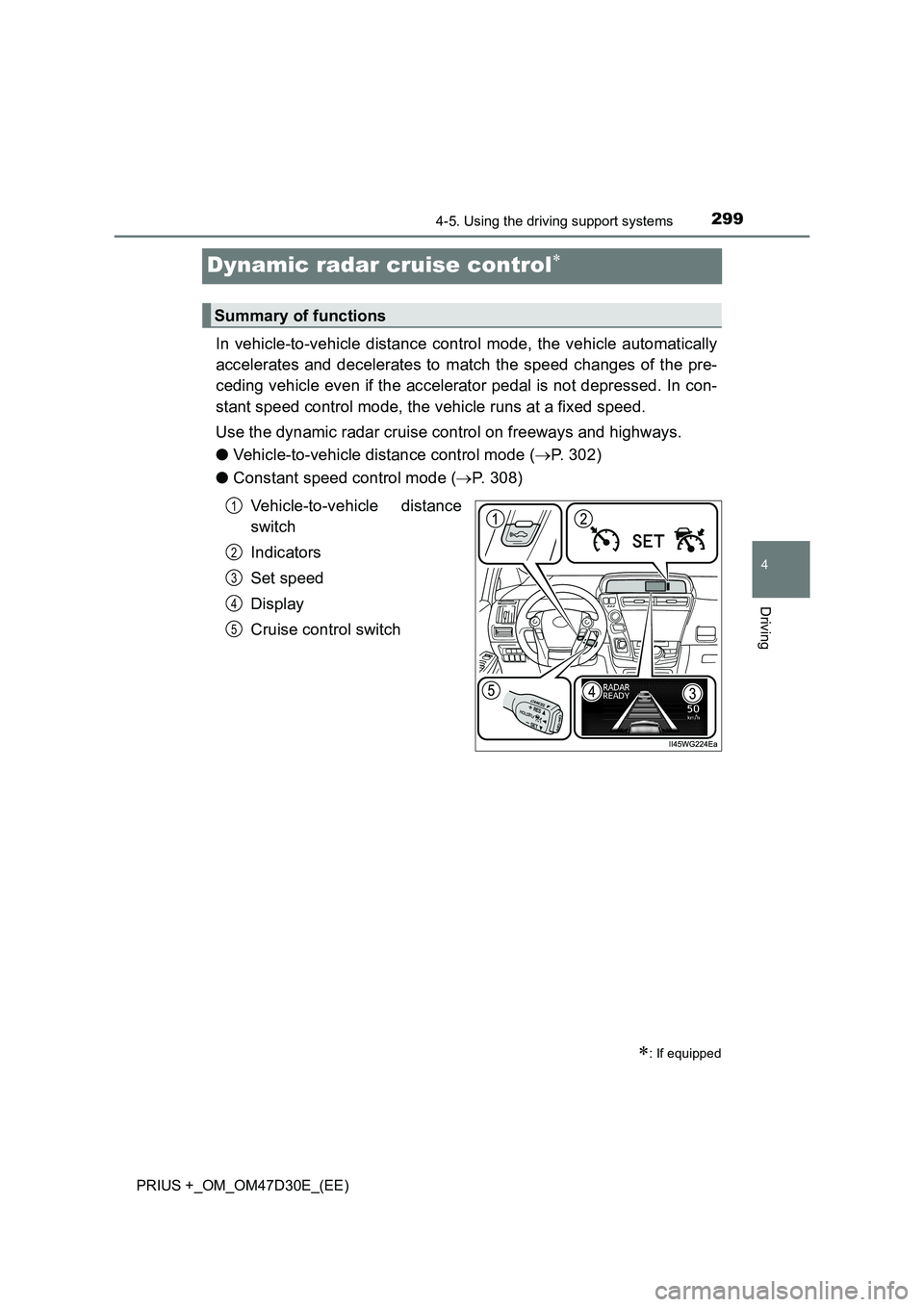
Vehicle-to-vehicle distance
switch
Indicators
Set speed
Display
Cruise control switch
: If equipped
Summary of functions
1
2
3
4
5
Page 304 of 568
3044-5. Using the driving support systems
PRIUS +_OM_OM47D30E_(EE)
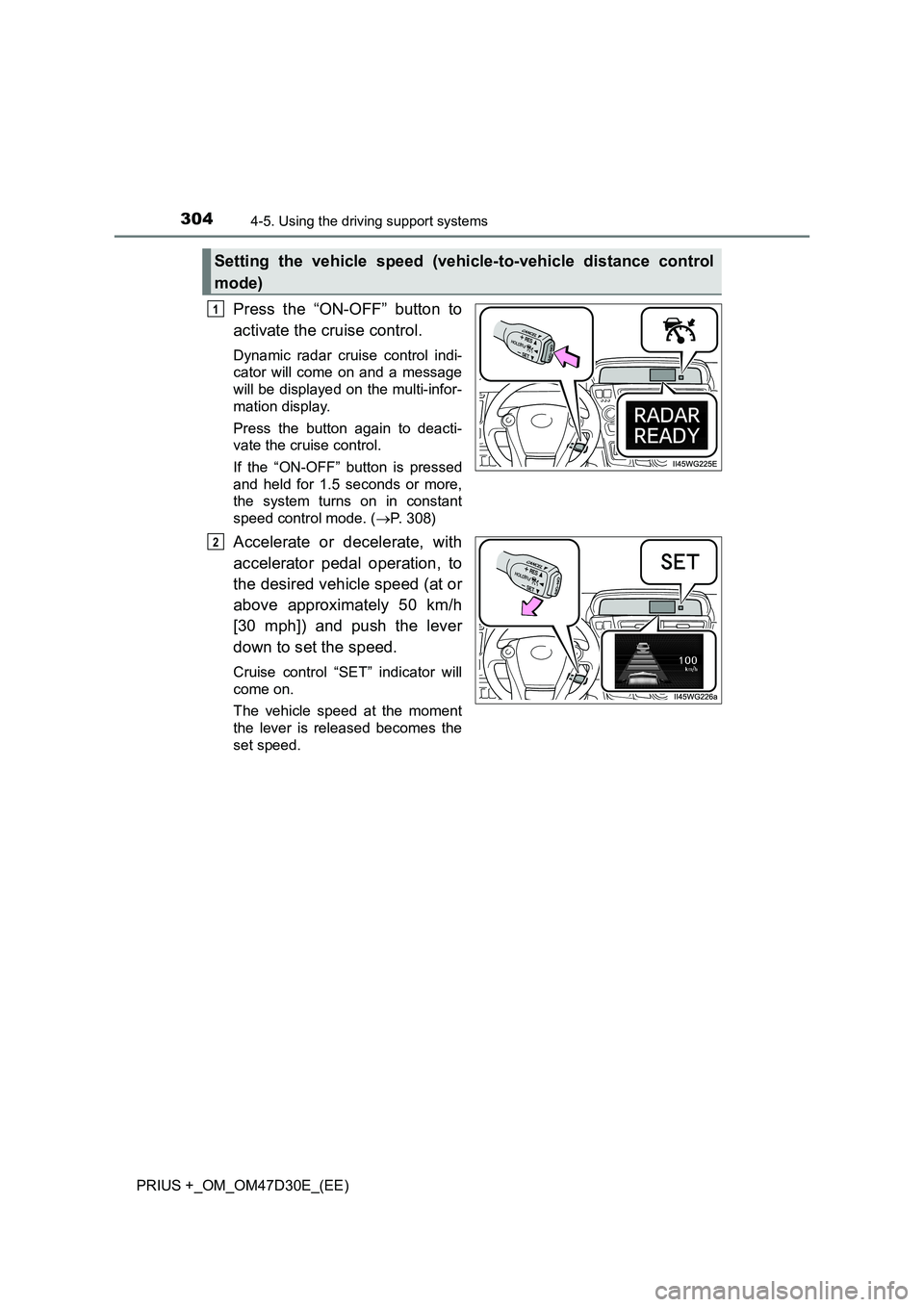
Press the “ON-OFF” button to
activate the cruise control.
Dynamic radar cruise control indi-
cator will come on and a message
will be displayed on the multi-infor-
mation display.
Press the button again to deacti-
vate the cruise control.
If the “ON-OFF” button is pressed
and held for 1.5 seconds or more,
the system turns on in constant
speed control mode. ( P. 308)
Accelerate or decelerate, with
accelerator pedal operation, to
the desired vehicle speed (at or
above approximately 50 km/h
[30 mph]) and push the lever
down to set the speed.
Cruise control “SET” indicator will
come on.
The vehicle speed at the moment
the lever is released becomes the
set speed.
Setting the vehicle speed (vehicle-to-vehicle distance control
mode)
1
2
Page 305 of 568
3054-5. Using the driving support systems
4
Driving
PRIUS +_OM_OM47D30E_(EE)
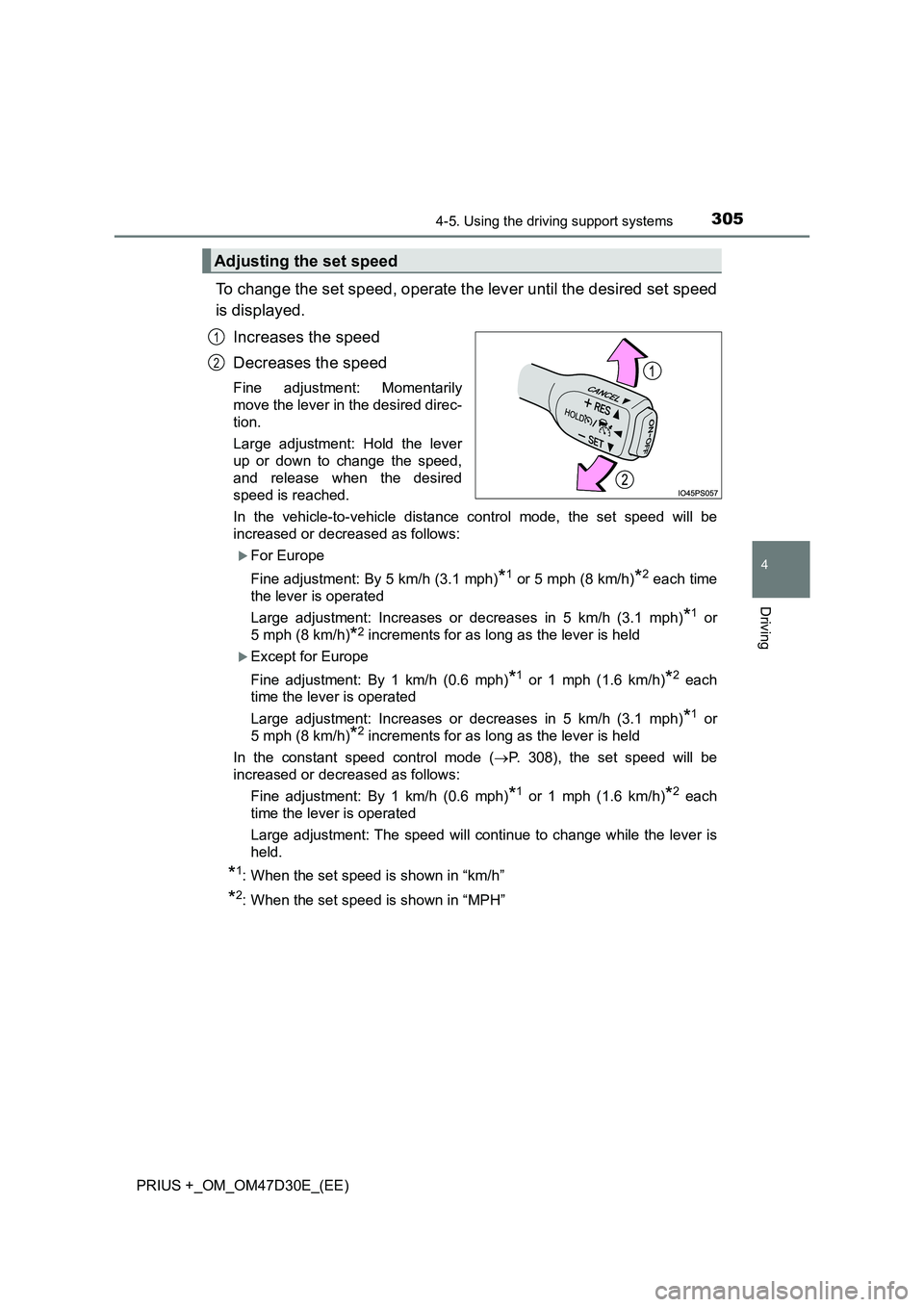
To change the set speed, operate the lever until the desired set speed
is displayed.
Increases the speed
Decreases the speed
Fine adjustment: Momentarily
move the lever in the desired direc-
tion.
Large adjustment: Hold the lever
up or down to change the speed,
and release when the desired
speed is reached.
In the vehicle-to-vehicle distance control mode, the set speed will be
increased or decreased as follows:
For Europe
Fine adjustment: By 5 km/h (3.1 mph)
*1 or 5 mph (8 km/h)*2 each time
the lever is operated
Large adjustment: Increases or decreases in 5 km/h (3.1 mph)
*1 or
5 mph (8 km/h)
*2 increments for as long as the lever is held
Except for Europe
Fine adjustment: By 1 km/h (0.6 mph)
*1 or 1 mph (1.6 km/h)*2 each
time the lever is operated
Large adjustment: Increases or decreases in 5 km/h (3.1 mph)
*1 or
5 mph (8 km/h)
*2 increments for as long as the lever is held
In the constant speed control mode (P. 308), the set speed will be
increased or decreased as follows:
Fine adjustment: By 1 km/h (0.6 mph)
*1 or 1 mph (1.6 km/h)*2 each
time the lever is operated
Large adjustment: The speed will continue to change while the lever is
held.
*1: When the set speed is shown in “km/h”
*2: When the set speed is shown in “MPH”
Adjusting the set speed
1
2
Page 306 of 568
3064-5. Using the driving support systems
PRIUS +_OM_OM47D30E_(EE)
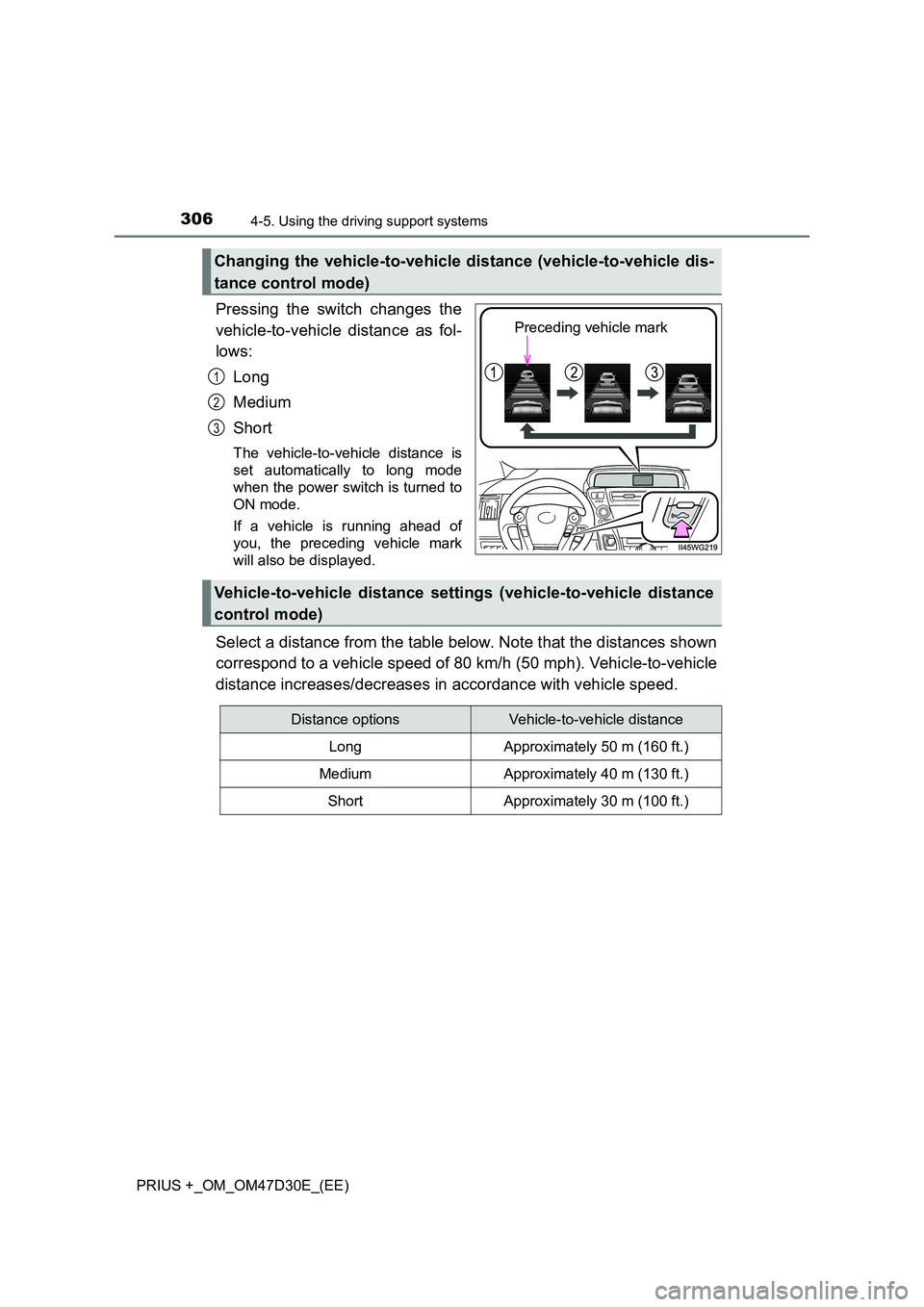
Pressing the switch changes the
vehicle-to-vehicle distance as fol-
lows:
Long
Medium
Short
The vehicle-to-vehicle distance is
set automatically to long mode
when the power switch is turned to
ON mode.
If a vehicle is running ahead of
you, the preceding vehicle mark
will also be displayed.
Select a distance from the table below. Note that the distances shown
correspond to a vehicle speed of 80 km/h (50 mph). Vehicle-to-vehicle
distance increases/decreases in accordance with vehicle speed.
Changing the vehicle-to-vehicle distance (vehicle-to-vehicle dis-
tance control mode)
Preceding vehicle mark
1
2
3
Vehicle-to-vehicle distance settings (vehicle-to-vehicle distance
control mode)
Distance optionsVehicle-to-vehicle distance
LongApproximately 50 m (160 ft.)
MediumApproximately 40 m (130 ft.)
ShortApproximately 30 m (100 ft.)
Page 307 of 568
3074-5. Using the driving support systems
4
Driving
PRIUS +_OM_OM47D30E_(EE)
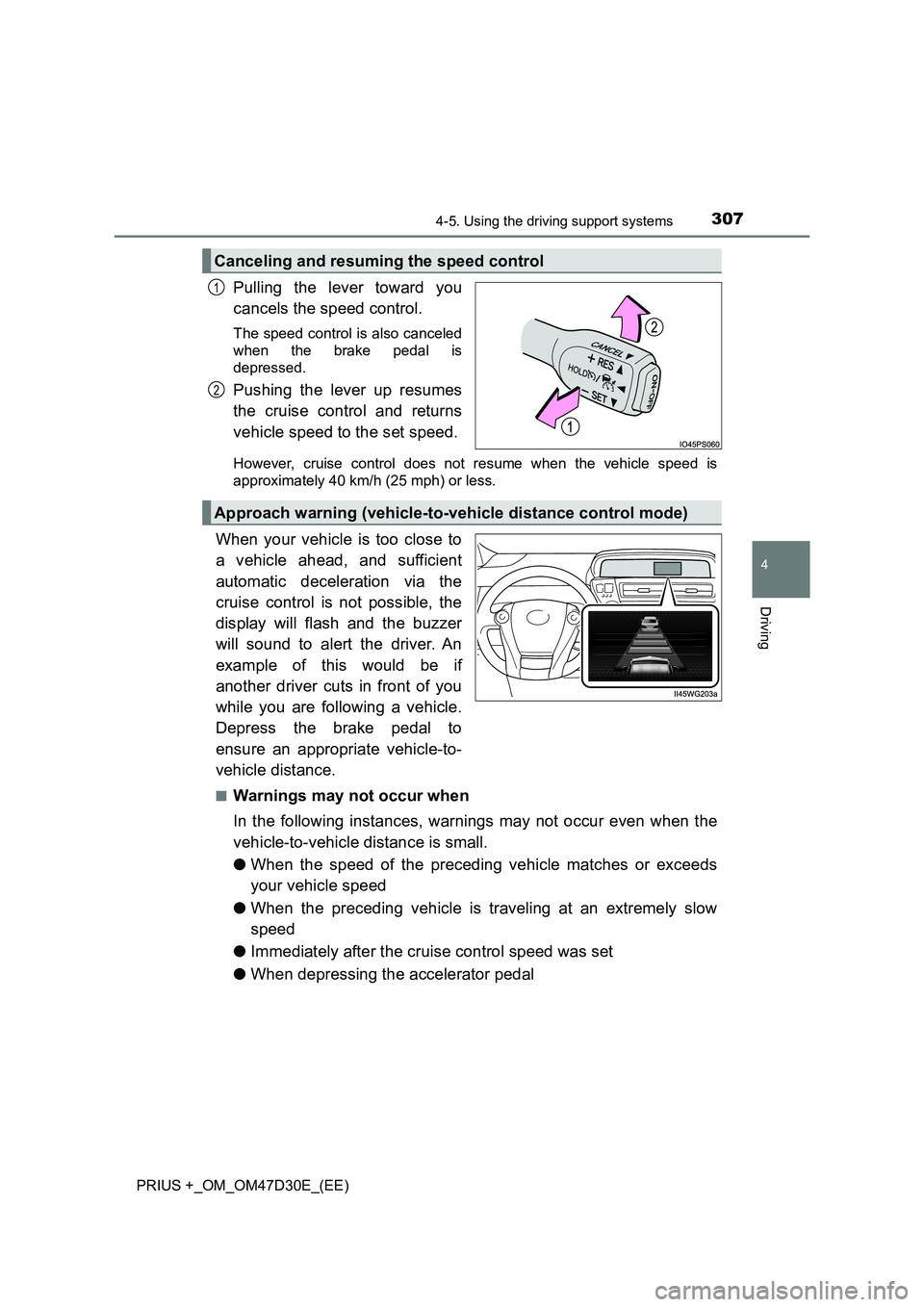
Pulling the lever toward you
cancels the speed control.
The speed control is also canceled
when the brake pedal is
depressed.
Pushing the lever up resumes
the cruise control and returns
vehicle speed to the set speed.
However, cruise control does not resume when the vehicle speed is
approximately 40 km/h (25 mph) or less.
When your vehicle is too close to
a vehicle ahead, and sufficient
automatic deceleration via the
cruise control is not possible, the
display will flash and the buzzer
will sound to alert the driver. An
example of this would be if
another driver cuts in front of you
while you are following a vehicle.
Depress the brake pedal to
ensure an appropriate vehicle-to-
vehicle distance.
■Warnings may not occur when
In the following instances, warnings may not occur even when the
vehicle-to-vehicle distance is small.
●When the speed of the preceding vehicle matches or exceeds
your vehicle speed
●When the preceding vehicle is traveling at an extremely slow
speed
●Immediately after the cruise control speed was set
●When depressing the accelerator pedal
Canceling and resuming the speed control
1
2
Approach warning (vehicle-to-vehicle distance control mode)
Page 310 of 568
3104-5. Using the driving support systems
PRIUS +_OM_OM47D30E_(EE)■Automatic cancelation of constant speed control mode
Constant speed control mode is automatically canceled in the following situa-
tions:
●Actual vehicle speed is more than approximately 16 km/h (10 mph) below
the set vehicle speed.
●Actual vehicle speed falls below approximately 40 km/h (25 mph).
●VSC is activated.
●TRC is activated for a period of time.
●Pre-crash braking is activated.
If constant speed control mode is automatically canceled for any other rea-
son, there may be a malfunction in the system. Contact any authorized
Toyota retailer or Toyota authorized repairer, or any reliable repairer.
■Brake system operation sound
If the brakes are applied automatically while the vehicle is in vehicle-to-vehi-
cle distance control mode, a brake system operation sound may be heard.
This does not indicate a malfunction.
■Warning messages and buzzers for dynamic radar cruise control
Warning messages and buzzers are used to indicate a system malfunction or
to inform the driver of the need for caution while driving. If a warning message
is shown on the multi-information display, read the message and follow the
instructions.
■When the sensor may not be correctly detecting the vehicle ahead
In the case of the following and depending on the conditions, operate the
brake pedal when deceleration of the system is insufficient or operate the
accelerator pedal when acceleration is required.
As the sensor may not be able to correctly detect these types of vehicles, the
approach warning (P. 307) may not be activated.
●Vehicles that cut in suddenly
●Vehicles traveling at low speeds
●Vehicles that are not moving in the same lane
Page 315 of 568
3154-5. Using the driving support systems
4
Driving
PRIUS +_OM_OM47D30E_(EE)
■Cruise control can be set when
●The shift position is in D.
●Vehicle speed is above approximately 40 km/h (25 mph).
■Accelerating after setting the vehicle speed
●The vehicle can be accelerated normally. After acceleration, the set speed
resumes.
●Even without canceling the cruise control, the set speed can be increased
by first accelerating the vehicle to the desired speed and then pushing the
lever down to set the new speed.
■Automatic cruise control cancelation
Cruise control will stop maintaining the vehicle speed in any of the following
situations.
●Actual vehicle speed falls more than approximately 16 km/h (10 mph) below
the preset vehicle speed.
At this time, the memorized set speed is not retained.
●Actual vehicle speed is below approximately 40km/h (25 mph).
●VSC is activated.
●TRC is activated for a period of time.
■If the cruise control indicator light comes on in yellow (vehicles without
multi-information display)
Press the “ON-OFF” button once to deactivate the system, and then press
the button again to reactivate the system.
If the cruise control speed cannot be set or if the cruise control cancels imme-
diately after being activated, there may be a malfunction in the cruise control
system. Have the vehicle inspected by any authorized Toyota retailer or
Toyota authorized repairer, or any reliable repairer.
■If the warning message for the cruise control is shown (vehicles with
multi-information display)
Press the “ON-OFF” button once to deactivate the system, and then press
the button again to reactivate the system.
If the cruise control speed cannot be set or if the cruise control cancels imme-
diately after being activated, there may be a malfunction in the cruise control
system. Have the vehicle inspected by any authorized Toyota retailer or
Toyota authorized repairer, or any reliable repairer.