light TOYOTA PRIUS PLUS 2019 Repair Manual
[x] Cancel search | Manufacturer: TOYOTA, Model Year: 2019, Model line: PRIUS PLUS, Model: TOYOTA PRIUS PLUS 2019Pages: 568, PDF Size: 73.58 MB
Page 235 of 568
2354-2. Driving procedures
4
Driving
PRIUS +_OM_OM47D30E_(EE)
■For the shift positions
●When the power switch is off, the shift position cannot be changed.
●When the power switch is in ON mode (the hybrid system is not operating),
the shift position can only be changed to N. The shift position will be
changed to N even if the shift lever is shifted to D or R and held in that posi-
tion.
●When the “READY” indicator is on, the shift position can be changed from P
to D, N or R.
●When the “READY” indicator is flashing, the shift position cannot be
changed from P to another position even if the shift lever is operated. Wait
until the “READY” indicator changes from a flashing to a solid light, and then
operate the shift lever again.
●The shift position can only be changed to B directly from D.
In addition, if an attempt is made to change the shift position by moving the
shift lever or by pressing the P position switch in any of the following situa-
tions, the buzzer will sound and the shifting operation will be disabled or the
shift position will automatically change to N. When this happens, select an
appropriate shift position.
●Situations where the shifting operation will be disabled:
• When an attempt is made to change the shift position from P to another
position by moving the shift lever without depressing the brake pedal.
• When an attempt is made to change the shift position from P or N to B by
moving the shift lever.
●Situations where the shift position will automatically change to N:
• When the P position switch is pressed while the vehicle is running.
*1
• When an attempt is made to select the R position by moving the shift
lever when the vehicle is moving forward.
*2
• When an attempt is made to select the D position by moving the shift
lever when the vehicle is moving in reverse.
*3
• When an attempt is made to change the shift position from R to B by
moving the shift lever.
*1: Shift position may be changed to P when driving at extremely low
speeds.
*2: Shift position may be changed to R when driving at low speeds.
*3: Shift position may be changed to D when driving at low speeds.
■Reverse warning buzzer
When shifting into R, a buzzer will sound to inform the driver that the shift
position is in R.
Page 238 of 568
2384-2. Driving procedures
PRIUS +_OM_OM47D30E_(EE)
NOTICE
■Hybrid battery (traction battery) charge
If the shift position is in N, the hybrid battery (traction battery) will not be
charged. To help prevent the battery fr om discharging, avoid leaving the N
position selected for a certain period of time.
■ Situations where shift control system malfunctions are possible
If any of the following situations occurs, shift control system malfunctions
are possible.
Immediately stop the vehicle in a safe place on level ground, apply the park-
ing brake, and then contact any authorized Toyota retailer or Toyota autho-
rized repairer, or any reliable repairer.
● Vehicles without multi-information display:
When the “WHEN PARKING, APPLY PARKING BRAKE SECURELY”
warning message appears on the instrument cluster. ( P. 448)
● Vehicles without multi-information display:
When the parking lock system warning light is illuminated.
● Vehicles with multi-information display:
When the warning message indicating the shift control system appears on
the multi-information display. ( P. 460)
● When the shift position indicator remains off.
■ Notes regarding shift lever and P position switch operation
Avoid repeatedly operating the shift lever and P position switch in quick suc-
cession.
The system protection function may activate and it will not be temporarily
possible to shift the shift position other than P. If this happens, please wait
for approximately 20 seconds before attempting to change the shift position
again.
Page 239 of 568
239
4
4-2. Driving procedures
Driving
PRIUS +_OM_OM47D30E_(EE)
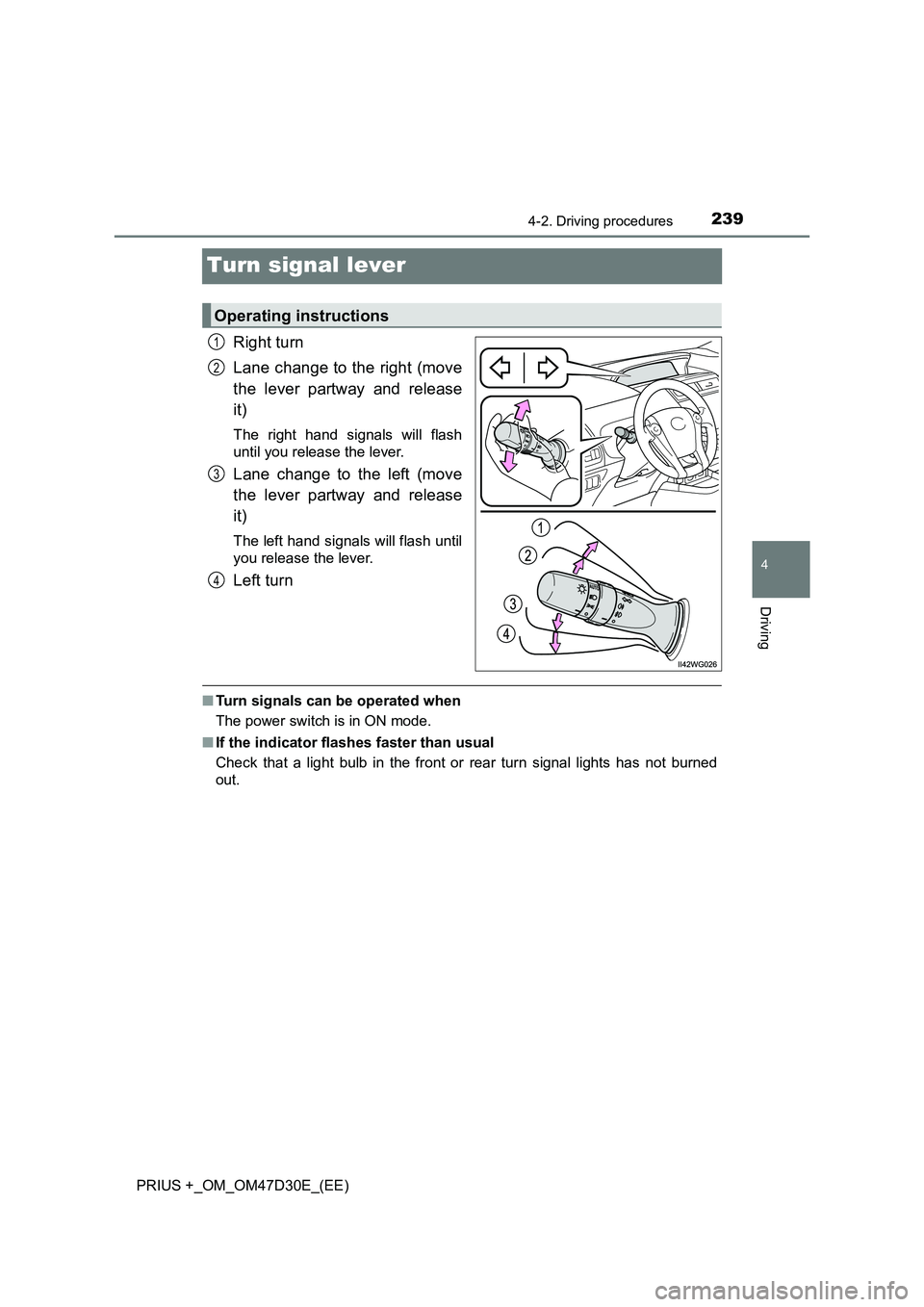
Turn signal lever
Right turn
Lane change to the right (move
the lever partway and release
it)
The right hand signals will flash
until you release the lever.
Lane change to the left (move
the lever partway and release
it)
The left hand signals will flash until
you release the lever.
Left turn
■ Turn signals can be operated when
The power switch is in ON mode.
■ If the indicator flashes faster than usual
Check that a light bulb in the front or rear turn signal lights has not burned
out.
Operating instructions
1
2
3
4
Page 241 of 568
241
4
4-3. Operating the lights and wipers
Driving
PRIUS +_OM_OM47D30E_(EE)
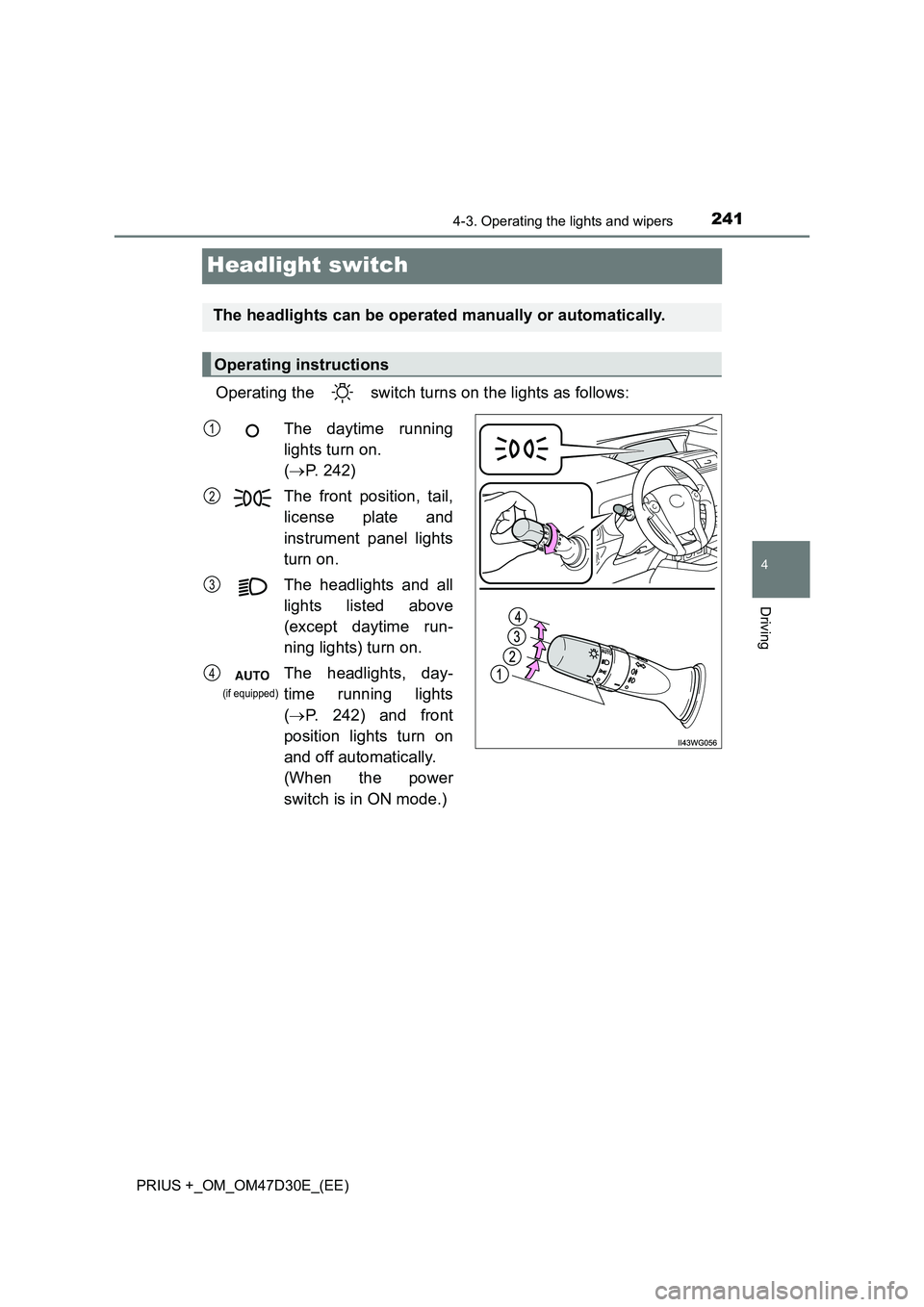
Headlight switch
Operating the switch turns on the lights as follows:
The headlights can be operated manually or automatically.
Operating instructions
The daytime running
lights turn on.
( P. 242)
The front position, tail,
license plate and
instrument panel lights
turn on.
The headlights and all
lights listed above
(except daytime run-
ning lights) turn on.
The headlights, day-
time running lights
( P. 242) and front
position lights turn on
and off automatically.
(When the power
switch is in ON mode.)
1
2
3
4
(if equipped)
Page 242 of 568
2424-3. Operating the lights and wipers
PRIUS +_OM_OM47D30E_(EE)
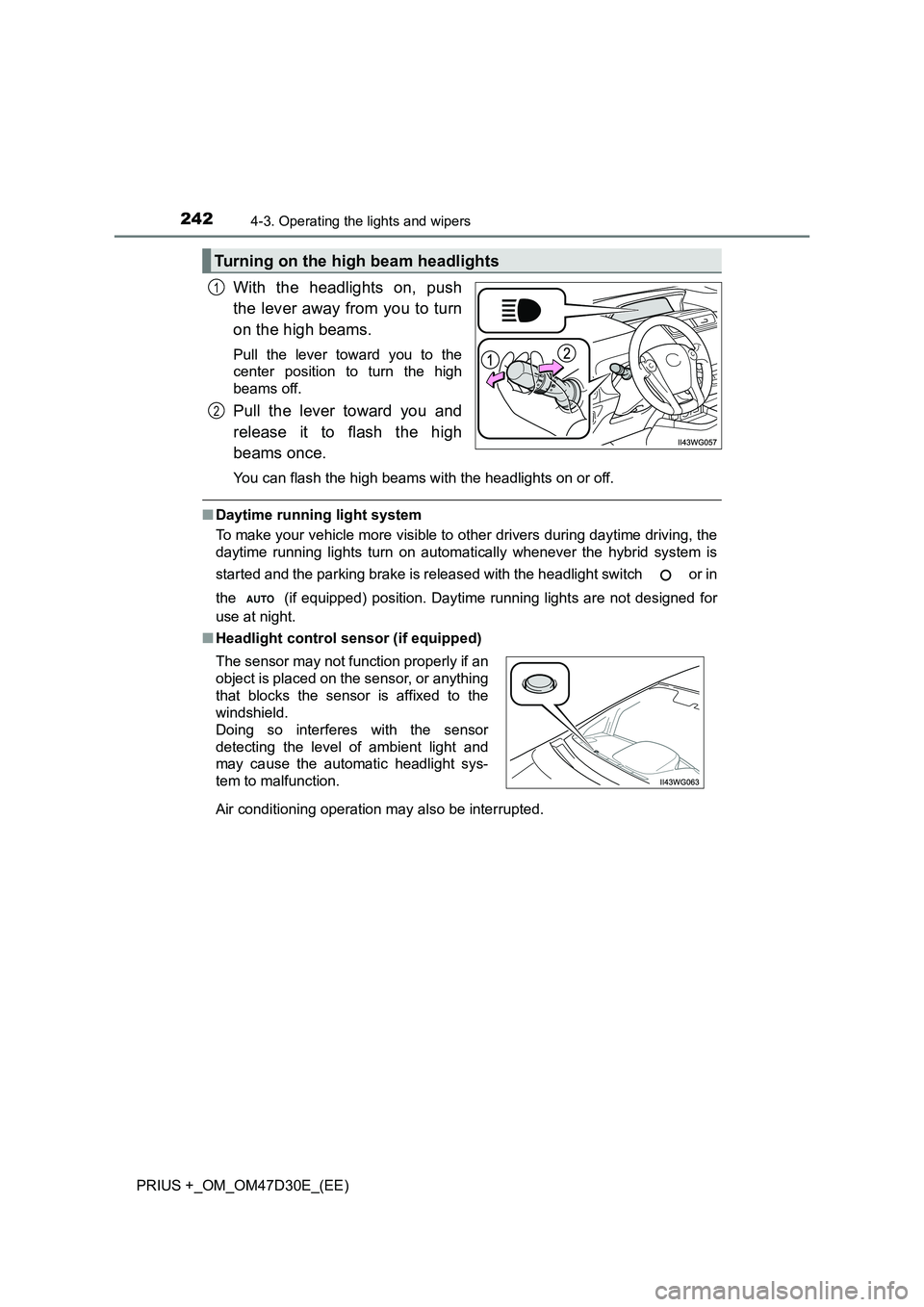
With the headlights on, push
the lever away from you to turn
on the high beams.
Pull the lever toward you to the
center position to turn the high
beams off.
Pull the lever toward you and
release it to flash the high
beams once.
You can flash the high beams wi th the headlights on or off.
■Daytime running light system
To make your vehicle more visible to other drivers during daytime driving, the
daytime running lights turn on automatically whenever the hybrid system is
started and the parking brake is released with the headlight switch or in
the (if equipped) position. Daytime running lights are not designed for
use at night.
■ Headlight control sensor (if equipped)
Air conditioning operation may also be interrupted.
Turning on the high beam headlights
1
2
The sensor may not function properly if an
object is placed on the sensor, or anything
that blocks the sensor is affixed to the
windshield.
Doing so interferes with the sensor
detecting the level of ambient light and
may cause the automatic headlight sys-
tem to malfunction.
Page 243 of 568
2434-3. Operating the lights and wipers
4
Driving
PRIUS +_OM_OM47D30E_(EE)
■ Automatic light off system
● When the headlight switch is in the or position: The headlights
and front fog lights turn off automatically if the power switch is turned off.
● When the headlight switch is in the position: The headlights and all
lights turn off automatically if the power switch is turned off.
To turn the lights on again, turn the power switch to ON mode, or turn the
headlight switch or once and then back to the or
position.
■ Automatic headlight leveling system
The level of the headlights is automatically adjusted according to the number
of passengers and the loading condition of the vehicle to ensure that the
headlights do not interfere with other road users.
■ Light reminder buzzer
A buzzer sounds when the power switch is turned off or turned to ACCES-
SORY mode and the driver’s door is opened while the lights are turned on.
■ Customization
Settings (e.g. light sensor sensitivity) can be changed.
(Customizable features: P. 539)
NOTICE
■To prevent 12-volt battery discharge
Do not leave the lights on longer than necessary when the hybrid system is
off.
Page 244 of 568
2444-3. Operating the lights and wipers
PRIUS +_OM_OM47D30E_(EE)
Automatic High Beam
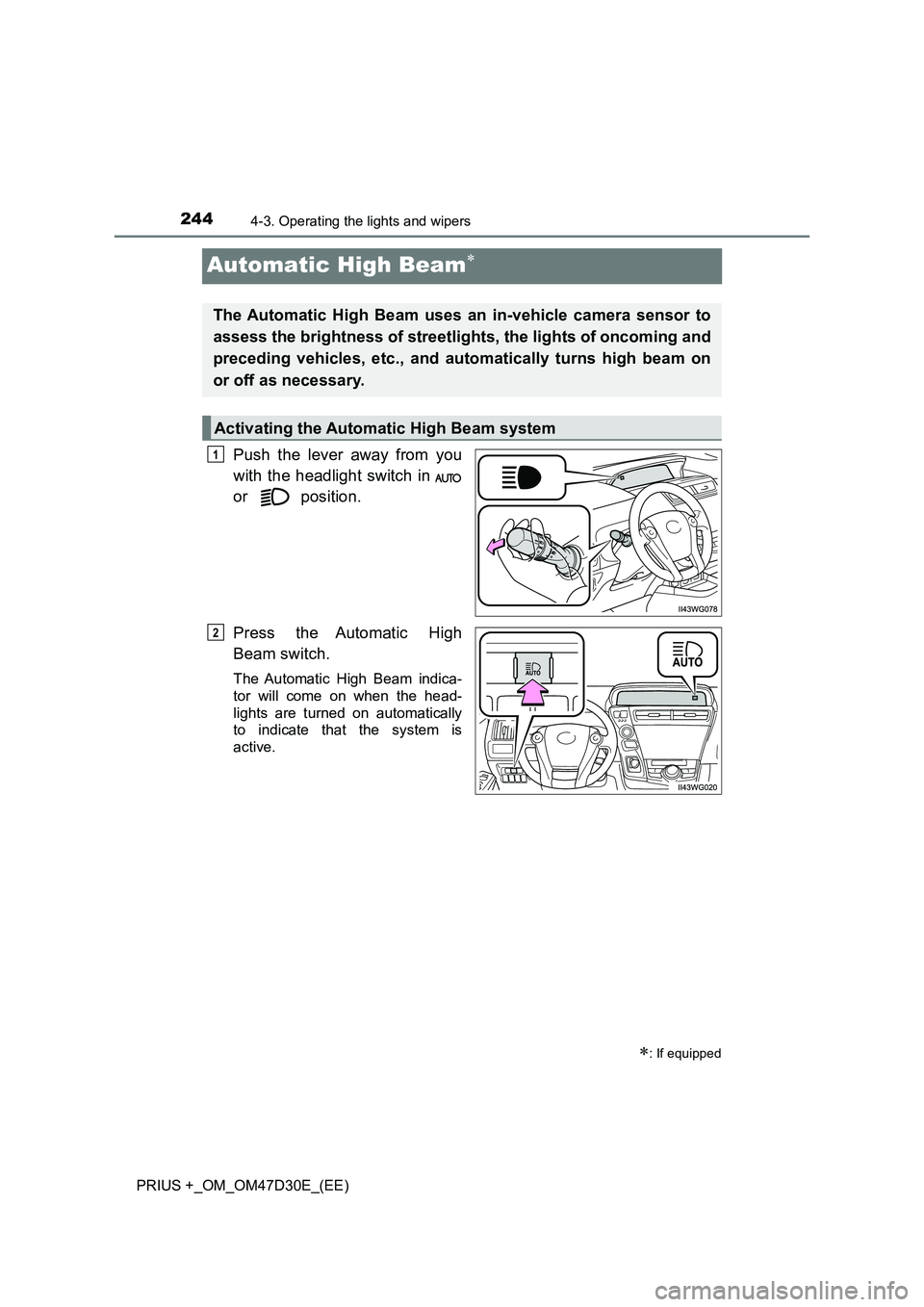
Push the lever away from you
with the headlight switch in
or position.
Press the Automatic High
Beam switch.
The Automatic High Beam indica-
tor will come on when the head-
lights are turned on automatically
to indicate that the system is
active.
: If equipped
The Automatic High Beam uses an in-vehicle camera sensor to
assess the brightness of streetlights, the lights of oncoming and
preceding vehicles, etc., and automatically turns high beam on
or off as necessary.
Activating the Automatic High Beam system
1
2
Page 245 of 568
2454-3. Operating the lights and wipers
4
Driving
PRIUS +_OM_OM47D30E_(EE)
When all of the following conditions are fulfilled, high beam will be
automatically turned on (after approximately 1 second):
●Vehicle speed is above approximately 40 km/h (25 mph).
●The area ahead of the vehicle is dark.
●There are no oncoming or preceding vehicles with headlights or tail
lights turned on.
●There are few streetlights on the road ahead.
If any of the following conditions are fulfilled, high beam will be auto-
matically turned off:
●Vehicle speed drops below approximately 30 km/h (19 mph).
●The area ahead of the vehicle is not dark.
●Oncoming or preceding vehicles have headlights or tail lights
turned on.
●There are many streetlights on the road ahead.
High beam automatic turning on or off conditions
Page 246 of 568
2464-3. Operating the lights and wipers
PRIUS +_OM_OM47D30E_(EE)
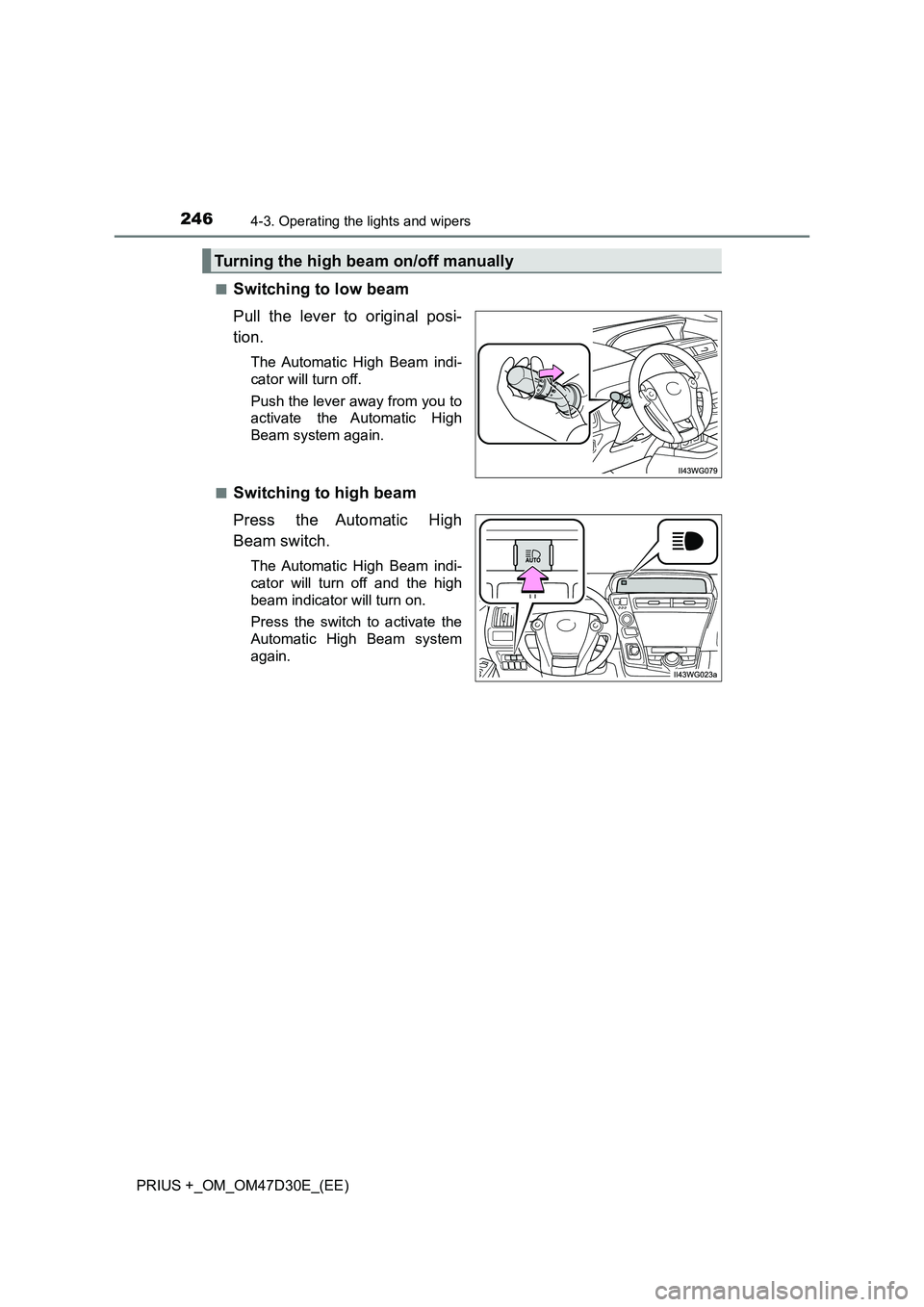
■Switching to low beam
Pull the lever to original posi-
tion.
The Automatic High Beam indi-
cator will turn off.
Push the lever away from you to
activate the Automatic High
Beam system again.
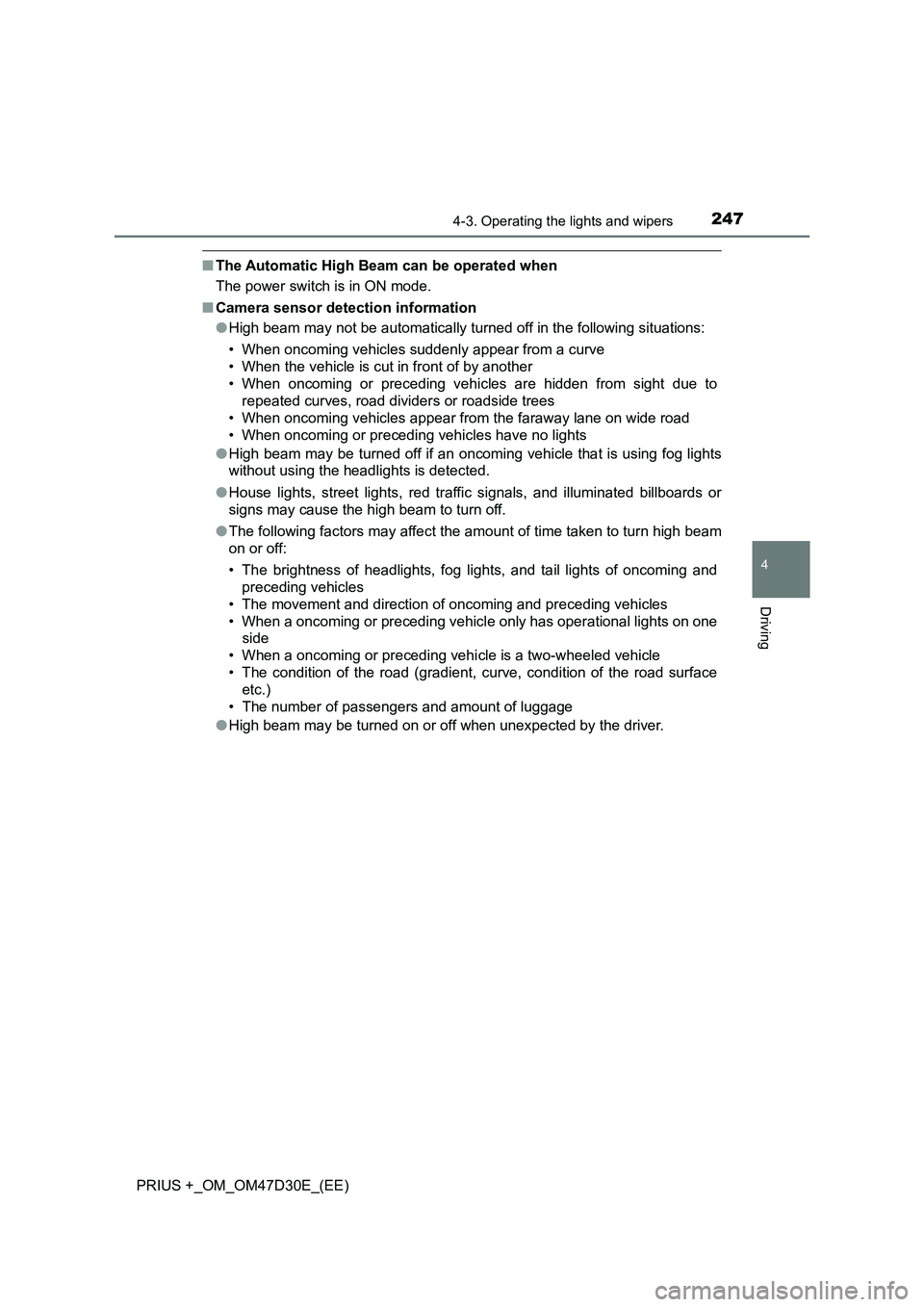
■Switching to high beam
Press the Automatic High
Beam switch.
The Automatic High Beam indi-
cator will turn off and the high
beam indicator will turn on.
Press the switch to activate the
Automatic High Beam system
again.
Turning the high beam on/off manually
Page 247 of 568
2474-3. Operating the lights and wipers
4
Driving
PRIUS +_OM_OM47D30E_(EE)
■The Automatic High Beam can be operated when
The power switch is in ON mode.
■Camera sensor detection information
●High beam may not be automatically turned off in the following situations:
• When oncoming vehicles suddenly appear from a curve
• When the vehicle is cut in front of by another
• When oncoming or preceding vehicles are hidden from sight due to
repeated curves, road dividers or roadside trees
• When oncoming vehicles appear from the faraway lane on wide road
• When oncoming or preceding vehicles have no lights
●High beam may be turned off if an oncoming vehicle that is using fog lights
without using the headlights is detected.
●House lights, street lights, red traffic signals, and illuminated billboards or
signs may cause the high beam to turn off.
●The following factors may affect the amount of time taken to turn high beam
on or off:
• The brightness of headlights, fog lights, and tail lights of oncoming and
preceding vehicles
• The movement and direction of oncoming and preceding vehicles
• When a oncoming or preceding vehicle only has operational lights on one
side
• When a oncoming or preceding vehicle is a two-wheeled vehicle
• The condition of the road (gradient, curve, condition of the road surface
etc.)
• The number of passengers and amount of luggage
●High beam may be turned on or off when unexpected by the driver.