turn signal TOYOTA PRIUS PRIME 2022 User Guide
[x] Cancel search | Manufacturer: TOYOTA, Model Year: 2022, Model line: PRIUS PRIME, Model: TOYOTA PRIUS PRIME 2022Pages: 808, PDF Size: 14.72 MB
Page 414 of 808

414
PRIUS PRIME_OM_OM47E74U_(U)
5-5. Using the driving support systems
Example of constant speed cruising
When there are no vehicles ahead
The vehicle travels at the speed set by the driver.
Example of deceleration crui sing and follow-up cruising
When a preceding vehicle driving slower than the set speed
appears
When a vehicle is detected running ahead of you, the system automatically
decelerates your vehicle. When a greater reduction in vehicle s peed is
necessary, the system applies the brakes (the stop lights will come on at
this time). The system will respond to changes in the speed of the vehicle
ahead in order to maintain the vehicle-to-vehicle distance set by the driver.
Approach warning warns you when the system cannot decelerate su ffi-
ciently to prevent your vehicle fr om closing in on the vehicle ahead.
When the vehicle ahead of you stops, your vehicle will also stop (vehicle is
stopped by system control). After the vehicle ahead starts off, pushing the
cruise control lever up or depressing the accelerator pedal (st art-off opera-
tion) will resume follow-up cruising. If the start-off operatio n is not per-
formed, system control continues to keep your vehicle stopped.
When the turn signal lever is operated and your vehicle moves to an over-
taking lane while driving at 50 mph (80 km/h) or more, the vehi cle will
accelerate to help to overtake a passing vehicle.
The system’s identification of what is an overtaking lane may b e deter-
mined solely based on the location of the steering wheel in the vehicle (left
side driver position versus right side driver position.) If the vehicle is driven
to a region where the overtaking lane is on a different side fr om where the
vehicle is normally driven, the vehicle may accelerate when the turn signal
lever is operated in the opposite direction to the overtaking l ane (e.g., if the
driver normally operates the vehicle in a region where the overtaking lane
is to the right but then drives to a region where the overtaking lane is to the
left, the vehicle may accelerate when the right turn signal is activated).
Example of acceleration
When there are no longer any preceding vehicles driving slower
than the set speed
The system accelerates until the set speed is reached. The syst em then
returns to constant speed cruising.
1
2
3
Page 427 of 808
427
PRIUS PRIME_OM_OM47E74U_(U)
5-5. Using the driving support systems
5
Driving
BSM (Blind Spot Monitor)
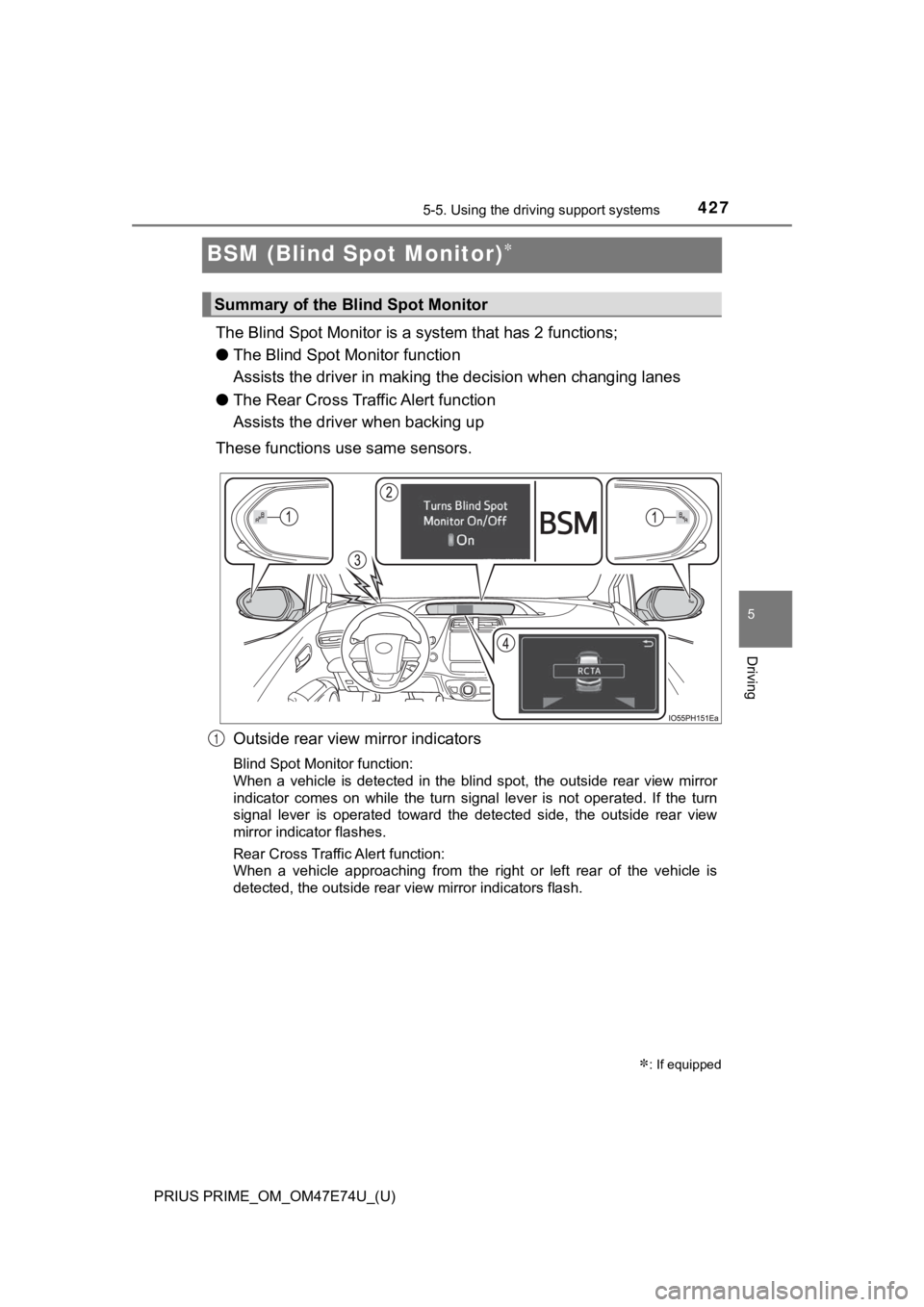
The Blind Spot Monitor is a system that has 2 functions;
● The Blind Spot M onitor function
Assists the driver in making t he decision when changing lanes
● The Rear Cross Traff ic Alert function
Assists the driver when backing up
These functions use same sensors.
Outside rear view mirror indicators
Blind Spot Monitor function:
When a vehicle is detected in the blind spot, the outside rear view mirror
indicator comes on while the turn signal lever is not operated. If the turn
signal lever is operated toward the detected side, the outside rear view
mirror indicator flashes.
Rear Cross Traffic Alert function:
When a vehicle approaching from the right or left rear of the vehicle is
detected, the outside rear view mirror indicators flash.
: If equipped
Summary of the Blind Spot Monitor
1
Page 470 of 808
470
PRIUS PRIME_OM_OM47E74U_(U)
5-5. Using the driving support systems
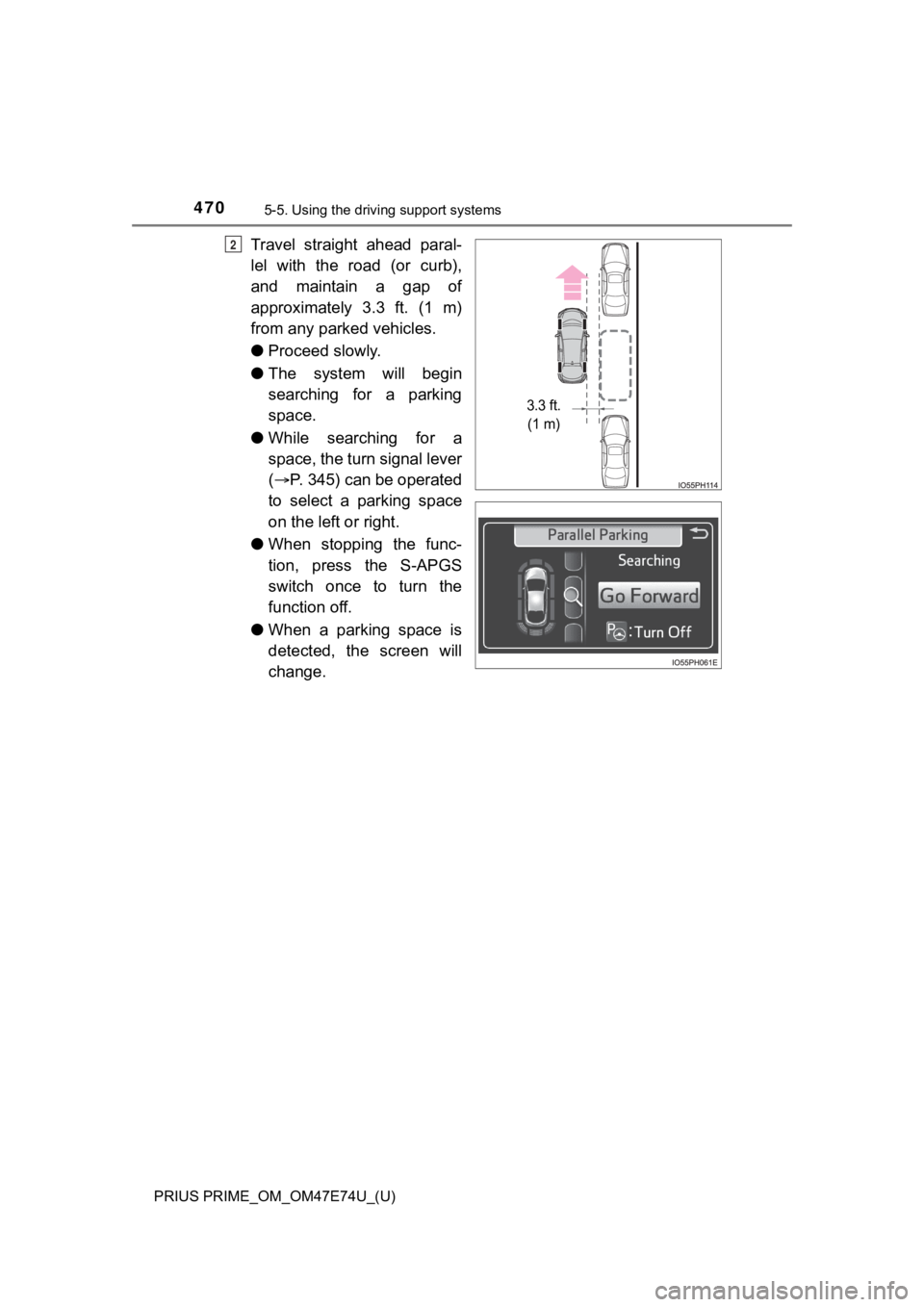
Travel straight ahead paral-
lel with the road (or curb),
and maintain a gap of
approximately 3.3 ft. (1 m)
from any parked vehicles.
●Proceed slowly.
● The system will begin
searching for a parking
space.
● While searching for a
space, the turn signal lever
( P. 345) can be operated
to select a parking space
on the left or right.
● When stopping the func-
tion, press the S-APGS
switch once to turn the
function off.
● When a parking space is
detected, the screen will
change.2
3.3 ft.
(1 m)
Page 475 of 808
PRIUS PRIME_OM_OM47E74U_(U)
4755-5. Using the driving support systems
5
Driving
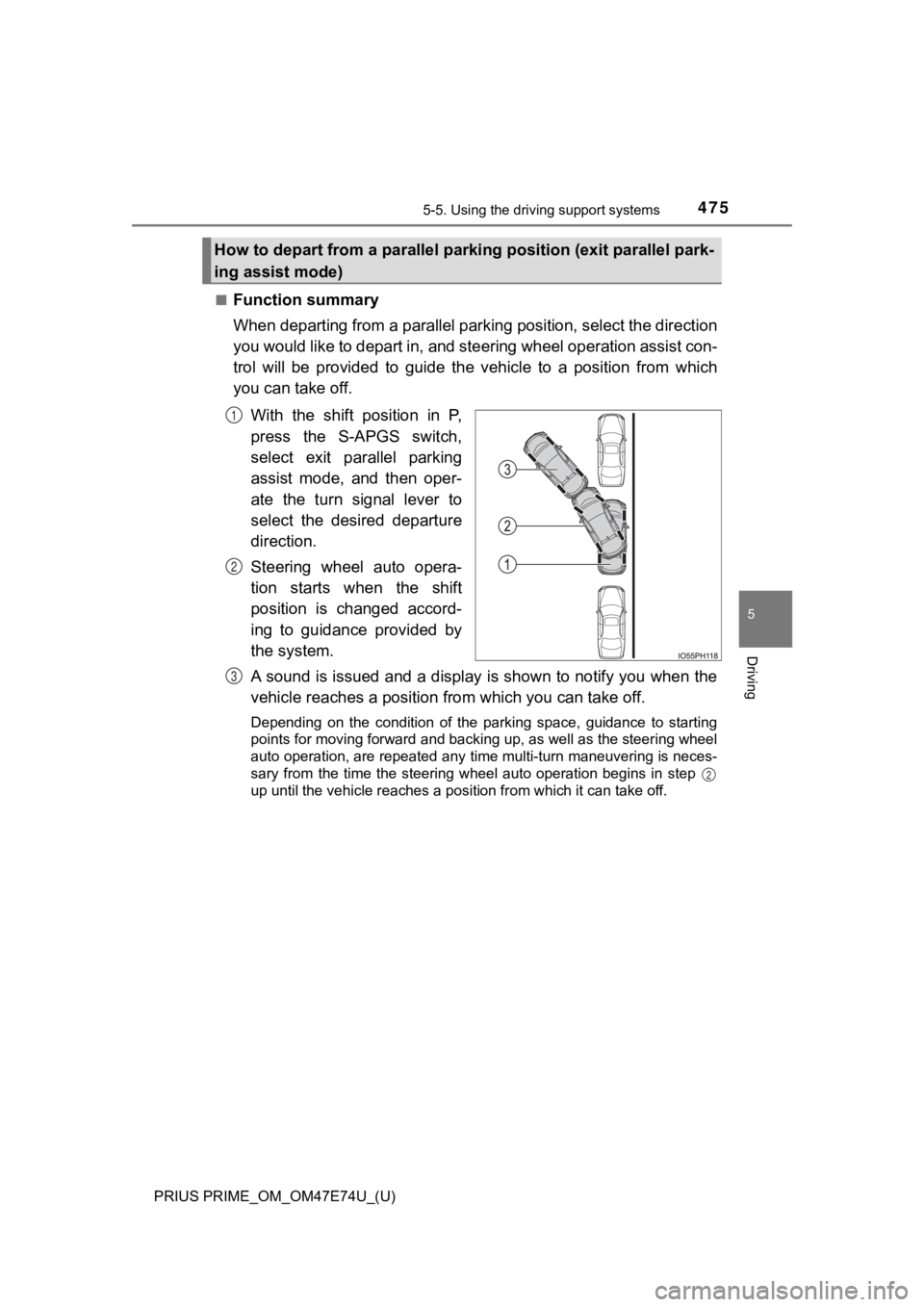
■Function summary
When departing from a parallel parking position, select the dir ection
you would like to depart in, and steering wheel operation assis t con-
trol will be provided to guide the vehicle to a position from w hich
you can take off.
With the shift position in P,
press the S-APGS switch,
select exit parallel parking
assist mode, and then oper-
ate the turn signal lever to
select the desired departure
direction.
Steering wheel auto opera-
tion starts when the shift
position is changed accord-
ing to guidance provided by
the system.
A sound is issued and a display is shown to notify you when the
vehicle reaches a position fr om which you can take off.
Depending on the condition of the parking space, guidance to st arting
points for moving forward and backing up, as well as the steeri ng wheel
auto operation, are repeated any time multi-turn maneuvering is neces-
sary from the time the steering wheel auto operation begins in step
up until the vehicle reaches a position from which it can take off.
How to depart from a parallel parking position (exit parallel park-
ing assist mode)
1
2
3
2
Page 476 of 808
476
PRIUS PRIME_OM_OM47E74U_(U)
5-5. Using the driving support systems
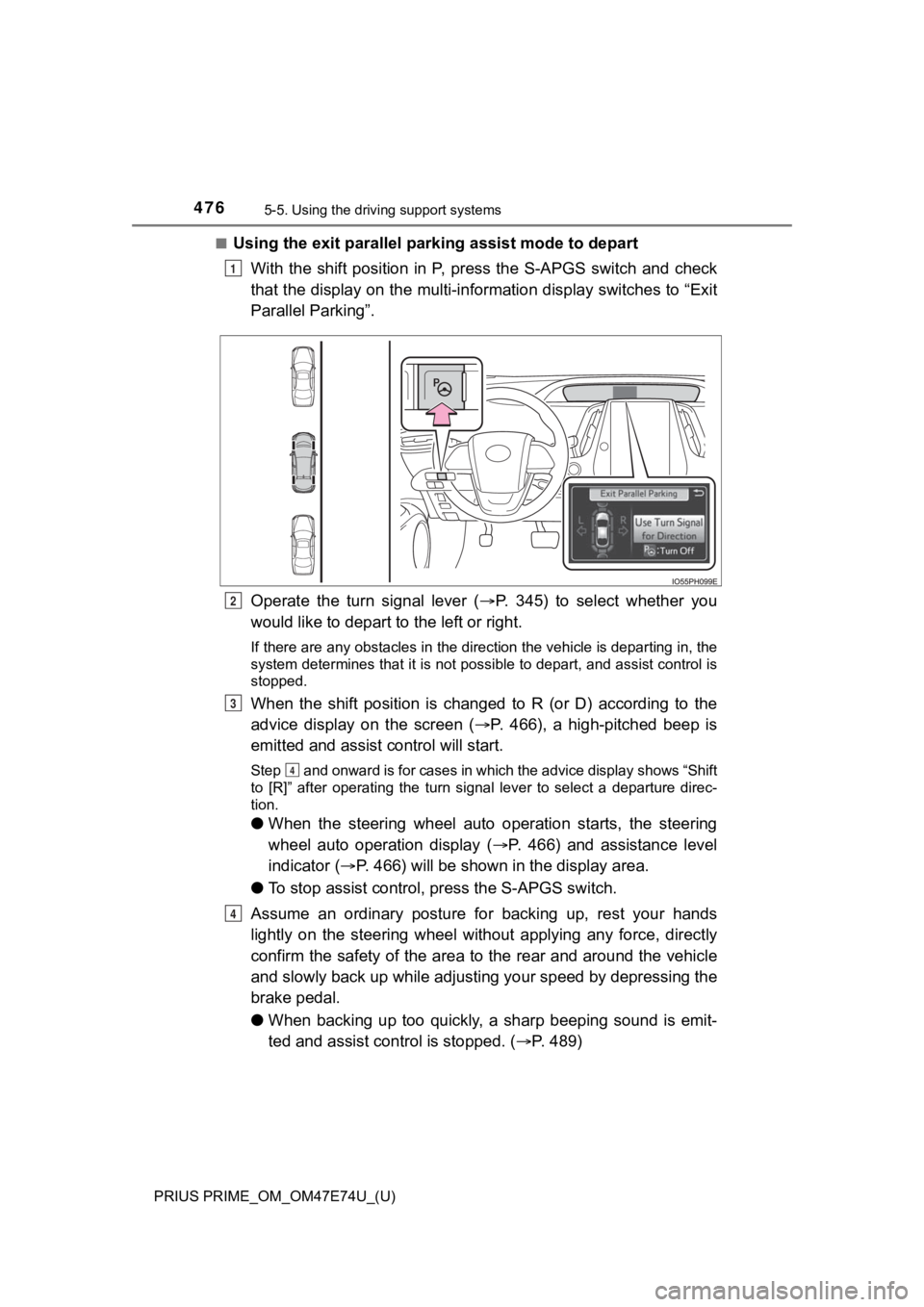
■Using the exit parallel par king assist mode to depart
With the shift position in P, press the S-APGS switch and check
that the display on the multi-information display switches to “ Exit
Parallel Parking”.
Operate the turn signal lever ( P. 345) to select whether you
would like to depart t o the left or right.
If there are any obstacles in the direction the vehicle is departing in, the
system determines that it is not possible to depart, and assist control is
stopped.
When the shift position is changed to R (or D) according to the
advice display on the screen ( P. 466), a high-pitched beep is
emitted and assist control will start.
Step and onward is for cases in which the advice display shows “Shift
to [R]” after operating the turn signal lever to select a depar ture direc-
tion.
● When the steering wheel auto operation starts, the steering
wheel auto operation display ( P. 466) and assistance level
indicator ( P. 466) will be shown in the display area.
● To stop assist control, press the S-APGS switch.
Assume an ordinary posture for backing up, rest your hands
lightly on the steering wheel without applying any force, direc tly
confirm the safety of the area to the rear and around the vehic le
and slowly back up while adjust ing your speed by depressing the
brake pedal.
● When backing up too quickly, a sharp beeping sound is emit-
ted and assist cont rol is stopped. (P. 489)
1
2
3
4
4
Page 481 of 808
PRIUS PRIME_OM_OM47E74U_(U)
4815-5. Using the driving support systems
5
Driving
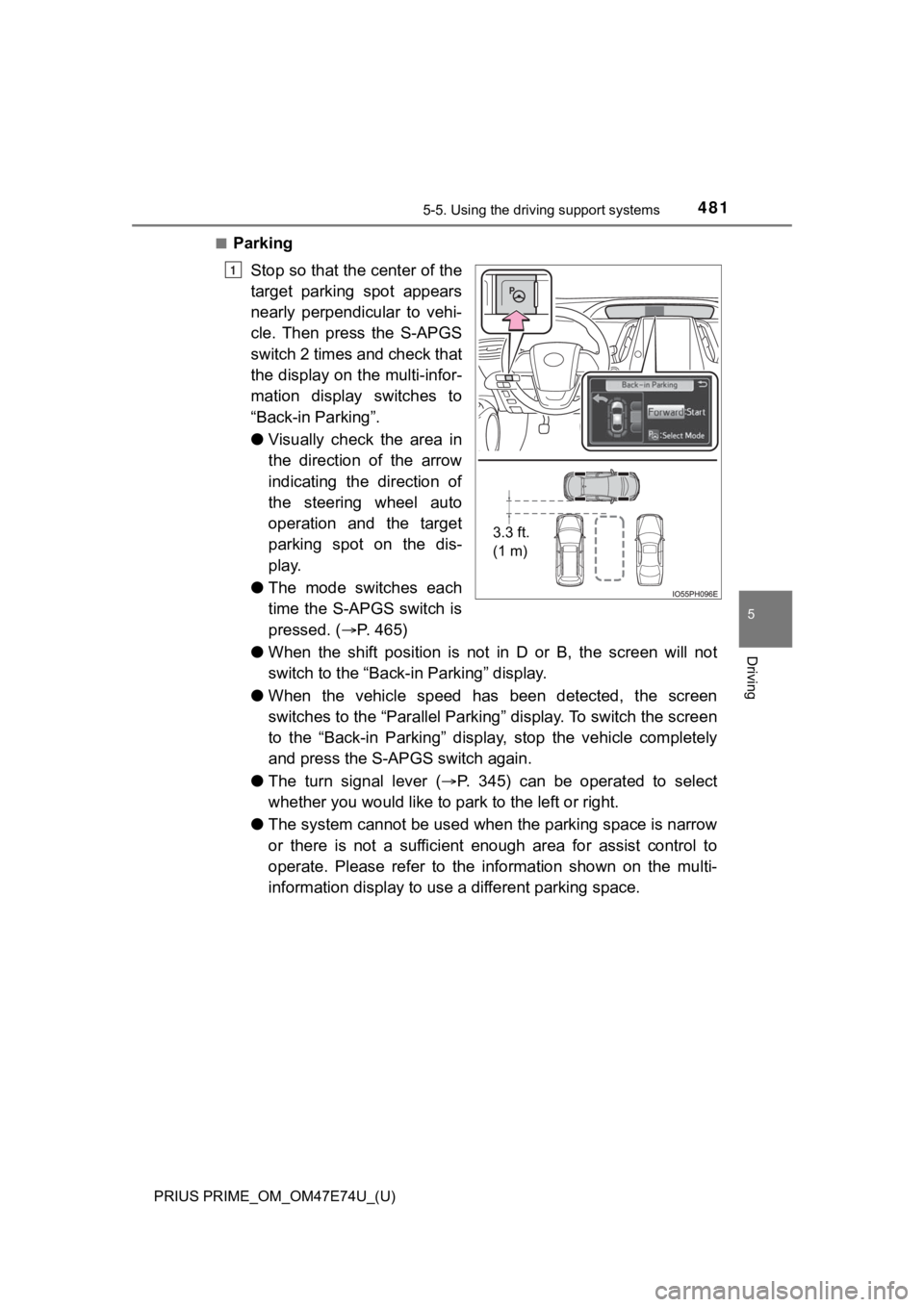
■Parking
Stop so that the center of the
target parking spot appears
nearly perpendicular to vehi-
cle. Then press the S-APGS
switch 2 times and check that
the display on the multi-infor-
mation display switches to
“Back-in Parking”.
●Visually check the area in
the direction of the arrow
indicating the direction of
the steering wheel auto
operation and the target
parking spot on the dis-
play.
● The mode switches each
time the S-APGS switch is
pressed. ( P. 4 6 5 )
● When the shift position is not in D or B, the screen will not
switch to the “Back-i n Parking” display.
● When the vehicle speed has been detected, the screen
switches to the “Parallel Parking” display. To switch the scree n
to the “Back-in Parking” display, stop the vehicle completely
and press the S-APGS switch again.
● The turn signal lever ( P. 345) can be operated to select
whether you would like to pa rk to the left or right.
● The system cannot be used when the parking space is narrow
or there is not a sufficient enough area for assist control to
operate. Please refer to the i nformation shown on the multi-
information displa y to use a different parking space.
3.3 ft.
(1 m)
1
Page 488 of 808
488
PRIUS PRIME_OM_OM47E74U_(U)
5-5. Using the driving support systems
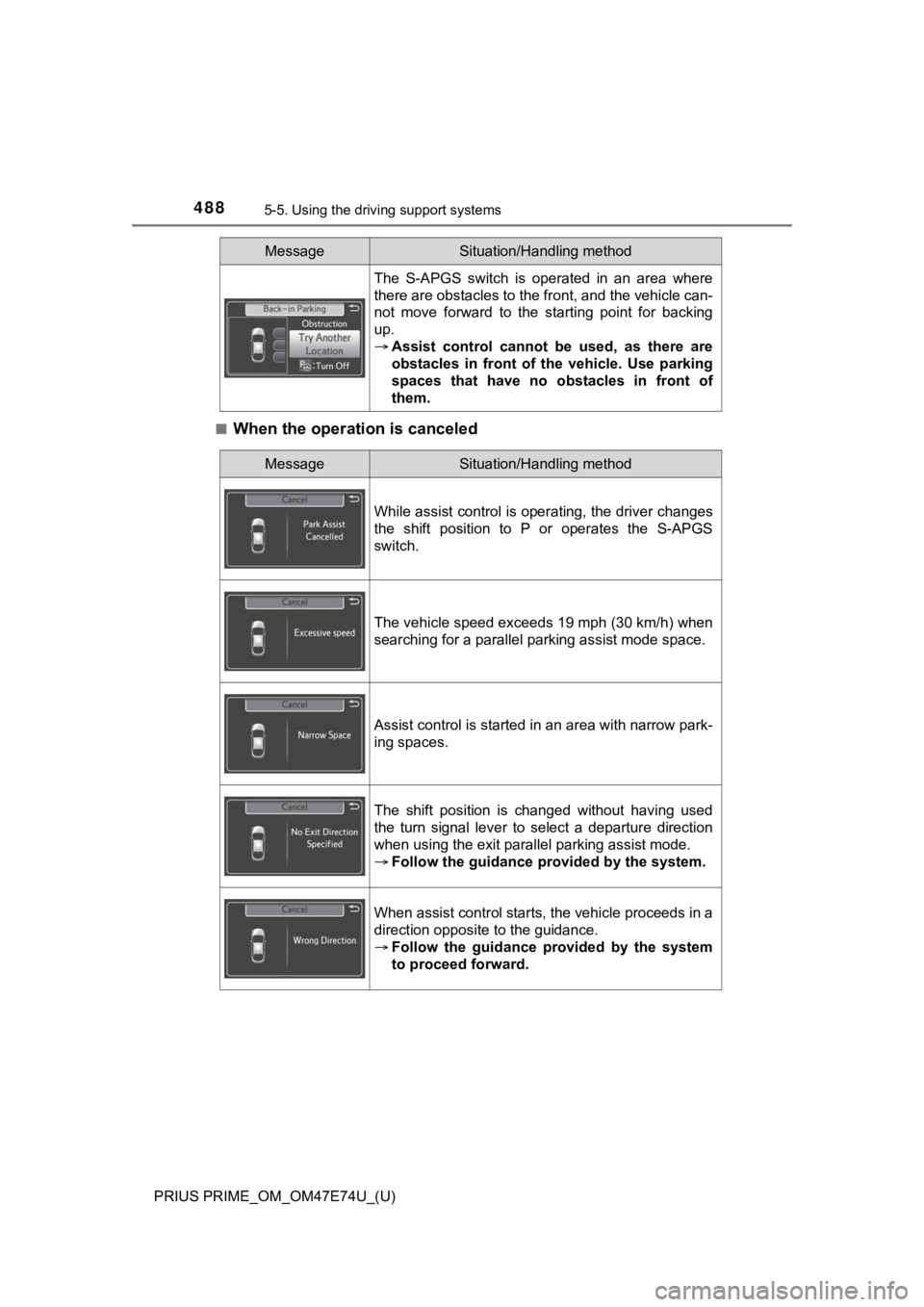
■When the operation is canceled
The S-APGS switch is operated in an area where
there are obstacles to the front, and the vehicle can-
not move forward to the starting point for backing
up.
Assist control cannot b e used, as there are
obstacles in front of the vehicle. Use parking
spaces that have no obstacles in front of
them.
MessageSituation/Handling method
MessageSituation/Handling method
While assist control is operating, the driver changes
the shift position to P or operates the S-APGS
switch.
The vehicle speed exceeds 19 mph (30 km/h) when
searching for a parallel parking assist mode space.
Assist control is started in an area with narrow park-
ing spaces.
The shift position is changed without having used
the turn signal lever to select a departure direction
when using the exit parallel parking assist mode.
Follow the guidance provided by the system.
When assist control starts, the vehicle proceeds in a
direction opposite to the guidance.
Follow the guidance provided by the system
to proceed forward.
Page 568 of 808
568
PRIUS PRIME_OM_OM47E74U_(U)
6-4. Using the other interior features
■Reprogramming a single HomeLink® button
When the following procedure is performed, buttons which alread y
have devices registered to them can be overwritten:
With one hand, press and hold the desired HomeLink
® button.
When the HomeLink
® indicator starts flashing orange, continue
to hold the HomeLink® button and perform “Programming the
HomeLink®” step (it takes 20 seconds for the HomeLink® indi-
cator to start flashing).
Press the appropriate HomeLink
® button. The HomeLink® indicator
light should turn on.
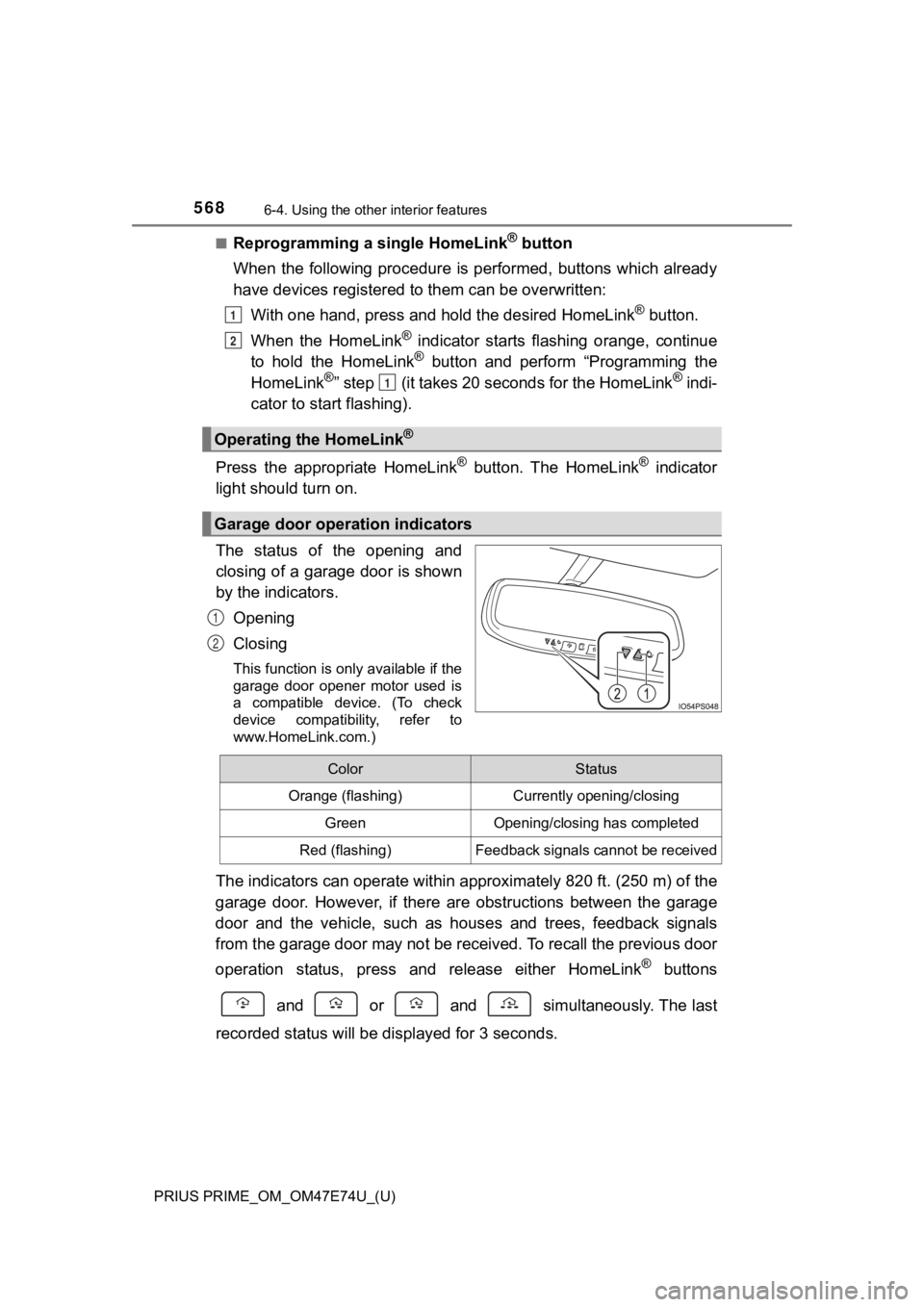
The status of the opening and
closing of a garage door is shown
by the indicators.
Opening
Closing
This function is only available if the
garage door opener motor used is
a compatible device. (To check
device compatibility, refer to
www.HomeLink.com.)
The indicators can operate within approximately 820 ft. (250 m) of the
garage door. However, if there are obstructions between the gar age
door and the vehicle, such as h ouses and trees, feedback signal s
from the garage door may not be received. To recall the previou s door
operation status, press an d release either HomeLink
® buttons
and or and simultaneously. The last
recorded sta tus will be display ed for 3 seconds.
Operating the HomeLink®
Garage door operation indicators
1
2
1
1
2
ColorStatus
Orange (flashing)Currently opening/closing
GreenOpening/closing has completed
Red (flashing)Feedback signals cannot be received
Page 617 of 808
PRIUS PRIME_OM_OM47E74U_(U)
6177-3. Do-it-yourself maintenance
7
Maintenance and care
■Situations in which the tire pressure warning system may not oper-
ate properly
●In the following cases, the tire pressure warning system may no t operate
properly.
• If non-genuine Toyota wheels are used.
• When a replacement tire is used, the system may not operate cor-
rectly due to the structure of the replacement tire.
• A tire has been replac ed with a tire that is not of the specif ied size.
• Tire chains etc . are equipped.
• An auxiliary-supported ru n-flat tire is equipped.
• If a window tint that affects the radio wave signals is instal led.
• If there is a lot of snow or ice on the vehicle, particularly around the
wheels or wheel housings.
• If the tire inflation pressure is extremely higher than the sp ecified
level.
• If wheel without the tire pressure warning valve and transmitt er is
used.
• If the ID code on the tire pressure warning valves and transmi tters is
not registered in the tire pressure warning computer.
●Performance may be affected in the following situations.
• Near a TV tower, electric power plant, gas station, radio stat ion, large
display, airport or other facilit y that generates strong radio waves or
electrical noise
• When carrying a portable radio, cellular phone, cordless phone or
other wireless communication device
●When the vehicle is parked, the time taken for the warning to s tart or go
off could be extended.
●When tire inflation pressure declines rapidly for example when a tire has
burst, the warning may not function.
■The initialization operation
●Make sure to carry out initializ ation after adjusting the tire inflation pres-
sure.
Also, make sure the tires are co ld before carrying out initialization or tire
inflation pressure adjustment.
●If you have accidentally turned the power switch off during ini tialization,
it is not necessary to press the reset swit ch again as initialization will
restart automatically when the power switch has been turned to ON
mode for the next time.
●If you accidentally press the reset switch when initialization is not neces-
sary, adjust the tire inflation pressure to the specified level when the
tires are cold, and cond uct initialization again.
Page 657 of 808

PRIUS PRIME_OM_OM47E74U_(U)
6577-3. Do-it-yourself maintenance
7
Maintenance and care
■Replacing the following bulbs
If any of the lights listed below has burnt out, have it replaced by
your Toyota dealer.
● Headlights and daytime running lights
● Front side marker lights
● Parking lights
● Fog lights (if equipped)
● LED accent lights (if equipped)
● Front turn signal lights
● Rear turn signal lights
● Rear side marker lights
● Tail lights
● Stop lights
● High mounted stoplight
● License plate lights
■LED lights
The lights other than the back-up lights each consist of a numb er of LEDs. If
any of the LEDs burn out, take your vehicle to your Toyota deal er to have the
light replaced.
■ Condensation build-up on the inside of the lens
Temporary condensation build-up on the inside of the lens does not indicate a
malfunction. Contact your Toyota dealer for more information in the following
situations:
● Large drops of water have built up on the inside of the lens.
● Water has built up inside the light.
■ When replacing light bulbs
P. 649