remote control TOYOTA PRIUS PRIME 2022 Owner's Manual
[x] Cancel search | Manufacturer: TOYOTA, Model Year: 2022, Model line: PRIUS PRIME, Model: TOYOTA PRIUS PRIME 2022Pages: 808, PDF Size: 14.72 MB
Page 525 of 808
PRIUS PRIME_OM_OM47E74U_(U)
5256-1. Using the air conditioning system and defogger
6
Interior features
■Heating
●In HV mode, the gasoline engine may operate in order to extract heat from
the engine coolant via the heater.
● In EV mode, heating is done by a heat pump system.
• When the outside temperature is low or it is snowing, compared to con-
ventional vehicles, heating may be less effective and warm air may not
come out.
• If frost has formed of the outside heat exchanger, the heating perfor-
mance will decline. The frost can be removed from the outside heat
exchanger by operating the Remote Air Conditioning System befor e driv-
ing ( P. 531). When frosted over, the heating operation of the Remote
Air Conditioning System starts after defrosting.
• When is turned on, the heating is controlled optimally. There -
fore, the set heating performance may not be achieved even if the fan
speed setting is increased.
● In the following situations the gasoline engine may operate in order to
extract heat from the engine coolant via the heater even in EV mode.
• The outside temperature is approximately 14°F (-10°C) or low
• is operating
■ Using automatic mode
Fan speed is adjusted automatically according to the temperatur e setting and
the ambient conditions.
Therefore, the fan may stop for a while until warm or cool air is ready to flow
immediately after is pressed.
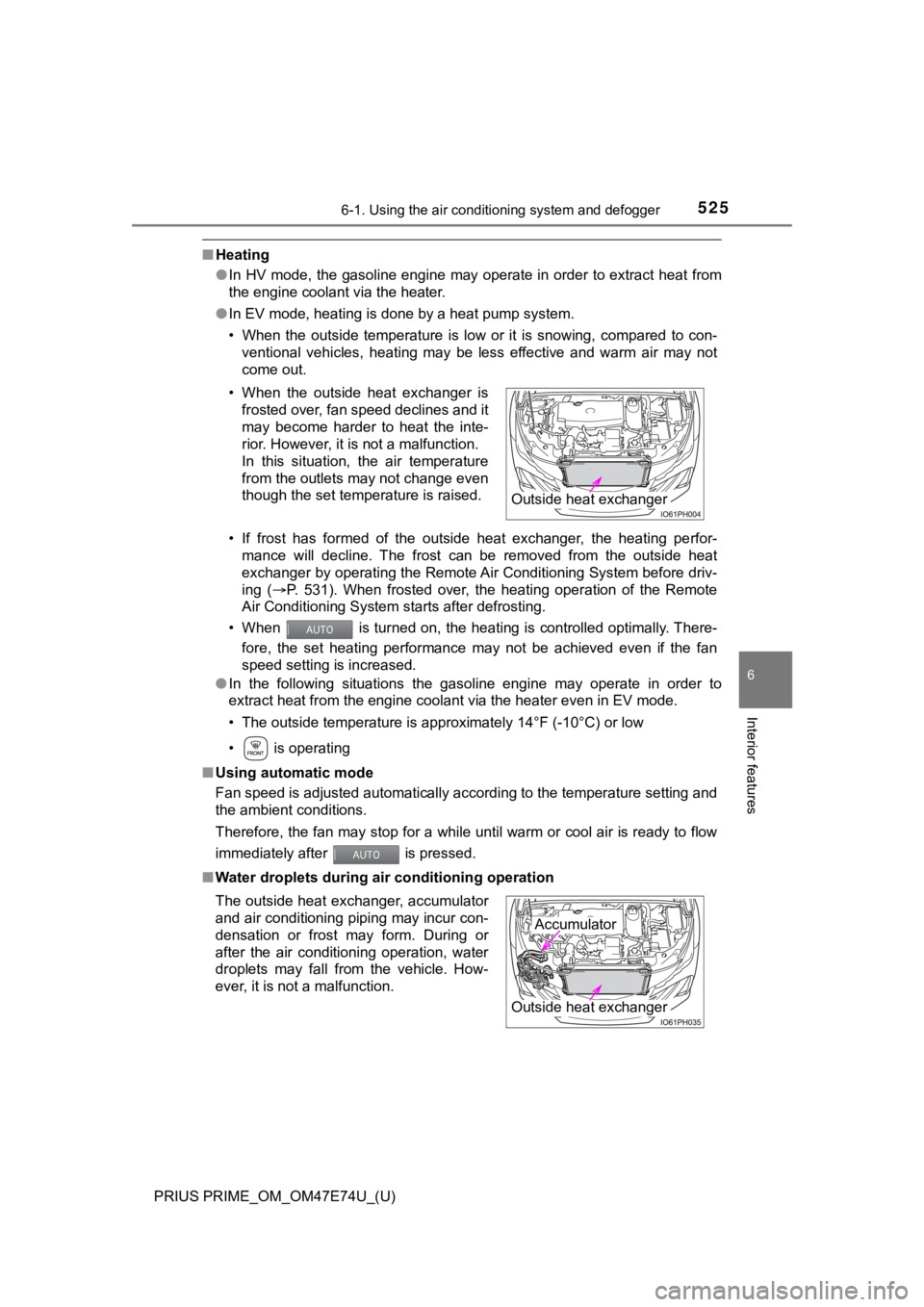
■ Water droplets during air conditioning operation• When the outside heat exchanger is
frosted over, fan speed declines and it
may become harder to heat the inte-
rior. However, it is not a malfunction.
In this situation, the air temperature
from the outlets may not change even
though the set temperature is raised.
The outside heat exchanger, accumulator
and air conditioning piping may incur con-
densation or frost may form. During or
after the air conditioning operation, water
droplets may fall from the vehicle. How-
ever, it is not a malfunction.
Outside heat exchanger
Outside heat exchanger
Accumulator
Page 531 of 808
531
PRIUS PRIME_OM_OM47E74U_(U)
6-1. Using the air conditioning system and defogger
6
Interior features
Remote Air Conditioning System
If the Remote Air Conditioning System is used while the chargin g
cable is connected to the vehicl e, the reduction of charge in the hybrid
battery (traction battery) will be suppressed to allow you to u se elec-
tricity from an exte rnal power source.
Charging will be conducted automatically after the Remote Air C ondition-
ing System is stopped.
Check the temperature setting o f the air conditioning system.
( P. 508, 521)
The Remote Air Conditioning System will operate in accordance w ith the
temperature settings of the air conditioning system.
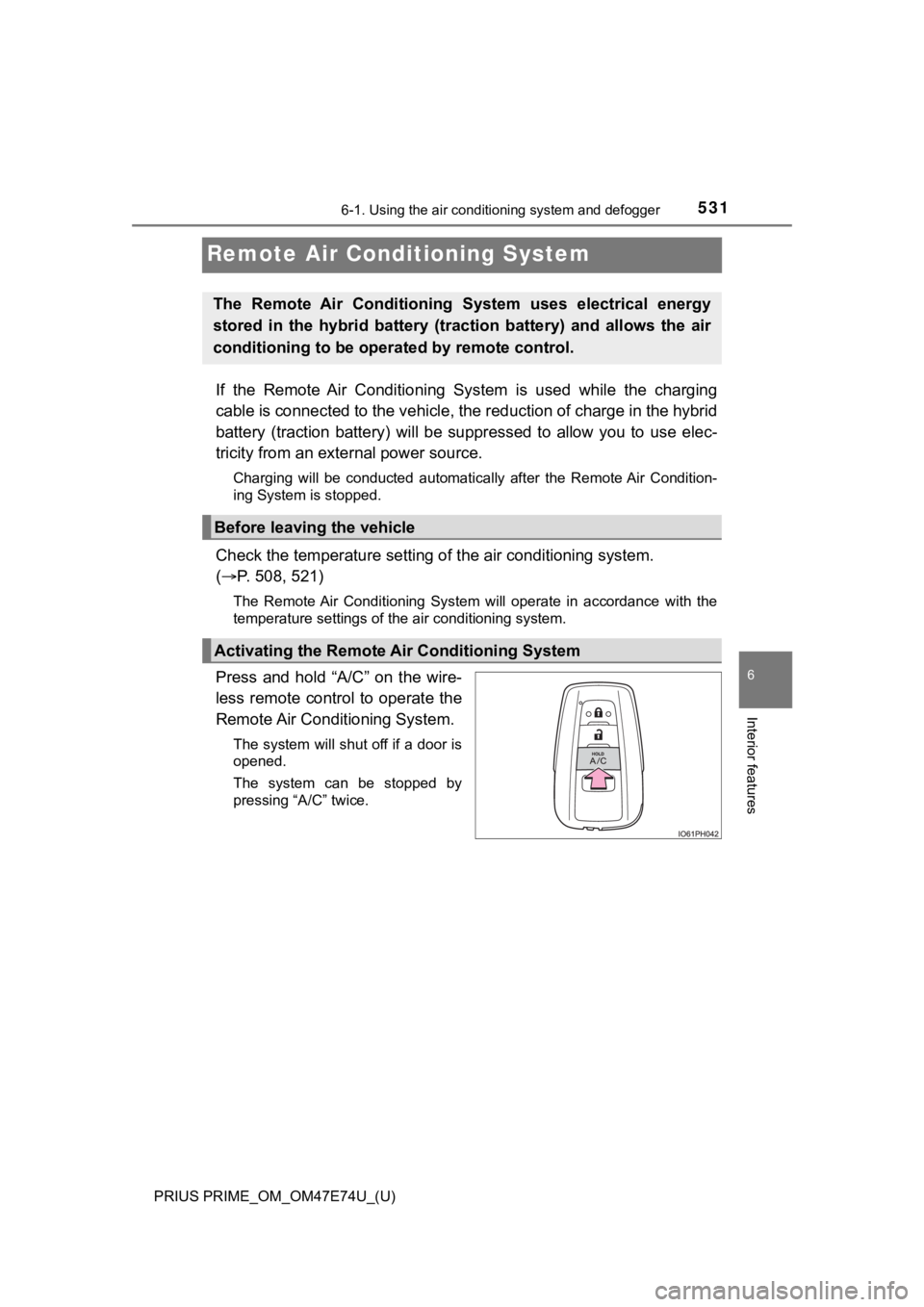
Press and hold “A/C” on the wire-
less remote control to operate the
Remote Air Conditioning System.
The system will shut off if a door is
opened.
The system can be stopped by
pressing “A/C” twice.
The Remote Air Conditioning System uses electrical energy
stored in the hybrid battery (traction battery) and allows the air
conditioning to be operated by remote control.
Before leaving the vehicle
Activating the Remote A ir Conditioning System
Page 533 of 808
PRIUS PRIME_OM_OM47E74U_(U)
5336-1. Using the air conditioning system and defogger
6
Interior features
■Security feature
Any unlocked doors will be automatically locked when the system is operat-
ing. The buzzer sounds and the emergency flashers flash to indi cate that the
doors have been locked or the system has been turned off.
(The doors locked: Once; The system turned off: Twice)
■ Conditions affecting operation
P. 293
■ When using the Remote A ir Conditioning System
A charging message will be displayed on the multi-information d isplay. Differ-
ent messages will be displayed depending on when the Remote Air Condi-
tioning System was started (after charging or during charging).
■ While the Remote Air Condit ioning System is operating
● Depending on the operating condition of the Remote Air Conditio ning Sys-
tem, the electric fan may spin and an operating noise may be heard. How-
ever, this does not indicate a malfunction.
● The Remote Air Conditioning System may stop operating temporari ly if
other features that use electricity (for example, the seat heater, lights, wind-
shield wipers) are in operation or if the charge level of the 1 2-volt battery
becomes low.
● The headlights, windshield wiper, combination meter, etc. will not operate
while the Remote Air Conditioning System is operating.
■ Electronic key battery depletion
P. 276
■ When the electronic key battery is fully depleted
P. 644
■ Customization
Setting (e.g. Operation using “A/C” on the wireless remote control) can be
changed. (Customizable features: P. 749)
Page 564 of 808
564
PRIUS PRIME_OM_OM47E74U_(U)
6-4. Using the other interior features
Garage door opener
The HomeLink® wireless control system in your vehicle has 3 buttons
which can be programmed to operate 3 different devices. Refer to the
programming methods on the following pages to determine the
method which is approp riate for the device.
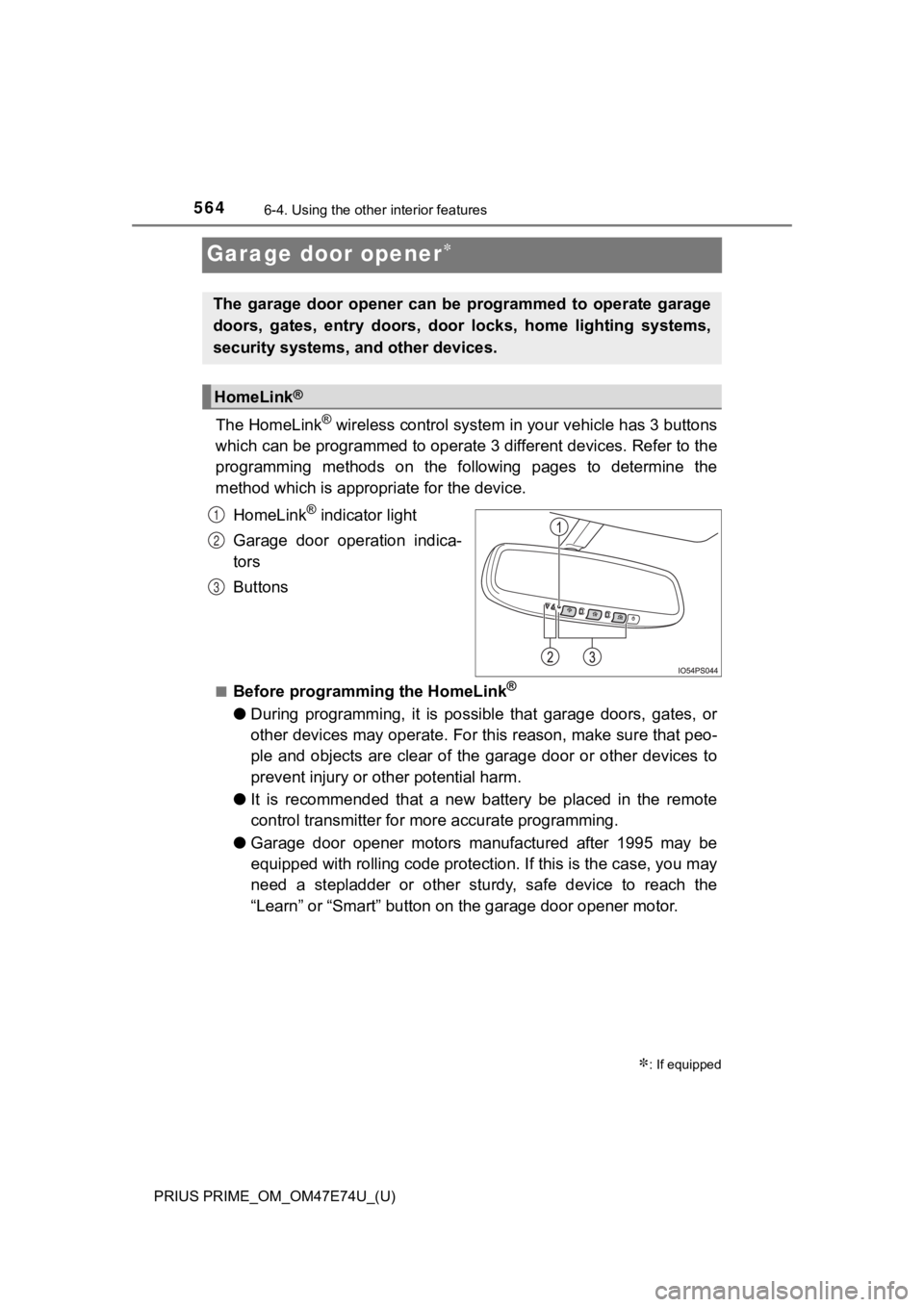
HomeLink
® indicator light
Garage door operation indica-
tors
Buttons
■Before programming the HomeLink®
● During programming, it is possible that garage doors, gates, or
other devices may operate. For this reason, make sure that peo-
ple and objects are clear of the garage door or other devices t o
prevent injury or other potential harm.
● It is recommended that a new battery be placed in the remote
control transmitter for mo re accurate programming.
● Garage door opener motors manufactured after 1995 may be
equipped with rolling code pro tection. If this is the case, you may
need a stepladder or other sturdy, safe device to reach the
“Learn” or “Smart” button on the garage door opener motor.
: If equipped
The garage door opener can be programmed to operate garage
doors, gates, entry doors, door locks, home lighting systems,
security systems, and other devices.
HomeLink®
1
2
3
Page 565 of 808
PRIUS PRIME_OM_OM47E74U_(U)
5656-4. Using the other interior features
6
Interior features
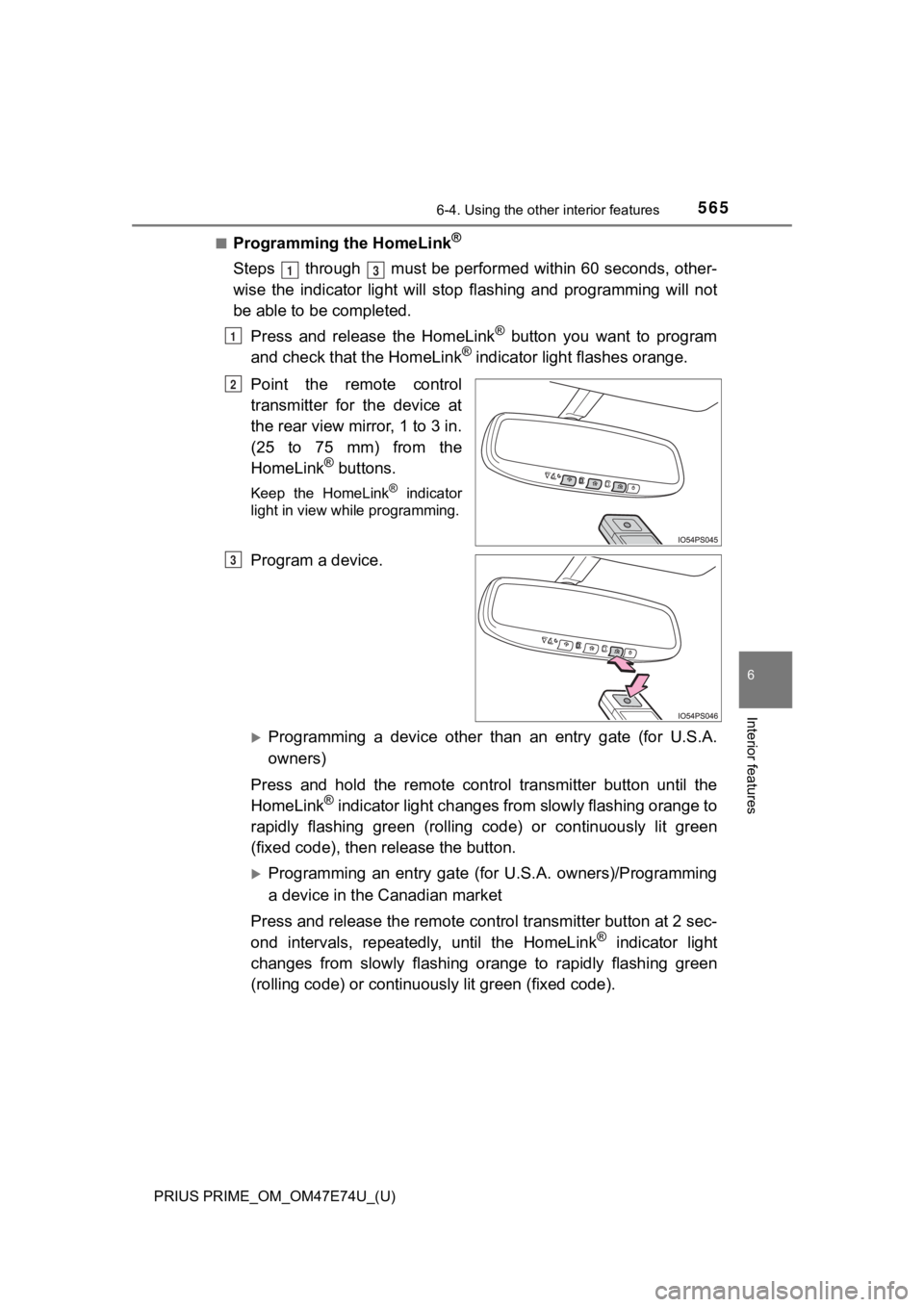
■Programming the HomeLink®
Steps through must be performed within 60 seconds, other-
wise the indicator light will stop flashing and programming wil l not
be able to be completed.
Press and release the HomeLink
® button you want to program
and check that the HomeLink® indicator light flashes orange.
Point the remote control
transmitter for the device at
the rear view mirror, 1 to 3 in.
(25 to 75 mm) from the
HomeLink
® buttons.
Keep the HomeLink® indicator
light in view while programming.
Program a device.
Programming a device other than an entry gate (for U.S.A.
owners)
Press and hold the remote control transmitter button until the
HomeLink
® indicator light changes from slowly flashing orange to
rapidly flashing gre en (rolling code) or continuously lit green
(fixed code), then release the button.
Programming an entry gate (for U.S.A. owners)/Programming
a device in the Canadian market
Press and release the remote con trol transmitter button at 2 sec-
ond intervals, repeatedly, until the HomeLink
® indicator light
changes from slowly flashing orange to rapidly flashing green
(rolling code) or continuous ly lit green (fixed code).
13
1
2
3
Page 571 of 808
PRIUS PRIME_OM_OM47E74U_(U)
5716-4. Using the other interior features
6
Interior features
WARNING
■When programming a garage door or other remote control device
The garage door or other device may operate, so ensure people a nd
objects are out of danger to prevent potential harm.
■ Conforming to federal safety standards
Do not use the HomeLink
® compatible transceiver with any garage door
opener or device that lacks safety stop and reverse features as required by
federal safety standards. This includes any garage door that cannot detect
an interfering object. A door or device without these features increases the
risk of death or serious injury.
■ When operating or programming HomeLink
®
Never allow a child to operate or play with the HomeLink® buttons.
Page 606 of 808
606
PRIUS PRIME_OM_OM47E74U_(U)
7-3. Do-it-yourself maintenance
■After recharging/reconnect ing the 12-volt battery
● Unlocking the doors using the smart key system may not be possible imme-
diately after reconnecting the 12-volt battery. If this happens, use the wire-
less remote control or the mechanical key to lock/unlock the do ors.
● Start the hybrid system with the power switch in ACCESSORY mode . The
hybrid system may not start with the power switch turned off. H owever, the
hybrid system will operate normally from the second attempt.
● The power switch mode is recorded by the vehicle. If the 12-volt battery is
reconnected, the vehicle will return the power switch mode to t he status it
was in before the 12-volt battery was disconnected. Make sure to turn off
the power switch before disconnect the 12-volt battery. Take ex tra care
when connecting the 12-volt battery if the power switch mode prior to dis-
charge is unknown.
If the system will not start even after multiple attempts at all methods above,
contact your Toyota dealer.
WARNING
■ Chemicals in the 12-volt battery
The 12-volt battery contains poisonous and corrosive sulfuric acid and may
produce hydrogen gas which is flammable and explosive. To reduce the risk
of death or serious injury, take the following precautions while working on or
near the 12-volt battery:
● Do not cause sparks by touching the 12-volt battery terminals w ith tools.
● Do not smoke or light a match near the 12-volt battery.
● Avoid contact with eyes, skin and clothes.
● Never inhale or swallow electrolyte.
● Wear protective safety glasses when working near the 12-volt ba ttery.
● Keep children away from the 12-volt battery.
■ Where to safely charge the 12-volt battery
Always charge the 12-volt battery in an open area. Do not charge the
12-volt battery in a garage or closed room where there is insufficient ventila-
tion.
■ How to recharge the 12-volt battery
Only perform a slow charge (5 A or less). The 12-volt battery may explode if
charged at a quicker rate.
Page 645 of 808

PRIUS PRIME_OM_OM47E74U_(U)
6457-3. Do-it-yourself maintenance
7
Maintenance and care
Remove the depleted battery.
When removing the cover, if the
battery cannot be seen due to the
electronic key module attaching to
the upper cover, remove the elec-
tronic key module from the cover
so that the battery is visible as
shown in the illustration.
When removing the battery, use a
screwdriver of an appropriate size.
Insert a new battery with the “+” terminal facing up.
When installing, reverse the steps listed.
■Use a CR2032 lithium battery
●Batteries can be purchased at your Toyota dealer, local electri cal appliance
shops or camera stores.
● Replace only with the same or equivalent type recommended by the manu-
facturer.
● Dispose of used batteries according to the local laws.
■ If the electronic key battery is depleted
The following symptoms may occur:
●The smart key system and wireless remote control will not funct ion properly.
● The operational range will be reduced.
3
4
Page 708 of 808
708
PRIUS PRIME_OM_OM47E74U_(U)
8-2. Steps to take in an emergency
If the electronic key does not operate
properly
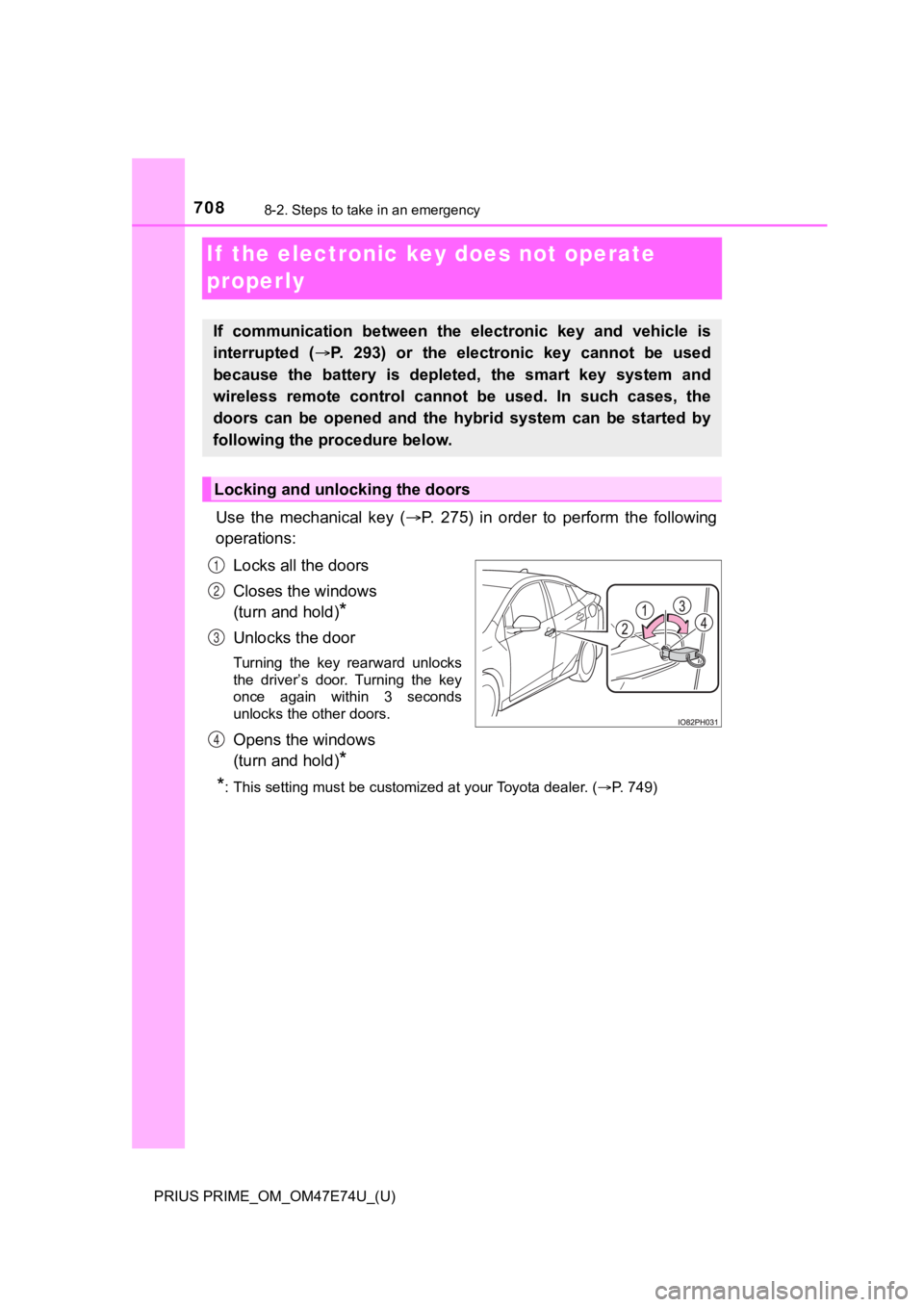
Use the mechanical key (P. 275) in order to perform the following
operations:
Locks all the doors
Closes the windows
(turn and hold)
*
Unlocks the door
Turning the key rearward unlocks
the driver’s door. Turning the key
once again within 3 seconds
unlocks the other doors.
Opens the windows
(turn and hold)
*
*
: This setting must be customized at your Toyota dealer. ( P. 749)
If communication between the electronic key and vehicle is
interrupted ( P. 293) or the electronic key cannot be used
because the battery is depleted, the smart key system and
wireless remote control can not be used. In such cases, the
doors can be opened and the hybrid system can be started by
following the procedure below.
Locking and unlocking the doors
1
2
3
4
Page 715 of 808
7158-2. Steps to take in an emergency
PRIUS PRIME_OM_OM47E74U_(U)
8
When trouble arises
■When recharging or replacing the 12-volt battery
●In some cases, it may not be possible to unlock the doors using the smart
key system when the 12-volt battery is discharged. Use the wire less remote
control or the mechanical key to lock or unlock the doors.
● The hybrid system may not start on the first attempt after the 12-volt battery
has recharged but will start normally after the second attempt. This is not a
malfunction.
● Vehicles with smart lid & connector locking system:
It may be impossible to unlock the charging port lid or locking and unlocking
the charging connector immediately after the 12-volt battery is reconnected.
In this case, carry the electronic key on your person and opera te the
charging port lid or charging connector lock switch again.
● The power switch mode is memorized by the vehicle. When the 12- volt bat-
tery is reconnected, the system will return to the mode it was in before the
12-volt battery was discharged. Before disconnecting the 12-volt battery,
turn the power switch off.
If you are unsure what mode the power switch was in before the 12-volt bat-
tery discharged, be especially careful when reconnecting the 12 -volt battery.
● If the 12-volt battery discharges while the shift position is in P, it may not be
possible to shift the shift position to other positions. In thi s case, the vehicle
cannot be towed without lifting both front wheels because the f ront wheels
will be locked. ( P. 664)
■ When replacing the 12-volt battery
●Use a 12-volt battery that conforms to European regulations.
● Use a 12-volt battery that the case size is same as the previou s one (LN1),
20 hour rate capacity (20HR) is equivalent (45Ah) or greater, and perfor-
mance rating (CCA) is equivalent (295A) or greater.
• If the sizes differ, the 12-volt battery cannot be properly se cured.
• If the 20 hour rate capacity is low, even if the time period w here the vehi-
cle is not used is a short time, the 12-volt battery may discharge and the
hybrid system may not be able to start.
● For details, consult your Toyota dealer.