ECU TOYOTA PRIUS PRIME 2022 Service Manual
[x] Cancel search | Manufacturer: TOYOTA, Model Year: 2022, Model line: PRIUS PRIME, Model: TOYOTA PRIUS PRIME 2022Pages: 808, PDF Size: 14.72 MB
Page 83 of 808
831-4. Theft deterrent system
PRIUS PRIME_OM_OM47E74U_(U)
1
For safety and security
Immobilizer system
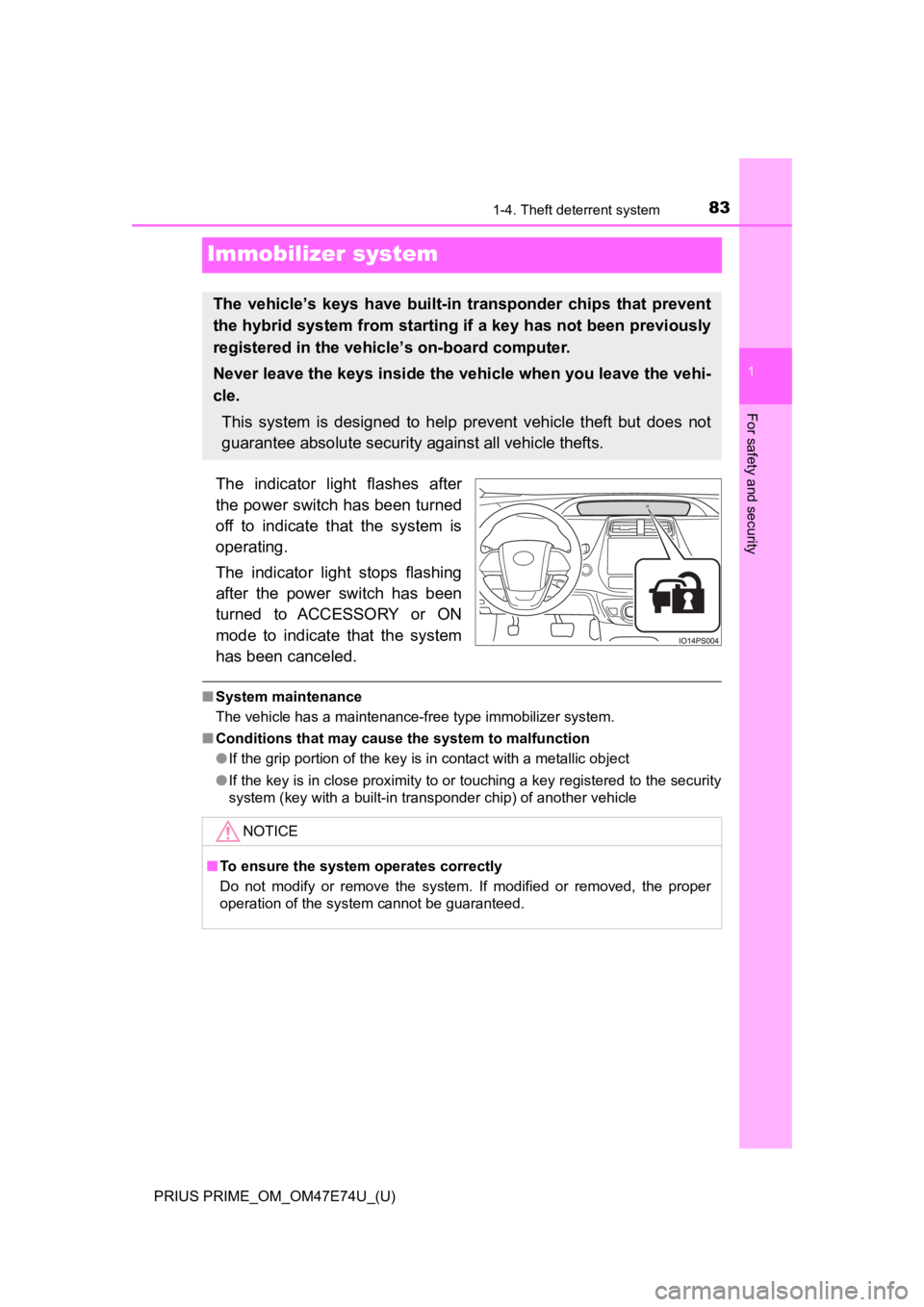
The indicator light flashes after
the power switch has been turned
off to indicate that the system is
operating.
The indicator light stops flashing
after the power switch has been
turned to ACCESSORY or ON
mode to indicate that the system
has been canceled.
■System maintenance
The vehicle has a maintenance-free type immobilizer system.
■ Conditions that may cause the system to malfunction
●If the grip portion of the key is in contact with a metallic object
● If the key is in close proximity to or touching a key registered to the security
system (key with a built-in transponder chip) of another vehicl e
The vehicle’s keys have built-in transponder chips that prevent
the hybrid system from starting if a key has not been previously
registered in the vehicle’s on-board computer.
Never leave the keys inside the vehicle when you leave the vehi-
cle. This system is designed to help prevent vehicle theft but does not
guarantee absolute security against all vehicle thefts.
NOTICE
■ To ensure the system operates correctly
Do not modify or remove the system. If modified or removed, the proper
operation of the system cannot be guaranteed.
Page 119 of 808
PRIUS PRIME_OM_OM47E74U_(U)
1192-2. Charging
2
Plug-in hybrid system
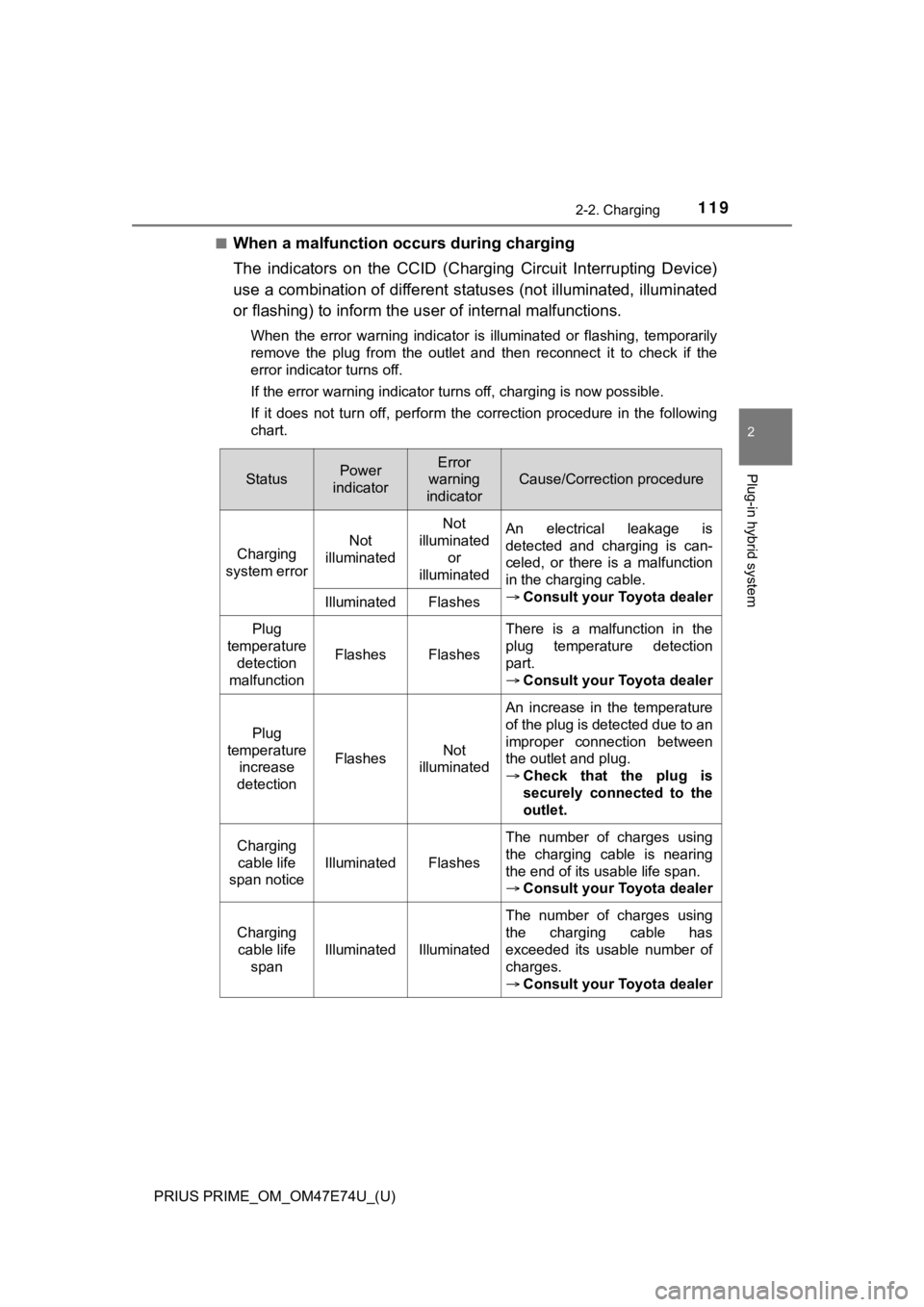
■When a malfunction occurs during charging
The indicators on the CCID (Charging Circuit Interrupting Device)
use a combination of different s tatuses (not illuminated, illuminated
or flashing) to inform the u ser of internal malfunctions.
When the error warning indicator is illuminated or flashing, te mporarily
remove the plug from the outlet and then reconnect it to check if the
error indicator turns off.
If the error warning indicator turns off, charging is now possible.
If it does not turn off, perform the correction procedure in the following
chart.
StatusPower
indicatorError
warning
indicator
Cause/Correction procedure
Charging
system error Not
illuminated Not
illuminated
or
illuminated An electrical leakage is
detected and charging is can-
celed, or there is a malfunction
in the charging cable.
Consult your Toyota dealer
Illuminated Flashes
Plug
temperature detection
malfunction
FlashesFlashes
There is a malfunction in the
plug temperature detection
part.
Consult your Toyota dealer
Plug
temperature increase
detection
FlashesNot
illuminated
An increase in the temperature
of the plug is detected due to an
improper connection between
the outlet and plug.
Check that the plug is
securely connected to the
outlet.
Charging
cable life
span notice
IlluminatedFlashes
The number of charges using
the charging cable is nearing
the end of its usable life span.
Consult your Toyota dealer
Charging
cable life
span
IlluminatedIlluminated
The number of charges using
the charging cable has
exceeded its usable number of
charges.
Consult your Toyota dealer
Page 121 of 808
PRIUS PRIME_OM_OM47E74U_(U)
1212-2. Charging
2
Plug-in hybrid system
For safety, inspect the charging cable on a routine basis.
Inspecting and maintaining the charging cable
WARNING
■Routine inspection
Check the following points regularly.
Failure to do so may cause an unexpected accident, resulting in death or
serious injury.
● The charging cable, plug, charging connector, CCID (Charging Ci rcuit
Interrupting Device) etc. have not been damaged
● The outlet has not been damaged
● The plug can be securely inserted into the outlet
● The plug does not get extremely hot during use
● The tip of the plug has not been deformed
● The plug is not dirtied by dust etc.
Remove the plug from the outlet before inspecting it. If any ab normalities
are found in the charging cable as a result of the inspection, immediately
stop use and consult your Toyota dealer.
■ Maintaining the charging cable
When the charging cable is dirty, first remove the dirt with a hard, wringed
cloth, and then wipe the cable with a dry cloth.
However, never wash it with water. If the charging cable is washed with
water, fire or electric shock may occur during charging, possib ly resulting in
death or serious injury.
■ When not using the charg ing cable for a long time
Remove the plug from the outlet. Dust could accumulate on the plug or in
the outlet, possibly causing overheating which could lead to a fire.
Also, keep the cable in a place free from moisture.
Page 145 of 808
PRIUS PRIME_OM_OM47E74U_(U)
1452-2. Charging
2
Plug-in hybrid system
■Certification
This device complies with Part 15 of the FCC Rules.
Operation is subject to the following two conditions:
(1) this device may not cause harmful interference, and
(2) this device must accept any interference received, including interference
that may cause undesired operation.
WARNING
■Caution when charging
People with implantable cardiac pacemakers or cardiac resynchro nization
therapy-pacemakers should not carry out the charging procedure. Ask
someone else to do it.
● Do not approach the charger and charging cable while charging.
Charging procedure may affect the operation of such devices.
● Do not remain in the vehicle during charging.
Charging procedure may affect the operation of such devices.
● Do not enter the vehicle even to take something out of the lugg age com-
partment.
Charging procedure may affect the operation of such devices.
■ When the charging cable is connected to the vehicle
Do not operate the shift lever.
In the unlikely event that the charging cable has been damaged, the shift
position may change from P to another position and the vehicle could move,
possibly leading to an accident.
NOTICE
■ Precautions when handling charging cable
Make sure to observe the following precautions. Failure to obse rve these
precautions may result in damage to the charging cable and charging inlet.
● Insert the charging connector straight into the charging inlet.
● After inserting the charging connector, do not apply excessive force to or
twist the connector. Also, do not lean on the connector or hang any objects
from it.
● Do not step on or trip over the charging cable.
● Vehicles with smart lid & connector locking system: Before removing the
charging connector, make sure that it is unlocked. ( P. 153)
● After removing the charging cable, promptly return it to its pr oper location.
● After removing the charging connector, securely install the charging inlet
cap.
Page 148 of 808
148
PRIUS PRIME_OM_OM47E74U_(U)
2-2. Charging
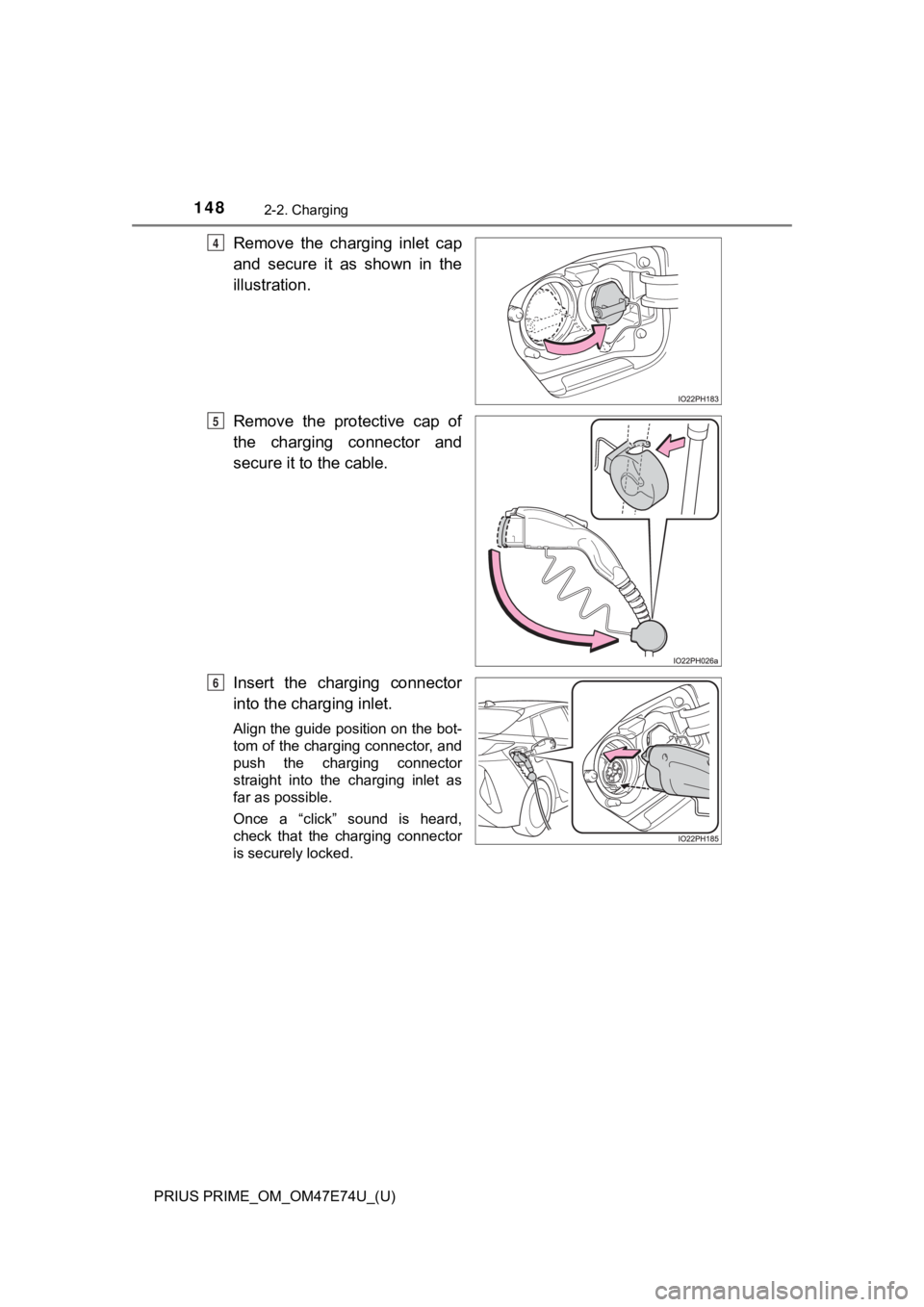
Remove the charging inlet cap
and secure it as shown in the
illustration.
Remove the protective cap of
the charging connector and
secure it to the cable.
Insert the charging connector
into the charging inlet.
Align the guide position on the bot-
tom of the charging connector, and
push the charging connector
straight into the charging inlet as
far as possible.
Once a “click” sound is heard,
check that the charging connector
is securely locked.
4
5
6
Page 154 of 808
154
PRIUS PRIME_OM_OM47E74U_(U)
2-2. Charging
WARNING
■When charging
Observe the following precautions.
Failure to do so may cause an unexpected accident, resulting in death or
serious injury.
● Connect to a power source suitable for charging. ( P. 132)
● Before charging, check that the charging inlet does not have deformations,
damage, corrosion, dust or other foreign materials such as snow or ice
adhering to it. If anything is adhering to the inlet, be sure to completely
remove the material before connecting the charging connector.
● Do not let the terminals of the charging inlet get wet.
● Make sure that the charging cable, plug and socket are free of foreign mat-
ter and not deformed or damaged.
● Only use outlets where the plug can be securely inserted.
● Do not charge if the charging cable is coiled or bundled.
● Wrapping 120 V charging cable while in-use is not recommended b ecause
cable may overheat. Failure to rewrap charging cable when not in-use
could result in strangulation or tripping hazard.
● Do not touch the terminals of the charging connector and chargi ng inlet
with a sharp metal objects (needles etc.) or hands, or short th em with for-
eign objects.
● When charging outdoors, make sure to connect to a weatherproof outlet
for outdoor use.
● If any heat, smoke, odors, noise or other abnormalities are noticed during
charging, stop charging immediately.
● Do not insert the plug if the outlet is submerged in water or s no w.
● When charging during rain or snow, do not pull out or insert the plug with
wet hands. Also, do not get the electrical socket and plug wet.
● Do not charge the vehicle during a lightning storm.
● Do not let the wheels on the charging cable, plug, charging connector and
CCID (Charging Circuit Interrupting Device).
● Firmly insert the plug into the outlet.
● Do not use an extension cord and converting adaptor.
● After connecting the charging cable, confirm that it is not wou nd around
anything.
● If the power indicator light does not illuminate after plugging the charging
cable into the socket-outlet, unplug it immediately.
Page 160 of 808
160
PRIUS PRIME_OM_OM47E74U_(U)
2-2. Charging
■Charging schedule
●The charge schedule cannot be set while driving.
● A maximum of 15 charge schedules can be registered.
■ To make sure that the charging schedule function operates corre ctly
Check the following items.
● Adjust the clock to the correct time ( P. 197)
● The calendar is set to the correct date ( P. 199)
● Check that the power switch is turned off
● After registering the charge schedule, connect the charging cable
The charging start time is determined based on the charge sched ule at the
time that the charging cable was connected.
● After connecting the charging cable, check that the charging indicator
flashes ( P. 115)
● Do not use an outlet that has a power cut off function (including a timer func-
tion)
Use an outlet that constantly supplies electricity. For outlets where the
power is cut off due to a timer function, etc., charging may no t be carried
out according to plan if the power is cut off during the set ti me.
■ When the charging cable remains connected to the vehicle
Even if multiple consecutive charge schedules are registered, t he next
charge will not be carried out according to the charging schedu le until the
charging cable is removed and reconnected after charging comple tes. Also,
when the hybrid battery (traction battery) is fully charged, ch arging according
to the charging schedule will not be carried out.
■ “Climate Prep”
●When the air conditioning-linked setting is turned on, the air conditioning
operates until the set departure time. Therefore, the air condi tioning will con-
sume electricity and charging may not complete by the set depar ture time.
● If the hybrid battery (traction battery) is fully charged, char ging will not be
carried out, even if the charge schedule is set. However, if “Climate Prep” is
turned on, the air conditioning will operate only once when it nears the time
set in “Departure”. If this occurs, the air conditioning will c onsume electricity
and the remaining charge of the hybrid battery (traction batter y) when
departing may be decreased.
● When the doors are unlocked, the air conditioning system does n ot operate.
■ Smartphone-linked operation (vehicles with 11.6-inch display)
After applying to Entune App Suite, it is possible to use the s martphone appli-
cation to change charging schedule settings.
For details about Entune App Suite, refer to http://www.toyota. com/entune/.
Page 182 of 808
182
PRIUS PRIME_OM_OM47E74U_(U)
2-2. Charging
The error warning indicator on the CCID (Charging Circuit Inter rupting
Device) flashes.
Electrical leakage detection
function or self- diagnostic
function operates and power
is cut off
When the voltage is insufficient, the error
warning indicator may flash when there is
noise interference. Perform a reset and con-
nect to a proper power source. ( P. 119)
If charging does not start, immediately stop
charging and contact your Toyota dealer.
Charging indicator does not illuminate, even though charging co nnector
is connected.
The plug is not properly con-
nected to the outletCheck whether the plug is properly con-
nected to the outlet.
Charging connector is not
securely connected to
charging inlet
Check the connection status of the charging
connector.
• When connecting the charging connec- tor, make sure not to touch the latch
release button. Insert the charging con-
nector securely until you hear a click. The
charging connector may not be connected
correctly if the latch release button is
pressed while inserting.
• After connecting the charging connector,
check that the latch release button is not
pressed and the charging indicator is
turned on.
If the charging indicator does not illuminate,
even though the charging connector is
securely connected, there may be a mal-
function in the system. Immediately stop
charging and contact your Toyota dealer.
Hybrid battery (traction bat-
tery) is already fully chargedWhen the hybrid battery (traction battery) is
fully charged, charging is not performed.
The charger does not oper-
atePlease contact the facility manager when
there is a problem with charger.
Likely causeCorrection procedure
Page 187 of 808
PRIUS PRIME_OM_OM47E74U_(U)
1872-2. Charging
2
Plug-in hybrid system
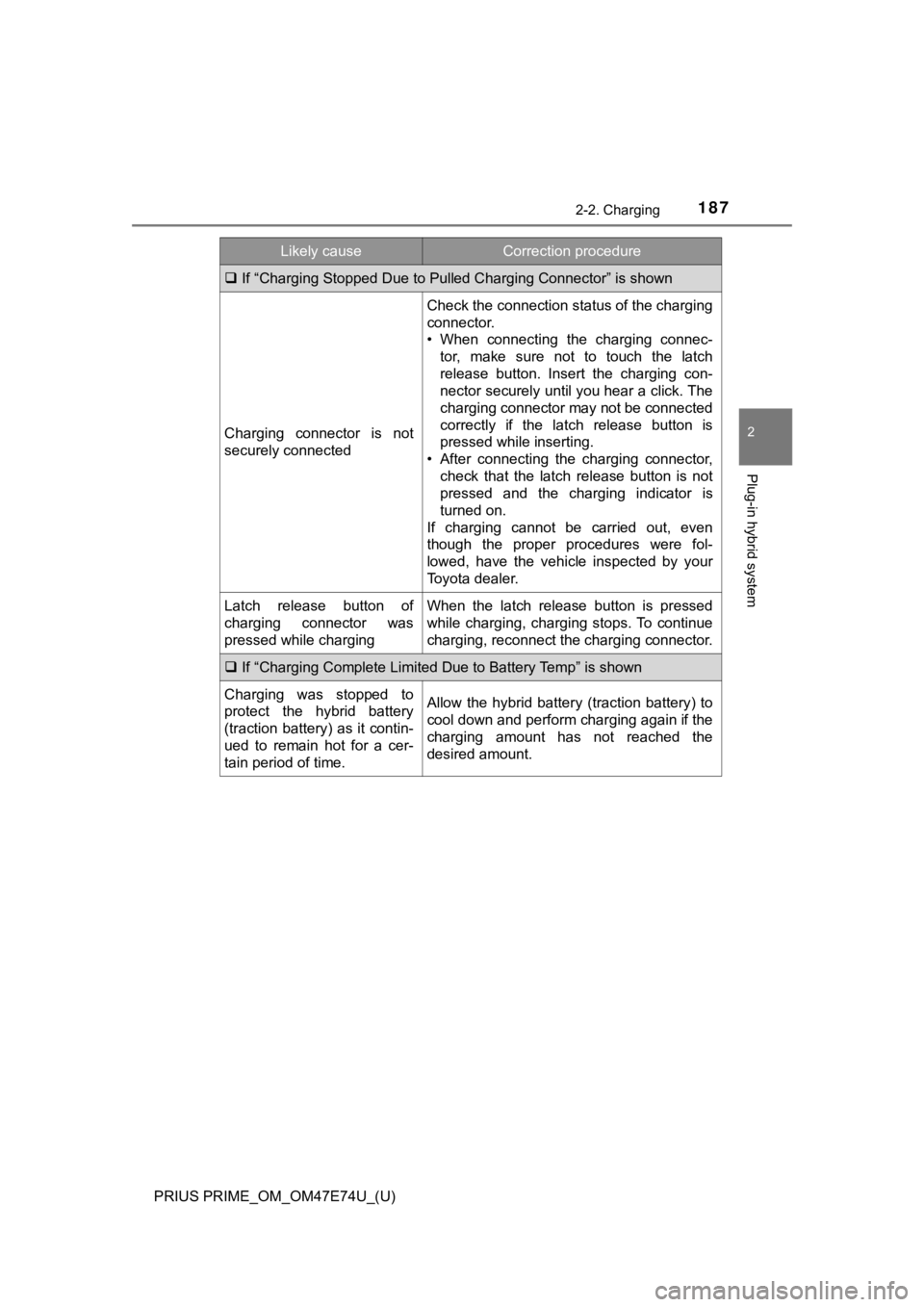
If “Charging Stopped Due to Pulled Charging Connector” is shown
Charging connector is not
securely connected
Check the connection status of the charging
connector.
• When connecting the charging connec-
tor, make sure not to touch the latch
release button. Insert the charging con-
nector securely until you hear a click. The
charging connector may not be connected
correctly if the latch release button is
pressed while inserting.
• After connecting the charging connector,
check that the latch release button is not
pressed and the charging indicator is
turned on.
If charging cannot be carried out, even
though the proper procedures were fol-
lowed, have the vehicle inspected by your
Toyota dealer.
Latch release button of
charging connector was
pressed while chargingWhen the latch release button is pressed
while charging, charging stops. To continue
charging, reconnect the charging connector.
If “Charging Complete Limited Due to Battery Temp” is shown
Charging was stopped to
protect the hybrid battery
(traction battery) as it contin-
ued to remain hot for a cer-
tain period of time.Allow the hybrid battery (traction battery) to
cool down and perform charging again if the
charging amount has not reached the
desired amount.
Likely causeCorrection procedure
Page 189 of 808
PRIUS PRIME_OM_OM47E74U_(U)
1892-2. Charging
2
Plug-in hybrid system
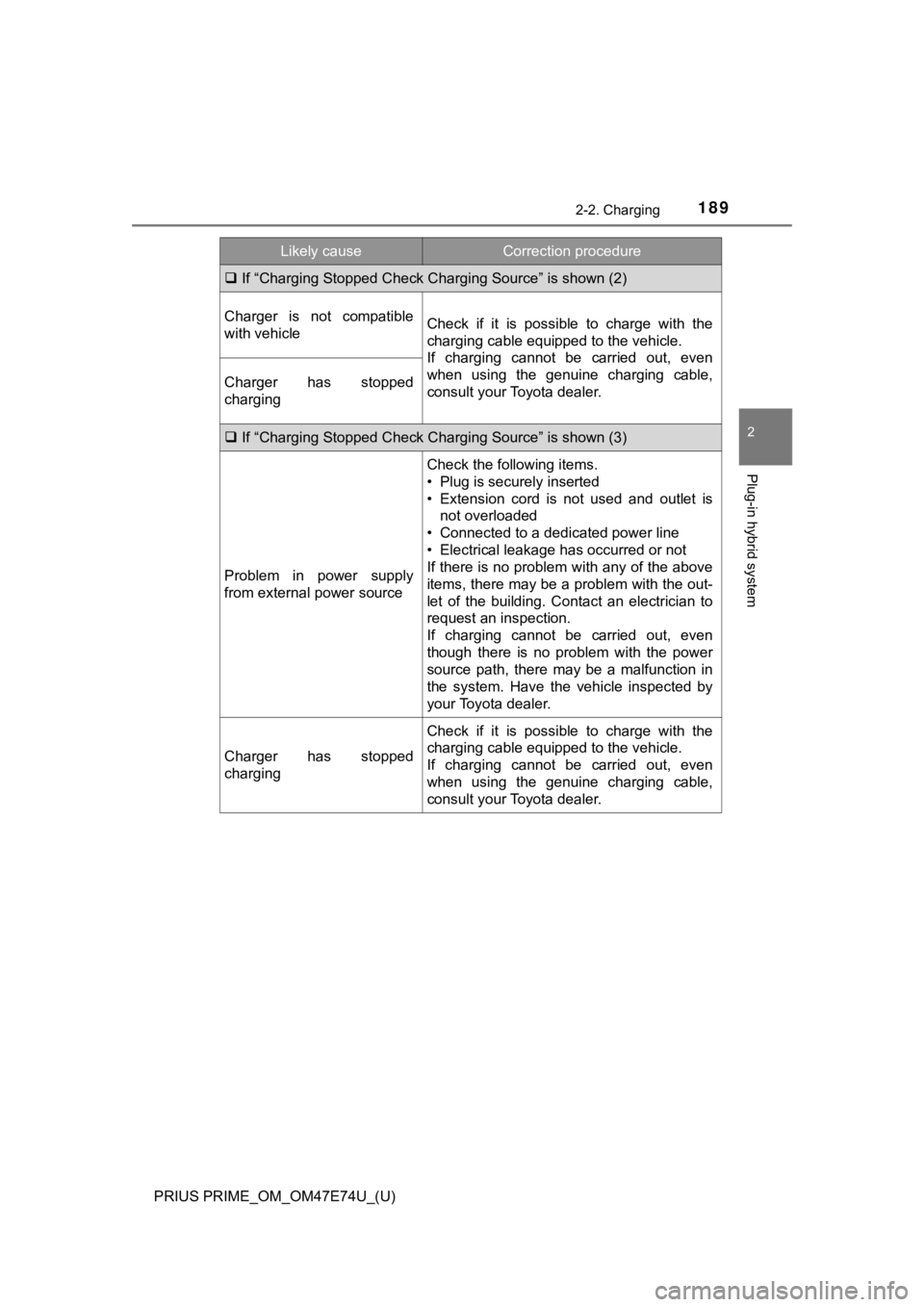
If “Charging Stopped Check Char ging Source” is shown (2)
Charger is not compatible
with vehicleCheck if it is possible to charge with the
charging cable equipped to the vehicle.
If charging cannot be carried out, even
when using the genuine charging cable,
consult your Toyota dealer.
Charger has stopped
charging
If “Charging Stopped Check Char ging Source” is shown (3)
Problem in power supply
from external power source
Check the following items.
• Plug is securely inserted
• Extension cord is not used and outlet is
not overloaded
• Connected to a dedicated power line
• Electrical leakage has occurred or not
If there is no problem with any of the above
items, there may be a problem with the out-
let of the building. Contact an electrician to
request an inspection.
If charging cannot be carried out, even
though there is no problem with the power
source path, there may be a malfunction in
the system. Have the vehicle inspected by
your Toyota dealer.
Charger has stopped
charging
Check if it is possible to charge with the
charging cable equipped to the vehicle.
If charging cannot be carried out, even
when using the genuine charging cable,
consult your Toyota dealer.
Likely causeCorrection procedure