key TOYOTA PRIUS PRIME 2022 Repair Manual
[x] Cancel search | Manufacturer: TOYOTA, Model Year: 2022, Model line: PRIUS PRIME, Model: TOYOTA PRIUS PRIME 2022Pages: 808, PDF Size: 14.72 MB
Page 706 of 808
706
PRIUS PRIME_OM_OM47E74U_(U)
8-2. Steps to take in an emergency
If the hybrid system will not start
One of the following may be the cause of the problem:
● The charging cable may be a ttached to the vehicle. (P. 147)
● The electronic key may no t be functioning properly.
* ( P. 708)
● There may not be sufficient f uel in the vehicle’s tank.
Refuel the vehicle. ( P. 101)
● There may be a malfunction in the immobilizer system.
* ( P. 8 3 )
● There may be a malfunction i n the shift control system.
*
( P. 336, 688)
● The hybrid system may be malfunc tioning due to an electrical prob-
lem such as electronic key battery depletion or a blown fuse. H ow-
ever, depending on the type of malfunction, an interim measure is
available to start the hybrid system. ( P. 707)
● There is a possibility that the t emperature of the hybrid battery
(traction battery) is extremely low (approximately below -22°F
[-30°C]). ( P. 101, 334)
*: It may not be possible to shift the shift position other than P.
One of the following may be the cause of the problem:
● The 12-volt battery may be discharged. ( P. 712)
● The 12-volt battery terminal connections may be loose or corrod ed.
( P. 605)
Reasons for the hybrid system not starting vary depending on
the situation. Check the followi ng and perform the appropriate
procedure:
The hybrid system will not start even though the correct starting
procedure is being followed. ( P. 332)
The interior lights and headlights are dim, or the horn does no t
sound or sounds at a low volume.
Page 708 of 808
708
PRIUS PRIME_OM_OM47E74U_(U)
8-2. Steps to take in an emergency
If the electronic key does not operate
properly
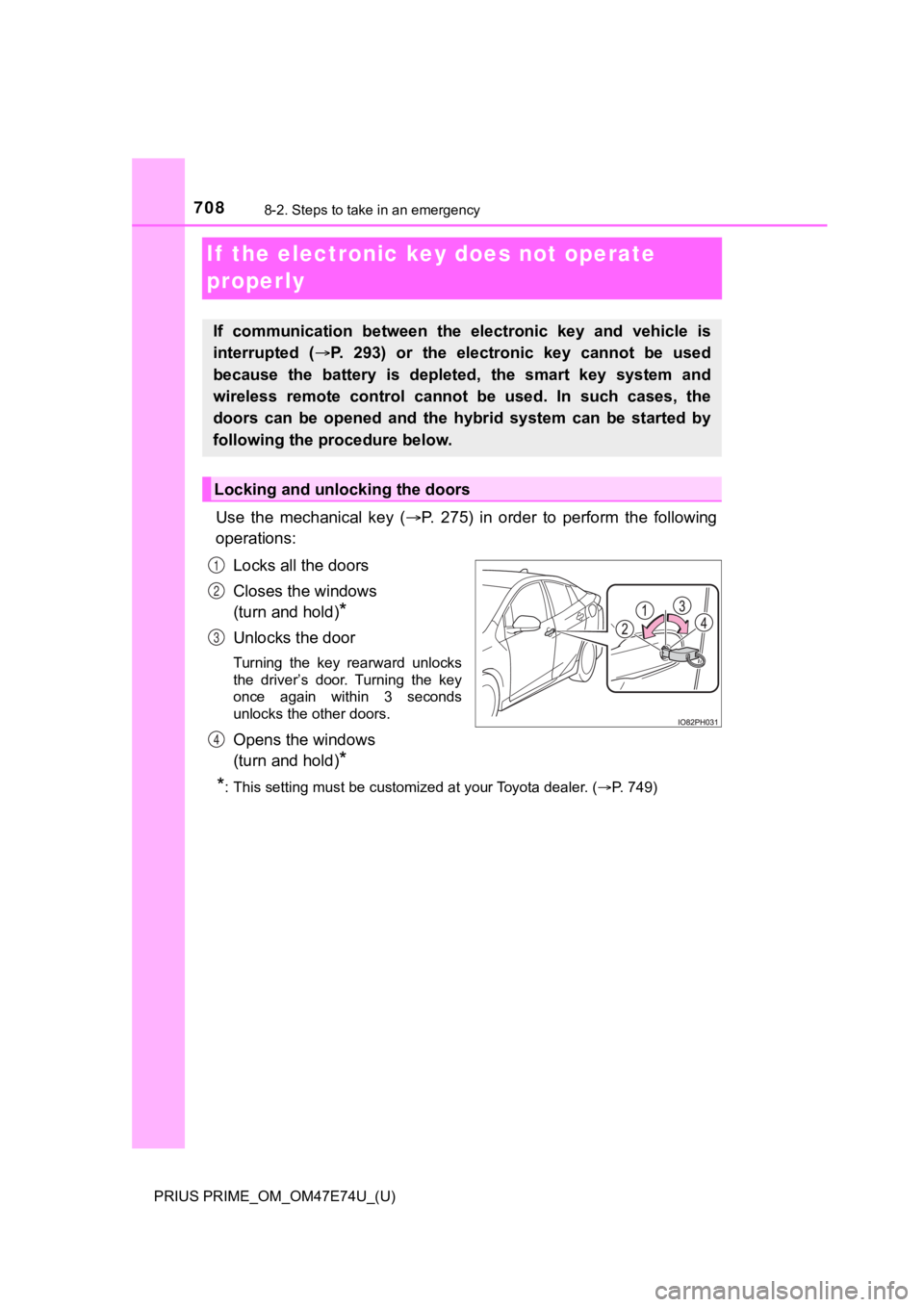
Use the mechanical key (P. 275) in order to perform the following
operations:
Locks all the doors
Closes the windows
(turn and hold)
*
Unlocks the door
Turning the key rearward unlocks
the driver’s door. Turning the key
once again within 3 seconds
unlocks the other doors.
Opens the windows
(turn and hold)
*
*
: This setting must be customized at your Toyota dealer. ( P. 749)
If communication between the electronic key and vehicle is
interrupted ( P. 293) or the electronic key cannot be used
because the battery is depleted, the smart key system and
wireless remote control can not be used. In such cases, the
doors can be opened and the hybrid system can be started by
following the procedure below.
Locking and unlocking the doors
1
2
3
4
Page 709 of 808
7098-2. Steps to take in an emergency
PRIUS PRIME_OM_OM47E74U_(U)
8
When trouble arises
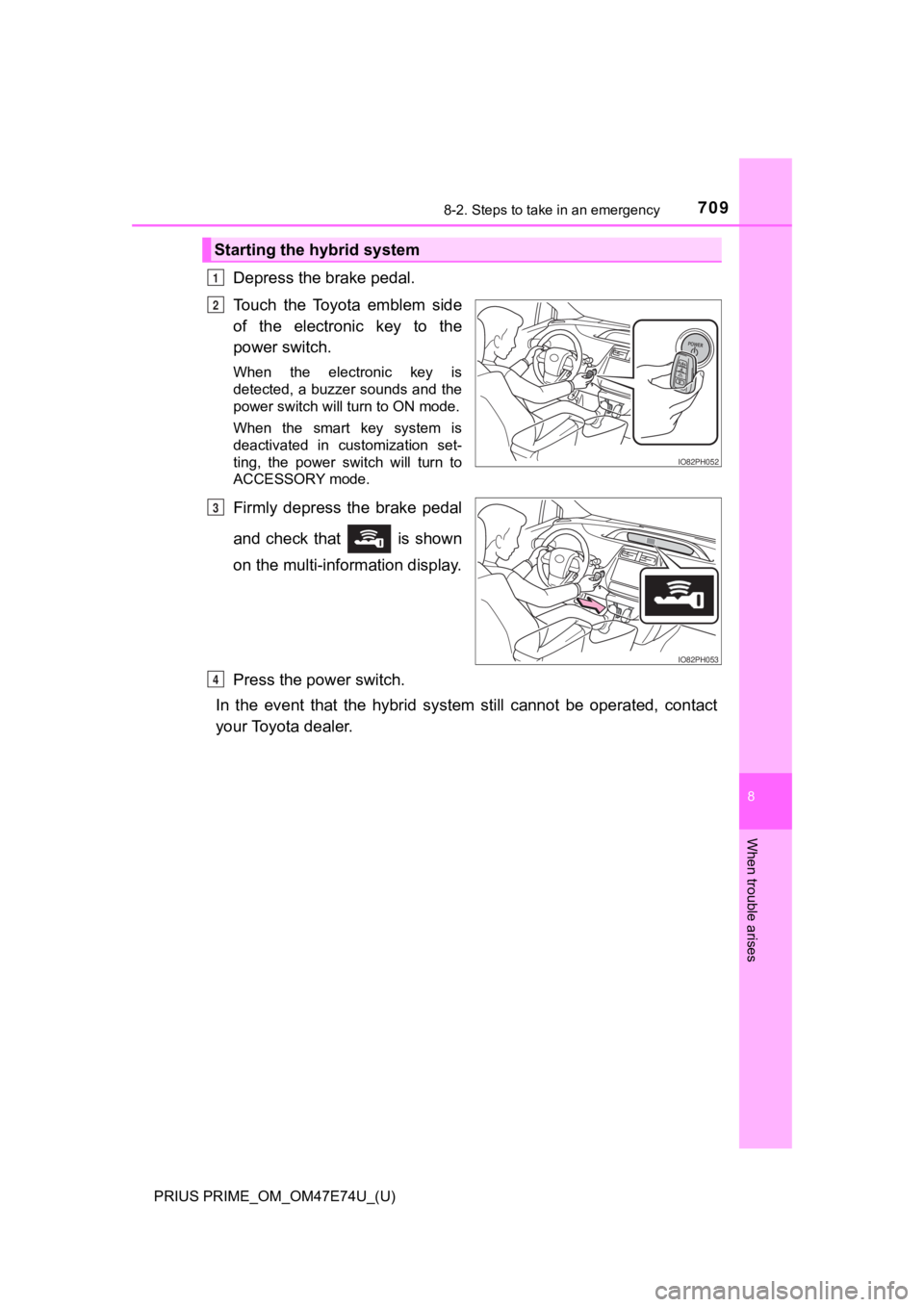
Depress the brake pedal.
Touch the Toyota emblem side
of the electronic key to the
power switch.
When the electronic key is
detected, a buzzer sounds and the
power switch will turn to ON mode.
When the smart key system is
deactivated in customization set-
ting, the power switch will turn to
ACCESSORY mode.
Firmly depress the brake pedal
and check that is shown
on the multi-information display.
Press the power switch.
In the event that the hybrid sy stem still cannot be operated, contact
your Toyota dealer.
Starting the hybrid system
1
IO82PH052
2
IO82PH053
3
4
Page 710 of 808
7108-2. Steps to take in an emergency
PRIUS PRIME_OM_OM47E74U_(U)■
Locking the charging port lid
Close the charging port lid. ( P. 113)
Lock the doors using t he mechanical key. (P. 708)
The charging port lid can be locked if the steps and are perf ormed
in reverse.
■
Unlocking the charging port lid
Unlock the doors using the mechanical key. ( P. 708)
Open the charging port lid. ( P. 1 1 2 )
*: Vehicles with smart lid & connector locking system only
■
Locking the charging connector Unlock the doors using the mechanical key. ( P. 708)
Open the charging port lid. ( P. 1 1 2 )
Insert the charging connector into the charging inlet. (P. 148)
Push the charging conne ctor lock switch. (P. 149)
The charging connector will be locked.
■
Unlocking the charging port lid
Unlock the doors using the mechanical key. ( P. 708)
Push the charging conne ctor lock switch. (P. 151)
The charging connector will be unlocked.
*: Vehicles with smart lid & connector locking system only
Locking and unlocking the charging port lid*
Locking and unlocking the charging connector*
1
2
12
1
2
1
2
3
4
1
2
Page 711 of 808
7118-2. Steps to take in an emergency
PRIUS PRIME_OM_OM47E74U_(U)
8
When trouble arises
■Stopping the hybrid system
Set the parking brake, shift the shift position to P and press the power switch
as you normally do when stopping the hybrid system.
■ Replacing the key battery
As the above procedure is a temporary measure, it is recommended that the
electronic key battery be replaced immediately when the battery is depleted.
(P. 644)
■ Changing power switch modes
Release the brake pedal and press the power switch in step above. The
hybrid system does not start and modes will be changed each time the switch
is pressed. ( P. 334)
■ When the electronic key does not work properly
●Make sure that the smart key system has not been deactivated in the cus-
tomization setting. If it is off, turn the function on.
(Customizable features: P. 749)
● Check if battery-saving mode is set. If it is set, cancel the f unction.
( P. 292)
WARNING
■ When using the mechanical key and operating the power windows
Operate the power window after checking to make sure that there is no pos-
sibility of any passenger having any of their body parts caught in the win-
dow.
Also, do not allow children to operate the mechanical key. It is possible for
children and other passengers to get caught in the power window .
3
Page 715 of 808

7158-2. Steps to take in an emergency
PRIUS PRIME_OM_OM47E74U_(U)
8
When trouble arises
■When recharging or replacing the 12-volt battery
●In some cases, it may not be possible to unlock the doors using the smart
key system when the 12-volt battery is discharged. Use the wire less remote
control or the mechanical key to lock or unlock the doors.
● The hybrid system may not start on the first attempt after the 12-volt battery
has recharged but will start normally after the second attempt. This is not a
malfunction.
● Vehicles with smart lid & connector locking system:
It may be impossible to unlock the charging port lid or locking and unlocking
the charging connector immediately after the 12-volt battery is reconnected.
In this case, carry the electronic key on your person and opera te the
charging port lid or charging connector lock switch again.
● The power switch mode is memorized by the vehicle. When the 12- volt bat-
tery is reconnected, the system will return to the mode it was in before the
12-volt battery was discharged. Before disconnecting the 12-volt battery,
turn the power switch off.
If you are unsure what mode the power switch was in before the 12-volt bat-
tery discharged, be especially careful when reconnecting the 12 -volt battery.
● If the 12-volt battery discharges while the shift position is in P, it may not be
possible to shift the shift position to other positions. In thi s case, the vehicle
cannot be towed without lifting both front wheels because the f ront wheels
will be locked. ( P. 664)
■ When replacing the 12-volt battery
●Use a 12-volt battery that conforms to European regulations.
● Use a 12-volt battery that the case size is same as the previou s one (LN1),
20 hour rate capacity (20HR) is equivalent (45Ah) or greater, and perfor-
mance rating (CCA) is equivalent (295A) or greater.
• If the sizes differ, the 12-volt battery cannot be properly se cured.
• If the 20 hour rate capacity is low, even if the time period w here the vehi-
cle is not used is a short time, the 12-volt battery may discharge and the
hybrid system may not be able to start.
● For details, consult your Toyota dealer.
Page 752 of 808
752
PRIUS PRIME_OM_OM47E74U_(U)
9-2. Customization
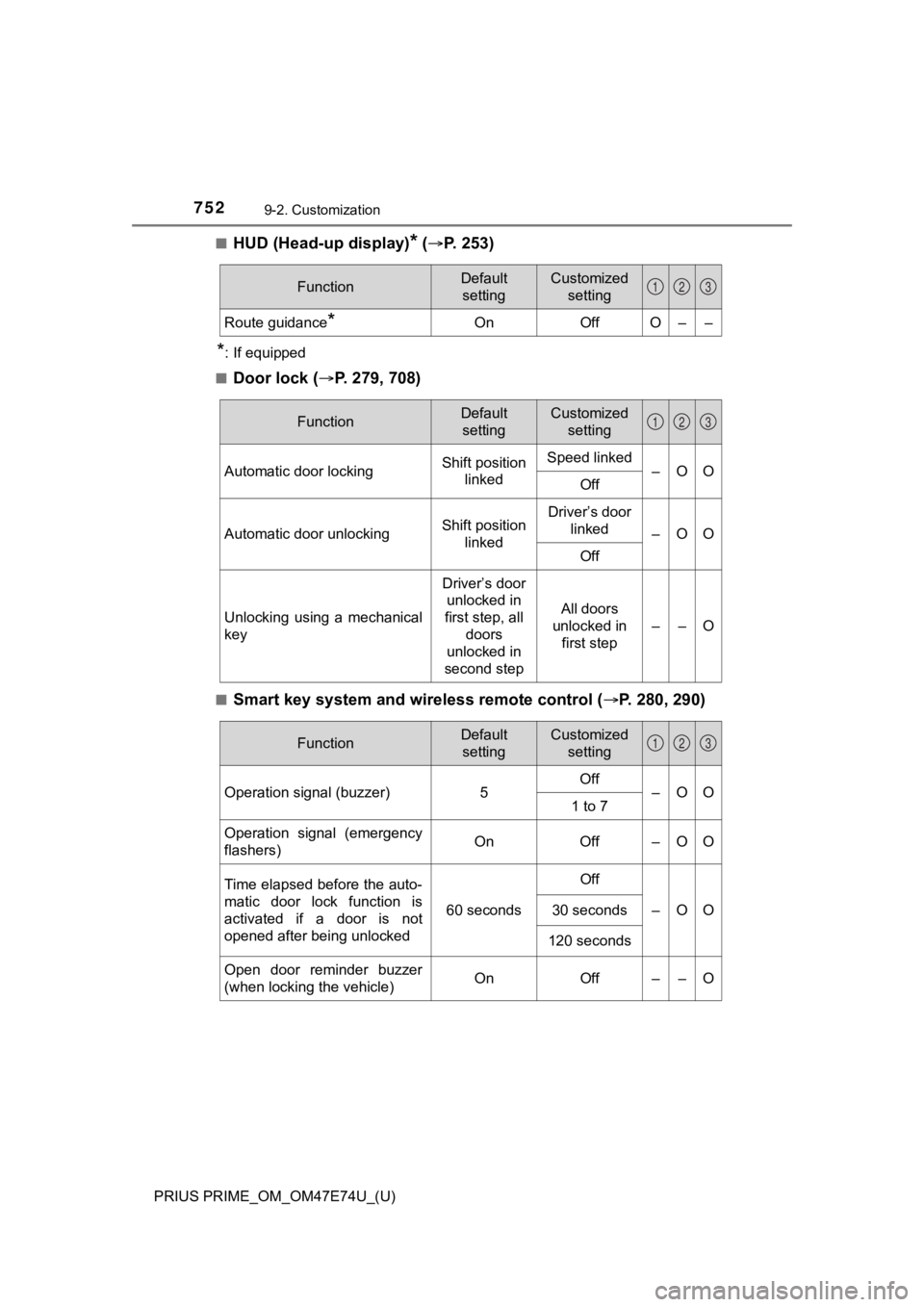
■HUD (Head-up display)* ( P. 2 5 3 )
*: If equipped
■
Door lock ( P. 279, 708)
■Smart key system and wireless remote control ( P. 280, 290)
FunctionDefault
settingCustomized setting
Route guidance*OnOffO––
123
FunctionDefault settingCustomized setting
Automatic door lockingShift position linkedSpeed linked–OOOff
Automatic door unlockingShift position linkedDriver’s door linked
–OO
Off
Unlocking using a mechanical
key
Driver’s door unlocked in
first step, all
doors
unlocked in
second step
All doors
unlocked in first step
––O
123
FunctionDefault settingCustomized setting
Operation signal (buzzer) 5Off
–OO
1 to 7
Operation signal (emergency
flashers) On
Off – O O
Time elapsed before the auto-
matic door lock function is
activated if a door is not
opened after being unlocked
60 seconds
Off
–OO30 seconds
120 seconds
Open door reminder buzzer
(when locking the vehicle)OnOff––O
123
Page 753 of 808
PRIUS PRIME_OM_OM47E74U_(U)
7539-2. Customization
9
Vehicle specifications
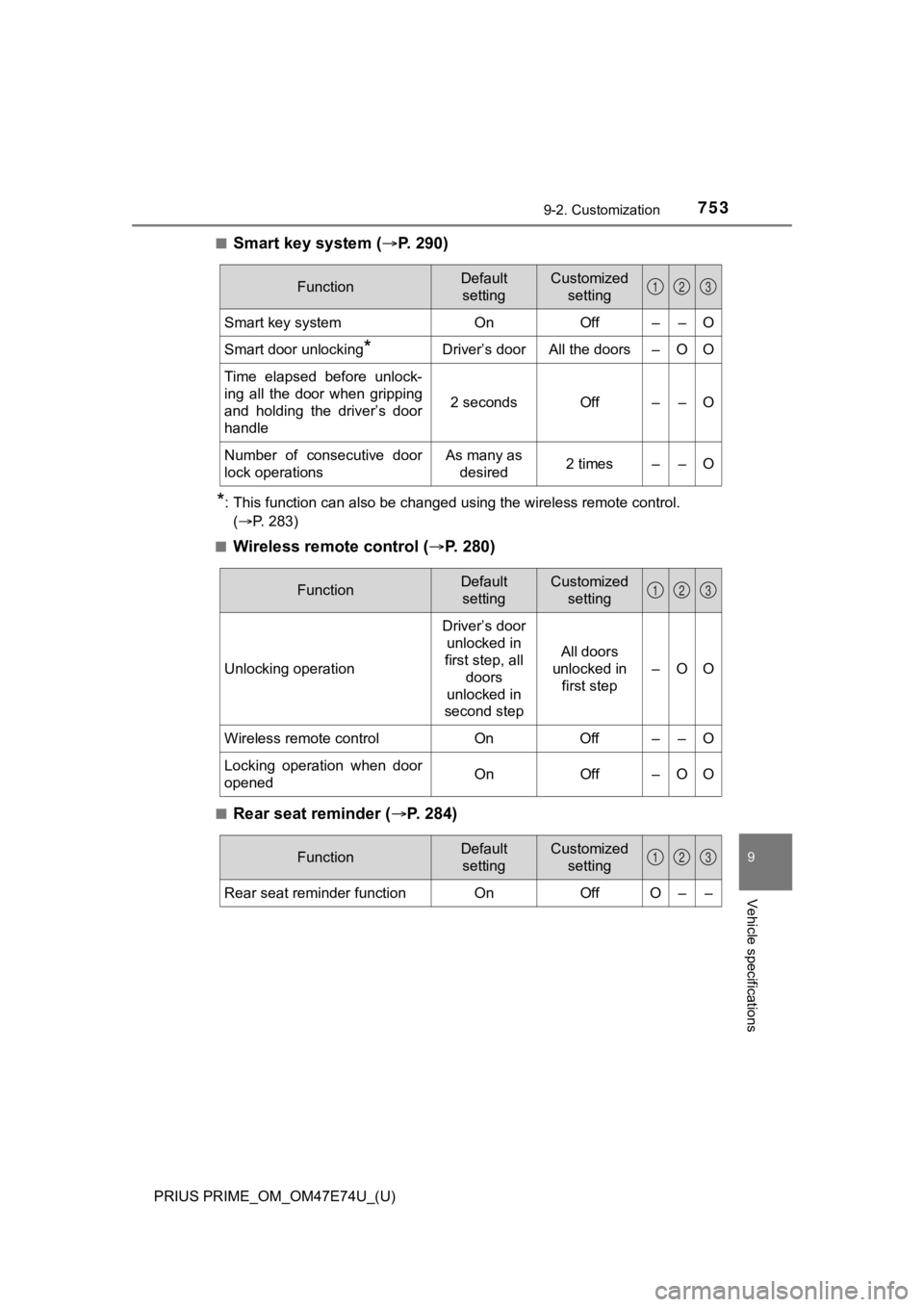
■Smart key system (P. 2 9 0 )
*: This function can also be changed using the wireless remote control.
(P. 283)
■
Wireless remote control ( P. 2 8 0 )
■Rear seat reminder ( P. 284)
FunctionDefault
settingCustomized setting
Smart key systemOnOff––O
Smart door unlocking*Driver’s doorAll the doors–OO
Time elapsed before unlock-
ing all the door when gripping
and holding the driver’s door
handle
2 secondsOff––O
Number of consecutive door
lock operationsAs many as desired2 times––O
123
FunctionDefault settingCustomized setting
Unlocking operation
Driver’s door unlocked in
first step, all doors
unlocked in
second step
All doors
unlocked in
first step –
OO
Wireless remote control On Off – – O
Locking operation when door
opened On Off – O O
123
FunctionDefault
settingCustomized setting
Rear seat reminder functionOnOffO––
123
Page 754 of 808
754
PRIUS PRIME_OM_OM47E74U_(U)
9-2. Customization
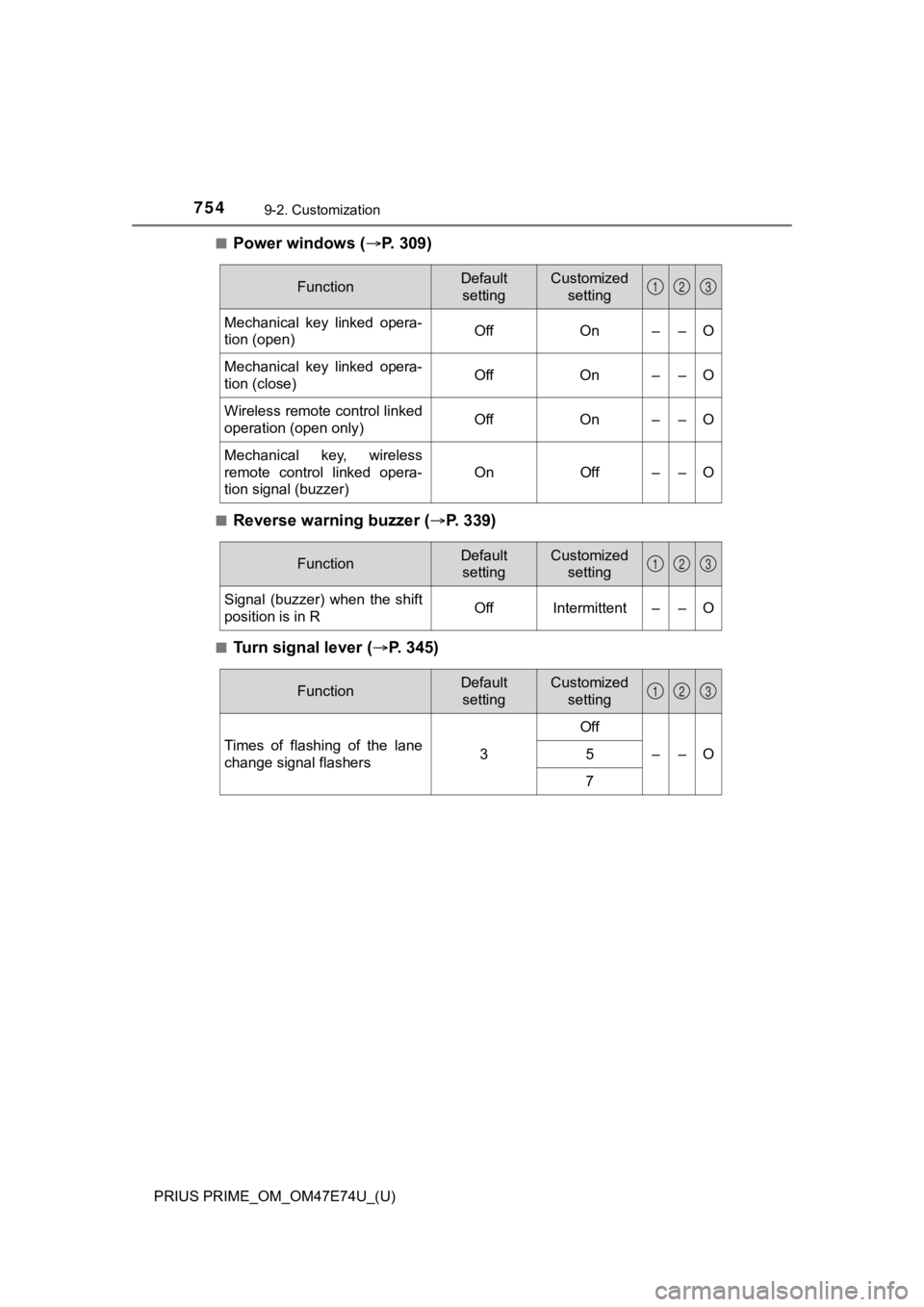
■Power windows (P. 309)
■Reverse warning buzzer ( P. 339)
■Turn signal lever ( P. 345)
FunctionDefault
settingCustomized setting
Mechanical key linked opera-
tion (open)OffOn––O
Mechanical key linked opera-
tion (close)OffOn––O
Wireless remote control linked
operation (open only)OffOn––O
Mechanical key, wireless
remote control linked opera-
tion signal (buzzer)
OnOff––O
123
FunctionDefault settingCustomized setting
Signal (buzzer) when the shift
position is in ROffIntermittent––O
123
FunctionDefault settingCustomized setting
Times of flashing of the lane
change signal flashers3
Off
––O5
7
123
Page 758 of 808
758
PRIUS PRIME_OM_OM47E74U_(U)
9-2. Customization
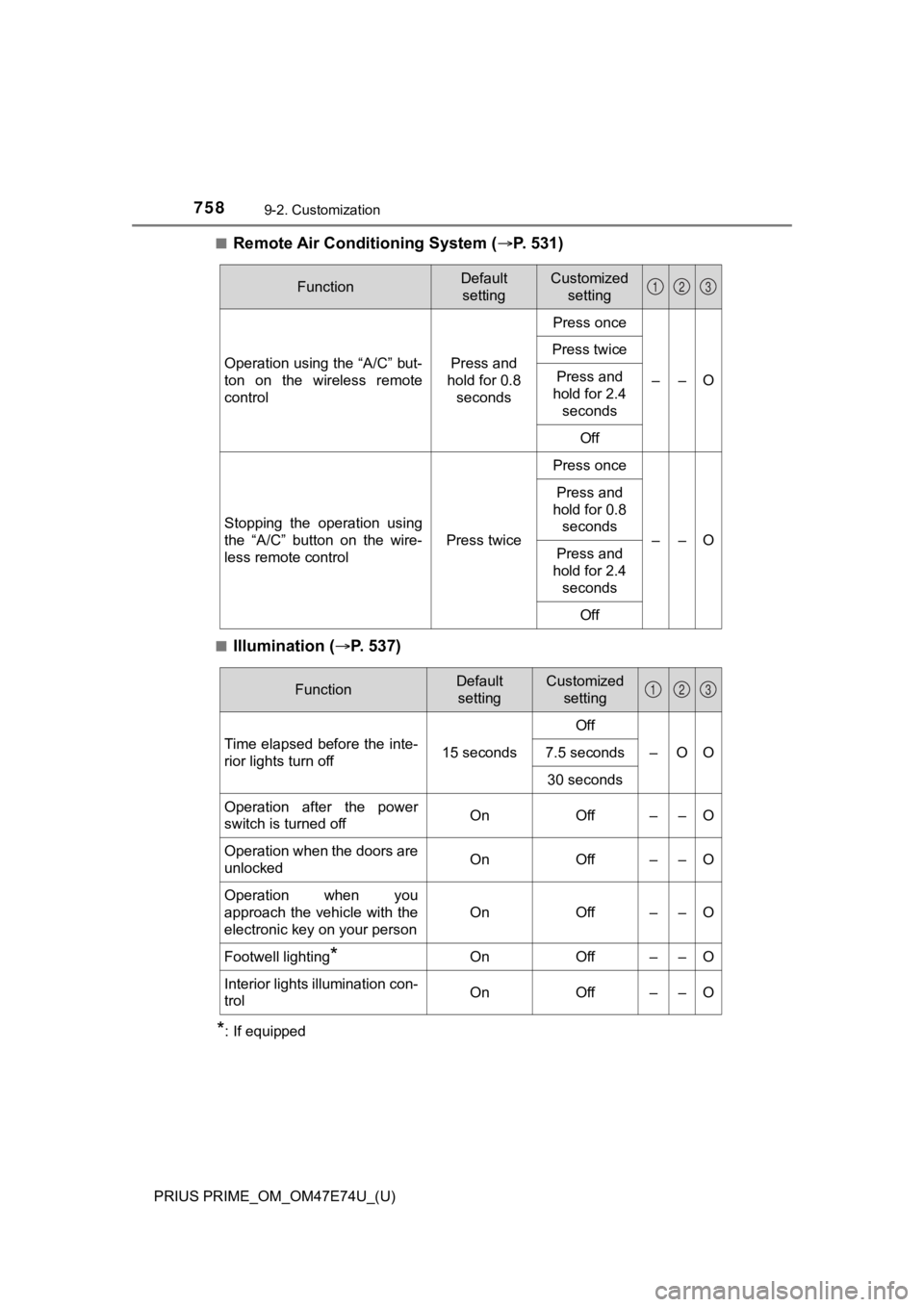
■Remote Air Conditioning System (P. 531)
■Illumination ( P. 5 3 7 )
*: If equipped
FunctionDefault
settingCustomized setting
Operation using the “A/C” but-
ton on the wireless remote
controlPress and
hold for 0.8 seconds
Press once
––O
Press twice
Press and
hold for 2.4
seconds
Off
Stopping the operation using
the “A/C” button on the wire-
less remote control
Press twice
Press once
––O
Press and
hold for 0.8 seconds
Press and
hold for 2.4
seconds
Off
123
FunctionDefault settingCustomized setting
Time elapsed before the inte-
rior lights turn off 15 secondsOff
–OO
7.5 seconds
30 seconds
Operation after the power
switch is turned offOnOff––O
Operation when the doors are
unlockedOnOff––O
Operation when you
approach the vehicle with the
electronic key on your person
OnOff––O
Footwell lighting*OnOff––O
Interior lights illumination con-
trolOnOff––O
123