wheel TOYOTA PRIUS PRIME 2022 Manual PDF
[x] Cancel search | Manufacturer: TOYOTA, Model Year: 2022, Model line: PRIUS PRIME, Model: TOYOTA PRIUS PRIME 2022Pages: 808, PDF Size: 14.72 MB
Page 486 of 808
486
PRIUS PRIME_OM_OM47E74U_(U)
5-5. Using the driving support systems
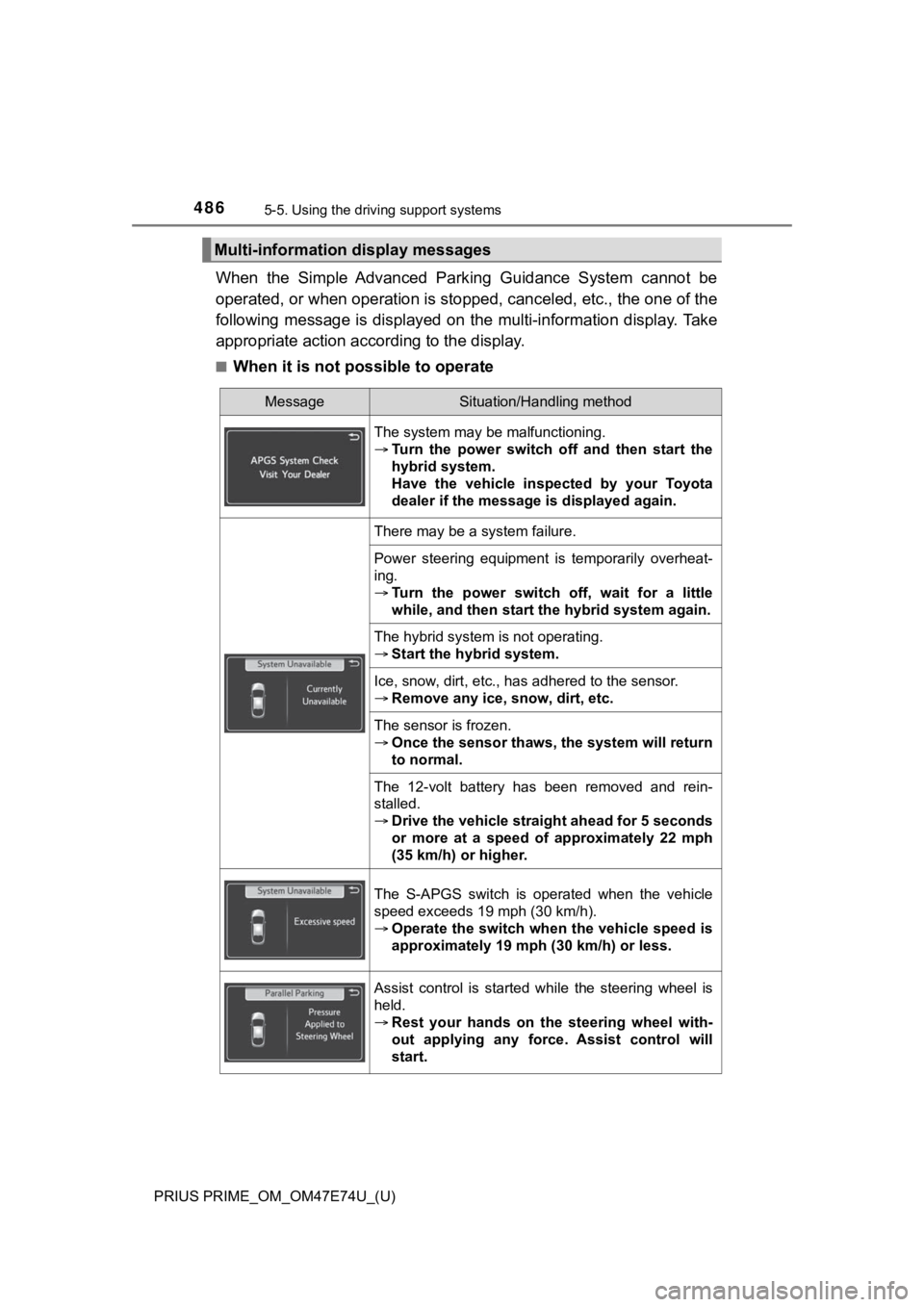
When the Simple Advanced Park ing Guidance System cannot be
operated, or when operation is stopped, canceled, etc., the one of the
following message is displayed on the multi-information display . Take
appropriate action acc ording to the display.
■When it is not possible to operate
Multi-information display messages
MessageSituation/Handling method
The system may be malfunctioning.
Turn the power switch off and then start the
hybrid system.
Have the vehicle inspected by your Toyota
dealer if the message is displayed again.
There may be a system failure.
Power steering equipment is temporarily overheat-
ing.
Turn the power switch off, wait for a little
while, and then start the hybrid system again.
The hybrid system is not operating.
Start the hybrid system.
Ice, snow, dirt, etc., has adhered to the sensor.
Remove any ice, snow, dirt, etc.
The sensor is frozen.
Once the sensor thaws, the system will return
to normal.
The 12-volt battery has been removed and rein-
stalled.
Drive the vehicle straight ahead for 5 seconds
or more at a speed of approximately 22 mph
(35 km/h) or higher.
The S-APGS switch is operated when the vehicle
speed exceeds 19 mph (30 km/h).
Operate the switch when the vehicle speed is
approximately 19 mph (30 km/h) or less.
Assist control is started while the steering wheel is
held.
Rest your hands on the steering wheel with-
out applying any force. Assist control will
start.
Page 487 of 808
PRIUS PRIME_OM_OM47E74U_(U)
4875-5. Using the driving support systems
5
Driving
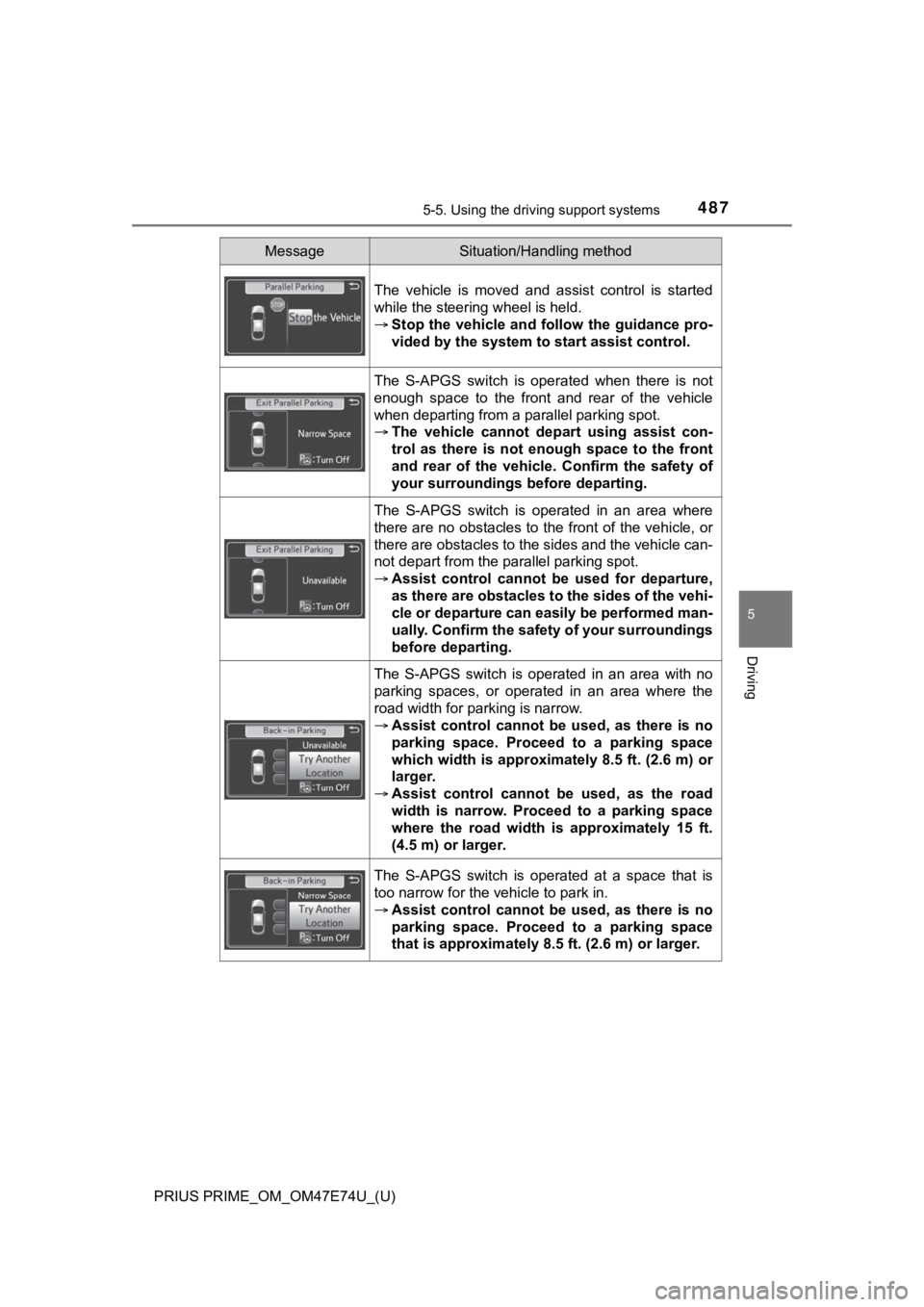
The vehicle is moved and assist control is started
while the steering wheel is held.
Stop the vehicle and follow the guidance pro-
vided by the system to start assist control.
The S-APGS switch is operated when there is not
enough space to the front and rear of the vehicle
when departing from a parallel parking spot.
The vehicle cannot depa rt using assist con-
trol as there is not enough space to the front
and rear of the vehicle . Confirm the safety of
your surroundings before departing.
The S-APGS switch is operated in an area where
there are no obstacles to the front of the vehicle, or
there are obstacles to the sides and the vehicle can-
not depart from the parallel parking spot.
Assist control cannot be used for departure,
as there are obstacles to the sides of the vehi-
cle or departure can easily be performed man-
ually. Confirm the safety of your surroundings
before departing.
The S-APGS switch is operated in an area with no
parking spaces, or operated in an area where the
road width for parking is narrow.
Assist control cannot be used, as there is no
parking space. Proceed to a parking space
which width is approximately 8.5 ft. (2.6 m) or
larger.
Assist control cannot be used, as the road
width is narrow. Proceed to a parking space
where the road width is approximately 15 ft.
(4.5 m) or larger.
The S-APGS switch is operated at a space that is
too narrow for the vehicle to park in.
Assist control cannot be used, as there is no
parking space. Proceed to a parking space
that is approximately 8.5 ft. (2.6 m) or larger.
MessageSituation/Handling method
Page 489 of 808
PRIUS PRIME_OM_OM47E74U_(U)
4895-5. Using the driving support systems
5
Driving
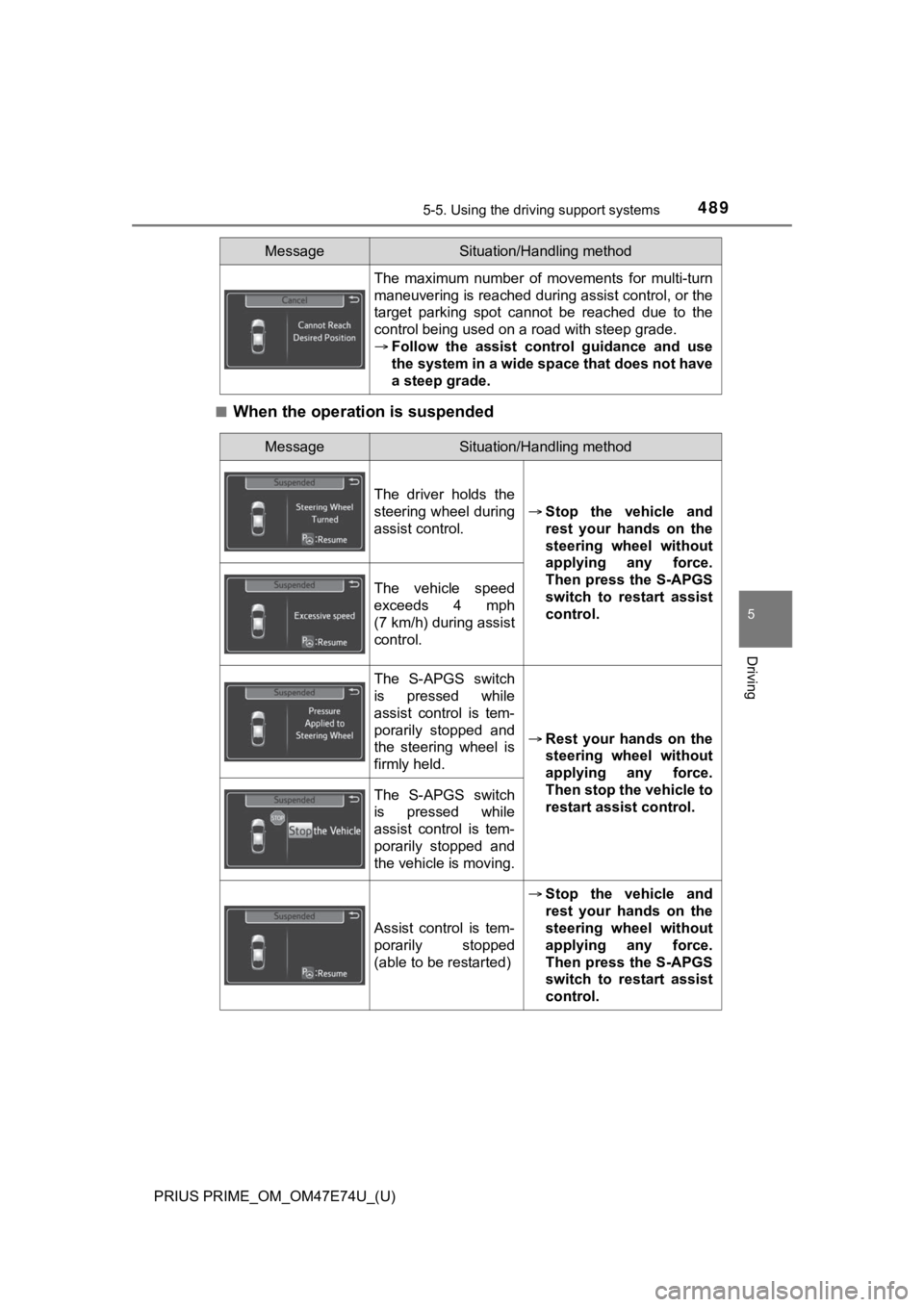
■When the operation is suspended
The maximum number of movements for multi-turn
maneuvering is reached during assist control, or the
target parking spot cannot be reached due to the
control being used on a road with steep grade.
Follow the assist control guidance and use
the system in a wide space that does not have
a steep grade.
MessageSituation/Handling method
MessageSituation/Handling method
The driver holds the
steering wheel during
assist control.
Stop the vehicle and
rest your hands on the
steering wheel without
applying any force.
Then press the S-APGS
switch to restart assist
control.
The vehicle speed
exceeds 4 mph
(7 km/h) during assist
control.
The S-APGS switch
is pressed while
assist control is tem-
porarily stopped and
the steering wheel is
firmly held.
Rest your hands on the
steering wheel without
applying any force.
Then stop the vehicle to
restart assist control.
The S-APGS switch
is pressed while
assist control is tem-
porarily stopped and
the vehicle is moving.
Assist control is tem-
porarily stopped
(able to be restarted)
Stop the vehicle and
rest your hands on the
steering wheel without
applying any force.
Then press the S-APGS
switch to restart assist
control.
Page 493 of 808
PRIUS PRIME_OM_OM47E74U_(U)
4935-5. Using the driving support systems
5
Driving
WARNING
●Do not rely solely upon the Simple Advanced Parking Guidance System.
As with unequipped vehicles, move forward and back up carefully while
directly confirming the safety of your surroundings and the are a to the rear
of the vehicle.
● Do not back up while viewing the multi-information display. Backing up
while only viewing the monitor screen may cause a collision or lead to an
accident, as the image displayed on the monitor screen may diff er from
actual conditions. Make sure to visually check the surrounding areas and
the area to the rear of the vehicle with and without the mirror while backing
up.
● Drive slowly while adjusting your speed by depressing the brake pedal
when backing up or moving forward.
● If it seems the vehicle may make contact with a pedestrian, ano ther vehi-
cle or any other obstacles, stop the vehicle by depressing the brake pedal,
and then press the S-APGS switch to turn off the system.
● Use the system in a parking lot with a flat surface.
● Observe the following precautions, as the steering wheel automatically
turns during use.
• There is risk of a necktie, scarf, your arm, etc. being caught on the
steering wheel. Please do not allow your upper body to be close to the
steering wheel. Also, do not allow children close to the steeri ng wheel.
• There is a possibility of injury when the steering wheel turns if you have long fingernails.
• In case of emergency, stop the vehicle by depressing the brake pedal,
and then press the S-APGS switch to turn off the system.
● Always confirm that there is appropriate space before attemptin g to park
the vehicle and operate the system.
Page 494 of 808

494
PRIUS PRIME_OM_OM47E74U_(U)
5-5. Using the driving support systems
WARNING
●Do not use the system in the following situations, as the syste m may be
unable to correctly assist you in reaching the target parking s pot and may
lead to an unexpected accident.
• In an area that is not a parking lot
• A parking lot that is not paved and has no parking space lines , such as
a sand or gravel parking lot
• A parking lot that has a slope or undulations in the road
• A frozen, snow-covered or slippery road
• The asphalt is melting due to hot weather
• There is an obstacle between the vehicle and the target parking spot
• Using tire chains
● Do not use tire other than that provided by the manufacturer. T he system
may not operate properly. When replacing tires, contact your Toyota
dealer.
● The system may not be able position the vehicle in the set location in the
following situations.
• The tires are extremely worn or the tire pressure is low
• The vehicle is carrying very heavy load
• The vehicle is tilted due to having luggage, etc. located on one side of
the vehicle
• There are road heaters installed in the parking lot to prevent the road
surface from freezing.
In any other situations when the set position and vehicle position greatly
differ, have the vehicle inspected by your Toyota dealer.
● Make sure to observe the following precautions regarding the exit parallel
parking assist mode.
Exit parallel parking assist mode is a function used when depar ting from a
parallel parking spot. However, this function may not be usable if obsta-
cles or people are detected in front of the vehicle. Only use this function
when departing from a parallel parking spot. In the event that the steering
control operates, either turn the system off using the S-APGS s witch or
operate the steering wheel to stop the control.
● If exit parallel parking assist mode is mistakenly used in the following situ-
ations, the vehicle may make contact with an obstacle.
The departure function is operated in a direction where an obstacle is
present, but the obstacle is not detected by the side sensors ( situations
such as when the vehicle is directly beside a pole).
Page 496 of 808
496
PRIUS PRIME_OM_OM47E74U_(U)
5-5. Using the driving support systems
Driving assist systems
◆ECB (Electronically Controlled Brake System)
The electronically controlled system generates braking force co rre-
sponding to the brake operation
◆ABS (Anti-lock Brake System)
Helps to prevent wheel lock when the brakes are applied suddenl y,
or if the brakes are applied while driving on a slippery road surface
◆Brake assist
Generates an increased level of braking force after the brake p edal
is depressed when the system de tects a panic stop situation
◆VSC (Vehicle Stability Control)
Helps the driver to control skidding when swerving suddenly or
turning on slippery road surfaces.
◆Enhanced VSC (Enhanced Vehicle Stability Control)
Provides cooperative control of the ABS, TRAC, VSC and EPS.
Helps to maintain directional stability when swerving on slippe ry
road surfaces by controlling steering performance.
◆TRAC (Traction Control)
Helps to maintain drive power and prevent the drive wheels from
spinning when starting the vehicl e or accelerating on slippery roads
To keep driving safety and perf ormance, the following systems
operate automatically in respon se to various driving situations.
Be aware, however, that these systems are supplementary and
should not be relied upon too heav ily when operating the vehi-
cle.
Page 497 of 808
PRIUS PRIME_OM_OM47E74U_(U)
4975-5. Using the driving support systems
5
Driving
◆Hill-start assist control
Helps to reduce the backward movement of the vehicle when start -
ing on an uphill
◆EPS (Electric Power Steering)
Employs an electric motor to reduce the amount of effort needed to
turn the steering wheel.
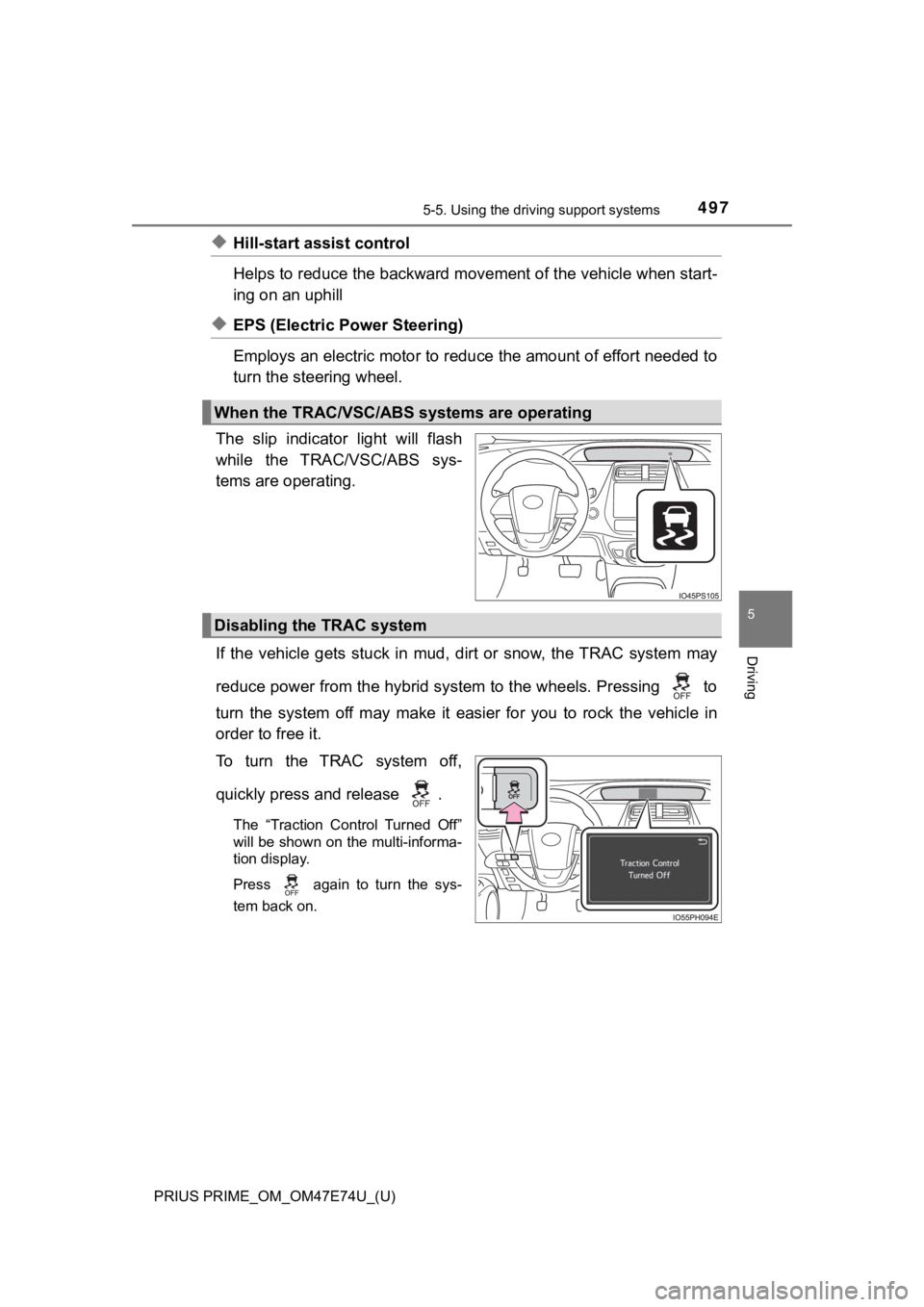
The slip indicator light will flash
while the TRAC/VSC/ABS sys-
tems are operating.
If the vehicle gets stuck in mud, dirt or snow, the TRAC system may
reduce power from the hybrid system to the wheels. Pressing to
turn the system off may make it easier for you to rock the vehicle in
order to free it.
To turn the TRAC system off,
quickly press and release .
The “Traction Control Turned Off”
will be shown on the multi-informa-
tion display.
Press
again to turn the sys-
tem back on.
When the TRAC/VSC/ABS systems are operating
Disabling the TRAC system
Page 499 of 808

PRIUS PRIME_OM_OM47E74U_(U)
4995-5. Using the driving support systems
5
Driving
■ECB operating sound
ECB operating sound may be heard in the following cases, but it does not
indicate that a malfunction has occurred.
● Operating sound heard from the engine compartment when the brak e pedal
is operated.
● Motor sound of the brake system heard from the front part of th e vehicle
when the driver’s door is opened.
● Operating sound heard from the engine compartment when one or t wo min-
utes passed after the stop of the hybrid system.
■ EPS operation sound
When the steering wheel is operated, a motor sound (whirring so und) may be
heard. This does not indicate a malfunction.
■ Automatic reactivation of TRAC and VSC systems
After turning the TRAC and VSC systems off, the systems will be automati-
cally re-enabled in the following situations:
● When the power switch is turned off
● If only the TRAC system is turned off, the TRAC will turn on wh en vehicle
speed increases
If both the TRAC and VSC systems are turned off, automatic re-e nabling
will not occur when vehicle speed increases.
■ Reduced effectiveness of the EPS system
The effectiveness of the EPS system is reduced to prevent the s ystem from
overheating when there is frequent steering input over an exten ded period of
time. The steering wheel may feel heavy as a result. Should thi s occur, refrain
from excessive steering input or stop the vehicle and turn the hybrid system
off. The EPS system should return to normal within 10 minutes.
■ Electric power steering system wa rning light (warning buzzer)
P. 672
Page 501 of 808

PRIUS PRIME_OM_OM47E74U_(U)
5015-5. Using the driving support systems
5
Driving
WARNING
■When the TRAC/VSC systems are turned off
Be especially careful and drive at a speed appropriate to the r oad condi-
tions. As these are the systems to help ensure vehicle stability and driving
force, do not turn the TRAC/VSC systems off unless necessary.
■ Replacing tires
Make sure that all tires are of the specified size, brand, trea d pattern and
total load capacity. In addition, make sure that the tires are inflated to the
recommended tire inflation pressure level.
The ABS, TRAC and VSC systems will not function correctly if different tires
are installed on the vehicle.
Contact your Toyota dealer for further information when replaci ng tires or
wheels.
■ Handling of tires and the suspension
Using tires with any kind of problem or modifying the suspensio n will affect
the driving assist systems, and may cause a system to malfunction.
Page 503 of 808
PRIUS PRIME_OM_OM47E74U_(U)
5035-6. Driving tips
5
Driving
Accelerate the vehicle slowly, keep a safe distance between you and
the vehicle ahead, and drive at a reduced speed suitable to roa d con-
ditions.
Park the vehicle and shift the shift position to P and block th e wheel
under the vehicle without setting the parking brake. The parkin g brake
may freeze up, preventing it fro m being released. If the vehicle is
parked without setting the parking brake, make sure to block th e
wheels.
Failure to do so may be dangerous because it may cause the vehi cle
to move unexpectedly, possi bly leading to an accident.
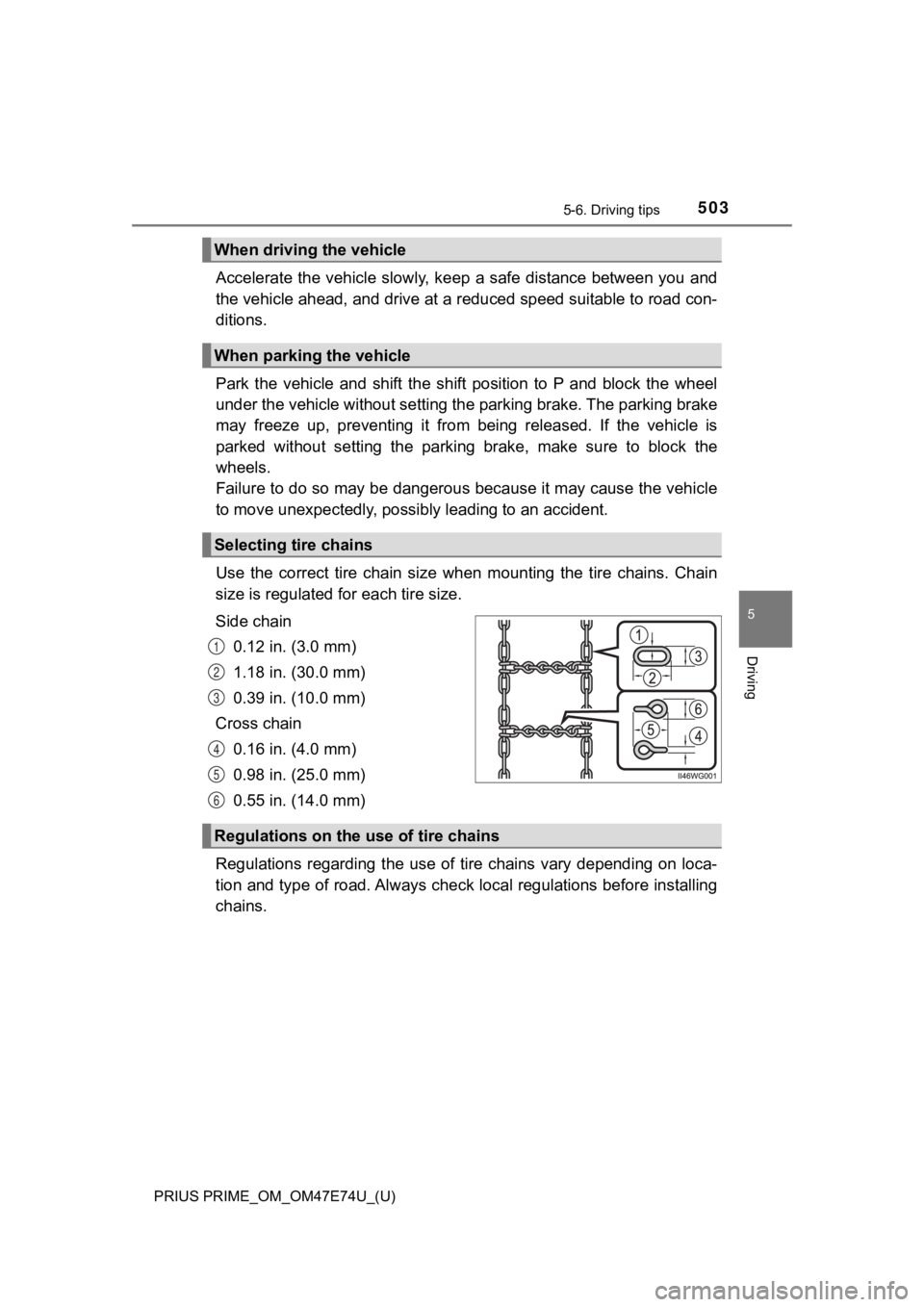
Use the correct tire chain size when mounting the tire chains. Chain
size is regulated for each tire size.
Side chain
0.12 in. (3.0 mm)
1.18 in. (30.0 mm)
0.39 in. (10.0 mm)
Cross chain 0.16 in. (4.0 mm)
0.98 in. (25.0 mm)
0.55 in. (14.0 mm)
Regulations regarding the use of tire chains vary depending on loca-
tion and type of road. Always chec k local regulations before installing
chains.
When driving the vehicle
When parking the vehicle
Selecting tire chains
1
2
3
4
5
6
Regulations on the use of tire chains